

Most founders stop using Google sheets for sales tracking too late or jump to a massive CRM, and both mistakes cost the same thing: deals. The signal when you should make changes isn’t a gut feeling. It’s a specific combination of deal volume, team size and how often you’re missing follow-ups. This post gives you the thresholds nobody else publishes.
Google Sheets vs CRM comes down to deal volume, team size and follow-up misses. Stay on Sheets if you’re solo with under 30 active deals and a simple sales cycle. Switch to a CRM when you’re missing follow-ups weekly, sharing the pipeline with a teammate or losing deals you can’t trace.
When Google Sheets Is Actually Fine For Sales Tracking
Most CRM blogs tell you to switch the moment you start tracking deals. That’s not quite right. Google Sheets is a real tool, and for some founders it’s the right one. The problem isn’t using spreadsheets. The problem is using Google Sheets or Excel past the point where it can hold your pipeline together.
Here’s the test. Sheets is fine when you check all three of these boxes:
- You’re a solo founder or have one other person who never touches sales
- You have under 30 active conversations open at any time
- Your sales cycle is simple (one or two touches before close)
Break even one of those and you’re losing deals. Not maybe, but actually losing them. When a second person joins, suddenly two of you are editing the same row at different times. You hit 35 active deals and you can’t remember which ones you followed up on this week. Your sales cycle stretches to five touches and the “notes” column becomes a wall of text you stop reading.
Now let’s do a thought experiment. Can you name your top 5 active deals right now without opening the tab? If you can’t, your pipeline isn’t in your sheet. It’s in your head, and your head leaks.
If all three boxes are still checked, stay where you are. Open the sheet, add the deal and get back to work. You don’t have a CRM problem yet.
5 Signs You’ve Outgrown Google Sheets
If even one of the three boxes broke, you’ll see it show up in your week. Here are the five signs that make switching to a CRM obvious.
1. You’re missing follow-ups every week
Not once a quarter. Weekly. A deal goes cold and you only notice when the prospect ghosts you, or worse, replies three weeks late asking why you went silent.
2. You can’t tell which deals are actually stuck
A spreadsheet shows you rows. It doesn’t show you which row hasn’t moved in 14 days. By the time you notice, the deal is dead.
3. The pipeline lives in your head, not the file
You open the sheet to “check on a deal” and need 30 seconds to remember the context. The sheet stores names. You store the actual pipeline.
4. A second person joined and the file fragmented
You both edited the same file and deleted each other’s notes. You might have separate tabs with different data and sorting through it takes more time than sending the message. This is the moment most teams panic-buy a CRM, and it’s also the moment they pick the wrong one.
5. You hit 30+ active deals
This is the hard ceiling. Around 30 active deals is where most solo founders and coaches I’ve worked with stop maintaining accurate stage information.
I’ve worked with over 50 B2B companies in various industries and many of them stored the leads I provided in Google sheets, which started to be a problem sooner or later. The thing that broke first wasn’t the deal count, it was that they didn’t add the proper information and forgot to update and follow up the deals. Then they always asked why it takes so long to close the deals and that’s why.
Austin Verner runs Cold Emailers, a cold email agency. Before he started using Fluid he tracked every positive reply in a Google Sheet and had to log all the information by hand. His words: “Before Fluid we were managing our pipeline in Google Sheets and it was getting cumbersome.” The leads were coming in, but booking them in and closing them took too much time.
Now he runs his pipeline in Fluid CRM. Positive replies from Smartlead get pushed in through the API and land as deals automatically. He sees them on the visual pipeline, follows up on time and his deal organization is “10x better” by his own count.
So the most common pattern is that leads aren’t the problem, the system holding them is.
Google Sheets vs CRM: Side-By-Side Comparison
Here’s the honest version, without the bias most CRM blogs put on their tables.
| Category | Google Sheets | CRM |
| Setup time | Under 5 minutes | 10 minutes (simple) to weeks (enterprise) |
| Pipeline visibility | Flat rows, no stages | Visual stages at a glance |
| Follow-up tracking | Manual, easy to miss | Automated reminders |
| Mobile use | Painful (pinch-zoom hell) | Built for phones |
| Multi-user editing | Tab fragmentation hell | Everyone sees the same pipeline |
| Data integrity | Breaks at scale | Stays clean as you grow |
| Cost | Free | 0€ to 200€+ per user per month |
| Reporting | Build it yourself | Built in |
Sheets wins on cost and setup. A CRM wins on everything that matters once you’re past the three boxes from the first section. The “build it yourself” line on reporting is where most founders give up. You can absolutely build a pipeline forecast in Sheets with formulas. But you will not maintain it past month two.
Don’t Jump From Google Sheets To HubSpot
This is the move I see most founders make, and it’s the most expensive mistake in the whole journey. They feel the pain of spreadsheets, Google “best CRM,” see HubSpot at the top and sign up for the free tier. Six months later they’re paying 800€/month for features they don’t use.
Doland White is a 72 year old executive coach in California. He’s tried HubSpot, Salesforce and most of the others. Here’s what he told me about HubSpot: “With HubSpot, if you want to do something different, you have to buy more. What starts off small gets bigger, bigger, bigger and bigger.” Doland’s not alone. The HubSpot upgrade trap is the most common failure mode I see for small teams switching from spreadsheets.
That’s the upgrade trap. The free tier hooks you, then every feature you actually need lives behind another tier. Doland runs a mastermind program, not an enterprise company. For coaches and consultants in his situation, the right tool looks very different. He has relatively low lead volume and high deal value. He doesn’t need marketing automation, lead scoring AI or workflow modules. Doland only needs to know who he’s calling back next Tuesday. HubSpot will sell him nine modules to do that. Sheets will charge him nothing and still let him forget.
Half the marketing agencies I worked with at Fenixtal tracked deals in Google Sheets. The other half paid for Salesforce and the sales team didn’t use it because it was too complicated and annoying. Both were broken systems. With Sheets people were missing follow-ups. With Salesforce people had a 200€/month tool nobody on the team would log into. Same outcome from opposite ends of the price range.
The middle layer exists. Calm visual CRM in the 15-30€/month range that does exactly what you need and nothing more.
How To Migrate From Google Sheets To A CRM
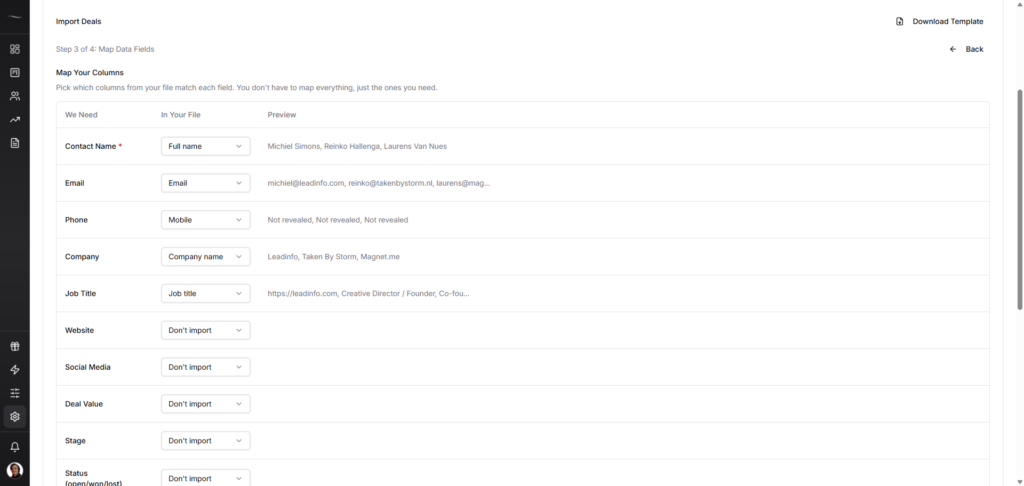
When you’re ready to switch, the migration itself is easy if you do it in the right order. Most people skip steps 1 and 2 and regret it. Also it’s worth mentioning that if you have a few dozen deals, it’s usually faster just to copy the data from your sheets to the CRM manually without importing tools and manually preparing the sheet.
Step 1: Clean the data
Before you import anything, open the sheet and kill the noise. Delete dead rows, merge duplicates, fix the column names and standardize “deal value” to one currency. Most Sheets pipelines have 6+ months of decay in them. You shouldn’t migrate that.
Step 2: Map your columns to deal fields
Every CRM has core fields: deal name, contact, company, value, stage, close date, owner, etc. Open your sheet next to a blank CRM and decide what maps to what. The columns that don’t map (random notes, side calculations) become deal notes or get dropped.
Step 3: Define your stages
This is the part most founders rush. Look at your last 20 closed deals. What were the actual stages they moved through? Not the template stages. The real ones you use in your business. For most B2B teams it’s something like: New → Contacted → Meeting Booked → Proposal Sent → Won/Lost. Or Positive Reply > Meeting > Proposal Sent > Won/Lost. Four or five stages is plenty.
Step 4: Import in batches
Don’t import 800 leads at once. If you’re still shortlisting tools, see our 5 Google Sheets CRM alternatives for B2B teams. Start with your active deals that have earned their place in the CRM. The 20-40 you’re working right now. Get those in, get the stages right and get yourself comfortable. Then bulk-import the rest of the historical data once you trust the setup.
Step 5: Set follow-up reminders on day one
This is the whole reason you’re switching. Before you do anything else in the new tool, go through your active deals and set a follow-up reminder on each one. If you skip this step, you’ve just bought a more expensive sheet.
The whole migration takes 1-4 hours for most solo founders. A small team should budget half a day.
What To Look For In A Spreadsheet Replacement
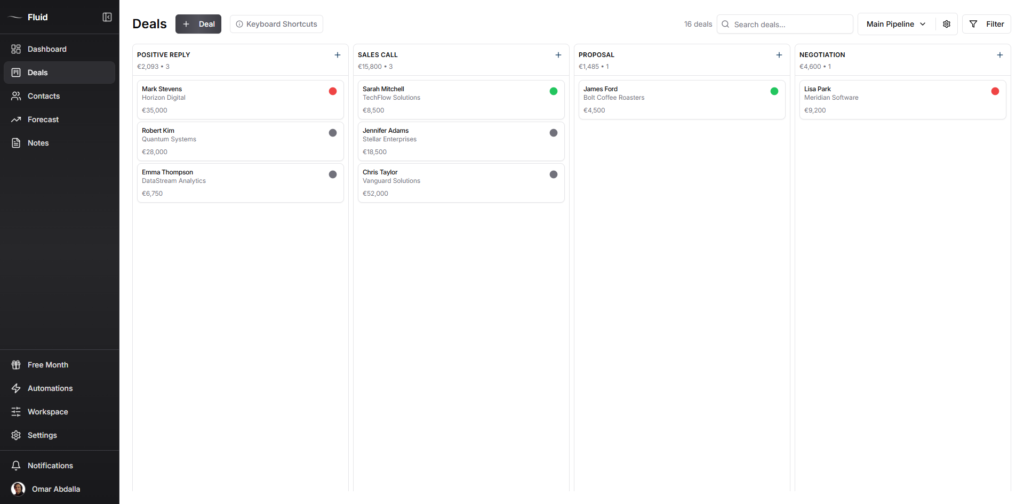
Once you’ve decided to switch, the question is what to switch to. Here’s what actually matters when you’re switching from spreadsheets to a CRM.
Visual pipeline
This is the single biggest upgrade over a sheet. You should see your stages, deals and what needs attention on one screen. If the tool’s “pipeline view” is just another table, you’ve bought the same thing in a different color.
Follow-up reminders
Follow-ups built in, not an integration with another tool, not a paid module. The whole reason Google Sheets fails for tracking is that it doesn’t remind you of anything. Don’t pick a CRM that fails for the same reason.
Activity logging
You should be able to see what changes you did and when. The ability to set notes on your contacts, deals and reminders is also important, especially if you work with a team.
This helps you remember the messages you sent, what you promised and what the situation is. With sheets you’re flying in the dark.
Setup under 10 minutes
If the tool needs an onboarding call, a setup wizard or a “success manager,” it’s too big for you. You’re a solo founder or a small team. You should be tracking your first deal in the time it takes to drink a coffee.
No upgrade traps
Read the pricing page carefully. Fluid CRM pricing is one plan with every feature included. If the features you actually need (unlimited deals, contacts, pipelines, reminders) are split across three tiers, walk away. The price you sign up at should be the price you stay at, especially as a small business.
If you need marketing automations, deep integrations or AI capabilities, then it’s acceptable that they become available at more expensive tiers.
FAQ
Technically Google Sheets handles millions of rows. Practically, your brain is the bottleneck, not the spreadsheet. Around 30 active deals is where most solo founders stop being able to maintain accurate stage information consistently. A two-person team breaks earlier, around 20-25 active deals, because of edit conflicts.
Cheap CRMs run between 15€ to 30€ per user per month. For a full comparison of options in this range, see the best CRMs for small B2B sales pipelines. Watch for “starter” tiers that lock pipelines, automations or reminders behind upgrades. The cheapest sticker price isn’t always the cheapest real cost six months in.
Yes. Every CRM worth using accepts CSV imports, and Google Sheets exports to CSV in two clicks (File → Download → CSV). The work is in the data, not the export. Clean the sheet first, map your columns to the CRM’s deal fields, then import. Plan for 1-2 hours on cleanup if your sheet is older than 6 months with hundreds of records.
A solo founder with 20-40 active deals can migrate in 1-4 hours or less, including data cleanup. A small team with 100+ deals should budget half a day. The migration itself is fast. The cleanup of months of accumulated mess in your sheet is the slow part.
You bring it with you. Most founders import only active deals into the CRM (the 20-40 they’re working on right now) and keep the historical sheet as an archive. You can also bulk-import won and lost deals from past months if you want closing-rate data inside the new tool. Either way, the original sheet doesn’t disappear unless you delete it. Keep it for 90 days as a backup.
Conclusion
Google Sheets for B2B deal tracking is fine until it isn’t. The day you miss a follow-up that costs you a deal, or the day a second person needs to see the pipeline, or the day you cross 30 active deals, the math flips. Until then, don’t switch for the sake of switching. After that, don’t wait. If you’re tired of tracking sales in messy spreadsheets, Fluid CRM gives you a clear visual pipeline without the bloat of a traditional CRM. If you want to see exactly how Fluid CRM compares to other small B2B options, the full breakdown is here.
You can also try Fluid CRM for free. Start your7 day trial here, no credit card needed.