

Sales tracking software keeps getting sold to teams ten times your size, packed with forecasting dashboards and lead scoring AI you will never touch. What a small team actually needs is a pipeline it will open every morning. This roundup covers ten tools that fit small B2B teams, with honest notes on who each one really suits.
The best sales tracking software for a small team is the one you will open every day. Pipedrive fits visual pipeline depth, Close suits heavy calling and Fluid CRM works for small B2B teams that outgrew a spreadsheet but do not want HubSpot. Match the tool to how your team sells.
What Sales Tracking Software Does for a Small Team
Sales tracking software shows you every open deal, who you talked to last and what you need to do next. For a small team that mostly means three things: a pipeline you can see at a glance, reminders so follow-ups do not slip and a record of what was said on each deal. Some people call it a sales tracker, others call it a CRM. The label matters less than whether your team opens it.
A spreadsheet does some of this. It holds names and numbers in rows. What it cannot do is tell you that the deal in row 38 has gone quiet for two weeks, or remind you to call back the prospect who said “next quarter” in March. That gap is where deals die.
Bigger platforms do far more. They score leads, run email campaigns and build forecasting models. For a five person team that extra weight is the problem, not the feature. You end up paying for a system nobody fully uses while the basics, like a clear pipeline and a nudge to follow up, get buried under settings.
The job of sales tracking software for a small team is narrow. Keep the pipeline visible, keep follow-ups honest and stay out of the way.
How I Picked These Sales Tracking Tools
I picked these sales tracking tools from watching how small B2B teams actually track deals, not from a feature checklist. Over three years running cold email and LinkedIn outreach at Fenixtal, I worked with more than 50 B2B companies across marketing agencies, dev firms, consultants and construction. Almost all of them tracked sales one of two ways. They tracked nothing and ran on memory, or they paid for Salesforce and nobody logged in.
That pattern shaped the four things I looked for in every tool here.
A pipeline you can read in five seconds
The whole point is to see your deals and their stages on one screen. If the pipeline view is just another table you have to scroll and sort, you have bought a prettier spreadsheet. Every tool on this list has a real visual pipeline.
Follow-up reminders built in
The most common reason small teams lose deals is not bad leads, it is forgetting to follow up. Reminders need to live inside the tool, not in a separate calendar you also forget to check.
Setup you can finish the same day
A small team does not have a week for onboarding calls and field mapping. If you cannot import your contacts and track your first deal in an afternoon, the tool is too heavy for you. Most tools here clear that bar. A couple do not, and I say so.
Pricing without surprise upgrades
The trick in this category is a cheap entry plan that locks the feature you actually need one or two tiers up. I flag where that happens. The price you sign up at should be close to the price you stay at.
The 10 Best Sales Tracking Software Tools for Small Teams
Here are the ten best sales tracking software tools for small teams, with the plan that matters, the real entry price and who each one fits. Annual billing usually drops the per seat cost.
| Tool | Best for | Entry price (per seat/mo) | Free option |
|---|---|---|---|
| Pipedrive | Visual pipeline depth | $24 (Lite) | 14-day trial |
| HubSpot | Sales plus marketing | $20 (Starter) | Free plan (2 users) |
| Fluid CRM | Small B2B teams past spreadsheets | $16 (all features) | 7-day trial |
| Close | High-volume calling | $19 (Solo, 1 user) | Free trial |
| Capsule | Contacts plus a light pipeline | $21 (Starter) | Free plan (2 users) |
| Less Annoying CRM | Tiny teams wanting cheap and simple | $15 (all features) | 30-day trial |
| Salesflare | Automatic Gmail and Outlook tracking | $29 (Growth, annual) | 30-day trial |
| Zoho CRM | Teams already in the Zoho stack | $14 (Standard, annual) | Free plan (3 users) |
| monday | Work and sales on one board | $12 (Basic, 3-seat min) | 14-day trial |
| OnePageCRM | Next-action focused tracking | $9.95 (Professional, annual) | 21-day trial |
Entry prices show each vendor’s lowest regular plan. Some are annual rates, noted per tool below, and monthly billing runs higher.
1. Pipedrive (best for visual pipeline depth)
Pipedrive is the tool most people picture when they think visual sales pipeline. The drag-and-drop stages are clean, the deal views are deep and it has been doing this longer than almost anyone. If your sales process has real stages and you want to live inside the pipeline, this is a strong pick.
Pricing starts at $24 per seat a month on the Lite plan, dropping to about $14 on annual billing. Most teams need the Growth plan at $49 a month ($39 annual) once they want email sync and automations. There is no free plan, just a 14-day trial. Watch the add-ons. Lead tools, web visitor tracking and campaigns all cost extra on top of the seat price, so the real bill climbs faster than the sticker suggests.
2. HubSpot (best for teams that want marketing attached to sales)
HubSpot Sales Hub makes sense when you want marketing and sales living in the same place. The free plan is genuinely useful for up to two users, and if you plan to run email campaigns, landing pages and lead nurture alongside your pipeline, few tools match the all-in-one reach.
The catch is the jump. Starter is $20 per seat a month, but the features people actually buy HubSpot for, like sequences, automation and real reporting, start at Professional. That plan is $100 per seat a month plus a one-time $1,500 onboarding fee that is not optional. For a small team tracking a few dozen deals, that is a lot of platform for a job a $16 tool can do. If you genuinely need the marketing engine, it earns its price. If you do not, you will feel it.
3. Fluid CRM (best for small B2B teams that outgrew a spreadsheet)
Fluid CRM is built for the team in the gap, too big for a spreadsheet and too small for HubSpot. You get a lightweight visual pipeline, follow-up reminders, contacts and deals that sync automatically and keyboard shortcuts for fast data entry. Setup takes minutes and every feature is included on both plans, so there are no upgrade traps.
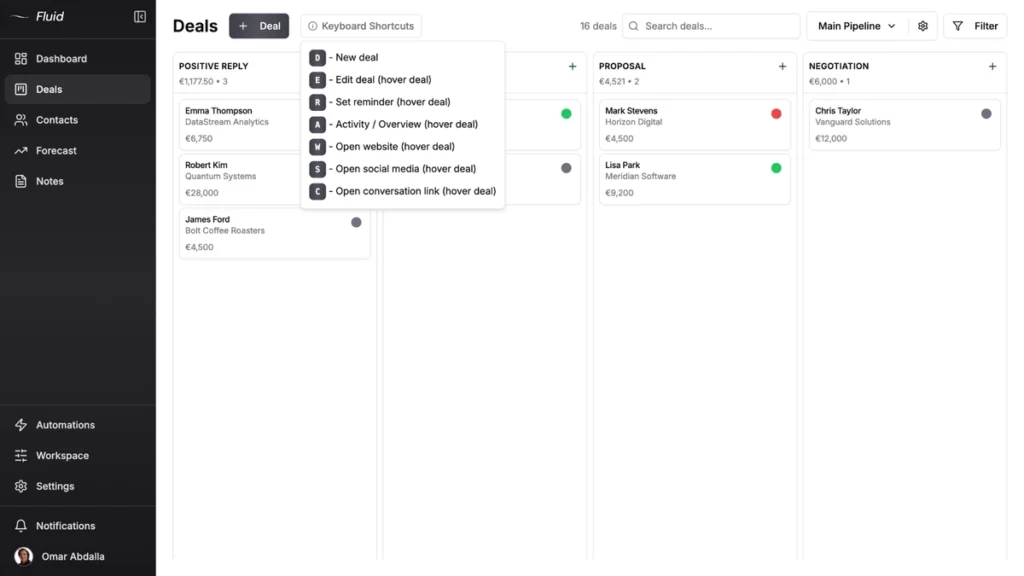
Pricing is $16 per seat a month, or $144 per seat a year, which works out to $12 a month with three months free. The trial is 7 days, no credit card required.
Viktor Otterskog, a solo B2B outbound operator in Sweden, runs his whole pipeline this way. He told me “the reminders is a seriously smart thing,” and his daily routine is the tool in a nutshell. He opens a deal, takes an action like a call or email, notes what happened and sets the next reminder. Fluid keeps that loop honest. Where it falls short is the heavy stuff. No native dialer, no marketing automation, no landing pages. If you need those, look higher up this list.
4. Close (best for high-volume calling and outbound)
Close is built for teams that live on the phone. Calling, SMS and email are baked in, and the Power Dialer on higher plans is one of the best built-in dialers you can buy. If your sales team makes dozens of calls a day, Close removes the gap between your CRM and your phone.
The Solo plan is $19 a month for one user. The first team plan, Essentials, is $49 a month ($35 on annual), and the Power Dialer that makes Close worth it sits on Growth at $109 a month. Call recording is a paid add-on on top. For a calling-heavy outbound team it is money well spent. For a team that sells over email and meetings, you are paying for a phone system you will barely touch.
5. Capsule (best for simple contacts plus a light pipeline)
Capsule sits close to the simple end of the market. It pairs clean contact management with a straightforward sales pipeline, and the free plan covers up to two users and 250 contacts, which is enough to test it properly. For a small team that mostly needs organized contacts with a pipeline bolted on, it fits well.
Paid plans start at $21 per seat a month for Starter, with about 15 percent off on annual billing. The thing to know is what Starter leaves out. Two-way email sync, workflow automations and multiple pipelines only show up on Growth at $38 a month. If you need automated follow-ups or more than one pipeline, budget for the higher tier from the start.
6. Less Annoying CRM (best for tiny teams wanting cheap and simple)
Less Annoying CRM does what the name promises. One price, every feature, no tiers to climb. It is aimed squarely at solo operators and tiny teams who want contacts, a pipeline and reminders without a single upsell email. The interface is plain in the best way.
The price is a flat $15 per user a month, everything included, with a 30-day free trial and no credit card. There is no premium tier dangling the feature you need. The trade-off is depth. You will not find advanced automations, a built-in dialer or heavy reporting here. For a small team that values simple and cheap over powerful, that is the whole point, not a flaw.
7. Salesflare (best for automatic Gmail and Outlook tracking)
Salesflare earns its place for one trick. It fills itself in. It pulls contacts, emails and meetings out of your Gmail or Outlook and builds the timeline for you, so the “I forgot to log it” problem mostly disappears. For a small B2B team that hates data entry, that automation is the selling point.
Pricing starts at $29 per seat a month on Growth with annual billing ($39 monthly). Pro is $49 and Enterprise is $99 on annual billing, with a five-user minimum. Email workflows and permissions sit on Pro and above. If your team sells through the inbox and wants the CRM to keep itself current, Salesflare is hard to beat. If you want a manual visual pipeline you control by hand, it can feel like it is doing things behind your back.
8. Zoho CRM (best for teams already in the Zoho stack)
Zoho CRM is the value pick, especially if you already use other Zoho apps like Books, Desk or Campaigns. It does a lot for the money and the free plan covers up to three users. For a team that wants everything under one login and is willing to spend time setting it up, the price is tough to argue with.
Standard is $14 per seat a month on annual billing ($20 monthly), and Professional is $23. The depth is real, but so is the setup. Zoho is more to configure than the simple tools on this list, and the interface can feel busy. If you are already in the Zoho world, it is an easy yes. If you are not, weigh the setup time against a tool you can run the same day.
9. Monday (best for teams that want work and sales on one board)
Monday started as a work management tool and grew a CRM, which is exactly its strength and its weakness. If your team already runs projects on monday and wants sales tracking on the same boards, the CRM keeps everything in one place. It is flexible and nice to look at.
Monday CRM runs about $17 per seat a month on the Standard plan, billed annually, with a cheaper Basic tier below it. The catch is the seat math. Paid plans start at a three seat minimum and then jump in blocks of five, so a four person team pays for five and a six person team pays for ten. For a team that wants sales and work side by side it is convenient. For pure sales tracking, a dedicated pipeline tool is usually leaner and cheaper.
10. OnePageCRM (best for next-action focused tracking)
OnePageCRM is built around one idea, that each contact needs a next action or it drops off your list. It turns your pipeline into a rolling to-do list, which is a genuinely different way to track sales. For a solo founder or a small outbound team that lives by “what do I do next,” it clicks.
Pricing is $9.95 per seat a month on the Professional plan with annual billing ($15 monthly), and Business is $19.95. The trial runs 21 days with no credit card. It is one of the cheapest serious options here. The limits show up in reporting and integrations, which are thinner than the bigger tools. If the next-action method matches how your brain works, that is a small price to pay.
What Most Small Teams Get Wrong About Sales Tracking
Small teams tend to fail at sales tracking in one of two ways, and both cost the same deals. The first is tracking nothing. The pipeline lives in your head and your inbox, and you only notice a deal went cold when the prospect ghosts you. The second is overcorrecting. You panic-buy a heavy platform, spend a weekend on setup and then quietly stop logging in because it is too much work.
I saw both ends constantly at Fenixtal. One construction company I ran outbound for had no shared system, so nobody knew who was talking to which lead, and the leads I sent them sat untouched for weeks. Another client had paid for an enterprise CRM that sat open in a tab nobody touched. Same lost deals, opposite reasons. None of this is unique to the teams I worked with. The average seller spends only about 40 percent of the week actually selling, with the rest lost to admin, data entry and internal meetings, according to Salesforce’s State of Sales report. A heavy CRM that adds more data entry makes that worse, not better.
The fix is almost never a more powerful tool. It is a tool light enough that opening it is not a chore. The teams that actually track sales are not the ones with the most features. They are the ones who check their pipeline every morning out of habit, because the tool makes that easy. Pick for the habit, not the feature list.
How to Choose Sales Tracking Software for Your Team
Choosing sales tracking software gets easier when you match the tool to how your team actually sells, not to a feature list. Here is a walktrough of different CRM examples and 15 real systems by use case.
Solo founder or freelancer
You need something cheap and simple that sets up fast. Less Annoying CRM, OnePageCRM or Fluid CRM all get you tracking the same day without a setup project. Skip anything with onboarding fees.
Small B2B team that outgrew a spreadsheet
You want a shared visual pipeline and reminders without the bloat. Fluid CRM, Capsule or Pipedrive fit here. If you do not need deep pipeline customization, lean to the simpler end.
Calling-heavy outbound team
You want the phone inside the CRM. Close is the clear pick, with the dialer doing the heavy lifting. Salesflare works too if most of your outreach is email.
Team that wants marketing attached
You plan to run campaigns and nurture alongside sales. HubSpot or Zoho CRM make sense, as long as you are ready for the setup and the bigger bill.
Team already living in another tool
If your work already runs on monday or the Zoho suite, adding their CRM keeps everything in one place. The convenience can outweigh a leaner standalone pipeline.
Frequently Asked Questions
The best one is the tool your team will open every day. For most small B2B teams that means a simple visual pipeline like Fluid CRM, Capsule or OnePageCRM rather than a heavy platform. Match the pick to how you sell, whether that is calling, email or a mix, and you will be right more often than not.
OnePageCRM is the cheapest serious option at $9.95 per seat a month on annual billing, with Zoho CRM close behind at $14 and a free plan for up to three users. Less Annoying CRM is $15 flat and Fluid CRM $16 flat with every feature included. Cheapest sticker price is not always cheapest in year one, so check what the entry plan leaves out.
If you have more than a handful of open deals and you have missed a follow-up in the last month, yes. The tool is not the point. The habit of seeing your pipeline and following up on time is, and a spreadsheet stops supporting that habit faster than most people expect.
You can, until it breaks. A spreadsheet is fine for a solo founder with under about 30 deals and a simple sales cycle. Past that, or the moment a second person needs the same view, the cracks show. Edits clash, follow-ups slip and the pipeline ends up living in your head again. Read Google Sheets vs CRM next.
For a small team, expect $9 to $30 per seat a month for a simple, focused tool. Heavier platforms like HubSpot Professional run $100 per seat plus a one-time onboarding fee. Annual billing usually cuts the per seat price, and the real cost depends on which features sit behind upgrades, so read the entry plan closely.
Conclusion
The best sales tracking software for your team is not the one with the longest feature list. It is the one you will actually open tomorrow morning. If you have outgrown a spreadsheet but do not want to wrestle with HubSpot, Fluid CRM gives you a clear visual pipeline and reminders that keep follow-ups honest.
Start your 7-day free trial, no credit card required.