

Consultants who hate admin work get sold the wrong CRM constantly. The lists all pretend you’re a sales rep chasing new logos. You’re not. Consultants juggle lead generation, client relationships, proposals and project delivery on the same day, and the CRM that fits respects all four jobs instead of burying you in fields built for a 50-rep sales org.
The 9 best CRMs for consultants are Fluid CRM, OnePageCRM, Pipedrive, Salesflare, Close, HubSpot, Folk, Attio and Capsule. Solo consultants who want low admin should pick Fluid CRM or OnePageCRM. Skip Salesforce and full-tier HubSpot, both built for sales teams rather than long-term client relationships.
I’ve spent 3 years running outbound consulting at Fenixtal. LinkedIn campaigns, cold email, multi-channel work for over 50 B2B clients, my own team and a few side businesses on top. So I know what consultants need from a CRM and what they don’t.
Why Most CRM Lists for Consultants Get It Wrong
The standard “best CRM for consultants” list lines up Monday, HubSpot and Pipedrive in some order and calls it a day. Generic listicles written by people who’ve never run a consulting business.
Here’s what those lists miss. A consultant doesn’t have one pipeline. They have multiple jobs running at the same time:
- A lead generation pipeline (cold outreach, referrals, inbound)
- A client relationship pipeline (active clients, retention, upsell)
- A project delivery pipeline (onboarding, milestones, handoff)
- A partnership or referral pipeline (people who send you work)
Half the marketing agencies, business consultants and sales coaches I ran outbound for at Fenixtal tracked all of this in Google Sheets. The other half paid for Salesforce and never opened it. Both were broken. The Sheets crowd lost track and the Salesforce crowd lost money. Neither built a system that actually served them.
The right CRM gives you separate pipelines for each job and lets you switch between them without buying a new plan. Fluid CRM ships with unlimited pipelines on every plan. So does OnePageCRM. HubSpot makes you pay for it.
Doland White runs Doland White Consulting and works as an executive coach. He’d tried HubSpot, Salesforce, Capsule and “every CRM there is” before he found Fluid CRM. He put it like this:
“I don’t have to configure my business to match how the CRM works. I go faster and I can plan my client actions with clarity.”
Doland White, Founder, Doland White Consulting
That quote is the whole post in one line. The CRM should serve the consultant, not the other way around.
What Consultants Actually Need From a CRM
Before you pick a tool, figure out which type of tool you need. Most “CRMs for consultants” are actually three different categories pretending to be one.
Sales CRM. Tracks deals, pipeline stages, follow-ups, reminders. Built for closing business. Fluid CRM, OnePageCRM, Pipedrive, Salesflare, Close and HubSpot all live here.
Relationship CRM. Tracks people first, not deals. Built for networking, partnerships, referrals. Folk and Attio lean this direction.
Project management with CRM features. Tracks projects, tasks, deliverables. Some have a CRM bolted on. Monday and Notion live here.
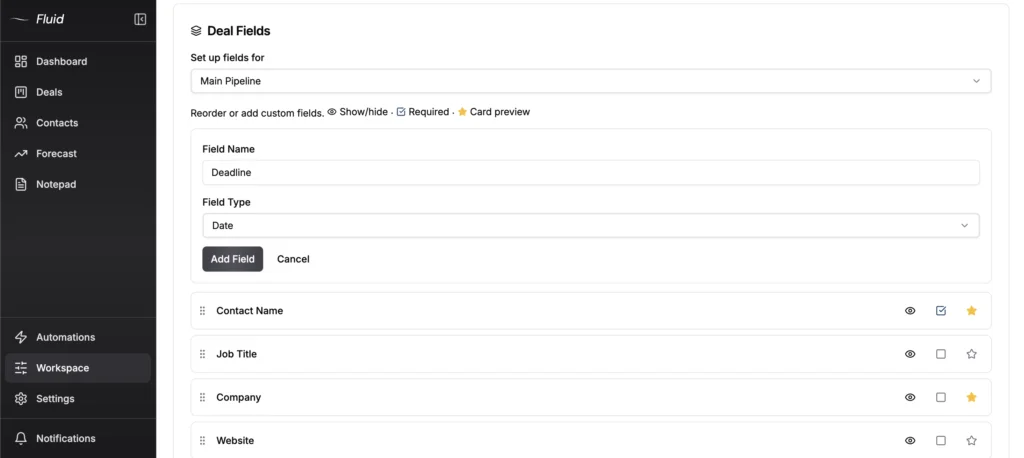
Most consultants need a sales CRM first. Pipeline, reminders, proposal tracking, that’s the daily work. If you also need light project tracking, pick a sales CRM that lets you customize deal cards or run a delivery pipeline alongside your sales pipeline. In Fluid CRM you can pin up to three custom fields to the front of a deal card, so project status, deadline or deliverable owner is visible on the board without opening anything. That lets you run sales and light project tracking in the same tool without paying for a project management platform on top.
If you actually need full project management (Gantt charts, time tracking, subcontractor coordination), buy a project management tool separately and integrate it. Don’t try to make a CRM be both.
The non-negotiable features for a consulting CRM:
- Visual pipeline you can scan in 10 seconds
- Follow-up reminders that work without integrations
- Notes and activity history on every contact and deal
- Unlimited pipelines (or at least multi-pipeline support)
- Mobile access that doesn’t make you cry
- Fast logging (under 30 seconds per deal update)
- Pricing under $30/seat for solo and small operations
What you don’t need: lead scoring AI, marketing automation, predictive forecasting, 47 dashboards, custom objects. Those are sales team features. You’re not a sales team.
If your work leans more coaching than consulting, my rundown of the 12 best CRMs for coaches sorts that side by a different split.
The 9 Best CRMs for Consultants
The list below ranks the nine CRMs that consistently work for consultants. Each entry covers who it’s best for, the entry price, what makes it work and where it falls short. Prices lead with monthly billing, with the annual rate in brackets where it changes the math.
1. Fluid CRM (best for consultants who want low admin)
Price: $16/seat/month, or $144/seat/year with 3 months free
Fluid CRM is built for the consultant who wants a clear visual pipeline and zero admin overhead. Every feature is included on both plans. Unlimited deals, contacts and pipelines, so you can run lead generation, client relationships and project tracking side by side without paying more.
What works:
- Unlimited pipelines on every plan, so a consultant can split sales from delivery without buying tiers
- Pin up to three custom fields to the front of a deal card, so project status, deadline or deliverable owner shows on the board itself
- Keyboard shortcuts for fast logging
- Follow-up reminders that surface what to do today
- API integration with cold email tools like SmartLead and Instantly
- $16/seat/month with every feature included, no upgrade traps
Where it falls short: No native dialer, no marketing automation, no built-in lead scoring. If you need any of those, you’re not the ICP. Fluid CRM is sales-first, not an all-in-one platform.
7-day free trial, no credit card required.
2. OnePageCRM (best for action-list consultants)
Price: $15/user/month ($9.95/user/month annual, Professional plan). Business from $19.95/user/month annual.
OnePageCRM is built around the “Next Action” approach. Every contact has one defined next step and the home screen is a prioritized list of what you should do today. Strong fit for solo consultants who think in to-do lists rather than pipeline stages.
What works:
- The Next Action method forces follow-up discipline
- Cheapest serious CRM on the market for what it does
- 21-day free trial, no credit card required
- Light project management for won deals built in
- Mobile app for logging on the go
Where it falls short: Reporting is thin and team features are limited compared to bigger tools. The Action Stream gets unwieldy if you fall behind on follow-ups for a few weeks.
3. Pipedrive (best for consultants with mid-volume pipelines)
Price: $24/seat/month ($14/seat/month annual, Lite plan). Most consultants need Growth at $49/seat/month for full email sync and automations.
Pipedrive is the workhorse listicle pick for a reason. Strong visual pipeline, good integrations, mature feature set. Best fit for consultants with 30 to 100+ active deals, or a small team where you need the standardization.
What works:
- Clean visual kanban pipeline
- Huge integration library (Zapier, Make, native marketplace)
- Strong mobile app
- Email sync, templates and tracking
Where it falls short: The cheap tier doesn’t include features most consultants need, so the real cost is closer to $49/seat/month. Logging speed lags behind faster tools. Overkill for a solo consultant doing 10 to 20 deals a year.
4. Salesflare (best for consultants who live in Gmail or Outlook)
Price: $39/seat/month (Growth plan). Pro at $64/seat/month adds email sequences.
Salesflare‘s pitch is “zero data entry.” It pulls contact info, email tracking and meeting times automatically from your email and calendar. If you live in Gmail or Outlook and don’t want to log anything manually, this is the tool.
What works:
- Automatic email and meeting capture
- Strong Gmail and Outlook plugins
- Built-in email sequences on Pro
- Less manual logging than any other CRM in this list
Where it falls short: Pricier than entry-level options and the automation only works as well as your inbox hygiene. Email sequences are Pro-only and Enterprise has a 5-user minimum.
5. Close (best for consultants who sell over the phone)
Price: $9/month for the single-user Solo plan. Essentials at $49/seat/month, Growth at $109/seat/month.
Close puts calling, email and SMS inside the CRM, so a discovery call gets dialed, recorded and logged without a second tool. If most of your pipeline moves by phone rather than email, that removes real work from the day.
What works:
- Built-in calling, email and SMS on every plan
- Call recording and logging without a separate dialer
- Solo plan at $9 is aimed squarely at single-operator sellers
- Strong for outbound-heavy consultants who still cold call
Where it falls short: The jump from Solo to Essentials is steep the moment you add one person. Power dialer and automated workflows sit at Growth, and you’re paying for a phone system whether you use it or not.
6. HubSpot (best for consultants scaling to a small agency)
Price: Free for basic use (2 users, limited features). Starter at $20/seat/month. Most consultants who actually need HubSpot end up on Professional at $100/seat/month plus a $1,500 one-time onboarding fee.
HubSpot makes sense when a solo consultant becomes a 5 to 10 person agency with marketing automation needs and content-driven inbound. For solo consultants and small operations, it’s overkill.
What works:
- Strong free tier for testing
- Real marketing automation, lead scoring, content tools
- Connects to almost everything
- Scales to actual agency size
Where it falls short: The upgrade trap. Doland told me about HubSpot: “With HubSpot, if you want to do something different, you have to buy more. What starts off small gets bigger, bigger, bigger and bigger.” That’s the pattern. Free becomes $20, becomes $100, becomes $100 plus $1,500 onboarding, becomes $150 plus $3,500 onboarding. Most consultants don’t need that ladder. I ran the full year-one math for a 2-person team if you want the numbers.
7. Folk (best for relationship-heavy consultants)
Price: $30/seat/month ($24/seat/month annual, Standard). Premium at $60/seat/month adds email sequences, deals and custom objects.
Folk is the contact-first CRM. Built for consultants whose business runs on relationships, partnerships, intros and warm referrals rather than an active sales pipeline. PR consultants, M&A advisors, fractional execs.
What works:
- Clean contact-first interface
- Strong LinkedIn and email integrations
- AI contact enrichment (Folk calls it Magic Fields)
- Suits the relationship-heavy workflow
Where it falls short: Email sequences, deals and API access are Premium-only. Pipeline mechanics are lighter than a real sales CRM. If you need to track 50+ active deals through stages, this isn’t the tool.
8. Attio (best for consultants who want to build their own system)
Price: Free for up to 3 seats. Plus at $36/seat/month ($29 annual), Pro at $86/seat/month ($69 annual).
Attio works more like a database you shape yourself than a fixed CRM. You define your own objects, fields and views, so a consultant tracking engagements, referral partners and renewals in parallel can build exactly that instead of bending someone else’s pipeline to fit.
What works:
- Build your own data model rather than accepting a default one
- Free plan for up to 3 seats is genuinely usable
- Strong for account-based work with multiple stakeholders per company
- Modern, fast interface
Where it falls short: The flexibility is the cost. You’re designing the system before you use it, which is a weekend you don’t get back. AI features and enrichments also run on a credit system stacked on top of the seat price.
9. Capsule (best for budget-conscious solo consultants)
Price: Free for up to 2 users and 250 contacts. Starter at $21/seat/month. Growth at $38/seat/month adds multiple pipelines and automations.
Capsule is the quiet workhorse. Decent free tier, fair pricing, no flashy AI claims. Works for consultants who want a simple CRM and don’t need bells and whistles.
What works:
- Real free tier, not just a marketing funnel
- Project boards on Growth and Advanced for delivery tracking
- 14-day free trial, no credit card required
- Sensible feature gates between tiers
Where it falls short: Multi-pipeline and automations are Growth-only at $38/seat/month. Reporting is thin on the Starter plan. The free tier caps at 250 contacts, which most consultants hit fast.
CRMs to Avoid as a Consultant
Some popular CRMs show up on every “best of” list but actively don’t fit consulting work. Here’s the list to skip.
Salesforce
Salesforce is built for enterprise sales teams with 50 to 500 reps, complex commission rules and custom code. A consultant with 5 to 30 active deals doesn’t need any of that, and the price tag (Pro Suite at $100/user/month billed annually, plus implementation costs) is brutal. The setup time alone is wasted weeks for a solo consultant. Unless you’re a Salesforce expert already, skip it.
HubSpot (Professional tier and above)
The free tier is fine for testing and Starter at $20/seat is workable. Once you move to Professional at $100/seat plus $1,500 onboarding, HubSpot stops being a CRM and starts being a marketing platform with sales bolted on. Consultants who don’t run inbound content or marketing automation are paying for features they’ll never touch.
Monday CRM
Monday CRM is a project management tool wearing a CRM costume. The pricing punishes small teams, since paid plans carry a 3-user minimum, so the advertised $12/seat is really $36/month minimum. The actual CRM features lag behind purpose-built sales CRMs. If you’re already in the Monday ecosystem for project management, fine. Otherwise, no.
Keap
Keap is marketing automation with a CRM attached. Pricing starts at $299/month monthly ($249/month annual) for 1,500 contacts and 2 users, plus a required implementation fee of $500 or more. The strength is email nurture sequences, not pipeline tracking. If you’re not running those flows, you’re paying four figures a year for a contact list with reminders.
GoHighLevel
GoHighLevel is built for marketing agencies running funnel-heavy lead generation for clients. It’s not a CRM, it’s a marketing operating system. Powerful for the right use case and the wrong tool for a consultant who needs to track deals and follow up with clients. Starts at $97/month and goes up fast.
Best CRM for Solo Consultants
A CRM for independent consultants has to survive being ignored for four days. You’re delivering client work all week, and the pipeline only gets touched in the gaps between calls. That rules out anything with a setup wizard, a required onboarding session or a dashboard you have to relearn every Monday.
The volume is low and the stakes per deal are high. Ten live conversations, three of which matter, and losing one to a forgotten follow-up costs more than a year of software. So the job is narrow. Show who’s gone quiet, remind you before it’s too late, take under a minute to update.
Fluid CRM fits that shape at $16/seat/month, with reminders and unlimited pipelines included rather than gated behind a tier you’ll get pushed onto later. OnePageCRM works too if you’d rather run off a daily action list than a visual board, and Capsule’s free tier covers you while you’re testing.
Where a solo setup gets hard: none of these send proposals or take payment. If your bottleneck is invoicing rather than chasing, buy for that instead and keep the CRM for the sales side.
Best CRM for Small Consulting Firms
Small consulting firms break on a different problem than solo consultants. The pipeline stops living in one person’s head, and two or three people now need the same view without stepping on each other. The question shifts from “did I follow up” to “who owns this lead and did anyone follow up.”
That makes shared visibility and clear ownership the features that matter, not reporting depth. Every partner should open the CRM and see which deals are theirs, what’s overdue and what a colleague already sent. Handoffs are where small firms lose deals, usually when one partner books an intro call and nobody logs what was promised.
Seat cost starts to bite here too. At five people, a $49 seat is $245/month before anyone has closed anything. Fluid CRM runs $16/seat/month, or $144/seat/year, with every feature on both plans, so adding a partner doesn’t move you up a tier. Pipedrive Growth at $49/seat earns its price if you need deeper integrations and real forecasting.
Where it stops working: past roughly 20 people, with separate departments and detailed permission rules, a lightweight CRM has run out of room.
Best CRM for Fractional Executives
Fractional executives run the longest sales cycles in consulting and the smallest lead counts. A fractional CFO or CMO might have six live conversations, each worth five figures over a year, most of them arriving through referral rather than outbound. Nothing about that setup needs marketing automation.
Two things decide whether the year works. Following up on a warm introduction before it cools, and knowing when an existing engagement is up for renewal. Renewal is the part most fractional operators track nowhere, then get surprised by in month eleven.
The answer is two pipelines rather than one. New business runs intro call, scoping, proposal, signed. The second tracks live engagements through active, renewal due, renewed or ended. Different stages, different rhythms, and forcing them into one board makes both useless.
Fluid CRM includes unlimited pipelines on both plans, so running the two side by side costs nothing extra. Folk at $30/seat is the other honest option if your work comes almost entirely through intros and you care more about people than deal stages.
Where it falls short: no contract storage and no invoicing in either. Fractional work involves both, so plan on a separate tool for the paperwork.
How to Pick the Right CRM for Your Consulting Business
Use this quick decision framework. Pick the path that matches your situation.
Solo consultant, low admin tolerance, under 30 active deals: Fluid CRM at $16/seat or OnePageCRM at $15/user ($9.95 annual). Both keep daily admin under 5 minutes. For a wider comparison, see best CRM for small B2B sales pipelines.
Solo consultant, relationship-driven (referrals, intros, partnerships): Folk at $30/seat or Attio at $36/seat. Contact-first beats pipeline-first when most of your work comes from warm intros.
2 to 5 person consultancy with mid-volume pipeline: Pipedrive Growth at $49/seat or Fluid CRM at $16/seat. Pipedrive if you need deeper integrations, Fluid CRM if you want lower cost and unlimited pipelines. Full side-by-side at Fluid CRM vs Pipedrive.
Consultant living in Gmail or Outlook who hates manual logging: Salesflare Growth at $39/seat. Automatic capture is the entire pitch.
Consultant who sells mostly over the phone: Close, starting at $9/month solo. Nothing else here includes a dialer.
Scaling to a small agency with marketing automation needs: HubSpot Starter or Professional. You’ll grow into the bloat and the upgrade path is built for that growth.
Budget consultant testing the waters: Capsule free tier or the OnePageCRM trial.
If two paths match, pick the cheaper one. You can always switch. The cost of being on the wrong CRM for 6 months is bigger than the cost of switching twice in your first year.
What to Do After Picking a CRM
Most consultants pick a CRM, import everything they have and never look at it again. Here’s the order that actually sticks.
- Clean the data first. Delete dead leads, merge duplicates and fix the contact info before you import anything.
- Set 3 to 5 pipeline stages, no more. New, Conversation, Proposal Sent, Won or Lost is plenty. Skip the 9-stage funnel.
- Import only your 20 to 40 active deals first. Add the historical archive later, once the live pipeline has a rhythm.
- Set up your pipelines for different jobs. Lead gen, client relationships, project delivery, running side by side from day one if your CRM allows it.
- Set follow-up reminders on every active deal on day one. This is the whole reason you switched, so don’t skip it.
- Block 10 minutes at the start of every day. Open the CRM, check follow-ups, log yesterday’s notes, then close it.
Do those six things in the first week and the CRM becomes part of your routine. Skip them and you’ve just bought a more expensive spreadsheet.
Frequently Asked Questions
The answer depends on team size. Solo consultants and 2 to 5 person firms use lightweight tools like Fluid CRM ($16/seat), OnePageCRM ($9.95/user annual), Pipedrive ($24/seat) or Capsule ($21/seat). Mid-size consultancies of 10 to 50 people use Pipedrive, HubSpot or Salesflare. Large firms run custom Salesforce or Microsoft Dynamics builds with dedicated internal teams. The right CRM scales with the size of your operation, not your ego.
HubSpot Free is the most feature-complete free tier, but it’s a funnel to paid plans. Capsule offers a real free tier at 2 users and 250 contacts without the upgrade pressure, and Attio’s free plan covers up to 3 seats. For solo consultants, the free trials on Fluid CRM (7 days), OnePageCRM (21 days) and Pipedrive (14 days) let you test paid tools without commitment.
Yes, once you have more than 10 to 15 active conversations going at any time. Below that, a Google Sheet or notebook works. Above it, keeping everything in your head starts costing you deals. The signal isn’t a number of clients, it’s how many follow-ups you missed last month. If the answer is more than two, you need a CRM.
The free tier is good for testing and Starter at $20/seat is workable for a consultant with simple needs. Professional at $100/seat plus $1,500 onboarding is overkill for almost any consultant. HubSpot fits consulting firms scaling into agencies that need marketing automation, content tools and lead scoring. For solo consultants and small operations, simpler tools cost less and produce more honest data.
Partly. A sales CRM with unlimited pipelines lets you run a delivery pipeline next to your sales pipeline, and tools that surface custom fields on the deal card can show project status or a deadline on the board itself. That covers light delivery tracking. If you need Gantt charts, time tracking or subcontractor coordination, buy a project management tool separately rather than forcing the CRM to do both jobs badly.
OnePageCRM at $9.95/user/month annual is the cheapest serious CRM with real pipeline mechanics. Capsule’s free tier is technically cheaper but caps at 250 contacts, and Close’s Solo plan is $9/month for a single user. Fluid CRM at $16/seat/month, or $144/seat/year, is the cheapest option with unlimited pipelines on every plan. Below $10/seat you’re usually getting a contact database or a stripped-down free tier from a vendor trying to upsell you.
Conclusion
Fluid CRM fits consultants who want low admin and unlimited pipelines without the bloat of enterprise CRMs. Visual pipeline, custom fields on the deal card for light project tracking, $16/seat/month with every feature included.
Fluid CRM isn’t built for consultants who need marketing automation, custom objects or deep BI reporting. If you need those, HubSpot or Salesforce still beats us. If you don’t, Fluid CRM is built for you.
Start your 7-day free trial here, no credit card required.
1 thought on “Best CRM for Consultants: 9 Low-Admin Picks (2026)”
Comments are closed.