

Your team isn’t lazy. Your CRM is bad. Every blog post and consultant will tell you to train harder, communicate better and build trust. They’re dodging the real problem. If logging a deal takes longer than a sticky note, your team has already decided not to use the CRM. So the fix isn’t more training. It’s a better tool.
Your team won’t use the CRM because of slow logging, useless dashboards, punishing required fields, surveillance dynamics, missing rep workflows and a private spreadsheet running on the side. The fix is a better tool, not more training. If logging takes more than 30 seconds, your team has already stopped using the CRM.
Why Your Team Quietly Stopped Using The CRM
Most CRM adoption advice gets the order wrong. The standard playbook says train the team, build a champion, set KPIs and run weekly reviews. That works when the tool is good. When the tool is bad, all you get is a tired team and the same empty pipeline.
Sales reps are pattern-matchers. The second they feel a tool costs more time than it saves, they stop opening it. They don’t tell you. They go back to a notepad, a sticky note or a private Google Sheet. The CRM you bought is now a dashboard you check, not a system anyone uses.
I’ve seen this play out at over 50 B2B companies I worked with at Fenixtal. The shape is always the same. A founder buys a CRM, the team uses it for two weeks and then a quiet drift starts. Three months later the manager opens the CRM, sees 14 deals from January and panics. The team has been closing deals the whole time. Just somewhere else with a system that isn’t as good as they’d deserve.
So before you blame the team, run the post below against your stack. If two or more of these reasons match, the CRM is the problem.
Reason 1: Logging A Deal Takes Longer Than A Sticky Note
What it looks like
A rep finishes a 20-minute sales call. They open the CRM to log it. The form has 14 fields. Three are required. Two are dropdowns with 30 options each. The “next step” field needs a date picker that takes four clicks. By the time they’re done, five minutes have passed and they haven’t even written the actual notes from the call.
Why it kills adoption
Logging isn’t free. Every second between “call ended” and “deal updated” is a tax. When the tax is higher than the value the rep gets back, they stop paying it. They write the notes in a notebook, swear they’ll log it later and never do.
Reps don’t refuse to log calls because they’re lazy. They refuse because logging costs more than it returns. That math has to flip.
How to fix it
Pick a CRM where logging a deal takes under 30 seconds. Keyboard shortcuts matter. So does smart defaults. So does a single screen that doesn’t make the rep click through three tabs.
Austin Verner runs Cold Emailers, a cold email agency. Before switching, he tracked every positive reply in a Google Sheet. After moving to Fluid CRM he told me: “I needed something more visually appealing. It’s fast as well. I like the hotkeys. I’ve actually been using them.”
That’s the bar. Hotkeys, fast logging, no friction. If your CRM doesn’t have that, your team has already voted with their behavior.
Reason 2: The Dashboard Tells You Nothing When You Open It
What it looks like
A rep logs into the CRM. The home screen shows a graph of leads from last quarter, a pie chart of deal stages and a widget showing “team activity score.” None of it tells the rep what to do next. They close the tab and open their inbox.
Why it kills adoption
A dashboard built for reports is not a dashboard built for work. Reps don’t need a quarterly trend graph at 9am. They need to know which deal needs a follow-up today, which proposal is overdue and who they promised a call to last week.
Most CRMs default to a “manager view” home screen. Pretty charts, useful for slides, useless for selling. The rep opens it once, sees nothing actionable and learns the CRM has nothing for them.
How to fix it
The home screen of a working CRM should answer one question: what do I need to do today? Active deals, overdue and today’s follow-ups and what’s closing this week. That’s it.
Pretty graphs belong in a reporting tab nobody opens by default. Move them out of the way.
Reason 3: Required Fields Punish Honesty
What it looks like
A rep wants to log that a lead said “not now, ask me in Q3.” Simple update. They open the deal. The CRM won’t save unless they pick a deal stage, a probability percentage, a close date, an industry, a deal source and a “next action.” Half of those fields don’t apply. The rep makes something up to get past the form.
Why it kills adoption
Required fields don’t produce clean data. They produce fake data. A rep facing a 20-field form will type “TBD” into half of them just to escape. Now the CRM has worse data than the notebook the rep was using before.
This is the HubSpot trap, scaled. Doland White is an executive coach in California who’s tried HubSpot, Salesforce, Capsule and most of the others. He told me: “With HubSpot, if you want to do something different, you have to buy more. What starts off small gets bigger, bigger, bigger, bigger.”
The more a CRM grows, the more fields it adds. The more fields it adds, the more reps lie to escape the form. Required fields are a manager’s wishlist dressed up as data discipline.
How to fix it
Drop required fields down to two. Deal name and stage. That’s it. Everything else is optional. The CRM should accept “I don’t know yet” as a valid state. If you need a probability, ask the rep when the deal moves to proposal stage, not when they first log it.
Optional fields with smart defaults produce more honest data than required fields with forced ones. Every time.
Reason 4: The CRM Was Built To Watch Reps, Not Help Them
What it looks like
The manager opens the CRM Monday morning and pulls up the “activity report.” Calls logged, emails sent, deals moved. The numbers go to a Monday slide. The rep knows this. They start logging calls to look good, not to track work. The CRM is now a stage, not a workspace.
Why it kills adoption
If the rep thinks the CRM is for the manager, they’ll use it like a performance review. Padded numbers. Defensive entries. No honest notes. No “this deal is probably dead.” Because honest notes get questioned in the Monday meeting.
Surveillance kills truth. Truth is the only thing a CRM is for. A CRM full of performative entries is a worse decision-making tool than no CRM at all.
Doland told me he’d tried every CRM there is. His verdict: “None of them work for what I’m looking for and they’re all clunky.” Clunky is the word reps use too. It means the tool fights them while they’re trying to work.
How to fix it
Two fixes. First, stop using activity counts as a management metric. Calls logged is not a leading indicator of revenue. Pipeline movement is. Deals closing is. Stop asking reps to perform for the dashboard.
Second, use a CRM with per-rep pipelines that everyone can see. Transparency without surveillance. Every rep sees the same pipeline, every rep sees their own deals and everyone sees how the team is doing without anyone counting keystrokes. That’s the version of visibility that builds trust instead of breaking it.
Reason 5: The CRM Doesn’t Support The Work Reps Actually Do
What it looks like
The rep’s actual job is to have conversations, follow up on time, send proposals and close. The CRM’s job, in theory, is to make that easier. In practice, the CRM is built around reports, custom objects and workflow automations the rep never touches. The rep wants a place to log “called Tom, he’s interested, call him Tuesday.” The CRM wants a custom field on lead score.
Why it kills adoption
Sales is a conversation business. A CRM that doesn’t put conversations at the center is a CRM built for someone else. Reps need to see notes, calls, emails and follow-ups for each deal on one screen. They don’t need lead scoring AI, marketing automation or 47 dashboards.
Most enterprise CRMs are built for the manager who needs reports. The rep is an afterthought. That’s why every top-ranked CRM gets the same complaint from small teams: too many features, too complicated, too slow.
None of these tools are bad. They’re just wrong for small B2B teams. HubSpot fits a 30-rep sales org. Salesforce fits a 100-rep enterprise. Pipedrive and Attio fit some teams. None of them fit a 5-person team closing deals between meetings.
How to fix it
Match the CRM to the work. A team of 3 to 15 doesn’t need lead scoring, marketing automation, custom objects or BI reporting. They need a visual pipeline, fast logging, reminders and contact history on one screen. Anything beyond that is bloat the team will route around.
Compare options honestly. See what each one costs at the tier where actual features unlock, not the sticker price. The best CRM for small B2B sales pipelines breakdown has the real cost math for each major option.
Reason 6: Your Team Has Already Built A Private Spreadsheet On The Side
What it looks like
You ask the rep how a deal is going. They pull up a Google Sheet on their second monitor. Not the CRM. The Sheet has the real notes, the real next steps, the real contact info. The CRM has a stage and a deal value, mostly outdated.
Why it kills adoption
This is the smoking gun. If a private spreadsheet exists, the team has voted. The CRM lost. They’re using the spreadsheet because it’s faster, simpler and doesn’t punish them for typing.
Half the marketing agencies I ran outbound for at Fenixtal tracked deals in Google Sheets. The other half paid for Salesforce and didn’t open it. The Salesforce half had worse data than the Sheets half because at least the Sheets half opened the file. Same outcome from opposite ends of the price range. Both broken, but in different ways.
The Sheet is not the disease. The Sheet is the symptom. The disease is that the CRM doesn’t pay for itself in time saved.
How to fix it
Don’t ban the Sheet. The Sheet will keep existing as long as the CRM is slower. Replace the CRM with one fast enough that the Sheet stops being faster. Then the Sheet dies on its own.
A working CRM kills the side spreadsheet the same way a good knife kills the bad knife. The team stops using the bad one because the good one is right there.
What To Do Instead Of More Training
Training is the consultant’s answer because consultants get paid to train. It’s the wrong answer in 80% of failed CRM rollouts.
Here’s the order that actually works:
- Audit the current CRM against the 6 reasons above. If two or more match, the tool is the problem.
- Stop investing more time, money and meetings into a CRM the team has rejected. Sunk cost won’t save it.
- Pick a CRM that takes 10 minutes to set up, not three months and a consultant.
- Get the team to track one week of deals in the new tool. If they log voluntarily, the tool works. If they don’t, pick a different one.
- Move the historical pipeline over only after the team has used the new tool for two weeks. Don’t migrate junk into a clean system.
The whole project takes a week if the new tool is the right one. It takes six months and a failed change-management initiative if you keep trying to save the wrong one.
Most adoption advice tries to fix the people. Fix the tool first. Adoption follows.
Pick A CRM Your Team Will Actually Open
The CRMs that fail at small teams all share the same trait. They were built for a team 10 times the size. Features for 50-rep sales orgs, priced for enterprise, designed around manager workflows. None of that fits a 5-person team trying to close deals.
The CRMs that work at small teams share a different trait. They’re built around a visual pipeline. Logging is fast. Reminders are built in. There are no upgrade traps and no required fields beyond the basics. The rep can open the tool, do their job and close the tab without losing time.
Doland told me, after seeing Fluid CRM for the first time: “That’s like exactly what I want to do. Really, really clean. I’m going to sign up.” The reason that quote matters isn’t the compliment. It’s that Doland had tried HubSpot, Salesforce, Capsule and “every CRM there is.” He didn’t need another option. He needed one that didn’t fight him. That’s the bar.
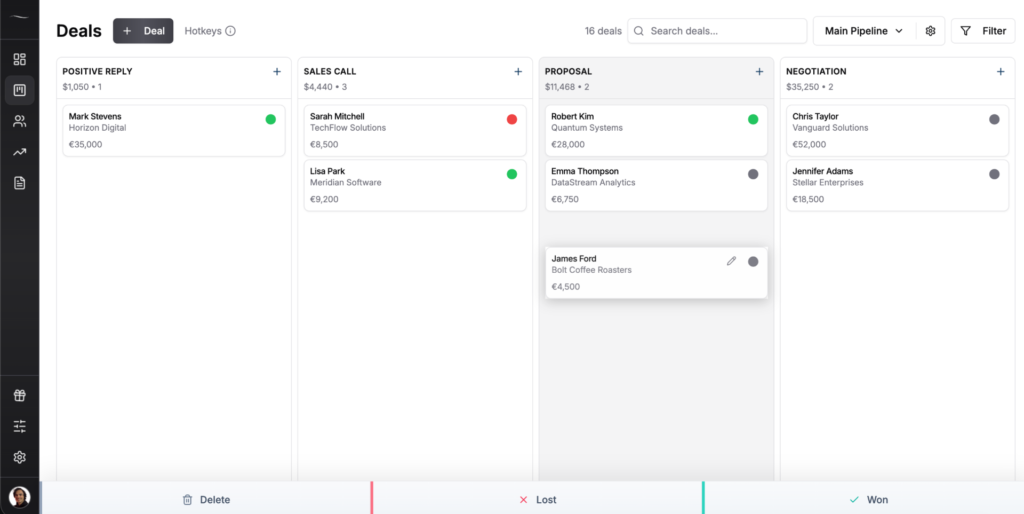
Fluid CRM gives small B2B teams, founders and agencies a clear visual pipeline without the mess of spreadsheets or the bloat of traditional CRMs. Every feature on both plans. No upgrade traps. No required fields beyond deal name and stage. Hotkeys for fast logging. Reminders so nothing slips. It’s not built for enterprises that need marketing automation, custom objects or deep BI reporting. If you need those, HubSpot or Salesforce still beats us. If you don’t, Fluid CRM was built for you. For coaches and consultants specifically, the calm-CRM fit is even cleaner.
Frequently Asked Questions
Under 30 seconds. If logging a deal takes longer than writing a sticky note, your team won’t do it. The fastest CRMs let you create a deal with one keyboard shortcut, fill the basics in 20 seconds and move on. Anything slower than that produces empty pipelines.
Because the tool costs more time than it returns. The first two weeks are training enthusiasm. By week three, reps realize logging a call takes five minutes and the dashboard tells them nothing useful. They quietly switch back to a notepad or a private spreadsheet. The CRM didn’t fail at month one. It failed at week three.
Almost always the CRM. Sales teams adopt tools that help them close. They reject tools that slow them down. If two or more reps stop using the CRM in the same month, the tool is the problem, not the team. The fix is picking a better tool, not running another training session.
Pick a tool that pays for itself in time saved on the first deal. That means fast logging, a visual pipeline, built-in reminders and no required fields beyond the basics. Then track adoption for one week. If reps log voluntarily, the tool works. If they don’t, switch.
Buying a CRM built for a team 10 times the size. Small teams of 3 to 15 don’t need marketing automation, lead scoring AI or 200 custom fields. They need a visual pipeline and reminders. Most failed rollouts are HubSpot or Salesforce purchases at small teams. The tool isn’t bad. It’s wrong for the team.
Conclusion
The reason your team won’t use the CRM is rarely the team. It’s the tool. Slow logging, surveillance dashboards, required fields, manager-first design and a private spreadsheet running on the side. Any one of those kills adoption. Two or more makes it certain.
If your CRM feels like a second job, Fluid CRM keeps it simple. Visual pipeline, no upgrade traps and $16/seat/month with every feature included. Start your 7-day free trial now, no credit card required.