

A lead fills in your form on Saturday, and a prospect answers your cold email on Sunday. Do both of them sit in your CRM on Monday morning, or does someone have to copy them in first? That depends on the API, and on a detail most buyers check too late.
A CRM with API access lets your other tools add and update leads without anyone typing. Almost every CRM has an API now, so check which plan it’s on, how requests are counted and whether webhooks come with it. Fluid CRM includes a REST API and 16 webhook events on its one plan.
At Fenixtal, my outbound agency, I booked 1,250+ sales calls for 50+ B2B clients. The leads I handed over often ended up in a spreadsheet or in a CRM nobody opened, and a lead that waits for someone to type it in is a lead that dies quietly.
What an API and a Webhook Do in a CRM
A CRM API is a way for other software to read and change the data in your CRM. Picture a door at the back of the building. Your form tool, your cold email tool or a script knocks on it and says “add this contact” or “show me every open deal”, and the CRM does it with nobody logged in.
A webhook is the same door used in the other direction. When something happens inside the CRM, such as a deal being won, the CRM sends a message to an address you gave it.
Through a typical CRM API, an outside tool can do four things:
- Find a contact, a company or a deal
- Create or update a record
- Log an activity or set a reminder
- Pull pipeline numbers into a report
Most automations need both. The API gets a new lead in, and the webhook tells your team chat or your reporting sheet that the deal moved.
3 Questions To Ask Before You Read the API Docs
Good documentation tells you nothing about whether you can use the CRM’s API on the plan you’re about to buy. Ask these three questions first, on the vendor’s pricing page and its developer pages.
1. Which plan is the API on?
Most CRMs for small teams now include the API from their entry plan, and a few start it higher. Look for the words “API access” in the plan comparison, and check the row for the plan you would pay for.
2. How is use counted?
Every API has a ceiling, and vendors measure it in different ways. A plain number of requests per minute is the easiest to plan around, because you can work out how long an import of 2,000 leads will take.
Others give you a daily budget of credits or tokens. Pipedrive’s is 30,000 tokens a day on its Lite plan, multiplied by your seats and by a higher factor on each plan above. Zoho CRM gives its free edition 5,000 credits a day.
A budget means you have to learn what one request costs before you know how far it goes.
3. Are webhooks on the same plan?
This is the question that catches people, because the API and the webhooks are often sold apart. Streak includes its API on the Pro plan, and webhooks start one plan up on Pro+.
Zoho CRM has the API on every edition and starts webhooks on Professional. HubSpot has the API on its free CRM, and sending a webhook from a workflow needs Data Hub Professional or Enterprise.
Five CRMs with an API, by plan
Here is where five CRMs put each piece. Plans change, so check the vendor’s page before you buy.
| CRM | Plan the API starts on | Plan webhooks start on | How use is counted |
|---|---|---|---|
| Fluid CRM | The one plan | The one plan | Requests per minute |
| HubSpot | Free | Data Hub Professional, when sent from a workflow | Requests per 10 seconds and per day |
| Pipedrive | Lite | Lite | Daily token budget |
| Zoho CRM | Free | Professional | Daily credit budget |
| Streak | Pro | Pro+ | No hard limit, about 10 requests a second |
Read the table across and one thing shows. The API itself is rarely the part you have to upgrade for any more, and the webhook or the allowance often is.
Of these five, Fluid CRM and Pipedrive include both the API and webhooks from their first paid plan. HubSpot and Zoho CRM include the API on their free plans and start webhooks higher up, and Streak starts its API on Pro.
For the deeper technical comparison, with bulk imports, safe resends and signed webhooks, see my guide to the best CRMs for GTM engineers.
A CRM API in Real Use: One Network’s Weekly Sync
The clearest picture I have of a CRM API in daily use comes from a customer who doesn’t sell anything. A verified customer who posts as OpaPopa coordinates a European coaching network of about 80 coaches, and he keeps all of it in Fluid CRM.
He keeps seven pipelines and lets the API do the reporting.
“I built an automated workflow that runs every Sunday. It pulls all deal and contact data from the Fluid CRM API, pipelines, stages, labels, contact details, and writes it into an external data table.”
Nobody opens the CRM for that report, because it builds itself once a week.
He also uses labels as a small database, with each coach tagged by certification year, language and role.
“Combined with the API, this turns labels into a lightweight structured data layer that is fully readable and writable.”
On the API itself he wrote this.
“Having a complete REST API on every account, with no paywall, is exceptional for a tool in this price range. Paginated responses, consistent JSON structure, and endpoints for deals, contacts, pipelines, stages and labels. It just works.”
He was just as specific about what was missing, and that part of his review is worth more to a buyer than the praise. He named three gaps.
- Two label fields. Records carried a “label” text field and a “labels” list, which he said “catches out anyone writing integrations.” The docs now explain both fields and show how to add or remove one label without touching the rest.
- Form submissions. He wanted to pull past form submissions through the API. There is a webhook for each new submission now, and there is still no way to fetch old ones.
- Field types. He asked for dropdown and multi-select custom fields. The API docs list text, number, date, URL and checkbox.
What You Can Connect to the Fluid CRM API
Fluid CRM has one plan, so the REST API, the 16 webhook events and the limits below are the same on the first day of the trial as they are a year in. The full reference is in the Fluid CRM API docs.
A workspace owner creates a key under Integrations, on the API tab. From there, these are the parts a small team uses most.
- Lead ingestion. One request finds the contact by email or creates it, then creates the deal in the stage you chose.
- Bulk create. Up to 50 deals, contacts or companies in one request, checked for duplicates the way a CSV import is.
- Read and update. Contacts, companies, deals, activities, reminders and labels, plus one call that returns deal counts and value per stage.
- Webhooks. 16 events covering contacts, deals, companies, activities, reminders and form submissions, with up to 3 retries if your side is down.
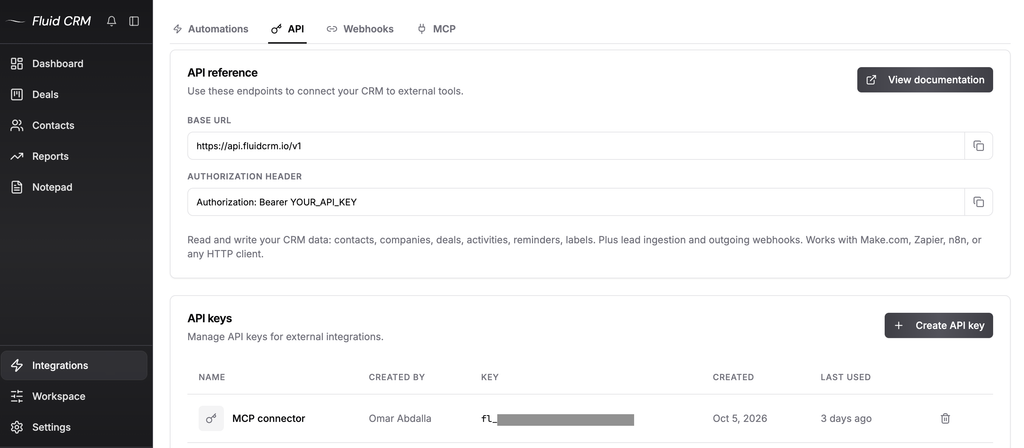
The limits are 300 reads and 60 writes a minute for each key.
There is no native Zapier, Make or n8n app for Fluid CRM yet. Those tools all have a step that sends a plain web request, and that step is how you connect them.
A verified customer wrote this in the first hours of testing, and asked for native Activepieces and Make integrations in the same sentence.
“API for automations is well documented.”
Austin Verner, founder of Cold Emailers, has his interested leads from Smartlead created as deals through the API. My post on Instantly CRM integration covers that setup for Smartlead too.
When an AI assistant does the job better
An API suits a job that repeats, such as every new form lead or every Sunday report. For a one-off job, an AI assistant is quicker.
Fluid CRM connects to Claude, ChatGPT and other assistants through MCP, which is a standard way for an assistant to use your tools. You ask in a sentence, and it can find, create and update deals, contacts, companies and reminders. It can’t delete anything.
I compared eight CRMs on this in my guide to the best MCP CRMs.
When You Don’t Need a CRM With an API
Plenty of small teams never touch an API, and that’s fine. Before you make it a requirement, check whether one of these already covers you.
- Your leads come from your own website. A lead capture form built into the CRM creates the contact and the deal for you. Fluid CRM includes these, and the same coaching network uses them. “No need for Typeform or Google Forms… embed a form, and it auto-creates a contact and deal in the right pipeline.” I explain the setup in how to create a lead capture form.
- You add leads in batches. If a list arrives once a month, a CSV import takes five minutes and needs no setup.
- Your tools already talk to each other. If your cold email tool has a native integration with your CRM, use it.
There are also cases where Fluid CRM is the wrong pick. If your company already keeps its contacts and reporting in HubSpot or Salesforce, build on that, because moving a team costs more than any API saves.
If you need custom objects and a data model you shape yourself, Attio is the stronger choice. Fluid CRM also has no two-way inbox sync, and it fits B2B teams of 1 to 10 best.
CRM With API: Frequently Asked Questions
Almost all CRMs have an API, and the difference is where it sits. Some include it on a free plan, some start it on a paid plan and some sell webhooks on a higher plan than the API. Check the plan comparison on the pricing page before you sign up.
CRM API access is free on some products. HubSpot and Zoho CRM include an API on their free plans, each with a daily ceiling, and on paid CRMs it is usually part of the seat price. Webhooks and higher limits are the parts most often kept for a more expensive plan.
You don’t need a developer for simple jobs. Tools such as Zapier, Make and n8n let you connect two apps by filling in a form, and an AI assistant can write the request for you. You need a developer when the job has many steps or has to handle errors on its own.
A rate limit is the number of requests a CRM accepts in a set time, such as 60 a minute or 5,000 a day. Go over it and the CRM refuses new requests until the window resets. It matters most on the day you import a large list.
Which CRM With API Access Should You Pick
Pick the CRM where the API, the webhooks and a limit you can live with all sit on the plan you would buy anyway. Then check that your team will want to open it, because an API only fills a pipeline and a person still has to work it.
For a B2B team of 1 to 10 choosing fresh, Fluid CRM gives you all of it on one plan at $16/seat/month or $144/seat/year.
Start your 7-day free trial here, no credit card required.