

You built the base. Contacts table, deals table, a few linked fields and a kanban view that looked great on day one. Now it’s month 6 and half the deals sit in the wrong stage. This post covers what an Airtable CRM really costs you, in seats and in upkeep.
An Airtable CRM works when someone maintains it. Build it if you already run other work in Airtable and know the tool well. Buy a dedicated CRM like Fluid CRM if you only need a sales pipeline and don’t want to spend weekends configuring one.
What an Airtable CRM Actually Is
An Airtable CRM is a base you build yourself out of 3 linked tables. There’s no CRM product inside Airtable. You’re assembling one from parts.
The standard setup looks like this:
- Contacts holds people, with name, email, phone and a link to their company
- Companies holds accounts, with website, size and a link back to their contacts
- Deals holds the actual pipeline, with value, stage, close date and links to both of the above
Link fields are what turn 3 spreadsheets into something CRM-shaped. Open a company record and you see every contact and every deal attached to it. That relationship is real, and it’s the reason people reach for Airtable in the first place.
From there you add views. A kanban grouped by deal stage gives you the visual pipeline. A grid filtered to “closing this month” gives you a forecast. A calendar view shows follow-up dates.
Then you add automations for the parts a spreadsheet can’t do, like sending a Slack message when a deal hits proposal stage, or stamping a date field when the stage changes.
That’s the whole build. A weekend if you know Airtable, longer if you’re learning it while you build.
Who Should Build a CRM in Airtable (and Who Should Not)
Two very different people search for “Airtable CRM” and they need opposite answers.
Group A: build it
You already run other work in Airtable. Inventory, content calendars, client projects, a product roadmap. The pipeline is the fifth thing living in your base, and it needs to link to the other 4.
Build it. Nothing else does what Airtable does here. A deal record that links to the delivery project that links to the client’s content calendar is genuinely useful, and Fluid CRM cannot replace that. It isn’t trying to.
You also know the tool. Filters, rollups, lookups and automations are not new to you, so maintenance costs you minutes instead of hours.
Group B: buy one
You wanted a pipeline. Airtable came up because it’s flexible and the free plan looked generous, so you started building. Now you maintain a tool instead of using one.
If you don’t know Airtable customization well and you don’t want to spend the time learning it, you don’t want a build. You want something that works out of the gate. Sign up, add your first deal, done.
Viktor, a solo B2B outbound operator in Sweden, worked this out before building anything. He’d been running lemlist cadences and needed somewhere for replies to land. His words: “I looked at HubSpot, Airtable and stuff like that. Glad I came across this one.”
He didn’t decide Airtable was bad. He decided he wasn’t going to spend his week configuring one.
Stop for a second and answer honestly. If your pipeline setup broke tomorrow, would you know how to fix it, and would you want to?
If Airtable is one of two tools you are weighing, I compared Notion and Airtable for a CRM separately.
The 1,000-Record Limit on Airtable’s Free Plan
Airtable’s free plan caps you at 1,000 records per base, and a CRM base burns through that faster than people expect. The number sounds enormous until you count what actually counts.
Every row in every table inside that base draws from the same 1,000. Contacts, companies and deals all count. Any activity log table counts too, and that’s the one nobody budgets for.
Here’s a worked example for a solo operator after a year of steady outbound:
- 200 contacts
- 120 companies
- 150 deals
- 450 logged activities (3 per deal, which is light)
That’s 920 records. You’re at the ceiling before you’ve had a good quarter.
A 3-person team gets there in a few months. Triple the contacts and deals and you’re past 1,000 on those two tables alone, before a single note gets logged.
To check your own number, add up the contacts you’d touch in a year, the companies behind them, the deals you’d open and the activities you’d log per deal. If that total lands anywhere near 800, treat the free plan as a trial rather than a home.
Splitting into separate bases doesn’t rescue you either. Airtable’s link fields connect records inside one base, so a contacts base and a deals base can’t link to each other. You’d be back to 2 disconnected spreadsheets, which is the exact problem the build was meant to solve.
Airtable CRM Pricing vs a Dedicated CRM
Airtable Team costs $20 per seat per month on annual billing, which is more per seat than Fluid CRM‘s monthly price of $16.
That’s the whole pricing argument in one line.
| Plan | Annual | Monthly | Records per base |
|---|---|---|---|
| Airtable Free | $0 | $0 | 1,000 |
| Airtable Team | $20/seat | $24/seat | 50,000 |
| Airtable Business | $45/seat | $54/seat | 125,000 |
| Fluid CRM | $12/seat ($144/year) | $16/seat | Unlimited |
Airtable’s AI add-on runs an extra $6 per seat per month on annual billing.
Run it for a 3-person team over a year:
- Airtable Team, 3 seats: $720
- Airtable Team plus AI, 3 seats: $936
- Fluid CRM annual, 3 seats: $432
- Fluid CRM monthly, 3 seats: $576
One thing Airtable does that deserves credit. Read-only viewers and form submitters are free on every plan, and only editors get billed. If you have an ops person who needs to look but not touch, or a website form feeding leads in, those people cost you nothing. That’s a genuinely fair model and plenty of CRMs don’t match it.
Where Fluid CRM falls short: No free plan exists, only a 7-day free trial, no credit card required. There’s no marketing automation, no calling and no lead scoring. Email is BCC sync, which logs emails to the deal. It is not two-way inbox sync, so if you want your whole inbox mirrored into the CRM, neither Airtable nor Fluid CRM does that. It also can’t hold your inventory, content calendar and project tracker next to your pipeline, which is exactly what Group A needs Airtable for.
How Follow-Up Reminders Work in an Airtable CRM
Airtable doesn’t come with follow-up reminders. It comes with date fields, and a date field sits there quietly while your deal goes cold. Getting real reminders out of an Airtable CRM means building three pieces and wiring them together yourself.
The first piece is the date field. Add a “Next follow-up” column to your Deals table. That takes 10 seconds and does nothing on its own except store a day.
The second is a filtered view. Build a view that shows deals where the follow-up date is today or earlier, sorted oldest first. Now you have an overdue list, which helps on the days you remember to open it.
The third piece is the automation, and it’s the one most builds skip. You set a trigger on a schedule, point it at that view and have it send you a Slack message or an email listing what’s due. Airtable’s automation builder handles this well once you know your way around trigger types, conditions and message formatting.
The honest part is that once those three pieces exist, the system works. Airtable’s automations are reliable and a filtered view loads fast. The cost isn’t quality. It’s that you now own three moving parts instead of using one. Change a field name and the view breaks silently, add a stage and the filter needs revisiting, and if you switch the automation off during a busy week nobody remembers to switch it back on.
Compare that to what a dedicated CRM does by default. Prospects get buried in tabs and forgotten. Fluid CRM gives you alerts for overdue follow-ups so nothing slips. You set the reminder when you leave the deal and the tool chases you on the day it’s due. There’s no view to maintain and no automation to repair when your sales process changes.
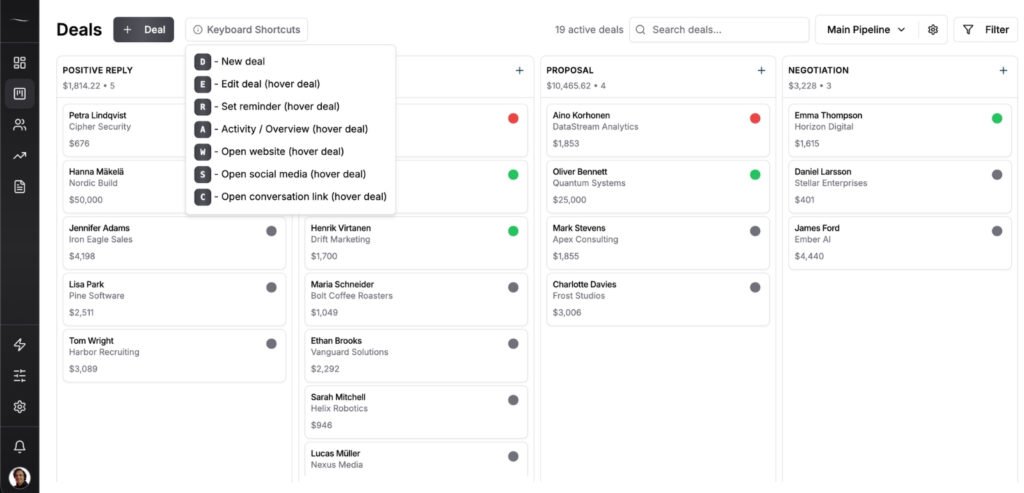
That’s the real split between building and buying. Not features, since both end up with a reminder that fires. The difference is whether the reminder system is something you own and repair, or something that just runs.
Why Most Airtable CRM Builds Stop Getting Maintained
Airtable CRM builds decay for one reason. Somebody has to keep them alive, and that person’s attention runs out before the pipeline does.
Across 50+ B2B clients at Fenixtal I watched this play out in almost every niche we ran outbound for. Marketing agencies, dev firms, construction companies, e-learning companies. The self-built tracking system got maintained for roughly as long as the person who built it stayed interested in it, and then it quietly rotted while everyone kept using it anyway.
The decay is boring, which is why nobody catches it:
- Stage names stop matching how you actually sell, so deals pile up in a stage that means nothing
- An automation fails silently and nobody notices for 3 weeks
- One person adds a field their way, another adds it a different way, and now you have 2 half-filled columns
- Follow-up dates stop getting set, because setting them is manual and manual things get skipped when you’re busy
My own Fenixtal build is the exception, and I want to be straight about why. We ran a custom Airtable CRM where positive cold email replies landed in it automatically. It worked well. It worked because I had a fractional automations and operations expert whose job included building and maintaining it.
I didn’t keep that system running. He did.
That’s the honest version of every Airtable CRM success story I’ve seen. There’s a builder behind it. If you’re a solo founder, a small B2B team or a small agency, you are the builder, and your build competes for time with your actual work.
A dedicated CRM has a maintenance cost too. The difference is that somebody else pays it.
When to Move From Airtable to a Dedicated CRM
Move off an Airtable CRM when the upkeep starts costing more than the flexibility returns. 4 signals make that obvious.
1. You’re editing the base more than the deals
Count your last 10 Airtable sessions. If more than 3 were spent fixing a view, adjusting a formula or repairing an automation, you’re maintaining a tool rather than running a pipeline.
2. Follow-ups are getting missed weekly
Go back through last month and count the deals that went two weeks with no contact. If you never wired up the three-piece reminder system, this is the signal that shows up first and the one that costs the most deals.
3. Somebody joined and immediately broke something
New person, new field, new way of naming stages. Airtable’s flexibility is a strength with one disciplined user and a liability with three casual ones.
4. You’ve hit the record wall and the upgrade math stopped making sense
You’re paying $20 or $24 per seat to keep a build you still have to maintain yourself. At that point you’re paying for both the tool and the labor.
When staying is the right call: If your pipeline links to other work in the same base, stay. If you know Airtable well and maintenance costs you 20 minutes a month, stay. If you have someone whose job includes keeping it running, stay. None of those readers have a problem worth solving.
Frequently Asked Questions
Airtable is a database platform you can shape into a CRM, not a CRM product. There’s no pipeline, no follow-up reminders and no deal stages until you build them. That flexibility is the appeal for people who want a custom setup and the drawback for people who just want to track deals.
Yes, on the free plan with up to 5 editors, but the 1,000 records per base cap arrives fast. Contacts, companies, deals and logged activities all draw from the same 1,000. A solo operator can hit it inside a year and a small team gets there in months.
The template gives you the table structure and a few views, which saves real setup time. What it doesn’t give you is your stages, your fields, your automations or your follow-up system, and those are the parts that decide whether the thing gets used. Treat the template as the first hour of the build, not the whole build.
Not once you’re past the free plan. Airtable Team is $20 per seat per month on annual billing and $24 on monthly, while Fluid CRM is $16 per seat per month or $144 per seat per year with every feature included. The free plan is genuinely free, so the honest answer is that Airtable is cheaper right up until the moment it isn’t.
Yes. Export each table to CSV, then import contacts, companies and deals into the new tool. Clean the export first by deleting dead rows, merging duplicates and standardizing your stage names, because migrating 6 months of drift just moves the mess somewhere new.
Conclusion
An Airtable CRM is a good build with a maintenance bill attached, and the bill comes due whether or not you have someone to pay it. If you’re already deep in Airtable and know the tool, keep building.
If you want to see the options first, I compared the sales tracking tools small teams actually use. If you want a pipeline that works without a builder behind it, Fluid CRM gives you a clear visual pipeline and follow-up reminders from the first deal you add.
Start your 7-day free trial here, no credit card required.