

Search “best CRM for interior designers” and you get a wall of all-in-one suites pitching mood boards, contracts and 3D renders. None of that helps the actual problem, which is leads dying before they sign. This post sorts the tools by the job they do, so you buy the right one.
The best CRM for interior designers depends on the job. Design suites like Dubsado and Houzz Pro handle delivery work like contracts, invoices and mood boards. For tracking leads from inquiry to signed, a lightweight sales pipeline like Fluid CRM keeps the acquisition side clean.
Win the client before the mood board
Warm inquiries die in busy weeks. Fluid CRM emails you who’s due.
No credit card required
Why CRM Lists for Interior Designers Get It Wrong
Most lists of CRMs for interior designers bundle two different products and call the bundle a CRM. They put lead tracking in the same box as contracts, invoicing, mood boards, procurement and 3D floor plans. The category got built that way because the software companies that serve designers sell delivery suites, and a lead-tracking screen is one tab inside them.
That bundling hides a real split. Winning a design project and delivering a design project are two separate jobs that benefit from two separate tools. A schedule builder is not a sales pipeline. A proposal generator is not a follow-up system. When a list treats them as the same thing, you end up paying for a heavy suite to do the light job of remembering who to call back.
I have watched this happen from the outside. In 3 years running cold outreach at Fenixtal, I booked 1,250+ sales calls, and a chunk of my clients were design and creative service businesses. The pattern was always the same. They either tracked leads in a messy spreadsheet or didn’t track them at all, then panicked and bought an all-in-one suite the size of a small ERP to fix it. Six weeks later they used one corner of it.
So before you pick a tool, get clear on which job you’re actually solving. That’s the next section.
A Design CRM and a Sales Pipeline Are Two Different Jobs
A design CRM and a sales pipeline solve different problems for interior designers. Winning the project covers the acquisition side: an inquiry comes in, you book a discovery call, you send a proposal, the client signs. Delivering the project is everything after the signature: mood boards, specifications, procurement, contracts, invoicing and client approvals. The all-in-one suites are built for the second job. They handle delivery beautifully and treat lead tracking as a side feature.
Here’s what the acquisition side actually looks like for a studio, stage by stage:
- New inquiry lands (website form, referral, Instagram DM)
- Discovery call booked
- Discovery call done, fit confirmed
- Proposal sent
- Won or lost
Five stages. That’s the whole sales pipeline for most design studios. Once the client signs at stage five, the work hands off to your design tool, where the mood boards, specs and invoicing live. The pipeline’s job ends exactly where the delivery suite’s job begins.
This is where I have to be straight about Fluid CRM, because the honesty is the entire point. Fluid CRM does not store files, mood boards or design assets. It does not do contracts, proposals or renders. It tracks the deal, not the project. If you want one tool that holds your client’s fabric selections and generates a branded invoice, Fluid is the wrong tool and I’ll tell you that to your face.
What Fluid CRM does is the acquisition half. It gives you a visual pipeline of those five stages, reminders so a hot lead doesn’t sit for nine days while you’re on a site visit, and a fast way to log what happened on the discovery call. That’s it. That narrow scope is deliberate. The deal-tracking job is small and a small tool does it better than a giant one.
What Interior Designers Actually Need from a CRM
Interior designers need a CRM that does four things on the acquisition side, and not much else. The inquiry-to-signed window in design work is short and it bleeds straight into delivery, which is exactly why a heavy sales CRM is overkill. You’re not running a 14-touch enterprise sales cadence. You get an inquiry, you have a conversation or two, you send a proposal, you sign. A tool built for long complex sales cycles is solving a problem you don’t have.
Here’s what matters for that short window.
A visual pipeline you can read in one glance
You should see every active inquiry and what stage it’s at without opening anything. A list of names in a spreadsheet doesn’t tell you which lead has gone quiet. A visual pipeline does. If a tool’s “pipeline” is just a table with more columns, it’s a spreadsheet wearing a costume.
Follow-up reminders that actually nag you
The single most common way designers lose work is a warm lead dying during a busy delivery week. You meant to follow up. You were on-site picking tile. Three weeks passed. The reminder system is the whole reason to use a CRM at all, so it has to be built in and it has to be loud.
Fast lead intake from your website
When an inquiry comes in, it should land in your pipeline without you retyping anything. Ritz Steytler at Abacus Partners runs his professional-services pipeline this way, capturing leads through a form and working them from his phone. He likes that it’s easy to use and stays out of his way. That’s the bar. Intake should be one step, not a data-entry chore.
If you need better lead intake yourself, read this guide on how to create lead capture forms that feed your pipeline next.
Setup measured in minutes, not weeks
You’re a designer, not an operations manager. If the tool needs an onboarding call, a setup wizard or a “success manager,” it’s built for the delivery job, not the acquisition one. You should be tracking your first inquiry in the time it takes to make a coffee.
Notice what’s not on this list. No file storage. No proposal builder. No procurement. Those belong to the delivery suite, and the next section covers which suite does what.
The 7 Best CRMs for Interior Designers
The seven tools below split into two groups. Six are full design suites built for the delivery job, picked for designers who want one tool to run the whole project. One is a lightweight sales pipeline for designers who already run a design tool and just need to stop losing leads. The numbers are positions in the list, not a quality ranking. The right pick depends entirely on which job you’re solving.
I’m not listing competitor prices here. Pricing on these suites changes often and varies by region, tier and seat count, so check each vendor’s page directly. I’ll state Fluid CRM’s pricing because I know it cold.
The full design suites (for running the whole project) handle delivery: specs, procurement, mood boards, contracts, invoicing and client portals. Each has a lead-tracking layer too, with the depth of that layer varying a lot.
1. Dubsado (best for branded client onboarding)
Dubsado is built around forms, proposals, contracts and invoicing, with strong workflow automation and customizable client portals. The forms and proposals are the standout. You can build branded lead-capture forms, questionnaires and proposals that look like an extension of your website, then move a signed client through automated onboarding. For a designer whose edge is a polished client experience from the first inquiry, this is a natural fit.
Where it falls short: The lead-tracking side is thin compared to a real sales pipeline. Dubsado is excellent at the client experience once someone is in your world, less so at showing you which of 20 cold inquiries needs a nudge today.
Use Dubsado not Fluid CRM if: you want one tool to send branded proposals, sign contracts and collect payment, and you’re fine managing your handful of active leads inside that same flow.
2. Houzz Pro (best all-in-one for design and build)
Houzz Pro is the heaviest suite on this list. It packs 3D floor plans, mood boards, product sourcing, selections, estimates, proposals, invoicing, QuickBooks sync, client portals and project management, plus a lead-management CRM layer and access to the Houzz marketplace for new leads. If you run a design-build operation and want one platform from first contact to final install, this is the most complete option here.
Where it falls short: That much software has a real learning curve, and the lead-tracking layer sits on top of a delivery-and-construction platform, so it’s a small part of a very big tool. You’re paying for the whole engine to use one gear.
Use Houzz Pro not Fluid CRM if: you want marketing, 3D visuals, procurement and invoicing under one roof and you’re willing to invest the time to learn it.
3. Studio Designer (best for procurement and accounting)
Studio Designer is the procurement and accounting powerhouse of the group. It turns proposals into purchase orders, tracks vendors and receiving, runs designer-specific accounting and reporting, handles payments through StudioPay and supports team permissions. For an established firm moving real product volume, this is the operational backbone.
Where it falls short: It’s built for scale and complexity, which is overkill for a solo designer or a new studio. The depth that helps a 10-person firm with heavy product orders is dead weight if you mostly sell your time.
Use Studio Designer not Fluid CRM if: you’re running serious procurement and need accounting and vendor management built for the design trade, not a lead pipeline.
4. Programa (best for specifications and schedules)
Programa is built around specifications and FF&E schedules. You create finish schedules, furniture schedules and lighting schedules, pull product specs straight from supplier sites with a web clipper, and share live schedules with clients and trades through branded dashboards. It also covers mood boards, client approvals, invoicing and time tracking. For a studio whose daily pain is spec sheets and version control, it’s purpose-built.
Where it falls short: The center of gravity is delivery and specification work. Lead tracking exists but it’s not why anyone buys Programa, and it won’t replace a dedicated sales pipeline.
Use Programa not Fluid CRM if: your real bottleneck is managing specifications and schedules across live projects, not chasing inquiries.
5. HoneyBook (best for solo service-business workflow)
HoneyBook is a client-flow platform for service businesses, covering proposals, contracts, invoices, payments and project tracking with a drag-and-drop pipeline. It’s tailor-made for solo operators and small teams who want client work to look polished from first inquiry to final invoice. Designers who also do staging, consults or e-design like that it handles the money side cleanly.
Where it falls short: HoneyBook has two real limits. You can’t build custom fields or advanced sales stages, and it’s available only to business owners in the US and Canada. If you’re a designer in the UK, Europe or Australia, it’s not an option yet.
Use HoneyBook not Fluid CRM if: you’re a US or Canada solo designer who wants proposals, contracts and payments in one branded flow.
6. Mydoma Studio (best for client-facing project delivery)
Mydoma Studio combines project management with client-facing tools: contracts, payments, design packages, client portals, time tracking, task management and QuickBooks integration. It’s the well-rounded pick for a solo designer or small team that wants everything in one place without the full operational weight of Studio Designer. Mydoma and Studio Designer are now owned by the same company, so think of Mydoma as the lighter, more client-facing sibling.
Where it falls short: Like the others here, it’s a delivery tool first. The client portal and design packages are the draw, not lead pipeline mechanics.
Use Mydoma not Fluid CRM if: you want a friendly all-in-one for delivering projects and collaborating with clients, and lead tracking is a minor concern.
The lightweight pipeline pick (for the acquisition side only) is the one tool here built for winning work rather than delivering it.
7. Fluid CRM (best for designers who already run a design tool)
Fluid CRM is a visual sales pipeline for the acquisition side and nothing else. It gives you a clear pipeline of your inquiries by stage, reminders so warm leads don’t die, fast intake so a website inquiry lands as a deal, and keyboard shortcuts that make logging a call quick. Every feature is included on both plans, and you pay per seat, never for feature unlocks. Pricing is $16/seat/month or $144/seat/year, which works out to three months free on annual. There’s a 7-day free trial, no credit card required.
To be clear one more time, because it’s the whole reason Fluid CRM earns a spot here: it does not store files, mood boards or design assets, and it does not do contracts, proposals or procurement. It tracks the deal, not the project.
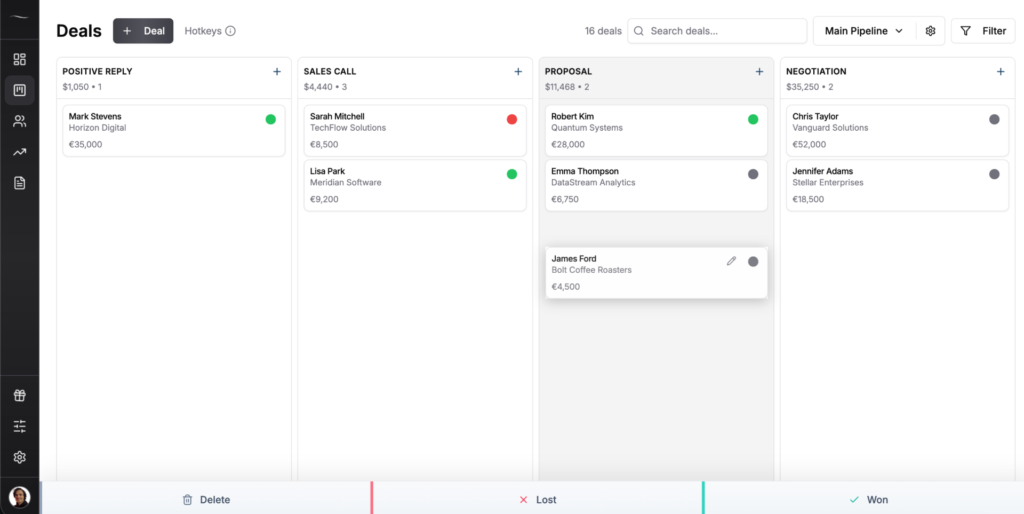
Where it falls short: If you want one tool to run the entire project including delivery, Fluid is not it, full stop. It has no design features and never will. It also has no native marketing automation and no built-in dialer.
Use a design suite not Fluid CRM if: you don’t already have a delivery tool and you want one platform for the whole job. Fluid CRM is for designers who already run something like Programa or Studio Designer for delivery and just need a clean pipeline for winning the next project. If you work on your own, see how it works as a CRM for solopreneurs.
How to Choose Between a Design Suite and a Sales Pipeline
Choosing between a design suite and a sales pipeline comes down to whether your real problem is delivering projects or winning them. Most interior designers buy a delivery suite, use about 10% of it as a glorified contact list, and call it their CRM. That’s backwards. You picked a procurement-and-invoicing engine to solve a follow-up problem, then wondered why leads still slip.
Match the tool to your situation:
You’re solo and running everything yourself
If you have no delivery tool yet and you want one platform, pick a design suite from the list above and use its lead layer for now. One tool is simpler than two when you’re starting out. The day the lead layer starts losing track of inquiries is the day you add a dedicated pipeline.
You already run a design tool for delivery
This is the clearest case for splitting the jobs. You already have Programa, Studio Designer, Houzz Pro or similar handling specs and invoicing. Bolting your sales tracking onto that means your hot leads live three menus deep inside a delivery platform. A lightweight pipeline like Fluid CRM sits alongside it and does the one job the suite does poorly.
You have a team handing off from sales to delivery
If one person wins work and another delivers it, the handoff point is exactly where the two jobs separate. Keep the pipeline clean for whoever is selling, then hand the signed project to the delivery suite. Mixing both in one tool means your salesperson wades through procurement screens and your delivery lead wades through dead leads.
Stop for a second and answer this honestly. How many warm inquiries did you let die in the last month because you were buried in a delivery week? If the number isn’t zero, your problem is the acquisition side, and no amount of mood-board software fixes it.
Frequently Asked Questions
Yes, if you’re losing track of inquiries or forgetting to follow up. A CRM for interior designers keeps every lead visible by stage and reminds you who to chase, which is the most common way design work slips away. If you only get a handful of referral leads a year and never lose one, a spreadsheet is fine.
A design CRM is usually a delivery suite that handles mood boards, specs, procurement, contracts and invoicing, with lead tracking added on. A sales CRM, or sales pipeline, tracks leads from inquiry to signed and does nothing else. The first runs your projects. The second wins them.
You can, but you’d be paying for a full client-experience and invoicing suite to use one part of it. Both are built for managing client work and money, not for running a focused sales pipeline. If lead tracking is all you need, a dedicated pipeline does that job for less and with less to learn.
Only if your design suite keeps losing your leads. Many designers find the lead layer inside their delivery tool is buried or too thin, so warm inquiries die. In that case a separate lightweight pipeline that handles the acquisition side, while the suite handles delivery, solves the problem without ripping anything out.
Conclusion
Winning a design project and delivering one are two jobs, and the best tool depends on which you’re solving. If you don’t have a delivery tool, pick a design suite and let its lead layer carry you for now. If you already run a design tool and you’re tired of warm leads dying, Fluid CRM gives you a clean visual pipeline for the acquisition side without the bloat of a full suite.
Start your 7-day free trial here, no credit card required.