

Your team is under 10 people and nobody’s job is running the CRM, so you want the pipeline in one place by this afternoon. Plenty of CRMs that call themselves simple want three add-ons and every call logged by hand six months in. These nine are light to use and quick to set up, and each one says who it is not for.
A lightweight CRM gives a small team a visual pipeline and follow-up reminders without setup wizards or feature unlocks. The best one for most small teams is Fluid CRM at $16/seat with every feature included. Less Annoying CRM and OnePageCRM are strong alternatives as well.
A CRM your team will still open in month three
Heavy CRMs get abandoned and deals die. Fluid CRM updates in seconds.
No credit card required
What Makes a CRM Actually Lightweight
A lightweight CRM, sometimes called a basic CRM, is one a small team can open and start using the same day without paying for modules to unlock the basics. The word gets stretched to cover $30 platforms that need a week of setup and three tiers before they do what you came for.
So before the list, here’s the bar every tool on it has to clear.
It has to be usable in minutes. Sign up, add a deal, see your pipeline. No onboarding call, no setup wizard, no “success manager” emailing you a calendar link.
It can’t gate the basics behind a higher plan. Tracking deals, setting follow-up reminders and seeing your pipeline are the basics. If those live behind a Premium tier, the cheap plan isn’t really a CRM.
It can’t force heavy manual data entry. A tool that makes you hand-key every contact, email and note gets abandoned no matter how clean it looks. More on that below.
It has to be priced for a small team, not an enterprise. A basic CRM for small business should cost about what a couple of streaming subscriptions do, not a per-seat enterprise rate. Starting cheap is a strong signal, though not a hard rule. A few tools here climb past $30 on the plan most teams actually need, and I’ll call that out where it happens.
That’s the filter. Price math on each entry does the rest of the honest work.
Why Some Simple CRMs Still Slow You Down
A CRM can look clean and still cost you an hour a day, because looking simple and being fast to run are not the same thing. The slowdown hides in data entry. If every deal needs you to type the contact, paste the email, log the call and set the reminder by hand, the tool stops being simple the moment you get busy.
In three years running cold email at Fenixtal I worked with more than 50 B2B clients. The pattern was almost always the same. They either tracked nothing, or they paid for Salesforce and never logged in. The second group didn’t quit Salesforce because it lacked features. They quit because every update was a chore and nobody had the time.
That’s the real test of a lightweight CRM. Not how few buttons it has. How little work it takes to keep current. The good ones pull contacts and email in for you, or at least make logging a 5-second job with a keyboard shortcut. The ones that look minimal but still make you do all the typing are spreadsheets with a nicer coat of paint.
Keep that in mind as you read the list. A clean interface is easy to ship. A clean interface that stays current without daily admin is the rare part.
The 9 Best Lightweight CRMs for Small Teams
These nine are ordered by how well they fit a small B2B team that wants a real pipeline without the bloat. Each one gets a plain “Best for,” an honest “Not for” so you can rule it out fast, and the real per-seat math on what the cheap plan actually leaves out.
1. Fluid CRM (best all-in lightweight CRM for small B2B teams)
Fluid CRM is a visual sales pipeline built for solo founders, freelancers and small B2B teams that outgrew a spreadsheet but don’t want a HubSpot-sized tool. You sign up, add a deal and your pipeline is on one screen. No setup wizard, no training call. It has follow-up reminders, keyboard shortcuts, embedded lead capture forms, eight in-app automations, unlimited deals and contacts plus an API for pushing leads in from tools like Smartlead or Instantly.
The pricing is the cleanest part. Fluid is $16/seat per month, or $144/seat per year (three months free). Every feature is on both plans. There are no upgrade traps and no feature unlocks. The only thing that changes when you pay yearly is the billing cadence and the discount.
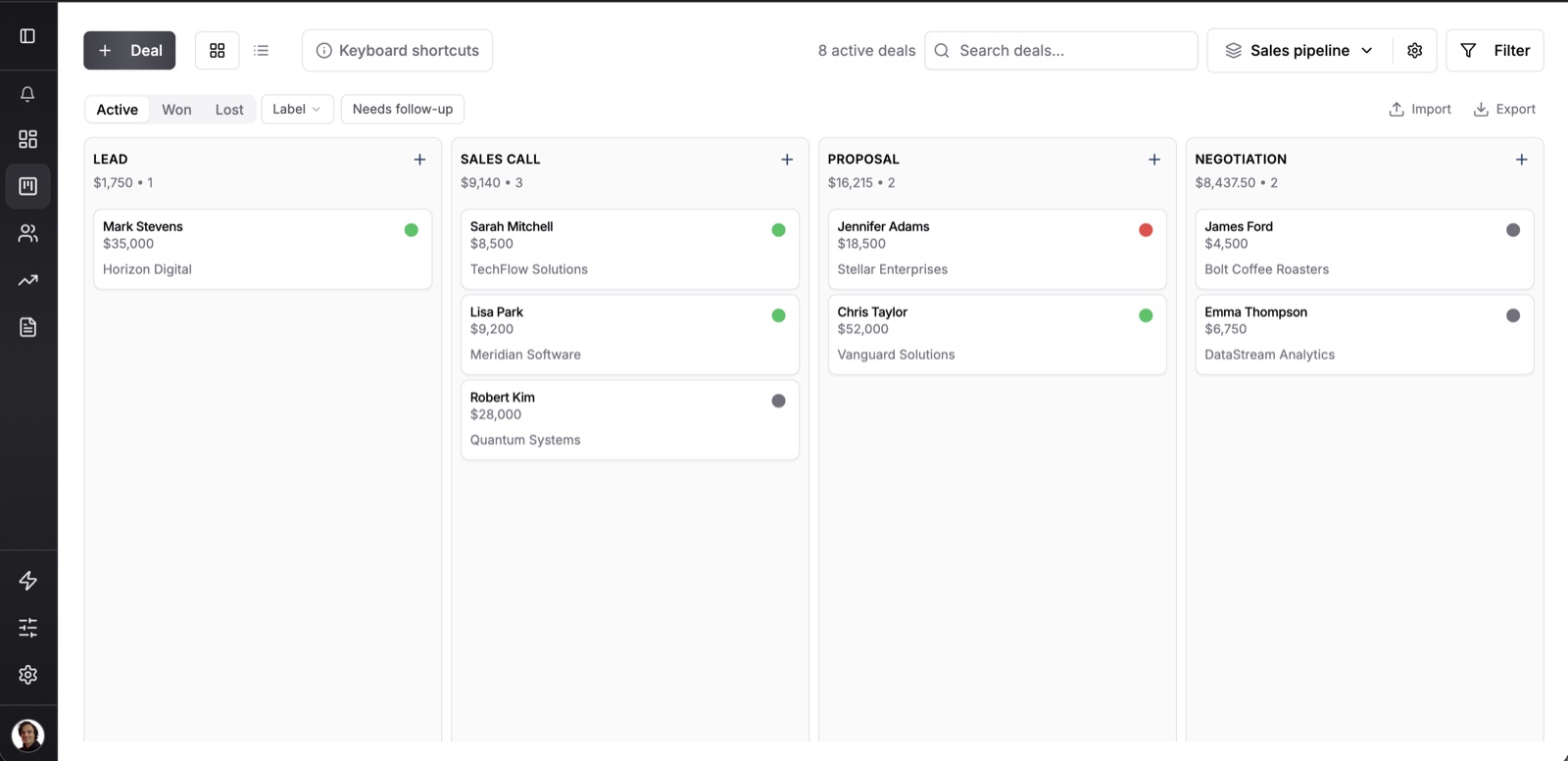
Viktor Otterskog, a solo B2B outbound operator in Sweden, put the appeal in one line after looking at HubSpot and Airtable first. “It really has that speed, no bells and whistles, just does what it’s supposed to do.”
Best for: Small B2B teams of 1 to 10 people leaving a spreadsheet, who want a visual pipeline and reminders they can update in seconds.
Not for: Large orgs that need granular department permissions, native marketing automation, multi-touch attribution or a built-in dialer. Fluid doesn’t do those, on purpose.
Cost for 5 seats: $80 a month, or $720 a year on annual billing, with every feature included. There’s a 7-day free trial, no credit card required.
2. Less Annoying CRM (best for the lowest flat price with no tiers)
Less Annoying CRM is a single-plan contact and task CRM aimed at small businesses and solo operators who hate pricing tiers. There’s one price, one plan, and everything is included. It does contacts, tasks, a calendar that syncs with Google and Outlook, simple lead tracking and a daily email of what’s due. It leans more toward contact-and-task management than a fast drag-and-drop deal board.
Best for: Solo consultants and small teams who want the most predictable flat price on the market with zero feature gating.
Not for: Outbound teams that want a visual drag-and-drop pipeline first, or anyone needing real automation and email sequences. It keeps things deliberately basic. I compared the two directly in Fluid CRM vs Less Annoying CRM.
Real pricing math: $15/user per month, all features, no add-ons. The free trial runs 30 days with no credit card. The price is its whole pitch and it holds up.
3. OnePageCRM (best for a next-action sales method)
OnePageCRM is a lead management tool built around one idea. Every contact must have a next action attached to it. It turns your pipeline into an action list so leads don’t die while you forget about them. Quick lead capture, reminders, email sync and a clean mobile app round it out.
Best for: Outbound sellers and solo founders who want the tool to force a next step on every lead so nothing stalls.
Not for: Teams that want rich reporting, marketing automation or a classic kanban deal board. Reporting is thin and the cheapest price needs an annual commitment. I compared the two directly in Fluid CRM vs OnePageCRM.
Real pricing math: Professional is $9.95/seat per month on annual billing, or $15/seat month to month. Business is $19.95 and the top Max plan runs about $29.95. The 21-day trial needs no card. The $9.95 sticker is real but it’s the annual rate.
4. Capsule (best free tier for under 250 contacts)
Capsule is a clean SMB CRM with a genuinely useful free plan. The free tier covers two users, 250 contacts and a single pipeline, which is enough to run a tiny pipeline for real and not just test it. The paid plans add contact volume, multiple pipelines, automation and project boards.
Best for: Small teams who want to start free and grow into paid, plus light project tracking alongside the sales pipeline.
Not for: Anyone who needs multi-pipeline or automation on a budget. Those sit on the Growth plan at $38, not the cheaper Starter. The free tier’s 250-contact cap also fills up fast.
Real pricing math: Free for 2 users and 250 contacts, then Starter at $21/seat, Growth at $38/seat and Advanced at $60/seat per month. The 14-day trial covers the paid features. The jump from free to a multi-pipeline plan is the real cost most teams hit.
5. noCRM.io (best for lead-first selling without pipeline bloat)
noCRM.io is built for salespeople who think in leads, not deal records. It strips out the data-entry busywork and pushes you to take the next action on every lead. The focus is on closing, not on filling out forms.
Best for: Outbound sellers and small teams who want a fast lead-and-action workflow and dislike traditional CRM data entry.
Not for: Teams that want a classic deal pipeline with deep reporting, or that will blow past the Starter limits quickly. The cheap plan caps you at 500 leads and one pipeline.
Real pricing math: Starter runs about $13/seat per month annual ($22 monthly) and caps you at 500 leads and a single pipeline. Expert at roughly $26/seat annual removes those limits and adds quotes, invoices and unlimited pipelines. Dream Team is about $39/seat annual. The free trial runs 15 days with no card. Starter’s 500-lead cap is the limit you’ll feel first.
6. Streak (best for living inside Gmail)
Streak is a CRM that lives entirely inside Gmail. There’s no separate app or login. Your pipeline sits in a sidebar next to your inbox, and email threads link straight to deals. For someone who runs their whole day in Gmail, that zero-switching setup is hard to beat.
Best for: Solo operators and very small teams who run sales, email and follow-ups without ever leaving Gmail.
Not for: Teams that need a real shared pipeline on the cheap, anyone on Outlook or high-volume users. Streak can lag once a pipeline gets large.
Real pricing math: The free tier covers 500 contacts and a basic pipeline, which is enough for a solo user to start for real. Solo at $15/seat annual ($19 monthly) lifts the contact cap, and Pro at $49/seat is the real shared-pipeline tier for a team. The 14-day trial covers Pro. The jump to a team plan is steeper than the entry price suggests.
7. Salesflare (best for automatic contact and email capture)
Salesflare is a B2B CRM that fills itself in. It pulls contacts, emails, calls and meetings from your inbox and calendar so you stop typing them by hand. That data-entry-killing automation is the whole point and it works well for teams that live in Gmail or Outlook and hate admin.
Best for: Small B2B teams who want the CRM to capture contacts and email automatically instead of logging everything manually.
Not for: Budget solo users or anyone who wants a free tier. There isn’t one, and the entry price is higher than the truly cheap tools. Workflows and permissions sit on the Pro plan.
Real pricing math: Growth is $39/seat per month, or $29/seat on annual billing. Pro, which adds multi-step workflows and permissions, is $64/seat ($49 annual). Enterprise is $124/seat with a five-user minimum. The 30-day trial needs no card. Useful, but it climbs past the lightweight price line fast.
8. Folk (best for relationship and network-led sales)
Folk is a relationship-first CRM built for people who win work through their network. Its Chrome extension captures LinkedIn profiles in one click, and the layout looks like a clean spreadsheet you can filter and segment. It fits agencies, founders and partnership work better than high-volume deal chasing.
Best for: Agencies, founders and VC-style operators doing relationship-led outreach through LinkedIn and email.
Not for: Anyone who needs deal tracking on the cheap plan, or a mobile app. Folk has no mobile app, and deal management is gated behind the pricier Premium tier.
Real pricing math: Standard is $30/seat per month ($24 annual), but it can’t track deals. For deal management you need Premium at $60/seat ($48 annual). Custom starts at $100. The 14-day trial defaults to Premium features. A $30 CRM that won’t track deals is exactly the gating this list warns about.
9. Nimble (best for social and contact enrichment)
Nimble is a social CRM that builds rich contact profiles for you. Its Prospector extension pulls contact details and social data from profiles and websites into the CRM, which saves real time on prospect research. It sits inside Gmail and Outlook and leans toward relationship-driven selling.
Best for: Relationship-driven sellers and consultants who want social enrichment and contact intelligence built into the CRM.
Not for: Teams that need deep automation and reporting, or that will hit the usage caps. The single plan limits enrichment credits, storage and automations, and overages cost extra.
Real pricing math: One plan at $24.90/seat per month on annual billing, or $29.90 month to month. The base plan caps you at 25 enrichment credits, 2GB of storage per seat and limited automations, with $10 add-ons for more of each. The 14-day trial needs no card. The sticker is fair, but the caps push real spend higher.
How to Choose a Lightweight CRM for a Small Team
Pick a lightweight CRM by where your leads come from and how many people touch the pipeline, not by counting features. The feature list barely matters once a tool clears the bar above. What matters is whether it fits how your team already works. Here’s the short version by buyer type.
You run outbound as a solo founder
Fluid CRM or OnePageCRM. Both push you to take the next action on every lead and both set up in minutes. Fluid gives you a visual pipeline with reminders, OnePageCRM forces a next action on every contact.
Read best CRMs for outbound agencies or best CRMs for solo founders for more info.
You want the lowest flat price with no tiers
Less Annoying CRM at $15/seat. One price, everything included, nothing to upgrade into. The trade is a lighter deal pipeline.
You live entirely inside Gmail
Streak for a solo operator, since it never leaves your inbox. Just price in that the real shared-pipeline tier is $49/seat, so it stops being cheap for a team.
You hate manual data entry
Salesflare. It captures contacts and email automatically from your inbox. You pay more for it ($39/seat to start) but you stop logging things by hand. This post breaks down best CRMs for consultants who hate admin work.
You sell through your network and LinkedIn
Folk or Nimble. Both pull contacts from LinkedIn and treat people, not deals, as the center. Folk is cleaner for pipelines, Nimble is stronger for social enrichment. This post breaks down how to find clients from LinkedIn.
You want to start free
Capsule. The free tier handles 2 users and 250 contacts for real, so you can run a small pipeline before paying anything.
Frequently Asked Questions
A lightweight CRM is a simple sales tool that tracks your pipeline, contacts and follow-ups without the setup, cost or bloat of a full platform. You can start using it the same day with no training. It gives a small team the structure of a CRM with most of the simplicity of a spreadsheet, and skips the heavy reporting and automation that bigger orgs need.
Fluid CRM is the easiest CRM you can set up and run without a manual. Fluid CRM lets you add your first deal in a few minutes with no onboarding call. Ease usually comes down to two things. How fast you can start, and how little work it takes to keep the data current. Tools that have lead capture forms and robust API cut the daily admin even further.
The four types are operational, analytical, collaborative and strategic. Operational CRMs run your day-to-day sales, marketing and service tasks. Analytical CRMs dig into your data to spot trends. Collaborative CRMs share customer info across teams. Strategic CRMs focus on long-term relationship building. Most lightweight CRMs on this list are operational tools, built to move deals through a pipeline rather than crunch reports.
ChatGPT can help you build a basic tracker, like a spreadsheet template or even simple code, but it isn’t a CRM itself. It won’t remind you to follow up, hold your live pipeline or capture leads from your inbox. For a real system that runs every day without you babysitting it, a purpose-built lightweight CRM beats anything you can prompt your way into.
Conclusion
Lightweight doesn’t mean weak. It means a tool that earns its place by being fast to start, cheap to run and honest about what it gates. Hold any CRM to that bar and most of the “simple” list shrinks fast. If you’re tired of a CRM that feels like a second job, Fluid CRM keeps it simple with a visual pipeline and every feature included at $16/seat. If you are moving off a spreadsheet, see how Fluid CRM works as a simple CRM. If you run a sales team of 3 to 15 reps, our guide to the best CRM for small sales teams prices each pick for 5 and 10 seats.
Start your 7-day free trial here, no credit card required.