

Picking a CRM should take a week, not 2 months. The standard advice tells you to map every process, score 9 tools in a spreadsheet and hold meetings about the spreadsheet. I’ve watched that produce decision paralysis and a tool nobody opens. If you’re not sure you need a CRM at all, start with our straight answer to the do I need a CRM question. If you know you need one, here’s how to pick it.
To choose a CRM, set 3 non-negotiables, a real per-seat budget and a shortlist of 3 tools. Then run real deals through the cheapest tool that clears your list for 7 days before you commit. Small teams pick better by testing fast than by comparing feature lists for 6 weeks.
Why Most CRM Buying Advice Fails Small Teams
Almost all CRM buying advice is written for companies with a procurement process. Map your workflows first, gather requirements from every department, then evaluate vendors against the document. That process makes sense when 200 people will use the tool and switching later costs a fortune. For a team of 3, it produces a 6-week requirements document and a decision made out of exhaustion.
Here’s the opposite approach, and it’s the one I’d give a friend. Pick the cheapest tool that clears your 3 non-negotiables, run it for 7 days with real deals and switch if it fails. That’s not laziness. At small team size, switching costs are low, so the fastest way to learn what you need is to use something. In my opinion, your second CRM is almost always better than your first, because the first one teaches you what you actually need. No requirements document can do that. Nobody selling you a long evaluation process will tell you this, because long evaluation processes are how expensive CRMs get sold.
The exhaustion at the end of the standard process is real. Doland White runs Doland White Consulting, an executive coaching business in the US. Before he found a tool that stuck, he had been through HubSpot, Salesforce, Capsule and more. His verdict on the field: “None of them work for what I’m looking for, and they’re all clunky.” He didn’t need a better spreadsheet of features. He needed to stop evaluating and start testing.
I’ve seen the other side of this at scale. In 3 years running Fenixtal, my B2B outbound agency, I booked 1,250+ sales calls for clients across marketing agencies, construction companies, consultants and dev firms. The pattern repeated in every niche. Either they tracked leads in nothing at all, or they paid for a system nobody on the team logged into. Both groups had done their research, so research wasn’t the problem. Adoption was.
Before You Compare Anything: 3 Questions That Cut the List
Before you compare CRM features, 3 questions eliminate most tools from your list. They do the job the “4 types of CRM” taxonomy pretends to do, except these actually end in a decision. Our guide to what a CRM is explains the usual types in one table, if you want them anyway.
1. How many people will open it every day?
Not how many will have a login. How many will open it every working day? A 10-seat plan where 2 people log in is a 2-person CRM with 8 seats of waste. Count the daily users, buy that many seats and add more when someone new actually needs one. Every tool in the small-team range lets you add seats in minutes.
2. What is the one thing you will log every single day?
For a sales team it’s usually the call or email you just finished, plus the next follow-up date. If you can’t name your daily log, you’re not ready to buy a CRM. You’re shopping for a feeling of being organized, and no tool sells that. Write the one thing down. Then judge every tool on how fast it lets you log exactly that.
3. What happens between “they said yes” and “they paid”?
This question saves people from buying the wrong category entirely. If the answer is “I send an invoice,” you need a sales CRM. If the answer is a 3-month delivery project with tasks, files and client approvals, you need a project or practice tool for that part, and possibly a sales CRM alongside it. A huge share of CRM regret comes from buying one tool and expecting it to do both jobs.
Winning the client and delivering the work are different jobs, and tools are built for one or the other. If you run a consultancy, agency or firm, our guide on how to choose a CRM for professional services goes deeper on this exact split.
The 7 Steps To Choose a CRM
The 7 steps below take a small team from a messy pipeline to a committed CRM in about a week, and most of that time is the trial itself.
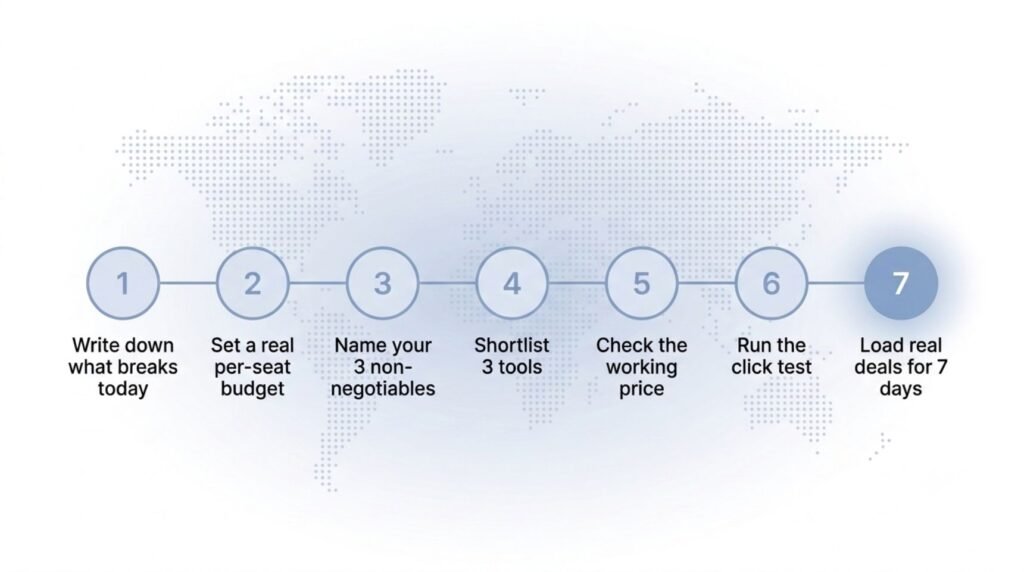
Step 1: Write down what breaks today
Name the specific failure. Missed follow-ups, no shared view of the pipeline, deals dying quietly in a spreadsheet tab. If your current system is Google Sheets and you’re not sure it’s actually broken, read our guide on when to switch from Google Sheets to a CRM first. The failure you write down becomes the test you run in step 7.
Step 2: Set a real budget per seat, not a total
Budgets stated as totals hide the math. “Under 100 dollars a month” sounds clear until you realize it means $50 per seat for 2 people or $12 per seat for 8. Decide what one seat is worth per month, multiply by your daily users from question 1 and hold the line when a tool’s second tier asks you to double it.
Step 3: Name your 3 non-negotiables and cut everything else
Three, not ten. For most small B2B teams the honest list is a visual pipeline, follow-up reminders and setup you can do yourself in one sitting. Yours might swap one out for lead capture forms or an API. Everything that isn’t on the list is decoration, and decoration is what feature comparison pages are made of. For the setup itself, follow our CRM implementation guide for small teams.
Step 4: Shortlist 3 tools, not 9
Nine tabs of pricing pages is how a 1-week decision becomes a 2-month one. Pick 3 tools that plausibly clear your non-negotiables and ignore the rest. If you don’t know where to start, our CRM examples post breaks down 15 real systems by use case and exists to do exactly this job. Match your use case, take the closest 3 and move on.
Step 5: Check the working price, not the sticker price
For each of your 3, find the plan that actually contains your non-negotiables. That’s the working price, and it’s often not the plan on the pricing page banner. The next section shows the real numbers, because this step is where budgets quietly double.
Step 6: Run the click test
Count the clicks it takes to log a completed call and set the next follow-up. Do it in each trial account yourself, with a timer if you want honesty. My position, after 3 years watching small teams live with the tools they picked: if it takes more than 3 clicks, your team will quietly stop doing it. The adoption test section below explains why this one number predicts more than any feature list.
Step 7: Load real deals for 7 days, then decide
Take the cheapest tool that survived steps 5 and 6 and run your actual pipeline in it for 7 days. Not demo data. Real deals, real follow-ups, real mornings where you either open the tool or don’t. The trial protocol further down makes this concrete. If the tool fails, you’ve lost a week and gained a precise list of what you need. That’s a cheap education.
What a CRM Actually Costs
A CRM’s sticker price and its working price are 2 different numbers, and pricing pages are built around the first one. The sticker price is the cheapest plan on the page. The working price is the plan that contains the features you listed as non-negotiables. Here’s what that gap looks like per seat per month on monthly billing.
| CRM | Plan you sign up for | Plan you land on | What pushes you up |
|---|---|---|---|
| HubSpot Sales Hub | Starter, $20 | Professional, $100 plus a one-time $1,500 onboarding fee | Sequences, automation and custom reporting live on Professional |
| Pipedrive | Lite, $24 | Growth, $49 | Two-way email sync and automations start on Growth |
| Capsule | Free (2 users, 250 contacts) | Growth, $38 | Automations and multiple pipelines start on Growth |
| Salesforce | Starter Suite, $25 | Pro Suite, $100 on an annual contract | Custom objects, sales automation, advanced reporting and AppExchange access all sit on Pro |
| Fluid CRM | $16 | $16 | Nothing. Both plans include every feature. |
The single row is the point. Both Fluid CRM plans differ only in billing cadence, so the sticker price is the working price. See how it works as a simple CRM for small teams.
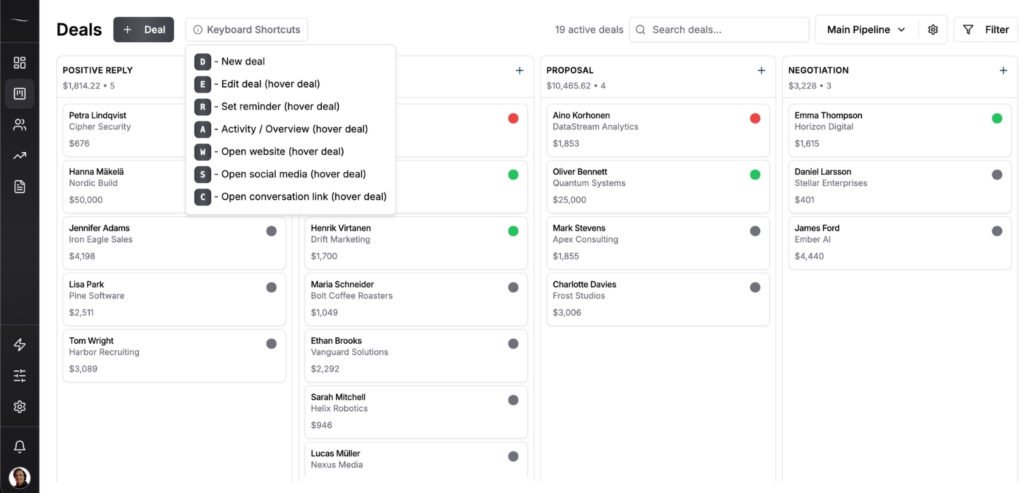
For bigger teams the upper tiers earn their price. The mistake is budgeting the left column and paying the middle one. If the HubSpot math specifically is what sent you here, we’ve compared the HubSpot alternatives for small business in detail.
Two more patterns to price in. First, the free plan trap. Free tiers cap on users or contacts, and the cap is the funnel. Capsule’s free plan stops at 2 users and 250 contacts, Salesforce’s Free Suite stops at 2 users and HubSpot’s free CRM keeps the features people buy HubSpot for on Professional. A free plan is fine as a trial that never expires. It’s not a long-term price. If those two are your shortlist, we price the paid step on both in Salesforce or HubSpot.
Second, annual versus monthly. Pipedrive’s annual discount is the biggest real one in the table, dropping Lite from $24 to $14 and Growth from $49 to $39. Capsule takes up to 15% off for annual. Salesforce charges the same $25 for Starter Suite either way, and Pro Suite requires the annual contract. HubSpot often shows an intro offer on Starter, so budget the $20 standing rate rather than the banner. The rule for a first CRM is simple. Pay monthly until the 7-day trial and the first full month prove the tool out, then take the annual discount.
The Adoption Test Most Buyers Skip
Ease of use decides whether a CRM works, and it’s the factor buyers evaluate last. SuperOffice asked more than 1,000 of its own prospects what mattered most when choosing a CRM. 86% said user-friendliness. Buried under feature comparisons, that number is the whole game. A CRM your team doesn’t open is a subscription, not a system.
So test adoption directly. Open the trial account and count the clicks from “I just finished a call” to “the call is logged and the next follow-up is set.” Stop for a second and actually do it, don’t estimate it. More than 3 clicks and I’d bet against your team still logging calls by week 6. Salespeople don’t refuse to use clunky tools. They just drift back to memory and inbox flags, one skipped log at a time, and the pipeline goes dark without anyone deciding anything.
The sharpest version of this test comes from Nathan Shooter, who runs a speaking and branding business in Australia. He works with an assistant who isn’t in the tool every day, which means the tool can’t rely on habit or training to carry it. His bar: “It’s got to be simple enough that someone who’s not working with me every day can not have to try and continually learn how to figure out the software.” That’s the standard worth stealing. Judge the tool by your least frequent user, not your most motivated one.
If you’ve already bought a CRM and it’s gathering dust, the pattern is fixable. We wrote up the 6 reasons your team won’t use the CRM and what to fix for each one.
How To Run a 7-Day CRM Trial That Tells You Something
A 7-day CRM trial with real deals tells you more than a month of demos. The mistake is treating the trial as a tour. You click around, everything looks clean, you form an impression. Impressions don’t predict adoption. Behavior does, so the trial has to produce behavior you can judge.
The protocol is short. On day one, load your live pipeline into the tool. Active deals only, 20 to 40 of them, each with a next follow-up date set. Then work your normal sales days inside the tool for 5 working days. Log every call and email the moment it happens, move deals between stages as they move in reality and let the reminders drive your mornings instead of your memory. A full working week is enough. 5 working days is long enough to see whether you open the tool without being reminded, and short enough that you’ll finish the test instead of abandoning it halfway through week 2.
At the end, answer 3 questions honestly. Did you open the tool each morning without forcing yourself? Did any follow-up slip that the tool should have caught? Can you name your top 5 deals right now from the pipeline view, without digging? Two or more bad answers means the tool failed, and that’s a useful result. You now know exactly which non-negotiable it missed, which makes the second pick fast and precise.
At Fenixtal I handed leads to 50+ B2B clients and watched what happened next, and the difference between the teams that closed and the teams that leaked was never the tool’s feature count. It was whether the tool got opened every day. The trial is how you find that out for $16 instead of finding it out over 6 months.
Common CRM Selection Mistakes To Avoid
The same 4 mistakes show up whenever a small team picks a CRM under pressure. All of them are cheaper to read about than to make.
1. Buying for the team you’ll have in 3 years
Teams of 4 buy 20-person platforms because they plan to grow into them. What actually happens is 3 years of paying for permissions, territories and approval flows nobody touches. Buy for the team you have. Migrating a small pipeline later takes an afternoon, and the growth you’re planning for will tell you what it needs when it arrives. My CRM migration checklist covers that move step by step.
2. Picking the tool with the longest feature list
Feature count is the easiest thing to compare and the worst predictor of results. Every feature that isn’t one of your 3 non-negotiables is either noise or a future upsell. The question isn’t what the tool can do. It’s how fast it does the one thing you log every day.
3. Letting a free tier make the decision
Free is a price, not a fit. The caps on users and contacts are placed exactly where a growing team hits them, and by then your data lives inside the tool and the path of least resistance is the paid tier above you, whether or not it’s the right tool. Evaluate the paid plan you’d land on. If that plan wouldn’t win your shortlist on its own, the free tier shouldn’t either.
4. Skipping the trial because the demo looked good
A demo is the tool on its best day, run by the person who knows it best. Your Tuesday afternoon with 6 calls to log is the tool on a normal day. Every tool on your shortlist offers a free trial, so there’s no reason to sign an annual contract on a first impression. Run the 7 days.
Frequently Asked Questions
Set 3 non-negotiable features, a per-seat budget and a shortlist of 3 tools that clear both. Check each tool’s working price, run the click test on logging a call, then trial the cheapest survivor with real deals for 7 days. Commit if it passes, switch if it fails. The trial teaches you more than any comparison page.
The best beginner CRM is one you can set up and log your first deal in without a tutorial. Look for a visual pipeline, built-in follow-up reminders and pricing that doesn’t split those basics across tiers. If a tool needs an onboarding call before you can use it, it’s not a beginner tool, whatever the marketing says.
The textbook 4 types are operational, analytical, collaborative and strategic. Operational CRMs run day-to-day sales and contact work, analytical ones focus on reporting, collaborative ones share customer data across departments and strategic ones tie it all to long-term planning. The taxonomy is real, and it changes nothing about what a small team should buy. Any CRM a team under 20 people would shortlist is operational.
Between $15 and $50 per seat per month covers the plans small teams actually land on. Fluid CRM is $16 per seat with every feature included, Capsule Growth is $38 and Pipedrive Growth is $49 on monthly billing. Above that range you’re usually paying for automation depth, compliance features or reporting a team under 20 people won’t use.
A simple CRM takes about 10 minutes to set up, and migrating a solo founder’s active pipeline into it takes an afternoon at most. Enterprise tools take weeks and often require paid onboarding. If a tool needs a setup wizard or a success manager before you can log a deal, it’s too big for a small team.
Conclusion
You don’t need 6 weeks to choose a CRM. You need 3 non-negotiables, a shortlist of 3 and a week of real deals inside the cheapest tool that qualifies. The trial will tell you more than any comparison spreadsheet, and if the first pick fails, the second one gets easier. If you want a place to start, Fluid CRM gives small B2B teams a clear visual pipeline with every feature on both plans and no upgrade traps.
Start your 7-day free trial here, no credit card required.