
Here’s everything Fluid CRM does, what it looks like and why small B2B teams, coaches and agencies switch from spreadsheets and bloated CRMs.
Fluid CRM gives you a clear visual pipeline to close more deals without the mess of spreadsheets or the bloat of traditional, expensive CRMs. It has a calm drag and drop kanban view, activity logging, smart in-app automations, fast keyboard shortcuts and an API to integrate with your stack.
Start Free Trial, no credit card required
“The CRM serves me, not the other way around.”
“Before Fluid, I was tracking prospects, clients and podcast guests across Google Contacts, LinkedIn, spreadsheets and marketing platforms. I was constantly updating information instead of focusing on the client. Fluid ended the wasted effort. I don’t have to configure my business to match how the CRM works. I go faster and I can plan my client actions with clarity.”
Doland White, Founder, DWC
Visual pipeline
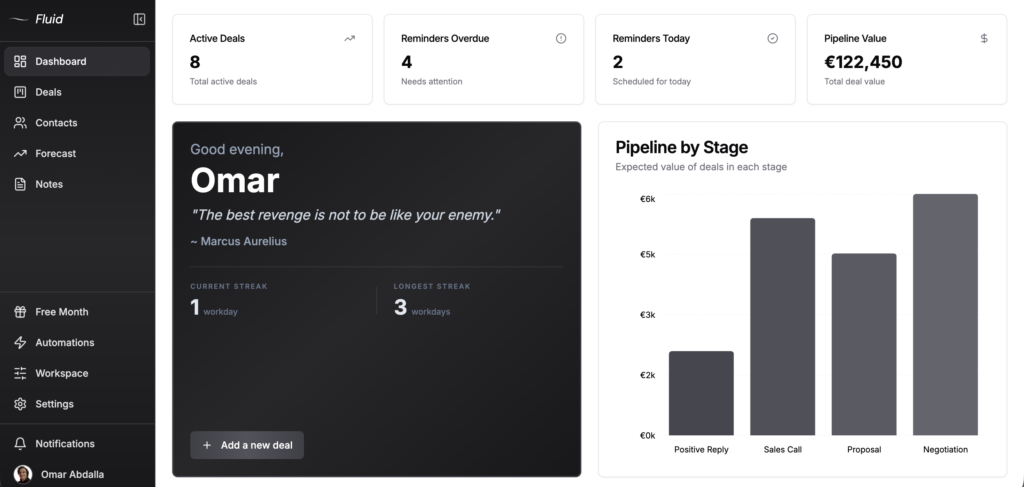
Drag and drop deal cards across stages and see your whole pipeline on one screen. No tabs, filters or menus to dig through. Just your deals where you can actually look at them.
Every plan includes unlimited deals, unlimited contacts and unlimited pipelines. No tiered pricing where you suddenly hit a deal cap and get pushed into the next plan up. If you want one pipeline for sales and another for onboarding and a third for partnerships, build all three. Same plan, same price.
The pipeline view is the main screen of your sales process. You can filter by team member, deal value, label, recency or upcoming reminders. Each deal card shows the prospect, company, value and the rep assigned at a glance. Click any card and you get the full deal context without leaving the page.
- Unlimited deals, contacts and pipelines on every plan
- Drag and drop kanban view across all stages
- Filter by rep, value, label, recency or reminder status
- Search across all deals in real time
- Compact deal cards with key info visible at a glance
- One-click deal detail view without losing pipeline context
- Color-coded labels for hot leads, cold leads or any custom tag
For a side-by-side against the other visual-pipeline tools, see Fluid CRM vs Pipedrive.
Dashboard
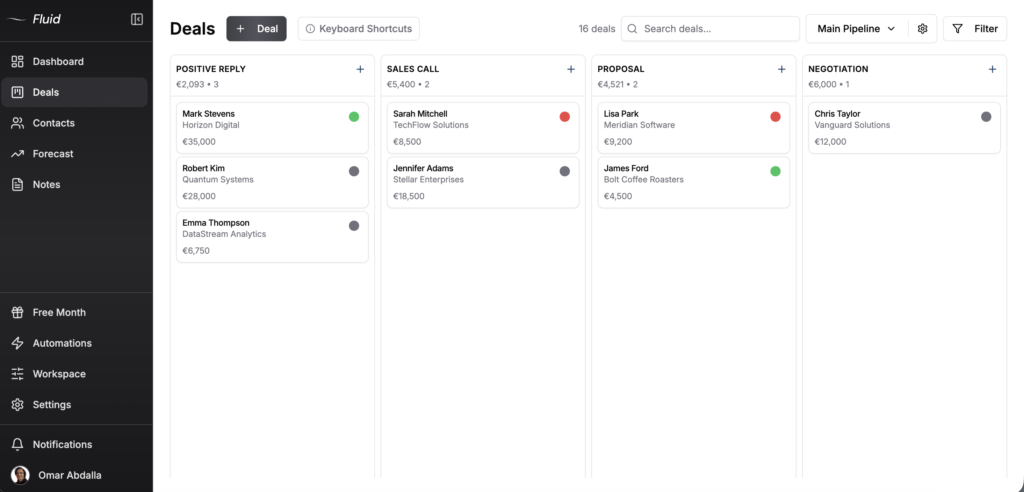
The dashboard answers one question the moment you log in. Where does my business stand today? You see your active deals, reminders overdue, reminders today and total pipeline value across the top. Below that, a pipeline value graph by stage so you can spot where deals are stacking up.
This is the difference between opening your CRM and getting lost versus opening it and knowing the next move. Most CRMs dump you into a feed or a settings page. Fluid puts the day’s priorities front and center.
Two small touches make a difference. A daily quote at the top, because sales is mental and a good line on a Monday helps. And a login streak counter showing your current and longest workday streak. Sounds silly but it works because showing up daily is half the game.
“I’m not guessing what to do next anymore.”
“I previously used Pipedrive. What I like most about Fluid is how clear and structured everything feels. It’s simple to see where each deal stands and what needs to happen next. My daily work is more focused now. I have a clear overview of my pipeline and it’s much easier to keep my sales process moving forward consistently.”
Hanna-Maria Ojala, CEO, Menestyvä Myynti
- Active deals, overdue reminders and today’s reminders at the top
- Pipeline value by stage graph
- Daily motivational quote
- Login streak counter to build the habit
- One-click “add a new deal” button
Deals
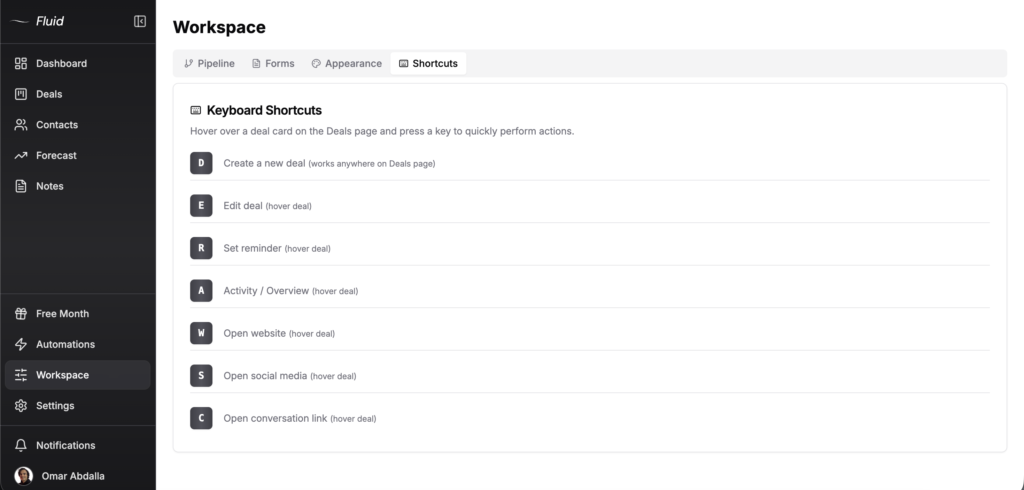
A deal in Fluid is more than a card with a value on it. Every deal stores the contact info, company, website, social link, conversation thread and the full activity log. Calls, emails, meetings, notes and tasks all logged with timestamps so anyone on the team can see what happened and when.
You log a call after a discovery, drop a note after a demo, set a reminder for next Tuesday and tag the deal “hot.” All in one card. Your team sees the same context you do. Nothing slips through because nothing lives in someone’s inbox or head.
When you create a deal, the contact (person and company) is created automatically and linked. You don’t enter the same data twice. Move the deal to “Won” and the activity history stays attached forever.
- Drag and drop deal cards between stages
- Activity logging for calls, emails, meetings, notes and tasks
- Auto-created person and company on every new deal
- Reminders with green for upcoming, red for overdue
- Custom labels for hot leads, deal types or any tag you need
- Conversation links so the email or LinkedIn thread is one click away
- Full deal history visible without leaving the deal view
Keyboard shortcuts
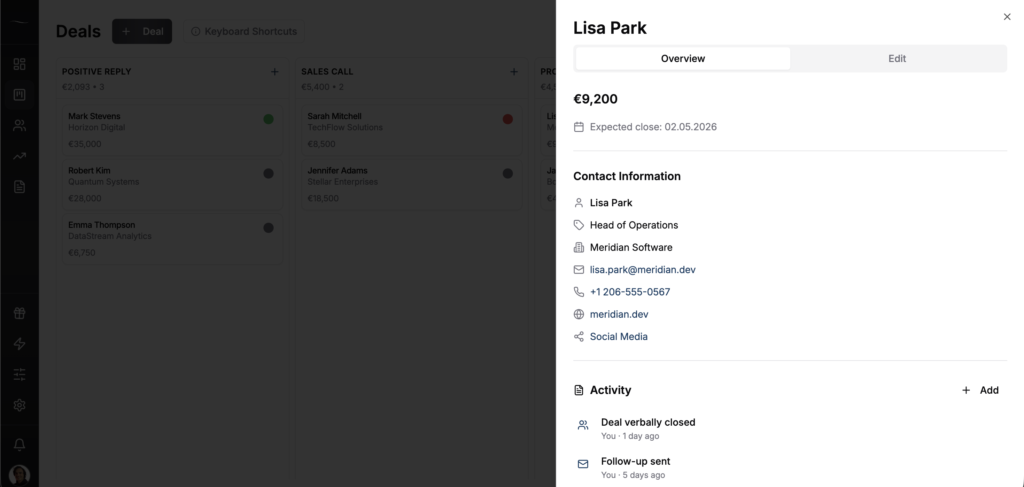
This is the feature you don’t see in any other CRM. Also, it’s the one I use the most. I can open a prospect’s website, social, email or conversation link in one keystroke. When I’m working through 40 deals on a Monday morning, that adds up to real time saved. No annyoing mouse hunting or tab switching. Hover a deal, hit a key and it’s done. 1 second instead of 10 and this adds up really fast.
Seven shortcuts cover the actions you do all day:
- D: Create a new deal (works anywhere on the Deals page)
- E: Edit deal (hover deal)
- R: Set reminder (hover deal)
- A: Activity / Overview (hover deal)
- W: Open website (hover deal)
- S: Open social media (hover deal)
- C: Open conversation link (hover deal)
“Fluid is so fast as well. I love the hotkeys. I’ve actually been using them.”
Austin Verner, Founder, Cold Emailers
Contacts
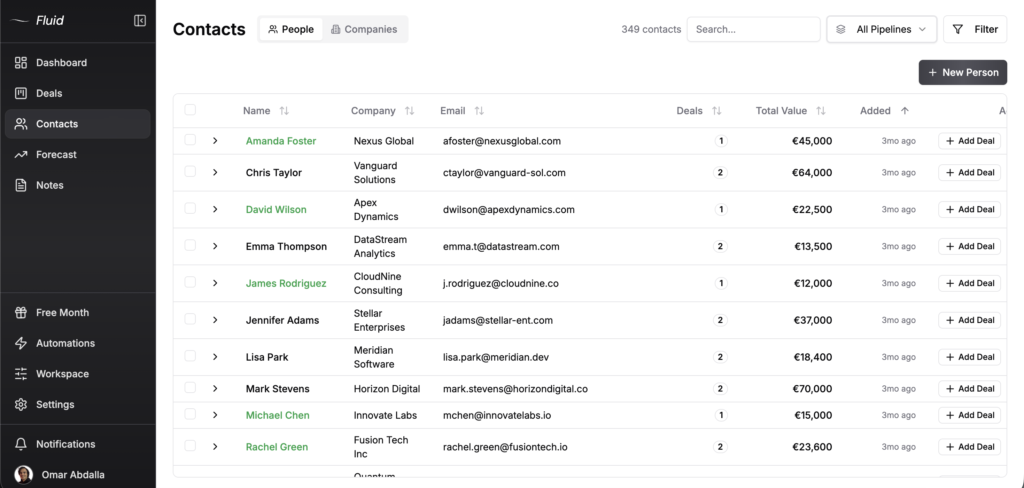
Contacts has two views: people and companies. Toggle between them depending on what you’re looking for. The People view lists every contact with name, company, email, deal count and total value. The Companies view rolls everything up by company so you can see how many people you have at each account and which ones have active deals.
People are auto-linked to companies. Add a contact at Acme and they show up under Acme in the company view. Add three more contacts at the same company and you see all four under one row. This matters when you’re working multi-stakeholder deals or running account-based outbound and need to know who else you’ve already talked to at a given company.
Duplicates happen, especially when you import data or use lead capture forms. The Merge Duplicates function lets you fix them in seconds without going through one by one.
- People view with name, company, email, deals and total value
- Companies view rolling up all contacts and deals by account
- Auto-link people to companies, no manual linking needed
- Merge Duplicates function for cleanup
- Filter by pipeline, won/lost, stage, value, tag, data quality or recency
- Search across all contacts in one place
BCC email-sync
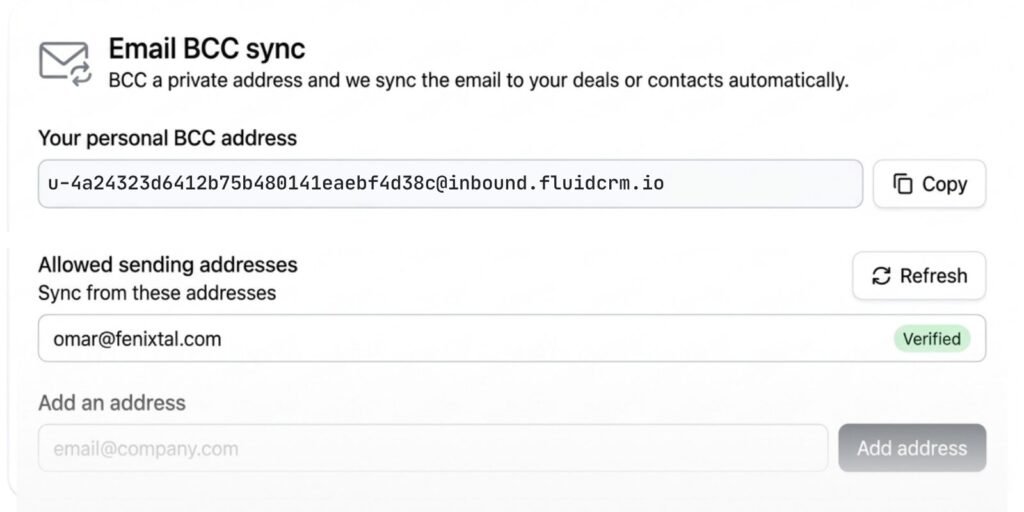
BCC one private address and the email lands on the deal automatically. No browser extension, no inbox plugin, no two-way sync to configure.
Every workspace gets a personal inbound address. Put it in the BCC line when you email a contact and Fluid CRM logs the email on their most recent open deal, or as a contact note if they have no open deal. Set your email client to auto-BCC it and you never think about it again.
Only verified sending addresses are logged, so nobody can inject email into your workspace by guessing the address.
- Personal inbound address per user
- Logs to the most recent open deal, or as a contact note
- Verified sending addresses only
- Works from any email client, Gmail, Outlook, anything
- Auto-BCC it once and forget it
Forecast
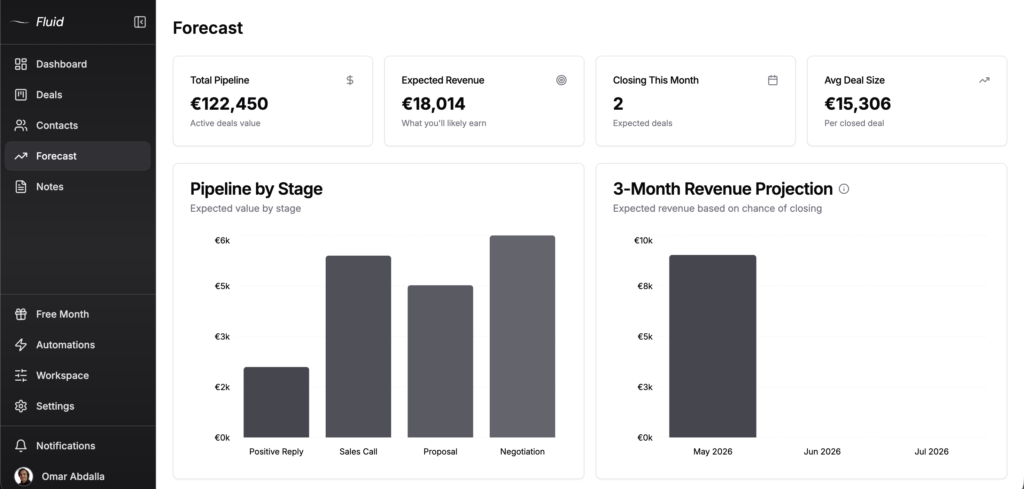
The Forecast page shows four numbers at the top. Total pipeline, expected revenue, deals closing this month and average deal size. Below that you’ll find two charts. Pipeline value by stage and the killer feature, a 3-month revenue projection.
The 3-month projection takes the deals you have, the stage they’re in, the close probability based on stage and your average sales cycle and shows you what revenue is realistically coming in over the next 90 days. Not a guess. Hard numbers from your actual pipeline.
This is the chart you check before making the call on a new hire, a software subscription, an office lease. Most small B2B teams plan their next quarter on gut feel because their CRM doesn’t show them this. Fluid does and it’s on every plan.
- Total pipeline value across active deals
- Expected revenue weighted by close probability
- Closing this month with deal count
- Average deal size across closed deals
- Pipeline by stage chart
- 3-month revenue projection based on stage and sales cycle
Notes
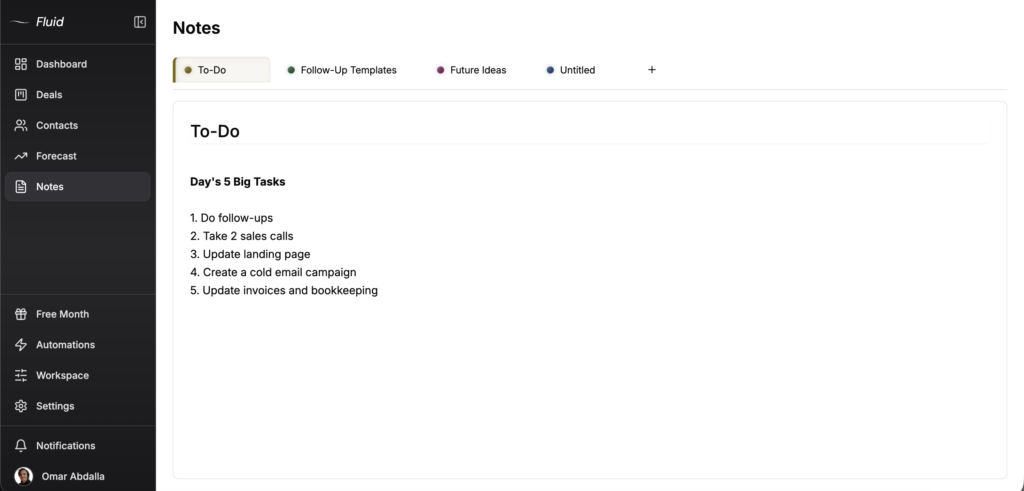
Notes are tabs. Create a tab for to-do lists, a tab for follow-up drafts, a tab for client questions you keep getting asked or a tab for ideas. Switch between them like browser tabs without losing your place.
Most CRMs treat notes as an afterthought, buried somewhere in a deal record or in your phone. Fluid treats notes as a real workspace because the work between deal updates is where most of your sales thinking actually happens. Drafting a follow-up email, jotting down what to send next week or keeping a running list of objections you’ve heard. All of it lives here.
You can have one tab open or 10. They’re persistent and they don’t disappear when you log out. Plus they’re separate from deal-level activity notes, which stay attached to specific deals.
- Create unlimited note tabs
- Switch between tabs like a browser
- Persistent across sessions
- Separate from deal-level activity logs
- Use for to-do lists, drafts, client notes or general thinking
Automations
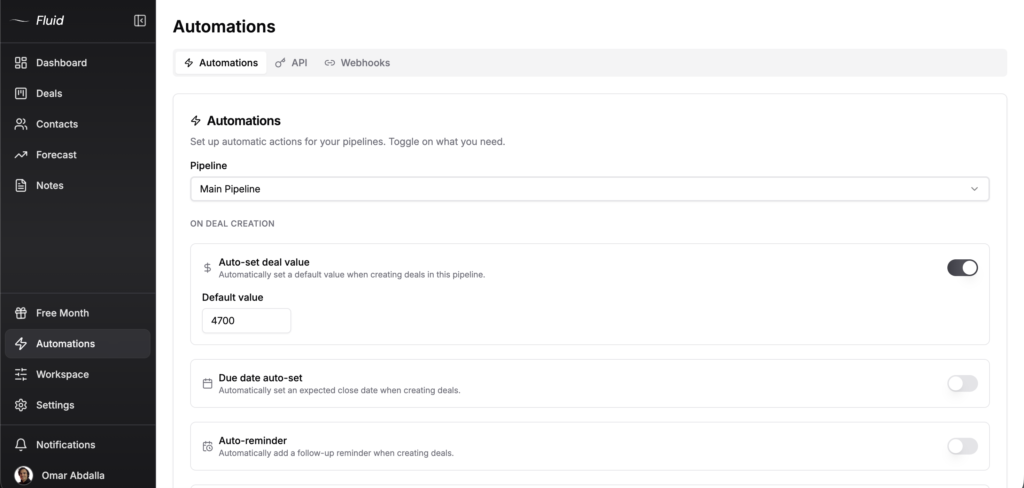
Eight in-app automations handle the busy work. Toggle on what you need, leave the rest off and change anytime. No upgrade traps, separate plan or per-automation pricing. Everything is included.
What’s great is that you can set them per pipeline. Your sales pipeline can auto-set deal values to your average deal size while your onboarding pipeline auto-creates a kickoff task. Different work, different automations, no clash.
The eight automations:
- Auto-set deal value: Default value for new deals in this pipeline
- Due date auto-set: Auto-set an expected close date based on your sales cycle
- Auto-reminder: Add a follow-up reminder when a deal is created
- Auto-assign deals: Route new deals to a specific team member
- Stage notification: Notify the right person when a deal moves stages
- Auto-create activity: Create a task or activity log on deal creation
- Cross-pipeline move: Move deals between pipelines on stage changes
- Idle follow-up: Reminder when a deal has been idle too long
Pipeline customization
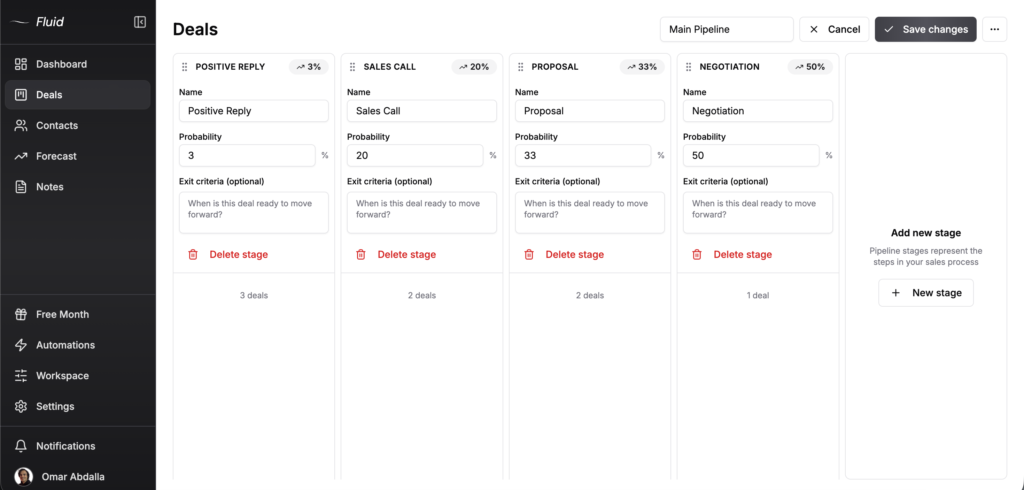
Every pipeline has its own fields. A sales pipeline needs deal value, source and expected close date. A delivery pipeline needs project type, kickoff date and assigned account manager. Partner pipelines need commission split and contract type.
In most CRMs, you set fields once at the workspace level and every pipeline inherits them. Fluid lets you customize per pipeline. Reorder fields, add custom ones, mark them required, choose which three show on the deal card preview and hide ones you don’t use.
Default fields cover the basics out of the box: name, company, value, website, title, email, phone, conversation, social media, next action, label, expected close date, source, stage and notes. Add custom fields for anything specific to your work.
- Per-pipeline field customization
- Reorder fields by drag and drop
- Add custom fields beyond the defaults
- Mark fields as required or hide unused ones
- Choose 3 card preview fields per pipeline
- Default fields cover most B2B sales workflows
Lead capture forms
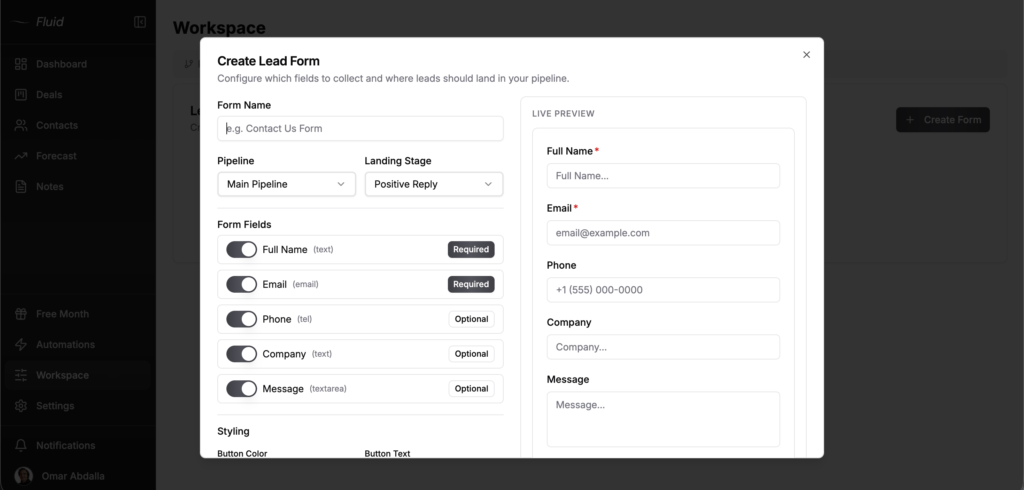
Build embeddable forms that create contacts and deals automatically in your pipeline. Drop the form on your website, landing page or anywhere you can paste an embed code. When someone fills it out, the contact is created, the deal lands in the stage you picked and the right reminders trigger.
This means your website actually feeds your pipeline instead of dumping leads into a separate inbox you’ll forget to check. The form connects directly. No Zapier, no extra tool, no missed leads sitting in form notifications.
Use forms for inbound demo requests, contact-us submissions, lead magnet downloads, partner applications, anything where someone fills in a field and you want to follow up.
- Embed forms on any website
- Custom fields, required or optional, drag to reorder
- Custom CSS so the form matches your site, no branding to pay your way out of
- Live preview while you build
- Auto-create contacts and deals on submission
- Pick which pipeline and stage submissions land in
- Trigger automations on form-created deals
- No third-party tools required
Themes
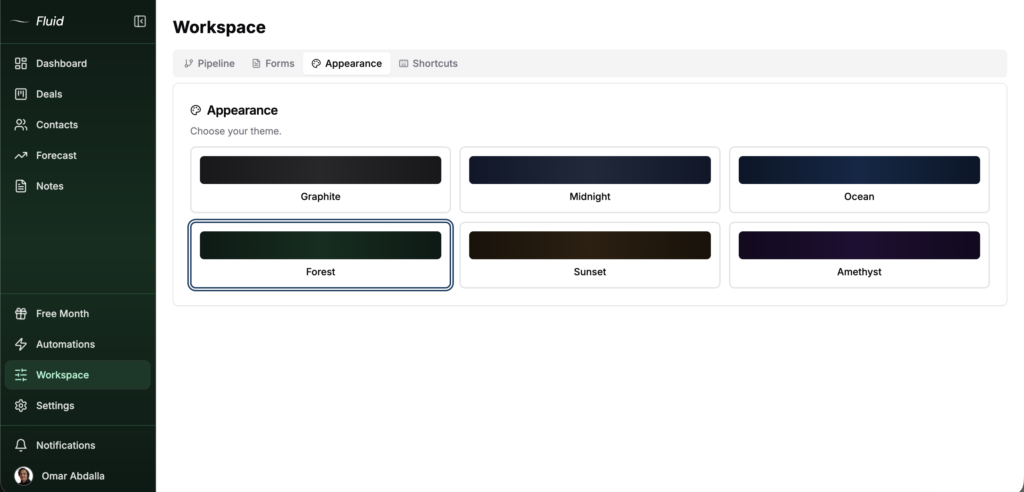
Nine themes built for working long hours without burning your eyes. Pick the one that fits your setup or your mood:
- Graphite: Pure dark grey for focus
- Obsidian: Near-black, maximum contrast
- Midnight: Deep blue, easy on the eyes
- Ocean: Lighter blue with a calmer feel
- Forest: Dark green, nature-inspired
- Moss: Muted olive, softer than Forest
- Sunset: Warm orange and brown tones
- Merlot: Deep red, warm and low glare
- Amethyst: Dark purple with a creative feel
All nine are dark by default because most of us spend 8+ hours in the CRM and a white screen at 6pm is rough. Switch themes anytime in workspace settings.
Team
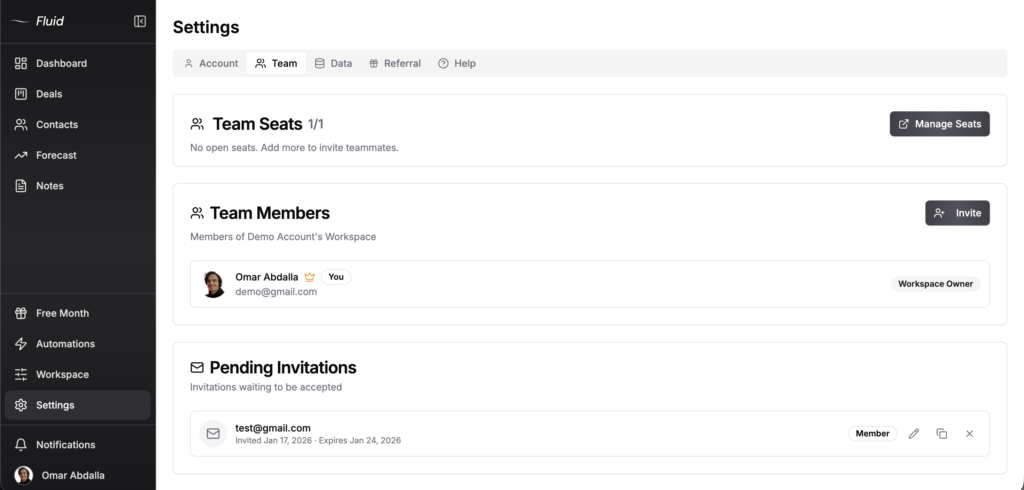
Invite your team. Buy seats from the Team Seats page, send invitations, assign each person as Member or Workspace Owner. Owners can manage billing and settings. Members work the pipelines they’re assigned to.
Pipeline access is per-person. If your sales rep should only see the sales pipeline and not the partner pipeline, set it that way. They won’t see what they don’t need. Useful when you have client-facing pipelines, internal pipelines and pipelines for specific projects all running side by side.
- Invite team members with Member or Owner roles
- Per-person pipeline access controls
- See pipeline ownership at a glance
- Reassign pipelines when team changes
- In-app notifications for stage changes and assignments
API and webhooks
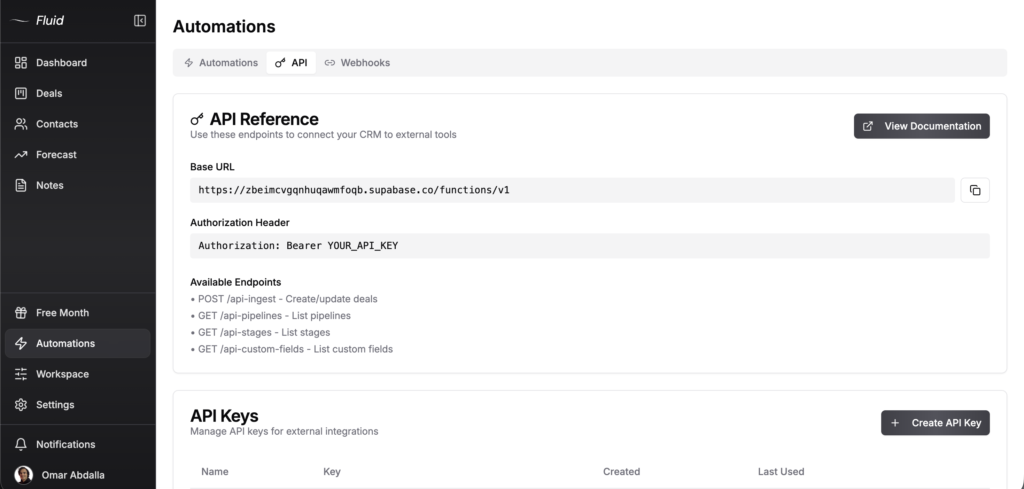
Fluid has a real REST API. Not a marketing claim, not a “coming soon” or gated behind a higher plan. Every account gets API access on both plans, at $16/seat/month or $144/seat/year. Again, no upgrade traps.
The API covers the full data model. Read and write contacts, companies, deals, activities, reminders and labels, plus a lead ingestion endpoint built for cold email replies.
POST /api-ingest: Create a deal and auto-create or update the contact by email
GET, POST, PATCH, DELETE /api-contacts, /api-companies, /api-deals, /api-activities, /api-reminders, /api-labels
GET /api-pipelines, /api-stages, /api-custom-fields
Webhooks fire on 16 real-time events so your other tools react the moment something changes:
Deals: created, updated, deleted, reopened, stage changed, won, lost
Contacts: created, updated, deleted
Companies: created, updated, deleted
Activities: created
Reminders: due
Forms: submitted
Use the API directly or connect through Make.com, Zapier or Pabbly. The most common setup is auto-creating deals from cold email replies. Smartlead and Instantly both have webhook outputs that hit the Fluid /api-ingest endpoint and create the deal automatically when someone replies positively. No manual data entry or missed leads. Your cold email tool fires and Fluid catches it.
Authentication is Bearer token. Generate API keys from the API settings page. Manage them, revoke them, see when each was last used. You can read the full API documentation here.
“We’re capturing 100% of our interested leads.”
“Before Fluid we were managing our pipeline in Google Sheets and it was getting cumbersome. The simplicity is what sold us. An easy deal view, reminders and our interested leads from Smartlead auto-created via API. Our deal organization is 10x better. Follow-ups and onboarding are all managed in Fluid, which keeps us on top of every stage.”
Austin Verner, Founder, Cold Emailers
Most CRMs at this price either don’t have an API or hide it behind the enterprise plan. Fluid puts the full API on every account and documents the endpoints publicly.
- Full REST API on both plans
- Read and write contacts, companies, deals, activities, reminders and labels
- Lead ingestion endpoint with idempotency for cold email replies
- 16 webhook events with HMAC signature verification
- Compatibility with Smartlead, Instantly, Make.com, Zapier, n8n and Pabbly
- Cursor pagination and documented rate limits
AI agents (MCP)
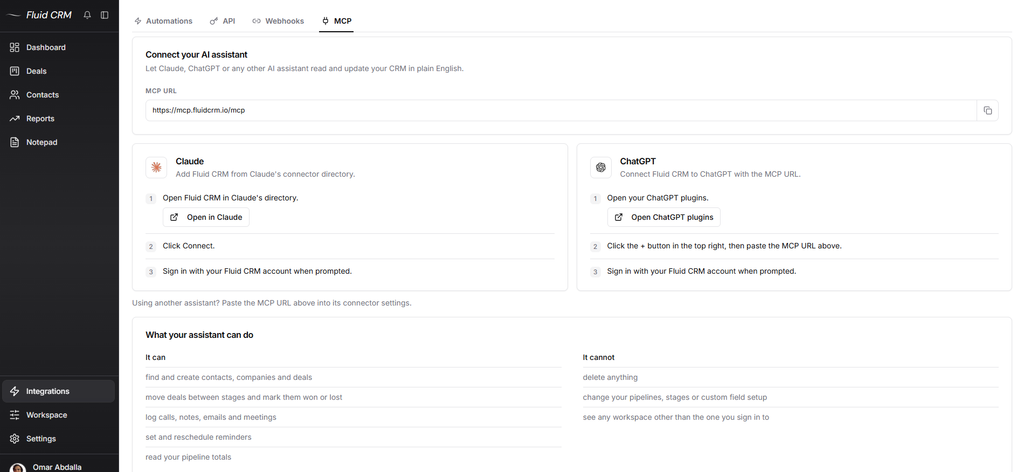
Fluid CRM connects to Claude, ChatGPT and any other AI tool that supports MCP. MCP is the open standard that lets an assistant use another app. You connect once, and then you ask for things in plain language, right in the chat.
Ask what needs a follow-up today and the assistant reads your pipeline and answers. Tell it to log a call with Lisa and set a reminder for Friday, and both land on the deal. Paste a list of forty leads and it adds them in one go.
The connector has 21 tools:
Read: deals, contacts, companies, reminders, activities and a pipeline summary
Create: deals, contacts and companies, one at a time or in bulk, plus activities and reminders
Update: deals, contacts, companies, activities and reminders
There are no delete tools, so an assistant can’t remove a record by mistake. It signs in as you and only sees the workspaces you can open yourself.
In Claude it is a search and a click, because Fluid CRM is listed in Claude’s connector directory. In ChatGPT you copy your MCP address from Settings and paste it in. The AI CRM page walks through both.
Fluid keeps the AI out of the app itself. Nothing pops up while you work, and the assistant you already use does the typing from outside.
- Works with Claude, ChatGPT and any tool that supports MCP
- 21 tools to read, create and update
- Bulk create for deals, contacts and companies
- No delete tools
- Sign in with your Fluid CRM account, with no API key to copy
- Included on both plans
Data import and export
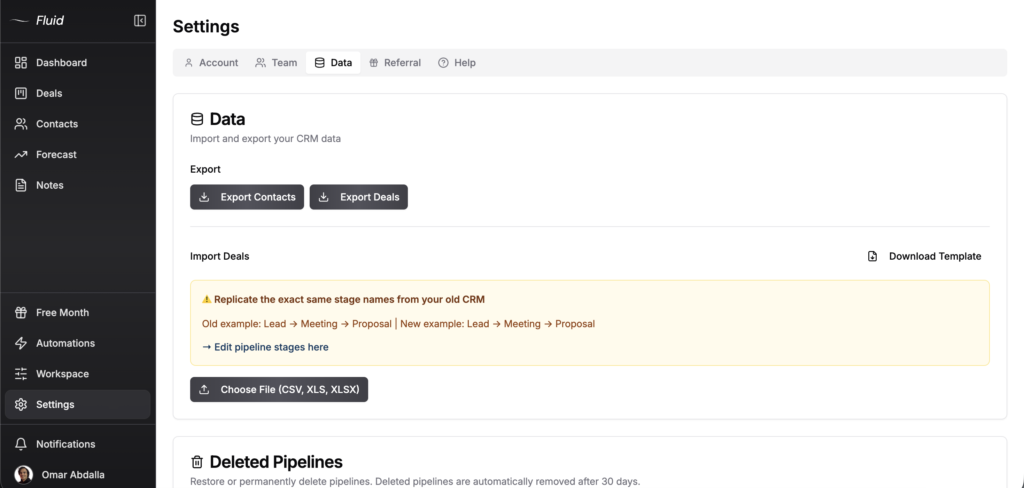
Import deals from your old CRM with CSV, XLS or XLSX files. Download the template, paste your data into the right columns and upload the file. Fluid maps the fields and creates the deals in the stages you specify. Hanna-Maria came over from Pipedrive without losing a deal. Most migrations take about 5 minutes.
Export is even simpler. One button for contacts and one button for deals. CSV downloads instantly. Your data is yours so take it whenever you want.
Pipelines you delete sit in a 30-day recovery window. Restore the wrong ones, let the rest expire.
- CSV, XLS and XLSX import support
- Downloadable template for clean imports
- One-click export for contacts and deals
- 30-day recovery on deleted pipelines
- Migration support for moves from Pipedrive, HubSpot and others
See full Fluid CRM data import guide here.
Security and settings
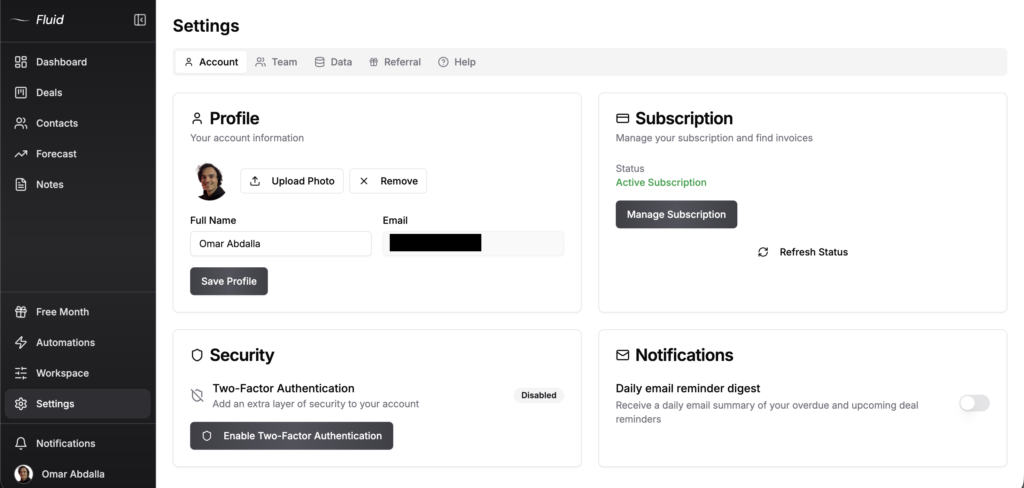
Two-factor authentication is available on every account. Turn it on from the Security section in account settings. Daily email reminder digest is also available, so you get a summary of overdue and upcoming deal reminders in your inbox each morning. Useful for the people who live in their inbox more than their CRM.
Account settings cover the basics. Profile, email, photo, subscription status. The Manage Subscription button takes you to the billing portal where you can update payment methods, switch between monthly and annual or cancel.
- Two-factor authentication
- Daily email reminder digest
- Profile and account management
- Billing portal access for plan changes
- One-click subscription cancellation
Referrals
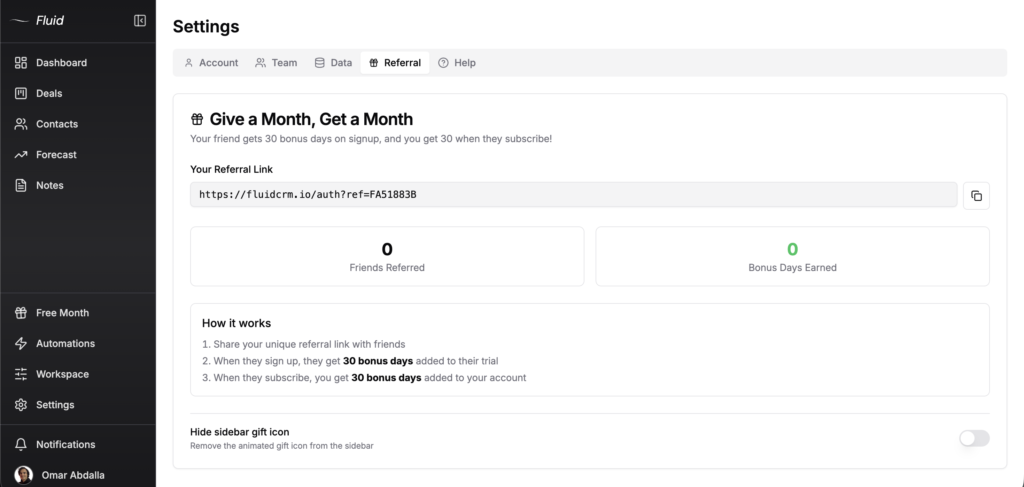
Refer a friend, give a month and earn a month for yourself. Your friend gets 30 bonus days when they sign up and you get 30 bonus days when they subscribe. The referral link is in your settings under the Referral tab. Copy it, share it and watch the bonus days stack up.
This isn’t a one-time promo. Every friend you refer adds another 30 days. Refer enough people and you can stack months of free use.
- 30 bonus days for friends on signup
- 30 bonus days for you when they subscribe
- Unlimited referrals
- Track referrals and bonus days earned in settings
Frequently Asked Questions
Yes, Fluid is a full CRM for teams who need to track deals, contacts, activities and follow-ups. You get pipeline management, contact records, activity logging for calls, emails and meetings, automations, forecasting, lead capture forms and a real API. Fluid is not a full CRM if you need email marketing automation, complex multi-step workflows or 200 custom fields. That’s intentional.
Yes. Unlimited deals, unlimited contacts, unlimited pipelines, 8 in-app automations, full REST API access, 16 webhook events, BCC email sync, lead capture forms with custom CSS, keyboard shortcuts and all 9 themes. No tier upgrades, no per-feature pricing, no enterprise plan locking the API behind a sales call.
$16 per seat per month or $144 per seat per year (3 months free on annual). Same features on both plans. No surprise charges, no module pricing, no upsells. Full price breakdown on the pricing page.
Yes. Full REST API with bearer token authentication, full read and write access to contacts, companies, deals, activities, reminders and labels, a lead ingestion endpoint and 16 webhook events. Same API on every plan. Public documentation at fluidcrm.io/api-docs.
Yes. Fluid imports from any CRM that exports CSV, XLS or XLSX files. Download the import template, paste your data into the right columns, upload, done. Most migrations take about 5 minutes. See the full step-by-step import guide here.
Fluid has the structure of a CRM with the simplicity of a spreadsheet. HubSpot and Pipedrive are built for scale, with features and pricing most small teams never need. Fluid keeps only what you actually use to close deals, at a fraction of the cost. Less setup, less training, less admin. See full breakdowns at Fluid CRM vs HubSpot and Fluid CRM vs Pipedrive.
Yes. Buy team seats from your settings, invite teammates by email, assign each person as Member or Workspace Owner. You control which pipelines each person can see, so your sales rep doesn’t see your partner pipeline and vice versa.
Yes, up to about 25-30 reps. Past that, you’ll need a CRM with deeper automations and enterprise features. Most small B2B teams don’t need those. If you’re under 30 reps, Fluid scales with you. We’ll tell you honestly when you’ve outgrown it.
You can export all your data from Fluid at any time, before or after cancelling. One click for contacts, one click for deals. Your data is yours, in CSV format you can take anywhere.
Ready to switch?
If your current solution feels like a second job , Fluid CRM keeps it simple. Visual pipeline with all the features outlined above, no upgrade traps and $16/month flat.
Start your free 7 day trial here, no credit card needed.