

You are running sales on a Trello board and it worked fine until it did not. Cards are stacking up in one list, you cannot remember which client you already quoted, and somebody suggested Pipedrive. The two are not really the same kind of tool, which is the first thing worth sorting out.
Trello is a board and Pipedrive is a CRM, so the real question is what your pipeline actually needs. Trello runs $0 to $17.50 per user per month and Pipedrive $14 to $79 per seat, both on annual billing. Fluid CRM puts the board view, contacts, deal values and reminders in one plan.
The free-versus-paid framing falls apart the moment you need Custom Fields, because the Trello tier that works as a sales pipeline is not the free one.
At Fenixtal I worked with agencies, consultants and web studios, and a surprising number of them ran real revenue off a board of cards and nothing else. It held until they had about thirty live deals. We later built Fluid CRM for the point where it stops holding.
What Trello Costs In 2026
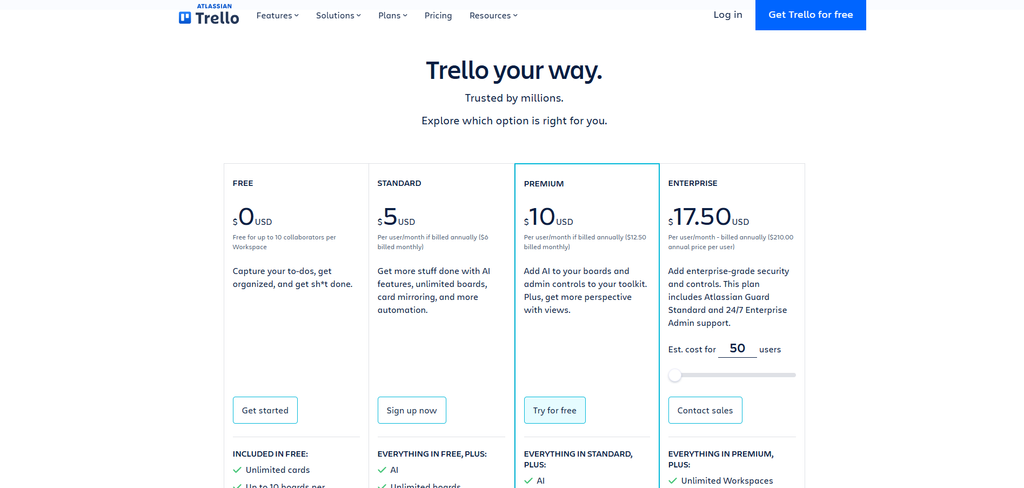
Trello runs four tiers.
Free is $0 and caps at 10 collaborators and 10 boards per Workspace, with unlimited cards. Standard is $5 per user per month on annual billing, or $6 monthly.
Premium is $10 annually or $12.50 monthly. Enterprise is $17.50 per user per month, billed annually at $210 per user.
The gate that matters for sales is Custom Fields, and it starts at Standard. On the free plan a card has a title, a description, a due date and labels. Add a deal value, a company name or a next step and you are on a paid tier.
Views are the second gate. Calendar, Table, Timeline and Dashboard all start at Premium, so seeing your pipeline as anything other than columns of cards is a $10 per user decision.
What Pipedrive Costs In 2026
Pipedrive prices per seat across four tiers. On annual billing they run from $14 for Lite to $79 for Ultimate, with Growth at $39 and Premium at $59 in between. Pay monthly and the same four cost $24, $49, $79 and $99.
There is no free plan and the trial is 14 days with no credit card. Pipedrive also sells add-ons billed per company rather than per seat, including LeadBooster and Smart Docs at $32.50 a month each on annual billing, so the seat price is rarely the final number.
Pipedrive vs Trello: What 5 Seats Actually Cost
Five people over twelve months.
| Setup | Year one |
|---|---|
| Trello Free | $0 |
| Trello Standard | $300 |
| Trello Premium | $600 |
| Fluid CRM, annual | $720 |
| Pipedrive Lite, annual | $840 |
| Pipedrive Growth, annual | $2,340 |
Look at the middle of that table rather than the ends. Trello Premium at $600 and Pipedrive Lite at $840 are $240 apart over a full year for five people, which is about five dollars a week.
The gap people imagine between the free tool and the real CRM has mostly closed by the time Trello does what a pipeline needs. You are choosing on fit rather than on price.
So price should not decide this. A lead you already paid for, sitting in an archived card nobody reopened, costs you more than the $240 between those two rows.
What A Board Cannot Do For A Sales Pipeline
Trello does more than people give it credit for. Cards take assignees and due dates on the free plan, and there is built-in automation, capped at 250 Workspace command runs a month.
The problem is not that reminders do not exist. It is that a due date sits on a card, while the thing you actually need to chase is a person you have a relationship with over months.
A card is a task. A deal is the same company coming back three times across two years, with four people involved and a quote you sent in March. When the card gets archived, that history goes with it.
Three things break specifically. Contacts do not persist across deals, so the same client gets retyped every time. Deal value is not a real field until you pay for Custom Fields, and nothing tells you why deals stall, because a board records where a card is and never how long it sat there.
Who Should Stay On Trello
Some teams should not move at all, and I would rather say so than sell you something you will resent.
Stay on Trello if the work is genuinely project delivery and the sale is the easy part. Stay if you are under about ten live deals, where the whole pipeline fits on one screen and you can hold it in your head anyway.
Stay if your team already runs everything else in Trello. A slightly worse tool everyone opens beats a better one that only you log into, and I would take that trade every time.
Stay too if the value in your business sits after the deal closes rather than before it. One verified customer, who manages relationships with existing clients rather than chasing new ones, put the distinction well.
“Right now sales functionality isn’t what I’m focused on… What I was really after was seeing if the tool could handle the full cycle, the ongoing communications and touch points with existing clients after the sale.”
He is right that this is not what a sales CRM is built for, mine included. If what you need is to track work and conversations after the sale, a pipeline tool is answering a question you did not ask.
Where Fluid CRM Fits Between A Board And A CRM
Choosing between a board and a CRM used to mean giving something up either way. You got the board that was pleasant to look at and forgot everything, or the CRM that remembered everything and nobody opened.
Fluid CRM keeps the visual pipeline, so you still see deals as cards moving across stages. It also holds contacts that persist, deal values as a normal field, follow-up reminders attached to the deal and BCC email logging that puts the thread on the record without a Power-Up.
One plan at $16 per seat per month, or $144 per seat per year. Every feature is in it, which is the whole point when the comparison you just read was about which tier unlocks what.
Here is what you give up. Fluid CRM has no free plan, so unlike Trello it costs money from the first seat once the trial ends.
Email is logged by BCC rather than synced both ways, and there is no dialer or marketing automation. It fits teams under about 20 people.
If you want the fuller list of ways to keep a board feel without leaving Kanban behind, I went through the 7 Trello CRM alternatives that keep the Kanban board separately.
Pipedrive vs Trello: Common Questions
Up to a point, and further than most people expect. You will need Standard at $5 per user per month for Custom Fields to hold a deal value, and Premium at $10 for table and calendar views. What you cannot get is contacts that persist across deals or a history that survives the card being archived.
Ten collaborators and ten boards per Workspace, unlimited cards and 250 automation runs a month. Custom Fields are not included, which is the one that matters if you are tracking deal values.
Export the cards to CSV first, because you want the history rather than just the current state. Map one list to one pipeline stage, and treat card titles as deal names and card members as contacts. The part nobody warns you about is that descriptions hold most of your real notes and they import badly, so read them before you migrate rather than after.
If you are consistently losing track of who you owe a reply to, yes. If your board still fits on one screen and nothing is slipping, the board is doing its job and moving would be work for its own sake.
Choosing Between Trello And Pipedrive
Pick Pipedrive if you have a real multi-stage pipeline, want automation and can live with add-ons billed on top. Stay on Trello if the sale is simple and the delivery is the hard part.
If you are in the middle, wanting the board you actually enjoy opening with the deal records a board cannot hold, that gap is exactly what Fluid CRM was built for. The 8 best Pipedrive alternatives for small teams covers the rest of that middle ground.
Start your 7-day free trial here, no credit card required.