
Every CRM homepage now says AI somewhere near the top. Some say AI-native, some say AI-powered and a few say autonomous, and few of them stop to explain what you would be buying.
An AI-native CRM is a CRM built so AI captures your emails and calls, keeps records current and suggests next steps as part of how the product works. Small teams have another option. Fluid CRM has no AI inside it, and your own assistant updates it through a connector.
That second option matters, because a label on a homepage tells you nothing about whether anyone will keep your pipeline current.
What an AI-Native CRM Is, in Plain Words
An AI-native CRM is a sales CRM where the AI is part of the foundation. The product was designed from the first day around one idea. Nobody should have to type what the software can work out by itself.
In practice that comes down to three jobs.
- Capture means it connects to your inbox, your calendar and your calls, then logs every email and meeting on the right contact and deal.
- Enrich means it fills in missing details such as job title, company size and website from public sources.
- Suggest means it reads what happened and proposes the next step, such as a follow-up draft or a deal that looks stuck.
A normal CRM waits for you to tell it what happened. An AI-native one tries to know already.
What AI-native does not mean
The term gets stretched, so here is what does not count.
- A chat box added to the corner of a CRM that existed for years
- A “summarize this” button on a contact page
- A helper that writes emails but never touches the record
- A lead score that appears next to a deal and changes nothing
- The word AI on the homepage
Each of those can be useful. They are AI features on a CRM, which is a different thing from a CRM built around AI.
Chatbot, workflow or agent
Three different things get called AI inside a CRM, and they do very different amounts of work.
| What it is | What it does | Example |
|---|---|---|
| Chatbot or assistant | Answers questions and drafts text when you ask | “Summarize this account” |
| Workflow automation | Follows a fixed rule every time | Create a task when a deal reaches Proposal |
| AI agent | Decides the steps itself to reach a goal you set | Research these 20 companies and add the ones that fit |
An “agentic CRM” is one built around that third row. The five examples further down all have some mix of the three, and the agent is the newest part and the one I’d trust least so far.
AI-Native vs AI-Assisted vs AI-Connected CRM
Most explanations split AI CRMs in two. There are really three ways AI can reach your pipeline, and the third is the one small teams tend to overlook.
| AI-native CRM | AI-assisted CRM | AI-connected CRM | |
|---|---|---|---|
| Where the AI lives | Inside the product, from the start | Inside the product, added later | Outside, in your own assistant |
| Who does the data entry | The CRM, from your inbox and calls | You, with AI helping on some screens | Your assistant, when you tell it what happened |
| What you pay for | Seats, and often credits for AI actions | Seats, with AI often on higher plans | Seats, plus the assistant plan you already have |
| If you switch the AI off | It loses automatic capture, the main thing you pay for | The CRM works as before | The CRM works as before |
| What it needs access to | Your inbox, calendar and calls | Usually just the CRM data | Only what you allow the connector to do |
| Examples | Lightfield, Clarify, Day.ai | HubSpot, Pipedrive, Zoho CRM | Fluid CRM, OnePageCRM |
Think of a house. AI-native is a house built with the wiring inside the walls, AI-assisted is an older house with extension cords and AI-connected is a house with good sockets where you plug in the appliances you already own.
An AI-connected CRM leans on your assistant instead of building its own AI. Claude or ChatGPT reads and updates it through a connector, also called MCP, which is a secure link you switch on in the assistant’s settings. I explain that part in what is an MCP server, and Anthropic lists the available ones in its connector directory.
The boxes overlap. Attio, HubSpot, Pipedrive and Zoho CRM all have AI inside the product and an official connector as well, so you can use either route with them.
Fluid CRM sits in the third column on purpose. It is an AI CRM in the sense that your assistant can see and edit every deal, contact and reminder, and it is not an AI-native CRM because there is no AI built into the app.
The same sales call in all three
A 30-minute call with a prospect ends at 2 pm. Here is what happens next in each type.
In an AI-native CRM, the call was recorded. A few minutes later the summary sits on the deal, the stage may have moved and a follow-up draft is waiting, all without you touching anything.
In an AI-assisted CRM, you open the deal and write your notes. Then you click a button and the AI tidies them or drafts the follow-up from what you typed.
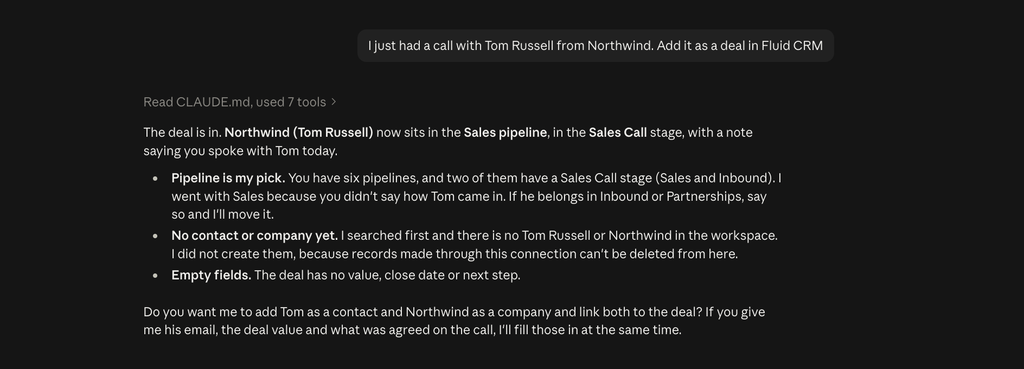
In an AI-connected CRM, you say one sentence to your assistant. “Log a call on the Northwind deal, they want pricing for ten seats by Friday. Move it to Proposal and remind me Thursday.”
The first is the least work and gives the software the most access. The third takes ten seconds and you decide exactly what gets written.
4 Questions That Show Whether a CRM Is Really AI-Native
Any vendor can put AI-native on a homepage, so ask the product four direct questions before you believe it.
Does the AI write to the record or only suggest?
A real AI-native CRM changes the record. It logs the email, moves the deal and fills the field without you clicking save.
Many products only show a suggestion in a side panel. That is useful, but you are still the one doing the data entry.
What happens if you switch the AI off?
Imagine the AI features disappeared tomorrow. If the product would still do its whole job, the AI was added on top and the CRM is AI-assisted.
If you would lose the thing you bought it for, it is AI-native. Neither answer is bad, but they are different purchases.
What does the AI cost after the first month?
Look at how the AI is charged. Some CRMs include it in the seat, some keep it for higher plans and some meter it with credits that every AI action uses up.
A metered CRM can be fair value. It also means the bill depends on how much the software does, which is hard to predict before you have used it for a quarter.
Can you see and undo what the AI changed?
An AI that writes to your pipeline will sometimes write the wrong thing. Ask where the log of its changes lives and how you reverse one.
If nobody can show you that screen in a demo, you will be finding its mistakes by accident.
What an AI-Native CRM Changes for a Small Team, and Where It Falls Short
An AI-native CRM brings real gains to a small team, so I’ll state them fairly first. A team that lives in email gets a pipeline that fills itself. Call prep takes minutes because the history is already there and the data stays fresher than any person would keep it.
For a team with a heavy inbox and no patience for typing, that is worth paying for. Four limits come with it.
It needs your inbox, your calendar and your calls
Automatic capture only works if the CRM can read everything. For most small teams that is fine, and for some it is a conversation with clients or a compliance question first.
It can fill the record with things that are wrong
An AI that logs every email will log the wrong ones too. It can attach a thread to the wrong deal or read a polite “not now” as interest.
Self-filling data still needs someone who looks at it. How many of your open deals were last updated by a person who checked them?
The AI is often metered
Credits are a common model for AI-native CRMs, which means every enrichment or agent action draws from a balance. I went through how that plays out in Attio vs Clarify.
The point here is about attention. A tool that counts usage gives you one more number to watch.
It does not make anyone open the CRM
This is the limit that matters most to me. At Fenixtal, my outbound agency, I booked 1,250+ sales calls for 50+ B2B clients, and I watched what happened to those leads afterwards.
They did not die for lack of features. They died on the days nobody opened the CRM, because a lead still needs a person to decide what happens next.
A pipeline that fills itself and a pipeline that someone works are two different things. More AI inside the app also means more panels and more suggestions on the screen, and a crowded screen is one reason teams stop using their CRM.
Kyler Thompson has a solo creative studio called Knight Theory, and he wrote this about the CRMs he tried before.
“Other CRMs force so many unneeded features onto me in the name of being an all-in-one, so I love that Fluid CRM is exactly what I needed, which is a clean, no-frills interface that does what I need and doesn’t annoy me with features that I don’t.”
5 AI-Native CRM Examples and What Makes Each One AI-Native
Lightfield, Clarify, Attio, folk and Day.ai show what an AI-native CRM looks like in October 2026. This is a set of examples and I have not ranked them. Each description comes from the vendor’s own homepage.
Lightfield
Lightfield uses the exact words AI-native CRM. It says the CRM updates itself from every call, email, meeting and Slack thread, drafts follow-ups and flags deals at risk.
That covers all three jobs, and capture is the centre of it. It suits a team that wants the record to fill itself and is comfortable connecting every channel to do so.
Clarify
Clarify describes itself as an autonomous CRM with agents that handle prospecting and follow-ups. It syncs with email and calendar, records and summarizes calls and turns them into next steps.
Of the five it puts agents furthest forward, with the word autonomous in its headline. It suits a team that wants software to take tasks off the list, and is willing to check what the agents did.
Attio
Attio does not use the words AI-native on its homepage, though it is usually put in this group. It lists live email and call data, automatic enrichment of every record, call recording and custom agents.
Its strength is the flexible data model underneath, which the AI then fills. It suits a team that likes to design its own CRM and has someone who enjoys that work.
folk
folk calls itself the AI CRM for your whole sales motion. It offers one-click enrichment, a browser extension that captures contacts and assistants that suggest and draft follow-ups.
It is the lightest of the five and the one that starts from your contacts. It suits people whose selling begins with a network and a list of names.
Day.ai
Day.ai’s homepage talks about a company brain more than a CRM. It takes in your team’s email, calendar, meetings and Slack, then has agents draft replies and flag stalled deals.
It shows where the far end of AI-native is heading, away from a pipeline you look at and toward a system you ask. It suits a team that already works by asking an assistant for everything.
Fluid CRM is the contrast case. It keeps the app plain and leaves the AI to the assistant you already use, which is the trade I’d make for a team under ten people.
If you want the list of CRMs that work this way, see my Claude CRM comparison. If you are leaving one of the tools above, my Attio alternatives post covers that.
AI-Native CRM: Frequently Asked Questions
It is better at keeping records current without typing, which matters most for teams that sell through a busy inbox. It is not better at getting a team to open the pipeline and act on it. Pick based on which of those two problems you have.
AI-native describes how the product is built, with AI in the foundation. Agentic describes what the AI does, which is to plan and carry out several steps toward a goal you set. An agentic CRM is usually AI-native as well, and not every AI-native CRM has agents.
There are three models. Some charge per seat with the AI included, and some charge per seat and sell AI actions as credits. AI-connected CRMs charge per seat, and the AI comes from the assistant plan you already pay for.
Not by the test in this post. HubSpot was a complete CRM long before its AI features arrived, and it would still do its job with them switched off, which makes it AI-assisted. It also has an official connector, so your own assistant can work in it too.
It depends on where your selling happens. If most of it is in email and calls, choose one whose main strength is automatic capture and check how its AI is charged. If your team is small and already uses an assistant daily, an AI-connected CRM does the same job with less inside the app.
No. Fluid CRM has no AI built into the app. It is an AI CRM in a different sense, because Claude, ChatGPT and other assistants can read and update your pipeline through its connector. For email it is BCC only today, with no two-way inbox or calendar sync and no AI notetaker.
Often, yes. Many established CRMs now have an official connector for Claude or ChatGPT, so your assistant can read and update the records you already have. Look for the connector in your assistant’s directory before you think about switching.
Do You Need an AI-Native CRM
Whether you need an AI-native CRM comes down to one question, which is whether your problem is typing or attention.
Who should buy an AI-native CRM
- Your selling happens in email and calls at volume, and what you lack is time to log it
- You are comfortable giving the CRM access to your inbox, calendar and call recordings
- Someone on the team will check what the AI wrote
- You have looked at how the AI is charged and the number works
If that is you, automatic capture is the feature to pay for. Fluid CRM is not the right pick, because it does not capture email automatically.
Who should not buy an AI-native CRM
- Your team is under ten people and already uses Claude or ChatGPT every day
- Your real problem is that nobody opens the CRM, which more AI inside the app will not fix
- You want a bill you can predict before you know how much the AI will do
- You have paid for features you never used before
A verified customer who works solo described that last one better than I can. “Clean, functioning and well thought design and not all the gimmickies that you pay extra, study forever and never use.”
If that is you, Fluid CRM is a calm pipeline your team opens, with your own assistant doing the typing from outside. It is one plan at $16 per seat per month or $144 per seat per year, charged in dollars, euros or pounds depending on where you log in.
Start your 7-day free trial here, no credit card required.