

You connected Claude to a few sales tools and it still can’t tell you which deal to chase today. Each tool answers for itself and none of them share a record, so the reply that came in this morning lives in one place and the deal lives nowhere.
The best Claude connectors for a small B2B sales team are Fluid CRM for the pipeline, Prospeo and Apify for lead lists and Instantly, HeyReach and Meta Ads for outreach. Fathom and Gamma cover calls and decks. Fluid CRM is the record the other seven write into.
I ordered these by where the lead is in its life, because a connector is only useful if what it finds ends up somewhere your team opens.
The 8 Best Claude Connectors for Sales at a Glance
The order below follows the job each connector does, from holding the record to closing the deal. It is not a quality ranking, and you do not need all eight.
| Connector | Stage | Job in the stack | Best for | How you add it | What Claude can do | Keep on ask-first |
|---|---|---|---|---|---|---|
| Fluid CRM | Record | Holds every deal, contact and reminder | Small B2B teams that want one pipeline | Official Claude connector, or the MCP URL in ChatGPT and other tools | Read and write, no delete | Bulk imports |
| Prospeo | Find | Builds B2B lead lists with work emails | Lists by job title, industry and company size | Hosted MCP URL with sign-in | Read only, spends credits | Bulk enrichment |
| Apify | Find | Scrapes niche lists from most public websites | Leads no database has | Claude directory, or the MCP URL | Read, and starts scrapers that cost usage | Any large scrape |
| Instantly | Reach | Cold email campaigns and replies | Teams already sending cold email | Custom connector with your API key | Read and write | Activating a campaign, sending a reply |
| HeyReach | Reach | LinkedIn outreach campaigns | Teams whose buyers answer on LinkedIn | MCP connection from your HeyReach workspace | Read and write | Starting a campaign |
| Meta Ads | Reach | Ad reporting and campaign setup | Lead gen ads on Facebook and Instagram | Custom connector with Facebook login | Read, write and some delete | Budgets, activating, anything deleted |
| Fathom | Close | Call recordings and summaries | Pulling what the buyer said on the call | Official Claude connector | Read | Nothing |
| Gamma | Close | Decks and one-pagers | A proposal deck the same day as the call | Official Claude connector | Creates new files, cannot edit old ones | Nothing, though each deck uses credits |
Three things to know before you connect the first one.
- A connector is a door. It lets Claude read from a tool and, if you allow it, change things inside it. The technical name is an MCP server, and my Claude CRM post covers how that works for CRMs.
- You can start on any Claude plan. Anthropic’s custom connector guide says custom connectors work on Free, Pro, Max, Team and Enterprise, with Free limited to one. On Team and Enterprise an owner adds the connector first and each member then connects their own account.
- Anything that sends, spends or deletes stays on ask-first. Claude asks before it uses a tool unless you click “Allow always”. Reading your pipeline is safe to allow, while launching a campaign or changing an ad budget should always wait for your yes.
The Claude CRM Connector That Holds the Record
A CRM connector is where Claude writes down what your other sales tools find. A lead list, a reply, an ad lead and a call summary all need one place to land, or they stay scattered across seven tools.
1. Fluid CRM (best for holding every lead in one pipeline)
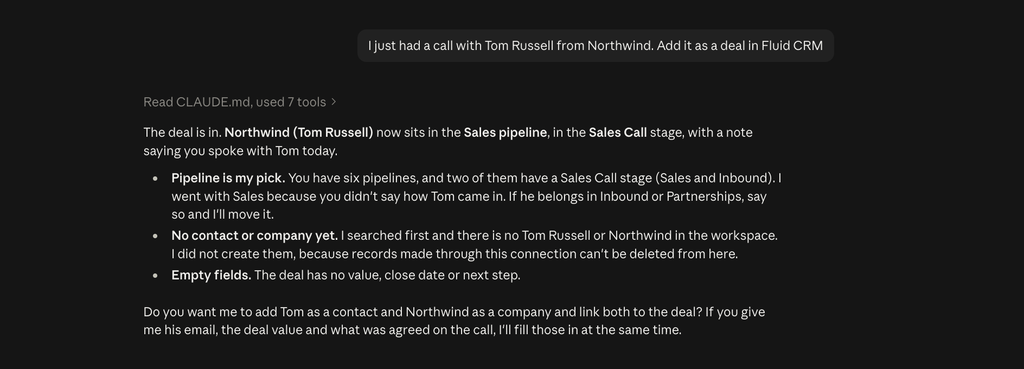
Fluid CRM is the sales CRM I built for small B2B teams. Through the connector, Claude can read your pipelines, deals, contacts, companies, reminders and activities, and it can create or update all of them when you ask.
Try this after a call: “Log a call on the Northwind deal, they want the proposal by Friday. Remind me Thursday morning.” Claude writes the note and sets the reminder, and you never open a form.
The connector cannot delete anything, and that is on purpose. It also does not send emails to your contacts, and changes to existing records ask for your approval first.
At Fenixtal, my outbound agency, I booked 1,250+ sales calls for 50+ B2B clients. Those leads rarely died on a bad call. They died because the reply sat in an outreach tool and never reached a place anyone opened.
Austin Verner, founder of Cold Emailers, fixed that leak with Fluid CRM’s API before the connector existed. “An easy deal view, reminders, and our interested leads from Smartlead auto-created via API. Our deal organization is 10x better.”
The line on his testimonial says what that bought him. “We’re capturing 100% of our interested leads.”
- Best for: B2B teams of 1 to 10 who want Claude to keep the pipeline current
- Not for: teams that need a built-in dialer or marketing automation, since Fluid CRM has neither
- How to add it: the official Claude connector in Claude’s directory. In ChatGPT and other AI tools, paste the MCP URL
https://mcp.fluidcrm.io/mcpand sign in - Plan: one plan at $16 per seat per month or $144 per seat per year, with the connector included. Prices show in dollars, euros or pounds depending on where you log in
Claude Connectors for Building Lead Lists
A lead list is where a lot of small teams stall before they send anything. These two connectors cover the two kinds of list you will ever need, the one a database has and the one it doesn’t.
2. Prospeo (best for B2B lists with verified work emails)
Prospeo is the lead database I pull most of my own lists from. Its official connector lets Claude search people and companies by filters like job title, industry and headcount, then enrich the ones you keep with a work email.
Try: “Find founders of marketing agencies with 5 to 20 people in the UK, and show me the first page before you enrich anyone.” Asking for the preview first matters, because a search costs one credit per page and enrichment costs credits per match.
Prospeo only reads and returns data, so there is nothing for Claude to break. The risk is spending credits on a list you did not check, which is why bulk enrichment belongs on ask-first.
- Best for: lists you can describe with filters
- Not for: local businesses or niche directories that are not in a B2B database
- How to add it: add
https://mcp.prospeo.ioas a custom connector and sign in to Prospeo - Plan: uses the credits on your Prospeo plan
3. Apify (best for niche lists no database has)
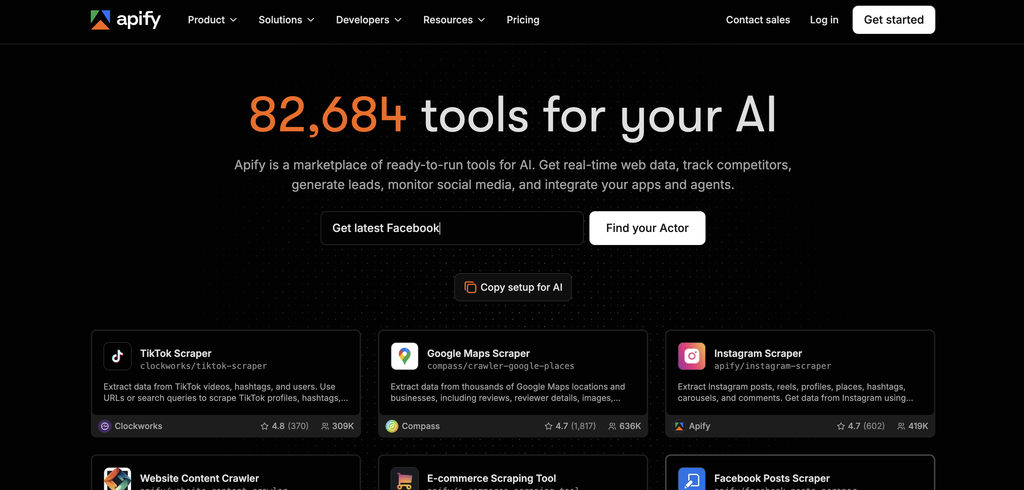
Apify is a library of ready-made scrapers, which it calls Actors. Through the connector, Claude can search that library, start an Actor and read the results back into the chat.
I reach for it when the buyers are not in a database. Think trade show exhibitor pages, Google Maps categories or members of an industry association.
Try: “Find an Actor that scrapes Google Maps, then pull every commercial cleaning company in Manchester with a website and phone number.” Claude picks the scraper, runs it and hands you a table.
Scraped lists come back raw. You still have to remove duplicates and check the emails before anything goes into a campaign.
- Best for: local, niche or event-based lead lists
- Not for: teams that want a finished list with no cleaning
- How to add it: search Apify in Claude’s directory, or add
https://mcp.apify.comand sign in - Plan: Actor runs bill to your Apify account the same as running them yourself
Claude Connectors for Cold Email, LinkedIn and Ads
Instantly, HeyReach and Meta Ads are the connectors that reach people. That makes them the ones where a wrong click costs real money or your sending reputation, so the ask-first rule matters most here.
4. Instantly (best for cold email campaigns and replies)
Instantly is a cold email platform, and its connector covers most of the daily work. Claude can create, update and pause campaigns, add and move leads, read and answer replies, verify emails and pull campaign stats.
Try: “Which of my active campaigns has the lowest reply rate this month, and what do the first lines of those emails have in common?” That takes a lot of clicking in the dashboard and one question in a chat.
The simple setup puts your API key inside the connector URL, so treat that URL like a password and never paste it into a screenshot or a shared doc. I connect mine with the config-file method instead, which keeps the key out of the URL.
Keep your cold email in a tool like this and out of your CRM. I explain the deliverability reason in why you should never send cold email from your CRM, and I compare the senders in my cold email software list.
- Best for: teams already sending cold email who want faster reporting and reply handling
- Not for: anyone hoping Claude will fix a bad list or a weak offer
- How to add it: in Claude, add a custom connector with the URL from Instantly’s help page and your API key
- Plan: needs an Instantly plan with API access
5. HeyReach (best for LinkedIn outreach campaigns)
HeyReach automates LinkedIn connection requests and messages across several accounts. I have used HeyReach itself but not through Claude yet, so this entry is based on what HeyReach documents.
Its official MCP works with Claude and ChatGPT. HeyReach says Claude can filter a lead list down to decision makers, launch a multi-step campaign, pull the replies and draft follow-ups.
Try: “From this list, keep only founders and heads of sales, then draft a two-step LinkedIn sequence and show it to me before anything starts.”
LinkedIn limits how many requests an account can send, and no connector changes that.
- Best for: teams whose buyers ignore email and answer on LinkedIn
- Not for: a single seller sending ten messages a day by hand
- How to add it: in HeyReach, open Integrations, choose HeyReach MCP Server, create an MCP key and copy the connection URL into Claude as a custom connector
- Plan: HeyReach says the MCP costs nothing extra on top of your subscription
6. Meta Ads (best for lead gen ads on Facebook and Instagram)
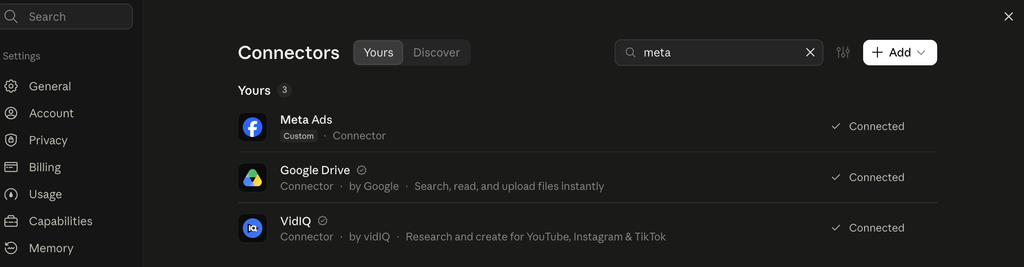
Meta Ads got its own connector from Meta in April 2026, and I use it on my ad account. Claude can report on spend and results, build campaigns, ad sets and ads, and change budgets and audiences.
The detail that makes it safe to try is that every campaign Claude creates starts paused. Nothing spends until the campaign is activated, so keep activation on ask-first.
Try: “Compare cost per lead across my active ad sets for the last 14 days and tell me which one to pause.” Reporting is where it saves the most time, because Ads Manager makes that comparison slow.
This connector can also delete creatives and audiences. Leave every write and delete tool on ask-first, since it touches a budget.
- Best for: small teams running their own lead gen ads without an agency
- Not for: teams with no ad budget yet, where a connector adds nothing
- How to add it: add Meta’s connector URL
https://mcp.facebook.com/adsas a custom connector and sign in with Facebook - Plan: needs a Meta ad account you have access to
Claude Connectors for Sales Calls and Decks
Fathom covers the sales call and Gamma covers the deck you send after it. After your last sales call, how long did it take before the notes reached your CRM?
7. Fathom (best for pulling call context into the deal)
Fathom records and summarizes your sales calls. I use Fathom on my calls but have not connected it to Claude yet, so this is what Fathom’s own documentation says.
It is an official Claude connector that you authorize by signing in. Once connected, you can ask Claude about your meetings, and on a team account an owner has to enable it first.
Try: “From yesterday’s call with Northwind, list every objection they raised and what I promised to send.” Then ask Claude to write those into the deal in your CRM.
Fathom’s connector reads your meetings and its docs show no way for Claude to change them. If you use another notetaker, Granola and Fireflies both have official Claude connectors too.
- Best for: sellers who take calls back to back and forget the details
- Not for: teams that do not record calls
- How to add it: find Fathom in Claude’s directory and click Connect
- Plan: Fathom says the connector is on every plan, the free one included
8. Gamma (best for a proposal deck the same day)
Gamma builds presentations, documents and simple web pages from a prompt. I make decks in Gamma but have not used it through Claude yet, so this entry follows Gamma’s documentation.
The official connector lets Claude create a new deck from whatever is in the chat. Gamma says you can set the theme, the amount of text and the export format in the same prompt.
Try: “Turn the Northwind call summary and their three objections into a six-slide proposal in my usual theme.” Because Claude already has the call and the deal in the same chat, the deck starts from what the buyer said.
Gamma’s docs say the connector cannot edit a deck that already exists. You finish the polish inside Gamma.
- Best for: founders who lose a day between the call and the proposal
- Not for: teams with a fixed sales deck that never changes
- How to add it: find Gamma in Claude’s directory and sign in
- Plan: works on every Gamma plan, and each deck uses Gamma credits
3 Sales Workflows That Chain These Connectors
One connector saves you clicks. Several of them in the same chat let Claude carry a lead from one tool to the next, which is where the time comes back.
From a blank page to a cold campaign
Ask Claude to build the list in Prospeo, show you the first 25 rows and wait. Once you approve it, have Instantly verify the emails and add the good ones to a draft campaign.
Claude creates the campaign and you switch it on. My cold email outreach playbook covers the copy and the sending setup that have to be right before that step.
From a positive reply to a deal with a reminder
Ask: “Check Instantly for interested replies since Monday, create a deal in Fluid CRM for each one with the reply as a note and set a reminder for tomorrow.” Every warm lead now sits in the pipeline with a next step.
This is the workflow that matters most. A positive reply that stays in the outreach tool is a lead you paid for and then lost.
The same hand-off can be wired through the API if you want it to happen without asking. A verified customer who builds automations wrote, “API for automations is well documented.”
From a sales call to a deck
Ask Claude to pull the call from Fathom, log the summary on the deal in Fluid CRM and build the proposal in Gamma. You review three things and write none of them from scratch.
What Claude Connectors Can’t Do (And Which Ones I Left Off)
Claude with eight connectors and no record is a sharp assistant with no filing cabinet. It helps in the moment, and nothing it found is stored anywhere your team can open. Know these three limits before you build on it.
- Claude only acts when you ask. Nothing here watches your inbox overnight. A reply that arrives on Saturday waits until someone opens a chat on Monday.
- Connectors spend real money. Prospeo searches use credits, Apify runs bill usage, Gamma decks use credits and Meta Ads spends budget.
- Your team still has to open the pipeline. Claude keeps the data current, and a person still decides which deal to work today.
A few well-known connectors are not on this list, each for a reason.
- HubSpot, Salesforce, Attio and Close are CRMs. You only need one, and I cover them in my Claude CRM post.
- Apollo overlaps with Prospeo. Pick one lead database and learn it properly.
- Clay does far more than list building. A small team’s needs are covered by Prospeo and Apify together.
- Smartlead has a connector that works and I send from it too. I listed Instantly because its connector covers more of the daily job.
- Gmail, Google Calendar and Slack are worth connecting, but they are general tools every team adds anyway.
- Zapier is the bridge for a tool with no connector of its own.
For the wider toolkit beyond Claude, see my list of sales tools for startups.
Claude Connectors for Sales: Frequently Asked Questions
No. Anthropic’s help page says custom connectors work on Free, Pro, Max, Team and Enterprise plans, and Free is limited to one custom connector. A sales stack with several connectors needs a paid plan in practice.
It is safe if you control which actions need your approval. Leave reading on “Allow always” and keep anything that sends a message, spends money or deletes data on ask-first. Check each connector for delete tools before you connect it, because some have them and some do not.
They are the same thing seen from two sides. An MCP server is what a software company builds so AI assistants can use its product, and a connector is what Claude calls it once you have added it.
Claude can use several connectors in the same conversation, which is what makes the chained workflows possible. I switch off the ones a task does not need, because in my own use Claude picks the right tool more often with fewer of them on.
Not without you. Claude can draft a campaign in Instantly and prepare a reply, and it asks for approval before it uses a tool unless you chose to always allow it.
Which Claude Connector to Add First
Start with the place the leads will live, then add one connector for whatever is slowing you down most.
- No leads yet: add Prospeo, or Apify if your buyers are not in a database.
- Leads but no replies: add Instantly or HeyReach and look at what your campaigns are telling you.
- Replies but no record of them: this is the expensive one, so connect your CRM before anything else.
- Calls but slow proposals: add Fathom and Gamma.
Fluid CRM is built to be that record for a small team, with the Claude connector included on its one plan.
Start your 7-day free trial here, no credit card required.
1 thought on “8 Best Claude Connectors for Sales Teams in 2026”
Comments are closed.