

Most small teams I’ve worked with don’t have a lead problem. They have leads arriving in three or four places and a CRM that only knows about the ones somebody typed in. The rest die quietly, and you already paid for every one of them.
A CRM for lead generation catches every lead your cold email, website forms and outreach produce, without anyone typing them in. It doesn’t create the leads. For small B2B teams and agencies, Fluid CRM is the best option, because leads arrive through its API, lead capture forms and AI chat.
Further down is a section on when Fluid CRM is the wrong pick.
What a CRM for Lead Generation Has To Do
A CRM for lead generation is a sales CRM set up so that every new lead lands in a pipeline by itself, with an owner and a next step. It doesn’t find leads for you. Cold email replies, website forms and your own outreach do that part.
A CRM doesn’t generate leads, and shopping as if it does sends you after features you won’t use.
At Fenixtal, my outbound agency, I booked 1,250+ sales calls for 50+ B2B clients. The campaigns worked. What I kept seeing afterwards was those leads sitting in a spreadsheet nobody trusted, or in a CRM the team disliked so much that it stayed closed for days.
A marketing agency would pay for a month of outreach, get the calls and then lose track of many of the people who said “talk to me next quarter”. Nobody decided to drop them. They were never written down anywhere that someone looked at.
So I judge a CRM for lead generation on four tests.
1. Do leads arrive without typing?
Every lead that depends on someone copying it over is a lead that can be lost on a busy day. The cold email reply, the form on your site and the person you met yesterday should all end up in the same pipeline with no copy and paste.
2. Does each lead get a next step with a date?
A lead with no reminder is a name in a list. The CRM should let you attach a date to every new lead, and ideally do it for you.
3. Will your team open it on a normal Tuesday?
Leads die on the days the CRM stays closed. A tool that makes logging one call a chore gets opened less, and no feature makes up for that.
4. Can your other tools and your AI assistant reach it?
Your sending tool, your website and your AI chat all hold leads at some point. A CRM they can’t write into leaves you as the only bridge between them.
3 Ways Leads Get Into Fluid CRM Without Typing
Leads get into Fluid CRM without typing in three ways. Your cold email tool sends them through the API, your website sends them through a lead capture form and your AI chat adds them when you ask.
From your cold email tool through the API
Smartlead and Instantly can fire a webhook, a short message sent the moment a lead is marked as interested. A middle tool such as Make or n8n catches it and calls the Fluid CRM API, which creates the contact and the deal.
Austin Verner, founder of Cold Emailers, described his setup as “an easy deal view, reminders and our interested leads from Smartlead auto-created via API.”
The full setup, step by step, is in my post on Instantly CRM integration. If you run outbound for clients, I compare the options in best CRM for outbound agencies.
From your website through lead capture forms
Fluid CRM has lead capture forms built in. You build the form, embed it on your site and each submission becomes a contact and a deal in the pipeline you picked.
OpaPopa, a verified customer who coordinates a European coaching network of about 80 coaches, calls the lead forms one of Fluid CRM’s best features. “No need for Typeform or Google Forms. Embed a form, and it auto-creates a contact and deal in the right pipeline.”
Kyler Thompson of Knight Theory, a solo creative studio, asked for embeddable forms during his trial. He wrote that he had always looked for a way to track his pipeline “while also making it really easy to intake said leads.”
I cover how to build one in how to create a lead capture form, and I compare the tools that include them in best CRMs with built-in lead capture forms.
From your AI chat
Fluid CRM connects to Claude, ChatGPT, Cursor or any tool that supports MCP, the open standard that lets an AI assistant work inside other software. Once it’s connected, you can tell the assistant about a lead in plain words.
Something like “add Dana from Northwind as a new deal in Discovery, note that she wants pricing and remind me Thursday” does the whole job. The assistant can find, create and update deals, contacts, companies and reminders, move stages and log calls, emails, meetings and notes. It can’t delete anything.
Be clear on what this is. The chat logs what you tell it to, and it doesn’t go out and generate leads.
Email works through a second connection. Fluid CRM can’t send email, but if your assistant is also connected to your Gmail and you’ve given it permission to send, it can draft and send the email from the same chat. The Gmail connection does the sending.
My Claude CRM post goes deeper on what an assistant can and can’t change in a CRM.
How To Work a Lead List Fast in Fluid CRM
Working a lead list fast in Fluid CRM comes down to the list reaching you, every lead having a date on it and the daily actions not needing a mouse. Getting leads in is half the job, and the other half is what happens on the days nobody opens the CRM.
Peter Duffy, who works in a small B2B team, described the daily use this way. “It feels intuitive and quick to use, which makes keeping the CRM up to date far less of a chore.”
Stop and think about your own list for a second. How many leads from last month could you name the next step for, right now, without opening anything?
The daily reminder digest
Fluid CRM sends a daily email digest of your reminders. On a day when the app stays closed, the list still reaches the inbox you were going to open anyway.
A reminder on each deal
Every deal can carry a reminder with a date. Switch on the auto-reminder automation in Fluid CRM’s in-app automations and every new lead from a form or the API gets a reminder by itself.
That automation has to be on for this to happen. Leads you add through the AI chat get a reminder when you ask for one in the same sentence.
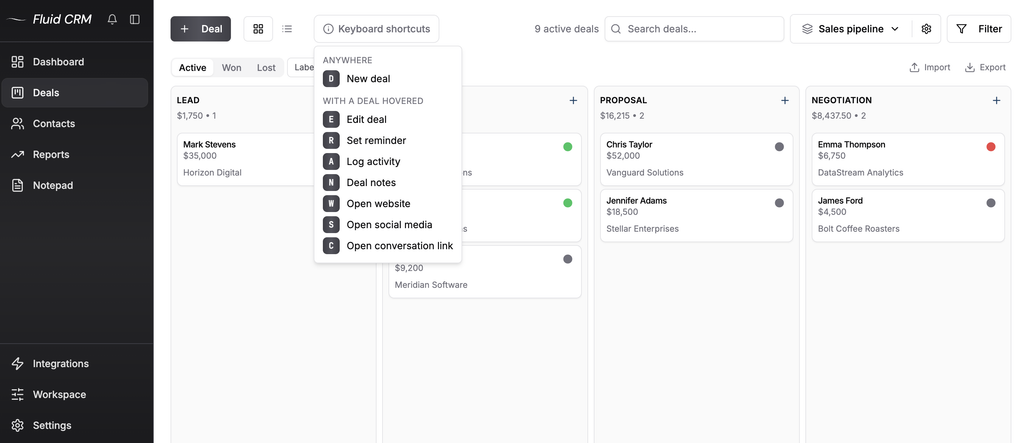
The 8 keyboard shortcuts
Fluid CRM has 8 keyboard shortcuts for the actions you repeat all day. They matter more than they sound, because a list of 40 new leads is 40 small actions and each extra click gets multiplied by 40.
A G2 reviewer in marketing and advertising summed up the speed this way. “It offers 90% of what most CRMs offer while only using about 20% of the time it takes when using them.”
5 CRMs for Lead Generation Compared
The five CRMs for lead generation below are compared on how leads get in, whether an AI assistant can reach them and what gives out first for a small team. Prices are per seat for the lowest paid plan.
| CRM | How leads get in | AI assistant access | Price per seat | What breaks first |
|---|---|---|---|---|
| Fluid CRM | API, lead capture forms, import, AI chat | MCP, included | $16 a month or $144 a year, one plan | No lead scoring, nurture flows or dialer |
| HubSpot | Free forms tool, many native integrations | MCP server | Free for 2 users, Starter $20 a month billed monthly | More system than a small team will set up |
| Pipedrive | API, web forms through the LeadBooster add-on | MCP server | Lite $14 a month billed annually | Web forms are a paid add-on, billed per company |
| Zoho CRM | Web-to-lead forms on every edition, API | MCP server | Free for 3 users, Standard $14 a month billed annually | Webhooks start at Professional, and setup takes real time |
| monday CRM | Forms, API | MCP server | Basic $12 a month billed annually, plans start from 3 users | Automations start on the Standard plan |
Fluid CRM
Fluid CRM is a simple sales pipeline that works best under 20 people. Every way in from the section above is part of the one plan, along with the reminders, the daily digest and the 8 in-app automations.
Best for small B2B teams and lead generation agencies whose leads come from cold email, a website form and their own outreach.
HubSpot
HubSpot has the widest set of ways in. Its forms tool is free, a form fill lands in the CRM by itself and most sending tools have a native HubSpot integration.
It’s also a marketing platform, with nurture emails and landing pages that Fluid CRM doesn’t have. Best for teams that want marketing and sales in one system and have someone to run it.
Pipedrive
Pipedrive is a sales pipeline first, with a mature API and a long list of integrations. Web forms and chat come through its LeadBooster add-on, which is billed per company.
Best for sales teams that want a deeper sales tool and are fine choosing a plan and add-ons to get there.
Zoho CRM
Zoho CRM includes web-to-lead forms on every edition, including the free one, and scoring rules from Standard. Webhooks start at Professional.
It can do nearly anything once it’s configured, and the configuring is the cost. Best for teams with the time to set it up, or already inside the Zoho family of tools.
monday CRM
monday CRM is built on monday’s work boards, so leads, deals and delivery work can sit in one place. Plans start from 3 users, and custom automations begin on the Standard plan.
Best for teams that already run their projects on monday and want sales next to them.
When Fluid CRM Is the Wrong Pick for Lead Generation
Fluid CRM is the wrong pick for lead generation when your process depends on scoring, nurturing or calling at volume. I’d sooner you find that out here than on day five of a trial.
- You need lead scoring. Fluid CRM has none, so if you get hundreds of inbound leads a month and need the system to rank them, pick a CRM that scores.
- You need nurture flows. There are no email sequences, drip campaigns or marketing automation. Fluid CRM tracks the lead and your other tools do the sending.
- You sell by phone at volume. There’s no dialer and no SMS. A CRM with calling built in, such as Close, is the better fit.
- You want every email logged by itself. Email logging works by BCC, with no two-way inbox sync.
- You run a call centre that sells leads. Lead distribution, per-lead billing and agent queues are a different product.
- Your sales team is over 20 people. Fluid CRM works best under 20 people, and bigger teams need permission and reporting depth it doesn’t have.
If two or more of those describe you, one of the other four in the table will fit better.
CRM for Lead Generation: Frequently Asked Questions
A CRM for lead generation is a sales CRM set up to catch leads from every source by itself and give each one an owner and a next step. The leads come from your cold email, forms and outreach. The CRM makes sure none of them go untracked.
No. A CRM stores and organises leads, and some include forms or chat widgets that collect them from visitors you already have. The demand still comes from your outreach, your content or your ads.
Yes. Use the native integration if your CRM is on the sending tool’s list, or a webhook into the CRM’s API if it isn’t.
No. Fluid CRM has no lead scoring, no nurture flows and no dialer. It has reminders, a daily reminder digest, lead capture forms, an API and 8 in-app automations.
For a small B2B team whose leads come from cold email, a website form and their own outreach, I’d pick Fluid CRM. For a team that needs lead scoring or marketing automation, HubSpot or Zoho CRM is the better fit, and for a team that sells by phone, Close.
Which CRM for Lead Generation To Pick
The right CRM for lead generation is the one where your leads arrive without typing and your team opens it the next morning. Count the places your leads come from today, then check that each one has a way in.
Fluid CRM is my pick for small B2B teams and agencies. It’s one plan at $16 per seat per month or $144 per seat per year, charged in dollars, euros or pounds depending on where you log in.
Start your 7-day free trial here, no credit card required.