

You want a form on your site that drops new leads straight into your sales pipeline. Simple ask. The problem is half the tools that rank for this don’t have a form built in at all, and the ones that do bury it behind a paid add-on. This list only covers CRMs where the form is real.
The best CRM with built-in lead capture forms is Fluid CRM, where a form submission lands straight in your pipeline as a deal. Capsule and Zoho have forms built in too. HubSpot includes free forms, and Pipedrive charges extra through an add-on.
Read How To Create Lead Capture Forms That Feed Your Pipeline next if you want a step-by-step tutorial.
What Counts As A Built-In Lead Capture Form
A built-in lead capture form means the form ships inside the CRM, not bolted on through a third-party tool you wire up later. That sounds obvious. It isn’t, because a lot of lead capture roundups mix in tools that aren’t CRMs at all, contact databases and event badge scanners that have nothing to do with your pipeline.
There are three honest states a CRM can be in:
- Built in: the form lives in the CRM and you turn it on without paying for anything extra.
- Built in but add-on: the form is the vendor’s own, but it sits behind a paid module you buy on top of your plan.
- Needs a connector: there’s no real form, so you bolt on Typeform or Google Forms and hope the data syncs.
Having a form is not the same as the form feeding your pipeline. A form that drops a lead into a dead inbox is worse than no form, because you think you’re covered and you’re not. Roundups skip this because it reframes the whole category. The winner isn’t the tool with the most form features. It’s the tool where the lead lands somewhere you’ll actually see it.
Kyler at Knight Theory, who runs a solo creative studio, said it plainly when she explained why she went looking. “So many CRMs don’t have them,” she said about native forms, and the ones that do are too complicated to justify the cost. That gap is the whole reason this post exists.
I saw the same gap from the other side at Fenixtal. Across 50+ B2B clients the most common failure wasn’t a missing form. It was the form feeding one place while the selling happened somewhere else, so leads slipped through the crack between them. If those leads land in a spreadsheet you update by hand, the gap is even wider. Google Sheets vs CRM covers why that handoff fails.
The 5 Best CRMs With Built-In Lead Capture Forms
These five CRMs all have a form you can build and embed without a third-party tool. They’re ranked by how cleanly the form feeds your pipeline and how much you pay to get it. Fluid CRM leads because the submission becomes a deal you can see and work, not just a contact sitting in a list.
1. Fluid CRM (best for a small team that wants the form and pipeline in one place)
Fluid CRM has lead capture forms built into the core product. You pick the fields, embed the form on your site and every submission lands in your pipeline as a deal in the stage you choose, with the qualifying answers attached to it. No add-on unlocks the feature. Both plans include it.
That last part matters more than it sounds. The submission doesn’t just create a contact you have to go find later. It shows up as a deal on the visual pipeline, which is the difference between a lead you’ll follow up on and one you’ll forget. If a few of you share the inbound leads, see how it works as a CRM for small sales teams.
Kyler at Knight Theory, a solo creative studio founder, chose Fluid for this. As she put it, she’d “tried more CRMs than I care to admit” before landing on a clean form-to-pipeline setup that didn’t fight her.
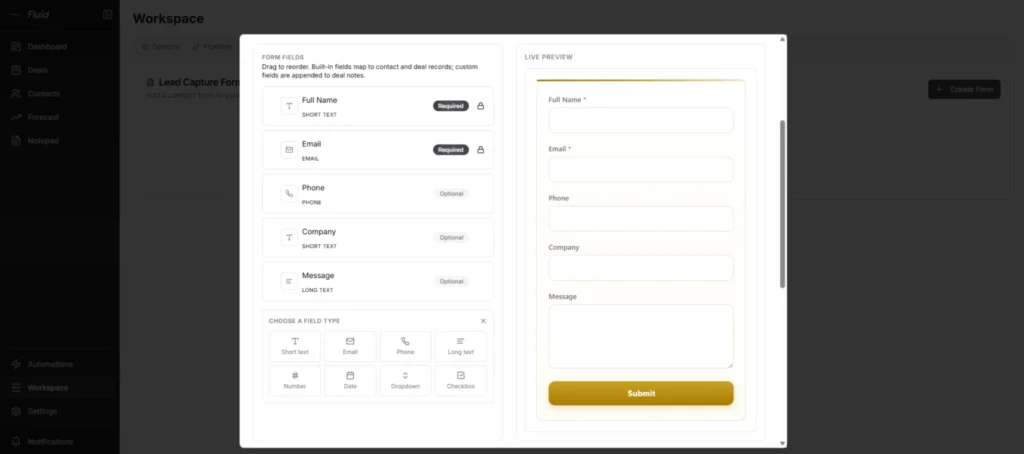
Where it falls short: Fluid CRM isn’t built for heavy marketing. No conditional form logic, no lead scoring, no behavior-triggered email sequences. If you need those, keep reading down the list.
Pricing: $16/seat/month or $144/seat/year, both plans feature-complete. 7-day free trial, no credit card required.
Watch this video to see how to create lead capture forms end-to-end in Fluid CRM:
2. Capsule (best free built-in form builder)
Capsule CRM has a genuine form builder inside the core product, not locked behind a marketing add-on. You toggle the fields you want, copy the embed code and put it on your site with no coding. It works on the free plan, and paid plans let you remove Capsule branding from the form.
One honest catch sits underneath that. The native form creates a contact and a task to review it, not a deal in your pipeline automatically. For a lot of small teams that’s fine. The native form also doesn’t support dropdown or list fields. If you need those, Capsule points you to Transpond, its separate marketing add-on, which is a paid extra on top of your plan.
Where it falls short: The free native form is plain, and dropdown or list fields aren’t supported on it. New leads land as contacts you convert into deals yourself, not as deals on the pipeline.
Choose Capsule over Fluid CRM if: You want a free tier to start on and you’re happy for new leads to arrive as contacts you sort by hand.
Pricing: free plan (2 users, 250 contacts), Starter $21/seat/month, Growth $38/seat/month. 14-day free trial, no card required.
3. HubSpot (best free forms if you accept the upgrade path)
HubSpot gives you lead capture forms on its free plan, which is more than most tools this cheap can say. You build the form, embed it and submissions create or update a contact in the free CRM. For a brand-new operation with no budget, that’s a real starting point.
The catch is the path it puts you on. Free forms carry HubSpot branding. Removing that branding means Marketing Hub Starter at $15/seat/month annual ($20 monthly). The features people actually want, conditional logic, smart fields and workflows that turn a submission into a deal, sit in Marketing Hub Professional, which runs $890/month for 3 seats plus a $3,000 one-time onboarding fee. The free tier is a real on-ramp. The climb from free forms to real form power is a cliff, not a step.
Where it falls short: The free forms are branded and basic, and the real form power is gated behind a steep jump to Professional.
Choose HubSpot over Fluid CRM if: You’re going to grow into full marketing automation and want the form, email nurture and lead scoring in one platform later.
Pricing: free forms (HubSpot-branded), Marketing Hub Starter $15/seat/month annual ($20 monthly) to remove branding, Marketing Hub Professional $890/month (3 seats) plus $3,000 onboarding for advanced form features.
4. Pipedrive (best if you already pay for LeadBooster)
Pipedrive‘s web forms are the vendor’s own, fully native to the CRM, and a submission drops straight into Pipedrive as a new lead or deal. The build experience is clean and the routing is solid. There’s one asterisk that decides whether Pipedrive belongs on your shortlist.
The forms live in the LeadBooster add-on, not the base subscription. LeadBooster runs from $32.50/month per company (billed annually) or $39/month (monthly), on top of whatever Pipedrive plan you already pay for. So a solo operator on the entry Lite plan is looking at the seat price plus the add-on before a single form goes live.
Where it falls short: You pay twice to get the form, once for the CRM seat and again for the add-on that holds the form.
Choose Pipedrive over Fluid CRM if: You already run LeadBooster for its chatbot and prospecting, so the web forms come along at no extra cost.
Pricing: base plans from $24/seat/month (Lite, monthly) plus the LeadBooster add-on from $32.50/month per company.
5. Zoho CRM (best native webforms across a wider price range)
Zoho CRM has web forms built into the product, native to the CRM, with submissions creating leads or contacts you can route to the right rep through assignment rules. It widens the price range on this list and fits teams already living in the Zoho ecosystem.
The thing to know is where the forms start. Zoho’s free plan (up to 3 users) doesn’t include web forms. They begin on the Standard plan at $20/seat/month ($14 billed annually). That’s still cheap, but it means the free tier won’t hand you a form the way Capsule’s or HubSpot’s free tier will.
Where it falls short: Zoho is powerful but fiddly. Expect real setup time to get it configured the way you want, and a heavier interface than the simpler tools above.
Choose Zoho over Fluid CRM if: You already use other Zoho apps, or you want deep customization and don’t mind the configuration time to get there.
Pricing: free plan (3 users, no web forms), Standard $20/seat/month ($14 annual) where web forms begin.
Lead Capture CRM Pricing And Native Form Comparison
This table lines up the five CRMs by how the lead capture form is delivered and what the cheapest plan with a working form costs.
| CRM | Native form status | Cheapest plan with the form | Price |
|---|---|---|---|
| Fluid CRM | Built in, lands as a pipeline deal | Either plan (both feature-complete) | $16/seat/month |
| Capsule | Built in, lands as a contact | Free tier (branding removal on paid) | Free, or $21/seat/month |
| Zoho CRM | Built in, lands as a lead | Standard | $20/seat/month ($14 annual) |
| HubSpot | Built in, free but branded | Free tools | Free, branded |
| Pipedrive | Built in via LeadBooster add-on | Any plan plus LeadBooster | from $24/seat plus $32.50/month per company |
The pattern across the table is simple. Only one of these lands a form submission in your pipeline as a deal without an add-on or an upgrade. The rest either drop the lead in as a plain contact, brand the free version or charge you separately for the form itself. That’s not a knock on any of them, it’s just the spec you’re buying.
How To Make A Lead Capture Form Convert
A lead capture form only earns its place if people actually fill it out. Picking the CRM is half the job. The other half is building a form that converts, and that comes down to a few things you control: how many fields you ask for, how clearly you explain the trade and how fast you follow up. For that last one, our post on how fast to respond to leads sets a target by lead source.
Keep the fields tight
Every field you add costs you submissions. HubSpot’s analysis of more than 40,000 landing pages found conversion rates peak around three fields and fall as you add more. Ask for what you need to qualify the lead and nothing else. Name, email, one or two qualifying questions. You can learn the rest on the call. Our guide to lead scoring shows how to turn those answers into a score.
Give a real reason to submit
People hand over their details when the trade is obvious. A vague “Contact us” button gets ignored. “Get a quote in 24 hours” or “See if we’re a fit in 10 minutes” tells the visitor exactly what they get back. Match the promise to where the person is, a light ask for a browser and a firmer one for someone ready to buy.
Match the form to the page it sits on
A pricing-page form and a blog-footer form shouldn’t ask the same thing. Someone on your pricing page is close to buying, so a couple of qualifying questions are fair and even useful to them. Someone who just read a blog post is browsing, so ask for an email and little else. Put the heavier form where intent is high and the lighter one where it’s low, and both convert better than a single form copied across every page.
Follow up while the lead is warm
Speed is the whole game with inbound. A form that feeds an inbox you check on Fridays might as well not exist. This is why the form landing in your pipeline as a deal matters so much. You see it, it carries a follow-up reminder and you act while the lead still remembers filling it out. If you want the step-by-step on building one of these forms, I covered the full setup in How To Create Lead Capture Forms That Feed Your Pipeline.
Frequently Asked Questions
No. Plenty of CRMs market “lead capture” but actually mean you connect a separate form tool like Typeform or Google Forms through an integration. Others, like Pipedrive, keep the form in a paid add-on. Built in means the form ships inside the CRM and a submission lands in your records without a third-party tool in the middle.
On the free tier, Capsule and HubSpot both give you a working form at no cost, though HubSpot brands its free forms and Capsule’s native form brings leads in as contacts. If you want the submission to land as a pipeline deal on a paid plan, Fluid CRM does that at $16/seat/month with every feature included.
Yes, but only on some tools. Fluid CRM creates a deal in the pipeline stage you choose the moment someone submits. Pipedrive’s LeadBooster forms can create a deal too once you pay for the add-on. Capsule’s native form and HubSpot’s free form create a contact instead, and turning that into a deal takes extra setup or a higher tier.
Yes. HubSpot’s free CRM includes forms you can build and embed, and submissions create or update a contact. The free forms carry HubSpot branding, and advanced form features like conditional logic and workflow routing need paid tiers, with the real automation starting at Marketing Hub Professional.
For sales, usually yes. Typeform and Google Forms are great at collecting answers, but the data sits outside your pipeline until you sync or import it, which is the exact gap where leads die. A native CRM form skips that step, so the lead and its answers are in the system you sell from right away.
Conclusion
A form is only as good as where the lead lands. The tools that bury it in an add-on or drop it into a plain contact list all leave the same gap, the one between capturing a lead and following up on it. If you want the form and the pipeline in one place, Fluid CRM lands every submission as a deal you’ll see and work.
Start your 7-day free trial, no credit card required.