

A CRM (customer relationship management) is software that keeps every customer and every deal in one shared place. It shows who each person is, what was said, what the deal is worth and what happens next. In Fluid CRM, each deal is on a visual pipeline with a reminder for its next step.
CRM Meaning and What It Replaces
CRM stands for customer relationship management. People use the phrase for three different things, which is why the term confuses so many first-time buyers.
Sometimes it means a business strategy, the idea that you should know your customers and treat them well. Sometimes it means a habit, the way a team writes down every conversation. Most of the time, and in this guide, it means the software.
Wikipedia’s entry on customer relationship management covers the strategy side and its long history, while this guide sticks to the tool a small team logs into.
For a small team, a CRM takes over a job that is now spread across five places. Think of Gmail, a Google Sheets or Excel file, a calendar, a notebook and whatever someone remembers on the drive home. Our CRM statistics page shows how many small firms use one.
Picture a made-up solo recruiter with nine clients hiring and 40 candidates in play. The client who asked for a shortlist “by Thursday” lives in one email thread, the salary range lives in a notebook and the date she promised to call back lives nowhere at all.
A CRM puts each of those facts on the record for that client, next to the date of the next step. Nothing about her work changes except where she looks first in the morning.
You can build something close to this yourself, and our guide to a Google Sheets CRM shows how with three tabs. The catch is that a sheet never reminds you of anything, so the follow-up date still depends on you opening the file.
What Does a CRM Do? The 7 Jobs
A CRM does seven jobs for a small team, and each one replaces something you do by hand today. The third column is the problem most people notice before they buy one.
| Job | What it means | What happens without one |
|---|---|---|
| Keep every contact in one place | Name, email, phone, company and role, saved once | The same person sits in three inboxes with two spellings |
| Track each deal and its value | Every sale you are trying to win has its own record with a dollar value | Nobody can say what the open work is worth |
| Show the pipeline by stage | Deals sit in columns such as New, Call booked, Proposal, Won | You find out a deal stalled when the client goes quiet |
| Remind you of the next step | Each deal has a date for what happens next | Follow-ups happen when someone happens to remember |
| Keep the history | Notes, emails and calls stay on the deal in date order | A colleague who takes over has to ask you everything |
| Catch new leads | A form on your website creates the contact and the deal | Website leads wait in an inbox until someone copies them over |
| Report what is open and likely to close | Totals by stage and a forecast of what closes next | Revenue for next month is a guess |
The benefits every vendor guide lists come straight out of that table. You answer people faster, you lose fewer deals to silence and the whole team sees the same numbers.
Fluid CRM does all seven. Lead capture forms create the contact and the deal for you, emails are logged by BCC and the forecast page projects the next three months from the deals you have open.
What a CRM does not do
The CRM itself does not find leads, write your emails or close a deal. It holds the work and tells you what is due, and the selling is still yours.
That matters because a lot of teams buy one hoping it will fix a slow month. If nobody is replying to your outreach, a CRM will give you a very tidy record of nobody replying.
Inside a CRM: What a Small Team Sees When It Logs In
The easiest way to understand a CRM is to follow one deal through it. Here is a made-up web project for a dental clinic, moving through the screens of Fluid CRM.
The pipeline board
The deal starts as a card on the board, in the first column. Each column is a stage and each card shows the person, the company and the value, so the whole pipeline fits on one screen.
The colored dot on a card shows the state of its reminder. Green means it is due today and gray means it is set for later.
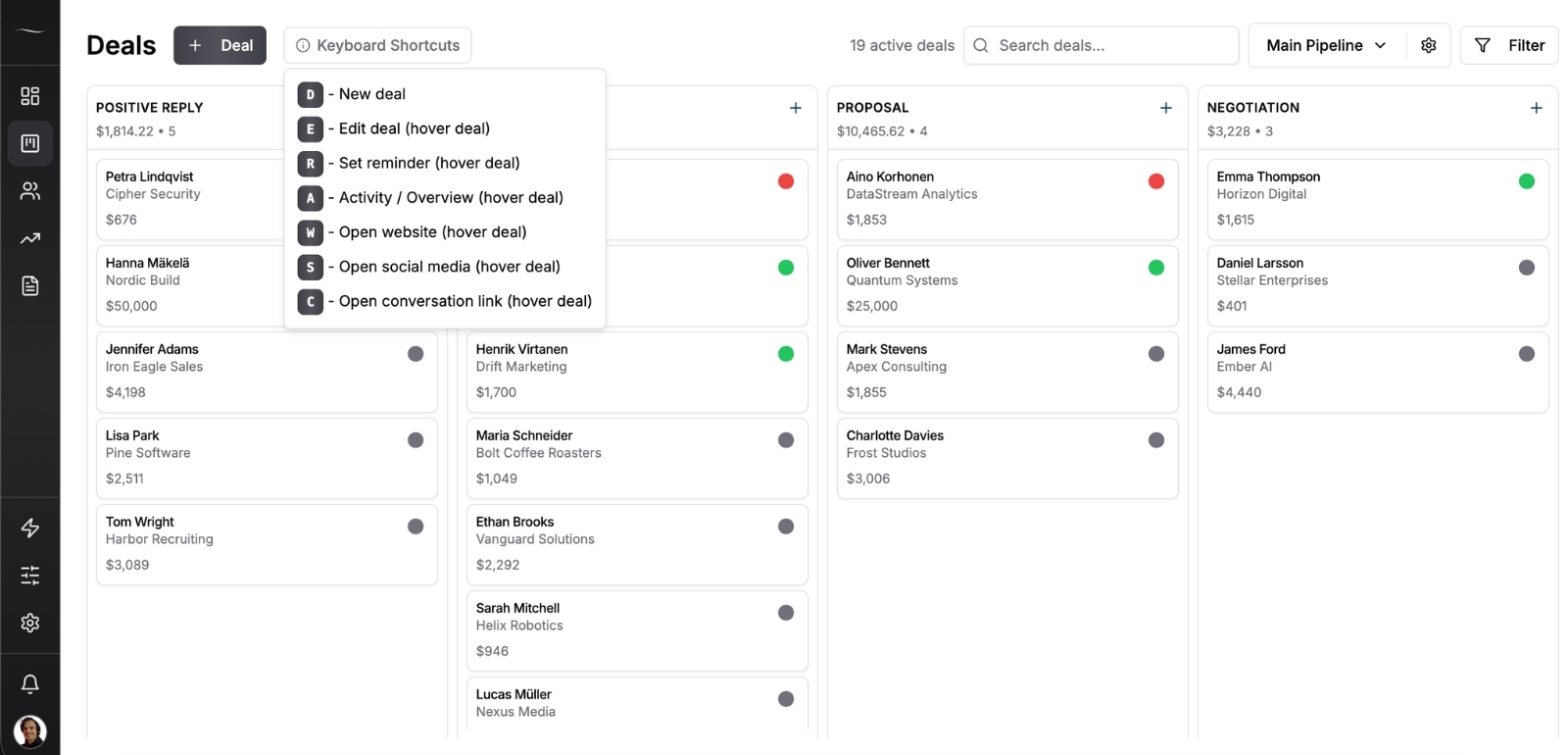
When the clinic books a call, you drag the card one column to the right. That one move is most of what “updating the CRM” means on a normal day.
The deal itself
Click the card and the deal opens. It holds the value, the stage, the expected close date, the next action, the reminder and the contact’s details, with the notes and email history below.
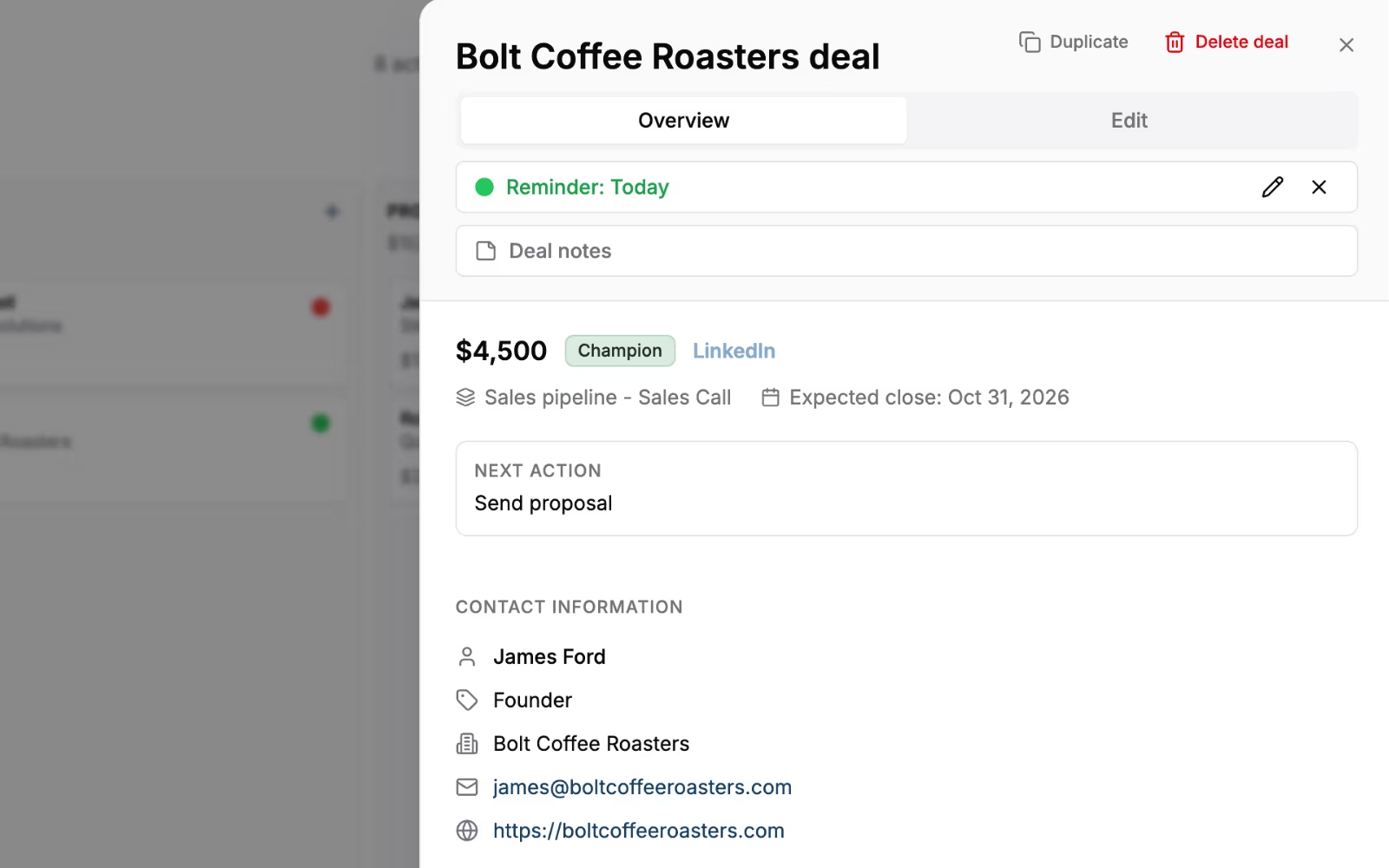
Emails land here when you add your Fluid CRM address to the BCC line of an email you send.
Contacts and companies
The contacts page lists every person and company, with how many deals each one has and what they are worth. Creating the clinic’s deal already created the office manager as a contact and the clinic as a company. If people are all you need to track, our guide to contact management software compares the tools built around them.
What each of those records stores, field by field, is the subject of our guide to the CRM database.
The dashboard and the forecast
The dashboard opens with four numbers, which are active deals, overdue reminders, reminders due today and total pipeline value. The forecast page shows what is likely to close, by stage and by month.
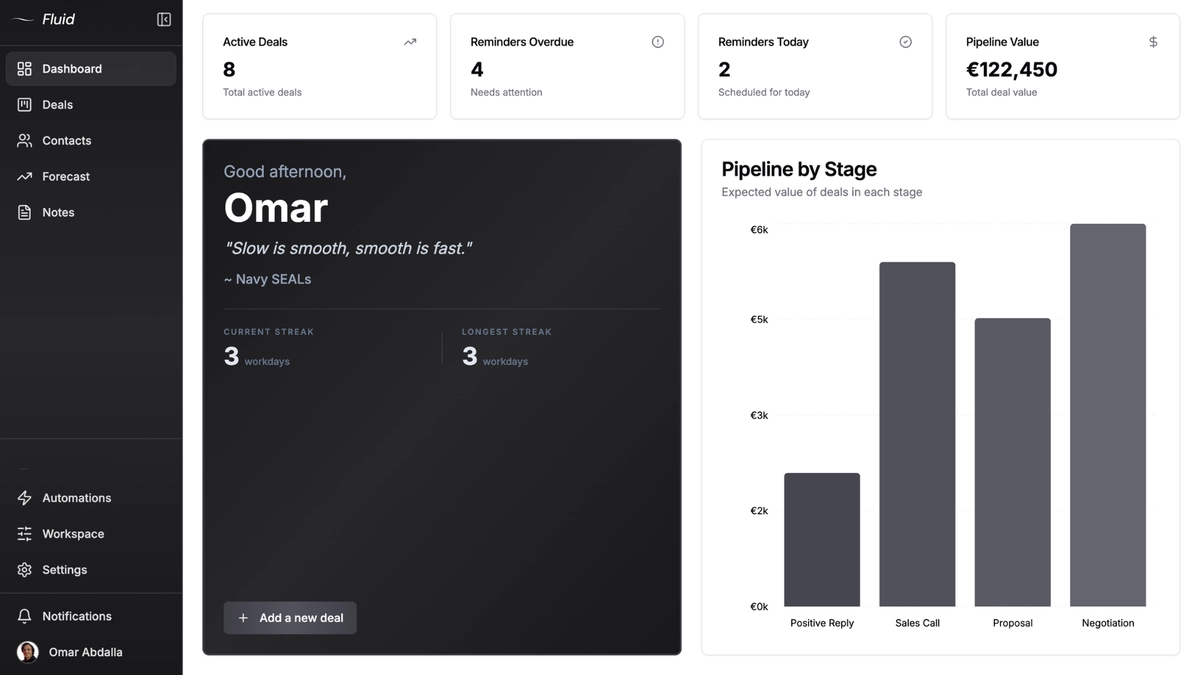
That is the whole tool for most teams of one to ten. A simple CRM is those screens done well, with nothing in the way.
Types of CRM: The Textbook Three and the Split That Matters
Every guide to CRM software lists the same three types. They are useful vocabulary, so here they are in one table.
| Textbook type | What it is about | Where you meet it |
|---|---|---|
| Operational | Running the daily work of sales, marketing and service | Pipelines, reminders, email sequences |
| Analytical | Studying customer data for patterns | Dashboards, forecasts, reports |
| Collaborative | Sharing customer information across departments | Shared records, handoffs between teams |
In my experience these three describe big-company software projects far better than a small team’s choice. Nobody at a five-person firm goes shopping for “an analytical CRM”, and almost every product sold today does a bit of all three.
The split that changes what you buy is this one.
| What you are really choosing | Built for | Fits | Watch out for |
|---|---|---|---|
| Sales pipeline CRM | Moving deals from first contact to won or lost | Agencies, consultants and B2B teams that sell to other businesses | Marketing email is usually missing or basic |
| All-in-one sales and marketing suite | Pipeline plus email campaigns, automation and landing pages | Teams with someone whose job is marketing | Features on higher plans and a long setup |
| Industry CRM | One trade, such as law, real estate or insurance | Firms that need that trade’s fields and rules | Little use outside the trade |
| Account management tool | Looking after clients after the sale | Teams whose revenue is renewals and repeat work | Weak at winning new business |
Fluid CRM is a sales pipeline CRM. One verified customer who mainly wanted to manage ongoing contact with existing clients after the sale wrote in a review that it can be made to do that with some creativity. That is not the job it was built for.
Price follows the type too. An all-in-one suite such as HubSpot runs from a free plan for up to two users to $150 per seat a month on Enterprise, because each plan up adds more of the marketing side.
If you want named products, our list of CRM examples puts 15 real systems side by side by use case.
How a Small Team Uses a CRM Day to Day
A CRM shows its value on a normal workday, not in a demo. Here is a normal day for a made-up three-person IT support company that sells monthly support contracts to local offices.
9:00 a.m., the reminder email arrives
Fluid CRM sends a daily digest at 9:00 in each person’s own time zone, and it is on by default. It lists the deals with a reminder due today and the ones that are overdue.
The owner reads it with her coffee and already knows her first three jobs. Nobody had to open the app to find out.
9:10 a.m., ten minutes on the board
She opens the board and works down the reminders. An accounting office that went quiet gets a short check-in email, and she sets the next reminder for Friday before she moves on.
A law firm said yes on the phone yesterday, so its card moves to Won. Every open deal she touches gets a new next-step date, which is the one habit that keeps the board up to date.
11:30 a.m., an email goes out and gets logged
Her colleague sends a proposal to a new architect client and adds the Fluid CRM address to the BCC line on the way out. The email lands on the deal, so anyone who opens it later can read what was offered.
2:00 p.m., a website form creates a deal
A property manager fills in the contact form on the company website. Fluid CRM creates the contact, the company and a deal on the board, so the lead is waiting there instead of sitting in an inbox.
4:30 p.m., the AI logs the last call
After a call with the property manager, the owner asks Claude to log a note on that deal. Fluid CRM’s MCP connector writes it in, so the record is current even though she never opened the board.
Monday, a short look at every open deal
Once a week the three of them spend about half an hour going through every open deal together. Anything with no next step gets one, and anything that died weeks ago gets moved to Lost.
Why leads die in the days after the call
Across more than 1,250 sales calls I booked at Fenixtal, the leads that died almost never died on the call. They died in the days after it, when the next step lived only in someone’s head.
When did your team last open the place your open deals live?
The first day matters as much as the hundredth. A verified customer who manages client relationships put it this way.
“I’ve never been able to hit the ground running so quickly and with minimal friction.”
A verified G2 reviewer in IT services wrote about the part that keeps a team coming back every morning.
“Probably my favorite UI/UX of any CRM I’ve used. It’s clean, uncluttered and incredibly easy to navigate.”
Who a CRM Is For
A CRM helps anyone with more open conversations than they can hold in their head, and anyone who sells alongside a second person. It can wait while you are one person with a handful of deals from one source, and our guide do I need a CRM gives the full test.
Leads die on the days the CRM stays closed, so the right tool is the one your team will actually open each morning.
When you are ready to set one up, our guide to CRM implementation covers it step by step, and our guide on how to choose a CRM gives seven steps for comparing tools.
Fluid CRM is a simple CRM with one plan and every feature in it, at $16/seat/month or $144/seat/year.
Start your 7-day free trial here, no credit card required.
Frequently Asked Questions
CRM stands for customer relationship management. The term started as the name of a business idea and now mostly means the software that supports it. When someone says “our CRM”, they nearly always mean the tool.
A small business uses a CRM to keep its contacts, open deals and next steps in one shared place. It shows what each deal is worth, which stage it is in and what is due today. Most small teams use it so no open deal dies without a next step.
No, although sales is where most small teams start. Some teams use extra pipelines for hiring, partner deals or client onboarding. Ongoing account management after the sale is where a sales CRM is weakest.
A CRM covers everything up to and around the sale, which means people, deals and conversations. An ERP runs the back office, such as stock, orders, invoices and accounting. Small service businesses usually need a CRM long before an ERP.
Some can. Fluid CRM has an MCP connector for Claude and ChatGPT, so you can ask the assistant to add a deal, log a note or list what is due. The AI does the typing from outside the app, so the pipeline stays current even on days nobody logs in.