

You picked a CRM, opened the settings and found forty things you could configure. Many guides to CRM implementation then hand a small business a project plan that runs for weeks. A team of five does not need the plan, and it still has six choices to make before the first deal goes in.
CRM implementation is setting up a CRM so your team works from it every day. For a team of 1 to 10 with one pipeline, open deals in one file and no integrations, my estimate is one afternoon for the six setup decisions, the import and inviting a second person. In Fluid CRM the board itself is ready in minutes.
What CRM Implementation Means for a Team of 1 to 10
CRM implementation is the work between buying a CRM and a team using it every day. It covers the setup, the data that goes in and the habits that keep it current.
The long version exists for companies with systems to connect, permissions to design and hundreds of people to train. If you need integrations on day one, or more than about ten people are starting together, it is for you too.
A team of 1 to 10 has none of that. You have a list of open deals, a way you already sell and one or two people who need to see the same thing. Your CRM implementation plan is a checklist, and the one in this post fits on a page.
Most small teams start from a spreadsheet or from nothing, which is the case this post is written for. Those teams want a simple CRM that works before anyone has designed anything.
At Fenixtal, my B2B outbound agency, we built 12M€+ in pipeline for 50+ B2B clients, and I watched leads we had generated die because nobody opened the client’s CRM.
The Six CRM Setup Decisions to Make Before You Import Anything
Setting up a CRM for a small team comes down to six decisions. Make them in this order, because each one shapes the next, and write the answers down before you touch the import.
1. Start with one pipeline
A pipeline is one board with its own stages. Start with one, for the thing you sell most, and add a second only when a different kind of work truly has different stages.
Renewals are a fair second pipeline, since “Renewal sent” means nothing for a new enquiry. A pipeline per salesperson or per lead source is not, because the stages are the same and you lose the one shared view.
There is one exception, and it comes from decision 6. People you want to stay in touch with, who are not buying anything yet, get their own small pipeline, which the checklist adds in the first month.
Fluid CRM has unlimited pipelines on its one plan, so the limit here is your attention and not the price.
2. Name each stage after a milestone
A stage is a milestone that happened, not a task you repeat. “Proposal sent” is a milestone. “Follow up” is a task, and a deal can sit in it forever without anyone learning anything.
Use five to seven stages and start with five. Here is a set that works for most service businesses.
- Enquiry
- Discovery call
- Proposal sent
- Verbal yes
- Won
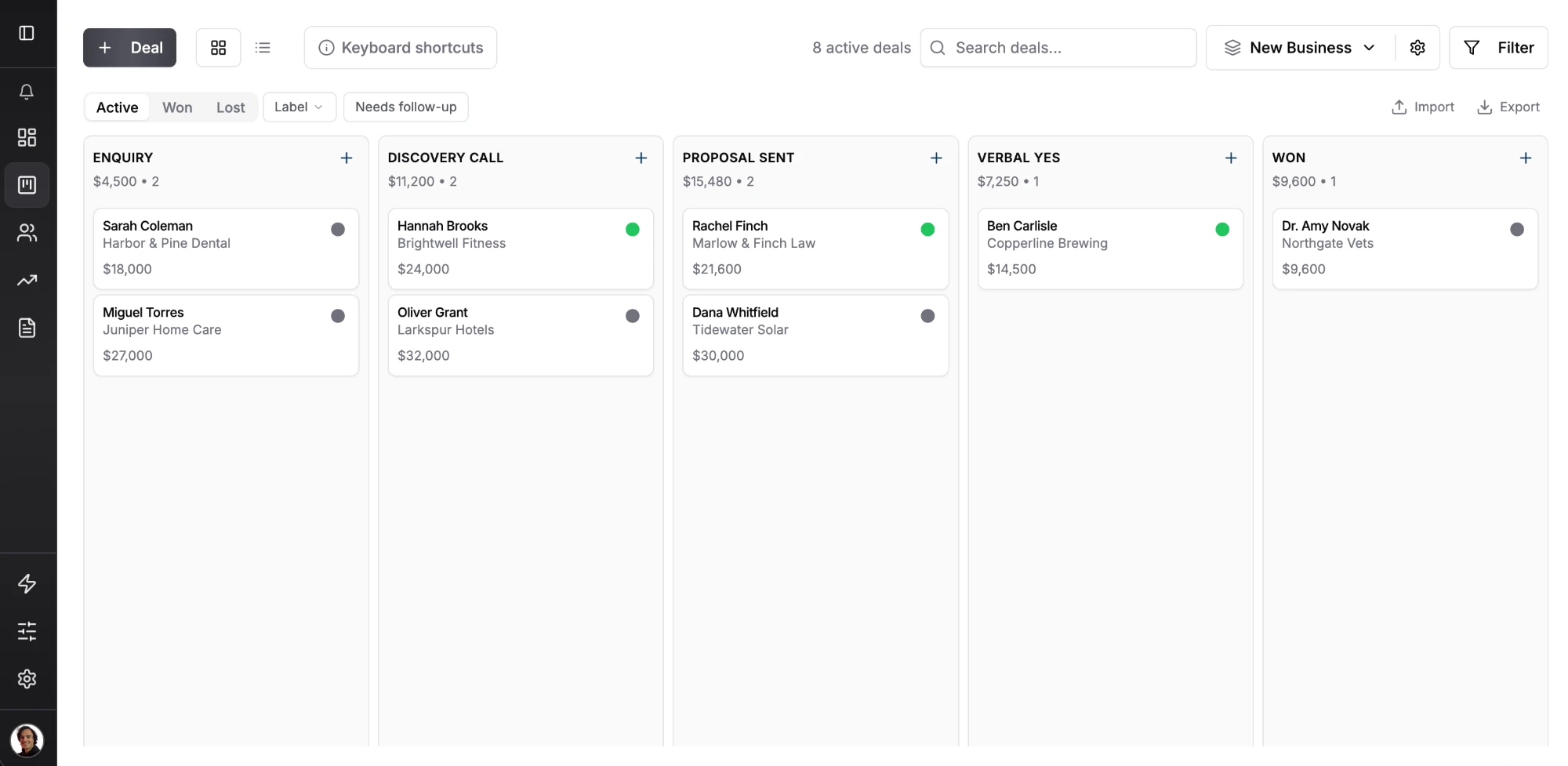
If two people on your team would put the same deal in different columns, the stage names need work. The reasoning behind each stage is in my post on sales pipeline stages.
3. Choose a custom field or a label for each extra detail
A CRM comes with built-in fields such as value, source and expected close date. Everything else you want to track is either a custom field or a label, and the table in the next section shows which one fits.
Cap it at three or four custom fields on day one. Add a field only when you would look at it every week. Fluid CRM has unlimited custom fields in text, number and date types, which is exactly why the cap has to be yours.
4. Import open deals and the people in them
Bring in the deals that are open today and the people in them.
Customers and your opt-out list also belong in the new CRM, and my CRM migration checklist explains how to bring those across. The rest of the old list stays in the file, where you can still find it.
In Fluid CRM you import deals from a CSV file with columns such as contact_name, company, email, phone, value, stage, reminder_date and notes. Creating a deal also creates its contact and company, so one file is enough. The click-by-click version is in the Fluid CRM import guide.
If your spreadsheet has no clear structure yet, my post on building a Google Sheets CRM shows the columns worth having before you export.
5. Decide how email gets into the CRM
Fluid CRM logs email by BCC only. You add your Fluid CRM address in the BCC line and the email is filed against the deal, and it has no inbox sync, so replies do not log themselves. For a small team that usually means the important emails are in the CRM and the rest stay in the inbox.
Whichever tool you use, agree with the team that proposals, prices and anything a colleague would need if you were away get logged.
6. Put the reminder on the deal
Reminders are the reason a CRM beats a list, so decide where they live before anyone starts using calendars and sticky notes again. The answer is on the deal, with a date.
Here is the rule I would give the whole team. Every open deal has a next step with a date, and a deal without one is not open.
In Fluid CRM a deal holds one reminder at a time, and the daily email digest shows you which ones are due. That is why a person you only want to remember needs a card. Put them in a “Staying in touch” pipeline with a reminder a few months out, and the reminder shows up on the right day.
Custom Field or Label? A Short Table
A custom field holds a value that is different on every deal, and a label marks a group that several deals belong to.
Check the built-in fields first, because some of what you want is already there.
| What you want to track | Use | Why |
|---|---|---|
| Lead source, deal value, expected close date | Already built in | source, value and expected_close_date are standard fields |
| Contract end date | Custom field, date | A different date on every deal |
| Number of seats or sites | Custom field, number | A different number on every deal |
| Who referred them | Custom field, text | A different name on every deal |
| Industry | Label | A handful of groups |
| Product or service they asked about | Label | A handful of groups |
| VIP | Label | Yes or no |
| Do not contact | Label | Yes or no |
Star the two or three fields you want to see without opening the deal, and Fluid CRM shows them on the deal card. If you want the fuller picture of how deals, contacts and companies fit together, my post on what a CRM database holds explains each record.
How to Implement a CRM: The Plan in Four Time Blocks
This is the whole plan, so copy it, delete the lines that do not apply and work down it. The times in the headings are my estimates for one pipeline and one clean file. The CRM implementation steps are numbered straight through so you always know where you are.
Before you start (30 minutes, on paper)
- Write down your five stage names, each one a milestone.
- List the three or four extra details you track today and mark each one “field” or “label”.
- Copy your open deals into one clean file, one row per deal, with a header row and a
labelcolumn for the labels from step 2. - Add a column with the next step and a date for every row.
- Decide who the second person is and tell them which day they are joining.
The first hour (in the CRM)
- Open your pipeline, name it and set your five stages.
- Create the custom fields and star the two or three that matter most.
- Add five real deals by hand before you import anything, and move one of them a stage.
- Fix whatever felt wrong, which is usually a stage name or a field nobody could fill in.
- Import the rest of the file and check ten deals against the spreadsheet.
- Make sure every open deal has a reminder with a date.
The first week (one small task a day)
- Day 1, the same afternoon. Invite the second person and have them add their own deals.
- Day 2. Send your next proposal with the BCC address on it.
- Day 3. Work only from today’s reminders for one morning, with the sheet closed.
- Day 4. Hold your weekly sales catch-up from the board and nothing else.
- Day 5. Count the open deals with no reminder, and fix the setup if the number is not zero.
- Archive the old sheet as read-only so nobody keeps two versions.
The first month (add one thing at a time)
- Delete any custom field that is empty on most deals.
- Merge any stage that never holds a deal for more than a day.
- Add the “Staying in touch” pipeline if people are being kept in your head.
- Add one extra, and only one, such as a lead capture form on your website or an automation.
- Connect Claude or ChatGPT to the CRM if you already work in one of them.
Step 8 is the one people skip, and it is where a bad stage name shows up while it is still quick to change.
Zero automations on day one is deliberate, because you cannot automate a process you have not done by hand for a week.
How Long Does CRM Implementation Take for a Small Business?
For a team of 1 to 10, CRM implementation takes about one afternoon by my estimate, and it depends on how many pipelines you need, how clean your file is and whether anything has to connect to another system.
That estimate is the first two blocks of the checklist plus step 12: about 30 minutes on paper, about an hour in the CRM and the rest of the afternoon for inviting the second person and having them add their own deals. It is my own estimate and not a measured average, and it assumes a simple CRM such as Fluid CRM, one pipeline, open deals in one file and no integrations.
Yannick, a verified customer, described what he had been looking for this way.
“I had been looking for a solution like this for a long time: something that is not overly complicated, offers a beautiful and user-friendly experience, and can be implemented quickly.”
You will see small-business timelines of several weeks quoted all over the web, usually by firms that sell the setup.
Three things make a small-team setup take longer than it should.
- A messy file. Mixed columns and merged cells have to be sorted before the import.
- Over-building. Every extra stage, field and automation is one more decision.
- Waiting for agreement. Two days on the wrong stage names teach more than two weeks of debate.
Why CRM Implementations Fail in Small Teams
In a small team a CRM implementation rarely fails on launch day. It fades over a few weeks, and in my experience the cause is nearly always a setup choice that made the tool slower to use than whatever came before it.
The five I would check first are too many stages, a field for everything (my post on CRM data entry shows which to delete), the whole archive imported, reminders kept outside the CRM and one person owning the board alone. All five are setup problems, and the six decisions above are the fix.
Some causes sit in the tool and not in your setup, such as slow logging or a home screen built for reports, and I cover those in 6 reasons your team won’t use the CRM.
What To Check in Week Two Before You Add Anything Else
Week one tells you whether the data arrived. Week two tells you whether the setup fits how you work, because by then the novelty has gone and only habit is left.
Count these five things at the end of the second week.
- Did each person open the CRM on most working days without being asked?
- Does every open deal have a reminder with a date?
- Is the old spreadsheet still closed?
- Did the second person add or move a deal on their own?
- Has anyone asked “where do I put this?” more than once?
Each miss points to a setup fix. Deals without reminders usually mean the stages are doing the reminder’s job, so cut the task-like stages.
A spreadsheet that is open again means something in it is missing from the board, which is a field to add or to star. The “where do I put this?” question means a stage name or a label is unclear, so rename it.
Fix two things at most, then leave the setup alone for another two weeks. A setup that changes every few days never becomes a habit.
A CRM implementation for a small team is finished when nobody talks about the CRM any more and the deals keep moving. If you are starting from a spreadsheet and want a simple CRM to try this checklist on, Fluid CRM gives you the board, the reminders and the import on one plan.
Start your 7-day free trial here, no credit card required.
FAQ
For a team of 1 to 10 with one pipeline, open deals in one file and no integrations, about one afternoon is a fair estimate. That covers the six setup decisions, the import and inviting a second person.
Decide six things first. Those are how many pipelines, what the stages are called, which details are custom fields or labels, what to import, how email gets in and where reminders live. Then add five real deals by hand, import the rest, put a reminder on every open deal and invite a second person the same afternoon.
Not for a simple CRM and a team of 1 to 10. If you can export a spreadsheet and name five stages, you can do the setup yourself. Paid help makes sense when you have custom integrations to build or a large amount of data to move between complex systems.
With a simple CRM the cost is the seats and a few hours of your own time. Fluid CRM is $16 per seat per month or $144 per seat per year with every feature included. Costs rise when a tool needs paid onboarding, custom integrations or a consultant.