

What you know about your customers sits in your inbox, a spreadsheet and your own head. A CRM database puts it in one place, and for a team of 1 to 10 it is much smaller than the vendor guides make it sound.
A CRM database is where a business keeps everything it knows about its customers and prospects. It holds contacts, companies, deals, activities and reminders as linked records instead of loose rows, so one customer shows every related record. In Fluid CRM, creating a deal also creates its contact and company.
What a CRM Database Is in Plain Words
Definition: A CRM database is the place where a business stores, organizes and looks up what it knows about its customers and the people it hopes to sell to.
You click around in the CRM, and the database is the information saved underneath it. When you drag a deal to a new stage, the screen is the CRM and the saved change is the database.
A customer database is the same idea with a narrower name. It usually means a list of people and what they bought, while a CRM database also holds the sales you are still working on and the date you plan to write to each person next.
A small team needs five kinds of record and about fifteen fields, which is all this guide covers.
What CRM Data Is: The 5 Kinds of Record in a CRM Database
CRM data is every fact your business has saved about a customer, and in a CRM database it is sorted into five kinds of record. A record is one saved thing, such as one person or one deal.
| Record | What it holds | What it links to | Why you keep it |
|---|---|---|---|
| Contact | One person and how to reach them | Their company and their deals | So you know who to write to |
| Company | One business you sell to | Its contacts and its deals | So a person leaving does not erase the customer |
| Deal | One sale you are trying to win, with a value and a stage | One contact and one company | So you know what is open and what it is worth |
| Activity | One thing that happened, such as a call, an email or a note, with its date | The deal it belongs to | So anyone can read what was said |
| Reminder | One date with the next thing to do | The deal it belongs to | So the next step has a day |
The links are the part a list cannot give you. A contact record points at a company record, a deal record points at both and each activity and reminder points at its deal.
Custom fields are the sixth thing you will hear about, although they are not a record. A custom field is an extra box you add yourself, for a fact your business cares about and the software did not think of, such as the date a customer’s contract ends.
If your customer list lives in Google Sheets or Excel today, this is the main change you would notice in a simple CRM. The same facts are there, each saved once and linked to the others.
Every CRM arranges these records a little differently. In Fluid CRM the reminder sits on the deal, and a deal holds one contact and one reminder at a time.
CRM Database Examples: One Customer Across Every Record
Salesforce, HubSpot and Pipedrive are the names people give when asked for CRM database examples, and our list of CRM examples sorts 15 products by what each is good for. The example below shows what sits inside the database for a single customer.
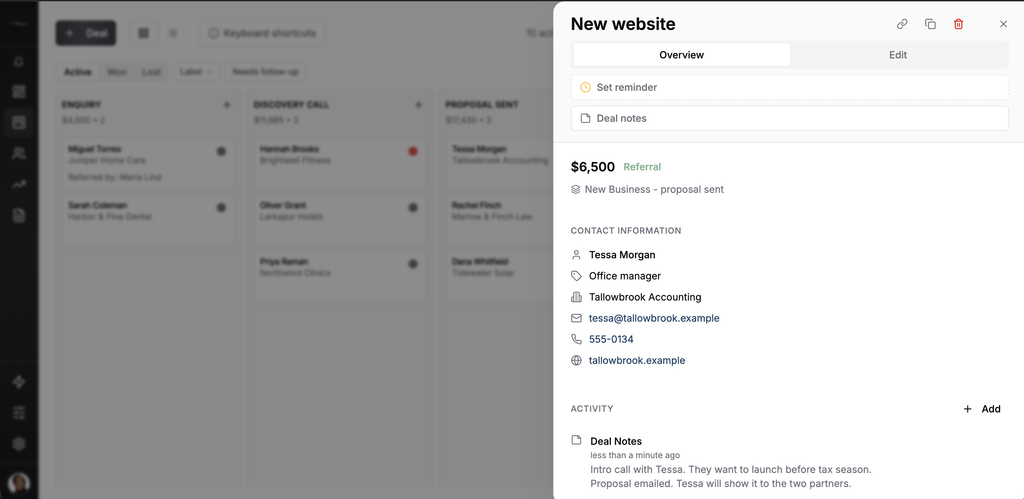
Tallowbrook Accounting is a made-up firm of twelve people that wants a new website from a made-up web studio of three. Here is everything the studio knows about that customer after two weeks, split into the five kinds of record.
| Record | What is saved |
|---|---|
| Company | Tallowbrook Accounting, tallowbrook.example |
| Contact | Tessa Morgan, office manager, tessa@tallowbrook.example, 555-0134 |
| Deal | New website, $6,500, stage is Proposal sent, came from a referral, owned by Sam |
| Activity | March 3, intro call with Tessa. They want to launch before tax season |
| Activity | March 6, proposal emailed. Tessa will show it to the two partners |
| Reminder | March 13, call Tessa about the partners’ answer |
That is six records for one customer, with each fact saved once. Tessa’s email address is saved on her contact record and nowhere else, so changing it there changes it everywhere it shows.
The links matter a few months later. Suppose the studio wins the website and Tallowbrook then asks about a monthly care plan, which becomes a second deal linked to the same company.
Nobody types the company or Tessa’s details again. Anyone on the team who opens the company can see the finished website, the open care plan and every note along the way.
One shorter case shows how the same five records fit another kind of work.
A marketing agency with a retainer client. One company record, two contacts (the owner and the marketing manager) and two deals over the year, which are the first project and the renewal. The activities on the first deal tell whoever handles the renewal what was promised.
CRM Fields Worth Keeping and the Ones to Leave Out
A small business should keep about fifteen fields in its CRM database, spread over the five kinds of record. A field is one box on a record, such as the email address on a contact.
This is the list I would start a team of 1 to 10 on if it sells to other businesses, which is why it has a follow-up date and an owner and no birthday or loyalty tier.
- Contact (4 fields). Name, email, phone and job title.
- Company (2 fields). Company name and website.
- Deal (6 fields). Deal name, value, stage, source, owner and notes.
- Activity (2 fields). What happened and the date, which also gives you the last contact date.
- Reminder (1 field). The next follow-up date.
Copy the list as it is. Job title tells you if the person can say yes, source tells you where your customers come from and owner tells a team of three who is responsible for each deal.
Most of the fifteen are already there the day you sign up for a CRM. The ones you add yourself are custom fields, where three or four is plenty for a small team.
In Fluid CRM a custom field can hold text, a number or a date. Which facts deserve one, how to name your stages and what to import first are setup choices, and our guide to CRM implementation goes through each of them.
What to leave out of a CRM database
Every field is a small job somebody has to do on every record, so the fields you leave out matter as much as the ones you keep. These are the ones I would skip.
- Facts you could look up in ten seconds. Employee count, yearly revenue and a postal address you will never post anything to.
- Personal details with no use in the sale. Birthday, age and home address.
- Scores and ratings. A “lead score” or a 1 to 5 “interest” box that each person fills in differently.
- Card numbers and passwords. These never belong in a CRM, not even in a notes box.
One marker is worth adding even to a short list. When someone asks you to stop emailing them, write it on their record the same day, so the next person on your team sees it before they hit send.
The less personal detail you keep, the less you have to protect and explain if a customer asks what you hold on them. If your CRM already has dozens of fields that nobody fills in, our post on CRM data entry shows how to find them and delete them.
CRM Database vs Spreadsheet: One Row or Linked Records
A spreadsheet keeps one row per thing and a CRM database keeps linked records, and that is the whole practical difference.
Put the Tallowbrook example into Google Sheets or Excel and it becomes one row.
| Company | Contact | Deal | Value | Status | Last note | Next step | |
|---|---|---|---|---|---|---|---|
| Tallowbrook Accounting | Tessa Morgan | tessa@tallowbrook.example | New website | $6,500 | Proposal sent | Showing it to the partners | Call March 13 |
That row is easy to read and it is fine for one deal. The trouble starts with the second deal, because the care plan needs a new row and Tessa’s name and email get typed a second time.
Now the same person lives in two rows. If she changes her email, somebody has to remember to fix both, and the “Last note” cell only ever holds the latest note because the earlier ones were typed over.
| What happens | In the sheet | In a CRM database |
|---|---|---|
| A second deal for the same company | A new row, with the company and contact typed again | A new deal linked to the company that is already there |
| The contact changes her email | Fix every row she appears in | Change it once on her contact record |
| You want the history | The latest note, in one cell | Every activity, in date order |
| The next step is due | You open the file and look | The reminder has a date and shows up on that day |
| A colleague takes over | They read the row and ask you the rest | They open the deal and read it |
A spreadsheet can be made to do more than this, and our guide to building a Google Sheets CRM gets closer to linked records with three tabs and a few formulas. When to stop is a separate question that Google Sheets vs CRM answers sign by sign.
3 Habits That Keep a CRM Database Clean
A CRM database stays clean when three small habits are kept. None of them needs an administrator.
1. Search before you add
Type the company name or the email address into the search box before you create anything. Duplicates almost always start with someone adding “Tallowbrook” while “Tallowbrook Accounting” was already there.
Two records for one customer split the history in half, so neither one can be trusted.
2. Update the record before you close the email
Add one line about what was said and set the date of the next step while the call is still in your head.
A deal with a note and no next date is only half updated, because the note says what happened and nothing says what happens next.
3. Spend 15 minutes a month on a sweep
Once a month, go through the open deals and look for three things, which are deals with no reminder, deals nobody has touched in 60 days and customers that appear twice. Sixty days is my rule of thumb, which a business with long sales can double.
Fix or close each one as you find it, because a deal that died in the spring and still sits in the pipeline makes every total on the screen wrong.
Can you say right now how many of your open deals have no next step date?
Where CRM Data Lives and Who Can See It
CRM data lives on the vendor’s computers, which is all “in the cloud” means, and you reach it through a login. That makes four questions worth asking any vendor before your customer list goes in.
- Where is it hosted? Ask for the country and the hosting company, in writing.
- Who on my team sees what? Ask whether everyone sees every record and what roles exist.
- How do we sign in? Ask whether there is a second step after the password.
- How do we get it out? Ask whether you can export your data to a file.
Here is how we answer them. Fluid CRM hosts your core workspace data, the deals, contacts and notes, in the EU on AWS in Stockholm. It has two-factor authentication, and it has import and export.
Everyone on the team sees the same deals and who owns each one, and each person is an owner or a member.
If the hosting country matters to your customers, our guide to choosing a CRM with EU data hosting shows how to check a vendor’s claim instead of taking it on trust.
Do You Need a CRM Database Yet
You do not need a CRM database while one person keeps one tidy list and can find any customer’s last conversation in a few seconds. A spreadsheet that gets opened every week beats a database that does not.
You need one when the facts about a single customer sit in more than one place. The usual signs are a second deal for a company you already have, a contact whose new email you had to fix in two places and a note you had to search your inbox to find.
If you are still unsure, our post that answers do I need a CRM gives a short test you can do this week.
When the answer is yes, start small. Set up the five kinds of record, keep the fifteen fields and bring in only the deals that are open today.
Fluid CRM is a simple CRM built for exactly that size of job, with one plan at $16/seat/month or $144/seat/year.
Start your 7-day free trial here, no credit card required.
Frequently Asked Questions
A CRM is software built on top of a database. The database stores the records for contacts, companies, deals, activities and reminders, and the CRM is the set of screens you use to read and change them. In everyday talk people use the two words for the same thing.
A customer database is a list of customers and what you know about them. A CRM database holds the same people and also the sales you are still working on, the history of each conversation and the date of the next step. A customer database tells you who bought, and a CRM database also tells you what to do next.
A small business that sells to other businesses should keep about fifteen fields. They are the contact’s name, email, phone and job title, the company’s name and website, the deal’s name, value, stage, source, owner and notes, what happened in each activity with its date and the next follow-up date. Leave out anything nobody will fill in.
Yes, for one person with a short list of open deals. A spreadsheet keeps one row per thing, so it works until the same customer needs a second row, a second person needs the history or a next step gets missed. At that point linked records save more time than the spreadsheet does.