

Most lead scoring advice was written for a marketing department that sees thousands of leads and can’t read them all. A team of four with 30 new leads a month reads every one. The problem it has is smaller and more urgent, which is deciding who gets the first call today.
Lead scoring ranks leads by how likely they are to buy. For a small team, five yes-or-no questions (three about fit, two about intent) give each lead a score from 0 to 5 that decides who gets called today. In Fluid CRM, that score is a number field on the deal card.
What Lead Scoring Means When Every Lead Gets Read
A lead score answers two questions about a person who just got in touch. Could they become a good customer, which is fit, and are they buying now, which is intent? A lead needs both to be worth a call today.
The guides at the top of Google mostly score behavior. They give points for opening an email, visiting the pricing page or downloading a guide, then pass a lead to sales once it crosses a line such as 70 points out of 100. That works when software tracks every visitor and nobody has time to read the leads.
Predictive scoring goes further. Software studies your past wins and losses and learns which traits led to a sale, so it needs a long history of closed deals before it can beat five good questions.
A small team has the opposite situation. You have few leads and you read each one, so the reply itself tells you more than any click count.
What you lack is a shared rule, so two people looking at the same inbox call the same person first.
I’ve read more than 5,000 positive replies across Fenixtal’s clients and my own outreach.
An “interested” from a three-person shop with no budget looks exactly like an “interested” from a 40-person agency that wants a price. Calling them in the right order is the whole value of a score.
The score also has to be where the team looks every morning. In a sales team CRM it belongs on the deal itself, next to the next step and the reminder, not in a column of a spreadsheet nobody opens.
How to Build a Lead Scoring Model in 5 Steps
A five-question lead scoring model takes an afternoon to set up and about 30 seconds per lead after that. Fit and intent are what most guides call demographic and behavioral data, or fit and engagement. Here they come from what the lead is and what the lead said, not from tracking clicks.
Step 1: write down who already pays you
Open your list of current customers and note what the best of them share, such as the type of business, the team size and who signed. If you already have an ideal customer profile, compress it into one line. Question 1 below is that line, and it beats any persona document because these people actually paid you.
Step 2: write five yes-or-no questions
Each question gets a yes or a no, and a yes is worth 1 point. Copy this table as it is, then change the “counts as yes” column to match your business.
| # | Question | Type | Counts as yes when |
|---|---|---|---|
| 1 | Do they look like customers we’ve already won? | Fit | Same kind of business and a similar size to the customers who pay you today |
| 2 | Are we talking to the person who decides? | Fit | Owner, founder or head of the team that will pay, or they’ve said they sign |
| 3 | Did they describe the problem we solve? | Fit | In their own words, without you suggesting it |
| 4 | Did they ask a buying question? | Intent | Price, start date, contract terms, how to get started or a request for a call |
| 5 | Is there a date or a trigger? | Intent | A deadline, a contract ending, a new hire, a launch or a busy season coming |
Step 3: let fit outweigh intent, three questions to two
Add the points and every lead gets a score from 0 to 5. Fit gets three questions and intent gets two on purpose. A lead that is a perfect fit but has no reason to buy this month should land in the middle.
A lead with a deadline and nothing else in common with your customers can’t reach the top.
Step 4: give each score an action
A score that changes nothing is just a number. Tie each band to what happens today.
| Score | Tier | What you do |
|---|---|---|
| 4 to 5 | A | Reply or call today, before anything else on the list |
| 3 | B | Follow up this week with one specific question that would turn a no into a yes |
| 0 to 2 | C | Move it to a nurture pipeline or close it as not a fit |
Step 5: check the score against wins every quarter
Once a quarter, list the deals you won and the tier each one started in. Mostly A means the model works. A lot of B and C means one question is pointing at the wrong thing, so look at what those wins had that the question missed.
The knockout rule (instead of negative scoring)
Big models subtract points for bad signs, but a small team does better with a knockout. One hard no sets the score to 0, whatever else is true. Examples are a country you can’t serve, a budget a tenth of your smallest project, a student doing research or a competitor checking your prices.
Why yes-or-no beats a 1-to-10 scale
Two people scoring the same lead on a 1-to-10 scale will argue about whether it’s a 6 or a 7. Ask them whether the person mentioned a deadline and they’ll agree in a second. Yes-or-no questions make the score the same no matter who on the team fills it in.
If your leads still sit in Google Sheets, add a Score column to the free lead tracker template and use these five questions to fill it.
Fit Signals and Intent Signals That Actually Predict a Sale
The hard part of scoring is telling a strong signal from a weak one. Most of the signals the big models count are weak for a small B2B team, because they measure attention instead of buying.
| Signal | Strength | Why |
|---|---|---|
| Asked what it costs for their team size | Strong intent | Nobody prices something they aren’t considering |
| Asked how to get started, or for a call | Strong intent | They’re already picturing the next step |
| Named a date or an event | Strong intent | Gives the deal a reason to close this month |
| Opened your email three times | Weak intent | Preview panes and security scanners trigger opens too |
| Visited the website or downloaded a guide | Weak intent | Curiosity, research or a competitor |
| “Interesting, send more info” | Weak intent | Usually a polite way to end the conversation |
| Looks like a past customer | Strong fit | Your own wins are the best predictor you have |
| Owner or founder of the buying company | Strong fit | The person replying is the person who pays |
| Big, famous logo | Weak fit | Unless you’ve sold to companies that size before |
A simple way to handle cold email replies is to sort each one into Interested, Meeting Request, Information Request or Out Of Office. A meeting request is a yes on question 4 straight away. An information request only counts when the question is about price, timing or how to start.
A reply asking “what exactly do you do?” is research, not buying. Austin Verner, who runs a cold email agency, has his interested replies from Smartlead created as deals in Fluid CRM through the API, so every reply lands on the board ready for someone to score it.
Fit is where most small teams fool themselves. A director at a large company feels like a great lead, but if every customer you’ve ever won has 5 to 20 staff, that director scores 0 on question 1. Your won deals decide what fit means, not the job title.
A Worked Example: Scoring Three Leads From One Monday
Here is the five-question lead scoring model applied to three leads from one Monday morning. This is an illustration, built around a three-person web design studio that wins most of its work from local service businesses.
| Lead | Where from | What they said | Q1 | Q2 | Q3 | Q4 | Q5 | Score | Tier |
|---|---|---|---|---|---|---|---|---|---|
| Office manager, 12-person accounting firm | Website form | “What would a new site cost? We want it live before tax season.” | 1 | 0 | 1 | 1 | 1 | 4 | A |
| Founder, 4-person SaaS startup | Cold email reply | “Interesting, send more info.” | 0 | 1 | 0 | 0 | 0 | 1 | C |
| Owner, 6-person physio clinic | Referral | “Our site is embarrassing. Is this the kind of thing you do?” | 1 | 1 | 1 | 0 | 0 | 3 | B |
The accounting firm gets a call before lunch. The office manager isn’t the decider, so the one question on that call is who signs off and whether they can join the next conversation.
The physio clinic gets one email this week. It asks the question that would earn the missing points, something like “is there a date you’d want the new site live by?” A date moves the clinic to A.
The founder looks like the best lead on paper, with a big title and a fast-growing industry. It scores lowest because nothing says they’re buying and the studio has never won a SaaS client. That lead goes to the nurture pipeline with a reminder in a month.
Look at the last five leads in your inbox. Which one would you call first, and could you say why in one sentence?
A-tier leads are also the ones where reply time matters most, so pair this model with a speed to lead routine for anything that scores 4 or 5.
When to Drop BANT and What to Ask Instead
BANT stands for budget, authority, need and timeline. It’s one of the best-known lead qualification checklists in sales, and it was built for large deals with a finance team and a buying committee on the other side. For many small B2B teams, two of its four letters do more harm than good.
Budget is the first to break. A buyer looking at a $3,000 website or a $500-a-month retainer often has no number until they see yours. Ask “what’s your budget?” on the first call and you either get a guess or end the conversation.
Authority is the second. When you sell to businesses with 5 to 20 staff, the person replying is usually the owner, so the question answers itself. It matters again only when you sell into bigger companies.
Need and timeline still earn their place, so the five-point model keeps both. Need becomes question 3, timeline becomes question 5, and budget is replaced by question 1. A company that looks like your past paying customers can almost always afford you.
BANT still fits when your deals are large enough that a finance step or several approvers exist. Ask budget on the second call in that case, after the buyer knows what they’d get. Our guide to the discovery call covers where each of those questions goes, and how to build a sales process shows where scoring sits before it.
How to Record a Lead Score in Your CRM
Wherever you keep leads, the rules are the same. The score is a number in its own field, filled in when the deal is created, visible without opening anything and changed the moment something changes. A score buried in the notes never gets read twice.
If you’re still choosing where leads should live, our roundup of lead tracking software compares the options for teams of 2 to 10. Here’s the setup in Fluid CRM, which takes about five minutes.
1. Add a number field called Score
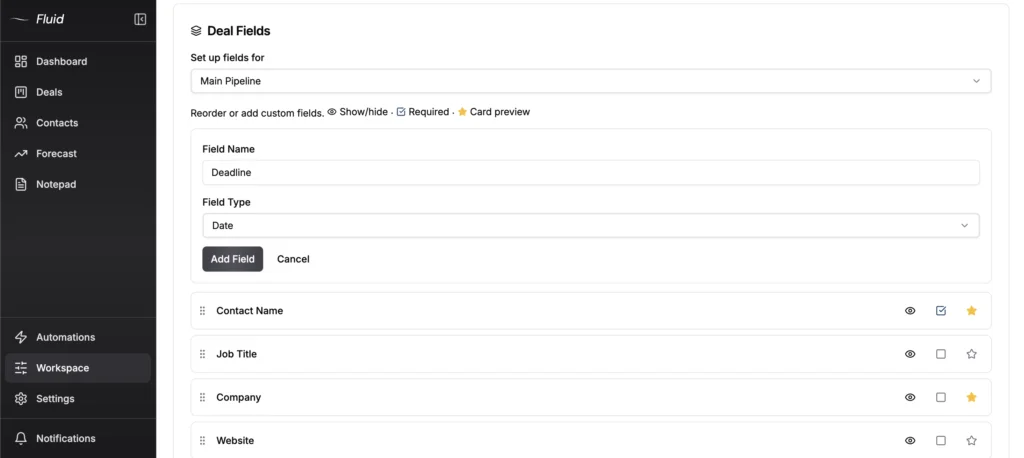
Open the deal fields for the pipeline your leads land in and add a field called Score with the type Number. Fluid’s custom fields are set per pipeline, so a lead pipeline can have a score while your project pipeline doesn’t.
2. Mark it required
Tick Required so nobody on the team can add a deal by hand without a score. Leads that arrive through a lead capture form or the API still need scoring on the first read, so make that part of opening a new lead.
3. Star it so it shows on the card
Starred fields appear on the deal card, up to four of them. With Score starred, you can scan the board each morning and see the A leads without opening a single deal.
4. Put the tier on a label
A label for each tier, such as Score:A, Score:B and Score:C, makes the board readable at a glance. When you rescore a lead, swap the label at the same time you change the number.
A verified customer who coordinates a coaching network of about 80 coaches uses the same Category:Value label pattern to keep several facts on one record, and he described it this way.
“I can tag a coach as P.CertCoach:2024, P.Lang:EN and P.Role:Coach all at once.”
5. Give every A lead a reminder due today
The tier only works if it leads to a dated next step. Set a reminder due today on every A lead and one later in the week on every B lead. The morning digest email then puts them in front of you before you open anything else.
Fluid CRM doesn’t calculate the score for you, and it doesn’t track email opens or website visits. You set the number yourself, which is the point of a model this short.
If you use Claude or ChatGPT, the Fluid CRM MCP connector lets the assistant read a deal’s notes and fill in the field, but the five questions and the final call are still yours.
Lead Scoring Mistakes That Make the Score Useless
Most scoring models don’t fail because the questions are wrong. They fail because the team stops trusting the number, and these are the usual reasons.
Scoring what’s easy to count
Opens and clicks are easy to count, which is why so many models use them. For a small B2B team they say almost nothing about who will buy. Score what the person said and who they are.
Too many questions
A model with a dozen criteria feels thorough on the day you build it. Long lists get skipped within a few weeks, and a half-filled score is worse than none. Five questions is enough to sort 30 leads a month.
Scoring once and never again
A score is true on the day you set it. Change it when the lead replies with a date, brings in the decider or stops answering. A lead that scored 3 last month and has been silent since isn’t a 3 anymore.
A score with no action attached
If an A and a C get the same follow-up, the score changes nothing. Every tier needs a rule for what happens today, this week or never.
Each person scoring their own way
If one person counts “send me more info” as a buying question and another doesn’t, your scores can’t be compared. Write the five questions and the “counts as yes when” column somewhere the whole team sees, such as the top of your team’s sales doc.
Never checking the score against wins
The quarterly check in step 5 is what keeps the model accurate. Skip it and you’ll keep calling the leads that look good instead of the ones that buy.
FAQ
In a five-point model, a 4 or a 5 is a lead to call today. A 3 is worth a follow-up this week with one question that could raise it. Anything from 0 to 2 goes to nurture or gets closed.
Lead qualification decides whether a lead is worth pursuing at all. Lead scoring ranks the qualified leads so you know who to contact first. For a small team, one five-question score does both jobs at once, with the knockout rule handling the leads that don’t qualify.
An MQL, or marketing qualified lead, is a lead marketing thinks is ready because of its behavior, such as visits and downloads. An SQL, or sales qualified lead, is one sales has checked and accepted. A team without a separate marketing department can skip the handover and score every lead straight away.
Not usually. Scoring software earns its cost when leads arrive faster than anyone can read them. A team getting under 100 leads a month can score by hand in a number field on each deal.
Score Your Next Ten Leads Before You Change Anything Else
Don’t build the perfect model first. Write the five questions down, score the next ten leads that come in and call them in score order for a week. Put the score in a sales team CRM where it shows on the deal card, as Fluid CRM does, and check it against your wins at the end of the quarter.
Start your 7-day free trial here, no credit card required.