

A new inquiry comes in on Tuesday afternoon. Two people each think the other one replied, and by Friday the prospect has booked a call with someone else. That is a lead tracking problem, and most tools sold to fix it were built to track deals instead.
The best lead tracking software for a small team holds five things for every inquiry: source, status, date of first reply, owner and next step. Fluid CRM, Pipedrive, HubSpot, Zoho CRM, Bigin, Less Annoying CRM and Freshsales can hold all five. Fluid CRM fits teams of 2 to 10 that want lead forms and reminders.
What Lead Tracking Software Should Record for Every Inquiry
Lead tracking software is where every new inquiry gets written down the moment it arrives and followed until it becomes a deal or gets ruled out. It covers the stretch between “someone raised a hand” and “we have a real opportunity”, and it needs five fields to do that job.
- Source. Where the lead came from: the contact form, a cold email reply, a referral from a past client or a phone call. Without it you can’t tell which channel deserves more money next month.
- Status. New, contacted, qualified or not a fit. One glance should tell you which inquiries nobody has touched.
- Date of first reply. The day someone on your team first answered. Most small teams never look at this number, and the next section shows why it matters.
- Owner. One name per lead, because two names usually means nobody follows up.
- Next step. An action with a date, like “send the proposal Thursday”. A lead with no next step is a lead you will find again in three weeks.
Once a lead turns into a real opportunity, the questions change to deal value, close dates and what each rep did this week. That is the job of sales tracking software, and it’s a different list. If you are picking one tool for a whole team, our sales team CRM page shows leads and deals on one board together.
Where Leads Die Before Anyone Replies
Many leads die in the first two days, before anyone has written back, because nobody was sure whose job it was.
A Harvard Business Review audit of 2,241 US companies found that the average reply to an online inquiry took 42 hours, counting only the companies that replied at all. Our guide to speed to lead turns that into a response target and an owner with a fallback for a small team.
A separate set of 1.25 million leads in the same study showed that firms that reached out within an hour were nearly seven times as likely to qualify the lead as firms that first reached out an hour later. More numbers like this are in our roundup of sales statistics.
I saw the same pattern from the agency side. At Fenixtal, my outbound agency, we booked 1,250+ sales calls, and I could see which clients kept track of the leads and which did not. The clients who lost leads either had messy spreadsheets or a CRM their team hated opening, so new inquiries sat wherever they first arrived.
Stop and check this for your own team. How many inquiries came in last week, and how many got a reply the same day? If you can’t answer without digging through two inboxes, that is the problem a lead tracker is for.
How to Choose Lead Tracking Software: 5 Questions
Feature tables make every tool look the same. These five questions split them fast.
1. Does a new lead show up without anyone retyping it?
Look for a web form, an API or an email address that creates the record. Copying leads in by hand is where the first day gets lost.
2. Can you see every untouched lead on one screen?
You want a board or a filtered list where “new” stands out, not a report you have to build first.
3. Is the source stored on the lead itself?
A field you fill once stays attached when the lead turns into a deal, so you can still see which channel paid off months later.
4. Does every lead have exactly one owner?
Check that the tool lets you assign one teammate per lead and filter the list by that person. Our guide to the best CRM for small sales teams covers ownership once leads become deals.
5. Will it remind you of the next step on the right day?
A dated reminder should reach you by email or on the home screen, so a quiet lead shows up again on its own.
Then price it for your real team. A one-seat price hides the bill, so every entry below shows what 5 seats cost a month. To check whether that bill pays for itself, our guide to CRM ROI walks through the math.
The 7 Best Lead Tracking Tools for Small Business
1. Fluid CRM (best for small B2B teams that want leads and deals on one board)
Fluid CRM is a visual pipeline CRM we built for small B2B teams, and lead capture is built in. Lead forms embed on your website, and every submission creates the contact and the deal in the pipeline you choose.
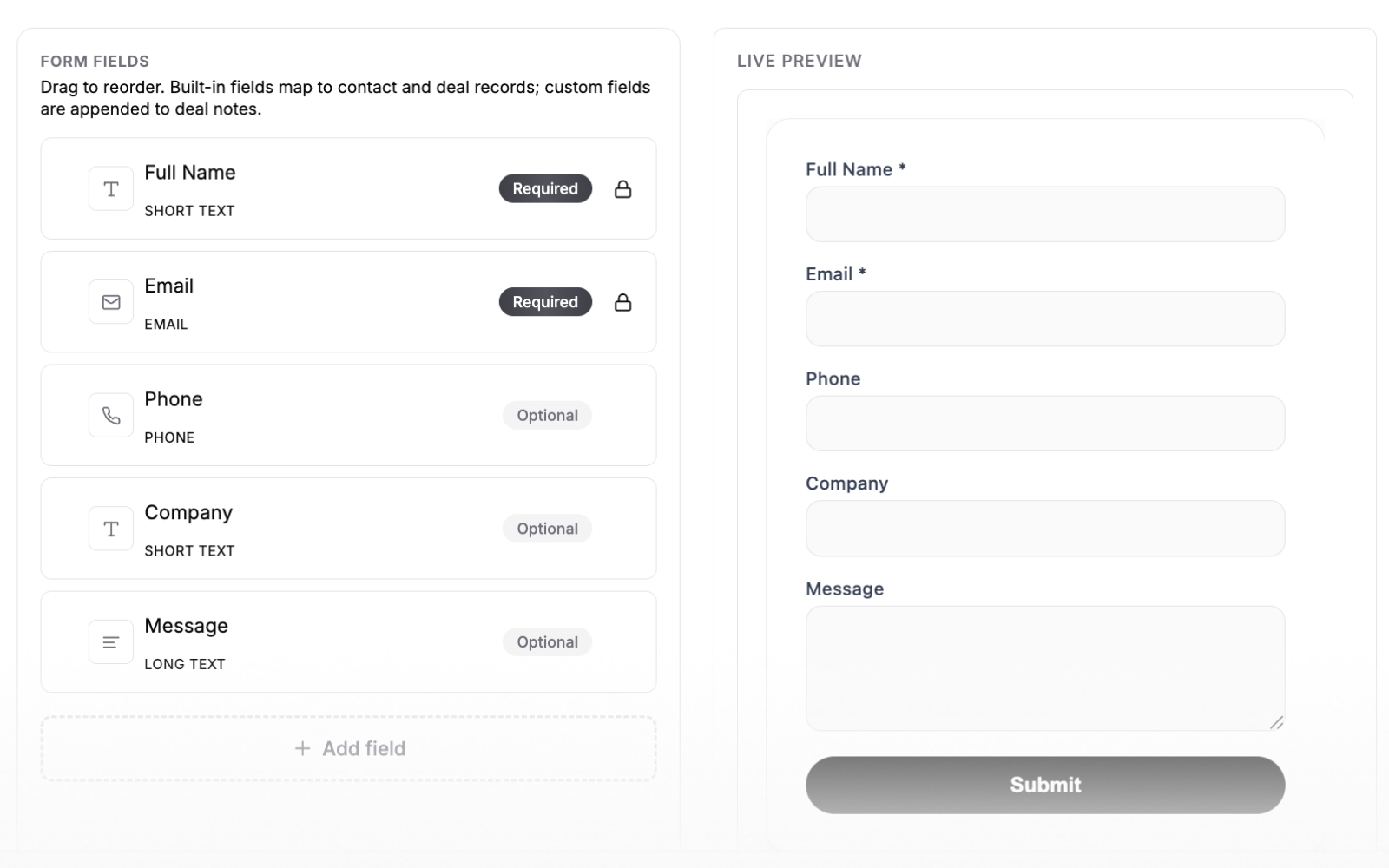
Every deal has a source field, an owner, a label such as “Hot” and one reminder with a date. The daily digest email at 9:00 lists the reminders due that day, so every lead with a reminder shows up in your inbox on the right morning.
Leads from other tools can arrive on their own through the REST API and webhooks, which is how teams send interested cold email replies straight in. The MCP connector also lets you tell Claude or ChatGPT to log a lead for you.
- Best for: B2B teams of 2 to 10 that get inquiries from forms, referrals and cold email.
- Not for: teams that need a phone dialer, lead scoring, two-way email sync or a native mobile app (Fluid CRM works in the phone browser).
- Cost for 5 seats: $80 a month ($16 per seat) billed monthly, or $720 a year ($144 per seat) billed yearly. One plan with every feature, and a 7-day free trial with no credit card required.
2. Pipedrive (best for keeping unqualified leads off the pipeline)
Pipedrive has a separate Leads Inbox for inquiries that are not deals yet. You sort and label them there, then convert the good ones into deals, and everything attached to the lead moves across with it.
That split helps when you get a lot of low-quality inquiries and don’t want them cluttering the board. The catch for small teams is that some extras, such as LeadBooster, are add-ons billed per company on top of the seats.
Lite costs $14 per seat a month billed yearly or $24 billed monthly. For 5 seats that is $70 a month billed yearly or $120 billed monthly, and our Pipedrive pricing breakdown covers the add-ons.
3. HubSpot (best free starting point for two people)
HubSpot gives you a free CRM for up to 2 users, with forms and a Lead status field on every contact. If two founders answer every inquiry themselves, that covers the five fields at no cost.
The bill changes once you add people. Sales Hub Starter lists at $20 per seat a month, so 5 seats is $100 a month. Professional also requires a one-time onboarding fee of $1,500 and Enterprise one of $3,500.
4. Zoho CRM (best for a formal lead-to-deal step)
Zoho CRM keeps leads in their own module, apart from contacts and deals. When a lead qualifies you convert it, and Zoho creates the contact and the company, plus a deal if you want one.
That suits a team that wants a clear line between “inquiry” and “customer”. Expect a longer setup, because the settings go deep. The free edition covers 3 users, and Standard is $14 per seat a month billed yearly, so 5 seats is $70 a month.
5. Bigin by Zoho (best for the lowest paid price)
Bigin is Zoho’s smaller pipeline CRM. Web forms for contacts and pipelines come on every plan, including the free one for a single user.
Express costs $7 per seat a month billed yearly or $9 billed monthly, so 5 seats is $35 or $45 a month. Express caps you at 3 team pipelines, which is enough for one lead pipeline and one sales pipeline.
6. Less Annoying CRM (best for one price and a long trial)
Less Annoying CRM has one price, $15 per user a month, and a 30-day free trial with no credit card required. Its form builder maps answers to contact, company or lead fields, and pipelines are unlimited.
It is built around contacts rather than a board, so it fits teams that think in people more than in stages. For 5 seats you pay $75 a month. Our Fluid CRM vs Less Annoying CRM comparison goes deeper on that difference.
7. Freshsales (best for cheap seats with lifecycle stages)
Freshsales Growth is $9 per seat a month billed yearly and includes contact lifecycle stages, which work as a lead status. For 5 seats that is $45 a month.
Contact scoring is on Pro at $39 per seat, so the cheap plan is a starting point, not the whole product. You get a 21-day free trial to find out which one you need.
How the 7 compare
| Tool | Where new leads land | Free plan | 5 seats per month |
|---|---|---|---|
| Fluid CRM | Lead form or API into a pipeline | No (7-day trial) | $80 monthly ($16 per seat), $60 billed yearly |
| Pipedrive | Leads Inbox, then convert | No | $120 monthly, $70 billed yearly |
| HubSpot | Contact with Lead status | Yes, 2 users | $100 (Starter) |
| Zoho CRM | Leads module, then convert | Yes, 3 users | $70 billed yearly |
| Bigin | Web form into a pipeline | Yes, 1 user | $45 monthly, $35 billed yearly |
| Less Annoying CRM | Form into contacts or leads | No (30-day trial) | $75 |
| Freshsales | Contact with lifecycle stage | No (21-day trial) | $45 billed yearly |
When a Spreadsheet Is Enough to Track Leads
You don’t need any of these tools if one person answers every inquiry. At that size Google Sheets or Excel with the five columns above does the job, and our free lead tracker template gives you those columns ready to fill.
The sheet stops working when a second person starts answering leads. A spreadsheet never reminds you of anything, and it has no idea who owns which row. Our guide on when to switch from Google Sheets to a CRM covers the signs in detail.
Tim Chorlton, a verified customer, describes exactly that setup: “I am a ‘one-man-band’ but I have an external sales person and also handle my own enquiries. I have used Fluid to pull the ‘warm leads’ out of the spreadsheet swamp so I can focus on them.”
One verified customer who moved over from Excel described the switch like this:
“Not complicated to understand or use. Enough information gets entered for me to understand who, what, when and how. Handy note section to keep track and add reminders. Beats using an Excel spreadsheet.”
If you want to keep deals in a sheet a while longer, our sales tracking spreadsheet lists the columns worth keeping.
How to Track Leads in Fluid CRM From Form to First Reply
Here is the setup we suggest to new teams in Fluid CRM. It needs no settings beyond what is on the screen.
Make one pipeline just for leads
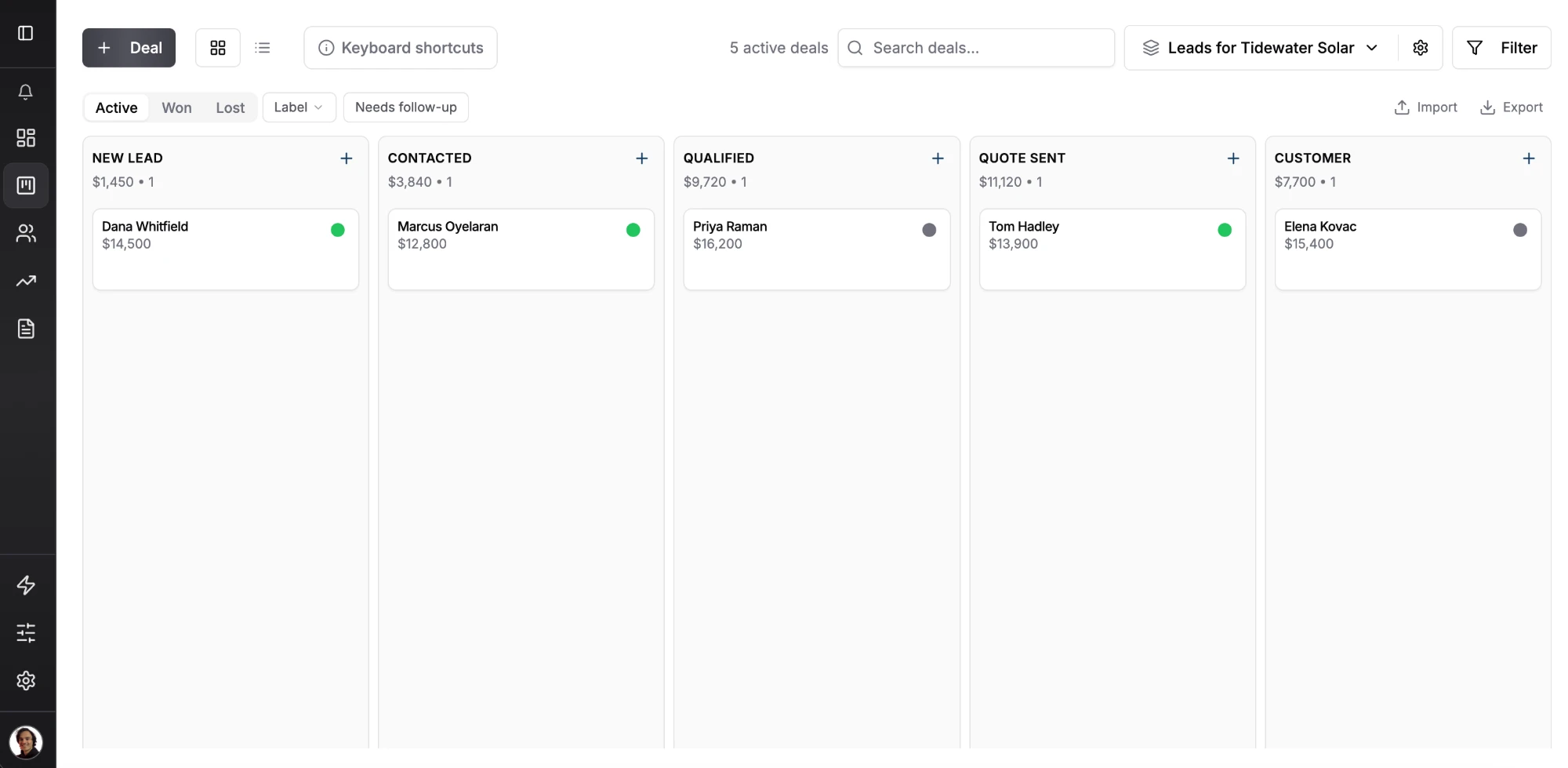
Every card in Fluid CRM is a deal, so a lead pipeline is a pipeline whose first stages hold inquiries. A simple version is New lead, Contacted, Qualified, Quote sent and Customer, where the first two stages are the lead stretch and the inquiry becomes a real opportunity at Qualified. To decide which inquiries reach Qualified first, our lead scoring model gives each one a score from 0 to 5.
Put a lead form on your contact page
Point the form at the New lead stage, using our guide to creating a lead capture form for the step-by-step version.
Fill in the source, the owner and a first reply date
Source takes a few seconds by hand, and leads that come in through the API can carry it with them. Our post on a CRM for lead generation shows how to route cold email and ad leads that way.
A verified customer who owns an agency put the hand-entry part simply: “It is simple and super easy to use, and it doesn’t take hours to upload a lead.”
Add a custom date field called First reply and fill it in when you answer. Fluid CRM doesn’t time your first reply for you, so this field is how you see it.
Set a reminder on every new lead
Set the reminder for the day you plan to reply, and the lead shows up in front of its owner that day. A “Hot” label marks the ones that can’t wait.
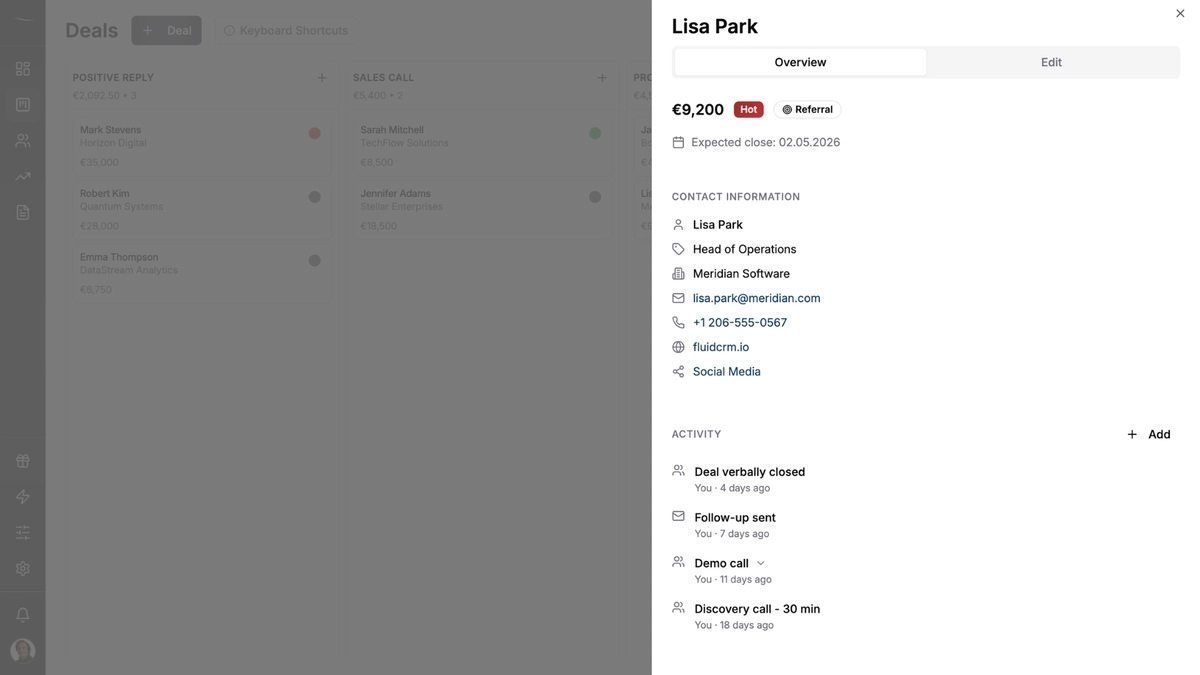
When you reply, move the card to Contacted and set the next reminder. Every lead on the board then has a source, a stage, an owner, a first reply date and a dated next step, which covers all five fields.
Frequently Asked Questions
A spreadsheet is free, and HubSpot and Zoho CRM have free plans for 2 and 3 users. Among paid plans, Bigin Express at $7 per seat a month billed yearly is the lowest on this list. Freshsales Growth follows at $9.
Yes. HubSpot is free for up to 2 users, Zoho CRM for up to 3 and Bigin for 1. Each one covers the basic fields, and the limits show up when you add people or want automation.
A lead is an inquiry nobody has qualified yet. A deal is a real opportunity with a value and an expected close date. Lead tracking covers the first stretch, from inquiry to qualified or ruled out.
Within the hour if you can. A Harvard Business Review study of 1.25 million leads found that firms reaching out within an hour were nearly seven times as likely to qualify the lead as firms that first reached out an hour later.
Pick the Tool That Gets Your Next Inquiry Answered
The right lead tracker is the one that gets a reply out the same day, with one owner and a dated next step on every inquiry. Price it for 5 seats before you decide. If you want leads and deals on one board for your whole team, see how Fluid CRM works as a sales team CRM.
Start your 7-day free trial here, no credit card required.