

Most “best CRM for freelancers” lists are written by people who think all freelancers are the same buyer. They are not. A wedding photographer and a fractional CMO need completely different tools and recommending HoneyBook to one and Pipedrive to the other will leave both worse off. This post fixes that.
The best CRM for freelancers depends on what you sell. Project-based freelancers (designers, photographers) need contracts and invoicing, so HoneyBook or Dubsado fit. Retainer and B2B freelancers (consultants, marketers) need pipeline tracking, so Fluid CRM or Pipedrive fit.
Why “Best CRM For Freelancers” Is The Wrong Question
The big freelancer CRM lists out there will recommend HoneyBook, Pipedrive, Brevo and Recruit CRM in the same article. That is not a list. That is four tools built for four different jobs glued together by an affiliate program.
Freelancers split into two clear camps. Project-based freelancers sell discrete deliverables. They book a wedding, shoot it, deliver photos and move to the next one. The same goes for graphic designers, branded creatives and event planners. What they need is contracts, proposals, invoicing and a client portal that looks professional. Their “pipeline” is short and the deal value is set per project.
Retainer and B2B freelancers sell ongoing work. They are consultants, fractional CMOs, freelance copywriters with monthly clients, dev shops and marketing freelancers. They are tracking conversations that take weeks to close and then run for months or years. What they need is pipeline visibility, follow-up reminders and a sense of which deals are stuck. Their contracts are usually a Google Doc or a DocuSign template, not the heart of the business.
Pick the wrong tool and you waste money in a specific way. A marketing consultant who buys HoneyBook because it tops a freelancer list spends 3 hours setting up contract templates she will never use, while her actual problem (forgetting to follow up on a warm lead from a podcast appearance) stays unsolved.
So before you compare tools, decide which camp you are in. The rest of this post is split that way.
One more thing worth saying. HoneyBook, Dubsado, Bloom and Moxie are usually marketed as CRMs. They are not, in the deal-tracking sense. They are business management tools with light contact records bolted on. If your real problem is “who do I need to call back this week,” none of them will fix it. They are built for the moment after someone says yes.
Best CRMs For Retainer And B2B Freelancers
If you sell retainers, consulting or any kind of ongoing B2B service, you need pipeline visibility and follow-up discipline more than you need a contract builder. Solo freelancers and 1-3 person consultancies typically carry 10-40 active opportunities at any given time. A CRM built for 200+ deals will pile on overhead you will never use.
A solo marketing consultant in London who walked me through her setup recently is a textbook case. She had been running her client pipeline in Trello. She told me, “Otherwise it just becomes unworldly. It just becomes a bit of a guessing game. Which is not ideal.” Trello is fine for tasks but breaks the moment you need to know which conversations are stuck and which deals need a follow-up by Friday.
In 3 years running cold email at Fenixtal across 50+ B2B clients, I saw the same pattern in marketing consultants and B2B freelancers. Half tracked deals in Trello or Google Sheets. The other half overpaid for HubSpot and barely logged in. Almost none had a CRM built for the way they actually work.
That is the gap these four tools fill.
1. Fluid CRM (best for marketing consultants and B2B freelancers under 5 people)
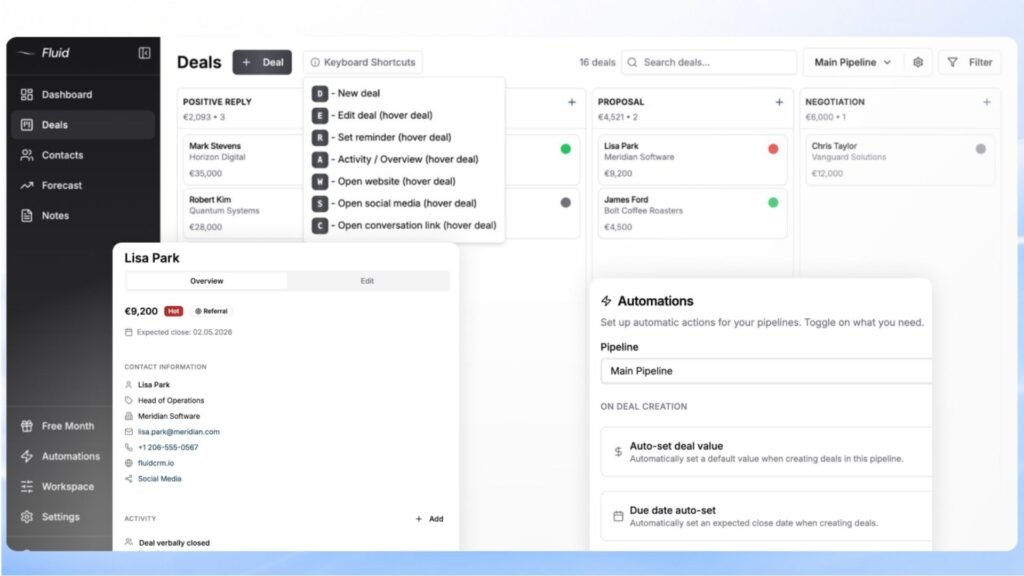
Fluid CRM is built specifically for solo founders, consultants and small agencies who have outgrown spreadsheets but do not want HubSpot’s bloat. The visual pipeline is the whole point. You see your deals, stages and what needs attention today on one screen. Reminders are built in, so no follow-up goes cold.
Top features: visual pipeline, follow-up reminders, keyboard shortcuts, unlimited deals and contacts, unlimited pipelines, 8 in-app automations, API and webhooks.
Pricing: $16/seat/month or $144/seat/year (works out to $12/seat/month, 3 months free). Every feature is included on both plans. No upgrade traps.
Verdict: For a marketing consultant, fractional CMO or solo B2B freelancer with 10-40 active opportunities, this is what you want. Setup takes about 10 minutes and the pipeline replaces the mess of Trello, Notion or Google Sheets without making you learn an enterprise tool. 7-day free trial, no credit card required. If you hate admin work and want further comparison, read this post next.
2. Pipedrive (best for freelancers who’ll grow into a small agency)
Pipedrive is the OG visual pipeline CRM. It has been around longer than most of its competitors, the integrations ecosystem is deep and it scales smoothly into a 5-15 person sales team. The tradeoff is price. The cheapest plan strips out automations and full email sync, so most freelancers will need at least the Growth tier.
Top features: visual pipeline, email sync, lead inbox, workflow automations (Growth and above), reporting dashboards.
Pricing: Lite $24/seat/month, Growth $49/seat/month, Premium $79/seat/month, Ultimate $99/seat/month. Annual billing drops Lite to about $14/seat and Growth to about $29/seat.
Verdict: Worth it if you know you will hire and want a CRM the new people will recognize. For solo founders weighing the same question, this breakdown goes deeper. Probably more than you need if you are solo and plan to stay solo.
3. Capsule (best for freelancers who want a free tier with real features)
Capsule is the polite, well-built CRM that nobody talks about. The free tier is real (250 contacts, 2 users) and you can run a small consulting practice on it for free until you hit either limit. After that, the paid plans are reasonably priced.
Top features: contact management, deal tracking, project boards (Growth plan and above), workflow automations (Growth and above).
Pricing: Free for up to 2 users and 250 contacts. Starter $21/seat/month, Growth $38/seat/month, Advanced $60/seat/month.
Verdict: The free tier is the hook. The catch is that the features most freelancers actually want (automations, multi-pipeline, reporting) only show up on Growth at $38/seat. By that point Fluid CRM is cheaper with everything included.
4. Close (best for solo outbound-heavy freelancers)
Close is built for sales-led teams that live in their CRM. Calling, email and SMS are baked in, which is rare. If your day is “send 30 cold emails, follow up with 10 warm leads, book a few calls,” Close is engineered for that motion.
Top features: built-in calling, email and SMS, power dialer (Growth and above), workflow automations, predictive dialer (Scale only).
Pricing: Solo $9/month (single user), Essentials $49/seat/month, Growth $109/seat/month, Scale $149/seat/month.
Verdict: The Solo plan at $9/month is genuinely interesting for a single outbound freelancer. Past that, Close gets expensive fast and the dialing features are overkill for most retainer-based work.
Best CRMs For Project-Based Freelancers
If you sell discrete projects (a wedding shoot, a logo design, a website build), your “CRM” needs to handle the whole job: proposal, contract, scheduling, invoicing, payment and a client portal. The tools below do all of that. None of them are great at deal-tracking in the B2B sense, but if you are a photographer trying to book and deliver 30 weddings a year, you do not need deal-tracking. You need the job to run smoothly from inquiry to final payment.
Before you read the four below, one warning. All of these tools are called CRMs by their marketing teams. They are not, in the way a B2B salesperson would mean it. They are business management platforms. The “contact record” is a side effect of running the job, not the point. If you need to track 50 open conversations across multiple deal stages, you want the tools in the previous section. If you need to make a client experience feel polished from quote to delivery, read on.
1. HoneyBook (best for creative freelancers needing contracts and invoicing)
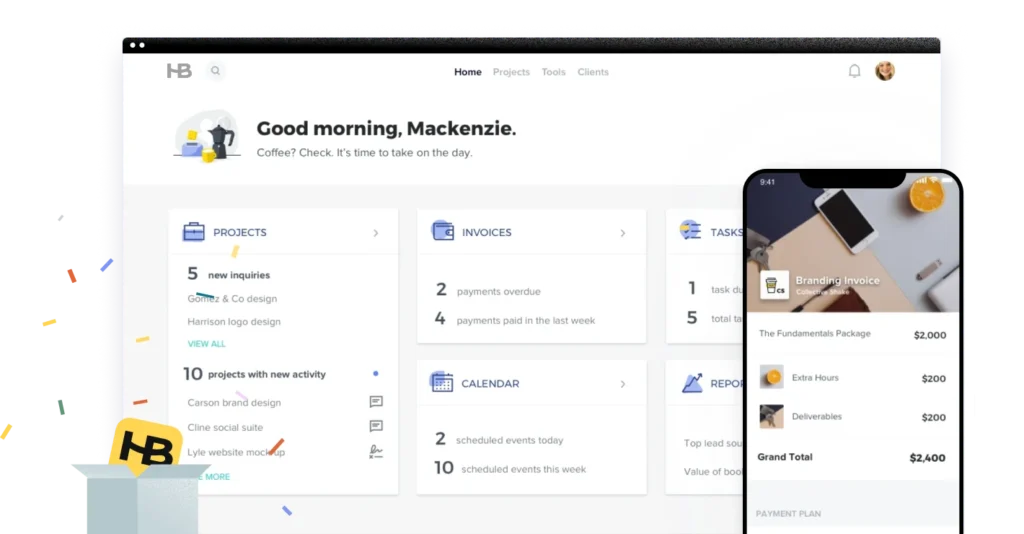
HoneyBook is the most popular tool in this category for a reason. The smart files combine proposals, contracts and invoices into one client-facing document that genuinely looks good. Booking workflows are automated. The client portal is clean. The downside is the price went up sharply in 2025.
Top features: smart files (proposal, contract, invoice in one), automated workflows, client portal, scheduling, branded payments, AI tools across all plans.
Pricing: Starter $36/month ($29 annual), Essentials $59/month ($49 annual), Premium $129/month ($109 annual). 30-day free trial, no credit card required. Payment processing fees of 2.9% + $0.25 per card transaction on top of the subscription.
Verdict: If you are a wedding photographer, branded creative or service-based business in the US or Canada, this is the default for a reason. The Essentials plan is the sweet spot. Skip Starter, the limits will push you up within a month. Note that HoneyBook is US and Canada only.
2. Dubsado (best for project-based freelancers who want deep customization)
Dubsado is what photographers and creative agencies switch to when they outgrow HoneyBook’s templates and want to build their own automation logic. The Flows builder is the deepest in this category. The tradeoff is a learning curve that takes about a week of real work to get right.
Top features: workflow automations (Premier only), unlimited lead capture forms (Premier only), Zapier integration (Premier only), custom branding, white-labeled client portal, available globally (HoneyBook is not).
Pricing: Starter $35/month or $335/year, Premier $55/month or $525/year. 21-day free trial, no credit card. Updated in December 2025.
Verdict: Go Premier or do not go at all. The Starter plan locks out scheduling, workflows and Zapier, which removes the reasons to buy Dubsado in the first place. Premier at $525/year is actually cheaper than HoneyBook Essentials at $588/year for comparable features and the 21-day trial does not require a credit card.
3. Bloom (best for budget-conscious creative freelancers)
Bloom looks better than it has any right to at this price. The UI is the cleanest in this category and the built-in galleries save photographers from paying for a separate Pixieset or ShootProof subscription. The catch is that the Starter plan adds a 1.5% processing fee on payments, which makes it more expensive than it looks.
Top features: lead capture, contracts and eSign, invoicing and payments, scheduling, client portal, built-in image galleries, beautiful UI.
Pricing: Starter $14/month or $7/month annual, Standard $34/month or $17/month annual, Plus $66/month or $33/month annual. Annual is marketed as “6 months free.”
Verdict: For solo photographers or creative freelancers running linear workflows (lead, book, deliver, get paid), this is the strongest budget option in 2026. Skip Starter because of the processing fee, jump straight to Standard at $17/month annual. That is the real entry point.
4. Moxie (best for freelancers wanting an all-in-one business hub)
Moxie covers a wider range of freelancer types than HoneyBook or Bloom. It works for designers, writers, developers, coaches and consultants who want proposals, contracts, invoicing, time tracking and basic project tasks in one tool. The interface is the weakest of the four, but it is also the cheapest.
Top features: proposals and contracts, invoicing, time tracking, project tasks, client portal (Pro only), automations (Pro only).
Pricing: Starter $12/month ($10 annual), Pro $25/month ($20 annual), Teams $40/month ($32 annual). 14-day free trial.
Verdict: Decent value if you are a generalist freelancer (writer, designer, developer) who wants one cheap tool for everything. The Starter plan locks out portals, automations and integrations, so Pro at $20/month annual is the real comparison. If you specifically need image galleries or wedding-style proposals, the others above are better picks.
The One Free Option Worth Trying (And When It Stops Working)
If you want to start free and you are explicitly a B2B freelancer (not project-based), the HubSpot CRM free tier is the one option worth testing. It gives you contact management, deal tracking, basic email sync and a usable pipeline view for $0, for up to 2 users.
The catch is the same trap every HubSpot customer hits eventually. The features you actually want (real automations, sequences, forecasting, full email tracking) live on the paid tiers. The Sales Hub Starter is $20/seat/month. Professional jumps to $100/seat/month and adds a one-time $1,500 onboarding fee. For specifically the 2-person team math, this breakdown goes deeper. Doland White, an executive coach who showed me his CRM frustrations recently, put it this way: “With HubSpot, if you want to do something different, you have to buy more. What starts off small gets bigger, bigger, bigger and bigger.”
So the honest take. Use HubSpot free if you want to test the CRM habit without spending money. Migrate the moment you hit a real limit. Do not assume you will stay on the free tier forever, because the gap between free and the first useful paid tier is the steepest in this list.
How To Pick The Right CRM As A Freelancer
If you skipped here, the three questions below sort the choice in about 60 seconds.
1. Do you sell projects or retainers?
Projects (a wedding, a logo, a website build) means you need contracts, invoicing and a client portal. Look at HoneyBook, Dubsado, Bloom or Moxie. Retainers and ongoing B2B work mean you need pipeline visibility and follow-up reminders. Look at Fluid CRM, Pipedrive, Capsule or Close.
If your answer is “both” because you do project work and also run retainers, pick based on which side is the bigger source of headache right now. A B2B consultant who occasionally takes a one-off project should still pick from the retainer tools.
2. How many active opportunities do you carry at once?
Under 10 active opportunities and a paid CRM is probably overkill. A clean Google Sheets file or Notion board will hold the pipeline fine.
Between 10 and 40 active opportunities is the sweet spot for solo and 1-3 person freelancers. This is where Fluid CRM, Bloom Standard, HoneyBook Essentials and Dubsado Premier earn their price. The tools surface what needs attention without making you wade through enterprise features.
Past 40 active opportunities you are either becoming an agency or you have too many warm leads sitting unconverted. Either way, the answer is not a bigger tool. It is either hiring help or running a stricter qualification process before something hits your pipeline.
3. Will you stay solo or grow into a team?
Solo for the foreseeable future means optimize for personal speed and low monthly cost. Hotkeys and a clean interface matter more than role-based permissions or team reporting. Pick the cheapest tool that does the job, ignore the “team” features and move on.
Planning to grow into a 3-10 person team in the next 12-18 months means look at the tools that scale with you. Pipedrive and HubSpot work well when you eventually add a salesperson. Fluid CRM works for small teams because you only pay per seat with no feature unlocks. Avoid tools where the team plan is double the solo plan for the same features.
Frequently Asked Questions
If you have under 10 active opportunities and a clean memory, no. Google Sheets or a Notion board is enough. Once you cross 10 active conversations or you start forgetting follow-ups, the cost of not having a CRM is paid in lost deals, not saved time. That is when the math flips.
The HubSpot CRM free tier is $0 for up to 2 users and is the cheapest real option. After that, Bloom Starter is the cheapest sticker at $7/month annual, though the 1.5% processing fee makes Standard at $17/month annual the better real-world entry point. Moxie Pro at $20/month annual is the next-cheapest project-based option. For retainer-based freelancers, Fluid CRM at $16/seat/month or Capsule’s free tier (250 contacts, 2 users) are the cheapest entry points.
You can, until you cannot. Both work for solo freelancers with under 10 active opportunities. Past that, the lack of pipeline stages and follow-up reminders becomes a problem. The marketing consultant I mentioned earlier said it best when her Trello board became “unworldly.” If your tool stops telling you what to do next, it has stopped being useful.
It depends entirely on which one you pick. Fluid CRM, Pipedrive and Capsule take 10-30 minutes to set up your first pipeline. Bloom and Moxie take an hour or two if you customize the templates. HoneyBook takes a few hours to a day if you build your smart files and workflows. Dubsado takes about a week to configure properly because the Flows builder rewards setup time.
A CRM tracks people and deals (who you are talking to, what stage they are in, when to follow up). Project management software tracks tasks (what needs to get done, by when, by whom). HoneyBook, Bloom, Moxie and Dubsado blur the line because they handle both for project-based freelancers. Fluid CRM, Pipedrive, Capsule and Close are pure CRMs and assume you have a separate tool for delivery.
Conclusion
There is no single best CRM for freelancers because there is no single freelancer. Project-based creatives need HoneyBook, Dubsado, Bloom or Moxie to manage the job from quote to payment. Retainer and B2B freelancers need Fluid CRM, Pipedrive, Capsule or Close to track conversations that take weeks to close and months to retain.
For a full breakdown of Fluid CRM against the other small B2B options, see best CRM for small B2B sales pipelines. If you are tired of forgetting follow-ups and running your pipeline out of Trello or Google Sheets, Fluid CRM gives you a clear visual pipeline without the bloat of a traditional CRM. Start your 7-day free trial, no credit card required.