

If you’re Googling whether you need a CRM, you’re already past the point where the answer is obviously no. The real question is whether you need one now or in three months. Half the people asking should sign up today. The other half should wait, save the seat price and revisit when the friction is real.
You need a CRM when leads come from 2+ sources, when follow-ups slip past you, or when a second person joins sales. Skip it if you’re solo with under 20 active deals from a single source. Fluid CRM works best when the friction is real, not when you’re chasing a tool to feel organized.
What A CRM Actually Does
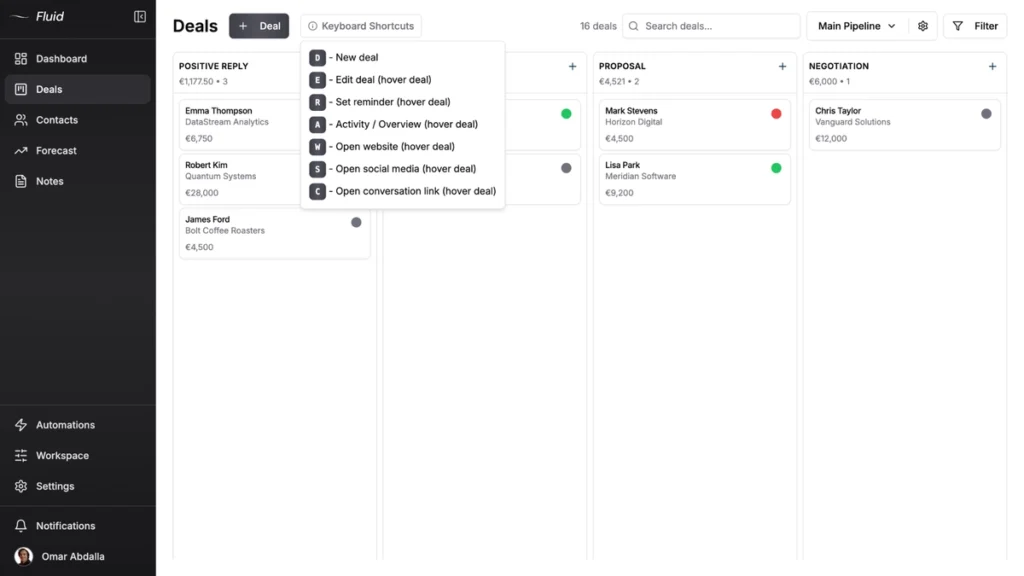
A CRM is a tool that tracks every conversation you have with a prospect or customer. The job it does is simple. Remember who said what, surface what you need to follow up on today and keep the context together so deals don’t fall through the cracks.
That’s the whole job. Track conversations, surface follow-ups, hold the context.
Everything else most CRMs sell you (workflow automation, lead scoring, marketing sequences, sales analytics) is built on top of that core job. If the core job doesn’t apply to your situation, the extras won’t save it. If the core job does apply, even a basic CRM beats a spreadsheet that gets messy by week three.
So before you ask which CRM, ask whether you have the problem a CRM solves. That’s the step most people skip.
The Honest Answer Depends On Two Things
Whether you need a CRM depends on two things, not one. Friction and adoption. Both have to be yes. Plenty of posts on this topic only check friction, which is why so many people buy a CRM, use it for two weeks and abandon it.
Friction is the real-world problem a CRM solves for you right now. Are you losing deals because you forgot to follow up? Is a teammate double-messaging the same prospect because nobody knows who’s already in touch? Are leads coming in faster than you can remember them? If yes, friction is real.
If you’re tracking 8 deals from one source, closing them within a week and never missing a follow-up, your friction is low. A CRM won’t help you. You’d be buying a tool to solve a problem you don’t have.
Adoption is whether you’ll actually use the thing every day. Not most days. Every day. A CRM that gets opened twice a week is worse than a sticky note, because at least the sticky note doesn’t pretend to know your pipeline.
Across 50+ B2B clients at Fenixtal, the pattern wasn’t that everyone needs a CRM. Specific friction points triggered the need, and installing one too early killed adoption every time. The clients who waited until friction was real used the CRM daily. The ones who bought first and looked for a reason after barely logged a single deal.
Friction without adoption commitment gives you another tab to feel guilty about. Adoption commitment without real friction gives you a clean tool tracking nothing important. You need both.
4 Triggers That Mean You’re Actually Ready
If you’re checking any of these triggers, the friction is real and a CRM will pay back the time you put into it. None of them are about revenue or team size. They’re about how leads flow and how often things slip.
1. You’re getting leads from 2+ sources
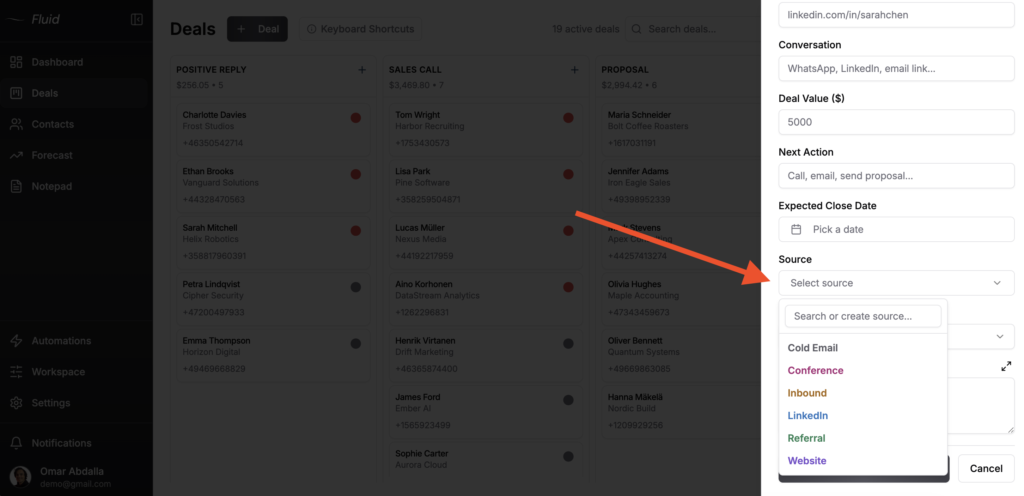
Cold email replies coming into one inbox, LinkedIn DMs in another, referrals via text and your warm leads buried in a contact form export from your website. Once leads come from more than one source, your brain becomes the bottleneck. You forget which prospect came from where, lose track of who said what and the same lead gets messaged twice from two channels.
This is the most common trigger I see at Fenixtal. Half the agencies I work with hit it at month three of running outbound, and most don’t notice until a prospect points it out.
2. You forgot a follow-up that cost you a deal in the last 30 days
Not “I should follow up more.” An actual deal that went cold because you forgot, and you can name it. If you can point to a specific lead that ghosted because you let two weeks pass without checking in, your spreadsheet or memory system has failed at its only job.
Austin at Cold Emailers ran his pipeline in Google Sheets until follow-ups started slipping. He switched to Fluid CRM, plugged Smartlead into the API and his deal organization improved 10x by his own count.
3. A second person joined sales and you’re double-messaging prospects
The moment you have two people doing sales without a shared system, you’ll send the same prospect two cold emails, two LinkedIn requests or two follow-up calls within a week. The prospect notices. They either ignore you or reply to call you out, and either way the deal is hurt.
A spreadsheet doesn’t fix this because spreadsheets don’t surface “this lead already got a message yesterday.” A CRM does.
4. You hit roughly 30 active conversations and can’t name the top 5 from memory
Around 30 active deals is where most founders stop being able to maintain accurate stage information in their head. Past that point, deals either get rushed because you remember them or forgotten because you don’t. There’s no middle ground without a system.
Quick test. Open your phone, set a 30 second timer and try to name your top 5 active deals, what stage they’re in and what the next step is for each. If you can’t do it, your pipeline isn’t where you think it is.
3 Signs You’re Not Ready Yet
Some posts will tell you every business needs a CRM. They’re wrong. Here are three signs you should wait, save the seat price and revisit this question in three to six months.
1. You’re solo with under 20 active deals from a single source
If all your leads come from one channel (just referrals, just one outbound campaign or just inbound from one landing page) and you’re closing fewer than 20 at once, your memory is still keeping up. Adding a CRM at this stage adds a daily logging task without solving a real problem.
A notes app or a single Google Sheet handles 20 deals from one source fine. Save the $16 and the setup time. Revisit when a second lead source or a second team member joins.
2. You’re not willing to log a conversation the day it happens
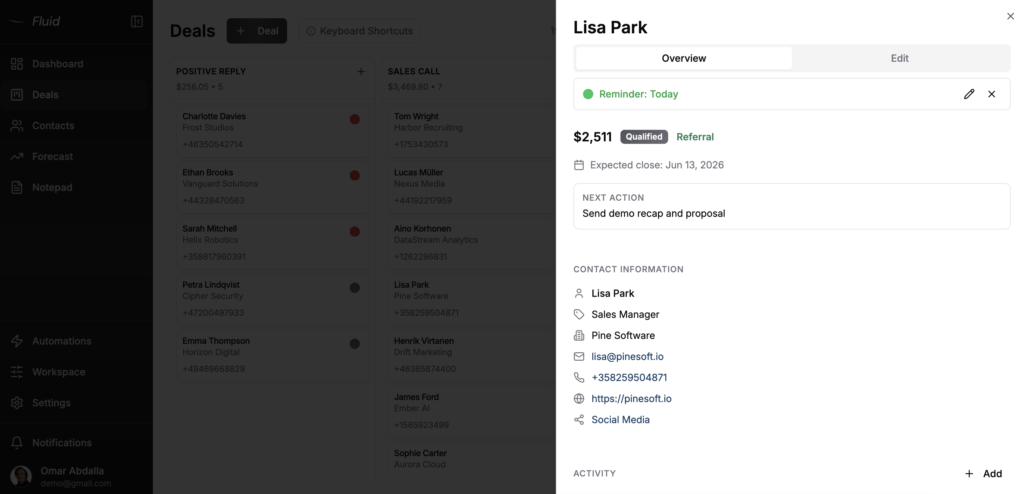
A CRM that gets updated once a week is a CRM full of stale data. The whole point is real-time context, and if you’re not the kind of person who’ll log a sales call within the hour, the tool will rot.
Be honest with yourself before you sign up. If your current system is a notes app full of half-finished entries from three months ago, a CRM will become the same notes app with a prettier interface.
3. You think a CRM will fix a sales problem
A CRM tracks conversations. It doesn’t generate leads, write better cold emails or close deals. If you’re not getting replies, not booking calls or not closing the calls you do book, a CRM won’t help you.
One construction company I worked with at Fenixtal set up a CRM before they had consistent outbound running. Three months in they had logged exactly four deals and blamed the tool for being too complicated. The tool was fine. They didn’t have a lead flow problem yet because they didn’t have lead flow, and buying a CRM before lead flow exists is treating the wrong illness. The CRM is for when leads exist and start slipping.
Which CRM Setup Fits Your Situation
If you passed the trigger check above, the question becomes which CRM setup matches your situation. The right answer depends on what you do, not just how many leads you have. Here’s how it breaks down by ICP.
If you’re a solo founder building a business from scratch, you need something you can set up in 10 minutes and run from your phone between client work. No team permissions, no admin overhead. See the best CRM for solo founders for the specific options.
If you’re a coach or consultant with a low-volume, high-touch sales process, you need a CRM that tracks the long conversations and reminds you when to circle back. Most coaching businesses don’t need automation or lead scoring. Here’s the CRM setup that works for coaches and consultants.
If you run a small marketing, design or development agency, the question is usually how to keep new business pipeline separate from delivery work without paying for Salesforce. The best CRM for small agencies breaks down what to look for.
If you run a cold email or outbound agency, the workflow is different. You need API integrations with tools like Smartlead or Instantly, fast hotkeys for logging dozens of replies and reminders so positive replies don’t sit untouched for three days. See the best CRM for cold email agencies.
If you’re still on Google Sheets and not sure when to leave, the trigger isn’t subjective. There are specific signs. I covered them in when to switch from Google Sheets to a CRM.
If your team already bought a CRM and nobody uses it, the problem usually isn’t the tool. It’s how it was rolled out. Here’s why teams don’t use the CRM you bought and how to fix it.
One quick example of right-timing the switch. A Finnish IT consultant doing specialized B2B work told me he ran his pipeline in Excel for years before moving over. The trigger wasn’t a deal count. It was that his sales cycle stretched out and he kept losing context between meetings. The Excel sheet had everything but couldn’t tell him what was next. That’s the right moment to switch.
How To Test Before You Commit
Before you commit to a CRM, run a one-week friction log. The point isn’t to evaluate a specific tool. It’s to find out whether your friction is real or imagined.
For seven days, log every prospect conversation as it happens. Cold email replies, LinkedIn DMs, referral intros, sales calls, demo bookings, follow-up messages. Note the prospect name, the channel, what was said and what the next step is. Use whatever you have. A notebook, a notes app or your existing spreadsheet.
At the end of the week, ask three questions.
How many follow-ups did you miss compared to what you logged? If the answer is zero, your current system is working. If it’s three or more, friction is real.
How long did it take you to log each conversation? If it took longer than your current method (and it will, the first time), notice whether you’re still willing to do it on day five. That’s your adoption test.
How often did you check the log to figure out who to message next? If you checked it daily and it gave you the answer, you have CRM-shaped friction. If you ignored it and worked from memory, you’re not ready.
But if the seven-day log tells you the friction is real, run the same exercise inside Fluid CRM next. The trial is 7 days, no credit card required, so the test costs you nothing except the discipline of logging.
Frequently Asked Questions
There’s no headcount minimum. A solo founder running outbound across three channels needs a CRM more than a five-person team selling one product through referrals. The trigger is friction, not team size. That said, solo founders typically hit the friction threshold somewhere between 20 and 30 active deals from multiple sources.
You can, and some people do it well. The tradeoff is that you’ll spend hours building views, custom fields and automations that come standard in a CRM built for sales. Notion and Airtable work as CRMs when your sales process is so unique that no off-the-shelf tool fits. For a normal pipeline (lead, contact, qualified, proposal, won/lost) a purpose-built CRM saves you the setup time.
It depends on the CRM. A simple visual CRM like Fluid CRM takes less than 10 minutes to set up. You sign up, create your first deal and you’re tracking. A traditional CRM like HubSpot or Salesforce takes weeks once you factor in onboarding sessions, custom fields, integrations and team training. The complexity is a feature for large teams and a bug for small ones.
Not directly. A CRM doesn’t write better emails or improve your sales pitch. What it does is make sure no deal slips through the cracks because you forgot to follow up. For small teams that lose more deals to neglect than to losing competitive battles, that’s a meaningful close-rate improvement over time. The CRM doesn’t close the deal. It keeps you in the conversation long enough to close it yourself.
A lead tracker logs incoming leads and where they came from. A CRM tracks the whole relationship from first touch to closed deal and beyond. If you only need to know which campaign produced which lead, a tracker is enough. If you need to know what stage each deal is in, what to do next and when to follow up, you need a CRM.
Conclusion
The straight answer to “do I need a CRM” is that you need one only if the friction is real and you’ll actually use the tool. Buy too early and you’ll abandon it. Wait too long and you’ll lose deals you can’t get back. If you ran the seven-day friction log and the answer was yes, Fluid CRM gives you a clear visual pipeline without the bloat of a traditional CRM. Start your 7-day free trial, no credit card required.