

Most “best CRM for cold email agencies” posts are written by cold email tool companies pushing their own built-in CRM. That’s the fox guarding the henhouse. After 3 years running cold email for 30+ B2B clients at my agency Fenixtal with the best cold email software tools, I can tell you what actually breaks at agency scale and what to use instead.
The best CRM for cold email agencies is Fluid CRM. It gives you unlimited pipelines, unlimited custom fields, API handoff from your sequencer and keyboard shortcuts to handle follow-ups fast. All on a 16€/month flat plan. It fits agencies better than built-in sequencer CRMs, spreadsheets or traditional CRMs.
What Cold Email Agencies Actually Need In A CRM
Before going deeper, let’s set the evaluation criteria. Many CRM posts skip this part because their criteria would disqualify their own product. Cold email agencies have specific operational needs that generic CRM advice ignores. Pricing also has to give you the basics on the base plan. Most CRMs lock custom fields, API access and pipeline counts behind expensive tiers, which is what starts to hurt agency economics.
Four non-negotiables for a cold email agency CRM:
1. Separate pipelines per client
Once you hit 3+ clients, one shared pipeline becomes a guessing game. Each client needs their own pipeline with their own stages and logic because their offers, sales cycles and replies are different. Most CRMs cap pipelines or charge extra for them. That’s a tax on running an agency.
2. Custom fields without a seat upcharge
You’re tracking different fields per client. Vertical, ICP, sequence ID, reply category, source list, sender inbox. Pipedrive locks custom fields behind higher tiers. HubSpot locks them behind paid modules. If your CRM charges extra for the basics, it’s not actually flexible.
3. API integration with your sequencer
The handoff from cold email tool to CRM has to be automatic. A positive reply in Smartlead, Instantly or PlusVibe should land in the right pipeline at the right stage without anyone copying anything. If this step is manual, tracking becomes annoying, follow-ups die and deals slip. No exceptions. If you want the sending side dialed in first, my cold email outreach playbook covers the full 30-step setup.
4. Fast follow-up handling
Cold email volume creates follow-up volume. If working through 50 replies takes 2 hours instead of 30 minutes, your team caps out earlier and your margins suffer big time. Keyboard shortcuts, fast deal navigation, minimal clicks and clear reminder systems aren’t nice-to-haves at agency scale. Especially as a cold email agency. They’re the difference between a profitable operation and a stressed one.
The Built-In CRM Trap (And Why Cold Email Tools Push Their Own)
Every cold email tool has shipped a built-in CRM in the last two years. Smartlead has one, Instantly has one and Saleshandy has one. They’re free or close to it on your existing plan. They look great in the demo. And they break the moment you run cold email for more than yourself and sometimes even then.
Here’s why. A built-in CRM inside a cold email tool is designed for a single sender managing their own outbound. One pipeline, one ICP and one sender domain. The moment you’re running cold email for 3 clients with 3 different ICPs, 3 different stage definitions and 3 different reply categories, that single shared pipeline becomes useless. You can’t separate Client A’s positive replies from Client B’s. You can’t customize the stages or logic for each. And you can’t give a client read-only access to just their own deals without exposing the others.
Austin Verner runs Cold Emailers, a cold email agency in the hood cleaner niche. He moved off Google Sheets and chose Fluid CRM over the built-in option in his sequencer. f you’re still on Google Sheets, the spreadsheet-to-CRM switch is its own decision. Here’s what he said:
“We’re capturing 100% of our interested leads. Before Fluid we were managing our pipeline in Google Sheets and it was getting cumbersome. The simplicity is what sold us. An easy deal view, reminders, and our interested leads from Smartlead auto-created via API. Our deal organization is 10x better. Follow-ups and onboarding are all managed in Fluid, which keeps us on top of every stage.”
Austin Verner, Founder, Cold Emailers
The piece that matters: Smartlead pushes interested leads into Fluid CRM via API. Smartlead does what it’s good at (sending, warm-up and deliverability), Fluid does what it’s good at (pipeline, fast follow-ups and deal management). Two tools, each doing one thing well.
Built-In CRM vs Traditional CRM vs Fluid CRM
The three options most cold email agencies consider, and how they actually compare at agency scale.
| Category | Built-In CRM (Smartlead, Instantly, Saleshandy) | Traditional CRM (HubSpot, Pipedrive) | Fluid CRM |
|---|---|---|---|
| Best for | Solo senders running their own outbound | Mid-market sales teams with heavy automation needs | Cold email agencies and small B2B teams |
| Plan structure | Bundled with cold email tool | Cheap base plan, real features locked behind higher tiers | All features on the 16€/month base plan |
| Custom pipelines | Usually 1, sometimes capped at 2-3 | Unlimited or locked behind higher tiers | Unlimited |
| Custom fields | Limited to none | Locked behind higher tiers | Unlimited |
| API and webhooks | Yes, no need for CRM | Yes, often locked behind higher tiers | Yes, included in the base plan |
| Multi-client setup | Breaks at 3+ clients | Works but expensive once you need real features | Built for cold email agencies |
| Learning curve | Low (you already use the tool) | Steep (training calls, onboarding sessions) | Low (open and start tracking) |
The built-in CRM works until it doesn’t. Traditional CRMs look cheap on the base tier and then nickel-and-dime you for the features that matter. The pattern I saw across 50+ total B2B clients at Fenixtal was different from what I expected. I needed to do too many clicks to handle the follow ups and were paying a heavy dime on API, custom fields and unlimited pipelines that I needed. What’s even worse was that my clients used complex CRMs or spreadsheets, so the positive replies and meetings I generated weren’t leveraged to their maximum potential. By the time someone followed up 5 days later, the prospect had moved on. The sequencer wasn’t the problem. The handoff and CRM was.
The 4 Things That Make Fluid CRM Work For Cold Email Agencies
Here are the four features that matter at agency scale, all within one 16€/month plan. No upgrade traps, no module pricing or per-feature charges.
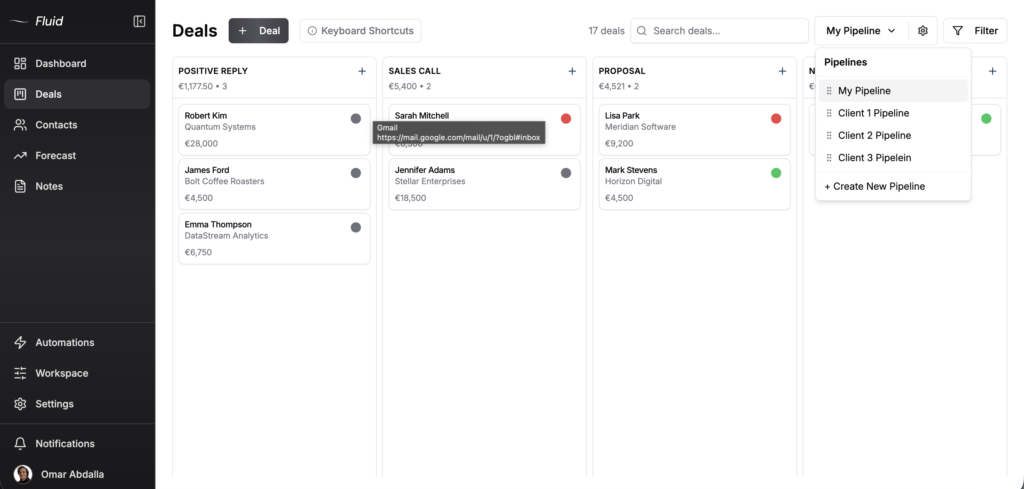
1. Unlimited custom pipelines on one plan
Separate pipeline per client, plus your own outreach pipeline, plus an onboarding pipeline. No cap. In-app automation sets reminders automatically to deals and moves deals across stages so you’re not dragging cards around manually. Most CRMs charge extra past 2 or 3 pipelines, which is exactly when an agency needs more.
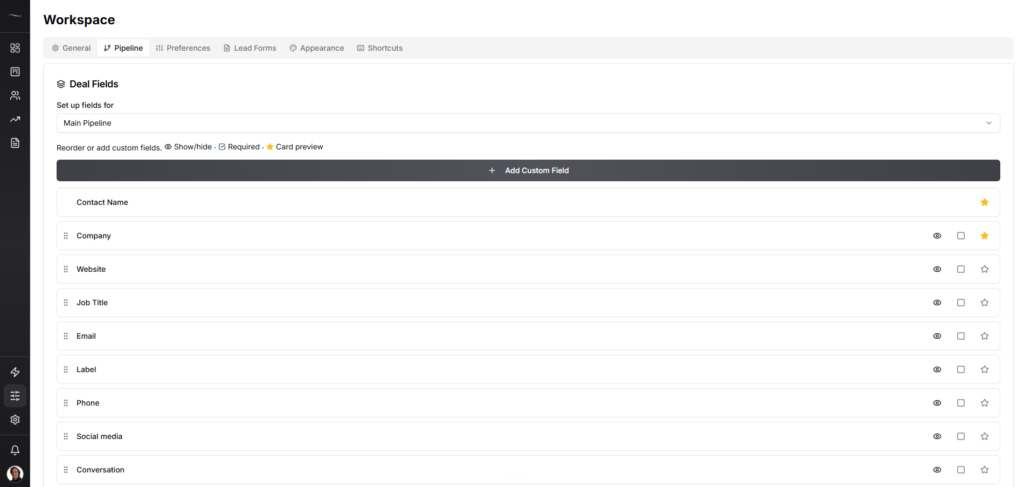
2. Unlimited custom fields without upgrading
Track vertical, ICP, sequence ID, reply category, source list and sender inbox per deal. Add a new field for a new client in 10 seconds. No plan upgrade, admin call or extra cost. Pipedrive starts limiting custom fields on the lowest tier and HubSpot’s free CRM caps you fast.
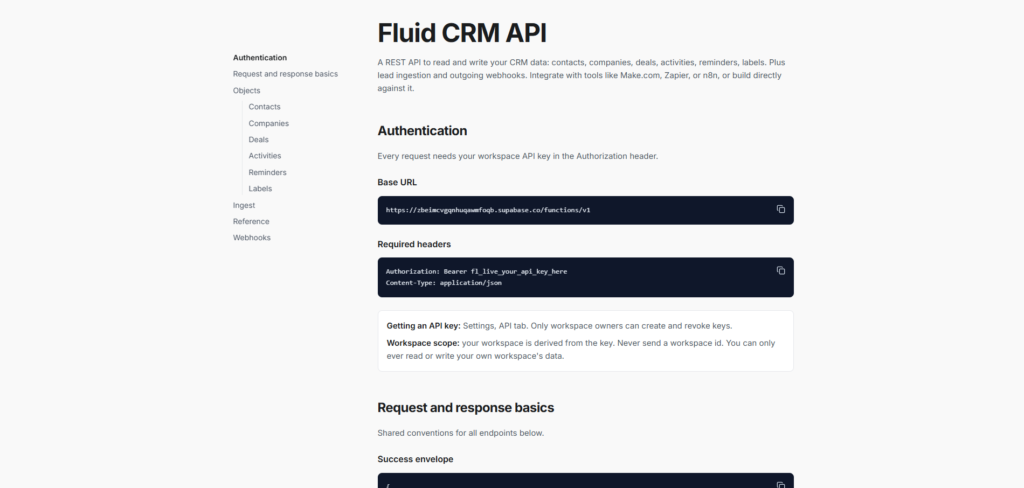
3. API to push positive replies straight into the pipeline
This is the one most cold email agencies are missing. Smartlead, Instantly or PlusVibe pushes a positive reply directly into the right Fluid CRM pipeline at the right stage via webhook. No manual copy-paste or replies sitting unworked because someone forgot to log them. The handoff is invisible. Read the Fluid CRM API documentation here.
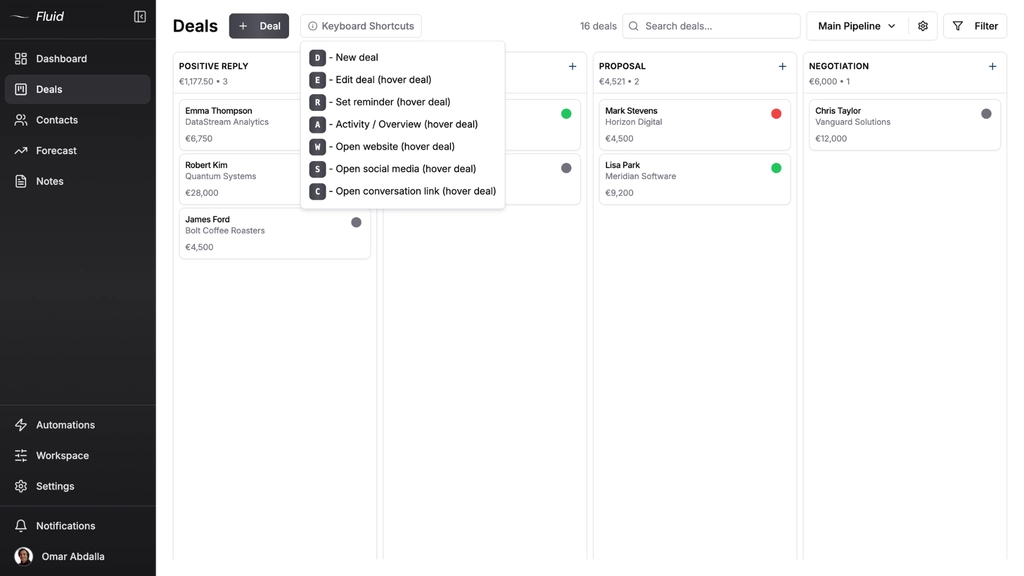
4. Keyboard shortcuts that save hours per week
This is the big one. Press D for new deal, R for reminder, W for website, S for social, E to edit and C for conversation. Hover a deal and hit one key to open the email thread. Working through 50 replies drops from 2 hours to 30 minutes once your team learns the easy shortcuts. Built after running cold email for 30+ done-for-you clients and mentoring 20 more on CRM and outbound setup.
The Cold Email To CRM Workflow That Actually Works
Cold email agencies run two distinct pipeline types. This is the operational reality no other CRM post explains, and it changes how you should set up your CRM.
Pipeline type 1: The agency’s own outreach (selling your services)
You’re closing your own deals here. The pipeline is longer because you take prospects from interested through to signed contract:
Positive Reply → Discovery Call → Demo Call → Proposal → Negotiations
A positive reply lands from your own cold email tool, the deal appears in this pipeline at “Positive Reply,” you book the discovery call and move it forward yourself. Standard agency sales cycle.
Pipeline type 2: Per-client pipelines (running cold email on their behalf)
Each client gets their own pipeline. The pipeline is short because your job usually ends at the booked meeting (altrough deal types can vary):
Positive Reply → Meeting Booked
That’s it. Two stages. The agency’s deliverable most often is a booked meeting on the client’s calendar. The client takes over from there to actually close the deal. Your job isn’t to track their sales cycle. Your job is to feed them qualified meetings and prove you did it.
Before launching a sequence for any client, run their prospect list through the free MX lookup tool to segment by email provider and protect deliverability across the Microsoft 365 and Google Workspace splits.
Here’s how the workflow runs end to end. A prospect replies positively to a sequence in Smartlead. The Smartlead webhook fires, hits Fluid’s API and the deal lands in the correct client pipeline at “Positive Reply” with the prospect’s email, company, reply text and conversation thread already filled in. A reminder auto-sets for 24h follow-up. The next day you hover the deal, hit C and the email thread opens. You reply, book the meeting and move the deal to “Meeting Booked.” That client’s monthly meeting count ticks up by one.
When I was running Fenixtal, half the marketing agencies I worked with tracked deals in Google Sheets. The other half paid for Salesforce and pretended to use it. Both groups had the same problem at agency scale. When I gave visibility to their own pipelines and trained them on how to use Fluid CRM, the churn lowered drasticy, because my client’s close rates went up. Most of those agencies were small operations who couldn’t justify HubSpot but needed real structure. The same will happen to you if you make it happen.
Why You Need Both a Cold Email Tool and a CRM
This is the part nobody on the search results says clearly. Cold email agencies need two tools, not one. Anyone selling you a single tool that does both halves is selling you something that does both halves badly.
A cold email tool (Smartlead, Instantly and PlusVibe) handles the sending side really well. Multi-sender infrastructure, inbox warm-up, deliverability monitoring, sequence logic, bounce handling, etc. This stuff is hard to build and harder to maintain. You can’t replace it with a CRM like HubSpot’s marketing automations.
A CRM (Fluid CRM for cold email agencies and small B2B teams) handles the pipeline side. Deal tracking, follow-up reminders, contact history, multi-client pipeline structure, custom fields and keyboard shortcuts. You can’t replace this with a sequencer’s CRM either, because sequencers don’t think in deals. They think in lead lists and reply rates.
People try to collapse these into one tool from both directions. Cold email tools ship built-in CRMs that fall apart past 3 clients. CRMs like HubSpot try to position themselves as cold email platforms even though they have no warm-up infrastructure and no multi-sender support. Both attempts fail because they’re trying to do something the architecture wasn’t built for.
The right setup is two tools that do their job well and talk to each other through an API. Smartlead does sending, Fluid CRM does pipeline. Smartlead’s webhook fires when a reply comes in, Fluid CRM catches it and creates the deal. That’s the architecture.
Frequently Asked Questions
Built-in CRMs in Smartlead, Instantly and Saleshandy are designed for a single sender managing their own outbound. They work well for that. The moment you’re running cold email for 3+ clients with different ICPs and different stage definitions, the single shared pipeline becomes useless. You can’t separate Client A’s deals from Client B’s, you can’t customize stages per client and you can’t give clients read-only access to just their own pipeline.
Yes, once you hit 3+ clients. Each client has different stages, different reply categories and different reporting needs. Trying to track them all in one shared pipeline turns into a guessing game fast. Fluid CRM gives you unlimited pipelines on the 16€/month plan so this isn’t a cost question, it’s a setup question.
Most modern cold email tools (Smartlead, Instantly and PlusVibe) have native webhooks that fire when a reply is categorized as positive. You point that webhook at your CRM’s API endpoint and the deal creates automatically with the prospect’s email, company and reply text pre-filled. Austin at Cold Emailers wired Smartlead to Fluid CRM this way and his data entry runs on autopilot.
No. HubSpot and Pipedrive aren’t built for sending cold email at agency volume. They have no inbox warm-up, no multi-sender infrastructure and no deliverability features. You should use Smartlead or Instantly for the sending side. On the CRM half they’re overbuilt for agencies fast follow-up needs and lock the features you actually need (custom fields, API access and pipeline counts) behind expensive tiers, which is what breaks agency margins. Cold email agencies need a sequencer for sending and a light CRM for tracking. Not one tool pretending to do both. For a specific 2-person agency scenario, see if HubSpot is worth it for a 2-person team.
For a deeper comparison of Fluid CRM against the other small-team options, see best CRM for small B2B sales pipelines. Cold email gets you replies. Fluid CRM turns those replies into booked meetings and closed deals. It has a visual pipeline, auto-reminders, keyboard shortcuts and API integration with Smartlead and Instantly. Start your 7-day free trial, no credit card needed.