

Searching for CRM examples gets you two kinds of lists. Vendor promos dressed up as advice, or 25-tool roundups where every option sounds perfect. Neither helps you pick. This is 15 real CRM systems sorted by who they fit and, more useful, who they don’t.
CRM examples range from lightweight tools like Fluid CRM and Capsule to sales-focused options like Pipedrive and Close, plus all-in-one HubSpot and enterprise Salesforce. The best one depends on your team size and what you will log every day, not the longest feature list.
Why Companies Pick the Wrong CRM
Picking the wrong CRM usually comes down to one mistake. Buyers shop by feature list instead of by what their team will actually use every day.
After 1,000+ meetings booked across 50+ B2B clients at my outbound agency Fenixtal, I saw the same thing on repeat. Companies either tracked nothing at all, paid for Salesforce and never logged in or ran a messy Google Sheet that fell apart by month three. The expensive CRM was almost always the unused one.
Can you name the three deals you most need to follow up on this week without opening a tab? If you can’t, the tool isn’t your problem yet. The habit is.
The best CRM example is the one your team opens every day, not the one with the longest feature list. A simple tool that gets used beats a powerful one that sits empty. Nicolas Virtsonis, who runs a cleantech marketing and sales pipeline agency, has tried Sugar, Zoho, Pipedrive, Salesforce and a stack of others. His take on the one he kept was blunt. “Most CRMs are a nightmare to use and maintain.”
So before you look at a single feature, answer two questions. How big is your team, and what will you log in that tool every single day? Those two answers point you straight to one of the buckets below.
Sales Pipeline CRM Examples
Sales pipeline CRM examples are built around one job. Moving deals through stages until they close or die. If your day is mostly outbound, demos and follow-ups, this is your category. When I ran cold email at Fenixtal, the clients who booked the most meetings and actually closed them treated the pipeline like a daily to-do list, not a database they updated once a week.
Pipedrive
Pipedrive is a sales-first CRM built around a visual deal pipeline you drag deals across. It is popular with small sales teams that live in the pipeline and want clear stages without much setup.
Plans run from $24/seat/month on Lite up to $99/seat on Ultimate, with a 14-day free trial that needs no credit card.
Where it falls short: Most agencies need at least the Growth plan ($49) for automations and full email sync, so the real entry price sits higher than the sticker. For a solo founder tracking 20 deals, the feature depth is more than you will use, and you end up paying for a sales engine when you wanted a simple tracker.
Close
Close is a sales pipeline CRM with calling, email and SMS built into every plan, made for high-volume outbound teams. It fits inside sales teams and SDRs who burn through calls all day and want the dialer native instead of bolted on.
Pricing starts at $9/month for the single-user Solo plan, then jumps to $49/seat on Essentials, $109 on Growth and $149 on Scale.
Where it falls short: The power features most outbound teams actually want (Power Dialer, automated workflows, the AI email tools) sit on Growth and above, so the real cost climbs fast. For a team that does not cold call, you are paying for a phone system you will never switch on.
Simple CRM Examples for Small B2B Teams
Simple CRM examples for small B2B teams sit between a spreadsheet and a full sales platform. Enough structure to track deals and follow-ups, none of the bloat that makes a team avoid logging in. This is the sweet spot for solo founders, freelancers and agencies under 20 people. It is the category most of the 50-plus B2B clients I worked with at Fenixtal needed and almost none of them had, stuck choosing between a spreadsheet that broke and a HubSpot account they dreaded opening.
Fluid CRM
Fluid CRM is a lightweight, visual and fast sales pipeline made for solopreneurs, small B2B teams and agencies who have outgrown spreadsheets but do not want the bloat of traditional CRMs. You get unlimited deals, contacts and pipelines, follow-up reminders, keyboard shortcuts and API access, all on a clear pipeline you can read at a glance.
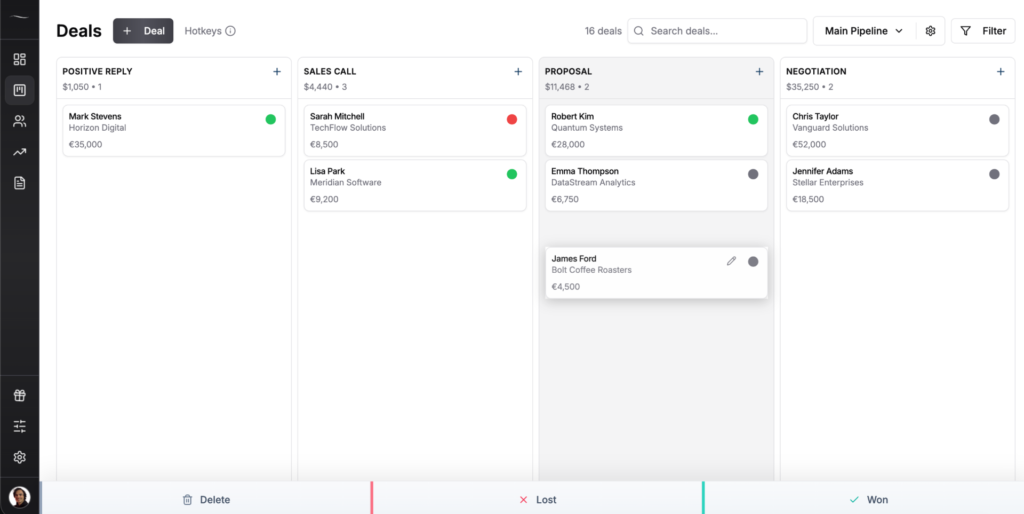
Pricing is two feature-complete plans that differ only in billing, $16/seat/month or $144/seat/year (three months free with annual), on a 7-day free trial, no credit card required. Every feature is included on both plans, so there are no upgrade traps. Kyler Thompson at Knight Theory called it “a clean, no-frills interface that does what I need and doesn’t annoy me with features that I don’t.”
Where it falls short: Fluid is not built for enterprise teams, heavy marketing automation or large orgs that need granular department permissions. No native dialer, no nurture flows.
Capsule
Capsule is a clean contact-and-pipeline CRM that small teams use to track deals without a heavy setup. It fits service businesses and small B2B teams that want contact management, a pipeline and light automation in one place.
There is a free plan for up to 2 users and 250 contacts, then Starter at $21/seat, Growth at $38 and Advanced at $60.
Where it falls short: The free tier caps fast, and the automations, multiple pipelines and reporting dashboards most teams actually want only show up on Growth ($38) and above. So the real working price is the mid-tier, not the free sticker that pulled you in.
Less Annoying CRM
Less Annoying CRM is exactly what the name says, a stripped-down CRM for solo operators and very small teams who want contacts, a simple pipeline and daily reminders. It fits consultants, agents and small service firms that have outgrown a spreadsheet but find most CRMs too much.
The price is refreshingly plain, $15/user/month for everything, with a 30-day free trial that needs no credit card.
Where it falls short: There is one plan and one feature set, so if you later need real automation, advanced reporting or a deep integration stack, you will hit a ceiling. It is built to stay simple, which is both the point and the limit.
All-in-One Sales and Marketing CRM Examples
All-in-one sales and marketing CRM examples bundle your pipeline with email marketing, automation and reporting under one roof. They suit teams that want sales and marketing in the same tool and have someone to actually run the automation. The trade-off is price and complexity that climb together. The honest test is whether you have a person whose job is to build and watch the automations. Without that person, the automation features turn into a monthly bill for screens nobody opens.
HubSpot
HubSpot is the best-known all-in-one CRM, pairing a free contact database with paid Sales Hub and Marketing Hub tiers for automation, reporting and nurture campaigns. It fits growing teams that genuinely need marketing automation and have the budget and time to run it.
The free tier covers basic contacts, Starter is $20/seat, and Professional jumps to $100/seat plus a one-time $1,500 onboarding fee that is required, not optional.
Where it falls short: The features people actually sign up for (automation, forecasting and real sales analytics) start at Professional, so the true entry cost is far above the free sticker. For a 2-person team, that is a lot of platform you will barely touch. If HubSpot’s pricing is what pushed you to research this, the full breakdown lives in HubSpot alternatives for small business.
Zoho CRM
Zoho CRM is a deep, customizable all-in-one that gives you sales, automation and a huge add-on ecosystem at a low per-seat price. It fits small-to-mid teams that want a lot of capability for the money and do not mind a steeper setup.
There is a free plan for up to 3 users, then paid tiers at $14, $23, $40 and $52/user/month on annual billing.
Where it falls short: The low price comes with a busier interface and more configuration than a simple tool, and the features that matter most (Blueprint automation, advanced analytics) live in the higher tiers. You trade polish and speed for flexibility and price, which is a fair deal for some teams and a slog for others.
Enterprise CRM Examples
Enterprise CRM examples are the heavyweight platforms built for big sales orgs with many departments, complex permissions and dedicated admins. They are powerful and wrong for almost everyone reading this, which is exactly why they belong on the list. Knowing what to skip saves money. The tell is headcount. If you do not have a full-time admin to run it, an enterprise CRM sits half-configured while your team quietly works around it in email.
Salesforce
Salesforce is the enterprise standard, an endlessly customizable CRM that can model almost any sales process if you have the team to build and maintain it. It fits larger organizations with dedicated admins, complex pipelines and the budget for setup and ongoing work.
For small business the Starter Suite is $25/user/month and Pro Suite is $100/user/month on an annual contract, but the real Salesforce most people picture (Sales Cloud) sits on higher tiers with implementation costs on top.
Where it falls short: For a small B2B team it is overkill in every direction, cost, setup time and daily complexity. Half the small companies I worked with at Fenixtal paid for it and never logged in.
Microsoft Dynamics 365 Sales
Microsoft Dynamics 365 Sales is the enterprise CRM for companies already deep in the Microsoft world of Outlook, Teams and Excel. It fits mid-size and large orgs that want their CRM wired into the rest of the Microsoft stack and have IT support to run it.
Pricing starts at $65/user/month for Sales Professional, $105 for Sales Enterprise and $150 for Sales Premium, before the implementation work that real deployments need (often tens of thousands up front).
Where it falls short: Outside a Microsoft-heavy company the integration edge disappears, and the setup and admin load is far beyond what a small team should take on. This is a platform you staff for, not one you just switch on.
CRM Examples That Live in Your Inbox
Inbox CRM examples turn the email client you already use into your pipeline, so you never leave Gmail to update a deal. They suit people who run sales mostly over email and hate switching tabs. The catch is they are only as good as the inbox they are tied to. These win on one habit. If your team already lives in Gmail all day, a CRM in the same window actually gets updated, and the moment a deal lives somewhere you have to open on purpose, it stops getting touched.
Streak
Streak is a CRM that lives entirely inside Gmail, adding pipelines, deal tracking and mail merge to the inbox you already work in. It fits solopreneurs and small teams of 2 to 10 who run email-heavy sales and never want to leave their inbox.
Paid plans are Pro at $49/user/month, Pro+ at $69 and Enterprise at $129, with annual billing knocking off about 20%.
Where it falls short: Streak dropped its free CRM tier, so the free option now is just email tools, not a pipeline. It also slows down once you pile up hundreds of deals, and if your team is not all-in on Gmail it is a non-starter from day one.
Copper
Copper is a CRM built specifically for Google Workspace, capturing contacts and emails from Gmail automatically so records stay current without manual entry. It fits small agencies and service firms that live in Gmail, Calendar and Drive and want a CRM that feels like part of Google.
Plans start at $9/seat/month for Starter, then $23 Basic, $59 Professional and $99-plus Business on annual billing.
Where it falls short: The cheap Starter and Basic plans do not include real deal and lead tracking, so the working price for a sales team is the $59 Professional tier. And if you are not on Google Workspace, there is no reason to look at it at all.
Marketing Automation CRM Examples
Marketing automation CRM examples started life as email engines and added a CRM on top, so the contact database serves the campaigns. They fit businesses where email nurture and automated follow-up drive most of the revenue. If your sales are relationship-led and low-volume, this is more engine than you need. The fit comes down to volume. Sending one-to-one follow-ups to thirty live deals does not need an automation engine. Drip-nurturing five thousand cold contacts does.
Keap
Keap is an all-in-one platform for small service businesses, bundling CRM, marketing automation, email, SMS, invoicing and scheduling in one tool. It fits coaches, consultants and small agencies that want sales and marketing automation in a single place and have the volume to justify it.
Pricing is a single plan starting at $249/month billed annually for 2 users and 1,500 contacts, plus a required onboarding fee around $500.
Where it falls short: For a solo operator or a team that just needs a pipeline and reminders, the price and the automation depth are far more than the job calls for. The cost also climbs as your contact list grows.
ActiveCampaign
ActiveCampaign is a marketing automation platform with a sales CRM attached, strongest at behavior-based email sequences and lead scoring. It fits B2B and ecommerce teams running real nurture campaigns who want the CRM and the email engine in one tool.
Pricing starts around $15/month for 1,000 contacts on Starter (annual billing) and climbs with both your plan and your contact count, with the sales CRM features landing on Plus and above.
Where it falls short: The price scales aggressively as your list grows, and the sales pipeline is a secondary feature next to the marketing engine. If you want a CRM first and email second, you are buying it backward.
Industry-Specific CRM Examples
Industry-specific CRM examples are built for one trade, with the workflows, fields and compliance that trade needs baked in. They suit firms in that exact vertical, where a general CRM would mean rebuilding the basics by hand. Outside that vertical they make little sense. The math only works when the vertical features replace a tool you would otherwise buy separately, like a law firm’s trust accounting or a real estate team’s lead routing. For a general B2B business, you pay for all of it and use none of it.
Clio
Clio is a legal practice management platform with a built-in CRM (Clio Grow) for client intake, matters and billing in one place. It fits law firms, from solo attorneys to mid-size practices, that need case management and intake tracking together.
Pricing runs from $49/user/month on EasyStart up to $149 on Complete, which bundles the Clio Grow intake CRM, with a 7-day free trial.
Where it falls short: Clio is legal software first, so for any business outside law you are paying for trust accounting, matter management and legal workflows you will never touch. A general B2B team gets nothing from the vertical features.
Follow Up Boss
Follow Up Boss is a real estate CRM built to capture leads from sources like Zillow and Realtor.com and route them to agents fast. It fits real estate agents and teams whose whole game is reaching new leads fast and following up across many lead sources.
Pricing is $69/user/month on the Grow plan, $499/month for up to 10 users on Pro and $1,000/month for up to 30 on Platform, with a 14-day free trial.
Where it falls short: The lead routing and integrations are tuned for real estate, so outside that industry the value drops sharply. It also leans on add-ons for calling and skips native transaction management, so the real cost runs higher than the base price.
How to Choose a CRM From These Examples
Choosing a CRM from these examples gets simple once you stop counting features and start with your team. Two questions do most of the work. How many people will use it, and what will you log every single day?
Here is the short version by who you are:
| Who you are | Best-fit CRM examples |
|---|---|
| Solo founder or freelancer on a spreadsheet today | Fluid CRM, Less Annoying CRM |
| Small B2B team or agency under 20 people | Fluid CRM, Capsule, Pipedrive |
| Outbound team that cold calls all day | Close |
| Running sales and marketing nurture together | HubSpot, Zoho |
| Living entirely in Gmail | Streak, Copper |
| Large org with admins and complex permissions | Salesforce, Microsoft Dynamics 365 |
| Law firm or real estate team | Clio, Follow Up Boss |
Whatever you pick, the test is the same. Open it tomorrow morning. If you do not want to, the tool is wrong, no matter how good the feature list looked.
If you have outgrown a spreadsheet but a big platform feels like too much, that middle ground is exactly where the simple CRM bucket above lives. And if you specifically run an agency juggling multiple clients, the breakdown for your case is in best CRM for marketing agencies.
Frequently Asked Questions
A CRM system is software that tracks your contacts, deals and follow-ups in one place. Real examples include Fluid CRM and Capsule for small teams, Pipedrive and Close for sales pipelines, HubSpot and Zoho for all-in-one sales and marketing, plus Salesforce for enterprise. The right example depends on your team size and how you actually sell.
Salesforce and HubSpot are the most widely used CRMs by market share, with Salesforce dominating enterprise and HubSpot strong in mid-market. But popular does not mean right for you. For a small B2B team, a simpler tool like Fluid CRM is usually a better fit than the platform with the biggest logo.
For a small business, the simplest CRMs are Fluid CRM, Less Annoying CRM and Capsule. Each gives you contacts, a visual pipeline and follow-up reminders without setup wizards or training calls. Fluid CRM runs $16/seat/month with every feature included and a 7-day free trial, no credit card required.
CRM pricing ranges from about $9/seat/month for entry tools like Copper Starter or Close Solo up to $150-plus per seat for enterprise platforms like Salesforce and Microsoft Dynamics 365. Simple CRMs for small teams sit in the $15 to $40 range. Watch for onboarding fees and features locked to higher tiers, which can quietly double the real cost.
A spreadsheet is fine when you are solo with a handful of deals and a simple sales cycle. You need a CRM once you are missing follow-ups, sharing the pipeline with a teammate or losing deals you cannot trace. The tipping point for most small teams is around 30 active deals, where a sheet stops holding the full picture for you. The full threshold breakdown is in Google Sheets vs CRM.
Conclusion
The 15 CRM examples here cover every real use case, from a solo founder’s first pipeline to an enterprise sales floor. The one that works is not the one with the most features. It is the one your team opens every morning without being told to.
If you have outgrown spreadsheets but do not want the bloat of a big platform, Fluid CRM gives you a clear visual pipeline at $16/seat/month with every feature included. Start your 7-day free trial, no credit card required.