

Plenty of professional services firms buy the wrong kind of CRM. They get sold a platform that runs billing, projects and resourcing when all they needed was a way to track who to follow up with on Friday. The split between those two tools decides everything else. This post helps you work out which one you actually need.
Choosing a CRM for professional services starts with one split. A sales CRM tracks who you follow up with and where deals stand. A PSA platform also runs billing, projects and resourcing. If your bottleneck is follow-up, you need a sales CRM. If delivery and invoicing live in the tool, you need a PSA.
The Two Kinds Of CRM Professional Services Firms Buy
When a professional services firm picks a CRM, it usually lands on one of two very different tools, and most don’t realize there was a choice until they’ve already paid. The first is a sales CRM. It tracks leads, deals, contacts and follow-ups, and that’s the whole job. The second is a PSA platform, short for professional services automation. It does the sales part too, but its real purpose is running the delivery side: time tracking, project budgets, resourcing and invoicing.
The price gap between those two jobs is huge, and so is the setup. A sales CRM you can run in an afternoon. A PSA platform is a project in itself.
In three years running cold email at Fenixtal I worked with more than 50 B2B clients across agencies, consultancies and dev firms. Half of them tracked their deals in a messy Google Sheet. The other half paid for Salesforce and nobody on the team ever logged in. Almost none of them had picked their tool on purpose. They bought whatever came up first when they Googled, and they bought too big.
That’s the whole reason this split matters. Get it right and your shortlist shrinks to a handful of tools that fit. Get it wrong and you spend a year inside a platform you never wanted.
How To Tell If You Need A Sales CRM Or A PSA Platform
The fastest way to tell whether you need a sales CRM or a PSA platform for your professional services firm is to look at where your bottleneck actually sits. One question sorts most firms in about ten seconds. Does your invoicing, billing or project delivery need to live inside the same tool as your pipeline? If yes, you’re in PSA territory. If your real problem is remembering who to chase and where deals stand, a sales CRM is all you need.
Signs you need a PSA platform
- You bill clients by tracked hours and want time logs, budgets and invoices sitting in one place.
- You run multi-person project delivery and need to see who is booked and who has room to take on more.
- You manage retainers or fixed-fee projects where your margin depends on watching cost against budget in real time.
- Your finance and delivery people need to work off the same numbers your sales team is looking at.
Signs you only need a sales CRM
- Your main pain is follow-ups slipping and warm deals going cold while you’re busy delivering.
- You already handle invoicing fine in an accounting tool and have no wish to move it.
- You’re solo or a small team, and project delivery lives in your calendar or a simple task tool.
- You want to see your pipeline at a glance and know who to call back without opening five tabs.
Stop for a second. Can you name the three deals most likely to close this month without opening anything? If you can, your problem isn’t delivery, it’s keeping that picture current. A sales CRM does that for cheap. A PSA platform buries it under modules you’ll open once and never touch again.
What PSA Platforms Cost For A Small Professional Services Firm
PSA platforms cost a small professional services firm far more than the sticker price suggests, because the per-seat number is only half the story. The other half is seat minimums and which features sit behind the top tier. I checked the live pricing on Scoro, Productive and Salesforce in June 2026. This is what a small firm actually pays.
| Tool | Entry plan | Price per seat (monthly) | Seat minimum | What a small firm really pays |
|---|---|---|---|---|
| Fluid CRM | single plan | $16 | None | $16 for one seat |
| Productive | Essential | $12 | 3 seats | About $36 a month |
| Salesforce | Starter Suite | $25 | None | $25 for one seat |
| Scoro | Core | $23.90 | 5 seats | About $119.50 a month |
Prices are monthly billing. Annual is cheaper on all four. Two numbers in that table do the persuading on their own.
Scoro’s entry plan looks reasonable at $23.90 a seat, but the minimum buy is five seats on every plan, even if you’re two people. So a two-person firm pays around $119.50 a month to use two logins. And on that entry plan the sales pipeline is an add-on. You don’t get it as a core feature until the Performance tier at $59.90 a seat. Productive starts lower at $12 a seat but holds a three-seat floor, so a solo operator pays for three. Salesforce Starter Suite is $25 a seat with no minimum, but the tier most firms grow into, Pro Suite, jumps to $100 a seat a month on an annual contract.
Look at the Scoro line again. You’re paying for a billing, resourcing and project delivery engine to get a pipeline that, on the entry plan, isn’t even switched on. That’s the mismatch most professional services firms walk straight into. You’re funding an enterprise roadmap to track follow-ups.
Nicolas Virtsonis runs marketing and sales pipeline development for cleantech B2B companies, and he’s tried Sugar, Zoho, Pipedrive, Salesforce and a stack of others. His read on the big tools: “It’s unlikely enterprise CRMs are suited for your work and needs.” He found the subscription fees didn’t fit a small operation either. When a veteran who has used everything tells you the enterprise platforms don’t fit, that’s worth more than any pricing table.
What To Look For In A Sales CRM For Professional Services
If the self-test put you in the sales CRM camp, the next question is what a professional services firm should actually look for in one. The features that matter aren’t the ones with the longest list. They’re the few that fix the follow-up problem without piling on more work.
A visual pipeline you can read at a glance
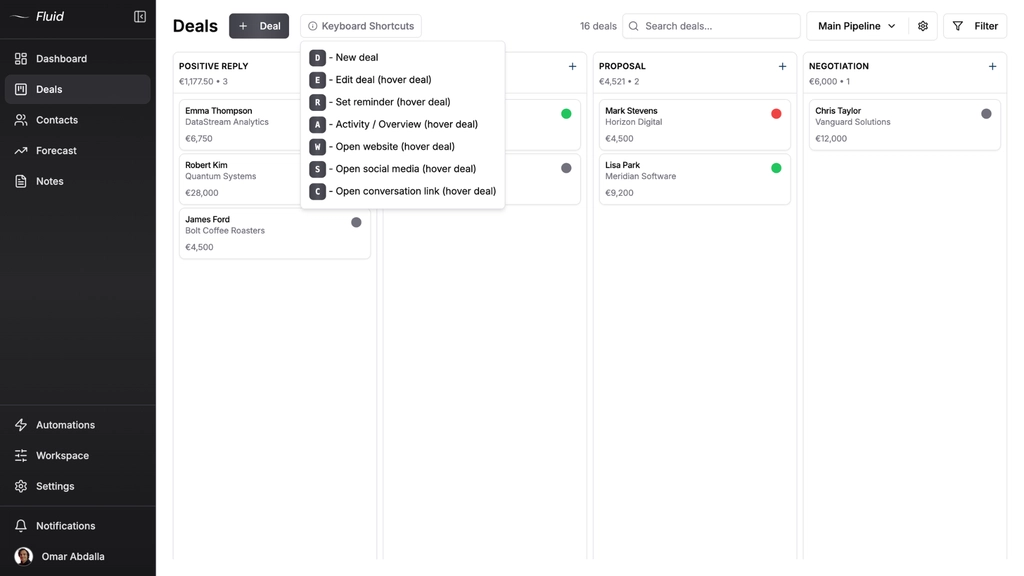
This is the single upgrade that fixes the follow-up problem. You should open the tool and see every deal, the stage it’s in and what needs attention today, all on one screen. If the pipeline view is just another table of rows, you’ve bought a spreadsheet with a login.
Follow-up reminders built in, not bolted on
The reason deals go cold in professional services is boring and predictable. A warm lead asks you to circle back in three weeks, and three weeks later nobody remembers. Reminders have to live inside the deal itself, not in a separate task app you’ll forget to check.
Multiple pipelines for different client types
Plenty of professional services firms run more than one process at once. New business is one pipeline. Upsells to existing clients or referrals from partners might be another. Look for a tool that lets you spin up a fresh pipeline in a click, not as a setup project.
Nested contacts for multi-stakeholder deals
B2B deals in professional services rarely have one decision maker. You’re talking to a founder, a head of ops and maybe a finance lead, all inside the same company. A CRM that nests several contacts under one company keeps that picture straight, which matters for any account-based work.
Setup under ten minutes
If the tool needs an onboarding call, a setup wizard or a success manager, it’s built for a bigger company than yours. You should be tracking your first deal in the time it takes to make a coffee. Setup tax is the quiet reason so many half-bought CRMs sit unused.
A Finnish IT consultant doing specialized B2B work walked me through his setup. He’d tried Pipedrive and drifted back to a spreadsheet because the tool kept getting in his way. He didn’t want more features. He wanted one clean pipeline that showed the few deals he was working and nudged him to follow up. Specialists with a low-volume, high-value pipeline don’t need a platform, they need a clear list and a reminder.
Below you’ll see an example of Fluid CRM visual pipeline that ticks all the boxes above.
The Best CRM By Type Of Professional Services Firm
The best CRM for a professional services firm depends on what kind of firm you run, so I’ve split the picks by type instead of forcing one answer. Each guide below goes deeper on the tools, the trade-offs and the setup for that specific kind of work. Start with the one that matches you.
Consultants
Independent consultants juggle a handful of high-value deals over long sales cycles, so the priority is never letting a warm conversation go cold. I broke down the best CRMs for independent consultants who hate admin work.
Freelancers
Freelancers tend to hit CRM pain the moment a third or fourth client lands and follow-ups start slipping. The need is light, fast and cheap, with no setup tax. I covered what works for a freelancer juggling a few clients in it’s own best CRM for freelancers post.
Small agencies
Small agencies need the whole team looking at the same pipeline without paying for an enterprise platform or fighting a setup wizard. Per-client pipelines and clear ownership matter more than reporting depth here. Here’s the best CRM setup I recommend for small agencies.
Coaches and consultants
Coaches and high-touch consultants run on word of mouth and low lead volume, where deal value is high and the worst outcome is forgetting to follow up with a warm referral. For that profile I wrote up the best CRM for coaches and consultants.
Law firms
Law firms track matters, deadlines and client intake, and most legal CRMs bundle practice management on top whether you need it or not. The real choice is between a bundled suite and a pure intake pipeline. I compared both routes in the best CRMs for law firms.
Accountants and bookkeepers
Accountants live inside their practice software, so the CRM question is really about tracking new client leads without duplicating what QuickBooks or Xero already handles. Tax season referrals go cold fast when nobody owns the follow-up. I covered the setup in the best CRMs for accountants and bookkeepers.
Staffing agencies
Staffing agencies run two pipelines at once, one for client companies and one for candidates, and most CRMs force you to pick a side. The tools that work let you track both without an ATS price tag. Here’s my breakdown of the best CRMs for staffing agencies.
Marketing agencies
Marketing agencies sell retainers and projects side by side, often with a partner or two splitting the pipeline. The pain shows up when proposals sit in someone’s inbox and nobody knows which deals are actually moving. I wrote up the best CRMs for marketing agencies.
Web designers
Web designers get most of their work from referrals and inbound forms, so lead intake matters more than sales reporting. A project ends, the client disappears and the follow-up for round two never happens. I covered what actually works in the best CRMs for web designers.
Interior designers
Interior designers manage long projects with big budgets and few active deals at a time, so losing one warm inquiry hurts more than it would in a volume business. The CRM job here is intake and follow-up, not project delivery. I broke it down in the best CRMs for interior designers.
Construction companies
Construction firms quote jobs worth tens of thousands and then lose track of which bids are pending, accepted or dead. One tool runs the job site, another should win the work. I split the two jobs apart in the best CRMs for construction companies.
Cleaning businesses
Commercial cleaning contracts come from quotes that need chasing, and most cleaning software focuses on scheduling crews instead of winning the contract in the first place. Different job, different tool. Here’s the full breakdown of the best CRMs for cleaning businesses.
Frequently Asked Questions
It depends on where your bottleneck sits. If your problem is losing track of follow-ups and deals, you need a sales CRM. If you need billing, time tracking and project delivery in the same tool, you need a PSA platform. Most small firms only need the sales CRM and get sold the platform.
Cheap sales CRMs for a small consulting firm run between $12 and $25 a seat a month. Watch for seat minimums. Scoro, for example, makes you buy at least five seats even if you’re two people. Fluid CRM is $16 a seat with no minimum and a 7-day free trial, no credit card required.
A PSA platform like Scoro or Productive handles both, but you pay for the delivery side whether you use it or not. A sales CRM handles the pipeline only and leaves delivery to your existing tools. If your delivery runs fine in a task app and your accounting tool, paying for an all-in-one platform is money spent on features you won’t open.
For most small professional services firms, Salesforce is more than they need. Starter Suite is fair at $25 a seat, but the tier firms actually grow into, Pro Suite, jumps to $100 a seat a month on an annual contract. Unless you need heavy customization and automation, a simpler sales CRM does the follow-up job for far less.
Conclusion
The choice isn’t really which CRM. It’s which category. Get the split right and the shortlist picks itself, because a firm that needs follow-ups won’t waste a year inside a billing platform it never wanted. If your bottleneck is knowing who to chase and where deals stand, Fluid CRM gives you a clear visual pipeline without the bloat of a PSA platform, with every feature included on both plans.
Start your 7-day free trial, no credit card required.