

Copper is not a bad CRM. It’s a fairly priced Gmail integration attached to an overpriced CRM, and the bill proves it once you need automation. Here are 9 Copper alternatives, priced by the plan that actually runs a sales pipeline, not the entry tier on the pricing page.
The best Copper CRM alternative depends on why you’re leaving. NetHunt and Bigin keep the Google-native workflow at a lower price. Fluid CRM, Pipedrive and Attio move the pipeline out of the inbox entirely. Compare capability prices, not entry tiers. Copper’s pipeline with automation starts at $69 a month per seat.
Why Teams Leave Copper CRM
Copper is a Google Workspace CRM with the deepest Gmail integration on the market, and teams rarely leave it because the product is bad. They leave when they work out what the money is actually buying. You’re paying for the sidebar, not the pipeline. Strip the Gmail integration away and the CRM underneath does nothing a $16 tool can’t.
The pricing ladder makes the point. Starter ($12 a month, $9 annually) is contacts only, with no pipelines. Basic ($29 a month, $23 annually) adds pipelines but leaves out lead management and workflow automation. So a working sales team lands on Professional at $69 a month ($59 annually), and that’s where the real bill starts. For a 3-person team, Professional runs $69 x 3 x 12, which is $2,484 a year. The same 3 seats on Fluid CRM cost $576. The gap is the price of the sidebar.
For some teams the sidebar is worth every dollar of that gap. It logs email automatically, pulls a year of thread history when you add a contact and saves reps real minutes every day. The problem starts when you’re paying sidebar money and your reps stopped opening the sidebar months ago.
I’ve run outbound for 50+ B2B clients at Fenixtal, and one pattern held across all of them. The teams paying the most for their CRM were rarely the teams using it most. Half tracked deals in messy Sheets, the other half paid for a heavyweight CRM the sales team never opened. The expensive tool wasn’t failing them. They just weren’t the team it was priced for.
Do You Still Need a Google-Native CRM?
Before picking a Copper alternative, work out which of 2 problems you actually have, because they lead to different tools.
Problem 1 is price alone. The Gmail sidebar genuinely earns its keep, your reps use it daily and you’d keep the workflow forever if it cost less. You want a Google-native CRM at a lower price, and NetHunt or Bigin is your answer.
Problem 2 is the realization that the sidebar was never the point. Your reps open the CRM in its own tab anyway, the deals need reminders and reporting more than they need inbox rendering and you’re paying a premium for a perk. You want the pipeline out of the inbox entirely, with email syncing in. That’s Fluid CRM, Pipedrive, Attio and the rest of this list.
Try this test. Count how many times your reps opened the sidebar yesterday for something an open tab couldn’t do. If the answer is close to zero, you’ve been paying business class prices because you like the lounge. The lounge is nice. The flight is the same.
One boundary worth drawing: if your complaint is a browser extension slowing Gmail down rather than the bill, that’s a Streak problem, not a Copper problem, and it has its own post. Copper’s issue is rarely speed. It’s what the speed costs.
9 Best Copper CRM Alternatives Compared
This table skips the entry-tier trick. For each tool it shows the cheapest plan that runs a real sales pipeline with automation, because that’s the plan you’ll actually pay for. Prices are monthly billing per seat, verified against official pricing pages in July 2026. Annual billing is cheaper on every tool here.
| Tool | Best for | Cheapest plan with pipeline + automation | Catch to know |
|---|---|---|---|
| Copper (for reference) | Staying put | Professional, $69 | Starter and Basic don’t run a full sales process |
| NetHunt | Google-native replacement | Business, $60 | Automation actions capped monthly, top-ups cost extra |
| Bigin by Zoho | Budget Google-friendly option | Express, $9 ($7 annually) | Capped at 10 workflows |
| Fluid CRM | Small teams pricing by capability | Single tier, $16 | No Gmail sidebar |
| Pipedrive | Bigger sales teams | Growth, $49 | Add-ons stack on top |
| Attio | Flexible data models | Plus, $36 | Automation runs on capped credits |
| HubSpot Sales Hub | Growing into a full suite | Professional, $100 + $1,500 onboarding | $1,500 onboarding is required, not optional |
| Capsule | Simple contact-first tracking | Growth, $38 | Entry tier lacks sync and automation |
| folk | Relationship-heavy work | Premium, $60 | Native automation is thin, teams add Zapier on top |
| Close | Calling-heavy outbound | Growth, $109 | Dialer pricing for an email-first team |
Notice what the table does to the shopping process. Half these tools advertise entry prices under $25, and only 2 of them actually run an automated pipeline at that price. Copper’s $69 stops looking unusual and starts looking like the category’s habit.
Best Google-Native Copper Alternatives
If the Gmail workflow earns its keep and price is your only complaint, 2 tools keep the pipeline near your inbox for less than Copper’s Professional tier.
1. NetHunt (best Google-native replacement)
NetHunt embeds full CRM records, pipelines and views into the Gmail interface, and its entry tier gives you more than Copper’s does. Basic at $30 a month ($24 annually) includes deals, multiple pipelines and tasks, which Copper doesn’t offer below Professional.
The capability tier is Business at $60 a month or $48 billed annually, where sales automation, sequences and reports unlock. That undercuts Copper Professional by $9 a seat while staying in your inbox. Automation actions are capped per month, with paid top-ups if you run heavy workflows.
Where NetHunt falls short: the feature depth brings a learning curve, and heavy automation users can outgrow the action caps. It’s cheaper Copper, not simpler Copper.
2. Bigin by Zoho (best budget Google-friendly option)
Bigin is the price outlier on this list. Express costs $9 a month per user, or $7 billed annually, and includes 3 pipelines, email integration and 10 workflow automations. It connects to Google Workspace, though it works alongside Gmail rather than rendering inside it. There’s also a real free plan for 1 user with 500 records.
The 10-workflow cap on Express is the honest catch. Premier at $15 a month ($12 annually) raises it to 30 workflows with 5 pipelines. Teams inside the Zoho ecosystem also tend to add Zoho products over time, and the stack cost grows past the headline price.
Where Bigin falls short: it’s built as a stepping stone to Zoho CRM, so power users hit its ceilings on purpose. For a 2-person team watching every dollar, that ceiling might be years away.
Best Standalone CRMs After Copper
For teams that decided the sidebar was never the point, a standalone CRM moves the deal record out of the inbox while email keeps syncing in. Your reps see reminders, stages and reports in a tool built for pipelines, and Gmail goes back to being email.
3. Fluid CRM (best for small teams pricing by capability)
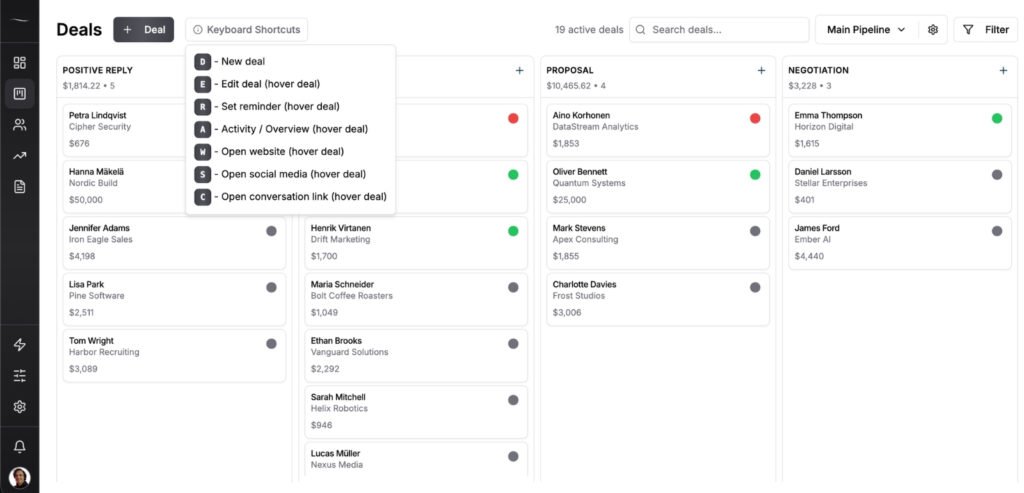
Fluid CRM gives small B2B teams, founders and agencies a clear visual pipeline to close more deals without the mess of spreadsheets or the bloat of traditional CRMs. It’s the cleanest answer to the capability-price question this post is built on, because there’s only one capability level to buy. Here’s what that looks like as a simple CRM for small teams.
Pricing is $16 per seat per month, or $144 per seat per year (3 months free with annual). Every feature is included on both plans: unlimited deals, contacts and pipelines, reminders, 8 in-app automations, keyboard shortcuts, API and webhooks. No upgrade traps. Run the 3-seat math against Copper Professional and it’s $576 a year versus $2,484. See the full breakdown at fluidcrm.io/blog/pricing.
Gmail stays in the loop through BCC email sync. You BCC one address on any email you send. If the thread matches a deal, it lands in that deal’s activity log. If you only have a contact so far, it lands on the contact’s notes. The deal history builds itself while your email stays in Gmail.
Where Fluid CRM falls short: there is no Gmail sidebar, and that’s the tradeoff stated plainly. Nothing renders inside your inbox, there’s no native dialer and there’s no marketing automation. If the sidebar is why you bought Copper and it still earns its keep, pick NetHunt instead. If it doesn’t, start the 7-day free trial, no credit card required.
4. Pipedrive (best for bigger sales teams)
Pipedrive built the visual pipeline category and remains the strongest pick for teams of 5 to 20 reps who need forecasting and team reporting. The capability tier is Growth at $49 a month, where workflow automation and full 2-way email sync unlock. Lite at $24 only gives you one-way email via BCC.
Where Pipedrive falls short: add-ons for lead capture, docs and projects stack on top of the seat price, and under 5 people you’re funding team infrastructure you won’t use.
Full comparison at Fluid CRM vs Pipedrive.
5. Attio (best for flexible data models)
Attio lets you build your own objects, attributes and views, which suits teams whose sales process doesn’t fit a standard pipeline. The capability tier is Plus at $36 a month ($29 annually), where workflow automation exists but runs on a capped monthly credit pool, so heavy automation either slows down or pushes you to Pro at $86 ($69 annually) where sequences and call intelligence also live. The free plan covers 3 seats and is genuinely usable.
Where Attio falls short: the flexibility costs setup time, and the credit system makes your real monthly bill harder to predict than a flat seat price.
Full comparison at Fluid CRM vs Attio.
6. HubSpot Sales Hub (best if you’ll grow into the full suite)
HubSpot‘s free tier covers contact management, deal tracking and Gmail sync for up to 2 users, and Starter adds the basics at $20 per seat. The capability tier is the expensive part. Sequences, real automation and custom reporting live on Professional at $100 per seat, plus a required $1,500 onboarding fee, the only one-time charge in this post. For a 3-person team that’s $5,100 in year one.
Where HubSpot falls short: between the free tier and Professional there’s a canyon. Buy it for where your company is going, not where it is.
Full comparison at Fluid CRM vs HubSpot.
7. Capsule (best for simple contact-first tracking)
Capsule is a calm, contact-first CRM with a real free plan covering 2 users and 250 contacts. The capability tier is Growth at $38 a month, where two-way email sync, workflow automations and multiple pipelines all unlock. Starter at $21 covers 30,000 contacts but logs inbound email through a manual forwarding address.
Where Capsule falls short: the entry tier is a contact book, not a sales pipeline. Budget for Growth from day one.
Full comparison at Fluid CRM vs Capsule.
8. folk (best for relationship-heavy work)
folk puts contacts, not deals, at the center, which fits PR, partnerships and agency work where the relationship outlasts any single deal. The Chrome extension captures contacts straight from LinkedIn. The capability tier is Premium at $60 a month ($48 annually), where deals as custom objects, sequences, dashboards and API access unlock. Native workflow automation is thin at every tier, so automation-heavy teams end up adding Zapier or Make on top.
Where folk falls short: Standard at $30 is a beautiful contact database without a real pipeline, and the automation gap adds tool costs the pricing page doesn’t show.
Full comparison at Fluid CRM vs folk.
9. Close (best for calling-heavy outbound)
Close bundles calling, SMS and email into the CRM itself. The capability tier is Growth at $109 a month, where workflow automation and the Power Dialer unlock. Essentials at $49 covers the core CRM without automation, and Solo at $19 ($9 annually) serves a single user.
Where Close falls short: if your outbound is email-first, you’re paying phone-team prices for a dialer you won’t touch, and calling minutes bill on top.
Full comparison at Fluid CRM vs Close.
When You Should Stay on Copper
Some teams reading this should close the tab and keep paying. Stay on Copper if all 3 of these hold: your whole company runs on Google Workspace, the sidebar saves your reps measurable time every single day and budget is not the constraint that brought you here.
When all 3 are true, the premium is earning its keep. Copper’s email backfill and automatic activity capture are genuinely the best in the Google ecosystem, and no tool on this list replicates them fully. The math in this post only bites when the sidebar goes unused. A sidebar your reps live in is a different purchase from a sidebar they forgot about, even at the same price.
If one of the 3 conditions breaks, run the capability table again and see what the gap buys you elsewhere.
How To Migrate Off Copper
Leaving Copper is a half-day job if you sequence it right. The data moves easily. The habits are what need rebuilding.
Step 1: Export everything to CSV
Copper exports contacts, companies and opportunities to CSV from the settings menu. Export all of it, including pipelines you abandoned. Deciding what survives comes next, and you want the full picture in front of you first.
Step 2: Clean before you import
Merge duplicate contacts, delete dead opportunities and standardize deal values to one currency. Copper’s automatic contact capture is generous, which means your export carries every person who ever emailed you once. Cut the noise now or carry it forever.
Step 3: Import active deals first
Bring over the deals you’re working right now, set the stages and live in the new tool for a week before bulk-importing history. Keep the CSV files for 90 days as a backup regardless.
Step 4: Rebuild only the automations you used
List the Copper workflows that actually fired last month, then rebuild those and nothing else. Automation graveyards migrate badly. A team usually finds it was living on 2 or 3 rules the whole time.
Frequently Asked Questions
Yes, several. HubSpot’s free tier covers deal tracking with Gmail sync for up to 2 users. Capsule’s free plan covers 2 users and 250 contacts, Bigin’s covers 1 user with 500 records and Attio’s covers 3 seats. Fluid CRM has no free plan. It has a 7-day free trial, no credit card required.
Bigin Express at $7 per user billed annually is the cheapest, with a 10-workflow cap. Fluid CRM at $16 per seat per month includes 8 in-app automations along with every other feature, with no caps to grow past. Both undercut Copper’s $69 Professional tier by a wide margin.
No. Copper offers a 14-day free trial with no credit card required, but there’s no permanent free tier. If a free plan matters, HubSpot, Capsule, Bigin and Attio all have real ones with different limits.
Yes, but know which kind you’re keeping. NetHunt keeps the sidebar experience inside Gmail. Standalone tools like Fluid CRM, Pipedrive and Attio keep email sync instead, so threads land on your deals without anything rendering in your inbox. Only the sidebar is unique to the Google-native tools.
Copper exports contacts, companies and opportunities to CSV from its settings, and most CRMs accept those files directly. The records move in an afternoon. Workflow automations don’t export at all, so plan to rebuild the handful you actually use in the new tool.
Conclusion
Copper’s question was never whether it’s a good CRM. It’s whether the Gmail sidebar is still worth the gap between $69 and what a pipeline actually costs. Price every tool by the plan that does the job and the answer gets obvious fast. If the sidebar stopped earning its keep, Fluid CRM gives you a clear visual pipeline at $16 per seat with every feature included.
Start your 7-day free trial here, no credit card required.