

You get enough calls, texts and form fills that names start slipping through the cracks. The quote you sent last Tuesday sits unanswered because nobody remembered to chase it. This post ranks 7 tools and separates the two jobs other lists mix together: running your cleaning jobs and winning new ones.
The best CRM for a cleaning business depends on the job. Field service tools like Jobber run your cleaning jobs. Fluid CRM tracks the leads, quotes and follow-ups that win you new clients, at $16/seat/month with every feature included and a 7-day free trial.
For winning cleaning clients, not scheduling jobs
Unchased quotes go to competitors. Fluid CRM emails you who’s due.
No credit card required
Why Cleaning Businesses Need Two Tools, Not One Platform
Cleaning business software splits into two jobs that get lumped into one list. The first job is running the work you already won: scheduling crews, dispatching, invoicing and getting paid. Tools like Jobber and ZenMaid do this well. The second job is winning new work: capturing leads, sending quotes and following up until someone says yes. That job needs a sales tracking software like Fluid CRM, and no field service tool takes it seriously.
Owners feel this as a specific pain. The phone rings, the forms come in, and three weeks later you can’t remember who asked about a weekly office clean and who wanted a one-time deep clean. The jobs you’re already running are organized. The jobs you could be winning live in a Google Sheet, your inbox and your head. Read Google Sheets vs CRM next for a full guide on when to make the switch.
Now stop for a second. How many quotes did you send last month, and how many did you follow up on more than once? If you don’t know the number, that’s the gap this post is about.
The all-in-one promise makes this worse, not better. Platforms that claim to do both jobs usually do the operations job well and bolt on a “CRM” that’s a client list with notes. You end up duct-taping integrations to cover the sales side and hitting dead ends anyway.
I saw this pattern across 50+ B2B clients at my outbound agency Fenixtal. Almost every company ran one of two setups, a messy Google Sheet or a paid CRM nobody on the team logged into. Both leak money the same way, through follow-ups that never happen.
Two simple tools beat one heavy platform. One tool to run the jobs, one to win them.
The 7 Best CRMs for Cleaning Businesses
These 7 tools are ranked by the job each one wins for a cleaning business. The first pick is a sales CRM for tracking leads and quotes. The rest cover scheduling, dispatch and payments, and each entry gets an honest falls-short note so you know exactly what you’re buying.
1. Fluid CRM (best for winning new cleaning clients)
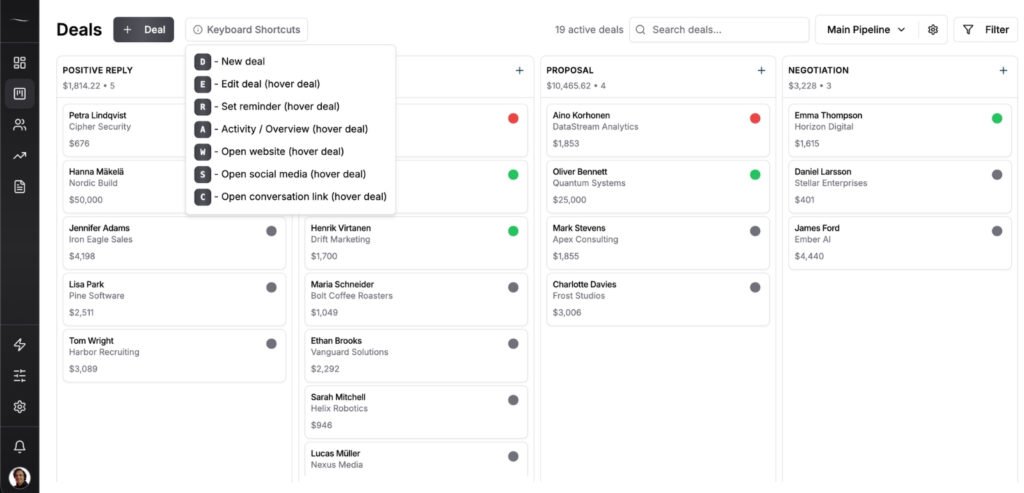
Fluid CRM is a visual sales pipeline built for the second job, turning inquiries into booked clients. Every lead from a call, text or website form becomes a card on one screen, so you always know who to call back and what they asked about. Reminders flag overdue follow-ups so a quote never dies from silence. See how owners use it as a simple CRM for quotes and callbacks.
The embedded lead capture forms are the standout for cleaning businesses. Add custom fields like budget, cleaning frequency and property type, embed the form on your site and new leads land in your pipeline pre-qualified. BCC email sync attaches your email threads to the right deal, and team ownership lets office staff assign deals with notes. Michal Pliszka, who runs the advertising agency Haiku Studio with a small calling team, described exactly this handoff. His employees assign contacts to him with notes like “Send an offer” or “Call back next week” and he sees every task with the contact details attached.
Setup takes minutes, with no wizards, training calls or onboarding sessions. Pricing is $16/seat/month or $144/seat/year, every feature included on both plans. 7-day free trial, no credit card required.
Where it falls short: Fluid CRM does no scheduling, dispatch, GPS tracking, crew management, invoicing or payroll. It wins you the client, then a tool like Jobber or ZenMaid runs the work. If you want one platform for everything, this isn’t it.
2. Jobber (best for running residential cleaning jobs)
Jobber is the field service standard for home services, cleaning included. Quoting, scheduling, dispatch, invoicing and payments all live in one place, and clients get a portal to book and pay on their own. If your pain is running the work, Jobber is the honest answer and I’d pick it over any all-in-one that promises the moon.
Pricing starts at $29/month on annual billing for a single user, and team plans jump hard from there.
Where it falls short: The CRM side is a client database attached to jobs, not a sales pipeline. Commercial contract bids with long cycles and multiple follow-ups have nowhere natural to live.
3. ZenMaid (best for maid service scheduling)
ZenMaid is built for residential maid services and nothing else, which is its strength. Recurring schedules, appointment reminders and cleaner coordination run on autopilot so the office stops being a phone-tag machine.
Pricing starts at $19/month plus $4 per cleaner. The Starter plan caps at 40 appointments per month, which a growing maid service hits fast.
Where it falls short: Residential only. If you’re bidding janitorial contracts or tracking a sales pipeline of any kind, ZenMaid was never meant for that job.
4. Housecall Pro (best for teams that want payments built in)
Housecall Pro leans into customer communication and getting paid. Online booking, automated text reminders and built-in payments make it easy for homeowners to book and pay without ever calling you.
Pricing starts at $59/month on annual billing, and that Basic plan covers a single user.
Where it falls short: Costs climb as you add features and users, and the sales side is thin. It keeps existing customers happy more than it wins new commercial work.
5. ServiceM8 (best for small crews working from their phones)
ServiceM8 runs the whole job from a phone. Crews see job details, capture photos, quote on site and invoice before they leave the driveway. For a small crew that lives in the field, that’s the whole pitch.
ServiceM8 has a free plan for solo operators, and paid plans start at $29/month with unlimited users, priced by job volume instead of seats.
Where it falls short: It’s a field tool first. The office and sales side is much lighter than Jobber’s, and pipeline tracking isn’t part of the picture.
6. Zoho CRM (best for owners who want one ecosystem)
Zoho CRM is a real sales CRM with a low entry price, and the wider Zoho suite covers invoicing, forms and email marketing if you want everything under one login. For an owner comfortable with software, it’s a lot of tool for the money.
Zoho CRM is free for up to 3 users, with paid plans from $14/user/month billed annually.
Where it falls short: Setup and admin. Zoho assumes someone will configure modules, layouts and workflows, and cleaning company owners who aren’t IT people get lost in the settings instead of selling.
7. HubSpot Sales Hub (best free starting point)
HubSpot Sales Hub has a genuinely useful free tier for up to 2 users, and it’s the easiest zero-cost way to get quotes and follow-ups out of a spreadsheet. The interface is polished and the learning resources are endless.
Where it falls short: The features you’ll want next, like automation and email sequences, sit at Professional. Starter runs $20/seat/month ($15 on annual) and Professional jumps to $100/seat/month plus a mandatory $1,500 onboarding fee. For a small cleaning company that’s a steep second step.
How to Set Up a Sales Pipeline for a Cleaning Business
A cleaning business wins money in three different ways, and mashing all three into one list is why tracking breaks. Residential leads move fast, commercial bids move slow and past clients need a different conversation entirely. In Fluid CRM you build one pipeline for each and see all three on one screen.
Pipeline 1: residential leads
Stages: New lead, Contacted, Quote sent, Follow-up, Won or Lost. Speed decides these deals. A homeowner who filled your form is also filling two competitors’ forms, so the reminder that says a quote went out 3 days ago with no reply is what wins the job. A lead capture form with budget, frequency and property type fields means you’re quoting qualified leads instead of chasing tire kickers.
Pipeline 2: commercial and janitorial contract bids
Stages: Prospect, Walkthrough booked, Bid submitted, Follow-up, Negotiation, Won or Lost. These deals take weeks or months and involve more than one decision maker, so notes and reminders carry the deal. A facility manager who says “ask me again next quarter” is a future contract only if next quarter actually gets scheduled.
Pipeline 3: win-backs and contract renewals
Stages: Renewal due, Contacted, Offer sent, Renewed or Lost. Past clients are the cheapest revenue you have, and they’re also the easiest to forget because nobody’s inbox reminds you a contract ends in 60 days. Load every contract end date as a deal with a reminder and renewals stop slipping.
Cleaning Business CRM Comparison
The table below classifies each tool by the job it does, since that split matters more than any feature list.
| Tool | Type | Best for | Starting price |
|---|---|---|---|
| Fluid CRM | Sales CRM | Winning new cleaning clients | $16/seat/month |
| Jobber | Field service | Running residential jobs | $29/month annual, single user |
| ZenMaid | Field service | Maid service scheduling | $19/month + $4 per cleaner |
| Housecall Pro | Field service | Booking and payments | $59/month annual |
| ServiceM8 | Field service | Small crews on phones | Free, then $29/month |
| Zoho CRM | Sales CRM | One-ecosystem owners | Free, then $14/user/month |
| HubSpot Sales Hub | Sales CRM | Free starting point | Free, then $20/seat/month |
Read the Type column before the price column. A cheap field service tool doesn’t replace a sales CRM, and an expensive sales CRM won’t schedule a single crew.
Frequently Asked Questions
Yes, once inquiries start slipping. If you’re getting calls, texts and form fills from more than a handful of prospects a month and you can’t say which quotes are waiting on a follow-up, a CRM pays for itself with the first saved deal. Below that volume, a tidy spreadsheet still works.
Cleaning business software like Jobber or ZenMaid runs the work you already won, meaning scheduling, dispatch, invoicing and payments. A CRM tracks the work you haven’t won yet, meaning leads, quotes and follow-ups. They’re different jobs, and the strongest setup is one simple tool for each.
You can store clients and quotes in Jobber, and for residential work that’s often enough. It breaks down on commercial bids, where deals need stages, reminders and notes across a long cycle. Jobber tracks jobs, not deals.
HubSpot’s free tier costs nothing for up to 2 users and works as a starting point. The catch shows up when you need more, since paid tiers jump fast. Fluid CRM runs $16/seat/month with every feature included, so the price you start at is the price you stay at.
Conclusion
The tools that run your cleaning jobs and the tool that wins you new ones are different purchases, and buying one platform to do both is how quotes keep dying in your inbox. Pick Jobber or ZenMaid for the work you’ve won. If you’re losing track of who to call back and which quotes need a nudge, Fluid CRM gives you a clear pipeline for every lead, bid and renewal.
Start your 7-day free trial here, no credit card required.