

Bigin is usually seen as the cheap Zoho, and that holds on the entry plans. Bigin’s top plan, Bigin 360, costs $4 more per user than Zoho CRM Standard, so the useful question is what each one counts and which count your team hits first.
Bigin is Zoho’s pipeline-first CRM for teams under 10, from $7 per user a month billed annually. Zoho CRM is the full platform from $14 per user with forecasting, and quotes and custom record types on higher plans. Bigin caps pipelines, records and fields, and a team that only needs a pipeline can look at Fluid CRM.
What Bigin Is And How It Differs From Zoho CRM
Bigin and Zoho CRM are siblings, not competitors. Zoho built Bigin for small teams that want a pipeline today and Zoho CRM for teams that will customize it.
Bigin is a pipeline app with a short menu, where you open it, see your deals in stages and move them along. Zoho CRM is a platform with modules, page layouts and process rules that someone on your team designs before it fits.
Zoho draws the line itself. Its own Bigin or CRM page says Bigin suits “small and micro businesses (ideally less than 10 users)” and Zoho CRM suits “mid to large enterprises (ideally more than 10 users)”.
In practice that means Bigin works on day one with almost no setup, and Zoho CRM rewards the team that has someone willing to build it. If you have read this far because both sound like more than you need, look at what a simple CRM covers before you pick either.
Bigin And Zoho CRM Plan Limits Compared
Bigin and Zoho CRM both have a free plan. Bigin has three paid plans and Zoho CRM has four, and they charge for different things. The table puts the counts and the features side by side.
| Bigin Free | Bigin Express | Bigin Premier | Bigin 360 | Zoho CRM Free | Zoho CRM Standard | Zoho CRM Professional | Zoho CRM Enterprise | |
|---|---|---|---|---|---|---|---|---|
| Users | 1 | No cap | No cap | No cap | Up to 3 | No cap | No cap | No cap |
| Pipelines | 1 | 3 | 5 | 15 | 1 | 5 | 10 | 20 |
| Records | 500 | 50,000 | 100,000 | 1 million | 5,000 | 100,000 | About 5 million | About 5 million |
| Custom fields per module | None | 10 | 25 | 50 | None | 10 | 155 | 300 |
| Automation | 3 automations | 30 | 50 advanced | 100 advanced | Workflow rules | Workflow rules | Workflow rules, 3 Blueprints | Workflow rules, 50 Blueprints |
| Sales forecasting | No | No | Target meter on dashboards | Target meter on dashboards | No | Yes | Yes | Yes |
| Quotes and invoices inside the CRM | No | No, connects to Zoho Books and Zoho Invoice | Same as Express | Same as Express | No | No | Yes | Yes |
| Custom record types (custom modules) | No | No | No | No | No | No | No | Yes |
| Built-in phone | Yes | Yes | Yes | Yes | No | Through telephony integrations | Through telephony integrations | Through telephony integrations |
Zoho CRM Ultimate sits above Enterprise with 50 pipelines and 500 custom fields per module. Bigin also includes WhatsApp from Express, 1,000 AI credits a month on Premier and 3,000 on Bigin 360. Every Bigin plan has mobile apps for iOS, Android and macOS and a connector for AI assistants (MCP).
Bigin counts pipelines, records and fields
Bigin’s record limit is the one people misread. Bigin counts “each row of data you enter across Pipelines, Contacts, Activities and Notes” as a record, so a note you type after a call uses up the allowance just like a new deal does.
Here is what that looks like on the free plan. Say you have 40 deals, each with a contact, 3 notes and 2 logged calls or tasks. That is 40 deals plus 40 contacts plus 120 notes plus 80 activities, or 280 records, and you hit 500 at about 70 deals with nothing else stored.
How many notes did your team write last month? The paid plans rarely hit the record limit, but pipelines run out sooner. Express gives you 3 and Premier gives you 5, and Bigin sells more pipelines and records as add-ons on top of the plan.
Zoho CRM counts fields and saves features for higher plans
Zoho CRM is generous on pipelines and records from Standard, and strict on custom fields. Standard allows 10 per module, the same as Bigin Express at half the price, and the jump to 155 comes at Professional.
The bigger differences are features that only higher plans include. Quotes, sales orders, invoices and Blueprint (Zoho’s step-by-step process rules) start at Professional. Your own record types, approval steps, territories and a sandbox for testing changes start at Enterprise.
Bigin Pricing And Zoho CRM Pricing For 3, 5 And 10 People
Bigin and Zoho both lead with the annual price, which is per user per month when you pay a year up front. Paying month to month costs more on every plan.
| Plan | Per user, billed annually | Per user, billed monthly |
|---|---|---|
| Bigin Free | $0, 1 user | $0, 1 user |
| Bigin Express | $7 | $9 |
| Bigin Premier | $12 | $15 |
| Bigin 360 | $18 | $21 |
| Zoho CRM Free | $0, up to 3 users | $0, up to 3 users |
| Zoho CRM Standard | $14 | $20 |
| Zoho CRM Professional | $23 | $35 |
| Zoho CRM Enterprise | $40 | $50 |
| Zoho CRM Ultimate | $52 | $65 |
Here is the yearly bill for a whole team. The first figure is on annual billing and the second is twelve months on monthly billing.
| Plan | 3 people a year | 5 people a year | 10 people a year |
|---|---|---|---|
| Bigin Express | $252 / $324 | $420 / $540 | $840 / $1,080 |
| Bigin Premier | $432 / $540 | $720 / $900 | $1,440 / $1,800 |
| Bigin 360 | $648 / $756 | $1,080 / $1,260 | $2,160 / $2,520 |
| Zoho CRM Standard | $504 / $720 | $840 / $1,200 | $1,680 / $2,400 |
| Zoho CRM Professional | $828 / $1,260 | $1,380 / $2,100 | $2,760 / $4,200 |
| Zoho CRM Enterprise | $1,440 / $1,800 | $2,400 / $3,000 | $4,800 / $6,000 |
Bigin Express is the cheapest paid plan here at every team size, and for a team with up to 3 pipelines and 10 fields per deal it is enough. Premier and Zoho CRM Standard are $2 apart on annual billing, so between those two the deciding factor is features, not price.
Bigin 360 is the odd one. At 10 people it costs $480 a year more than Zoho CRM Standard on annual billing, and what the extra buys is 15 pipelines, 50 custom fields and AI credits. If you are paying for 360 because you want a forecast or quotes on the deal, you are on the wrong product, because Bigin offers a target meter and connected Zoho apps for those instead.
Bigin has a 15-day free trial with no credit card, and Zoho CRM has a free trial on its paid plans too.
When You Outgrow Bigin
Bigin’s FAQ says you can move to Zoho CRM “with one-click data migration”, so outgrowing it is a plan change rather than a rebuild. These are the signals that you have, and the Zoho CRM plan each one lands you on.
- You need a forecast, not a target meter. Zoho CRM Standard.
- You send quotes or invoices from the deal and want them in the CRM, not in a connected app. Zoho CRM Professional.
- A deal has to pass fixed steps in order, such as a credit check before a contract. Blueprint, from Zoho CRM Professional.
- You need more than 50 custom fields on a deal. Zoho CRM Professional.
- You track things that are not deals or contacts, such as projects, properties or vehicles, as their own record type. Zoho CRM Enterprise.
- A manager has to approve discounts, or you split leads by territory. Zoho CRM Enterprise.
Notice what is not on that list. A sixth pipeline on Premier is a reason to buy an add-on or move to Bigin 360, not to move products, and a bigger team is not a signal on its own.
When to stay on Bigin
Stay if none of the signals above has happened yet. Stay too if your team calls from the CRM every day, because Bigin’s phone is built in and on Zoho CRM the phone comes through a separate telephony integration you set up yourself.
If You Only Need A Pipeline, Not Bigin Or Zoho CRM
A service business with one or two pipelines, no quotes and no wish to count records may not need Bigin or Zoho CRM at all.
When I ran Fenixtal, my outbound agency, I handed warm replies and booked calls to more than 50 B2B clients and then saw what their teams did with them. The leads that died were the ones sitting in a tool nobody liked opening, and the size of the plan behind it made no difference.
Leads die on the days nobody opens the CRM, so the tool that keeps them alive is the one your team opens every morning without thinking about it. Fluid CRM is a clean board of your deals with a reminder on each one and nothing to configure first.
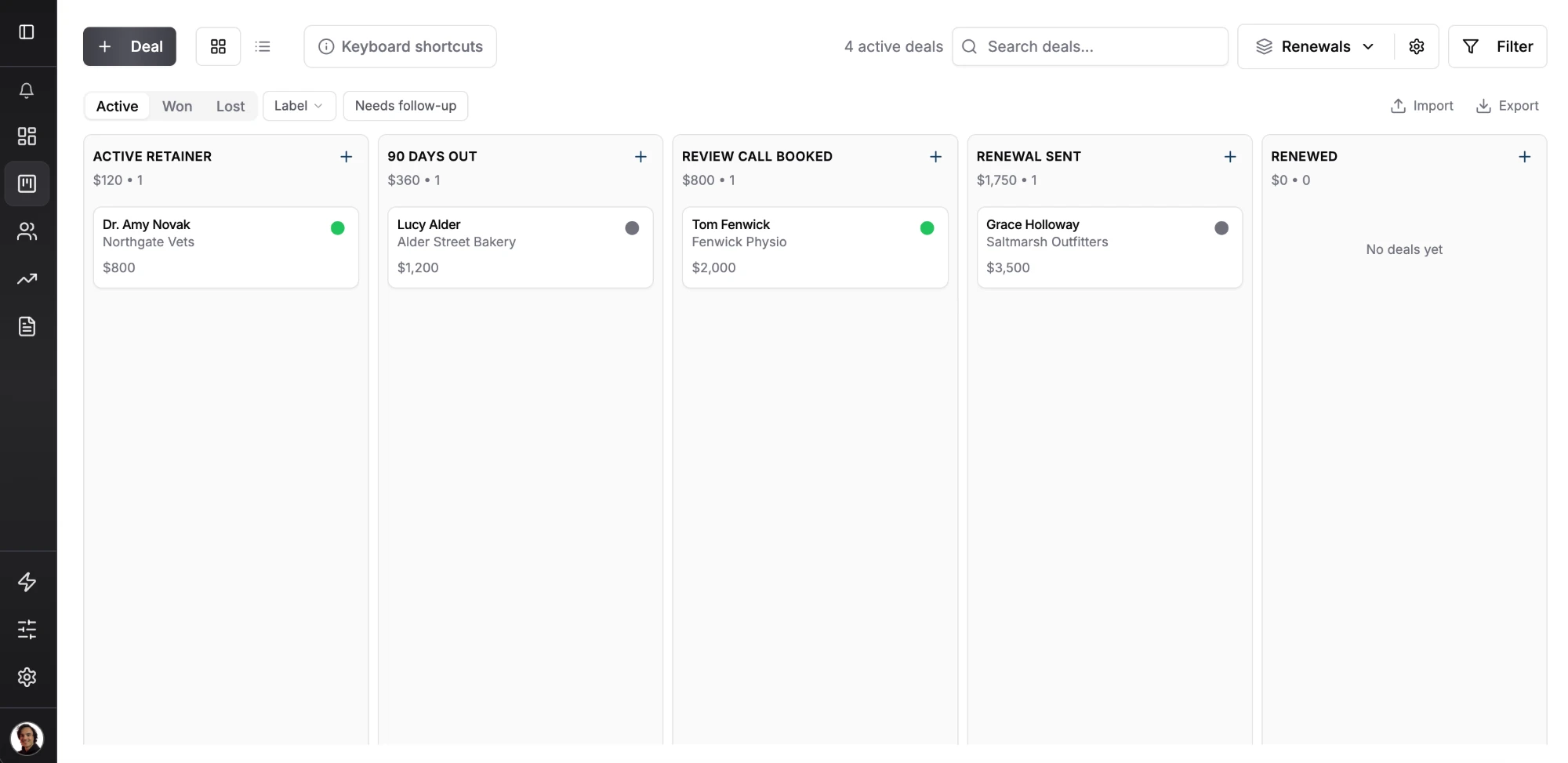
Fluid CRM is one plan at $16 per seat per month or $144 per seat per year, with every feature in it. There is no pipeline count, no record count and no custom field count, so a renewals pipeline next to your sales pipeline costs nothing extra.
You get reminders with a daily digest email, a revenue forecast, lead capture forms, 8 in-app automations, a REST API with webhooks and CSV import. Like Bigin, Fluid CRM has an MCP connector, so Claude or ChatGPT can create and update deals for you.
Ritz Steytler of Abacus Partners summed it up as “all you need (mostly!) and nothing you don’t (almost!)”. A verified customer listed “Unlimited Contacts, Unlimited Pipelines” among what they liked.
Two limits matter for anyone coming from Bigin. Fluid CRM has no built-in phone and no native mobile app, so on the road it opens in your phone’s browser.
If your team works mostly on the phone, Fluid CRM is not the tool for it.
For the full head-to-head, read Fluid CRM vs Zoho CRM. If you have already decided to leave Zoho, the shortlist is Zoho CRM alternatives, and every pick under $20 a seat is in affordable CRM.
If HubSpot is also on your list, HubSpot vs Zoho prices 3 and 5 seats on both, and our HubSpot pricing guide covers every HubSpot plan.
Bigin vs Zoho CRM: Frequently Asked Questions
No. Both are made by Zoho, but Bigin is a separate, simpler product built around pipelines for teams under 10. Zoho CRM is the full platform, with forecasting from Standard and quotes, custom record types and process rules on higher plans.
Bigin Express is $7 per user per month billed annually or $9 billed monthly. Premier is $12 or $15 and Bigin 360 is $18 or $21. A 5-person team pays $420 a year on Express with annual billing.
Zoho CRM is free for up to 3 users. Paid plans are Standard at $14 per user per month billed annually or $20 monthly, Professional at $23 or $35, Enterprise at $40 or $50 and Ultimate at $52 or $65.
Yes, for one user. The free plan has one pipeline, 500 records and 3 automations, and notes and activities count toward the 500.
Yes. Zoho offers a one-click data migration from Bigin to Zoho CRM. Most teams move when they need forecasting, quotes inside the CRM or their own record types.
Which Bigin Or Zoho CRM Plan To Start On
Start on Bigin Express if you have up to 3 pipelines and want it working today, and move to Zoho CRM Standard or Professional the day you need a forecast or quotes. Skip Bigin 360 unless you really need its 15 pipelines.
If all you want is the pipeline and none of the counting, Fluid CRM is a simple CRM for small B2B teams, and seven days of real deals will tell you whether it fits.
Start your 7-day free trial here, no credit card required.