

You and your business partner share a pipeline, you both do sales, you both do delivery, and your only real advantage over bigger teams is speed. The wrong CRM cancels that advantage in week one. The right one keeps both of you on the same page without forcing either of you to learn software for an hour a day. This post ranks the best CRMs for a 2-person B2B team and explains why this stage needs different logic than a 10-person team.
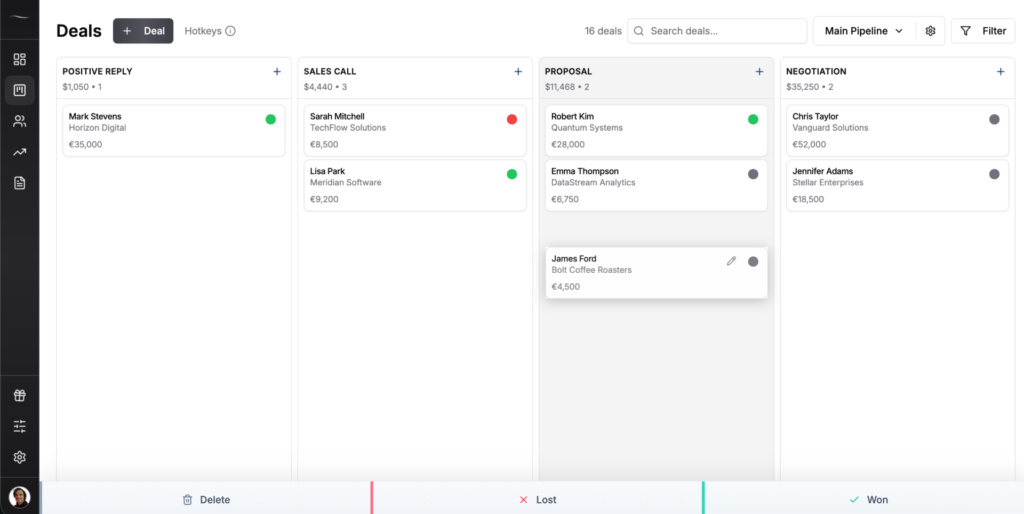
The best CRM for a 2-person team is one that gives both people the same visual pipeline without per-user complexity. Fluid CRM is the strongest pick at $16/seat with every feature included. HubSpot Sales Hub’s free tier works with caveats. Capsule is a cheaper backup.
Why A 2-Person Team Needs A Different CRM Than A 10-Person Team
A 2-person B2B team is the maximum-speed setup. No internal politics, no role friction and no “who owns this account” Slack threads. Both people see the same deals, both can pick up the phone, both can write the proposal. The whole company is the sales meeting.
That’s why a CRM built for a 10-person team will slow you down on purpose. Big-team CRMs are built for visibility, audit trails and approval flows. Those are great when you have a VP of Sales and three SDRs. They’re a tax when you’re two people moving fast.
I’ve worked with over 50 B2B companies through Fenixtal in the last three years. The 2-person and 3-person teams broke into two camps. Half tracked deals in Google Sheets and lost follow-ups every week. The other half paid for Salesforce or HubSpot Professional and nobody logged in. Same outcome from opposite ends of the price range.
The teams that actually worked had three things in common. They used a visual pipeline both people could see, set reminders that surfaced what needed a reply today and added nothing else to the stack. No custom object builder, no workflow designer, no lead scoring AI, no “success manager” calling them weekly.
The 2-person stage has zero training tolerance. If your CRM needs an onboarding call before you can log a deal, you’ve already lost the speed advantage that made being two people worth it.
What To Look For In A CRM For A 2-Person Team
Picking a CRM for two people isn’t about finding the most features. It’s about finding the shortest path from “we should track this” to “it’s tracked.” Five things matter at this stage. Skip them and you’ll be back on Google Sheets within a month.
Shared pipeline without seat tax
Both people need to see the same deals, edit the same contacts and update the same stages. That’s the entire reason you’re getting a CRM. What you don’t need is a tool that charges $50 per seat for a feature both of you will use 20 times a day. The lower the per-seat cost, the longer you can run as two people without your CRM bill becoming a discussion.
Per-user reminders, not shared inbox chaos
A shared inbox sounds great until day three, when neither of you knows who replied to which prospect. The fix isn’t a shared inbox. It’s per-user reminders inside a shared pipeline so you see your follow-ups, your partner sees theirs and the deals themselves stay shared. That’s how two people split work without stepping on each other.
Keyboard shortcuts because you cannot afford menu clicks
At two people, every minute of admin work comes out of your sales time directly. There’s no SDR to log the call, no ops person to update the deal stage and no admin to remind you who you talked to yesterday. If you have to open three menus to log a meeting note, you’ll stop logging meeting notes. Keyboard shortcuts aren’t a nice-to-have at this scale. They’re the difference between a CRM you use and one you abandon.
Under 10 minutes to first deal logged
If you can’t sign up and add your first deal in under 10 minutes, the CRM is built for someone else. Onboarding calls, setup wizards and “data architects” are signs the tool was designed for teams of 50. A 2-person team should be tracking a real deal before lunch on day one.
No upgrade trap when you stay 2 people for a year
Some CRMs price the cheap plan to look attractive, then gate the features you actually need behind the next tier. Reminders, multiple pipelines, automations and API access aren’t power-user features at the 2-person stage. They’re the basics. Pay attention to what’s locked behind upgrades when you read a pricing page. If “multiple pipelines” or “reminders” costs extra, the real price isn’t the sticker price.
The 6 Best CRMs For A 2-Person Team In 2026
Here are the six CRMs worth considering for a 2-person B2B team in 2026. Fluid CRM sits at the top because nothing else matches the price plus feature parity at this stage. The other five are real options for specific 2-person setups, and I’ll flag which setup each one fits.
1. Fluid CRM (best overall for 2-person B2B teams)
Fluid CRM is built for the exact stage you’re at. Two plans, both feature-complete. $16/seat/month monthly or $144/seat/year for annual billing (works out to $12/seat with three months free). No upgrade traps. No feature unlocks. The annual plan costs the same as the monthly plan, you just save by paying upfront.
Both people on your team get the same visual pipeline, unlimited deals and contacts, unlimited pipelines, eight in-app automations, reminders, keyboard shortcuts and API access. The setup takes under 10 minutes. The 7-day free trial doesn’t ask for a credit card.
Austin Verner runs Cold Emailers, a cold email agency with a small efficient team. He came to Fluid from Google Sheets. His words on the speed: “It’s fast as well. I like the hotkeys. I’ve actually been using them.” Hotkeys aren’t decoration when you’re two people. They’re how you log a call without breaking out of the call’s mental thread.
Fluid CRM doesn’t fit every 2-person setup. If you need native marketing automation, multi-touch attribution or a built-in dialer, this isn’t the tool. Fluid CRM is a sales pipeline CRM, not a marketing platform. For B2B teams under 20 people, that’s the right trade. For bigger orgs running ABM with five marketing channels, look at HubSpot Professional or Salesforce.
A lot of 2-person teams start as one founder plus a first hire. If that’s still you, the solo stage has its own shortlist, which I covered in the best CRM for solo founders.
2. HubSpot Sales Hub (best free tier, with caveats)
HubSpot’s free CRM lets up to 2 users in, which sounds purpose-built for your team. It mostly works as a contact database with basic deal tracking, and for a brand new 2-person team it’s a real option for the first six months.
The free tier is a funnel, not a product. The moment you need real automation, custom reporting or a third seat, you’re on the Starter plan at $15/seat/month annual ($20 monthly). The features most 2-person teams eventually want (sequences, custom reports, sales forecasting) live on the Professional plan at $100/seat/month plus a one-time $1,500 onboarding fee that isn’t optional.
Where HubSpot wins for 2-person teams: if you genuinely never need more than the free tier features, HubSpot’s free CRM beats a paid tool every time. If you’ll need automation or reporting within 12 months, you’re better off starting on a paid tool that doesn’t punish you for growing.
If HubSpot is the tool you’re seriously weighing for two people, I ran the full math on whether it pays off in is HubSpot worth it for a 2-person team.
3. Pipedrive (best visual pipeline if budget allows)
Pipedrive built its reputation on the visual pipeline view, and it’s still one of the cleanest sales-focused CRMs on the market. For 2-person B2B teams that want the visual pipeline experience and have $24/seat to spend on the Lite plan, it works.
The catch is what Lite doesn’t include. Email sync, full automations and reporting features live on the Growth plan at $49/seat/month. For two people, that’s $98/month, or about $1,176 a year. Pipedrive’s annual discount drops Growth to roughly $29/seat, which softens the math but doesn’t eliminate it.
Where Pipedrive wins: 2-person teams that have already validated their sales process and want a polished tool with deep integrations. It’s harder to justify when you’re earlier and still figuring things out.
4. Capsule (best cheaper alternative to Pipedrive)
Capsule sits in the same category as Pipedrive but at a lower entry price. The Starter plan is $21/seat/month with a 30,000-contact cap. For two people, that’s $42/month, which is below Pipedrive Lite’s two-person cost of $48 and gives you a real pipeline tool from day one.
Capsule’s Growth plan at $38/seat/month unlocks workflow automations, multiple pipelines and AI features. The free tier exists but is capped at 2 users and 250 contacts, so you’ll hit the contact limit before the user limit.
Where Capsule wins: 2-person teams that want something simpler than Pipedrive at a slightly lower price. It’s a real option if you can’t stomach Pipedrive’s per-seat cost but want a more established tool than some of the smaller players.
5. Less Annoying CRM (best for the genuinely simple use case)
Less Annoying CRM is one plan at $15/user/month. Every feature included. 30-day free trial. The pricing model is the same as Fluid CRM’s in spirit but lower on features and less B2B-focused.
The trade-off is what “less annoying” actually means in practice. The tool is built for the simplest use cases: contact management, basic deal tracking, calendar reminders. There’s no real visual pipeline view (Less Annoying uses lists and a board view that doesn’t match what most B2B teams expect from a pipeline). The interface looks older. The deeper integrations and API access aren’t comparable to newer tools.
Where Less Annoying wins: 2-person teams running a low-volume, relationship-driven business (consultants, advisors, small service shops without outbound work). For B2B teams running cold email, LinkedIn outreach or any kind of multi-channel sales process, the lack of a proper pipeline view will hurt.
6. Streak (best for Gmail-native 2-person teams)
Streak lives entirely inside Gmail as a Chrome extension. If you and your partner do most of your sales work from the inbox already, Streak gives you a pipeline view without ever leaving Gmail. The free plan covers basic pipeline tracking for 500 deals per user.
Paid plans start at $15/seat/month for Solo and jump to $49/seat/month for Pro, which is the cheapest plan that actually supports a 2-person team with shared pipelines and reporting. At $49 each, that’s $98/month for two people on Pro, matching Pipedrive Growth as the most expensive option on this list.
Where Streak wins: 2-person teams that genuinely live in Gmail and don’t want to context-switch to a separate tool. You’re paying a Pipedrive-tier price for a tool that lives entirely inside Gmail and breaks when your team grows past the email-as-CRM stage.
When A 2-Person Team Actually Needs Something Bigger
There are two scenarios where a 2-person team is right to start with a bigger CRM from day one, even with the speed cost.
1. Planned growth past 10 seats in 12 months with funded budget
If you’re a venture-backed startup hiring four sales people in the next two quarters, optimizing your CRM for the 2-person stage is a waste. Buy HubSpot Professional or Salesforce Starter, eat the onboarding cost and build the muscle to use it before the team scales. The 2-person stage is a 3-month window for you, not a 2-year window. Don’t pick a tool you’ll outgrow on the same timeline.
2. You’re already deep in HubSpot’s free tier and your workflow lives there
The switching cost of migrating contacts, deals, custom properties, integrations and team habits out of HubSpot is usually higher than the cost of staying. For a 2-person team already deep in the HubSpot ecosystem, the move is to stay until the switching cost drops below the tool cost. Revisit when you hit a real upgrade decision (paying for Starter or Pro), not before.
And if that upgrade decision is what finally pushes you off HubSpot, there are lighter options worth a look in HubSpot alternatives for small business.
Outside those two, the bigger-CRM logic doesn’t hold at the 2-person stage. Even the transition to three people doesn’t change much. Michal Pliszka runs Haiku Studio, a small advertising agency in Poland with himself plus two employees. His daily flow involves employees logging calls and assigning deals to him with quick context notes. In his words, the workflow needed “a note such as Send an offer or Call back next week” so he can see all his assigned work in one view. That’s a feature most simple CRMs handle out of the box. Pick a tool that won’t break when you add your first hire and you’re fine.
Frequently Asked Questions
You don’t strictly need one. You can run a 2-person team on Google Sheets, Notion, sticky notes or memory if your deal volume is low enough. The line is when you start missing follow-ups every week, or when neither of you can answer “what’s the status of deal X” without opening a tab. Below that, a CRM is overhead. Above it, the deals you forget cost more than the tool.
For two people on a paid plan, Fluid CRM at $32/month total ($16/seat times 2) is one of the cheapest options that gives you a real visual pipeline and every feature included. Less Annoying CRM at $30/month total is slightly cheaper but lacks the visual pipeline experience B2B teams expect. HubSpot’s free tier is $0 if you only need basic contact and deal tracking, with the caveat that you’re on the upgrade treadmill the moment you need more.
For the first six months of a 2-person team that doesn’t yet need automations, sequences or sales reporting, HubSpot’s free CRM is genuinely useful. After that, the limits start to bite. The free tier becomes a trial of the Starter plan ($15-20/seat/month) and then of Professional ($100/seat plus $1,500 onboarding). If you know you won’t need those features in 12 months, stay on free. If you’ll need them, start on a tool that doesn’t punish you for growing.
Some CRMs technically allow it (one login shared by two users) but it breaks everything you bought the CRM for. You lose per-user reminders, activity tracking, deal ownership and audit trails. Both people end up sharing one inbox of follow-ups and forgetting which ones they actually own. For a 2-person team, paying for two seats is the whole point. If the second seat doubles your bill enough to matter, the CRM is too expensive for your stage.
For a simple CRM like Fluid CRM, Less Annoying CRM or Capsule’s Starter, expect 10-30 minutes to be live and tracking your first deal. Bring over your existing pipeline (probably from Google Sheets) in another hour or two. For HubSpot or Pipedrive, budget half a day to a full day, mainly because of the customization options that pull you into setup decisions. For Salesforce or HubSpot Professional with required onboarding, allow two to four weeks before the team is using it daily.
Conclusion
A 2-person team’s biggest advantage is speed, and the wrong CRM cancels it. The right one gives both of you the same visual pipeline, surfaces what needs a follow-up today and gets out of the way the other 23 hours. If you’re tired of losing deals in shared Google Sheets or stuck on the HubSpot upgrade treadmill, Fluid CRM gives you a clear visual pipeline at $16/seat/month with every feature included.
Start your 7-day free trial, no credit card required.