
Open any cold email guide and you get the same advice on how to write the email. Then it stops. The email copy is maybe 20% of your results, from what I’ve seen personally. The other 80% is the whole operation around it, and that’s what this post covers.
Cold email outreach is sending relevant emails to decision-makers you have no prior relationship with. It still works in 2026, but only if the system around the email is right: sending infrastructure, targeted lead lists, clear copywriting, active inbox management and trustworthy online presence.
I’ve booked over 1,000 B2B meetings and generated more than 12M€ in sales opportunities for 50+ clients through my agency Fenixtal across three years. None of that came from clever subject lines. It came from getting the whole machine right. These are the 30 steps, grouped into the five areas that decide your result.
The 4 Pillars of a Cold Email Outreach System
A cold email outreach system has four parts that all have to work together. Get one wrong and the whole thing leaks. The four are the infrastructure you send from, the lead list you send to, the copy you send and the way you manage replies. There’s a fifth area too, your digital footprint, and I’ll cover it at the end because it quietly affects every reply you get.
A lot of people pour all their energy into the copy. They rewrite the first line for the tenth time while their domains are burning and half their list bounces. The copy matters, but it’s the smallest lever you have. From running outbound for three years, my rough split is that copy is about 20% of the result and the system around it is the other 80%. That’s my estimate from experience, not a measured figure, but it has held up across more than 50 B2B clients.
The other thing I see constantly is bad, outdated tools. If you’re not sure what to run, steal my best cold email software tools here.
So if you’ve been tweaking words or running an outdated toolstack and getting nowhere, the problem probably isn’t your words. It’s one of the other pillars. The 30 steps below walk through all of them in order, starting with the sending machine itself.
How To Set Up Your Cold Email Sending Infrastructure
Your sending infrastructure is everything that gets the email into the inbox instead of the spam folder. This is the part the popular guides skip, and it’s the part that decides whether anyone ever reads your perfect copy. Set it up wrong and you can write the best email in the world to nobody. Here’s the setup I use after setting it up dozens of times.
1. Pick a cold email sending tool
You can’t run cold email from a normal Gmail or Outlook account, especially if you plan to do any kind of meaningful volume. A CRM like HubSpot or Pipedrive won’t work well either. You need a dedicated cold email too such as Smartlead or Instantly.
The features that matter are support for multiple sending accounts, automatic sequencing and built-in warm-up. The right one depends on your volume and budget, so try a couple before you commit.
2. Get separate sending domains
Never send cold email from your main company domain. If fluidcrm.io gets flagged as spam, your real email to clients and colleagues breaks too, and that’s a disaster you don’t want.
Buy separate domains just for outreach, something close to your brand like:
- fluidinbox.com
- fluidmail.com
- fluidcrminbox.com
- fluidsend.com
- fluidcomms.com
You can grab them from Dynadot or any registrar in a few minutes.
3. Set up SPF, DKIM and DMARC
These are three records you add to each domain’s DNS settings. They prove to Google and Microsoft that you’re a real sender and not a spammer. Skip them and your emails go straight to spam, no matter how good they are. The setup is technical but it’s a one-time job, and Google publishes clear sender requirements you can follow step by step.
Image: Example of an SPF record in a domain name’s DNS settings:

4. Create your sending accounts
Each domain gets a set number of users, and each user sends a capped number of emails per day. Push too many from one account and you’ll land in spam. The right ratio between domains, users and daily volume decides how much you can safely send.
If you want to send 200 messages daily, you’ll need something like:
- 5 domain names
- 2 users for each domain
- A total of 10 users

Also, keep in mind that one user can safely send a maximum of 10-30 messages per day, depending on your specific setup.
One thing I’ve learned the hard way, create users on both Google Workspace and Microsoft 365, because spreading your sending across both providers improves deliverability.
You can also use resellers like Premium Inboxes, so you don’t need to worry about the technicalities.
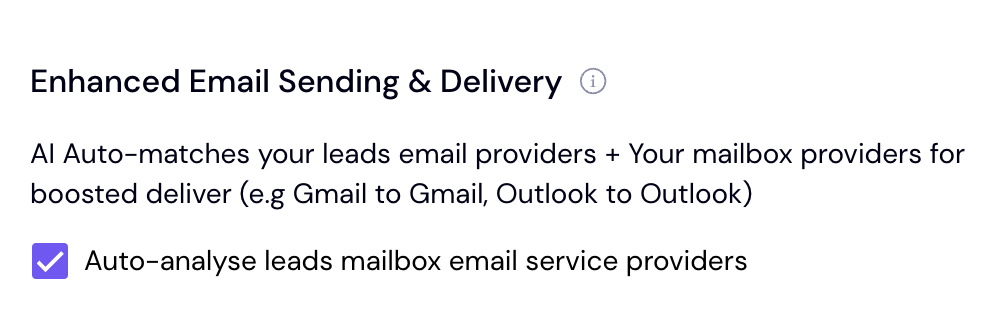
Most sending tools also have an “ESP matching” setting that sends from a Gmail account to Gmail inboxes and a Microsoft account to Microsoft inboxes, which lifts deliverability further, so turn it on.
5. Warm up your accounts
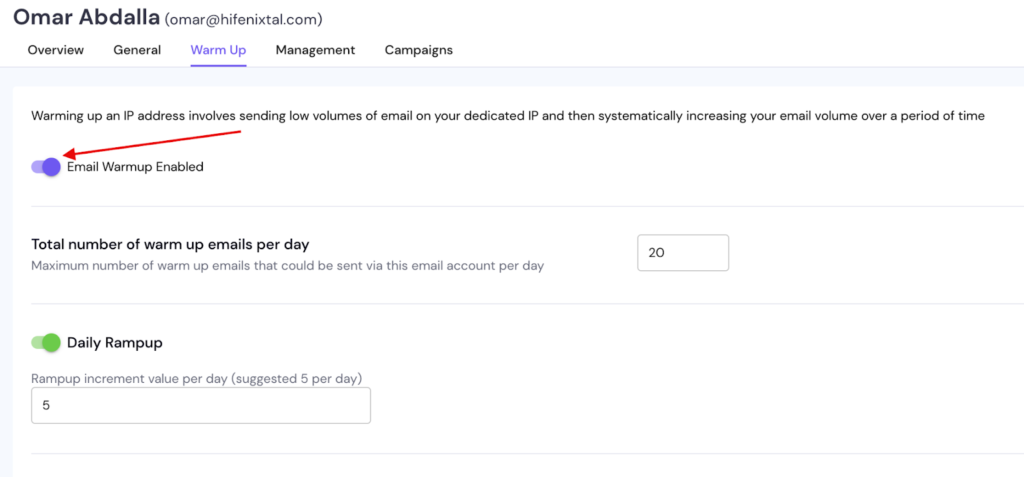
Brand-new accounts that start blasting cold email get a one-way ticket to spam, and Google and Microsoft are right to flag it. Warm the accounts up for two to three weeks before you send anything real.
During warm-up the tool simulates normal email traffic, so when your campaign starts the sending looks natural instead of suspicious.
The settings I use are around 20 warm-up emails per account per day, ramping up by about 5 a day, which keeps the climb gradual enough to look human.
6. Get your campaign settings right
After 2–3 weeks, your users are as warm as straight out of a sauna. Now, you’re ready to create campaigns.
We’ll cover list building and messaging next, but first, let’s look at campaign settings.
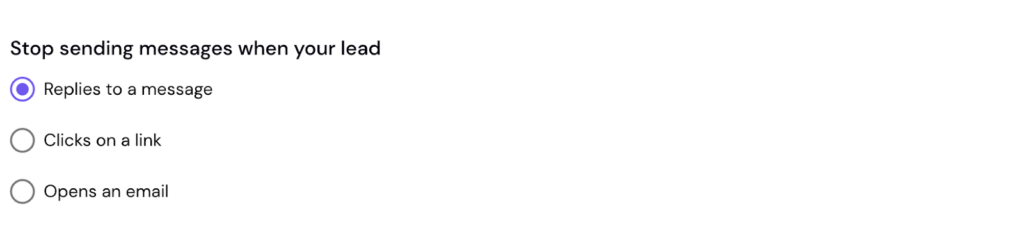
In Smartlead or Instantly, you can control when your email automation ends.
For example:
- It can stop when someone replies
Or when they click a link
Or even just open your message
This helps keep your outreach natural and avoids annoying people.
I send messages as plain text only. No images, links, or anything else.
I don’t track open rates or anything else because it requires an HTML pixel, which makes Google and Microsoft more likely to direct the message to spam.
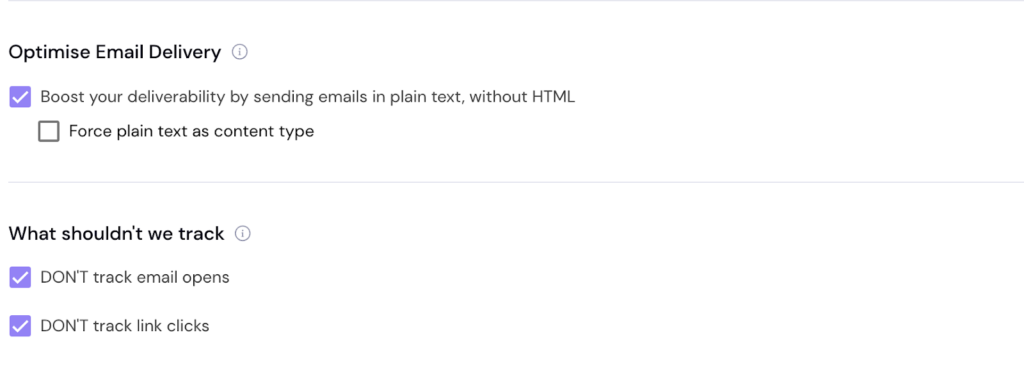
You can also choose a setting where communication stops for all decision-makers at the same company if one responds. I don’t use this myself because often one person says no, but another says yes.
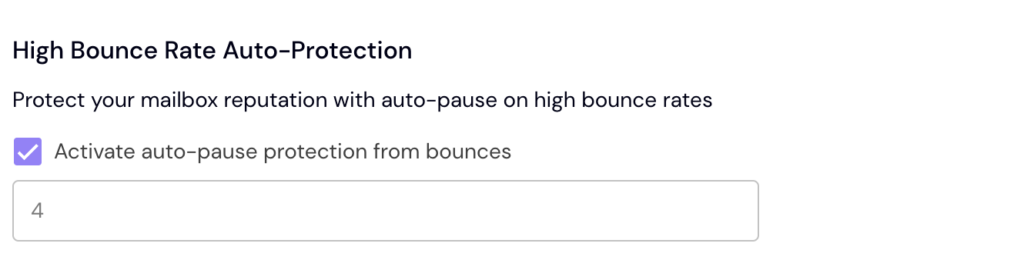
A bounce occurs when an email address you’re targeting doesn’t exist. If too many of these happen, Google & Microsoft will interpret you as a spammer and toss your messages into spam.
This setting stops the campaign if the bounce rate exceeds a certain threshold.
You can also add an “unsubscribe” link to every email. I don’t recommend this because the link makes your message more likely to end up in spam.
You can achieve the same effect by writing something like: “PS. If this isn’t relevant right now, just let me know, and I won’t message you.”
When your sending infrastructure is ready, you can move on to the next phase.
How To Build and Verify Your Lead List
Your lead list is who you send to, and it matters more than your copy. A relevant message to the wrong person gets ignored. The same message to the right person at the right time books a meeting. Building a good list comes down to three steps.
7. Define your target audience
Before you pull any data, get clear on who you’re targeting. A good audience checks four boxes:
- A burning pain you can actually solve
- The budget to pay for the fix
- Reachable without fighting through gatekeepers
- Good future potential, not a one-off buyer
Then nail the job titles that own the buying decision, and add synonyms and translations so you don’t miss anyone, like CEO, managing director and head of sales. The tighter your definition, the cleaner your list and the higher your reply rate.
Here are some examples:
- CEO
- Founder
- Head of Sales
- Head of Marketing
- Head of Communications
- Head of Finance
- Head of HR
- Head of Operations
- Head of Technology
- Head of Product
- Head of Manufacturing
This is just a portion of the decision-makers you can contact.
8. Collect decision-maker data
Once you know who you’re after, pull the data. Prospecting tools come in different flavors.
- Prospeo – 300M+ database with fresh prospects
- Clay – Multiple data sources in one + much more
- Apollo – General, gets data from LinkedIn
- Sales Navigator – LinkedIn’s own database
- Crunchbase – Startup & funding data source
- Store Leads – E-commerce data source
The right source depends on what data you need and which countries you’re targeting.
Here’s an example filtering from inside Apollo:
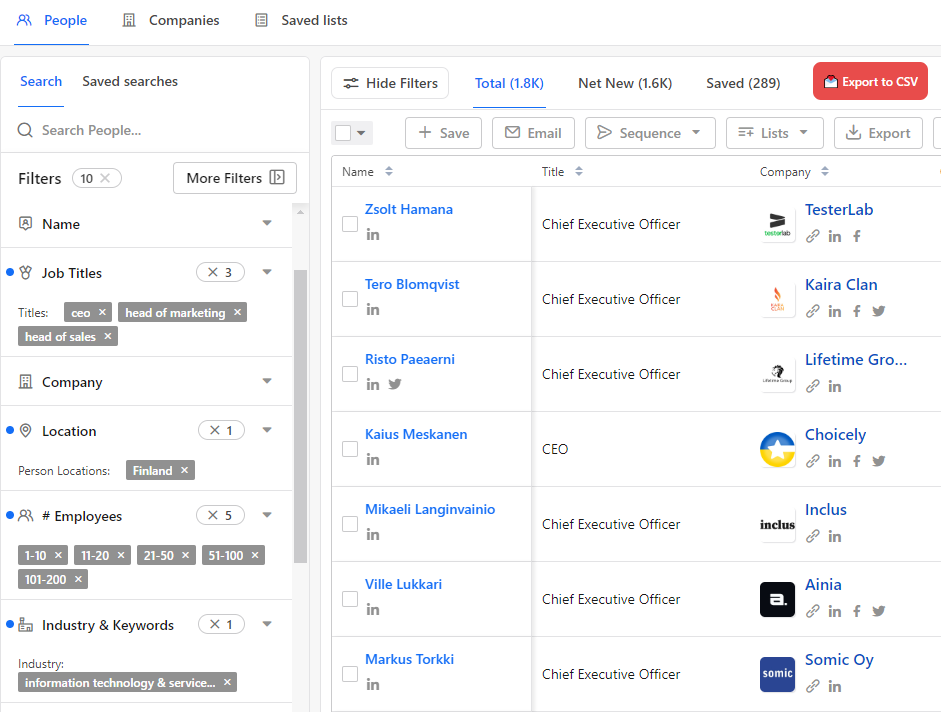
After filtering, export your list to a spreadsheet, cut the junk columns and tidy it up. If you can find good contacts outside the popular databases, your reply rates climb, because fewer people are hammering those same inboxes with the same pitch.
9. Verify the list before you send
Stop and look at your current list for a second. How many of those contacts did you actually verify, and how many are guesses you scraped and hoped were right? If you don’t know, that’s your bounce rate waiting to happen.
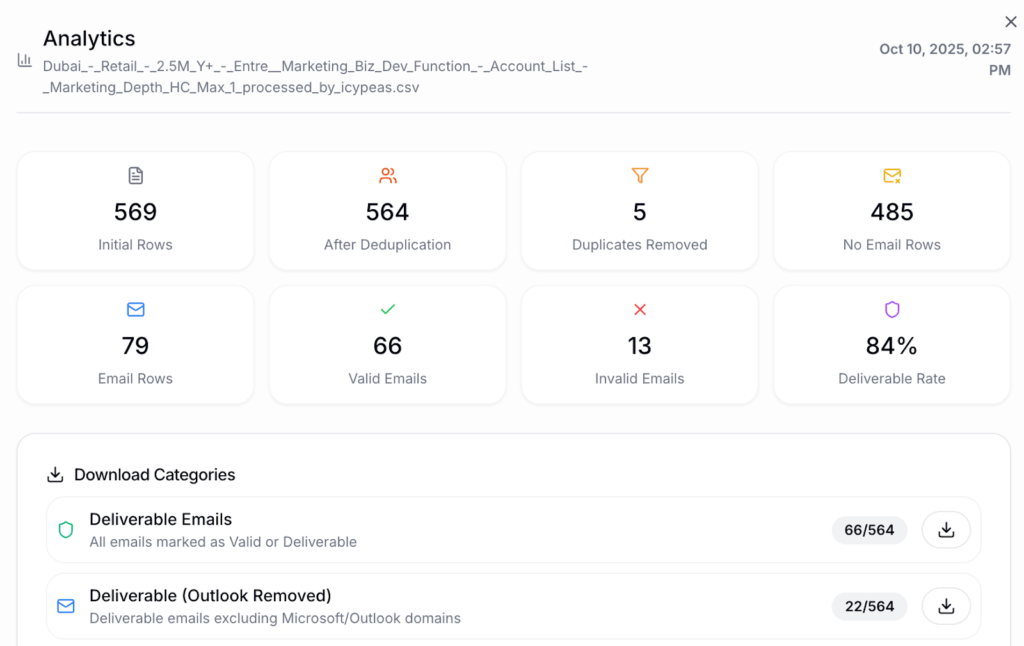
A bounce happens when you email an address that doesn’t exist. Too many bounces and Google and Microsoft flag you as a spammer, which undoes all your infrastructure work. So clean the list before you send.
I run mine through CSVgo, which removes dead addresses, separates rows with no email for enrichment and tags each contact’s email provider so I can match senders for better deliverability. You upload the CSV, wait a moment and export only the deliverable emails.
Image: Email verification analytics inside CSVgo
Writing Cold Emails That Get Replies
Writing cold emails that get replies is the part everyone obsesses over, and it’s the 20% I mentioned earlier. It still matters, so here’s how to do it well without overthinking it. The goal of a cold email isn’t to close a deal. It’s to start a conversation with someone who has never heard of you.
Austin Verner runs Cold Emailers, a cold email agency, so he sees this from the inside. He told me the biggest reason his clients churn is that “they’re getting leads, but they’re not closing.” Good copy starts the conversation. What you do after the reply is what turns it into money, and we will get to that.
10. Start with a clear offer
If you can’t say who you help, how you help them and what you’re offering in one sentence, you can’t write a good email. Vague offers get ignored. Compare “I help companies with social media” to “I help gyms sell out memberships in 60 days with no upfront cost.” The second one is specific, clear and low-risk, so it earns a reply.
The offer is king and when you have it dialed in, the copy almost writes itself.
Here’s the same idea applied to a full email. Weak version:
Hi, I’m Omar and I run a B2B outbound agency. We do cold email, LinkedIn outreach and lead generation. I’d love to book a 30-minute call to walk you through it. Are you free this week?
Strong version:
Hi Thomas, I noticed you’re hiring two SDRs. We booked one agency 101 meetings in 12 months with no extra headcount. Can I send you a short playbook on how we did it?
Same offer in the back end. The second one is about them, which leads with a result and asks for nothing but a yes.
11. Prioritize relevance
Relevance is the biggest lever in your copy, bigger than any clever line. It means something just happened that makes your message land at the right time or it’s simply just relevant to their title or situation. A relevant message with average wording beats a polished one sent at the wrong moment, every time.
So watch for buying signals before you reach out:
- They’re hiring for a role you sell into
- They just raised funding
- A decision-maker started a new job
- Headcount jumped in the last quarter
- They switched to a tool you plug into
The more buying signals you stack on one prospect, the sharper your timing.
12. Add personalization on top
Personalization is relevance’s smaller helper, and people confuse the two. Personalization means you mention something specific about the person, like a post they wrote or a detail from their site. It lifts replies, so use it when you can, by hand or with AI at scale. Just don’t lean on it as a substitute for relevance, because a personalized email at the wrong time still gets ignored.
13. Keep messages short
Decision-makers get dozens of emails a day, so a long email from a stranger is dead on arrival. Aim for 40 to 100 words. Your point has to land in the first two lines, before they decide to keep reading or bin it. Short respects their time and short gets read.
14. Drop the fancy words
Cut the jargon and the fancy words. If a teenager wouldn’t understand a sentence, rewrite it in plain language. Fancy words make the reader work, and a busy person won’t bother. I run my copy through the Hemingway Editor to flag anything too complex before it goes out. Personally I like to aim for 6th grade reading level or below.
15. Make it about them, not you
Nobody cares what you do, especially a total stranger. They care what you can do for them. Don’t open with your company story or your service list. Open with their situation and the result they want. The reader is silently asking one question the whole time, what’s in this for me, so answer it fast.
16. Lead with value
The fastest way to earn a reply is to give before you ask. Formats that work well as a giveaway:
- A short how-to guide or checklist
- A case study with real numbers
- A quick walkthrough video
- A free template or mini-course
The playbook this post is based on is itself a lead magnet I use in my own outreach. Value lowers the reader’s guard and makes asking for the meeting feel natural instead of pushy.
17. Use a soft call to action
Nobody likes being sold to, but everyone likes to buy. Asking for a meeting in the first email feels pushy and kills replies. Use a soft ask instead, something like “is this relevant for you right now?” Save the hard ask, the “can we book a 30-minute call,” for after they’ve replied. Once a conversation is going, asking for the meeting feels normal.
18. Back your claims with proof
If you’ve gotten results for someone or worked with a name people recognize, say so. Proof cuts through the noise faster than any clever line. Watch the same fact climb from forgettable to undeniable as you add specifics:
- Weak: “I help agencies book more meetings.”
- Better: “We booked an agency 12 meetings last month.”
- Strong: “We booked an agency 12 meetings last month, including with two brands you’d recognize.”
- Strongest: “We turned 12 meetings into 120,000€ of pipeline for an agency last month, including with two brands you’d recognize.”
Same underlying result, four very different levels of pull. The more concrete and outcome-driven the claim, the more it gets read.
19. Send plain text only
Send your first email as plain text with no images, no links and no attachments. Anything fancy in the message raises your odds of landing in spam, the same reason you turned off tracking earlier. Save the links and resources for after they reply. A plain, human-looking email gets delivered, and delivered beats pretty every time.
20. Show some personality
Trying to please everyone makes you forgettable. A bit of humor or a pattern break can do more than a polished template.One of my best openers had nothing to do with the offer. It read:
“I was thinking about who to send unwanted emails to first thing in the morning. Congratulations, you were selected.”
It stood out from the gray mass of boring outreach and booked more meetings than my normal openers. It also pulled a few annoyed replies, which is fine, because those filtered out people I wouldn’t want to work with anyway.
21. Test one thing at a time
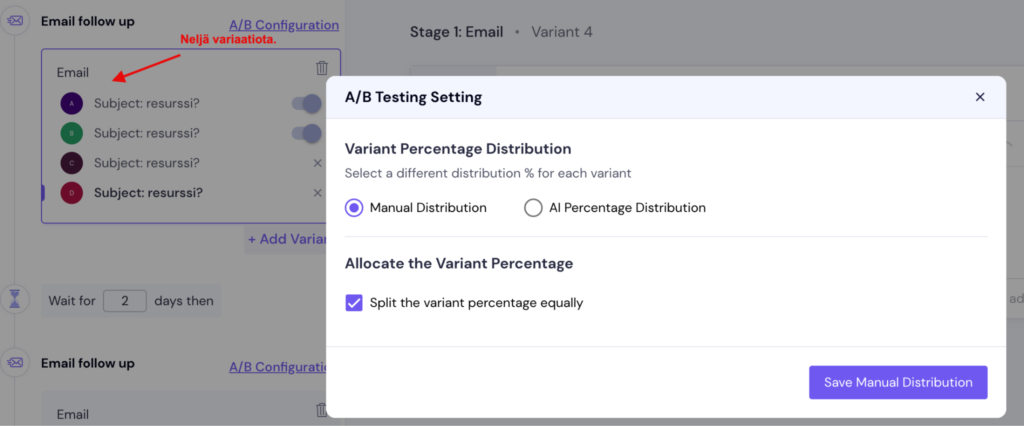
Run only one offer or one subject line and you’ll never know if it’s your best, and it probably isn’t. Test one variable at a time, one subject line against another or one offer against another, so you can tell what actually moved the needle. Give each version enough sends before you call a winner, because a handful of replies isn’t real data. Then keep the winner and test the next thing.
In Smartlead, you can easily create an A/B test, which distributes messages evenly among recipients.
22. Build a 2 to 4-step email sequence
One email isn’t enough to show your value, and more than four is asking to get flagged as spam. Two to four is the range I use. Each follow-up should hit your offer from a new angle, not just nudge them again.
Your sending tool fires them automatically at the intervals you set, and the whole sequence stops the second someone replies.
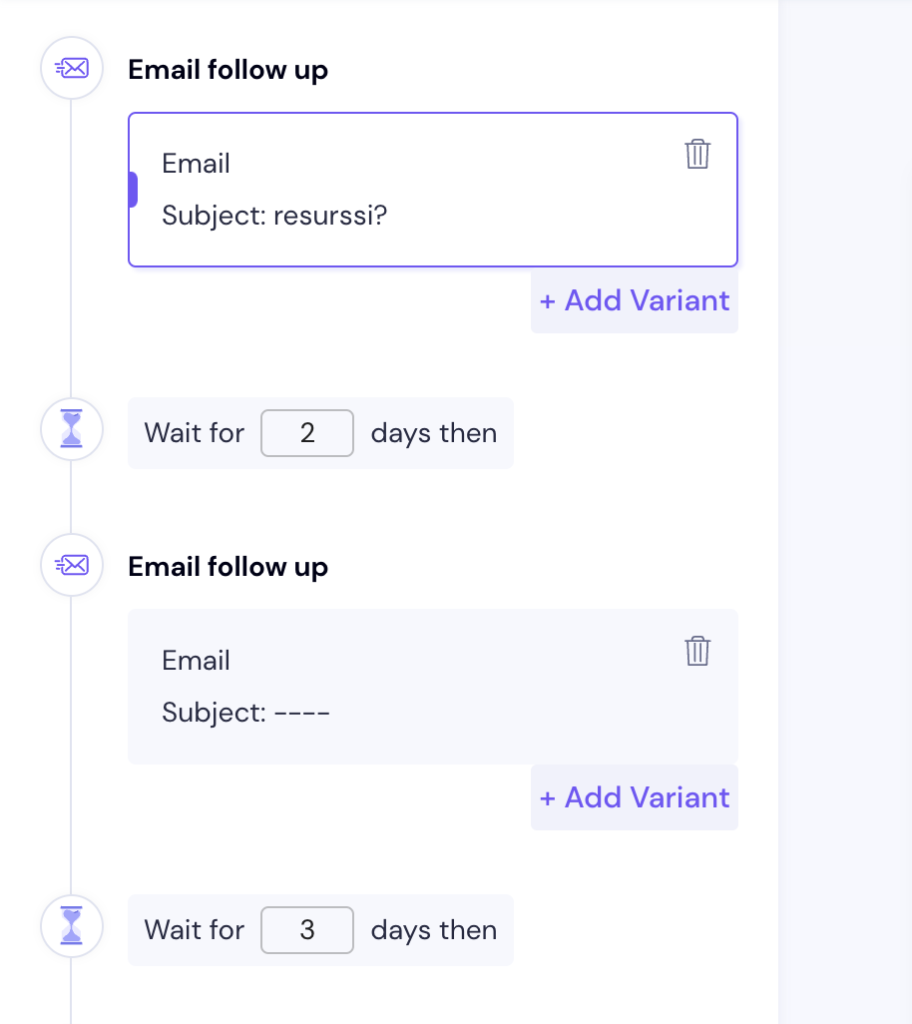
When your message sequence is ready and the campaign settings are in place, it’s time to start the campaign and move to the final phase.
How To Manage Cold Email Replies and Book Meetings
Managing cold email replies is where most of the money is made or lost. You can run perfect campaigns and still earn nothing if replies pile up unanswered and meetings never get booked. This is the conversion engine, and it’s the step the popular guides barely touch. Here’s how to turn replies into booked deals.
23. Respond fast
A prospect is warmest the moment they hit reply, and they cool fast. Aim to respond within 5 to 15 minutes when you can. You won’t always manage it, but speed has a real effect on how many replies turn into meetings, especially once your volume climbs.
Set up AI to auto-categorize replies and fire a Slack alert the second a positive one lands, so it never sits in your inbox going cold while you’re working on something else.
24. Move every reply into a pipeline
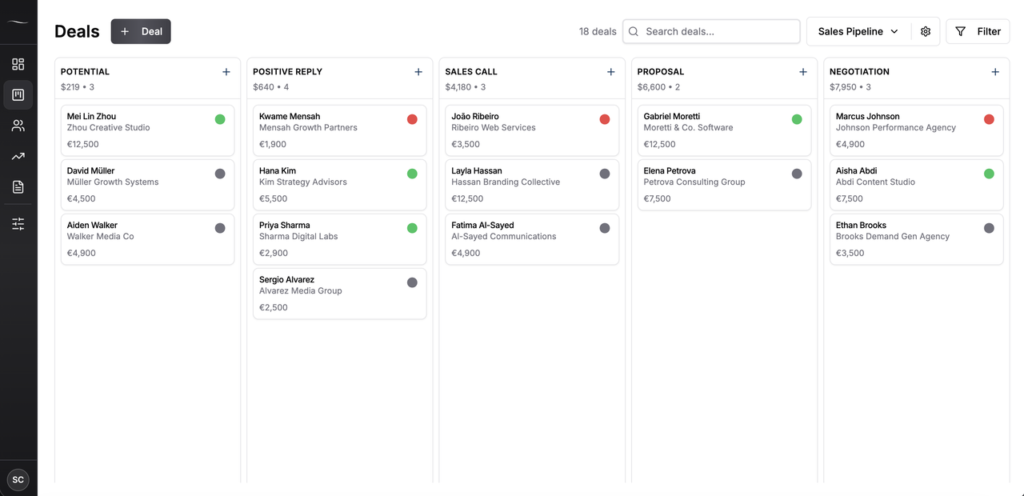
A reply sitting in your inbox is a deal you’re about to forget. The moment one lands, it needs a place where you can see it, stage it and act on it. I use Fluid CRM for this, because it gives you a clear visual pipeline without the bloat of traditional CRMs.
Each positive reply becomes a deal on the board, and with the right setup, interested leads from Smartlead get pushed into Fluid through the API and show up as deals automatically.
From there the work is simple. You set a reminder on each deal so you always know who to follow up with and when, and the forecast weights each stage by how likely it is to close. The stages I run, with the probability attached to each:
- Positive reply, 3%
- Discovery call, 10%
- Demo call, 20%
- Proposal sent, 33%
- Negotiation, 50%
- Won, 100%
- Lost, 0%
That weighting turns a messy inbox into a real revenue forecast. Austin cares about speed, and he told me, “I like the keyboard shortcuts. I’ve actually been using them.” When logging a deal takes a couple of keystrokes, the admin work stops eating into your selling time. I go deeper on picking the right tool in my guides to the best CRMs for cold email agencies and the best CRMs for outbound.
25. Don’t give up too early
A lot of replies don’t turn into a meeting on the first try, and that’s normal. Keep following up until you get a clear yes or no, especially after someone has shown interest once.
Austin put the problem with most senders bluntly when he asked, “Are you following up with them right away?” The honest answer, for most people, is no. I’ve booked meetings nine months after the first message. The deal you write off this week might close next quarter if you keep the reminder alive.
26. Book meetings manually
When someone agrees to meet, don’t fire back a calendar link and make them do the work. Every extra click loses you meetings.
Instead suggest clear options, like “would Monday or Tuesday at 10:00, 12:00 or 14:00 work for you?” It takes them two seconds to reply and the meeting gets locked in. Make saying yes as easy as you possibly can.
27. Automate reminders
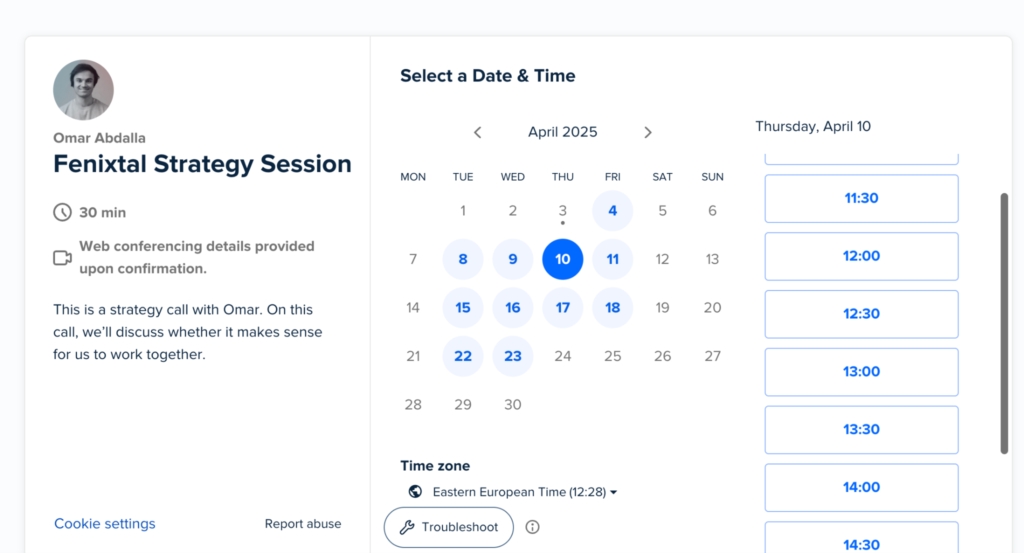
Booking the meeting manually doesn’t mean you skip reminders. Use a tool like Calendly to send the prospect an automatic reminder 24 hours and 30 minutes before the call. This one change cuts no-shows hard. You can also drop a short case study or video into the reminder so they show up already trusting you.
Building a Digital Footprint That Earns Trust
Your digital footprint is everything a prospect finds when they look you up, and they always look you up before they reply. A great email gets ignored if your website looks dead or your LinkedIn is empty. This part isn’t part of sending the email, but it quietly decides how many people respond. Three things matter most.
28. Build a website that converts
When someone gets your email and types your domain into a browser, they should land on a site that makes them want to keep reading. Show who you help, what you offer and how you deliver it, fast. A short video that walks through your service does more than a wall of text ever will. Keep the page scannable with images and short sections, and point everything at one clear call to action.
29. Stack up social proof everywhere
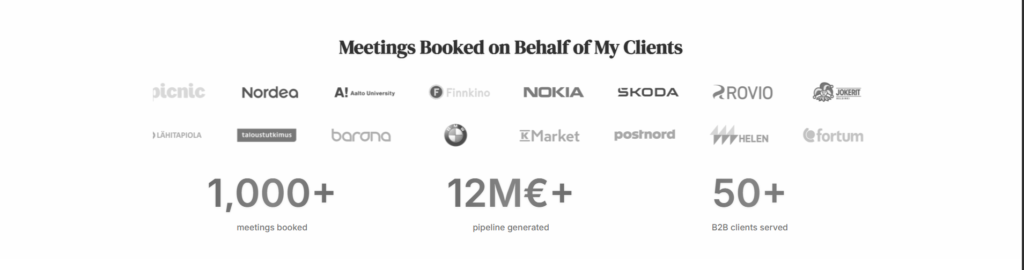
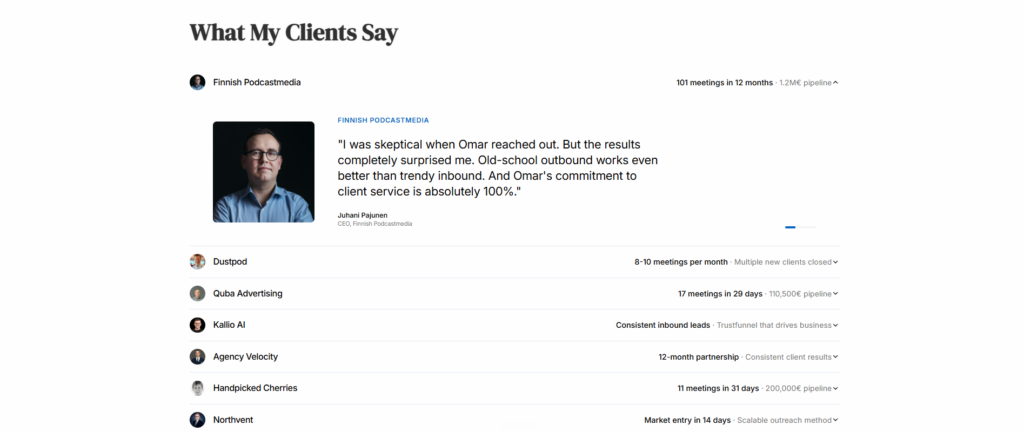
Social proof is the evidence that you can do what you claim, like logos, reviews, case studies and short result videos. It’s one of the strongest trust signals you have, in cold email and everywhere else. Spread it across your site, your LinkedIn and your outreach. After 1,000+ meetings booked across 50+ B2B clients in three years, the proof I lean on hardest is specific numbers, because numbers are much harder to fake than adjectives.’
Example social proof: Agency Fenixtal’s booked meetings and stats as social proof
Example social proof: Agency Fenixtal’s client testimonials as social proof
30. Optimize your LinkedIn profile
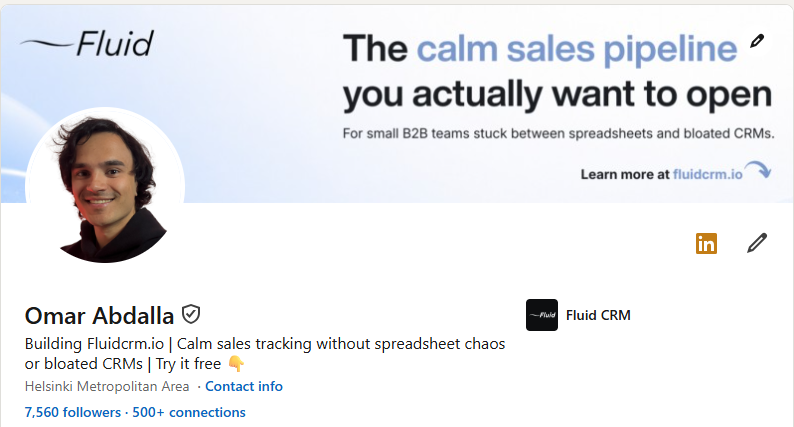
For cold email, your LinkedIn profile matters even more than your website, because it’s the first place a curious prospect checks. Treat it like a personal landing page. The headline and the top of the profile should say who you help and what result you get them, not just your job title. If your profile is convincing and you post regularly, trust climbs before you’ve even said a word back.
Image: My LinkedIn profile with optimized profile image, banner and headline
In addition, it’s worth completing these other sections of your profile:
- About
- Featured
- Experience
- Education
- Certifications
- Skills
- Recommendations
Plus, the Activity section fills up if you post actively, which is also recommended for cold email success.
If LinkedIn is a channel you want to use to find clients directly, not just to back up your cold email, I break down the full method in my guide on how to find clients on LinkedIn.
Frequently Asked Questions
Cold email outreach is sending targeted emails to decision-makers who don’t know you yet, with the goal of starting a business conversation. It’s different from spam because the messages are relevant, personal and sent to a verified list. Done right, it’s one of the cheapest ways to book B2B meetings.
You set up sending infrastructure with separate domains, verified records and warmed-up accounts, build and verify a targeted lead list, write short relevant emails with a soft call to action and manage every reply in a CRM so meetings actually get booked. The email copy is a small part of it. The system around the email does most of the work.
Send plain text only with no tracking pixel, keep emails between 40 and 100 words, lead with relevance and value instead of a hard pitch, cap your sequence at two to four emails and respond to replies within minutes. Verify your list before every send to keep your bounce rate low and your sender reputation healthy.
You need two kinds of tools. A sending tool like Smartlead, Instantly or Lemlist handles domains, sequencing and warm-up, and a CRM like Fluid CRM handles the replies and turns them into booked deals. A list-cleaning tool such as CSVgo sits between them to keep your list verified. No single tool does all three jobs well.
In most places, yes, cold email is legal when you follow the rules that apply to you. In the US that’s mainly CAN-SPAM, and in the EU it’s GDPR, which set requirements around things like honest sender details, an easy way to opt out and a lawful basis for contacting someone. This isn’t legal advice, so check the specific rules for the countries you’re emailing into before you start.
Conclusion
Cold email still works in 2026, but only if you treat it as a full operation and not just a clever email. Get the infrastructure, the list, the copy and the reply handling right and the meetings follow. Cold email gets you replies. Fluid CRM turns those replies into closed deals, with a visual pipeline, reminders and API integration with Smartlead and Instantly.
Start your 7-day free trial, no credit card required.