

Less Annoying CRM is a genuinely good tool. That’s a strange way to open a post about its alternatives, but most alternatives lists point you at tools twice as heavy as the one you’re leaving. This post keeps the simplicity, fixes specific gaps and tells you plainly if you should stay put.
The best Less Annoying CRM alternative for most small teams is Fluid CRM, thanks to its visual pipeline, in-app automations and EU data hosting. OnePageCRM and Capsule also keep the simplicity. And if none of Less Annoying CRM’s gaps touch your daily work, staying put is a valid answer.
Keep the simplicity and add a pipeline you can see
Stuck deals hide in a list. Fluid CRM puts every deal on a board.
No credit card required
What Less Annoying CRM Does Well
Less Annoying CRM (LACRM from here on) charges $15 per user per month with one plan, every feature included and a 30-day free trial with no credit card. Support comes from actual humans on phone and email. In a category full of tiered pricing and locked features, that setup deserves respect.
The product itself is contact and task based. You store people and companies, attach notes and work from a list of tasks and follow-ups. Thousands of small businesses run on exactly this and never miss a thing.
So the rest of this post won’t call LACRM broken, because it isn’t. Every alternative below earns its spot by fixing a specific workflow difference, like a visual pipeline, automation or where your data is hosted. If you don’t feel any of those gaps, the honest advice is in the next section.
Who Should Stay on Less Annoying CRM
Staying on Less Annoying CRM is the right call for a big share of the people searching for alternatives. If your daily work matches one of these three profiles, keep the $15 plan and close this tab.
1. You work from a task list, not a board
Some sellers think in “what do I do today” lists, not deal stages. LACRM is built around that exact habit. If you open your CRM to see today’s calls and follow-ups rather than a board of deals, you already have the right tool.
2. You run a low-volume relationship business
If you add a handful of new contacts a week and win work through referrals, phone calls and long relationships, LACRM’s contact-first design fits exactly. A visual pipeline adds little when you can count your open deals on two hands and know each one by heart.
3. You value long trials and human support
A 30-day trial with no credit card and phone support from real people is rare at this price. If those things matter more to you than features, no tool on this list beats LACRM at its own game.
Who Should Switch From Less Annoying CRM
Switching away from Less Annoying CRM makes sense when a specific gap blocks your daily work, not because a list told you to upgrade. After booking 1,250+ sales calls at my agency Fenixtal, I kept seeing the same two setups. Either nothing gets tracked, or the tool doesn’t match how the team actually sells. These three profiles are where LACRM stops matching.
1. You think in pipelines, not lists
LACRM tracks deals as lists and tasks, and the pipeline view lives under the reports tab rather than front and center. If you want to open your CRM and see stages as columns, drag deals between them and spot what’s stuck in 5 seconds, that’s a kanban pipeline. LACRM wasn’t built around one, and no setting changes that.
2. You want the repetitive work handled for you
LACRM has no workflow automation, and that’s a deliberate design choice, not an oversight. Every due date, deal value and reminder gets set by hand, every time. Stop for a second. Count the small steps you repeat on each new deal. If the list is longer than two, you’re doing work a CRM should do for you.
Viktor, a solo B2B outbound operator in Sweden, wrote his daily loop on a post-it. Open a deal and review it, take one action (call, email or LinkedIn), note the activity, set a new reminder. A loop like that holds up when reminders and due dates set themselves, because manual setup is always the first step people drop.
3. You need your CRM data hosted in the EU
LACRM runs on AWS in North Virginia, so your customer data sits in the US. For many businesses that’s a non-issue. But if your clients are European and their procurement teams ask where their data lives, a CRM with core data hosted in the EU makes that conversation short. Fluid CRM keeps core data in the EU on AWS in Stockholm.
The 7 Best Less Annoying CRM Alternatives
These 7 picks were chosen for one buyer, the person who chose LACRM because they wanted simple and still wants simple. You won’t find Salesforce, Zoho or HubSpot’s paid tiers here. Tools built for enterprise teams solve a different problem than the one you have.
1. Fluid CRM (best for visual pipelines and outbound)
Fluid CRM gives you the kanban pipeline LACRM skips, plus 8 in-app automations, keyboard shortcuts and an API with webhooks. Deals sit in columns you drag between stages and reminders flag what’s overdue. The automations handle the setup steps, like deal values, due dates and reminders on new deals. It stays a simple CRM at heart, just with the pipeline up front.
Positive replies from Smartlead or Instantly land as deals automatically through the API (see full cold email playbook here) and core data is hosted in the EU on AWS in Stockholm.
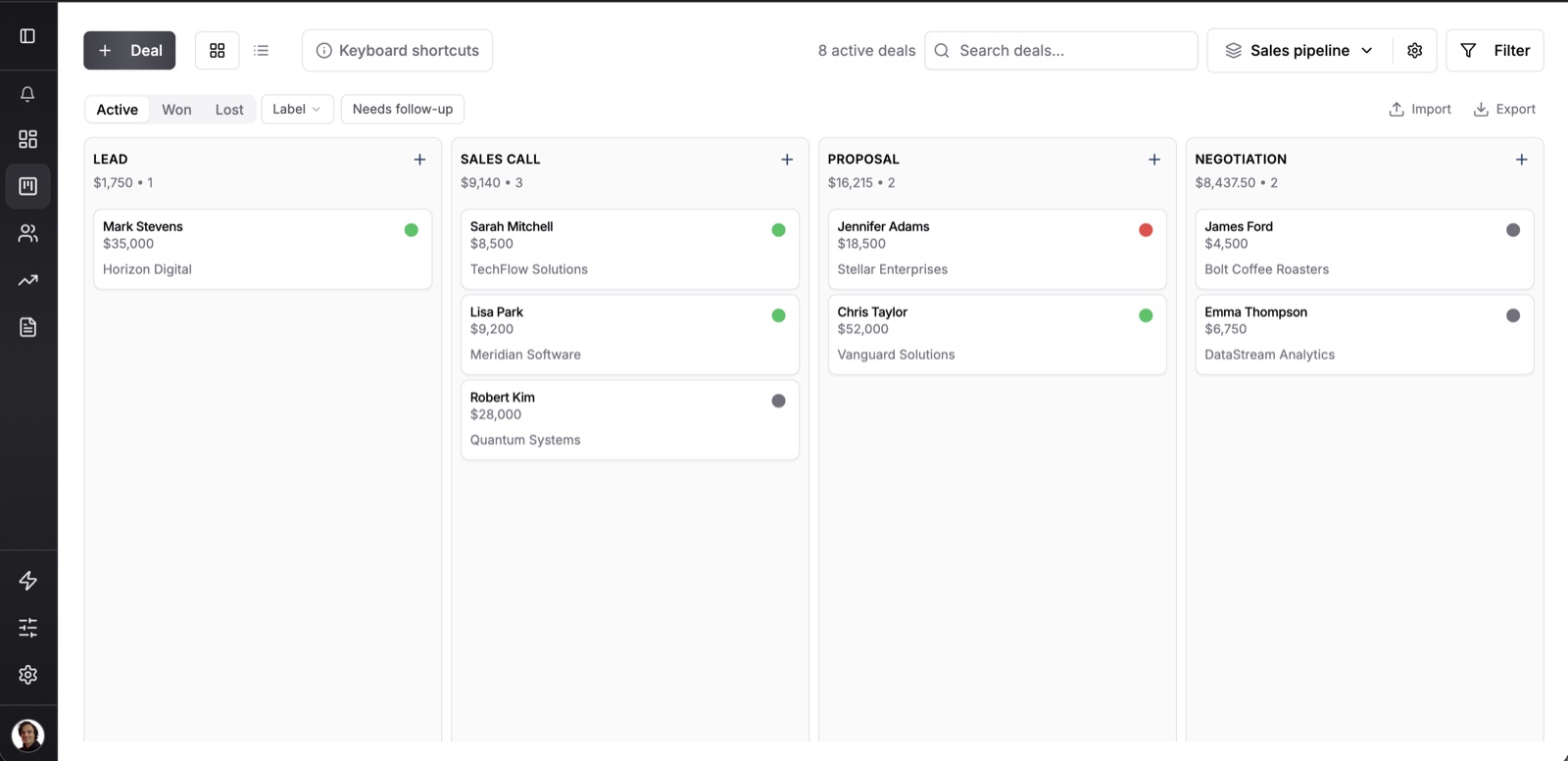
Viktor, a solo B2B outbound operator in Sweden, compared his options before picking Fluid: “I looked at HubSpot, Airtable and stuff like that. Glad I came across this one.”
Fluid costs $16/seat/month against LACRM’s $15, so nobody switches to save money. The annual plan at $144/seat/year works out to $12/seat with 3 months free, and that’s the only price win. Every feature is included on both plans.
Where it falls short: no built-in calling, no marketing automation and the 7-day trial is shorter than LACRM’s 30 days. Full breakdown of Fluid CRM vs Less Annoying CRM.
2. OnePageCRM (best for keeping the task-based style)
OnePageCRM is the closest match to LACRM’s way of working. Its Next Action system assigns one concrete task to every contact, so your database becomes a to-do list sorted by due date. Unlike LACRM, it also includes a kanban sales pipeline, API and webhooks on every plan and native mobile apps.
The Professional plan runs $15/user/month, or $9.95 on annual billing, with a 21-day free trial.
Where it falls short: Professional caps you at 1 pipeline and skips email scheduling and open tracking. Those need the Business plan at $29/user/month. Full breakdown of Fluid CRM vs OnePageCRM.
3. Capsule (best free tier to test with)
Capsule is the easiest tool on this list to try, because its free plan (2 users, 250 contacts) never expires. The paid Starter plan at $21/user/month, or $18 on annual billing, raises that to 30,000 contacts with a clean kanban pipeline and a 14-day trial of the paid features.
Where it falls short: Starter gives you a single pipeline, and workflow automations plus multi-pipeline support sit on the Growth plan at $38/user/month. If you’ll need automations within a year, price the Growth plan, not Starter. Full breakdown of Fluid CRM vs Capsule.
4. Close Solo (best if you live on the phone)
Close‘s Solo plan is for exactly one user, and that cap doesn’t stretch. Inside that limit it’s a lot of tool for the money. Built-in calling, email and SMS come standard at $19/month, or $9 on annual billing, so a solo seller who dials all day gets a phone system and CRM in one.
Where it falls short: the 10,000 lead cap, no workflow automation and the moment you hire someone the price jumps to the Essentials plan at $49/user/month. Full breakdown of Fluid CRM vs Close.
5. Pipedrive Lite (best integration ecosystem)
Pipedrive Lite is the entry plan of the biggest name in pipeline CRMs, at $24/user/month or $14 on annual billing. The pipeline view is excellent, the mobile apps are solid and the integration marketplace covers 500+ tools, which matters if your stack is unusual.
Where it falls short: Lite logs email one way through a BCC address rather than full two-way sync, and workflow automation isn’t included. Both arrive on the Growth plan at $49/user/month, which is where Pipedrive stops being a budget pick. Full breakdown of Fluid CRM vs Pipedrive.
6. Folk (best for relationship-heavy work)
Folk treats contacts as the center of the product, with a Chrome extension that captures people straight from LinkedIn and enrichment that fills in their details. For PR, partnerships or investor outreach where the relationship matters more than the deal stage, that design fits well. The Standard plan is $30/user/month, or $24 on annual billing.
Where it falls short: deal management, email sequences and API access all sit on the Premium plan at $60/user/month. A pipeline-first buyer ends up paying double for the parts that matter. Full breakdown of Fluid CRM vs folk.
7. Attio (best for custom data models)
Attio lets you build your CRM’s structure yourself, with custom objects and views that flex like Notion. The free plan covers up to 3 seats, and the Plus plan is $29/seat/month billed annually. For a technical founder who wants the data model to mirror their business exactly, nothing else here comes close.
Where it falls short: the longest setup on this list. AI features run on a metered credit system and email sequences sit on the Pro plan at $69/seat. If you picked LACRM because you wanted a tool working in 10 minutes, skip Attio. Full breakdown of Fluid CRM vs Attio.
Less Annoying CRM Alternatives Compared
Prices below are monthly billing per user, with annual prices noted where the gap is big.
| CRM | Price (monthly billing) | Visual pipeline | API and webhooks | Free trial |
|---|---|---|---|---|
| Less Annoying CRM | $15 | Under the reports tab | Yes (developer API) | 30 days |
| Fluid CRM | $16 ($12 effective on annual) | Yes | Yes | 7 days |
| OnePageCRM | $15 ($9.95 on annual) | Yes, 1 pipeline on Professional | Yes | 21 days |
| Capsule | $21 ($18 on annual) | Yes, 1 pipeline on Starter | Yes | 14 days |
| Close Solo | $19 ($9 on annual, 1 user max) | Yes | Yes | 14 days |
| Pipedrive Lite | $24 ($14 on annual) | Yes | Yes | 14 days |
| Folk Standard | $30 ($24 on annual) | Yes | Premium plan only | 14 days |
| Attio Plus | $29 billed annually | Yes | Yes | Free plan, 3 seats |
Frequently Asked Questions
Less Annoying CRM tracks deals as lists and tasks rather than a drag-and-drop board, and the pipeline view sits under the reports tab. That works well for task-driven sellers. If you want stages as columns you can drag deals between, you’ll need one of the alternatives above.
Yes. Less Annoying CRM has a developer API with webhooks, and LACRM itself notes most customers never use it directly. Native integrations number about 10, with Mailchimp, Google Calendar, Gmail, Outlook and Zapier among them, and Zapier covers most gaps. If you’re switching, the reason is usually the pipeline and automation side, and the list above covers both.
On monthly billing, OnePageCRM matches LACRM at $15/user and Close Solo runs $19 for a single user. On annual billing Close Solo drops to $9 and OnePageCRM to $9.95, the two cheapest real options. The spread across this whole list is small, so pick for the gap you’re fixing, not to save $6.
Yes. Export your contacts and tasks, clean the file, then import the CSV into the new tool. Every CRM worth using accepts CSV imports. Budget 1-2 hours of cleanup if your account is more than a year old.
Less Annoying CRM has announced future optional paid add-ons outside its core functionality. In their own framing, the core product stays one price and the add-ons are extras you can skip. Today the $15 plan includes everything, and that’s still one of the fairest deals in the category.
Conclusion
Switch for a reason, not for the sake of switching. If Less Annoying CRM matches how you work, the $15 plan is a keeper and no list should talk you out of it. If you’re missing a visual pipeline, automation that sets the reminders for you or EU data hosting, Fluid CRM covers all three at nearly the same price.
Start your 7-day free trial here, no credit card required.