
The best leads you got this month are probably in your LinkedIn inbox. That inbox sorts them by whoever wrote last, so a yes from Tuesday is under ten new messages by Friday, with no date on it and no next step.
A LinkedIn CRM turns each LinkedIn conversation into a deal with a stage, a next step and a follow-up date. Sync tools copy the messages in automatically. In Fluid CRM you log it by hand in about two minutes per conversation by pasting the thread link, writing the next step and setting a reminder.
Why LinkedIn DMs Die Untracked
LinkedIn messaging is a chat app. It shows who wrote last, and that is all it knows. There is no stage, no “follow up on Thursday” and no way to see the five people who said yes this week without scrolling past everyone who said thanks for connecting.
I have sent over 50,000 LinkedIn messages since 2021. Good LinkedIn conversations almost never die on a no.
They die right after a yes. Someone asks for the price, gets it, and nobody writes down what happens next. A week later the thread is ten rows down and neither side remembers whose turn it was.
A vague reply ends good threads too. “Sounds good, let’s talk soon” feels friendly, but it gives the other person nothing to say yes to, so the chat stops there.
A specific next step works the other way. “Does Thursday at 10 or Friday at 2 work?” needs one word back, which is much easier to send than “let’s find a time”. Speed matters as well, and our guide to speed to lead covers that side of it.
So the job of a LinkedIn CRM is not storing messages. It is making sure every interested person has a next step and a date, and that you see them the morning they are due.
Finding the people is a separate job, covered in how to find clients on LinkedIn. If you sell on your own, a solopreneur CRM built around that daily list is the place to start.
The 2-Minute Routine for Logging a LinkedIn Conversation
The routine below works in any CRM that has a deal, a notes box and a reminder date. I’ll show it in Fluid CRM, because that is what we built for it.
1. Decide that the DM is a deal
Log a conversation the moment the other person shows interest. That means they ask a question back, ask for a price, a link or more detail, or say yes to a call. A new connection is not a deal, and neither is a polite “thanks, likewise”.
This rule keeps the pipeline small enough to trust. Log everyone and the yeses get buried again, only this time inside your CRM. The same thinking is behind cutting CRM data entry down to the few fields you will actually keep filling in.
How many people said yes to you on LinkedIn last month? Could you list them right now without scrolling?
2. Create the deal with the person and company in the title
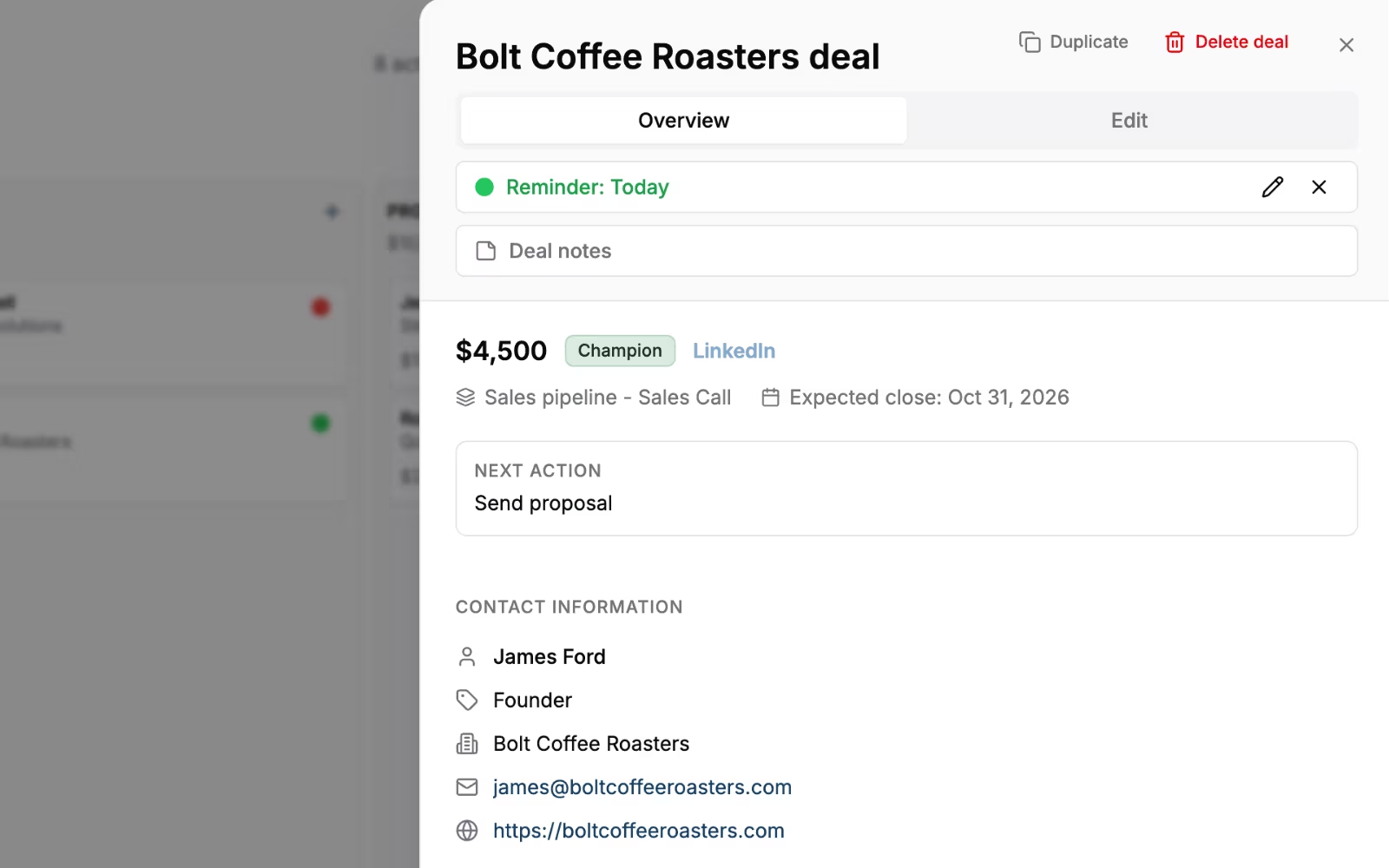
Write “Dana Ruiz, Northpeak Studio” as the deal name. In Fluid CRM, creating a deal creates the contact and the company with it, so there is no second form to fill in.
3. Paste the thread link into the Conversation field
Open the conversation on LinkedIn in a desktop browser and copy the address from the top of the page. Paste it into the deal’s Conversation field. In Fluid CRM, hover over the deal card and press C to jump straight back into that thread.
That one link replaces copying messages over. The whole history stays on LinkedIn, and you are one key away from it.
4. Write the next step in one line
Put it in the Next action box, as an action with a day: “Send two call times for Thursday” or “Send the case study and ask which part fits”. If you can’t write a next step, the conversation is not a deal yet.
5. Set the reminder date and the source
Set the reminder for the day the next step is due and the source to LinkedIn. Fluid CRM sends a daily email at 9:00 in your timezone listing every reminder due that day, so the threads that need you show up before you open LinkedIn at all.
The daily rhythm around it is short. In the morning, answer the threads in that email first, and after any interested reply, take the two minutes to log it.
Before you close LinkedIn for the day, scroll your inbox once for anyone who said yes and has no deal yet.
Doland White, an executive coach and founder of DWC, used to have his prospects split between LinkedIn and three other places before he moved them into one pipeline in Fluid CRM. The routine above is what keeps a list like that from splitting up again.
What to Record and Which Stages to Use
For each LinkedIn conversation you log as a deal, record enough to pick it back up in ten seconds without rereading the thread. Never paste the thread itself, because the link already holds it.
| Field | What to write | Example |
|---|---|---|
| Deal name | Person and company | Dana Ruiz, Northpeak Studio |
| Conversation | The LinkedIn thread URL | linkedin.com/messaging/thread/… |
| Stage | What the buyer has done so far | Call proposed |
| Next action | One action with a day | Send two call times for Thursday |
| Reminder | The day that action is due | Thursday |
| Source | Where the buyer came from | |
| Last thing they said | One sentence in their words, in the deal notes | “Busy until the 15th, then interested” |
| Deal value | A rough guess, fine to leave empty at first | $3,000 |
Name the stages after what the buyer did, not after what you did. “Connected” and “Messaged” are outreach activity, and a pipeline full of them hides the five people who actually said yes.
- Replied with interest. They asked a question, a price or for more detail.
- Call proposed. You sent specific times or a specific next step.
- Call booked. A date is in both calendars.
- Proposal sent. They have a price in writing.
- Won or lost. When you mark a deal lost in Fluid CRM, it asks for the reason, so you can see later why LinkedIn deals slip.
Keep a second pipeline called “Not now” for people who said yes to the idea and no to this quarter. Give each one a reminder 60 to 90 days out and something useful to send when it comes up. Our guides to keeping in touch with clients and lead nurturing for small business cover what to send.
Logging WhatsApp Conversations in the Same Pipeline
Plenty of B2B conversations start on LinkedIn and move to WhatsApp once there is a call booked. Keep it as one deal per buyer. Two deals for one person means two reminders that disagree.
WhatsApp has an official way to link to a chat. Its click-to-chat link is wa.me followed by the full phone number in international format, with no plus sign, brackets or dashes, for example wa.me/15551234567. Paste that into the Conversation field in place of the LinkedIn link.
Leave the source as LinkedIn, because that is where the buyer came from. Put a short line in the notes when the chat moves, such as “moved to WhatsApp after the call”.
If you sell from your phone, the WhatsApp Business app lets you put labels on chats, up to 20 of them. Naming them after your stages gives you the same picture on the phone.
Labels have no dates or reminders, though, so the deal in your CRM is the record you check. Fluid CRM works in your phone’s browser for that.
Tools That Connect LinkedIn to Your CRM
Fluid CRM does not sync LinkedIn or WhatsApp messages. You log the conversation by hand, with the 2-minute routine in this post. If you would rather not log by hand, the three tools below connect LinkedIn to a CRM, each in its own way.
| Tool | Best for | Price | LinkedIn messages |
|---|---|---|---|
| Breakcold | Many threads a day across LinkedIn and WhatsApp | $99 a month, one seat and two accounts | Synced into one inbox |
| folk | Relationship work where deals come later | $30 per member a month, $24 billed yearly | Profiles saved, templates in DMs |
| Sales Navigator Advanced Plus | Teams already on HubSpot, Salesforce, Dynamics or Oracle | Custom quote from LinkedIn | Logged to those CRMs |
| Fluid CRM | Founders who log by hand and want a daily list | $16 per seat a month, $144 a year | Logged by hand with the thread link |
My own view is that a founder with a few new interested threads a day is better off logging by hand. The two minutes is when you decide the next step, and the next step is what saves the deal.
A sync tool copies the conversation in, but it can’t decide what you do next.
Breakcold
Breakcold is a CRM built around a shared inbox. It syncs LinkedIn, WhatsApp, Telegram, Gmail and Outlook conversations into one inbox tied to the pipeline. It costs $99 a month for one seat and two connected accounts, plus $10 a month for each extra seat or account, or $79.20 a month billed yearly, with a 14-day free trial.
Pick this instead if you have more conversations a day across LinkedIn and WhatsApp than you can log by hand, and want them all in one inbox.
folk
folk is a relationship CRM. Its folkX browser extension saves a LinkedIn profile to folk in one click and lets you use message templates inside your LinkedIn DMs.
The Standard plan is $30 per member a month or $24 billed yearly and includes the extension plus email, calendar and WhatsApp sync. Deals start on Premium, at $60 a month or $48 billed yearly.
Pick this instead if your LinkedIn work is mostly about people and relationships, and deals with a value come later or not at all.
LinkedIn Sales Navigator Advanced Plus
Advanced Plus is the Sales Navigator plan with CRM sync, the route LinkedIn built itself. It logs InMails, messages and notes from Sales Navigator back to HubSpot, Salesforce, Microsoft Dynamics 365 or Oracle Sales. LinkedIn prices it on a custom quote, based on team size and the CRM you connect.
Pick this instead if your company already pays for one of those CRMs and you want LinkedIn activity in it through LinkedIn’s own sync.
Fluid CRM
Fluid CRM fits if you log by hand and want the deal, the next action and the reminder date to be what you see every morning. It costs $16 per seat a month or $144 per seat a year, with every feature in the one plan.
Besides the missing LinkedIn and WhatsApp sync, email logging works by BCC only, with no two-way inbox sync. If either matters more to you than a short, clean daily list, Fluid CRM is not the tool for it.
Frequently Asked Questions
No. LinkedIn messaging has no stages, deal values or follow-up dates. Sales Navigator’s Advanced Plus plan syncs activity to a few big CRMs, but LinkedIn itself gives you no pipeline with next steps.
LinkedIn’s User Agreement bans software that scrapes the service and bots that send messages or add contacts. Sales Navigator Advanced Plus is the sync route LinkedIn built itself. For any other tool, read how it connects in its own docs, and remember that logging a conversation by hand involves no tool at all.
Yes. Some CRMs sync WhatsApp messages directly. In any CRM you can log the chat by hand as a deal and paste WhatsApp’s click-to-chat link, wa.me plus the full international phone number, so the chat opens in one click.
More than most people expect, because you only log the ones that show interest. Most two-way chats never get past small talk, so the list is far shorter than the inbox. If you start more interested threads each day than you can log in a short break, a sync tool is worth paying for.
Where Your Next LinkedIn Deal Should Live
Every interested LinkedIn reply needs three things before you close the tab: a deal, a next step and a date. Two minutes per conversation is the whole cost, and the written next step is what turns a yes into a meeting.
If you sell alone and want that list waiting for you each morning, look at how Fluid CRM works as a solopreneur CRM.
Start your 7-day free trial here, no credit card required.