

Under about 30 open deals, a well-built sales tracking spreadsheet is genuinely fine, and you can have one working in 15 minutes. That is a CRM founder saying so. The catch is that most spreadsheets are built without the two columns that keep deals alive, and this post fixes exactly that.
A working sales tracking spreadsheet needs 9 columns: company, contact, deal value, stage, probability, next action, next action date, last touch and notes. Build it in 15 minutes or grab the free template below. Past about 30 open deals, move it into Fluid CRM before follow-ups start dying.
The 9 Columns a Sales Tracking Spreadsheet Needs
Tim Chorlton, who runs a one-man business with an external salesperson, wrote something in his review that most CRM founders would rather not quote: “I’ve used hundreds of sales CRM’s over the years and always end going back to spreadsheets for their simplicity.” He is not wrong, simplicity wins, which is why the sheet itself has to stay lean.
Every column has to earn its place, because every extra column is a reason not to update the sheet. These nine are the whole system.
- Company. The account name, one row per deal, not per person.
- Contact. The human you actually email, with their address.
- Deal value. A number, not a range. Guess if you must, the guess sharpens later.
- Stage. One word from a fixed list: Lead, Contacted, Call Booked, Proposal, Won, Lost.
- Probability. A percentage matched to the stage, so the pipeline math works.
- Next action. The specific thing you will do, “send case study”, never “follow up”.
- Next action date. The day you will do it. This column keeps deals alive.
- Last touch. The date anything last happened. This column shows you where deals are dying.
- Notes. One line per update, newest on top.
The two most skipped columns are next action date and last touch, and they are the only two that fight lead decay. A spreadsheet without them is a contact list wearing a pipeline costume.
For probability, tie the number to the stage instead of your mood: 10% at Lead, 25% at Contacted, 50% at Call Booked, 75% at Proposal. The exact numbers matter less than never changing them per deal, because a probability you adjust when you feel hopeful is not data, it is journaling.
At my old outbound agency I booked 1,250+ sales calls for 50+ B2B clients, and I saw the inside of a lot of these files. Almost none had a next action date column. That, more than any missing feature, is why the leads I generated for them rotted.
Build the Sales Tracking Spreadsheet in 15 Minutes
Open a blank Google Sheet or Excel file and work through these steps in order.
Step 1: add the columns and freeze the header
Type the nine headers across row 1, then freeze it (View, then Freeze, then 1 row in Sheets). Frozen headers sound cosmetic and are not, because a sheet you have to scroll blind through is a sheet you stop trusting.
Step 2: make Stage a dropdown
Select the Stage column, then Data, then Data validation, and enter your fixed stage list. Free-typed stages fork into “proposal”, “Proposal sent” and “prop” within a week, and at that point no formula can count anything.
Step 3: turn overdue rows red
Select your data range, then Format, then Conditional formatting, with a custom formula like =$G2<TODAY() where G is the next action date column. Set the fill to red. Now an overdue row is red before you have read a single cell, on the days you open the file.
Step 4: book the weekly ten minutes
The sheet only works if it gets opened on a rhythm, so put a 10-minute block in your calendar, same day every week. The routine is three sorts: next action date ascending to see the week, days since last touch descending to see the bleed, then weighted value to see whether the pipeline covers the target. A spreadsheet with a standing appointment beats a CRM without one.
Step 5: or skip the build entirely
The lead tracker template is this exact structure as a free Excel and Google Sheets file, stages and pipeline value included. It doubles as a sales tracker template, since the columns are the same job under a different name.
Three Formulas That Do the Sales Tracking For You
You need exactly three, and none of them is clever.
Weighted pipeline value
=C2*E2, deal value times probability, then a =SUM at the bottom of that column. A pipeline of $80,000 in raw deals is often $25,000 in weighted truth, and the weighted number is the one to plan around.
Days since last touch
=TODAY()-H2, where H is last touch. Sort descending on this column once a week and the top rows are your quiet bleed, the deals nobody has spoken to in two weeks and nobody has decided to close either.
Stage totals
=SUMIF(D:D,"Proposal",C:C) gives you the value sitting at each stage. When most of your pipeline value has been parked at Proposal for a month, you do not have a lead generation problem, you have a follow-up problem.
Can you answer “which three deals decay fastest right now” from your current sheet in ten seconds? With these three formulas you can, and that question is the entire point of tracking.
The 30-Deal Ceiling: Where a Sales Tracking Spreadsheet Breaks
Andy, a freelance web designer at Bear Sites, described a migration path plenty of readers will recognise: “Those of us that got a Hubspot account and then got a huge headache and went back to pen and paper or Excel.” Fleeing a heavy CRM for a spreadsheet is rational, and I will not pretend otherwise. The refuge just has a load limit.
In my experience it sits around 30 open deals, and three cracks appear in the same order every time.
The red rows only warn you if you open the file. Conditional formatting is a smoke alarm that only rings while you are staring at it. The week you get busy is the week follow-ups slip, and it is also the week the sheet goes unopened, so deals die on the days the file stays closed.
The second person breaks it. An external salesperson or a cofounder means edits collide, someone sorts the sheet and saves it, and nobody trusts row 14 anymore.
The history disappears. A cell holds one value, so when a deal value changes or a stage moves backwards, yesterday’s truth is simply gone, and you cannot learn from a pipeline that has no memory.
When To Switch From a Spreadsheet To a CRM (And When Not To)
Under 30 open deals and working alone, stay on the spreadsheet, honestly. Add the nine columns and it will not be the reason you lose deals.
Past 30 deals, or the day a second person needs the pipeline, move. The full decision is its own post, Google Sheets vs CRM: when to make the switch, and if you want tools rather than templates, best sales tracking software covers that lane.
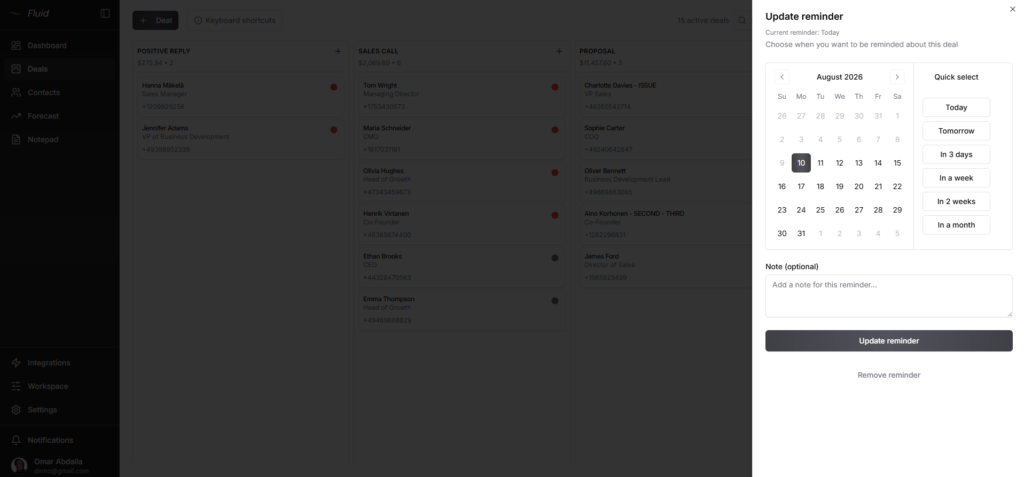
The move itself is smaller than it looks. The 9 columns map one-to-one onto a Fluid CRM pipeline, import is a CSV upload that takes minutes, and the difference on the other side is the one thing a sheet cannot do. The reminder fires whether or not you open the app. Andy’s review title, ten minutes in, was that it “already saved me months of work building my own CRM.
Our page on the simple CRM for teams leaving spreadsheets shows those columns as fields on a deal.
Frequently Asked Questions
Google Sheets, unless your company forbids it. Sales tracking is a shared, always-open document problem, and Sheets handles simultaneous edits and phone access without version copies. Every formula in this post works identically in both.
Two columns: a specific next action and a next action date, plus conditional formatting that turns the row red when the date passes. The honest limit is that the red only warns you inside the file, so pair it with a weekly sort on days since last touch.
It is the tracking half of one. A spreadsheet can hold the same data as a CRM, but it cannot remind you of anything on its own, keep edit history per deal or stay reliable with two people in it. Whether that matters depends entirely on your deal count.
Technically thousands of rows, practically about 30 open deals at a time. The ceiling is not storage, it is attention: past that point overdue rows pile up faster than you clear them and the sheet quietly stops being true.
The Spreadsheet To Start Today
Build the nine columns or take the lead tracker template, set the red-row formatting and put every live deal in it before the end of the day. Then write a note in your calendar for the day it holds 30 open deals, because that is the day the spreadsheet has done its job and earned the upgrade.
Start your 7-day free trial here, no credit card required.