

You asked Claude to update a deal and it told you it can’t see your CRM. Or you’re picking a CRM right now and you want one Claude can work in from day one. Both problems have the same fix, and it depends on which CRM you choose.
A Claude CRM is a CRM with an official connector that lets Claude read and update your pipeline from a chat. For small B2B teams, Fluid CRM, Pipedrive, Attio and HubSpot all have one in Claude’s directory. They differ in what Claude can change, which plan includes it and what that plan costs.
The short version, if you only have a minute:
- Small B2B team that wants one plan with everything in it: Fluid CRM, listed in Claude’s directory
- Team that sells by logging calls, emails and meetings all day: Pipedrive
- Up to three people who want to start free: Attio
- Team that will add marketing tools later: HubSpot
- Solo seller who lives on calls and email: Close
- Already using Zoho’s other apps: Zoho CRM
- Lowest paid price with a connector on every paid plan: OnePageCRM
What a Claude CRM Connector (MCP Server) Does and What It Cannot Do
A Claude CRM connector is a link between Claude and your CRM account. Once it’s on, you type a request in plain language and Claude reads or updates your pipeline for you. You don’t export anything and you don’t paste anything in.
You’ll also see it called an MCP server. MCP stands for Model Context Protocol, the open standard Anthropic created so AI assistants can talk to other software. “CRM with MCP” and “CRM with a Claude connector” mean the same thing in practice.
Every connector gives Claude some mix of three kinds of access. Read access lets Claude look things up, such as which deals have no next step, and write access lets it create and update records, such as logging a call or moving a deal. Delete access lets it remove records for good.
Think of it like giving a new assistant a key to the office. Reading the files is one key and writing in them is a second one. The key to the shredder is a third, and plenty of offices never hand that one out.
There’s one limit that applies to every CRM on this list. Claude only acts when you ask it to. It doesn’t watch your inbox, it doesn’t notice a deal sitting untouched for two weeks and it doesn’t start work by itself.
In practice you ask things like “Who do I need to follow up with today?” or “Log that I called Lisa at Meridian and set a reminder for Thursday.” Claude does the looking and the typing, and you still make the decision.
Three Questions To Ask Before Picking a CRM for Claude
It’s tempting to compare Claude connectors by tool count, as if 55 beats 21. For a team under ten people, I think that’s the wrong number to compare. These three questions tell you more.
Can Claude delete your records?
Zoho CRM’s connector includes delete tools, and Close lets you grant a destructive permission that allows deletes. Fluid CRM, HubSpot, Pipedrive and OnePageCRM give Claude no delete tools for your deals, contacts or companies.
If Claude deleted 40 contacts by mistake tonight, how would you find out? A wrong update is easy to spot and fix, while a deleted record is often just gone.
Is the connector on the plan you would actually buy?
A connector that exists is not the same as a connector you get. Some vendors put it on every plan, some limit how much you can use it and some keep it for their top tiers.
Salesforce’s hosted connector needs Enterprise Edition, and Capsule’s is in early access on its Growth plan and up. Pipedrive includes it on every plan but meters it with usage tokens. Check the plan you’d pay for, because that’s the one that counts.
Will your team open the CRM on the days nobody asks Claude?
A connector keeps your records current without anyone typing. That’s worth a lot, because data entry is the first thing a busy team drops.
It doesn’t decide what happens next with a lead, though. At Fenixtal I supplied leads to more than 50 B2B clients, and most of them tracked those leads in a messy spreadsheet or a CRM nobody wanted to open. The leads didn’t die from rejection, they died because nobody looked.
So you need both halves. Claude keeps the pipeline up to date from the outside, and the CRM has to be pleasant enough that a person still opens it and decides.
The 7 Best CRMs for Claude in 2026
The seven CRMs below are ordered by how well they fit a small B2B team that wants Claude working in its pipeline.
| CRM | In Claude’s directory | What Claude can do | Cheapest plan with the connector | Monthly / annual price |
|---|---|---|---|---|
| Fluid CRM | Yes | Read, create, update. No delete | The one plan | $16 / $144 a year ($12 a month) |
| Pipedrive | Yes | Read, create, update. No delete | Lite, with token limits | $14 billed annually |
| Attio | Yes | Read, create, update. Deletes only tasks and comments | Free, up to 3 seats | $0, then $44 / $35 |
| HubSpot | Yes | Read, create, update. No delete | Free, up to 2 users | $0 |
| Close | Yes | Read, write and delete, depending on the permission you grant | Solo, 1 user | $19 / $9 |
| Zoho CRM | Yes | Read, create, update and delete | Standard | $20 / $14 |
| OnePageCRM | Added by address | Read, create, update. No delete | Professional | $15 / $9.95 |
1. Fluid CRM (best for small B2B teams that want one plan with everything in it)
Fluid CRM is a visual sales pipeline for solo founders, agencies and B2B teams of 1 to 10. Its Claude connector is listed in Claude’s directory and has 21 tools. Eight read your data and thirteen create or update deals, contacts, companies, activities and reminders, including adding records in bulk. The full list of what it can and can’t change is on our AI CRM page.
There are no delete tools, on purpose. Claude cannot delete a deal, contact or company in Fluid CRM, so the worst mistake it can make is one you can see and correct.
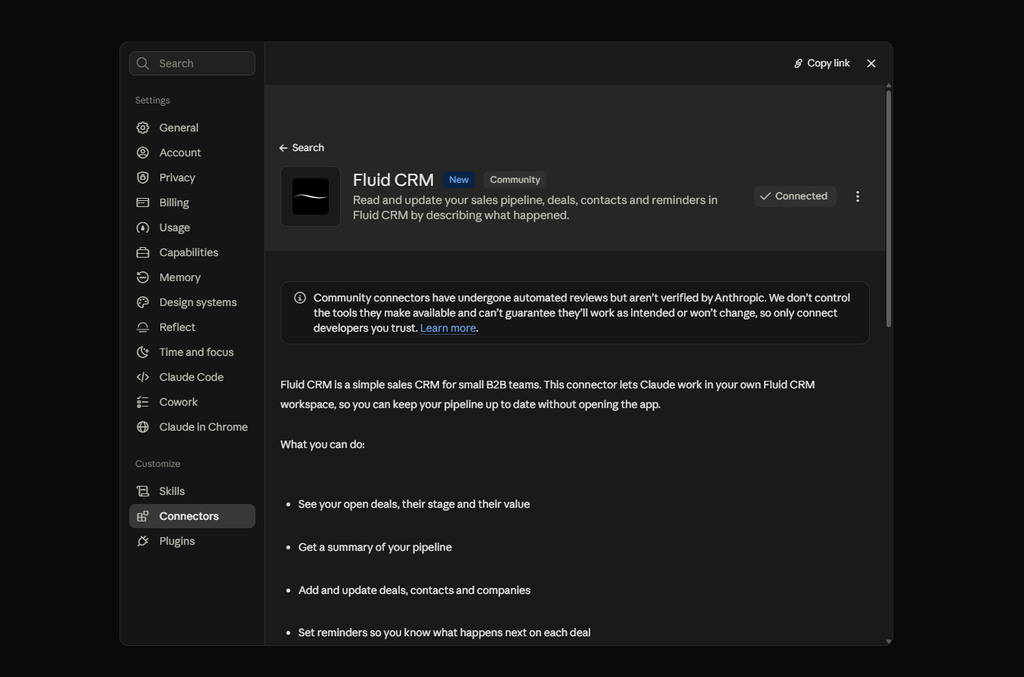
You can ask it things like “Add these 30 leads as deals in my Outbound pipeline” and paste the list. It works the same way in ChatGPT and Cursor, which connect through the same MCP address.
Best for: Small B2B teams that want a calm pipeline they’ll open every day, with Claude doing the typing from outside.
Not for: Teams that need a built-in dialer, marketing automation or call transcripts inside the CRM. Fluid has fewer tools than HubSpot or Close, and its listing carries Claude’s Community label.
Real pricing math: $16/seat/month, or $144/seat/year. There’s one plan and the connector is in it, along with every other feature.
2. Pipedrive (best for teams that sell by logging activities)
Pipedrive is built around activities, so every call, email and meeting gets scheduled and ticked off. Its connector is in Claude’s directory with more than 30 tools covering deals, people, organizations, activities and notes. I found no delete tool in its list.
You can ask something like “Move the Acme deal to Proposal Sent and schedule a follow-up for Friday.” Pipedrive’s own help pages still describe adding it by pasting an address, so the setup you see may differ from the directory route.
Best for: Teams of 3 to 10 whose day is a list of calls and meetings to get through.
Not for: Anyone who wants predictable usage. The connector is on every plan, but Pipedrive says usage is subject to token limits based on your plan, with more tokens sold separately.
Real pricing math: Lite is $14/seat/month billed annually. If you need more than the basics, my breakdown of Pipedrive alternatives covers what the higher tiers add.
3. Attio (best free start for up to three seats)
Attio is a flexible, database-style CRM that startups like. Its connector is in Claude’s directory with 23 tools listed, and Claude can search and update people, companies and deals, add notes and tasks and search emails, meetings and call recordings. Writes ask you to confirm first, and the only things it can delete are tasks and comments.
A typical request is “Add a task to follow up with Ramp in 3 days.”
Matthew, a verified Fluid CRM customer who has tried more than ten CRMs in 15 years, described the trade-off well. “Attio is great, but 10-second tasks take 5 minutes.”
Best for: Small startup teams that want to shape the CRM around their own data and start without paying.
Not for: Teams that want a pipeline they can use in the first ten minutes without building anything.
Real pricing math: Free for up to 3 seats, with the connector included. Plus is $44/seat/month or $35 billed annually. I went through the tiers in Attio pricing.
4. HubSpot (best if you will add marketing later)
HubSpot‘s connector is in Claude’s directory with 36 tools and it works on every HubSpot plan, including the free CRM. Claude can read, create and update contacts, companies, deals, tickets, tasks, notes, calls and meetings. It doesn’t support deleting, and bulk writes are capped at 10 records at a time.
You might ask “Update the deal Enterprise Package Q4 to Closed Won”, or have it summarize everything logged on an account before a call.
Best for: Teams that expect to grow into email marketing, forms and a help desk under one roof.
Not for: A two-person team that only needs a pipeline. You get a lot of product around the part you came for.
Real pricing math: The free CRM covers up to 2 users and includes the connector. If you’re weighing it up, read HubSpot alternatives for small business first.
5. Close (best for solo sellers who live on calls and email)
Close has calling, email and SMS built into the CRM. Its connector is in Claude’s directory with 55 tools, the most on this list. When you connect, you choose one of three permission levels, which are read only, safe writes and a destructive level that also allows deletes.
That choice is the good part. You can give Claude read access first, ask “Give me a pipeline health view by stage” and widen the permission later.
Best for: A solo seller or small team doing high-volume outreach by phone and email.
Not for: Teams that want one price for everyone. Solo is limited to one user and 10,000 leads with no workflows, and calls are billed by usage.
Real pricing math: Solo is $19/month or $9 billed annually. A team needs Essentials at $49/seat/month or $35 billed annually, and the power dialer starts on the Growth plan. Close doesn’t state which plans include the connector, so confirm before you pay.
6. Zoho CRM (best if you already use Zoho’s other apps)
Zoho CRM‘s connector is in Claude’s directory with 41 tools. Claude can read, create and update records, and it can delete records and notes as well. It can also see how your modules, fields and layouts are set up.
A simple request is “Show me all the deals closing this month.” Delete access is useful for an admin and risky for everyone else, so decide who on the team connects it.
Best for: Teams already on Zoho Books, Zoho Mail or Zoho Desk who want one vendor.
Not for: Teams that want one switch for everything. The directory connector includes delete tools, so locking it down means removing the delete permission in each user’s Zoho profile or installing Zoho’s separate read-only server. Zoho also counts connector calls against your plan’s API credits.
Real pricing math: Standard is $20/seat/month or $14 billed annually. Zoho doesn’t say clearly whether its free edition includes the connector. I compared the two directly in Fluid CRM vs Zoho CRM.
7. OnePageCRM (best low price with the connector on every paid plan)
OnePageCRM turns your contact list into a to-do list, where every contact has a next action. Its connector is on every paid plan, and Claude can read, create and update contacts, companies, deals, actions, notes, calls and meetings. It cannot delete.
You could say “Log a 30-minute call I just had with John at TechCorp about pricing and queue a follow-up for Friday.”
Best for: Solo sellers and small teams that want the lowest paid price and a strict next-action habit.
Not for: Teams that want a one-click install from Claude’s directory. I couldn’t find it listed there, so you add it by pasting its address as a custom connector.
Real pricing math: Professional is $15/user/month or $9.95 billed annually. More than one pipeline needs a higher plan.
CRMs left off this list and why
Seven other CRMs have a connector and didn’t make the list for a small sales team.
- folk: the connector is on the $30 Standard plan, but the deals object sits on Premium at $60/month or $48 billed annually.
- Breakcold: $99/month with one seat included, built for teams selling through LinkedIn and WhatsApp.
- Salesforce: the hosted connector needs Enterprise Edition and an admin to set it up.
- monday CRM: plans start at three seats, and Claude works with boards and items more than CRM records.
- Capsule: the Claude connector is in early access by request, on the Growth plan and up.
- Clarify: priced by credits, not seats, and its connector can delete.
- Streak: has a connector, and is built to sit inside Gmail, which suits teams that never leave their inbox.
CRMs with no official Claude connector yet
Two well-known small-team CRMs have no official Claude connector yet. Copper lists one as coming soon, and Less Annoying CRM has not built one.
How To Connect a CRM To Claude, Step By Step
Connecting a CRM to Claude takes about two minutes and needs nothing installed. The steps below use Fluid CRM as an example.
1. Open the connector directory in Claude
In Claude, open the settings and go to Connectors. Switch to the Discover tab and search for your CRM by name.
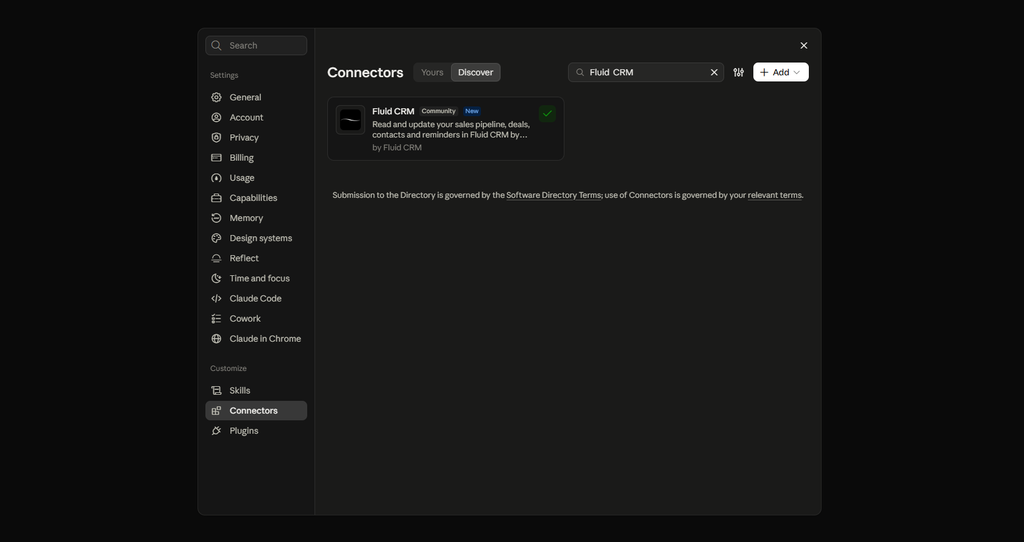
2. Connect and log in
Click the connector, then Connect. Claude sends you to your CRM’s login page, where you sign in and approve the access.
In Fluid CRM you can also start from the other side. Go to Integrations, then MCP, pick your assistant and follow the steps on screen.
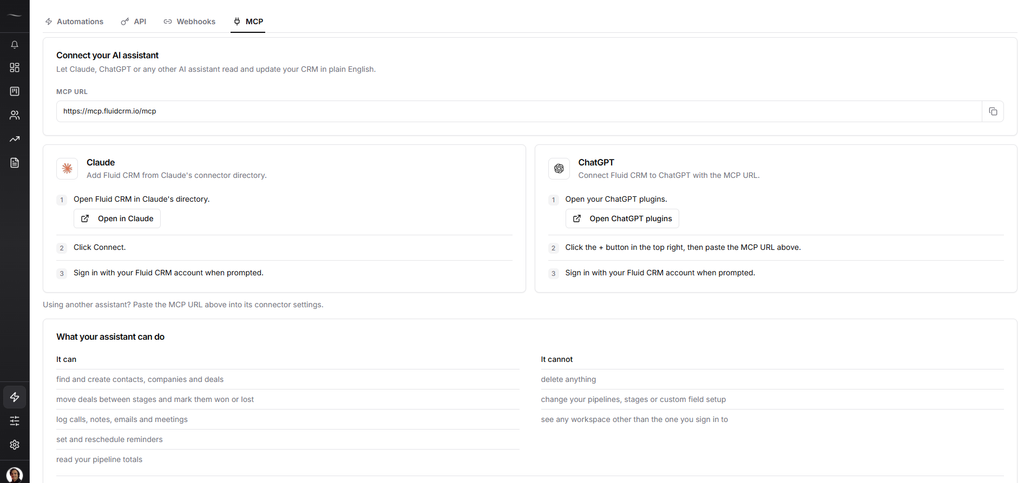
3. Ask your first question
Start with something that only reads, such as “What’s in my pipeline right now?” Once you trust the answers, let it write.
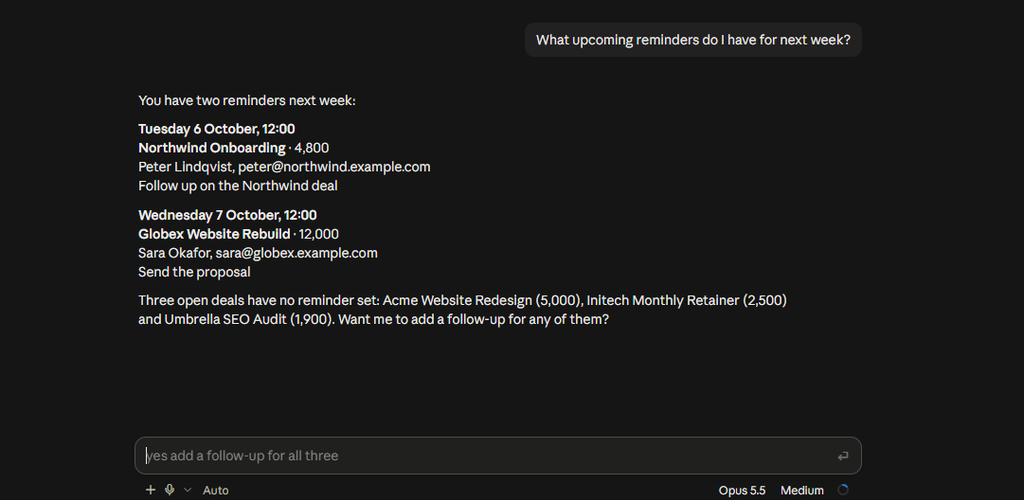
The connection belongs to your own login, so Claude sees what you see and nothing more. Everyone on the team connects their own account.
Open access matters beyond Claude too. A verified customer who coordinates a coaching network across Europe pulls his Fluid CRM data into an outside table every Sunday. In his words, “having a complete REST API on every account, with no paywall, is exceptional for a tool in this price range.”
When You Should Not Switch CRMs For Claude
A Claude connector is a poor reason to change CRMs if the one you have already works. If your team is happy on HubSpot, Pipedrive or Attio, connect the one you’ve got. Moving your data costs you time and the connector you’d gain already exists.
It’s also too early if you have a dozen deals in a spreadsheet and you can name all of them. Paste the sheet into Claude and ask your question. You don’t need a CRM yet, and how to choose a CRM covers when that changes.
And if you need a built-in dialer or marketing automation, Fluid CRM is not the pick, with or without Claude. Close and HubSpot do those jobs.
Switch when the CRM is the problem. If nobody on the team opens it and the data is always a week old, a connector on top won’t fix that.
Claude CRM: Frequently Asked Questions
For a small B2B team, the best CRM for Claude is one whose connector is on the plan you’d buy and can’t delete your records. Fluid CRM fits that at $16/seat/month with one plan. Attio and HubSpot are strong free starts, and Pipedrive suits teams that sell by logging activities.
A CRM MCP server is the piece of software that lets an AI assistant such as Claude or ChatGPT read and update your CRM. MCP stands for Model Context Protocol. Claude calls the same thing a connector, so a CRM with MCP and a CRM with a Claude connector are the same feature.
No. Claude can create and update records when you ask it to, but it doesn’t act without a request. It has no triggers, so it won’t log an email the moment it arrives or chase a deal that’s gone quiet unless you ask.
Anthropic’s help center says connectors from the directory are available to all Claude users, including the free plan. Free accounts are limited to one custom connector added by address. Some CRM vendors’ own help pages still say a paid Claude plan is needed, so check when you connect.
It’s safe if you limit what it can do. Start with read access where the CRM offers it, and prefer a connector with no delete tools. A wrong update can usually be spotted and fixed, while a deleted record usually can’t be brought back.
Usually, yes. HubSpot, Attio and Close have official ChatGPT apps. Fluid CRM and Pipedrive connect to ChatGPT through the same MCP address you’d use for a custom connector.
Which Claude CRM Should You Pick
Pick the CRM your team will open, then check that Claude can work in it. If you’re a small B2B team and want one affordable plan with the connector included and no delete access, choose Fluid CRM. If you want to start free, take Attio for up to three seats or HubSpot for up to two.
On the other hand, if you sell by phone, look at Close, and if you already use Zoho’s other apps, stay with Zoho CRM. If you’re happy where you are and your CRM is on this list, connect it tonight and skip the switch.
Start your 7-day free trial here, no credit card required.