

Most advice on Claude for sales stops at research and cold emails. Claude is already good at both. The hours a small team loses sit somewhere else, in the admin between calls, where somebody has to check who is due, write down what was said and set the next step.
Claude for sales works best on that daily admin, meaning reviewing what is due, logging calls from rough notes, prepping for meetings, drafting follow-ups from the deal history and clearing stale deals. Connect a CRM such as Fluid CRM so Claude reads and updates the pipeline, and you approve each change.
Below are six workflows with the exact prompts, a weekly routine and the jobs that should stay with you.
What Changes When Claude Can Read and Update Your Pipeline
On its own, Claude only knows what you paste into the chat. Ask it who to follow up with today and it has to guess, because your deals live somewhere it can’t see.
Connect Fluid CRM and that changes. Claude can read your deals, contacts, logged activities and reminders, and when you ask, it creates notes, sets reminders and moves deals between stages. This is what we mean by an AI CRM, a pipeline that stays current even on days nobody types into it. Under the hood the connection is an MCP server, the standard way AI assistants talk to other software, and our list of CRMs with an MCP server shows which others support it.
The connection itself takes a couple of minutes from Claude’s connector directory, and the Claude CRM guide walks through it with screenshots. If you also want Claude to see your inbox, calendar or call recordings, add those tools from the best Claude connectors for sales teams in the same way.
How to Set Up Claude for Sales in Five Steps
A Claude Project with five rules is what makes the daily workflows reliable. It takes about ten minutes, once.
- Make a Claude Project called Sales. Every chat inside it starts with the same instructions, so you stop repeating yourself.
- Write your stages into the instructions. One line each, such as “Proposal means a price has been sent”. Claude then moves deals for the same reasons you would.
- Add your timezone. Fluid CRM’s connector counts “due today” in UTC unless Claude passes your timezone, so a seller in Chicago would see tomorrow’s reminders early in the evening.
- Define a next step. For example, “every open deal has one reminder with a date and a verb”. Claude will hold every deal to that rule.
- Decide what Claude may do without asking. Leave reading on “Allow always” and keep every change on ask-first for the first two weeks.
6 Claude Sales Workflows, From Monday Morning to Friday
Each workflow below lists when to use it, the prompt to paste and what Claude writes back. Change the wording to match your own pipeline.
1. Morning pipeline review
Open the Sales project before your first call and paste this.
“What reminders are due today and which are overdue? List open deals that have no reminder at all. Then pick the three deals that most need my attention this morning and tell me why in one line each.”
Claude reads your reminders, your open deals and the pipeline totals, then answers. It writes nothing unless you reply with something like “add a follow-up for Thursday to all three”.
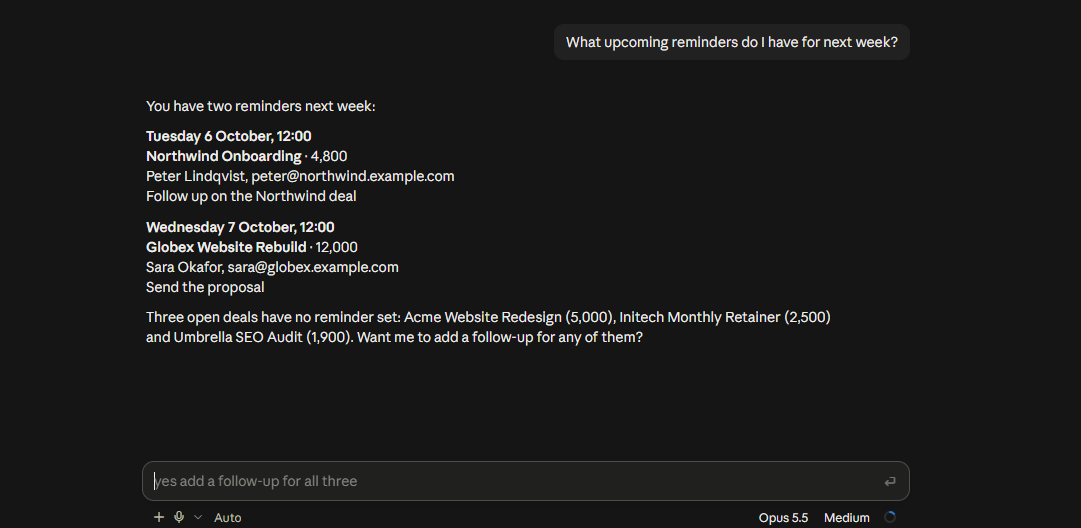
The useful line is the last one. Deals with no reminder are the ones nobody will think about until the buyer has signed with someone else.
2. Logging a call from rough notes
Paste your notes the moment the call ends, typos and all. A transcript from your notetaker works too.
“Log this call on the Bolt Coffee deal. Move it to Proposal if they asked for pricing, and set one reminder for the date they gave me. Notes: James wants a quote for 3 locations, budget approved in Q1, call back Tuesday after their board meeting.”
Claude finds the deal, writes the call as an activity, moves the stage and sets the reminder. Changes to an existing deal ask for your approval first, so you see each one before it lands.
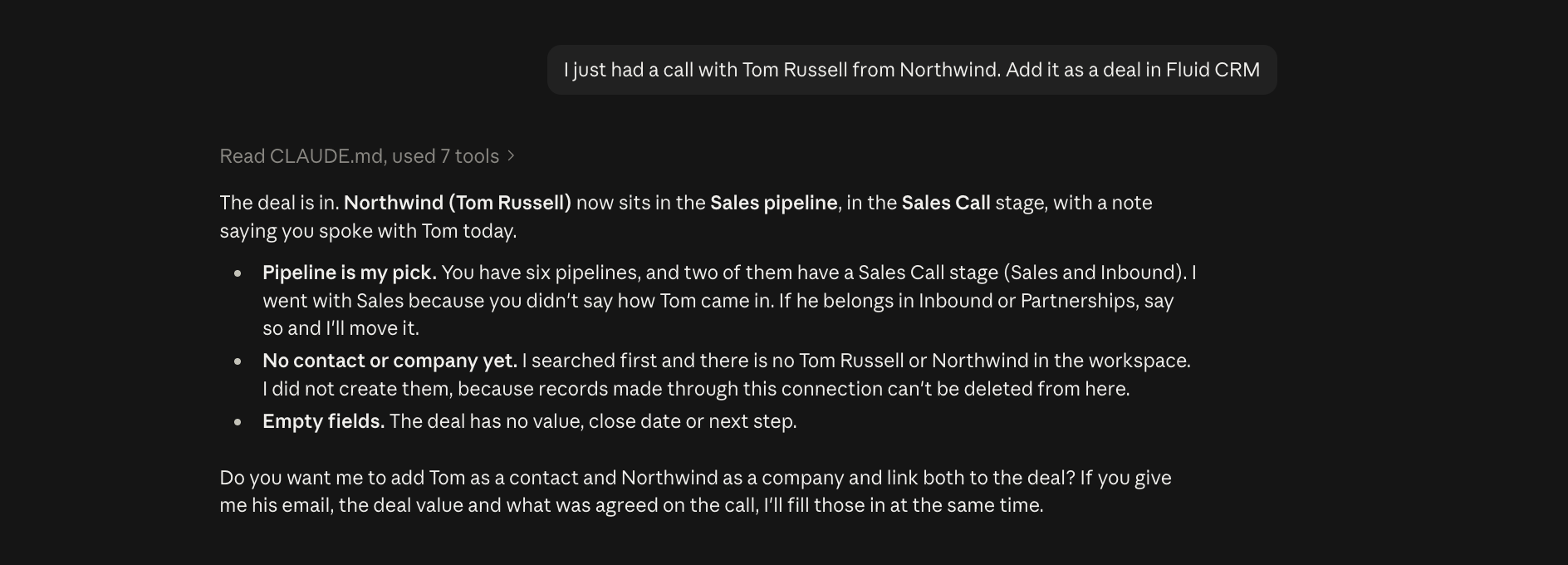
I tested this in a Claude Code session after a call. Claude added the deal, then stopped before creating the contact and company, because records made through the connection can’t be deleted from there. It asked for the email, the deal value and what was agreed, which is the question a good assistant should ask.
3. Prepping for a call in five minutes
Ten minutes before a meeting, ask for a brief instead of clicking through the deal.
“I have a call with James Ford from Bolt Coffee Roasters in 10 minutes. Read the deal, the contact and everything logged on it. Give me a five-line brief, what we promised last time and five questions that move this to a decision.”
Claude reads the deal value, stage, next action and every logged note, call and meeting. The brief tells you where the deal stands and what you said you would do, and the questions come from what is actually written on the deal.
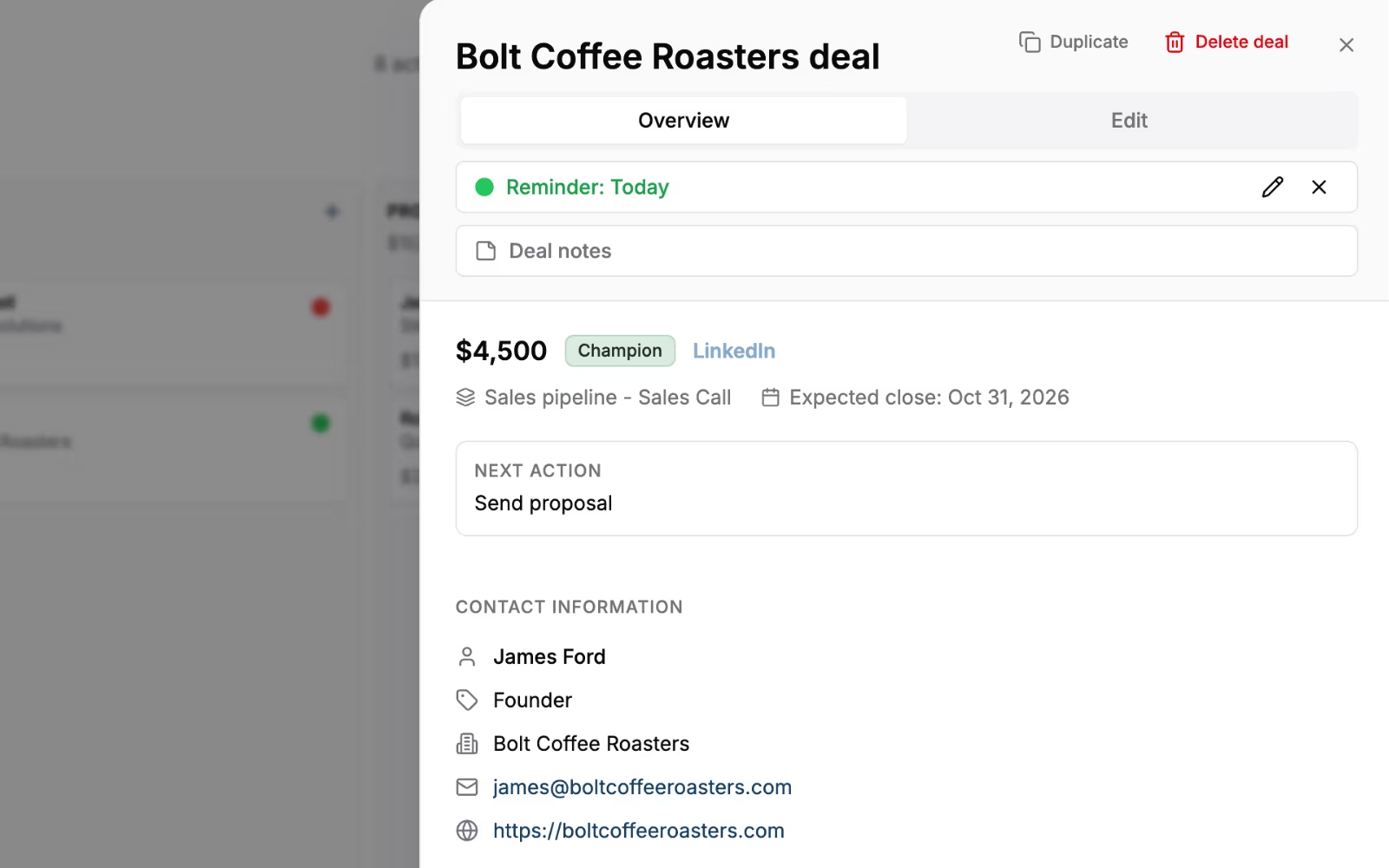
Claude also knows when a deal has nothing behind it. A brief that comes back with “no activity logged since the first call” tells you something before the meeting starts.
4. Drafting a follow-up from the deal history
The best follow-up repeats what the buyer said, in their words. Claude can do that when the words are on the deal.
“Draft a follow-up email to Lisa Park at Meridian Software. Use what was logged on her deal, keep it under 120 words, mention the two concerns she raised on the demo and suggest one specific time for the next call.”
Claude writes the draft in the chat and you paste it into your email. It doesn’t send anything to your contacts. Fluid CRM logs email by BCC, so Claude only sees the emails you BCC’d into the deal, plus your notes and calls.
If you want a starting structure for the email itself, our sales follow-up email templates cover seven moments in a deal.
5. Friday cleanup of stale deals
Open deals that nobody has touched for weeks make the pipeline look bigger than it is. Give Claude ten minutes on Friday afternoon to find them.
“List every open deal that hasn’t been updated in 14 days and has no reminder. For each one, suggest either a reminder with a date or a move to Lost, with one line of reasoning. Don’t change anything yet.”
Claude lists your open deals, compares the dates and comes back with a short table. You say yes or no deal by deal, then let it make the changes you approved. A deal whose buyer said “not yet” doesn’t need Lost either, it can go on a separate lead nurturing pipeline with a date to write again.
Marking a deal won or lost clears its reminders, so a deal moved to Lost by mistake also loses its follow-up date. Claude can’t delete records either, so anything that should go entirely ends up on a list for you to remove in the app.
6. Monday numbers for a team of two to five
A small team doesn’t need a dashboard meeting. It needs three numbers and a list of deals with no next step.
“Give me the pipeline value by stage, the deals marked won or lost in the last 7 days and every open deal with no reminder. Format it so I can paste it into Slack.”
Claude reads the pipeline summary and the deal list and returns a message you can post before the Monday call. The meeting then starts with the list, not with everyone opening the CRM at once.
A Weekly Claude Sales Routine: Which Prompt on Which Day
A Claude sales routine for a small team covers six prompts across the week, from Monday numbers to the Friday cleanup. It aims for roughly 15 minutes a day, and it is the routine I would hand a two-person team on day one.
| Day | Prompt | Aim for | What gets written to the CRM |
|---|---|---|---|
| Monday | Pipeline numbers by stage | 5 min | Nothing |
| Every morning | Due today, overdue and deals with no reminder | 3 min | Reminders you approve |
| After every call | Log the call from your notes | 2 min | Activity, stage, one reminder |
| Before every call | Five-line brief and questions | 5 min | Nothing |
| Same day as the call | Follow-up draft from the deal history | 3 min | Nothing, you send it |
| Friday | Stale deals with no update in 14 days | 10 min | Reminders or moves to Lost you approve |
When did you last log a call on the same day you had it? The routine above is the one I wish my Fenixtal clients had.
I booked 1,250+ sales calls for those clients, and many of them never tracked what happened to those leads afterwards. The call log in this table is the line that fixes that, and Claude does the typing.
What Claude Should Not Do in Your Sales Pipeline
Some guardrails are built in. Through Fluid CRM, Claude can’t delete deals, contacts or companies, can’t send emails or messages and can’t change your pipelines, stages or custom field setup.
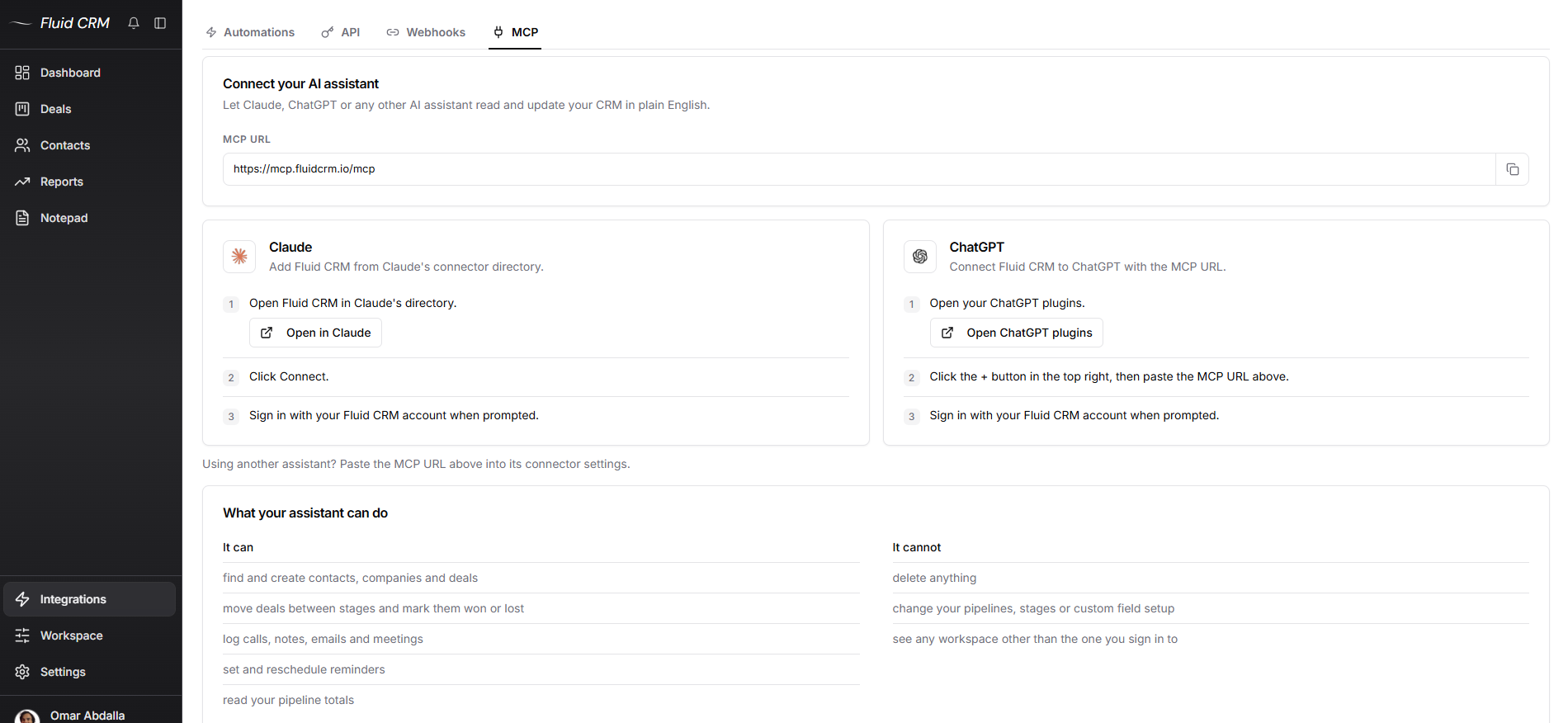
The rest is judgment, and these four jobs should stay with you.
Deciding which deals die
Claude can list stale deals and suggest a reason to close each one. It doesn’t know that the buyer who went quiet is on parental leave and asked you to call in March. You make the Lost call, every time.
Filling in numbers nobody gave it
If a call note doesn’t mention a value or a close date, Claude should leave the field empty and ask. Put this in your project instructions in plain words: “never guess a deal value, close date or stage”. A pipeline full of invented numbers is worse than one with gaps, because the forecast looks finished and isn’t.
Bulk changes on “Allow always”
Reading is safe to allow without asking. Moving 30 deals at once is not, because one misread instruction becomes 30 wrong records that you have to find and fix by hand.
Replacing the time you spend in the pipeline
Claude keeps the records current, and you still need to see the board. Nicolas Virtsonis, who leads a B2B marketing agency, described the problem most CRMs create on G2.
“The major problem with most CRMs is the complexity and time required to complete simple tasks as their extreme range of bloated features gets in the way of streamlined data entry and clean data.”
Claude takes over a good part of that data entry. The decisions about each deal still need a person looking at a clean pipeline.
Claude Cowork for Sales: Put the Pipeline Review on a Schedule
Claude Cowork is the mode where Claude takes on a multi-step task and works through it on its own. Anthropic includes it on the paid plans (Pro, Max, Team and Enterprise), and you start it by selecting Cowork in the Claude message box.
The feature that matters for sales is scheduled tasks. You save a task once, choose a cadence and Claude does it in the cloud, so your computer can be closed. Scheduled tasks can use the connectors and plugins you’ve set up, which includes Fluid CRM once it’s connected.
Anthropic also publishes a sales plugin for Cowork, with skills such as a daily briefing, call prep, pipeline review and a CRM hygiene check. Its listed CRMs are HubSpot, Close and Salesforce, so with Fluid CRM you write the task yourself. Here is one to save for weekday mornings at 8:30.
“Read my Fluid CRM pipeline. Write a short report with reminders due today, overdue reminders, open deals with no reminder and any deal that hasn’t been updated in 14 days. Suggest one next step for each deal on the list. Do not change any record.”
Cowork gives you three approval modes. Manual stops for every action, Auto keeps working without stopping while it reviews actions for safety and Skip doesn’t stop at all. Keep scheduled sales tasks on Manual, or write them as report-only like the one above, so nothing changes in your pipeline while you sleep.
Before you set it up, know that Fluid CRM already sends a daily digest email by default with your reminders at 9:00 in your own timezone, with no AI involved. Cowork is worth it for the parts that need judgment, such as which deals are slipping and what to say next.
A G2 reviewer in marketing and advertising put the value of seeing the next action this way.
“It solves a visibility issue by surfacing the best actions to take at the right time with minimal effort.”
Claude for Sales: Frequently Asked Questions
Put your pipeline stages with a one-line meaning for each, your timezone, what counts as a next step and the rules Claude must follow, such as never guessing a deal value. Add your offer and your common objections if you want better follow-up drafts. Keep it to one page so Claude follows all of it.
Keep the decisions. Deciding to drop a deal, setting a price and sending anything to a buyer should stay with you. Let Claude handle the looking up, the logging and the first draft.
A few minutes for most small teams. Claude reads your reminders and deals in one pass, and most of the time goes on reading its answer and approving any reminders it suggests.
No, and it doesn’t need to. Claude reads the pipeline fresh through the connection every time you ask, so the answer reflects what is in the CRM right now. A Claude Project keeps your instructions between chats.
Yes. Claude Code connects to the same MCP address as the Claude app with one command, and it can read and update your Fluid CRM pipeline the same way. It suits people who already work in a terminal, and the workflows in this post work there unchanged.
Start With One Claude Sales Workflow This Week
Pick one workflow and use it for five working days. The call log is the best first choice, because it fixes the step most teams skip, and the morning review is a close second.
If you want a pipeline Claude can read and update from day one, that is what we built Fluid CRM for. Our AI CRM page shows what the connection can and can’t do, and the plan is $16 per seat per month with every feature included.
Start your 7-day free trial here, no credit card required.