

Your AI agent can read your inbox, your calendar and your codebase, and it still can’t see a single deal. The fix is a CRM with a door for that agent, and the doors are not all the same size.
“CRM for AI agents” means a CRM with an agent built in, or an MCP CRM that lets your own agent work in it. This post covers the second. Fluid CRM, Attio, HubSpot and Close lead for small B2B teams, and they differ in which AI tools they name, what limits the agent and whether it can delete.
The picks by situation, if you’re short on time:
- Small B2B team that wants one plan and an agent that can’t delete: Fluid CRM
- Technical team that wants to shape its own data model: Attio
- Company that will add marketing tools later: HubSpot
- Team that wants to choose how much the agent may change: Close
- Sales team built around calls and meetings: Pipedrive
- Relationship-led selling with a coding agent in the mix: folk
- Solo seller who uses Perplexity, Grok or Mistral: OnePageCRM
- Deals that happen in LinkedIn and WhatsApp messages: Breakcold
What an MCP CRM Is (and the Two Meanings of “CRM for AI Agents”)
An MCP CRM is a CRM that publishes an MCP server. MCP stands for Model Context Protocol, an open standard that lets an AI tool use other software through a list of named actions, such as “list deals” or “create a reminder”.
“CRM for AI agents” gets used for two different products. The first is a CRM with an agent built into the app, one the vendor made and sells as part of the product. The second is a CRM with a door, so the agent you already use can come in and do the work.
Think of the built-in agent as an employee of the building, and the door as a contractor entrance. The employee only works there. The contractor you hired works across your email, your documents and your CRM in one job, and you can change contractors without moving offices. A third label you will see is AI-native, and I explain it in my post on what an AI-native CRM is.
This post is about the door. I work as a GTM engineer and I connect agents to CRMs most weeks, and the AI tool is the part of the stack I’ve swapped most often. Which would you still be using in a year, the assistant or the CRM?
MCP server vs API in a CRM
An API and an MCP server are close relatives. An API is for software you or a developer write, and an MCP server is for an agent that decides which action to call from a sentence you typed.
The API and webhook side has its own comparison in the best CRMs for GTM engineers.
Which AI Tools Work With Which MCP CRM
Two things have to line up before an agent can work in a CRM. The AI tool has to accept an outside MCP server, and the CRM has to publish one.
AI tools that can connect to an MCP CRM
Each of the 18 tools below accepts a remote MCP server by its address, according to the tool’s own documentation.
| AI tool | How you add a CRM | The catch |
|---|---|---|
| Claude (web and desktop) | Connectors, then pick from the directory or add a custom connector | Free accounts get one custom connector |
| ChatGPT | Turn on developer mode, then create an app with the address | Web only, and OpenAI’s own pages list different plans for it |
| Gemini app | Connected Apps, then add a custom app | US only, personal Google accounts, English |
| Perplexity | Connectors, then a custom remote connector | Listed under enterprise features, and an admin has to allow it |
| Mistral Le Chat | Connectors, then a custom MCP connector | Only an admin of the account can add one |
| Claude Code | One claude mcp add command | None stated |
| Codex | One codex mcp add command or a config file | One setup covers the CLI, the IDE and the app |
| Cursor | An mcp.json file | Company admins can restrict which servers are allowed |
| Windsurf | An mcp_config.json file | 100-tool limit, and enterprise accounts must switch it on |
| VS Code with GitHub Copilot | The “MCP: Add Server” command | On business plans the MCP policy is off by default |
| Gemini CLI | One gemini mcp add command or a settings file | None stated |
| Zed | AI settings, then add a remote server | None stated |
| n8n | The MCP Client Tool node in a workflow | You build the workflow around it |
| Microsoft Copilot Studio | Tools, then add a Model Context Protocol tool | Company data policies apply |
| Goose | Add a custom extension | None stated |
| Raycast | The “Install MCP Server” command | Pro plan only |
| Manus | Integrations, then custom MCP servers | Its page describes pasting a key, with no login screen |
| OpenClaw | One openclaw mcp add command | None stated |
The first five are chat assistants, the next seven are coding agents and the last six are automation and agent tools. If your tool is on this list, the remaining question is whether your CRM has an address to give it.
Which AI tools each MCP CRM names
“Named” means the CRM’s own help pages name that tool or give setup steps for it. “By address” means the vendor doesn’t mention the tool, so you paste the server address into the tool’s own add-a-server option.
| CRM | Claude | ChatGPT | Cursor | Codex | Gemini | n8n | Also named |
|---|---|---|---|---|---|---|---|
| Fluid CRM | Named | Named | Named | By address | By address | By address | A plain MCP address for anything else |
| Attio | Named | Named | Named | By address | By address | By address | |
| HubSpot | Named | Named | By address | By address | Named for some tools | By address | |
| Close | Named | Named | Named | By address | By address | Named | Claude Code, VS Code |
| Pipedrive | Named | Named | By address | By address | By address | By address | |
| folk | Named | Named | Named | Named | By address | By address | Claude Code, VS Code, Windsurf |
| OnePageCRM | Named | Named | By address | Named | By address | By address | Claude Code, Mistral, Grok, Perplexity |
| Breakcold | Named | Named | Named | Named | By address | By address | Claude Code, Windsurf, Goose, OpenClaw and nine more |
All eight publish a hosted address and let you log in through your browser, which is why “by address” works at all. I’ve connected Fluid CRM to Claude and ChatGPT myself, and I haven’t tested every pairing in this grid.
A named tool is the safer bet, because the vendor has tried it and written the steps down. Start with a named tool if you have the choice. If that tool is Claude, the best CRMs for Claude goes deeper on that one pairing.
What an AI Agent Can Do in Fluid CRM: All 21 Tools
Fluid CRM’s MCP server has 21 tools, listed below by the record each one works on. Eight of them read and thirteen create or update.
| Record | Read | Create and update | Add in bulk |
|---|---|---|---|
| Deals | deals_list | deals_create, deals_update | deals_bulk_create |
| Contacts | contacts_list | contacts_create, contacts_update | contacts_bulk_create |
| Companies | companies_list | companies_create, companies_update | companies_bulk_create |
| Activities | activities_list | activities_create, activities_update | |
| Reminders | reminders_list | reminders_create, reminders_update | |
| Pipeline and workspace | get_pipeline_summary, workspace_schema, workspaces_list |
There is no delete tool anywhere in that table. An agent in Fluid CRM can add and change records, and removing one stays a job for a person inside the app.
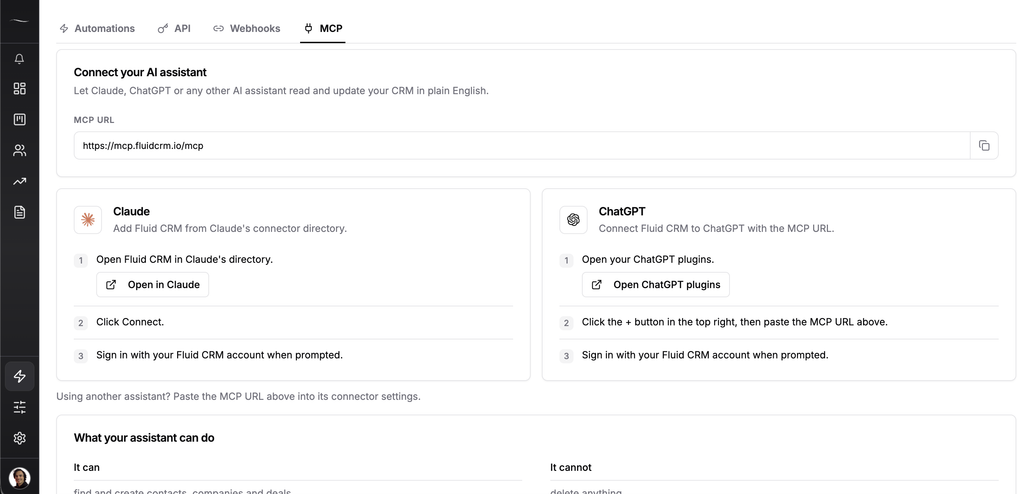
A single request usually chains several tools. These three are the ones I use most:
- “Which open deals have no reminder on them?” reads your deals and your reminders and compares the two.
- “Here are 40 companies from a trade fair. Put them in the Events pipeline as new deals” checks your stages, then adds companies, contacts and deals in bulk.
- “I just got off a call with Ines at Northwind. Note that she wants the proposal by Friday and remind me Thursday morning” finds the deal, logs the activity and creates the reminder.
The agent logs in as you, so it sees the workspaces you can see and nothing more. The only limit on it is the same rate limit the Fluid CRM API has, 300 reads and 60 writes a minute.
At Fenixtal we booked 1,250+ sales calls for 50+ clients, and I saw what happened after the handover. The booked call often reached the client’s CRM days later, typed in from memory, and by then nobody could say what had been promised on it.
That typing is the part an agent takes over. The other half is still a person opening the pipeline and deciding what happens next, and Peter Duffy, who works in a small B2B team, described that half.
“Fluid focuses on the features a small B2B team actually needs, without burying them beneath endless menus, settings and unnecessary complexity.”
The 8 Best MCP CRMs for AI Agents in 2026
The eight CRMs below are ordered for a small B2B team bringing its own agent. I ranked on three things, which are the AI tools the vendor names, what limits the agent and whether the agent can delete.
| CRM | Login | Read and write | What limits the agent | Can it delete? | Cheapest plan with the server |
|---|---|---|---|---|---|
| Fluid CRM | Your own login | Both | 300 reads and 60 writes a minute | No | $16/seat/month or $144/seat/year |
| Attio | Your own login | Both | 100 reads and 25 writes a second, and writes ask you first | Only tasks and comments | Free, up to 3 seats |
| HubSpot | Your own login | Both | 10 records per create or update | No | Free, up to 2 users |
| Close | Your own login or an API key | Both, by permission level | The permission level you grant | Yes, at the destructive level | Not stated. Solo is $19/month or $9 billed annually |
| Pipedrive | Your own login | Both | Usage tokens that depend on your plan | No | Lite, $14/seat/month billed annually |
| folk | Your own login | Both | None stated | No | Standard, $30/seat/month |
| OnePageCRM | Your own login | Read, with writing optional | Six tools | No | Professional, $15/user/month or $9.95 billed annually |
| Breakcold | Your own login or an API key | Both | Calls use tokens from a monthly allowance | Archives records, which can be restored | $99/month with one seat |
1. Fluid CRM (best for small teams that want an agent that can’t delete)
Fluid CRM gives the agent 21 tools on its one plan, and the server is there from the first day of the trial. We built it without an AI agent inside the app, so the pipeline stays calm for the people who open it and the agent works from outside.
Best for: Solo founders, agencies and B2B teams of 1 to 10 whose agent should add and update records and never remove one.
Not for: Teams that want an agent living inside the CRM, working without being asked. Fluid CRM is not the tool for it.
Email is logged by BCC, so the agent can’t read your inbox threads through Fluid CRM. Connect your email to the same assistant and it can work across both.
Real pricing math: $16/seat/month, or $144/seat/year, with every feature included.
2. Attio (best for a data model you shape yourself)
Attio names Claude, ChatGPT and Cursor, and its server reaches further than most. An agent can search emails, meetings and call recordings as well as people, companies and deals.
Reads go straight through and writes ask you to confirm first. The only things an agent can delete are tasks and comments. I went through the full tool list in Attio MCP.
Best for: Agents that need to search past emails and call recordings before they write anything.
Not for: Hands-off bulk work, because every write waits for your confirmation.
Real pricing math: Free for up to 3 seats with the server included. Plus is $44/seat/month or $35 billed annually, and I broke the tiers down in Attio pricing.
3. HubSpot (best if marketing comes later)
HubSpot puts its server on every product and plan, including the free CRM. Its help pages cover Claude and ChatGPT, and the tool list reaches past the CRM into campaigns and marketing emails.
The limit to know is the write size. An agent can create or update 10 records at a time, so a pasted list of 200 leads becomes twenty rounds. That limit and three others are in HubSpot MCP server.
Best for: An agent that should see marketing and sales records in the same request.
Not for: Bulk jobs through an agent, because of the 10-record ceiling.
Real pricing math: The free CRM covers up to 2 users. Read HubSpot alternatives for small business before you grow into the paid tiers.
4. Close (best for choosing what the agent may change)
Close names more tools than most, with Claude, ChatGPT, Claude Code, Cursor, VS Code and n8n all in its docs. It also offers an API key next to the browser login, which is what an unattended n8n workflow needs.
You pick one of three permission levels when you connect. The first is read only, the second adds safe writes and the third allows deletes.
Best for: Teams that want to start an agent on read access and widen it later, or need an API key for n8n.
Not for: A team hoping to share the cheapest plan, because Solo covers one user only.
Real pricing math: Solo costs $19/month, or $9 on annual billing. Essentials is $49/seat/month or $35 billed annually, and Close doesn’t state which plans include the server.
5. Pipedrive (best for teams built around activities)
Pipedrive has an official server on every plan, with tools for deals, people, organizations, leads, activities, products and notes. Its help pages cover Claude and ChatGPT and say any assistant with custom MCP connections can use it.
None of the tools Pipedrive lists removes a record. Usage is metered in tokens that depend on your plan, with more sold separately, and Pipedrive gives no numbers for the MCP server. I cover the tools, limits and token costs in my post on the Pipedrive MCP connector.
Best for: An agent whose main job is logging activities and notes against deals.
Not for: Anyone who wants to size a big agent job before starting it.
Real pricing math: The server starts on Lite, at $14/seat/month on annual billing. If the token meter puts you off, I compared the other options in Pipedrive alternatives.
6. folk (best for relationship-led selling with a coding agent)
folk names seven tools, and five of them are coding tools. Claude Code, Cursor, VS Code, Windsurf and Codex all get setup steps, next to Claude and ChatGPT.
The agent can’t delete a record. The closest it gets is removing a contact from a group.
Best for: Founders and partnership people who sell through relationships and already work in a coding agent.
Not for: Teams that need deals on the entry plan.
Real pricing math: The server is on Standard at $30/seat/month. The deals object sits on Premium, at $60/month or $48 billed annually.
7. OnePageCRM (best for solo sellers on Perplexity, Grok or Mistral)
OnePageCRM names the widest spread of chat assistants here. ChatGPT, Claude, Mistral, Grok, Perplexity and Codex are all in its docs.
The server is small on purpose, with six tools. Writing is a permission you switch on, and OnePageCRM states that the AI cannot delete data.
Best for: A solo seller who wants a strict next-action habit and uses an assistant other than Claude or ChatGPT.
Not for: Agents that need many specific actions. Six tools cover the basics and little more.
Real pricing math: The Professional plan costs $15/user/month, or $9.95 on annual billing, and it comes with a single pipeline.
8. Breakcold (best when deals happen in LinkedIn and WhatsApp)
Breakcold names 17 tools, the longest list of any CRM here, and offers an API key next to the browser login. Its server also hands the agent your LinkedIn, WhatsApp and Telegram conversations, and Breakcold says no other sales CRM syncs all of those.
Records can be archived by the agent and restored later. Breakcold also has its own agents inside the app, so you get a built-in agent and a door.
Best for: Teams whose pipeline lives in social messages. Breakcold says it is built for 5 to 30 people.
Not for: Teams that want a quiet app with no agent acting inside it.
Real pricing math: $99/month with one seat included, and extra seats are $10 each.
MCP CRMs left off this list and why
Eight more CRMs publish a server and didn’t make the list for a small team bringing its own agent.
- Salesforce: needs Enterprise Edition and an admin to set up the connection. The full server can delete, and a separate no-delete server exists.
- monday CRM: names nine tools, including Gemini CLI and Perplexity. One of its tools can send any change to your account, so there is no firm no-delete line.
- Zoho CRM: names Cursor, Claude Desktop, VS Code and Windsurf. The agent can delete records, and its calls use up your API credits. How to keep delete off is in Zoho MCP.
- Clarify: names Claude, Claude Code, ChatGPT and Codex, and has six delete tools.
- Affinity: the server starts on the Scale plan. It can delete after you confirm.
- NetHunt CRM: works with Claude, ChatGPT and Grok only.
- Streak: names five tools, and its own pages disagree on which plans include the server.
- Capsule: in private beta, by request.
Two more have nothing for an agent to connect to yet. Copper says its server is on the way and Less Annoying CRM has no official one.
How To Test an MCP CRM Before You Commit
A trial account and the AI tool you already use are enough to test any CRM on this list. Four requests tell you most of what the vendor’s page won’t.
1. Ask a question that only reads
Start with “How many open deals do I have in each stage?” You’re checking that the numbers match what you see in the app, stage by stage.
2. Create one record called “MCP test”
Ask the agent to add a deal named “MCP test” with a value and a reminder for tomorrow. Open the CRM and check it landed in the right stage with the reminder attached.
3. Paste a list of 30 leads
Thirty rows show you the limits. You’ll see whether the agent adds them in one go, works through them ten at a time or stops to ask for more usage.
4. Ask it to delete the test record
Ask the agent to delete “MCP test” and nothing else. If it can, you now know a wrong sentence could remove real records, and you can decide who on the team gets to connect.
MCP CRM: Frequently Asked Questions
An MCP CRM is a CRM that publishes an MCP server, so an AI tool can read and update your records through a set of named actions. You connect once, log in and then ask for things in plain language.
Fluid CRM, Attio, HubSpot, Close, Pipedrive, folk, OnePageCRM and Breakcold all have an official hosted server. So do Salesforce, monday CRM, Zoho CRM, Clarify, Affinity, NetHunt CRM and Streak. Capsule’s is in private beta.
Yes. Codex, Cursor, Gemini CLI and the Gemini app all accept a remote MCP server by its address. folk, OnePageCRM and Breakcold name Codex in their docs, and Fluid CRM, Attio, Close, folk and Breakcold name Cursor.
Yes. Fluid CRM has setup steps for Claude, ChatGPT and Cursor inside the app, under Integrations and then MCP. Any other AI tool that supports MCP connects through the plain MCP address on the same screen.
Only for work that has to happen without you asking. An agent on an MCP server acts when you type a request, while n8n or Zapier act on a trigger, such as a new reply or a stage change.
It depends on where your work happens. A built-in agent only knows the CRM, while your own agent can read your email, your calendar and your documents in the same request. Your own agent can also be replaced without moving your data.
Which MCP CRM Should You Pick
Two checks settle most of this choice. Look for your AI tool in the grid above, then ask the agent to delete a test record and see what happens.
Fluid CRM is my pick for a small B2B team that wants the answer to that second check to be no. Attio and HubSpot cost nothing to start, Close lets you set how far the agent can go and Breakcold fits selling through social messages.
Start your 7-day free trial here, no credit card required.