

You keep seeing “MCP server” in product updates, and every page that explains it seems to be written for people who code. You don’t want to build one, you want to know what it is and whether it is any use to you.
An MCP server is a small piece of software that lets an AI assistant, such as Claude or ChatGPT, use another app for you. It gives the assistant a fixed list of actions it may take in that app, like “find a contact” or “add a task”. The assistant can do those things and nothing else.
What An MCP Server Is, In Plain Words
The letters are short for Model Context Protocol. A protocol is an agreed way for two pieces of software to talk to each other.
An AI assistant is smart, but it can’t see your inbox, your calendar or your customer list. An MCP server is what lets it reach one of those apps.
Here is the best way I know to picture it. The server hands the assistant a menu. Every item on the menu is one action, and the assistant can only order what is printed there.
A server can share two other things as well. One is information for the assistant to read, and the other is ready-made instructions for common jobs. The actions are the part you will notice most.
There are three parts, and you only ever talk to the first one.
| Part | What it is | Example |
|---|---|---|
| The assistant | The AI you type to | Claude or ChatGPT |
| The MCP server | The menu of allowed actions for one app | The server for your CRM |
| The app | Where your real data lives | Your CRM, the app where a team keeps its customers and deals |
Anthropic, the company behind Claude, published MCP in November 2024. It now sits with a foundation that several big tech companies support, so no single company owns it.
What An MCP Server Does, Shown With Fluid CRM
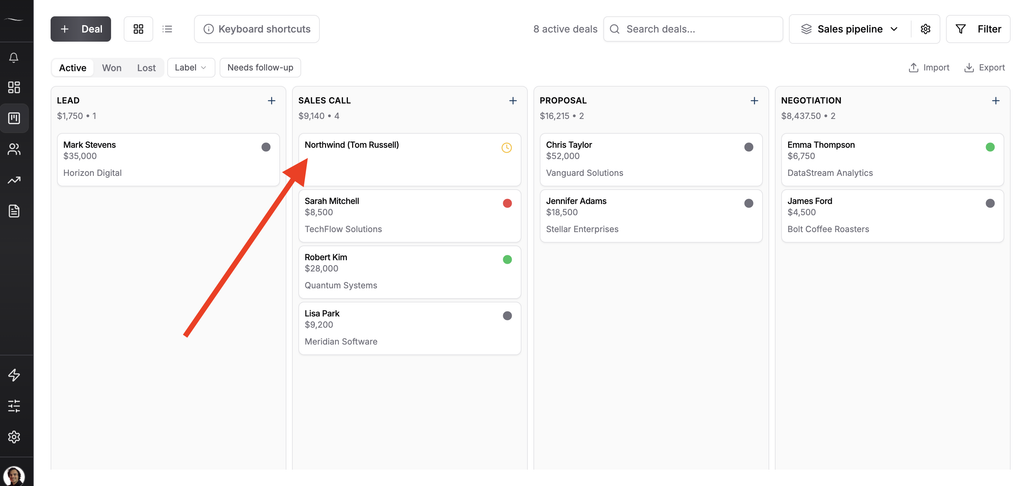
We built Fluid CRM, a simple CRM for small teams that sell to other businesses, and we built an MCP server for it. It shows your deals as cards on a board, and each column is a stage a deal moves through. So I’ll use ours to show what one really does.
The Fluid CRM server has 21 actions on its menu. Developers call these tools. 8 of them can read your data and 13 can create or change it for you.
You never see the tools. You type a normal sentence, and the assistant picks the right one.
| What you type to Claude | What the server lets Claude do | What happens in Fluid CRM |
|---|---|---|
| “Which reminders are due this week?” | Read your reminders | Nothing changes. You get a list |
| “How is my pipeline doing?” | Read a summary of your deals | Nothing changes. You get the numbers |
| “Add Tom Russell from Northwind as a contact” | Create a contact | A new contact appears |
| “Move the Northwind deal to Negotiation” | Update a deal | The card moves to the new stage |
| “Add these 12 companies from my list” | Create companies in bulk | Twelve new companies appear |
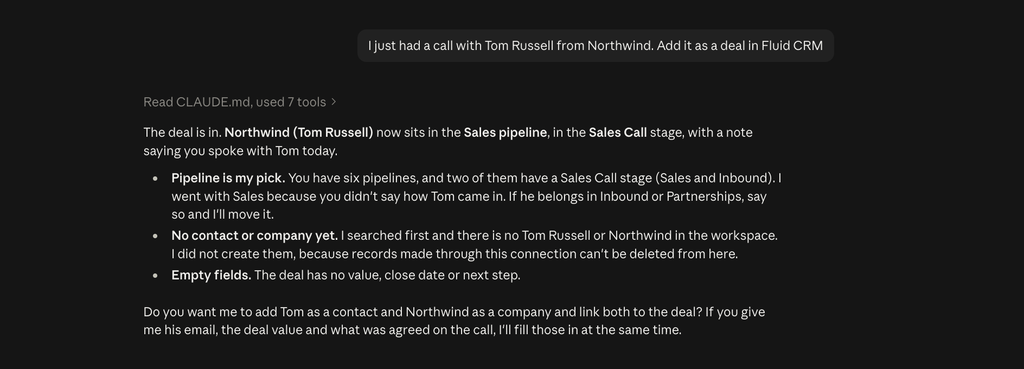
There is no delete on that menu. We left it out on purpose, so Claude can add to your pipeline and change it, and it can never wipe a deal.
The people who build the server decide what goes on the menu, and that choice decides how much can go wrong.
MCP Server vs API: What Is The Difference
You may have heard that apps already talk to each other through something called an API. They do, and an MCP server usually sits on top of one.
The difference is who it is made for. An API is made for a developer, who writes code that says exactly what to do, step by step. An MCP server is made for an AI assistant, which reads the menu and works out the steps from your sentence.
| API | MCP server | |
|---|---|---|
| Who uses it | A developer writing code | An AI assistant |
| Who decides the steps | The developer, in advance | The assistant, from what you ask |
| What you need | Coding skills | A sentence |
Back to the menu. With an API, a developer has to write down the whole order in advance, dish by dish. With an MCP server, you say what you feel like and the assistant picks from the menu for you.
Fluid CRM has both. Developers use the API to connect it to other tools, and everyone else can use the MCP server from a chat window.
How To Use An MCP Server Without Writing Code
You don’t install anything, and you don’t build anything. You switch on a server that the app’s maker has already built.
In Claude these are called connectors. You open the connector list, search for the app and sign in to it. Fluid CRM also has its own setup page under Integrations, then MCP, which walks you through it. What the assistant can do once it is connected is on our AI CRM page. I compare the connectors worth adding for sales in my post on the best Claude connectors for sales teams.
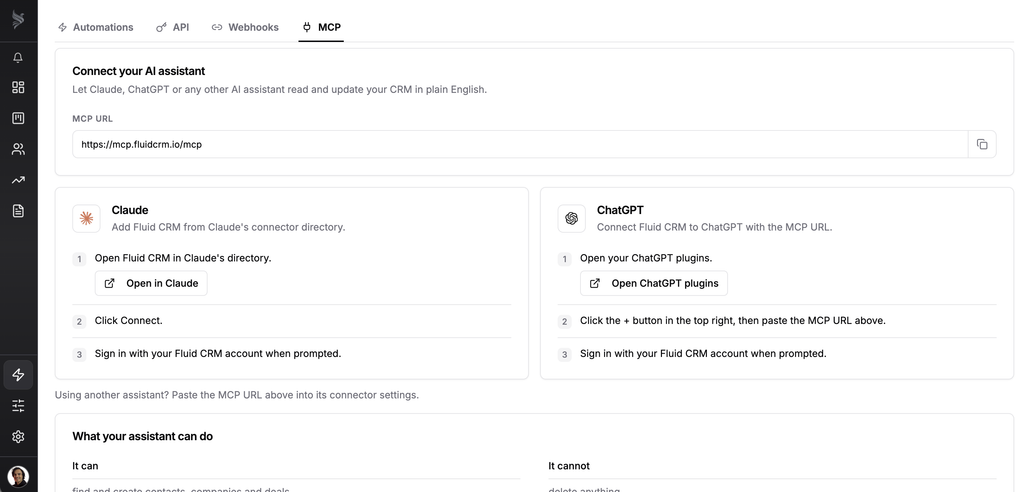
ChatGPT supports MCP as well and calls them apps. The step-by-step version, with screenshots, is in my guide to the best CRMs for Claude.
Make your first request one that only looks things up, such as “How many open deals do I have?” Once the answers look right, let it make a small change. Does the thought of an assistant typing into your CRM make you a little nervous?
Not Every MCP Server Is Built The Same
Each company writes its own list of allowed actions, so two MCP servers can behave very differently. I read three of them line by line this month.
- Attio’s MCP server asks you to confirm before every change
- HubSpot’s MCP server can’t delete and changes ten records at a time
- Zoho CRM comes with four separate servers, and one of them only reads
For the wider field, I compared eight CRMs on this in the best MCP CRMs for AI agents. I also went through the Pipedrive MCP connector and its token limits in a separate post.
Before you switch one on, check two things.
Who made the server
Use the one built by the company that makes the app. Anyone can publish an MCP server for a popular tool, and a copy made by a stranger gets the same access to your data.
Whose permissions it uses
A good server signs in as you. It can see what you can see and no more. With Fluid CRM, each person on the team connects their own account, so nobody’s access is shared with anyone else.
A third check is worth a minute too. Look for the word “delete” in the list of actions. If it is there, decide who on your team should have it.
MCP Server FAQ
Yes, but not one you own. The MCP servers in this post all live on the app maker’s own computers. You reach them by signing in, the same way you reach the app itself.
ChatGPT supports MCP and calls the connections apps. Many business tools have a ready-made app in ChatGPT’s list. Adding one by its web address needs a setting called developer mode, which is on paid ChatGPT plans.
You only need to sign in. Building a server takes a developer, and using one takes a sentence. If the app you use has a ready-made connector, the whole setup is a search and a login.
MCP itself is free and open. Whether a given server costs anything is up to the app’s maker. Fluid CRM includes its server in its one plan, at $16/seat/month.
Do You Need An MCP Server
You don’t need to build one, and you don’t need to understand how it works inside. You need to know whether the apps you already pay for have one, and which actions it allows.
For a sales team, the gain is simple. Nobody enjoys updating the CRM after a long day of calls, and an assistant that does it for you keeps your deals up to date. You still open the board and decide what happens next.
That is the idea behind Fluid CRM. We kept the board quiet enough that you want to open it, and we let your assistant handle the data entry.
Start your 7-day free trial here, no credit card required.