

You found a CRM with a free license, a clean interface and tens of thousands of GitHub stars. So the price looks like zero. Then somebody on your team has to keep a server alive, and that somebody is usually you.
Twenty CRM is a strong open source CRM that is free to self-host, plus the cost of a server, or $9 per user a month on Twenty Cloud, billed yearly. Self-hosting pays off when someone on your team can look after a server. Without that person, pick Twenty Cloud.
What Twenty CRM Is and What It Does Well
Twenty CRM is an open source CRM built around a data model you shape yourself. You add your own objects and fields, then look at the records as a table, a kanban board or a calendar. The project ships new releases often, so it is very much alive.
The code is mostly under the AGPLv3 license, and a smaller set of files sits under a commercial license that needs a paid subscription. You can host it on your own server or pay Twenty to host it for you. If you are weighing it against Attio, our list of Attio alternatives covers that side.
Twenty CRM pros
- Custom objects, fields and views with no limit on any plan, including the free self-hosted one.
- Email and calendar sync with Google and Microsoft accounts, so messages and events sit next to the people they belong to.
- Workflows and AI agents built in, plus a REST and GraphQL API, webhooks and an MCP server for AI assistants.
- No seat limit and no record limit on any plan.
- You can read the code, change it and keep the data on your own server.
Twenty CRM cons
- Self-hosting is a job. The server, the backups and the upgrades are yours, and the section on upkeep below lists each one.
- The free self-hosted plan has community support only, with no email or chat support from the Twenty team.
- SSO, row-level permissions and audit logs cost $19 per user a month, on the cloud and on your own server.
- Cloud Pro has caps, at 50 workflow credits a year and 50 API calls a minute.
Twenty CRM Pricing: Cloud, Self-Hosted and Enterprise
Twenty CRM has three plans, and each one can be bought hosted or self-hosted. The prices below are per user a month on yearly billing, which is 25% cheaper than paying monthly. Twenty Cloud comes with a 30-day free trial and no credit card.
| Plan | Twenty Cloud | Self-hosted | What it adds |
|---|---|---|---|
| Pro | $9 per user a month | $0 | Full customization, workflows, AI agents, API, webhooks and MCP |
| Organization | $19 per user a month | $19 per user a month | SSO, row-level permissions, audit logs, priority or Twenty team support |
| Enterprise | From $50,000 a year | From $50,000 a year | SCIM, dedicated support with an SLA, air-gapped setups when self-hosted |
Cloud Pro includes standard support, 50 workflow credits a year and 50 API calls a minute. Cloud Organization doubles the API limit to 100 calls a minute and adds a custom domain.
The row that matters for a small team is the $0 one. Self-hosted Pro gives you the whole product for up to 5 workspaces, and it is also the row where the work moves from Twenty’s team to yours.
What Self-Hosting Twenty CRM Asks of You
Self-hosting Twenty CRM is worth it for a small team when one person already looks after servers and has time for one more. It is not worth it when the CRM would be that person’s first server. Twenty’s own documentation is clear about what you take on when you self-host, and the table lists it.
| What you need | What Twenty’s docs ask for |
|---|---|
| Server | At least 2GB of RAM, with Docker and Docker Compose |
| Services | App server, background worker, PostgreSQL and Redis |
| Encryption key | Generated at setup and kept secret |
| HTTPS | A domain, a certificate and a reverse proxy |
| Backups | Database dumps kept off the server, with regular test restores |
| Upgrades | Back up first, change the version tag, restart |
| Email and calendar sync | A Google Cloud project or an Azure app with login credentials |
None of it is hard for a developer, and all of it is somebody’s job.
The server and four services
Twenty needs a server with at least 2GB of RAM, and the guide warns that less memory can crash it. The standard Docker Compose install starts four services, which are the app server, a background worker, a PostgreSQL database and Redis.
The encryption key and backups
During setup you generate an encryption key and store it somewhere safe. The docs say that losing it means losing access to every secret stored in the database. Backups are also yours, done with a database dump, kept off the server and tested by restoring them now and then.
Upgrades
The docs tell you to back up the database before every upgrade. The upgrade itself is a version tag you change in a settings file followed by a restart, and the database updates on startup. With releases landing several times a month, someone has to decide how often to do it.
Email and calendar sync setup
On Twenty Cloud you connect a mailbox from the settings with a Google or Microsoft login. On your own server, Gmail and Google Calendar need a Google Cloud project with three APIs switched on, a set of login credentials, six settings and a set of background jobs.
HTTPS and who fixes it when it breaks
The docs say HTTPS is required for some browser features, so you also set up a domain, a certificate and a reverse proxy in front of the app. That leaves one question the docs cannot answer for you. Who on your team restores the database if it breaks on a Tuesday morning while you are on a sales call?
Self-Host, Twenty Cloud or a Simpler CRM: 3 Routes for 1 to 10 People
A team of 1 to 10 has three honest routes here. You can host Twenty yourself, pay Twenty to host it or pick a simpler CRM that someone else looks after, such as Fluid CRM. The table shows what each one costs for 5 people over a year.
| Self-hosted Twenty | Twenty Cloud Pro | Fluid CRM | |
|---|---|---|---|
| Cost for 5 seats, one year | About $173 to $187 for the server | $540 on yearly billing, which works out to $45 a month | $720 on annual billing, which works out to $60 a month |
| Best for | A team with an engineer | A team that wants Twenty and no server | A team that wants a sales pipeline and nothing to build |
| Who looks after it | You | Twenty | Fluid CRM |
| Sync, after you set it up | Sync | Logged by BCC, no two-way sync | |
| Data model | Anything you build | Anything you build | Deals, contacts and companies with custom fields |
| Where the data sits | Your server | Twenty’s cloud | Fluid CRM’s cloud |
The self-hosted figure uses one example, a server with 2GB of RAM, Twenty’s stated minimum, from a large cloud host at $12 a month. That is $144 a year, or $173 with weekly backups and $187 with daily ones. The time spent on the chores above is not in that number.
Read the table plainly and Twenty Cloud is the default for anyone who wants Twenty without a server. It costs less than Fluid CRM, it removes the upkeep and it syncs email.
Fluid CRM costs the most of the three in cash. What you get for the money is less to set up in the first place.
Who Should Self-Host Twenty CRM
Self-hosting Twenty CRM makes sense for a small team if at least one of these is true.
- You have an engineer on the team who already looks after servers and would add this one to the list without noticing.
- Your customer data has to stay on your own infrastructure, because of a contract or a data residency rule.
- You want to extend the product in code, with your own apps and logic on top of the data model.
- You have a lot of seats. The server costs the same for 5 people or 50, so the saving against any per-seat plan grows with the team.
If that sounds like you, self-hosted Twenty is one of the best deals in software and you should take it. It is also a better starting point than the homemade setups we have written about, like building your own CRM with Claude Code, an Airtable CRM or Notion as a CRM.
Who Should Skip Self-Hosting Twenty CRM
Skip self-hosting if nobody on the team wants the server, and in that case Twenty Cloud is the first thing to try. Skip Twenty altogether if you do not want to design a data model either. Twenty’s strength is that you can build anything, and a team of three that only needs deals, next steps and reminders may not want to build.
Fenixtal, my outbound agency, booked 1,250+ sales calls for small B2B companies, and almost none of those clients had a CRM they liked. They were either in a spreadsheet that got messy fast or paying for a big CRM that nobody opened. The tool was the problem both times, because looking after it had turned into a second job.
Kon T., a CEO who uses Fluid CRM across several small projects, wrote in a review that “I need visibility and structure, but do not want to spend time configuring or maintaining a complex system.” Kon T. has not used Twenty and is talking about larger CRMs in general.
That is the reader we built Fluid CRM for. It is a sales pipeline with deals, contacts, reminders, 8 in-app automations, lead capture forms and an API, and all of it is switched on when you sign up. See how it connects as a CRM that works with Claude and ChatGPT.
A verified customer who judges tools by their API wrote, after their first hours of testing, that it is a “CRM that’s no BS, no bloat, works right out of the box”. Twenty has an API and an MCP server as well, so that line is about setup and nothing else.
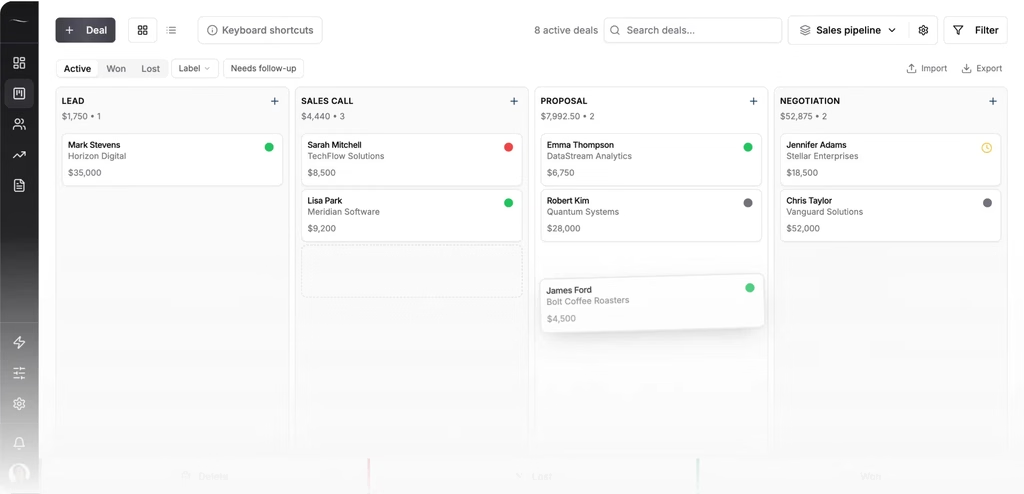
Fluid CRM has real limits next to Twenty. It is closed source and cannot be self-hosted, it has unlimited custom fields but no custom objects and it logs email by BCC with no two-way email sync. There is no dialer and no marketing automation, and it fits teams under 20 people best.
Kon T. names another one in the same review, saying “some parts of the interface still require more clicks and navigation than they should”, and adds that “these feel like normal gaps in a young product rather than fundamental problems, and the product is improving quickly.”
Fluid CRM costs $16 per seat a month or $144 per seat a year.
FAQ
The self-hosted Pro plan costs $0 and includes the full product for up to 5 workspaces. You still pay for a server, and you do the setup, backups and upgrades yourself. SSO, row-level permissions and audit logs cost $19 per user a month even on your own server.
Yes. Most of the code is under the AGPLv3 license and is public on GitHub. Some files are under a commercial license that needs a paid Twenty subscription.
Twenty Cloud Pro is $9 per user a month and Organization is $19 per user a month, both billed yearly. Enterprise starts at $50,000 a year. There is a 30-day free trial with no credit card.
You need a server with at least 2GB of RAM, Docker and a domain with HTTPS. The install starts an app server, a worker, a PostgreSQL database and Redis. You also keep an encryption key safe, take your own backups and set up a Google Cloud or Azure project if you want email sync.
It is worth it when someone on the team already looks after servers, or when the data has to stay on your own infrastructure. For 5 people, self-hosted Twenty costs about $173 to $187 a year for a small server against $540 a year on Twenty Cloud Pro, which works out to $45 a month. If nobody wants the server, Twenty Cloud is the better deal.
Which Twenty CRM Route to Pick
Self-host Twenty CRM if you have an engineer, a reason to keep the data on your own server or a model you want to extend. Pick Twenty Cloud if you want Twenty and nobody on the team wants a server. Pick a simpler CRM like Fluid CRM if you want a sales pipeline that works the day you sign up and nothing to build first.
Start your 7-day free trial here, no credit card required.