

Keap sells a CRM, email marketing, automation, texting, invoices and booking as one bundle, plus a setup package you have to buy. Plenty of owners use only part of it, and the right replacement depends on which part. We built Fluid CRM for owners who mostly track contacts and deals.
The best Keap alternative depends on the part of Keap you use. Pick ActiveCampaign or Brevo if you send automated email campaigns, Ontraport or HubSpot if you want payments, pages and email in one login, and Fluid CRM or Pipedrive if you mostly track contacts and deals.
What Keap Charges For, and What You Actually Use
Keap starts at $299 a month billed monthly, or $2,988 a year billed annually. That price includes 2 users and 1,500 contacts. Each extra user is $39 a month, and the price climbs in tiers as your contact list grows.
On top of the subscription, Keap requires a one-time implementation package. Its implementation page lists the package at $1,500, marked down to $500. If you sign the annual contract and cancel early, there is a $299 early termination fee.
So a 2-person business on annual billing pays $3,488 in year one with the $500 package, or $4,488 at the $1,500 list price. On monthly billing it is $4,088 with the $500 package. A third user adds $468 a year.
That money buys a lot. Keap’s plan covers contact management, email broadcasts, automation, landing pages and forms, a sales pipeline, appointment booking, text marketing, invoices and quotes. Text marketing works in the U.S. only.
One question decides your list. Open Keap’s automations and count the campaigns that sent an email you wrote in the last 90 days.
If the number is high, you use the bundle. If it is close to zero, you are paying for an email platform to hold a contact list.
Every tool below charges for something different, and that matters more than the starting price.
| Tool | What you pay for | Year one, 2 users |
|---|---|---|
| Keap | Users, contacts and a required implementation package | $3,488 annual, $4,088 monthly |
| ActiveCampaign | Contacts, with user seats set by plan | $948 on Pro, before the Pipelines add-on |
| Brevo | Emails sent, with one user until Professional | $5,388 on Professional, the first plan with multi-user access |
| Ontraport | Plan, contacts and $49 a month per extra user | About $1,578 on Plus, annual |
| HubSpot | Seats and marketing contacts | $480 on Marketing Hub Starter, billed monthly |
| Pipedrive | Seats, plus add-ons for email campaigns | $936 on Growth, annual |
| Fluid CRM | Seats only, every feature included | $288 annual, $384 monthly |
Keap now belongs to Thryv, which announced the acquisition of Keap in a deal valued at $80 million. Keap’s help articles now live on Thryv’s support site, so the export steps further down link there.
When You Should Stay on Keap
Staying on Keap is the right call for plenty of businesses. The bundle is the point of the product, and if you use the bundle, moving it to three cheaper tools costs you more time than it saves money.
Stay if any of these describes you:
- Automated campaigns bring in paying clients every month, and you would have to rebuild them somewhere else.
- You send invoices and take payments from Keap, so your sales and your billing share one contact record.
- Your implementation is done and your automations are built, so the hard part is already paid for.
- Text messages to U.S. customers are part of how you follow up.
Timing matters too. If you are on the annual contract, switch at renewal and skip the $299 early termination fee.
6 Keap Alternatives, Sorted by the Part You Use
The six tools fall into three pairs. The first pair replaces Keap’s email marketing, the second replaces the all-in-one bundle and the third replaces the contact list and pipeline.
1. ActiveCampaign (best if email automation is the part you use)
ActiveCampaign is the closest match to Keap’s automation builder. If your Keap value is the workflow that sends the right email after a form fill, a purchase or a tag, ActiveCampaign does that job and goes deeper on it.
Best for: Businesses whose revenue depends on email sequences.
Not for: Anyone who wants the sales pipeline included. Pipelines are part of a paid “Enhanced CRM” add-on.
Real cost: For 1,000 contacts on yearly billing, Starter is $15 a month, Plus is $49, Pro is $79 and Enterprise is $145. Pro is the first plan with 3 user seats, so a 2-person team needs it, at $948 a year before the Pipelines add-on.
2. Brevo (best for cheap email campaigns and a free plan)
Brevo prices by the number of emails you send rather than by contacts. That suits a business with a big list it emails a few times a month.
Best for: A solo owner who sends newsletters and a few simple automations.
Not for: A team. Starter and Standard are built for one user, and multi-user access with 10 seats starts on Professional.
Real cost: There is a free plan. Starter is $9 a month billed monthly or $8 billed yearly, from 5,000 emails a month.
Standard, which adds marketing automation and landing pages, is $18 monthly or $16 yearly. Professional is $499 monthly or $449 yearly, and pipelines are in a separate Sales plan.
3. Ontraport (best for one login with payments, pages and email)
Ontraport is the tool most like Keap in shape. One plan covers the CRM, marketing automation, email and SMS, websites and memberships, invoicing and order forms, so you keep your sales and billing together.
Best for: Coaches, course sellers and service businesses that take payments and run memberships.
Not for: Anyone leaving Keap because there was too much to set up. Ontraport is just as deep, and it sells an optional “Done-With-You” setup for $897 to help with that.
Real cost: Plus is $99 a month billed monthly or $990 a year billed annually. Pro is $149 or $1,490 and Enterprise is $299 or $2,990.
Those prices start at 1 user and 500 contacts, and each extra user is $49 a month. A 14-day free trial needs no credit card.
4. HubSpot (best if you want marketing and sales to grow together)
HubSpot gives you a free CRM for up to 2 users and sells marketing on top of it. If you want email, forms and landing pages on the same contact record as your deals, and you expect to grow into more, it is the safe long-term pick.
Best for: A business that plans to hire and wants one system to grow into.
Not for: Anyone who wants Keap-level automation at Starter money. Starter allows one automated email action, and multi-step workflows start on Marketing Hub Professional.
Real cost: Marketing Hub Starter is $20 per seat a month billed monthly, with 1,000 marketing contacts. Professional is $800 a month on an annual commitment or $890 billed monthly, with 3 seats, 2,000 marketing contacts and a required one-time onboarding fee of $3,000. I covered HubSpot’s other plans in HubSpot alternatives for small business.
5. Fluid CRM (best if you mostly use contacts and the pipeline)
Fluid CRM is a visual sales pipeline for owners and small B2B teams of 1 to 10. You get deals on a board, contacts and companies behind every card, follow-up reminders with a daily digest email, lead capture forms, custom fields, 8 in-app automations and an API with webhooks. Here is how it works as a solopreneur CRM.
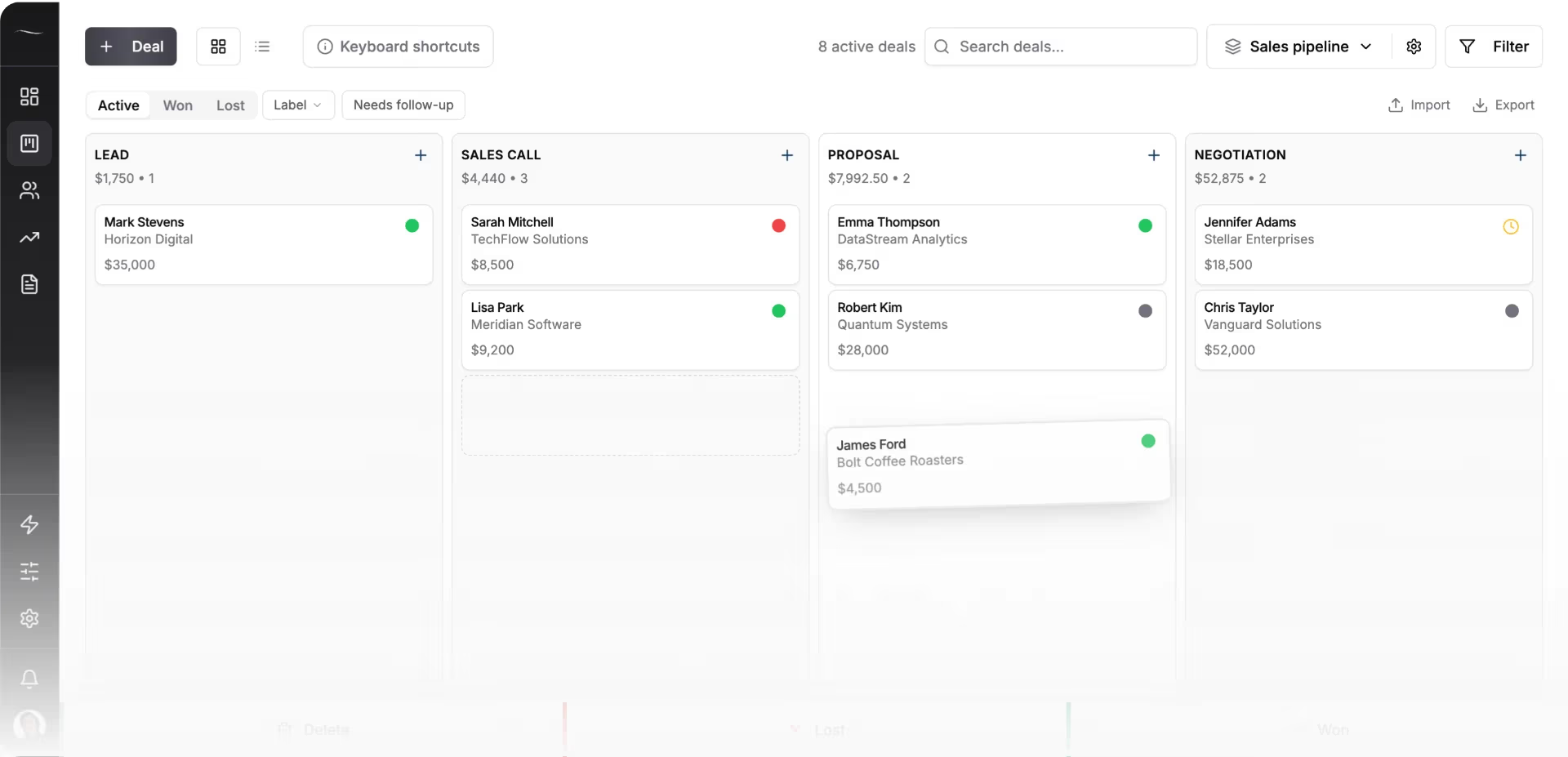
It also connects to Claude and ChatGPT through an MCP connector, so you can ask the assistant to add a deal or log a call and it does the typing.
A verified customer who works solo put the appeal plainly.
“This CRM is finally something that delivers what I actually need and want.”
Best for: Service businesses of 1 to 10 people whose Keap use comes down to the contact list, the pipeline and remembering who to follow up with.
Not for: Anyone who sends email campaigns or takes payments from the CRM. Fluid CRM has no email marketing and no invoicing.
Real cost: $16 per seat a month or $144 per seat a year, with one plan and every feature in it. Two seats cost $288 a year on annual billing.
Cost for 5 seats: five seats come to $80 a month, or $720 for the year on annual billing.
6. Pipedrive (best for a growing sales team that may add email later)
Pipedrive is a pipeline CRM with more reporting and team features than Fluid CRM. If you have several people selling and want forecasting by rep, it goes deeper.
Best for: Sales teams of 5 to 20 that live in the pipeline.
Not for: Anyone hoping to replace Keap’s email marketing in the base plan. Email campaigns are a paid add-on.
Real cost: Lite is $14 per seat a month and Growth is $39 on annual billing, or $24 and $49 billed monthly. The Campaigns add-on starts at $13.33 a month. The full breakdown is in Pipedrive alternatives.
Why a Cheaper Email Tool Is the Wrong Keap Replacement for Most Users
Nearly every list of Keap alternatives is a list of email tools. That makes sense if you use Keap for email. It makes no sense if you don’t, because you would pay less for the same part you never opened.
The implementation package tells you what Keap expects. Keap’s own FAQ says the package is required because, in its experience, the businesses that succeed with Keap are the ones that get set up properly. When those automations were never built, the leftover value is a contact list and a pipeline, and that is a much smaller job.
In a Reddit thread from an owner leaving Keap over the cost, the top answer skipped email entirely and asked whether they needed more than one pipeline. That is a question about tracking deals, not about sending campaigns.
I saw this from the supply side at Fenixtal, my outbound agency, where we built 12M€+ in pipeline for 50+ B2B clients. Most of those clients tracked their leads in a messy spreadsheet or in a CRM nobody on the team wanted to open. The leads died on the days nobody looked, whatever the software cost.
If your campaigns are real, keep an email tool and read my lead nurturing for small business setup before you rebuild them. If you are a coach weighing a Keap move, the CRM for coaches list sorts booking tools from sales tools. And if Keap was on your shortlist next to GoHighLevel, the GoHighLevel alternatives post covers that side, and our GoHighLevel pricing guide shows what its plans cost.
How to Move Off Keap Without Losing Tags and Notes
Moving off Keap has one trap that catches almost everyone. The contact export leaves out your tags and your notes, and in an old Infusionsoft account the tags are often the whole segmentation. These five steps, based on Keap’s own export guide, get everything out.
1. Export your contacts
In Keap, go to Contacts and select People. Tick Select All, then choose Export at the bottom of the page.
An export of 1,000 contacts or fewer downloads straight away as a CSV file. A bigger one arrives as an emailed link that stays valid for 24 hours, so download it the same day.
2. Pull your tags and notes separately
Tags and notes are not in the contact export. For tags, run the Tag Tracker report, which matches contact IDs to the tags applied to them. For notes, go to Reports and run the Task Note Report.
Keep the contact ID column in your main export. It is the only way to join the three files back together.
3. List every automation that still sends
Write down each campaign that sent an email recently. For each one, decide to rebuild it in an email tool or let it go. If the list is long and those campaigns make money, go back to the section on when to stay.
4. Turn your tags into a field before you import
A pipeline tool reads columns, not tags. Before you import, add one text column to your contact file and copy each contact’s main tag into it, such as “past client”, “lead” or “referral partner”.
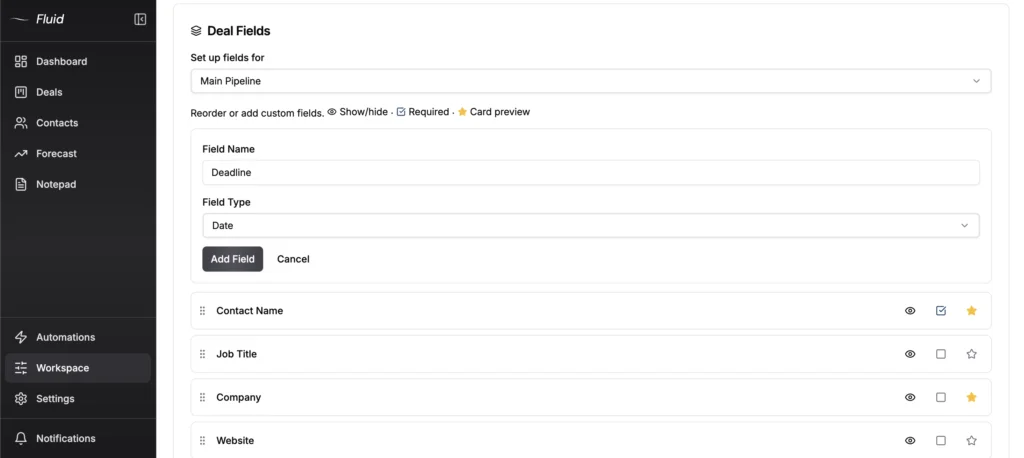
In Fluid CRM, create a matching custom field first, then import the CSV. The import takes up to 10,000 rows per file and lets you match each column to a field.
5. Time the switch to your renewal
Run both tools side by side for a week with your live deals, then cancel Keap at the end of the term. On the annual contract, that is how you avoid the $299 early termination fee.
Keap Alternatives: Frequently Asked Questions
Yes. Infusionsoft is the old name of the product, and the company behind it now sells it as Keap. Some long-time customers still use the older Max Classic version, which is why you see both names in help articles.
Thryv bought Keap in a deal valued at $80 million. Keap is still sold under its own name, and its help articles are now on Thryv’s support site.
Keap is a good fit if you use the whole bundle of email automation, payments, booking and texting in one place. If you only use the contact list and the pipeline, it is a lot of software and a required setup package for a small part of the product.
Yes. Brevo has a free email plan and HubSpot has a free CRM for up to 2 users, though neither replaces all of Keap for free. Fluid CRM is paid, with a 7-day free trial and no credit card required, then $16 per seat a month.
Which Keap Alternative Fits Your Business
Start with the part of Keap you use, not the price. If it is email automation, look at ActiveCampaign or Brevo. If it is payments and pages in one login, look at Ontraport or HubSpot, or stay on Keap if your automations already pay for themselves.
If it is the contact list and the pipeline, Fluid CRM gives you that at $16 per seat a month with every feature included. It has no email marketing, so keep an email tool if your campaigns matter. It works as a solopreneur CRM or for a small team.
Start your 7-day free trial here, no credit card required.