

Almost every guide on finding clients on LinkedIn tells you to post more and engage more, then wait. That’s completely backwards. I’ve booked over 1,000 B2B meetings and generated more than 12M€ in sales opportunities for 50+ clients through LinkedIn and cold email, and almost none of it came from posting into the void. It came from running LinkedIn as a system. Here’s the one I use.
Finding clients on LinkedIn comes down to five steps: optimize your profile, find decision-makers with Sales Navigator, automate your outreach, post content that builds trust and turn conversations into meetings. It works because LinkedIn rewards real relationships, not cold pitching.
The 5 Areas of LinkedIn Client Acquisition
LinkedIn client acquisition has five areas that work together: your profile, prospecting, outreach, content and your DM strategy. Most people run LinkedIn like cold calling or cold email, blasting pitches at strangers. That fails, because LinkedIn is more personal than either. You build trust over time, which can happen fast, and you stay subtle about the sell.
Get the system right and the results compound. Over three years I’ve used it to book meetings for more than 50 B2B companies across industries. Hanna-Maria Ojala at Menestyvä Myynti said it plainly after we built her LinkedIn and email system. Within a few weeks, “several meetings were booked directly into my calendar,” and she closed a couple of deals from them. The five steps below are that exact system, in order.
Step 1: Optimize Your LinkedIn Profile First
Your LinkedIn profile is the foundation, and nothing else works until it’s right. If a decision-maker checks you out and sees no banner, no clear headline and no proof, you’ve lost them before the conversation even starts. I once spoke with a founder who told me his profile was “good enough.” It had no banner, no compelling headline and no social proof. His real odds of turning a cold decision-maker into a paying client from that profile were close to zero.
Treat your profile like a landing page that sells while you sleep. Every part shapes the first impression people form of you:
- Approachable profile picture and well designed banner
- A headline that says who you help and the result you get them
- An about section that speaks to their problem, not your resume
- A featured section with proof and a clear next step
- Active, useful posts in your feed
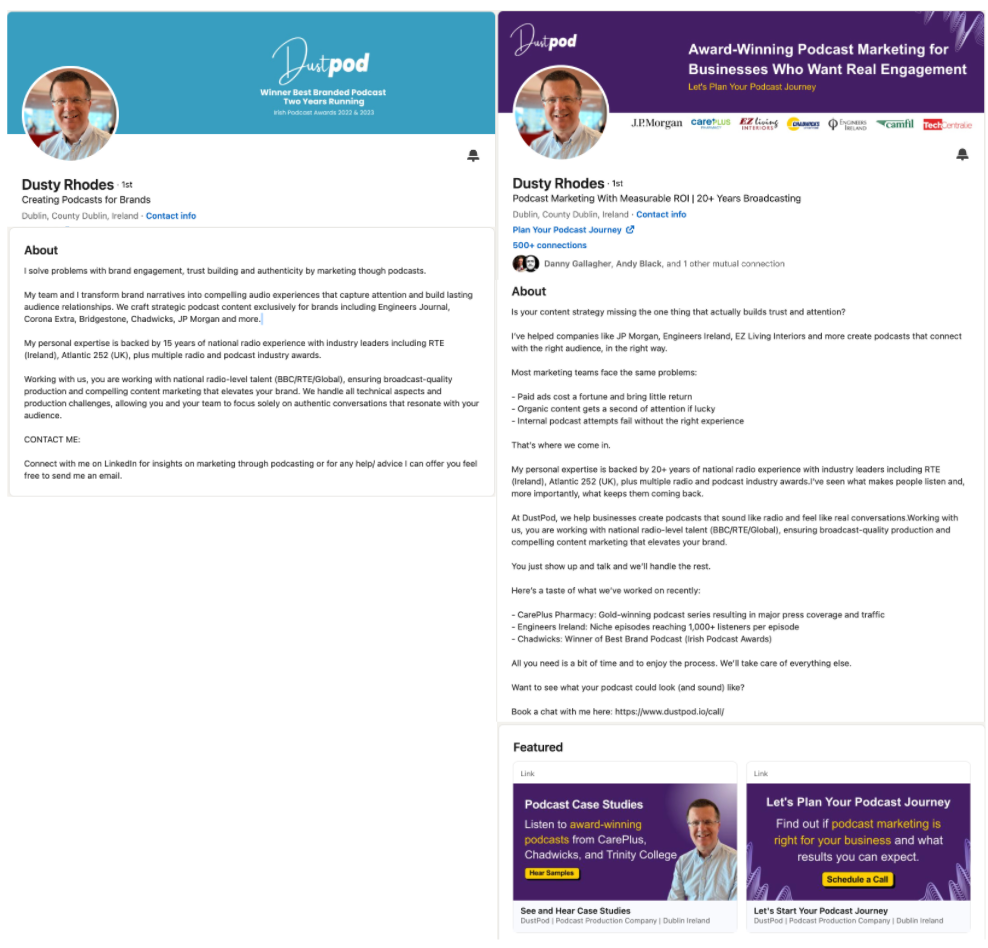
When I work with a client, the profile is the first thing we rebuild. Dusty Rhodes at Dustpod is a good example. Before touching the profile itself, we worked through six things: his target audience, positioning, services, offer, brand and how the profile converts a visitor into a conversation. The profile is downstream of those answers. His verdict afterward was that the system delivered “eight to ten quality meetings a month,” and many of them turned into new clients.
Image: Dusty Rhodes before/after LinkedIn profile
Only once the profile is exceptional, we move on to finding potential clients.
Step 2: Find Clients With LinkedIn Sales Navigator
LinkedIn Sales Navigator is the paid version of LinkedIn, and for B2B it’s the fastest way to find clients on the platform. People love to call it useless, asking why they’d pay just to see who viewed their profile. For students and casual users, fair enough. For anyone selling to other businesses, it’s a goldmine, and it’s been my most important prospecting tool for over three years.
With over a billion people on LinkedIn, practically every serious B2B decision-maker you want to reach is on the platform, and Sales Navigator unlocks the full filters to find them.
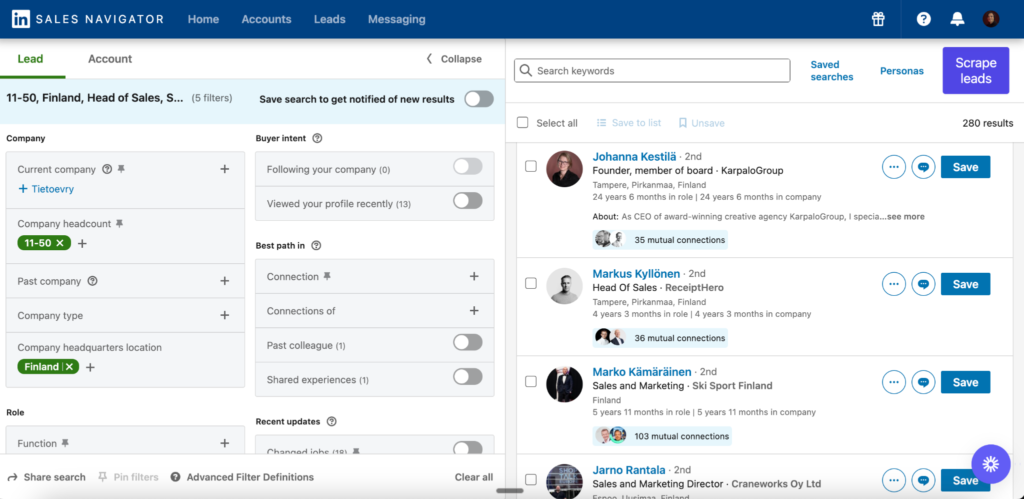
You can narrow by country, industry, company size, decision-maker role and activity level, then use Boolean search to exclude competitors or certain keywords. You can also run a company search to surface businesses that are growing, hiring or using a specific technology.
In a few minutes I pulled a list of 280 Finnish marketing agency founders and sales directors at companies with 11 to 50 employees. That’s 280 qualified people to start conversations with, found from filters alone.
You can send connection requests by hand straight from Sales Navigator, which keeps your network clean and relevant. The problem is it’s slow and easy to skip on a busy day. That’s where the next step comes in.
Step 3: Automate Your LinkedIn Outreach With Prosp
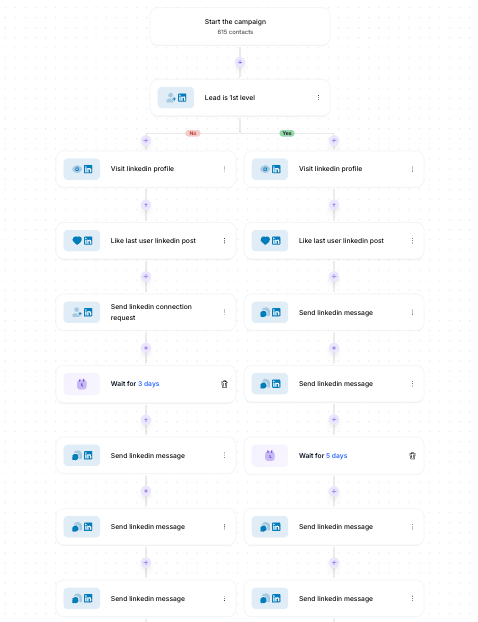
Doing all your LinkedIn outreach by hand eats hours every week, and it’s the first thing you drop when you get busy. I use Prosp to automate the top of the funnel. It visits decision-maker profiles, sends personalized connection requests to the right people, starts conversations and follows up on a schedule, all without me touching it.
Image: LinkedIn automation campaign setup inside Prosp.ai
The tool isn’t the important part though. What you write is. Most people ruin automation by firing the same generic pitch at everyone. Don’t. Your first message should never try to sell, because the person is a stranger. Stay social and conversational, the way you would in real life. Use one of three openers instead:
- A short intro about yourself with a relevant question
- Something genuinely valuable, like a free guide
- A specific, impressive result followed by a question
For example, a result-led opener could read: “Hi [name], saw you’re hiring sales reps. We recently helped an agency book 8 to 15 meetings a month from LinkedIn alone. Is booking more meetings a focus for you right now?” Treat that as a template, not a script, and make it sound like you.
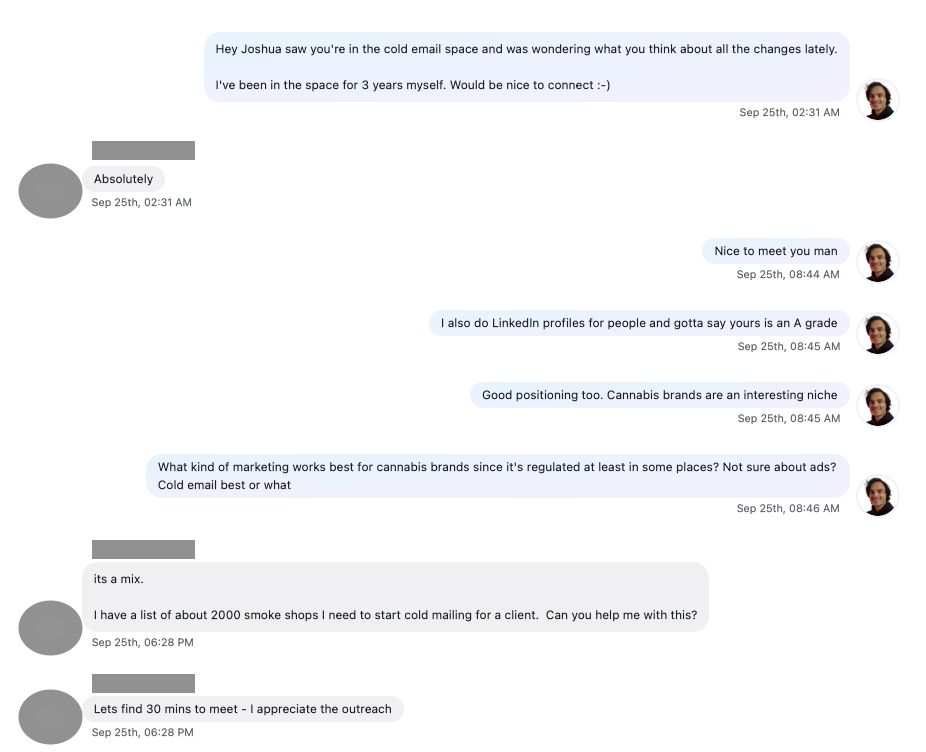
Another option is to keep it super casual and approachable, like my conversation below with Joshua that quickly resulted in a meeting.
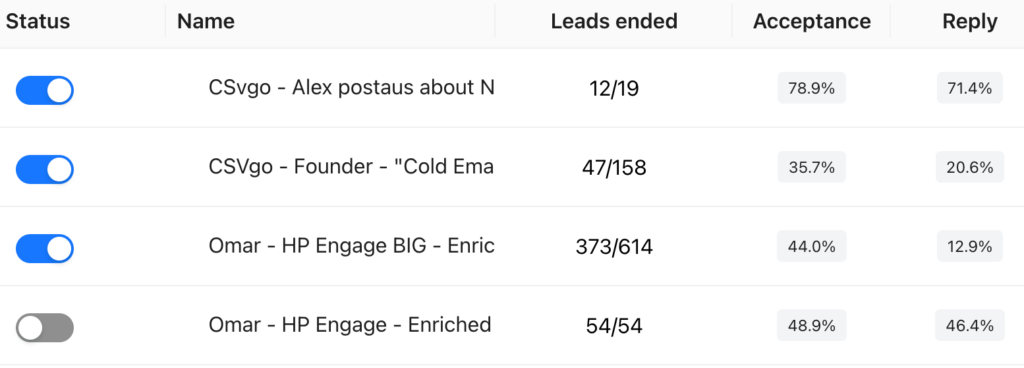
The goal is to spark curiosity and earn a reply you can build on. On one enriched campaign I ran, 48.9% of people accepted the request and 46.4% of those replied, because the list was tight and the message felt human. Done right, a campaign like this runs in the background and fills your network with the exact people you want to talk to.
Image: Prosp campaign results
Step 4: Post Content That Builds Trust and Authority
Posting content on LinkedIn builds trust and pulls in inbound, but it’s overrated as a client-getting move. You don’t need to post 14 times a week or wait a year to hit some follower count before you sign anyone. Smaller niche profiles often out-earn big ones, because they focus on conversations instead of chasing likes.
Post quality content 3 to 7 times a week and you become familiar to your network, which builds trust and shows your expertise. Keep the mix balanced. Some posts grab attention and reach new people, some build authority and some push the reader to act. When those are in balance, content supports your sales instead of just racking up vanity numbers.
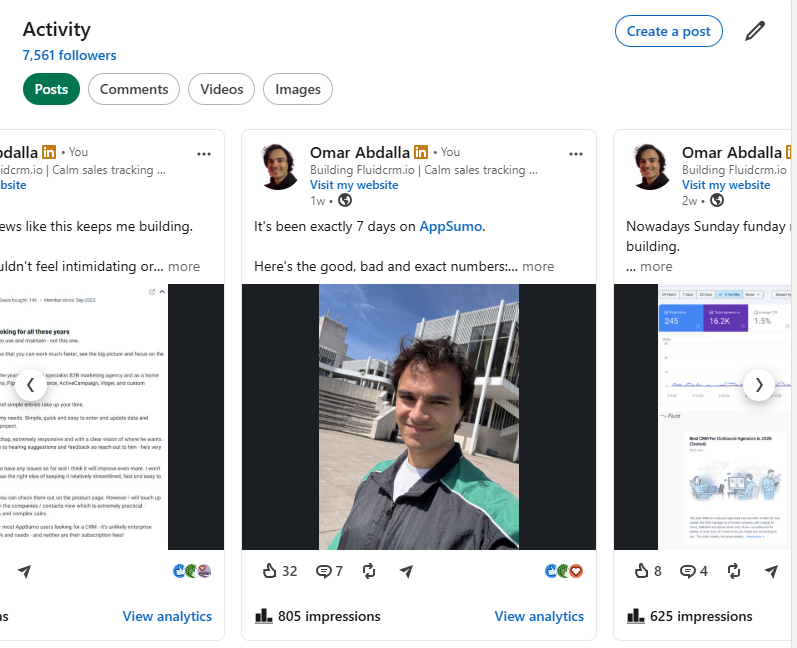
Another pro tip is to include selfies. In the age of AI, everybody can write decent content that sounds the same and kind of soulless. Nobody can fake a selfie though, and that’s an easy way to cut through the noise and build even more trust.
Image: Authentic story post with a real selfie
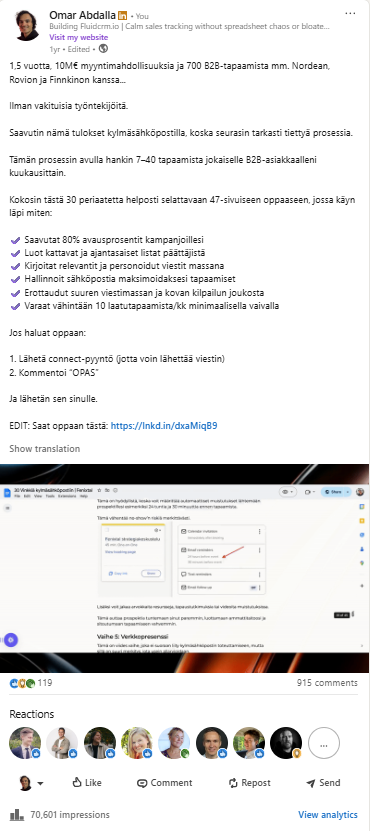
The single most powerful move I’ve made is the lead-magnet post, where you offer a free resource and ask people to comment a keyword. One of mine pulled 915 comments and 70,610 impressions, and added 382 newsletter subscribers, several clients and tens of thousands of euros in closed deals. Tino Tabell at Kallio AI saw the same pattern after building his LinkedIn presence this way. He told me it started generating inbound leads consistently, which is the whole point. Content that produces leads, not just likes.
Image: My LinkedIn lead magnet post that generated 70,610 impressions and 915 comments
Step 5: Turn LinkedIn Conversations Into Clients
Turning LinkedIn conversations into clients is where all the money is made, and it starts with a mindset shift. Detach from the outcome. If you walk into a chat with meetings and money on your mind, the person feels it and you book fewer meetings. Aim to be genuinely helpful whether a meeting happens or not. That’s what actually gets you the meeting. It’s funny how it works.
It helps to know the five levels of prospect warmth, from coldest to warmest:
- Cold
- Profile visitor
- Post engager
- Lead magnet downloader
- Inbound message or meeting request
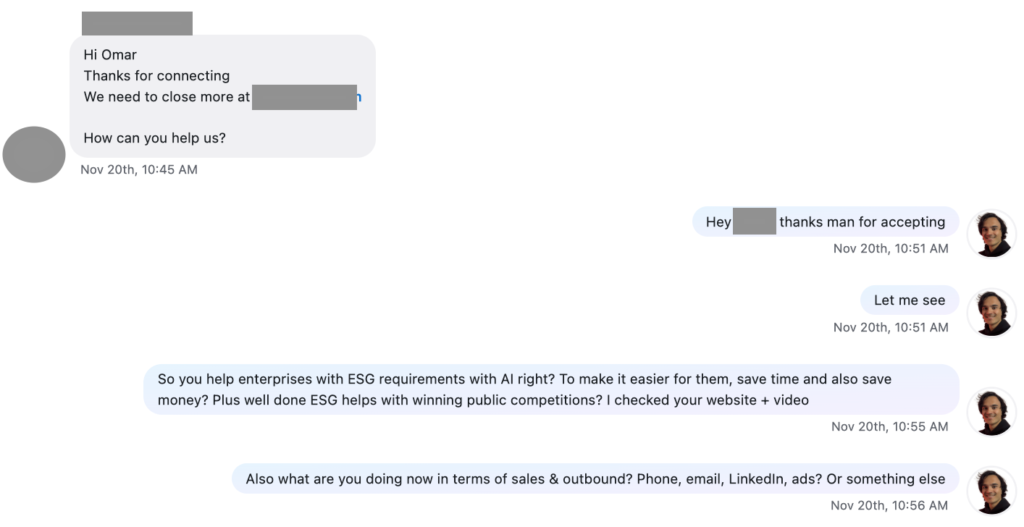
The warmer the prospect, the easier the meeting, so prioritize the warm ones. Don’t ignore the cold ones though, because they’re the vast majority. The hardest part for most people is starting the DM without sounding like a needy salesperson. One move that works is framing the prospect’s own service back to them as a question, which shows you actually looked them up. A few principles carry every conversation from there.
Image: Example of framing the prospect’s service as a question.
Maintain authority
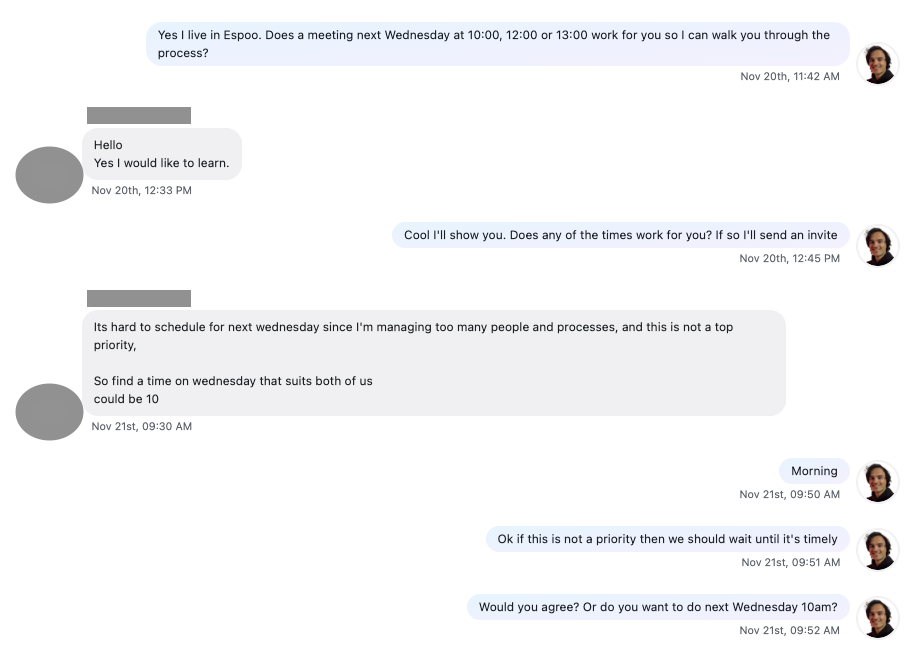
Don’t come across as too eager or overly flattering. Help and advise in every way you can, but from the position of someone who knows their stuff, like a doctor. Eagerness reads as desperation, and desperation doesn’t close deals. Keep in mind that not all conversations lead to meetings and that’s totally ok.
Image: Maintaining authority despite prospect showing interest without it being a priority
Mention specific results
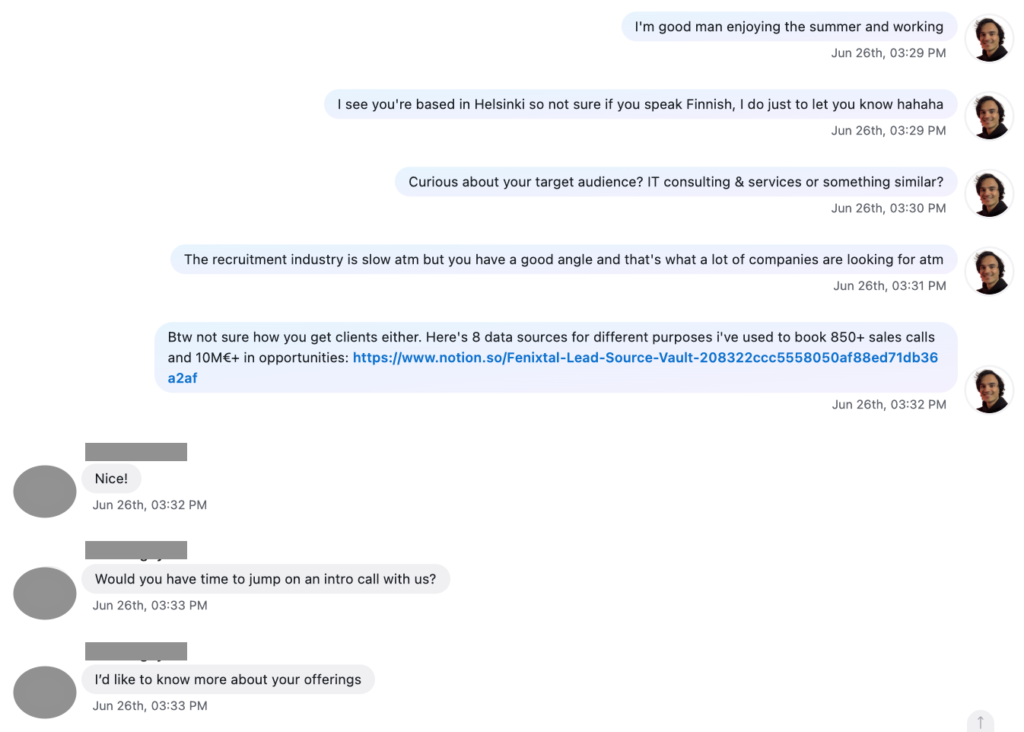
Big names, real partners and concrete numbers build trust fast. Vague claims don’t. The same way your profile leans on proof, your DMs should drop a specific result when it fits the conversation naturally.
Image: Mentioning results and providing value
Be specific in everything you say
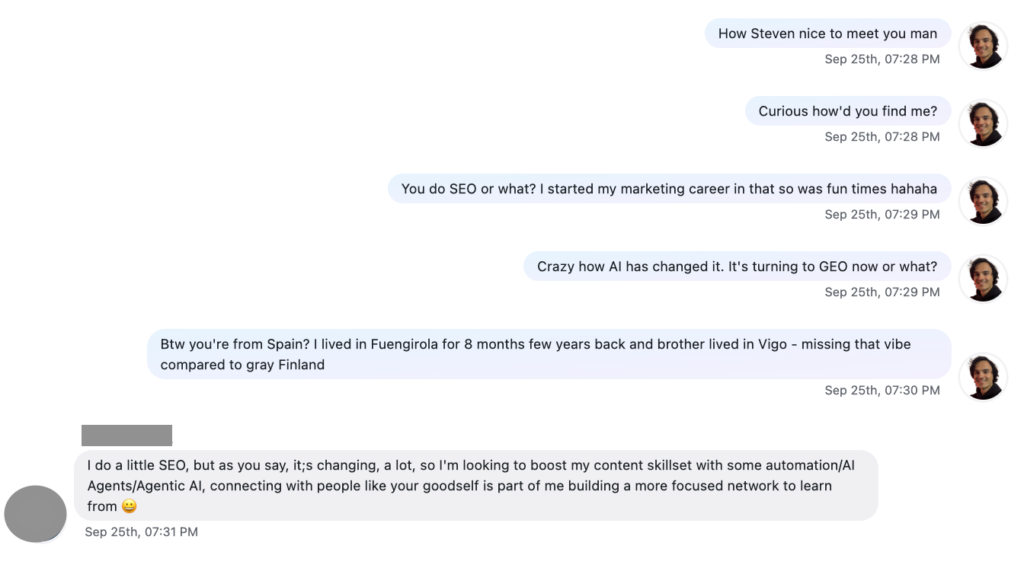
Don’t say “I help companies grow.” Say “I help marketing companies sign 2 to 3 clients a month through LinkedIn.” Specificity works in small talk too. Instead of “I lived in Spain,” I’ll say “I lived in Fuengirola for 8 months a few years back, missing that vibe.” Specific is memorable, and memorable gets replies.
Image: Being specific about my past experience that is relevant to the prospect
Ask multiple questions
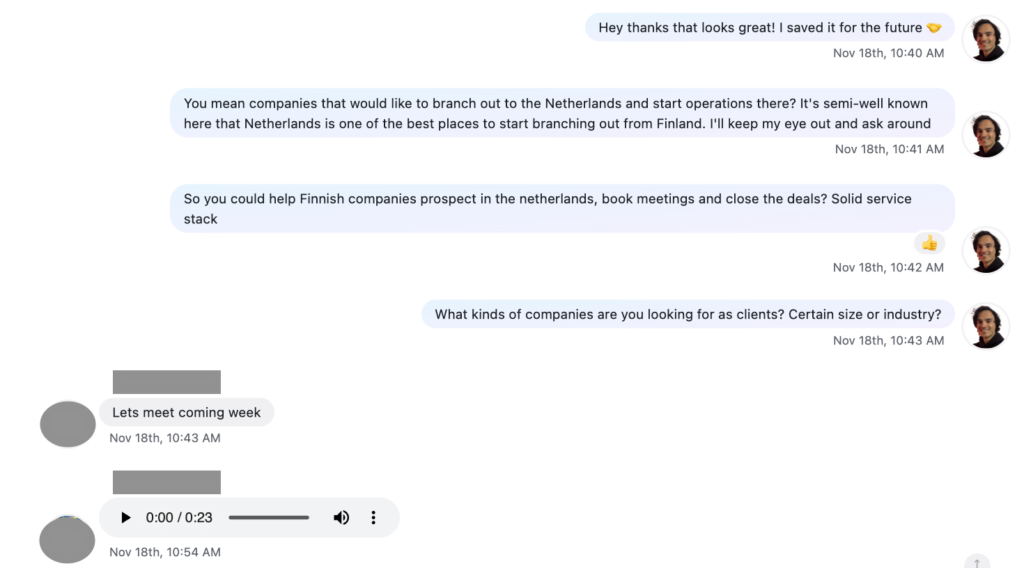
Asking a couple of questions at once keeps the tone relaxed and opens more than one path for the conversation to take. It feels like a chat instead of an interrogation, and chats are where meetings get booked.
Image: Asking three questions showing interests and trying to get the prospect to open up
These five DM-practices are a handful of the 30 DM practices I teach my clients at my agency Fenixtal and use myself to sign clients from LinkedIn every month. Get these right and the rest build on top of them.
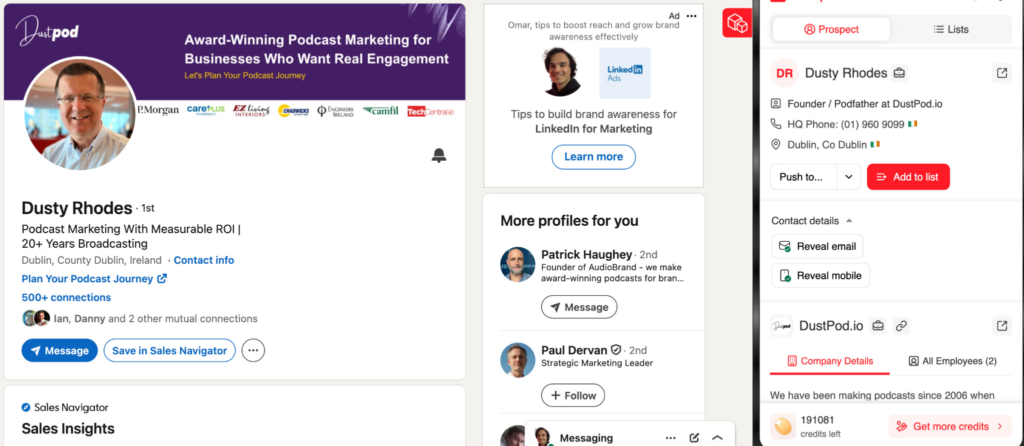
One more thing that doubles meetings for me. Use a tool like Prospeo to reveal a prospect’s email and phone from their profile, so you can follow up with a warm call or email instead of relying on LinkedIn alone. Reaching a decision-maker who already knows you from LinkedIn, this time on the phone, can literally double the meetings you book.
Image: Prospeo’s chrome extensions and buttons to reveal email and mobile
How To Track LinkedIn Conversations and Close Deals
All those LinkedIn conversations are worth nothing if you lose track of them. A reply in your inbox, a half-finished chat, a meeting you meant to follow up on, they all slip away fast when you’re running outreach at volume. LinkedIn starts the conversation. A CRM and your follow-ups are what closes it.
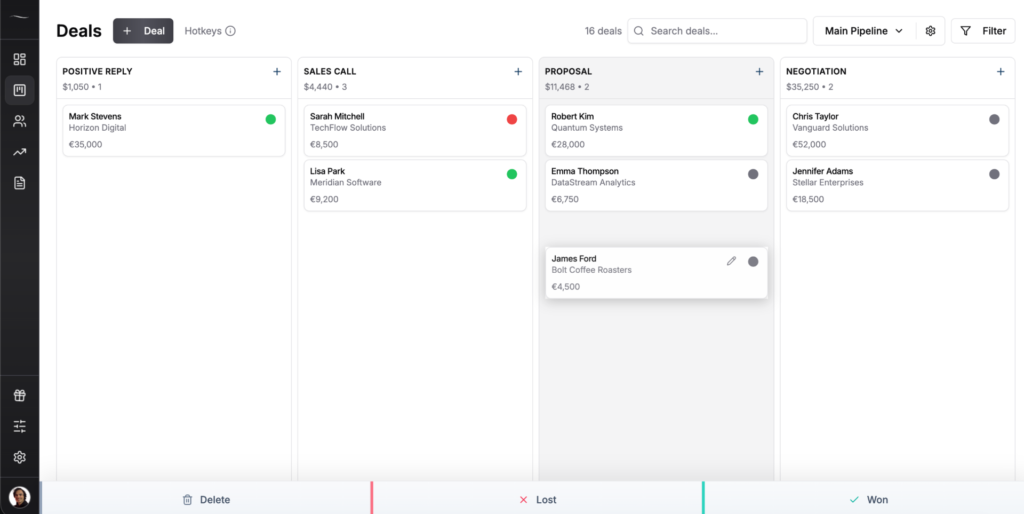
I move every interested conversation into Fluid CRM, which gives you a clear visual pipeline without the bloat of a traditional CRM. Each prospect becomes a deal that moves through clear stages: positive reply, discovery call, demo, proposal and won. You set a reminder on each one so nobody gets forgotten, and the forecast weights each stage by how likely it is to close. That turns a busy inbox into a revenue number you can actually plan around.
What’s best about Fluid are the keyboard shortcuts. You can add your linkedin conversation link into the “conversation” field, hover over the deal card and press “C” on your keyboard to land straight to the inbox. If you have dozens of active conversations, this saves hours every week.
Image: Fluid CRM visual pipeline
When someone agrees to meet, book it manually instead of dropping a calendar link, the same way I lay out in my cold email outreach playbook. If you want help picking the right tool, I go deeper in my guides to the best CRM for cold email and the best CRM for outbound.
Frequently Asked Questions
You find clients on LinkedIn by optimizing your profile so it builds trust, using Sales Navigator to find the right decision-makers, reaching out with personalized messages that don’t pitch, posting content that shows your expertise and moving every interested conversation into a CRM so it becomes a booked meeting. The profile and the follow-up matter as much as the outreach itself.
You get clients on LinkedIn by treating it as a system, not random posting. Dial in your profile, find decision-makers with Sales Navigator, automate the first touch with a tool like Prosp, build trust with content and convert conversations in the DMs. Track every lead in a CRM so the interested ones actually turn into meetings.
Yes, LinkedIn works well for B2B client acquisition when your audience is active on the platform. It’s one of the few places you can find a specific decision-maker, learn about them and start a real conversation in minutes. It works less well for purely local brick-and-mortar businesses whose buyers aren’t on LinkedIn.
You don’t strictly need Sales Navigator, but for B2B it’s worth it. The free version limits your search and your outreach fast. Sales Navigator unlocks the filters that let you find the exact decision-makers you want by country, industry, size and role, which is the whole game.
Posting 3 to 7 times a week is plenty to build trust and stay familiar to your network. You don’t need to post daily or chase a big follower count before you sign clients. Consistency and a good mix of content beat raw volume every time.
Conclusion
Finding clients on LinkedIn isn’t about posting more and hoping. It’s a system: a profile that sells, the right prospects, smart outreach, content that builds trust and a DM strategy that converts. Get those five working together and the meetings follow. LinkedIn starts the conversation. Fluid CRM turns it into a closed deal, with a visual pipeline, reminders and a forecast you can trust.
Start your 7-day free trial, no credit card required.