
Building the form is the easy part. The hard part is what happens after someone hits submit. A lot of lead capture forms fail for one boring reason. The lead lands somewhere nobody checks, so the follow-up never happens. This guide shows you how to build a form that drops straight into your pipeline.
A lead capture form collects a prospect’s details so you can follow up. To make one work, keep the fields tight, then route every submission straight into your sales pipeline.
What a Lead Capture Form Is
A lead capture form is a short form on your website or landing page that collects a visitor’s contact details. Name, email, sometimes a phone number or a question or two about what they need. Someone fills it out, hits submit and you get a new lead.
That’s the whole job on paper. In practice the form does two things at once. It collects the contact info, and if you set it up right, it sorts the serious prospects from the people just looking around.
You’ve seen thousands of these. The newsletter box under a blog post, the request-a-demo form on a software site and the get-a-quote button on a service business page all do the same job. Lead capturing is the same idea every time. You trade something the visitor wants for the details you need to follow up.
Why a Lead Capture Form Without a Pipeline Fails
A lead capture form only works if the lead goes somewhere you actually check. Build the prettiest form in the world and it still fails the moment the submission lands in an inbox you ignore or a spreadsheet you open twice a month. A form without a pipeline behind it is a doorbell wired to an empty house. It rings, but nobody’s home to answer.
Across 50+ B2B clients at Fenixtal, this gap showed up again and again. Leads got captured in one place and worked from another. The form fed a Google Sheet, or a form tool that fired off an email notification, and the actual selling happened somewhere else. So leads slipped through the crack between the two. A prospect fills out the form on Monday, gets an autoresponder, then sits in a row nobody opens until Thursday. By then they’ve booked a call with someone faster.
Be honest for a second. When a lead filled out your form last week, did you follow up the same day, or did you find the email three days later buried under everything else?
The form is not the asset. The follow-up is. A form that collects a lead and dumps it into a dead inbox is worse than no form, because now you think you have a system and you don’t.
This is why the form needs to connect to a pipeline. When a submission auto-creates a deal in a CRM like Fluid CRM, the lead shows up on the same board where you do your follow-ups. You see it, you set a reminder and you move it forward. That connection is what turns a form into a lead capture system instead of a lead collection point. Fluid takes the form from a place where details get dropped to the first stage of a tracked deal.
How To Create a Lead Capture Form
Creating a lead capture form takes about ten minutes once you know what each field is for. The build matters less than two decisions around it. What you ask for, and where the lead goes after it submits. Here’s the order I’d follow.
Watch this video if you want to see how to create lead capture forms end-to-end in Fluid CRM:
Step 1: decide whether you’re capturing or qualifying
First, get clear on the form’s job. A top-of-funnel capture form has one goal, which is volume. You want as many of the right people as possible to hand over an email. A qualifying form has the opposite goal. You want fewer submissions but better ones, with enough detail to know who’s worth a call before you reply.
Step 2: pick the fields and cut the rest
Every field you add costs you submissions. Research on form length shows conversion tends to drop as field count rises, with three fields landing as a practical sweet spot before the rate falls off at four and beyond. In one well-known case study, a company that cut its form from eleven fields to four saw conversions jump by 120%. So ask for the basics first, usually name, email and company. Then check every extra field and cut the ones that don’t change how you follow up.
Step 3: add qualifying fields if you’re pre-screening
If the form’s job is qualifying, this is where you add the fields that sort leads. The three that do the most work for service businesses are budget, timeline and project type. Make them dropdowns, not free text. A dropdown takes one click and gives you clean, sortable data instead of someone typing “asap” into a box you can’t filter.
How to build a lead capture form in Fluid CRM
Here’s the actual build inside Fluid CRM, start to finish. Six steps, and no developer needed for a standard setup.
1. Open Workspace and go to the lead forms tab. This is where every form you build lives.
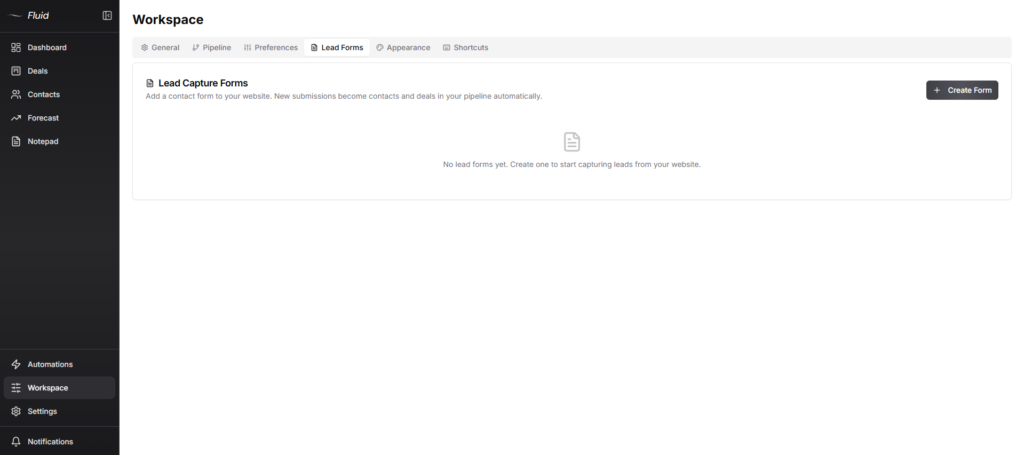
2. Click Create Form and name it. Give the form a name you’ll recognize later, like “Work With Me” or “Quote Request.”
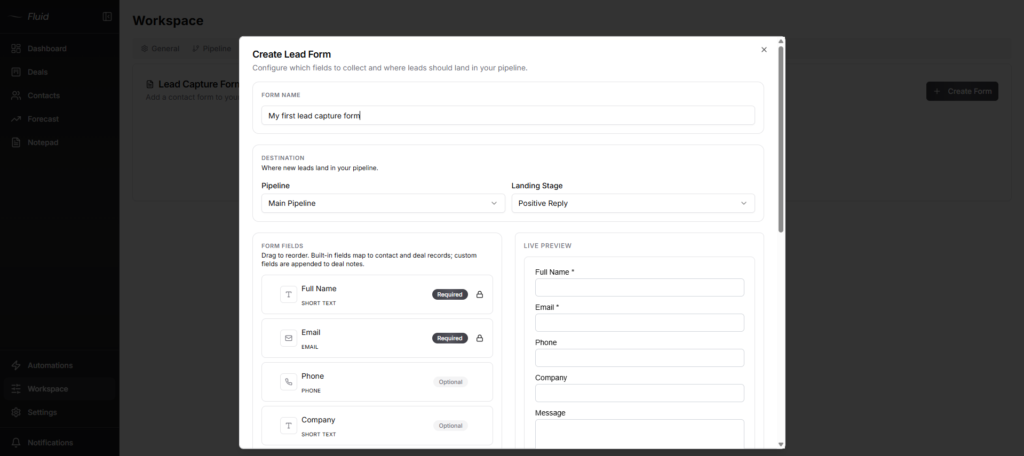
3. Set the destination. Choose the pipeline the lead lands in and the stage it starts at, so every submission enters your pipeline as a deal in the right place.
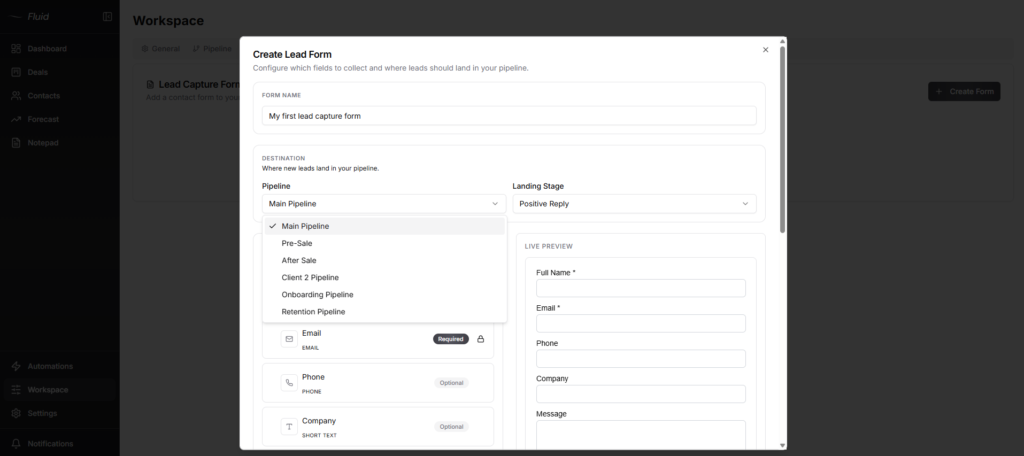
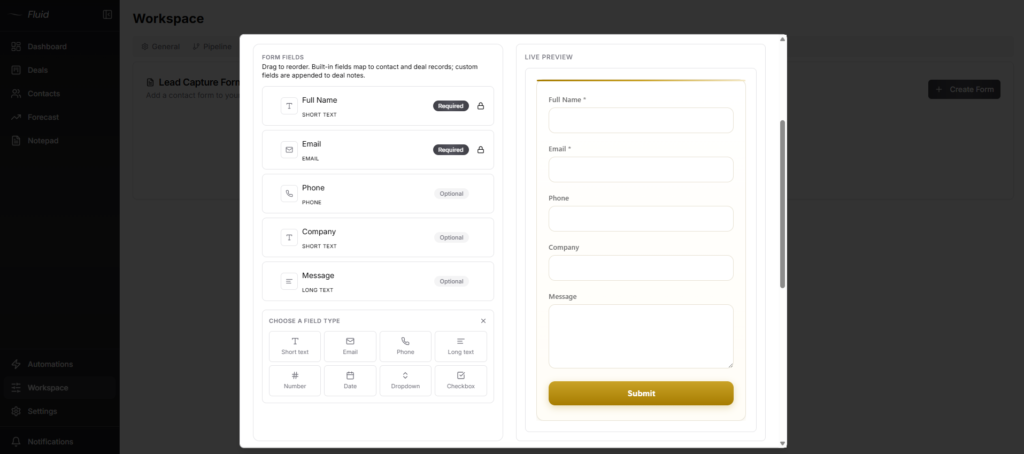
4. Choose your fields. Built-in fields like name, email, phone and company map straight to contact and deal records. Mark each one required or optional, and add custom fields for your qualifying questions. The custom field answers are appended to the deal’s notes, not stored as separate filterable fields, so they’re there for you to read before you reply rather than to sort by.
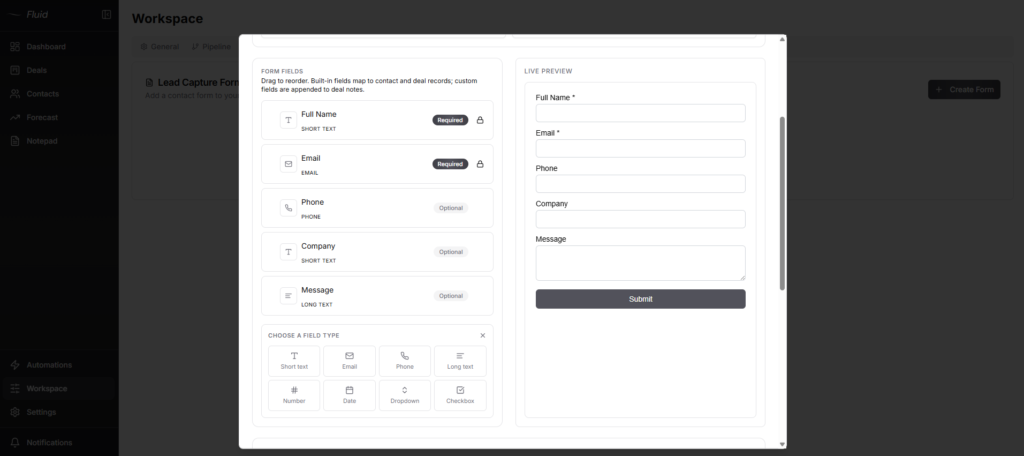
5. Style the form. Set the button color, button text and success message, add a redirect URL if you want, or drop in custom CSS targeting the .ff- classes for a fully branded look.
6. Turn on spam protection if you need it. Cloudflare Turnstile captcha is available and off by default, so flip it on for high-traffic or public forms.

That’s the build. The reason it matters is what happens at submit. Because the form lives inside Fluid CRM, every submission lands in the pipeline as a new deal in the stage you picked, with the contact details on the record and the qualifying answers sitting in the deal’s notes. You see the lead where you already work, not in a separate inbox you have to remember to open.
One last move makes the difference. Set a follow-up reminder the moment the deal lands, or let an automation add one to every new deal. A deal sitting on the board still goes cold if nobody acts on it. The reminder is the part that turns the form into revenue.
Lead Capture Form Examples
Lead capture form examples fall into two buckets, and the difference is the goal. Some forms exist to grab volume. Others exist to qualify hard. Here’s what each looks like in practice.
A top-of-funnel capture form
The simplest example is a newsletter or free-guide signup. One field, maybe two, usually an email and sometimes a first name. The visitor trades almost nothing, so a high share of them convert, and you sort out who’s serious later through follow-up. This is the right call when you’re building an audience, not booking calls. The whole point is to lower the bar so more people step over it.
A qualifying form for service work
A service business needs the reverse. Fewer leads, more detail on each one. A “work with me” page with a short form asking for budget, timeline and project type tells you who’s worth a discovery call before you ever reply. Ritz at Abacus Partners runs this kind of setup, using a lead capture form to bring prospects in. He kept it because Fluid CRM was, in his words, “a really nice, simple, easy-to-use tool” he liked a lot. The form does the first round of sorting, so he spends his time on the leads that actually fit.
Same tool, two different jobs. The capture form maximizes how many leads you get. The qualifying form maximizes how good they are.
How To Add a Lead Capture Form To Your Website
Adding a lead capture form to your website usually means embedding it with a snippet of code. Here’s how that works, plus one alternative if your tool offers it.
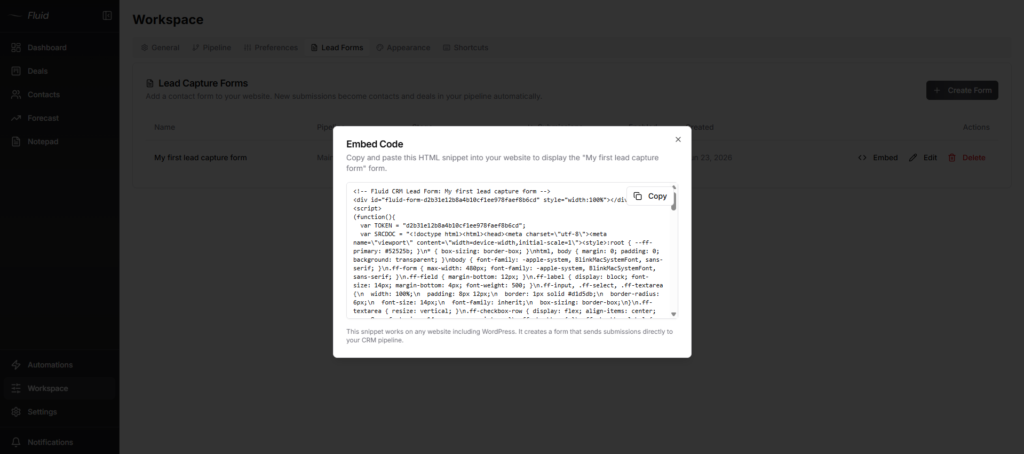
The embed method puts the form right on your page. You copy a short snippet of code from the form you built, then paste it into the page where you want the form to show, and it appears inline. On WordPress, Webflow, Squarespace and most site builders you drop the code into an embed or custom HTML block. With Fluid CRM you grab the embed code from your lead form and paste it into your site, no developer needed for a standard page.
If your form tool also gives you a hosted form page, you can skip the code. Some tools hand you a standalone link you point a button at, so a “work with me” or “get a quote” button sends visitors straight to the form. Use whichever your tool supports.
Whichever you pick, test it once before you rely on it. Submit a fake lead, then check that it shows up where it should. With Fluid the test submission should appear in your pipeline as a deal within seconds. If it doesn’t land, fix that before you send real traffic to the form.
Here’s an example of Fluid CRM’s lead capture form’s embed code.
Frequently Asked Questions
A lead capture form is a short form that collects a visitor’s contact details so you can follow up with them. It usually asks for a name and email, sometimes a few qualifying questions on top. The goal is to turn an anonymous visitor into a lead you can reach.
A lead intake form goes a step further than a basic capture form. It asks qualifying questions like budget, timeline and project scope so you can sort leads before you respond. A capture form gets you the contact. An intake form gets you the context to decide who’s worth a call.
Decide whether the form is for volume or for qualifying, pick the smallest set of fields that does the job, then build it in a tool that routes submissions to where you actually work. Keep top-of-funnel forms to two or three fields. Add qualifying fields only when you need to pre-screen. The full walkthrough is in the section above.
Lead capture works in three moves. A visitor fills out a form with their details, they hit submit, and the lead lands somewhere you can act on it. The part that matters is the third move. If the lead doesn’t land in a pipeline or list you check, the capture was wasted.
A “request a quote” form on a service business website is a common example. It asks for a name, an email and a short note on the project, then sends the lead to the business owner. A newsletter signup box is the simpler version, asking for just an email in exchange for updates.
You either embed the form with a snippet of code or link a button to a hosted form page. For embedding, paste the code into an embed block on your site builder. For the hosted version, point a button at the form’s link. Both take a few minutes and most need no developer.
Three things. A clear reason to fill it out, as few fields as possible and a submit button that’s obvious. Conversion drops with every extra field, so cut anything that doesn’t change your follow-up. The offer matters more than the design, because people trade their details for something worth having.
Fewer than you think. For top-of-funnel capture, two or three fields is plenty, usually name and email. For qualifying forms, four to six, adding budget, timeline or scope. Past six or seven fields conversion drops off a cliff, so only ask for what changes your next step.
A contact form opens a conversation. Someone sends a message, you reply, and there’s no structure beyond that. A lead capture form starts a tracked pipeline entry, with fields built to qualify and a submission that becomes a deal you follow up on. One is a mailbox. The other is the front door of your sales process.
A lead capture system is the full path a lead travels, not just the form. The form collects the lead, the lead lands in a pipeline, and a reminder makes sure you follow up. The form is one piece. A CRM like Fluid CRM is what holds the rest of the system together so leads don’t slip.
You can, and plenty of people start there. It works until the handoff breaks. A lead lands in a row, nobody checks the sheet that day, and the follow-up never happens. Once you’re losing leads in the gap between the sheet and your follow-up, a pipeline pays for itself. The full breakdown is in Google Sheets vs CRM.
Not for a single form on a quiet site. A form tool that emails you a notification is fine at low volume. The moment you want leads tracked and followed up without dropping any, a CRM earns its place. Fluid CRM gives you the form and the pipeline in one tool, so the lead never has to move between systems.
Conclusion
The form was never the hard part. Getting the lead to a place where you’ll actually follow up is. Build a tight form, route every submission into a pipeline, and set the reminder before the lead has a chance to cool. If you want the form and the pipeline in one place instead of stitched together with a notification email, Fluid CRM does both. 7-day free trial, no credit card required.