

Streak put your sales pipeline inside Gmail, and for a while that felt clever. Then the free plan disappeared, Pro landed at $49 per user and your inbox started lagging. Here are 9 Streak alternatives, split by the question that decides everything: do you need a CRM inside Gmail, or out of it?
The best Streak CRM alternative depends on whether you need a pipeline inside Gmail or outside it. Copper and NetHunt keep the CRM in your inbox. Fluid CRM, Pipedrive and Attio move deals out while email syncs in. Most teams leaving Streak over price or speed need the second kind.
Take your pipeline out of the inbox
Deals in Gmail are easy to miss. Fluid CRM shows each one on a board.
No credit card required
Why Sales Teams Leave Streak CRM
Streak is a CRM that runs inside Gmail as a browser extension, and the reasons teams leave it come down to 3 things: price, speed and the second seat.
Price first. Streak removed its free plan. Pro costs $49 per user per month billed annually, and that buys you mail merge and shared pipelines. The automations that actually save you time start at $69 per user on Pro+. Enterprise runs $129. A 3-person team pays $147 a month before a single follow-up gets automated. That’s a steep bill for a tool that renders inside your email tab.
Speed second. Because Streak is an extension, every pipeline, deal box and sidebar loads inside the same browser tab as your inbox. The more deals you track, the slower Gmail gets. You end up paying $49 a month to make your email worse.
The second seat is the one nobody warns you about. I’ve run outbound for B2B clients at Fenixtal and booked 1,250+ sales calls into their pipelines. The inbox-native CRM setups broke the same way every time. They worked fine for the founder, then a second person joined and half the pipeline lived inside an extension in one person’s browser. The new hire saw fragments. Deals died in the gap between two inboxes.
So if you’re here because of the price, the lag or a new teammate, you’re in the right place. But before you pick a replacement, there’s one question to answer first.
Do You Need a CRM Inside Gmail or Outside It?
Choosing a Streak alternative starts with one split. Either you need your pipeline rendered inside Gmail, or you need your deals out of your inbox while your email stays in Gmail. Those are 2 different products, and every tool on this list falls on one side.
Segment A needs the pipeline in the inbox. You live in email 8 hours a day, your deals genuinely are email threads and adding a separate tab would kill your workflow. You’re usually solo or a 2-person team. For you, Copper and NetHunt are the real Streak alternatives, and honestly, staying on Streak might be too.
Segment B needs the pipeline out of the inbox. Your deals are dying because nothing reminds you to follow up, your inbox is lagging under the extension and a teammate needs to see the same pipeline you do. For you, another Gmail extension solves nothing. You need a standalone CRM that syncs with Gmail instead of squatting inside it.
Stop for a second. When did you last open a Streak pipeline for a reason that wasn’t an email already sitting in front of you? If you can’t remember, your pipeline doesn’t need to live in Gmail. It’s just stuck there.
That’s the split the rest of this post is built on. Email belongs in Gmail. The deal record doesn’t have to.
9 Best Streak CRM Alternatives Compared
Here’s the full list side by side. Prices are monthly billing per seat, verified against official pricing pages in July 2026. Annual billing is cheaper on every tool here.
| Tool | Best for | Price/seat (monthly billing) | Gmail relationship |
|---|---|---|---|
| Copper | Pipeline rendered inside Gmail | $29 (Basic, first tier with pipelines) | Lives in your inbox |
| NetHunt | Budget option inside Gmail | $30 | Lives in your inbox |
| Fluid CRM | Small teams moving the pipeline out | $16, every feature included | BCC email sync |
| Pipedrive | Bigger sales teams | $49 (Growth) | Native 2-way sync |
| Attio | Flexible data models | $36 (Plus) | Native sync |
| Close | Calling-heavy outbound | $49 (Essentials) | Native sync + built-in dialer |
| Capsule | Simple contact-first tracking | $21 (Starter) | Sync from Growth tier |
| folk | Relationship-heavy work | $30 (Standard) | Native sync |
| HubSpot Sales Hub | Growing into a full suite | $20 (Starter) | Native sync |
The first 2 are for segment A. The other 7 are for segment B. Let’s go through them.
Best CRMs That Live Inside Gmail
If your pipeline genuinely needs to render inside Gmail, 2 Streak alternatives do it well. Both keep the extension model, so both carry the same tradeoffs Streak does. You’re choosing them because the in-inbox workflow is worth it to you, not because they escape it.
1. Copper (best for teams that need the pipeline in Gmail)
Copper is the deepest Google Workspace CRM on the market. It syncs Gmail, Calendar and Drive, and when you add a new contact it pulls in a full year of past email history automatically. If your team works leads in email for weeks before logging them, that backfill alone saves hours.
Watch the pricing ladder though. Starter ($12 a month, $9 annually) is contacts only with no pipelines. Basic ($29 a month, $23 annually) adds pipelines but not lead management or workflow automation, so most sales teams land on Professional at $69 a month ($59 annually), with Business at $134 ($99 annually) above it.
Where Copper falls short: it’s still an extension living inside Gmail, so the in-inbox limits that pushed you off Streak follow you here. And it requires Google Workspace, so mixed email stacks are out.
2. NetHunt (best budget option inside Gmail)
NetHunt embeds full CRM records, pipelines and views directly into your Gmail interface. Basic costs $30 a month ($24 billed annually) and includes deals, multiple pipelines and tasks at entry, which is more than Copper gives you at twice the price.
The catch sits one tier up. Sales automation, sequences and reports only start on the Business plan at $60 a month or $48 billed annually. Automation actions are also capped per month, with paid top-ups if you run heavy workflows.
Where NetHunt falls short: the feature depth brings complexity, and the moment you want automation you’re at $60 per seat. For a tool you picked to stay light, that stings.
Best Standalone CRMs With Gmail Sync
A standalone CRM with Gmail sync keeps your email in Gmail and moves the deal record into a tool built for pipelines. Your inbox stays fast because nothing renders inside it, and your teammates see the same pipeline you do without installing anything in their browser. These 7 do it at very different prices.
3. Fluid CRM (best for small teams moving the pipeline out of Gmail)
Fluid CRM gives small B2B teams, founders and agencies a clear visual pipeline to close more deals without the mess of spreadsheets or the bloat of traditional CRMs. It’s built for exactly the moment Streak users hit: the deals need a real home, but nobody wants a tool that feels like a second job.
The Gmail bridge is BCC email sync. You BCC one address on any email you send. If the thread matches a deal, it lands in that deal’s activity log. If you only have a contact so far, it lands on the contact’s notes. Your email stays in Gmail where it belongs, the deal history builds itself and your inbox stays fast because nothing is rendering inside it. Here’s how small teams use Fluid CRM as a simple CRM.
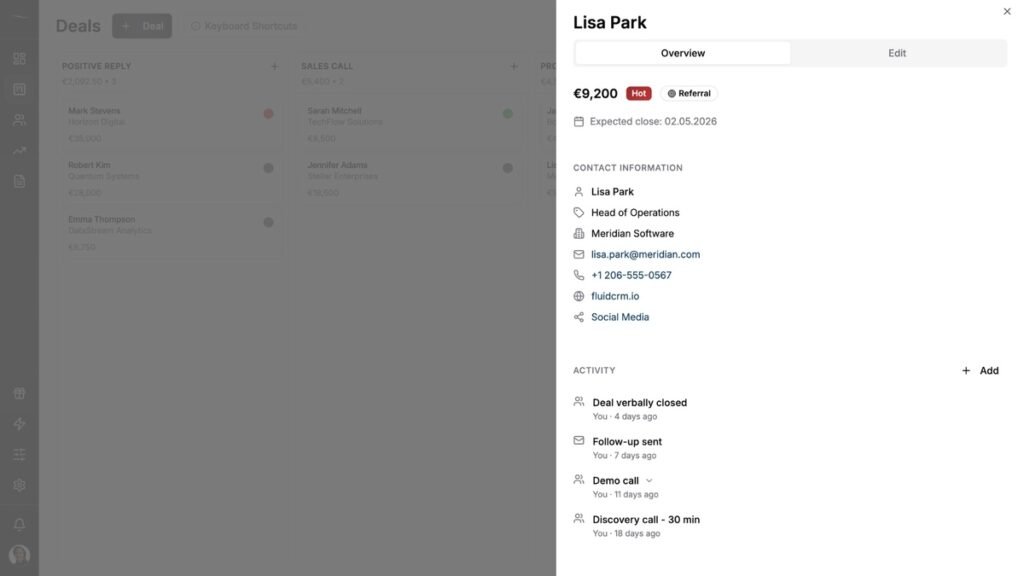
Pricing is $16 per seat per month, or $144 per seat per year (3 months free with annual). Every feature is included on both plans: unlimited deals, contacts and pipelines, reminders, 8 in-app automations, keyboard shortcuts, API and webhooks. No upgrade traps. Compare that to Streak’s $49 base with automations locked at $69 and the math ends fast. See the full breakdown at fluidcrm.io/blog/pricing.
Where Fluid CRM falls short: it is not a Gmail CRM. It won’t render a pipeline inside your inbox, there’s no native dialer and there’s no marketing automation. If you’re segment A, pick Copper or NetHunt instead. If you’re segment B, start the 7-day free trial, no credit card required.
4. Pipedrive (best for bigger sales teams)
Pipedrive built the visual pipeline category and it’s still one of the best at it. For teams of 5 to 20 reps who need forecasting, team reporting and deep automation, it earns its place.
Know the tiers before you sign. Lite at $24 a month only gives you one-way email via BCC. Full 2-way Gmail sync and workflow automation start on Growth at $49 a month, which is where most real sales teams land. Add-ons like lead capture and docs stack on top of that.
Where Pipedrive falls short: under 5 people, you’re paying for team infrastructure you won’t use, and the add-on costs creep. I wrote a full comparison at Fluid CRM vs Pipedrive.
5. Attio (best for flexible data models)
Attio is the Notion of CRMs. You build your own objects, attributes and views, which makes it powerful for teams whose sales process doesn’t fit a standard pipeline. The free plan covers up to 3 seats and is genuinely usable, not a disguised trial.
Paid tiers run Plus at $36 a month ($29 annually) and Pro at $86 ($69 annually). The features growing teams reach for, like sequences and call intelligence, sit on Pro, and an AI credit system meters enrichment and automation on top of the seat price.
Where Attio falls short: the flexibility costs setup time, and the credit system makes your real monthly bill harder to predict. Full comparison at Fluid CRM vs Attio.
6. Close (best for calling-heavy outbound)
Close bundles calling, SMS and email into the CRM itself, which makes it the strongest pick on this list for teams that live on the phone. Solo runs $19 a month for a single user ($9 annually), Essentials is $49 per seat and the Power Dialer that makes Close famous starts on Growth at $109.
Where Close falls short: if your outbound is email-first, you’re paying phone-team prices for a dialer you won’t touch. Calling minutes and add-ons also bill on top of the seat price. I compared it directly at Fluid CRM vs Close.
7. Capsule (best for simple contact-first tracking)
Capsule is a calm, contact-first CRM with a real free plan: 2 users and 250 contacts, no time limit. Starter costs $21 a month and covers 30,000 contacts with a single pipeline.
The limits show up fast for sales use. Two-way email sync, workflow automations and multiple pipelines all live on Growth at $38 a month. On Free and Starter, logging inbound email means forwarding threads to a drop box address by hand.
Where Capsule falls short: the entry tier is a contact book, not a sales pipeline. Budget for Growth from day one or look elsewhere. Full comparison at Fluid CRM vs Capsule.
8. folk (best for relationship-heavy work)
folk treats contacts, not deals, as the center of the world, which makes it a fit for PR, partnerships and agency work where the relationship outlasts any single deal. The Chrome extension captures contacts straight from LinkedIn, and Standard costs $30 a month ($24 annually).
Read the tier gates carefully. Deals as custom objects, email sequences, dashboards and API access are all Premium-only at $60 a month ($48 annually).
Where folk falls short: at the entry price it’s a beautiful contact database, not a pipeline tool. Sales teams end up on Premium fast. Full comparsion at Fluid CRM vs folk.
9. HubSpot Sales Hub (best if you’ll grow into the full suite)
HubSpot‘s free CRM tier is real and covers contact management, deal tracking and Gmail sync for up to 2 users. Starter adds the basics at $20 per seat. If you know you’ll eventually want marketing, service and content tools under one roof, starting here saves a migration later.
The step that surprises people is the next one. Sequences, real automation and custom reporting live on Professional at $100 per seat, plus a required $1,500 onboarding fee. For a 3-person team that’s $5,100 in year one.
Where HubSpot falls short: between the free tier and Professional there’s a canyon, and small teams tend to fall into it. Buy HubSpot for where your company is going, not for where it is. Full comparision at Fluid CRM vs HubSpot.
When You Should Stay on Streak
Not everyone reading a Streak alternatives post should actually switch, and it would be dishonest to pretend otherwise. Stay on Streak if all of these are true: you’re solo or a stable 2-person setup, your deals genuinely are email threads, you’re under about 30 active deals and the Pro price fits your budget.
If that’s you, the $49 is annoying but a migration would cost you more than it saves. Streak’s in-inbox workflow is still the best version of that specific thing. The problems in this post are team problems and volume problems. If you don’t have them yet, save the switch for when you do.
The moment a second seat is coming or follow-ups start slipping weekly, come back to this list.
How To Move Your Pipeline Out of Gmail
Migrating off Streak is smaller than it feels. Budget an afternoon, do the steps in order and don’t skip the last one.
Step 1: Export your Streak pipelines to CSV
Streak exports each pipeline to Google Sheets or CSV from the pipeline settings. Export every pipeline you have, including the ones you stopped maintaining. You’ll decide what survives in the next step, not this one.
Step 2: Clean the export
Delete dead rows, merge duplicate contacts and standardize your deal values to one currency. An old Streak account carries months of decay. Migrating that mess just gives it a new home.
Step 3: Import active deals only
Bring over the 20 to 40 deals you’re actually working, get the stages right and live with the new tool for a week. Bulk-import the historical won and lost deals later, once you trust the setup. Keep the exported sheets for 90 days as a backup. See full Fluid CRM import guide here.
Step 4: Set up email sync on day one
This is the whole reason you left an inbox CRM, so don’t postpone it. Connect the native sync or grab the BCC address, send yourself a test email and confirm the thread lands on the right record. A standalone CRM without email sync is just a prettier spreadsheet.
Frequently Asked Questions
Yes. HubSpot’s free CRM tier covers deal tracking with Gmail sync for up to 2 users. Capsule’s free plan covers 2 users and 250 contacts, and Attio’s free plan covers 3 seats. Fluid CRM has no free plan. It has a 7-day free trial, no credit card required.
For a working sales pipeline, Fluid CRM at $16 per seat per month is the cheapest tool on this list with every feature included. NetHunt Basic at $24 annually is close, but automation pushes you to $60. Watch any tool whose entry tier locks deal tracking or email sync behind an upgrade.
Yes, and that’s the whole point of segment B. Standalone CRMs sync with Gmail rather than replacing it. You keep writing email exactly where you do now, and the CRM logs threads through native sync or a BCC address. Nothing about your inbox workflow changes except the speed.
Streak exports pipelines to Google Sheets or CSV from each pipeline’s settings menu. Export all pipelines, clean the files and import your active deals into the new CRM. The export takes minutes. The cleanup is the real work if the account is old.
No. Your email lives in Gmail, not in Streak, so every thread stays in your inbox after you cancel. What you lose is Streak’s deal-level view of those threads, which is why you export pipelines before leaving and set up email sync in the new tool on day one.
Conclusion
Streak’s real question was never which Gmail CRM to pick next. It’s whether your pipeline belongs in your inbox at all, and for teams hitting the $49 cliff, the lag or the second seat, it doesn’t. If you’re ready to move your deals out of Gmail without taking on a bloated CRM, Fluid CRM gives you a clear visual pipeline at $16 per seat with every feature included.
Start your 7-day free trial here, no credit card required.