

Half the “best CRM for designers” lists either crown HubSpot for solo studios (a mistake) or actually review client portals instead. But really, a CRM tracks leads and deals, not file delivery or contracts. Those are other tools entirely. This list is the CRM kind, sorted by studio size, with one solo designer’s actual lead-capture workflow.
The best CRM for a solo designer or 1-5 person studio is Fluid CRM at $16/seat/month with embedded lead forms and a visual pipeline. Freelancers who need contracts in the same tool should pick HoneyBook or Dubsado. Studios above 5 sales people scale to Pipedrive or HubSpot.
What Web Designers Actually Need In A CRM
Web designers don’t sell the same way SaaS reps do. Leads come from referrals, the site contact form, Instagram and design communities like Dribbble. Sales cycles are short (a discovery call and a proposal) or long (months of nurturing for a 30k rebrand). The CRM has to fit both.
Three things matter more for designers than for other operators.
The first is lead intake. A pre-qualifying form on your site that asks for budget, timeline and project type filters out the “Hey, I need a $300 logo by Friday” leads before they hit your inbox. Designers who add this filter book fewer junk calls and close more of the ones they take.
Visual pipelines come second. You shouldn’t need a tutorial to see what’s hot, what’s stale and who you owe a reply. Plenty of designers I’ve worked with at Fenixtal abandoned their CRM because the daily view was too much.
Follow-up reminders come third. Designers ghost their own pipelines. Not on purpose. The project work absorbs them, the lead from two weeks ago gets buried and the deal goes cold. Reminders are the antidote and they should not require an automation degree to set up.
What designers don’t need from a CRM: marketing automation, lead scoring, an AI sales agent, multi-channel campaign tracking or a 200-page setup wizard. Those are sales-team features and they fit sales teams.
Three quick designer archetypes before the list:
- Solo designer or small studio (1-5 people, project-based, leads from the website)
- Freelancer who lives or dies by contracts and invoicing (single operator, project ops matter more than pipeline ops)
- Growing studio or creative agency (5-15+ people, retainer mix, deal pipeline matters)
The seven CRMs below map to those three.
The 7 Best CRMs For Web Designers, Reviewed
1. Fluid CRM (best for solo designers and small studios)
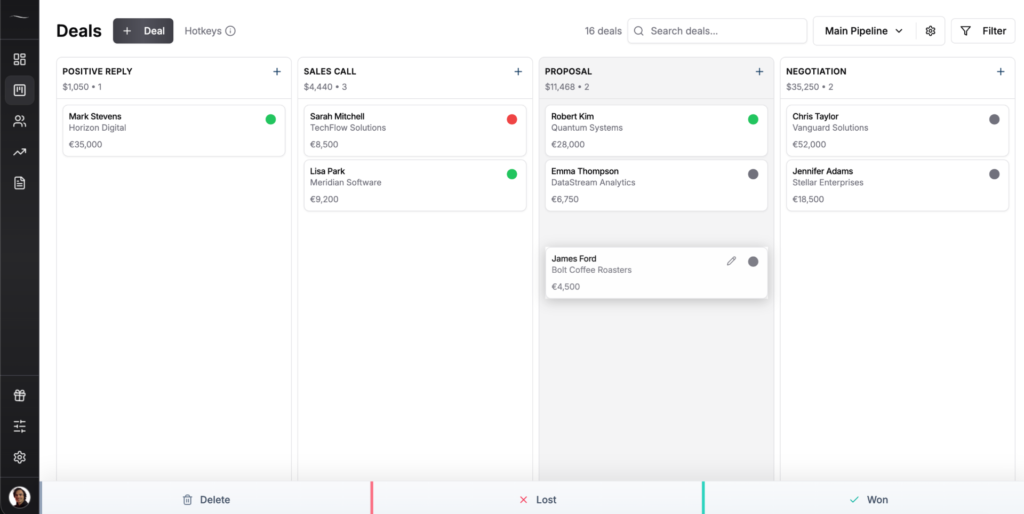
Fluid CRM is built around a clean visual pipeline and an embedded lead form, which is the workflow most solo designers and small studios actually need. The lead form sits on your site with custom fields (budget, timeline, project type) and pushes pre-qualified leads straight into the pipeline. The reminder system flags overdue follow-ups in red. Keyboard shortcuts (D for new deal, R for reminder, E to edit) let you fly through a daily review in a few minutes.
Kyler Thompson runs Knight Theory, a solo creative studio. Before Fluid, she’d in her words tried “more CRMs than I care to admit.” Her exact issue: “I’ve always searched for a cost-effective way to track lead pipeline and client contacts, while also making it really easy to intake said leads (aka, embed-able lead forms!). So many CRMs don’t have them, and if they do, it’s overall too complicated of a software to justify price-wise.”
Where Fluid falls short for designers: it doesn’t include contracts, invoicing or a client portal. If you want one tool for sales tracking and project delivery, this is the sales half, not the delivery half. Pair it with a separate contracts and invoicing tool and you’re set. No native mobile app yet, though the web version works on phones.
Pricing: $16/seat/month or $144/seat/year (works out to $12/seat/month with 3 months free). Unlimited custom fields per pipeline. Every feature included on both plans. You can try Fluid free for 7 days, no credit card required.
Verdict: if you’re a solo designer or a 2-5 person studio and your main need is a lead form and a clear pipeline, Fluid CRM is the simplest fit in this list.
2. HoneyBook (best for freelancers who need contracts and invoicing)
HoneyBook is designed for solo creatives who want sales tracking, contracts, scheduling, invoices and payments inside one tool. The proposal flow (client sees the proposal, signs the contract, pays the deposit) is the strongest part of the product. Templates are well-designed. The client portal is included.
HoneyBook has two real issues. The first is geography: HoneyBook is USA/Canada only. If your business is registered outside North America, you can’t use it. The second is cost. Pricing jumped in 2025 and again in 2026. Starter went from $19 to $36/month monthly. Essentials (where most freelancers land) is $59/month monthly or $49/month annual. Payment processing fees stack on top at 2.7% + 10¢ per card transaction. For a freelancer with low volume, the all-in math gets steep fast.
Pricing: Starter $36/mo, Essentials $59/mo, Premium $129/mo (monthly billing). Annual billing drops to $29/$49/$109. 30-day free trial, no credit card required.
Verdict: best fit for US-based freelancers who want contracts, invoicing and a basic sales pipeline in one tool and are willing to pay for the convenience.
3. Dubsado (best for designers who want deep workflow automation)
Dubsado covers the same ground as HoneyBook (sales, contracts, invoicing, scheduling) with deeper automation and a famously steep setup curve. The “Forms and Workflows” engine lets you trigger emails, send follow-up sequences and move clients through stages on autopilot. People who’ve finished Dubsado setup tend to keep it for years. People who haven’t finished setup six months in tend to quit.
The trade is setup time for power. Dubsado expects you to build your own templates, workflows and forms. Plan a week of unpaid configuration time before you see any return. Limit honest: both plans include 3 users; team members beyond that cost $25/month per seat (4-10), with higher tiers above. Starter is a trap, since it has no scheduling and no automated workflows, so most freelancers end up on Premier or not on Dubsado at all.
Pricing: Starter $35/mo ($335/yr). Premier $55/mo ($525/yr). 21-day free trial with full Premier access, no credit card required.
Verdict: best for designers willing to spend a week on setup in exchange for the most customizable client workflow on this list.
4. Pipedrive (best for growing studios running a real sales pipeline)
Pipedrive is a proper sales CRM. Visual pipeline, deal stages, activity tracking, email sync, reporting. It’s the natural step up when your studio outgrows a simple CRM and you have a few people who genuinely need to see the pipeline daily.
The catch is the pricing tiers. The Lite plan ($24/seat/month) skips workflow automations and full email sync, so most studios end up on Growth at $49/seat/month. For a 5-person studio on Growth, that’s $245/month before any add-ons. Pipedrive also leans sales-team in design language, which can feel off-brand if your studio identity is creative-first.
Pricing: Lite $24/seat/month. Growth $49/seat/month. Premium $79/seat/month. Ultimate $99/seat/month. Annual saves up to 42%. 14-day free trial, no credit card required.
Verdict: best for studios above 5 people who run a real sales process and need stage automations, not just a pipeline view.
5. HubSpot Sales Hub (best for agencies running multi-channel automations)
HubSpot Sales Hub is the right CRM for one specific designer profile: an agency above 15 people running multi-channel marketing (paid, content, email nurture) where the sales pipeline and the marketing system genuinely need to live in the same tool. For that profile it earns its price.
For everyone else, HubSpot is the upgrade trap. The free tier hooks you. Starter ($20/seat/month) gives you a watered-down CRM. The features people actually buy HubSpot for (workflows, sales automation, sequences, custom reporting) live on Professional at $100/seat/month plus a one-time $1,500 onboarding fee. Twelve months in, a 5-person agency on Professional has spent $7,500 on a tool nobody on the team logs into voluntarily. James at Wonderfish runs a podcast booking agency and stays on HubSpot himself for the automation depth, but he summed up the trade this way: “It’s a Ferrari, but I sometimes feel like I only need a Honda or a Hyundai.”
Pricing: Free, $20/seat/month (Starter), $100/seat/month + $1,500 onboarding (Professional), $150/seat/month + $3,500 onboarding (Enterprise). 14-day free trial.
Verdict: best for 15+ person agencies that need real marketing automation alongside the CRM, not for solo designers or small studios under any condition.
6. WillowSpace (best for designers who prioritize a designer-built UX)
WillowSpace is the boutique option in this list. Built by designer Danielle Joseph for her own studio, it’s the only CRM here that visibly cares about how it looks while you use it. The client portal is genuinely pretty. Multi-currency invoicing is included. The product is simple and the founder is responsive.
The real trade-off: WillowSpace is still maturing. The integration list is short. There’s no API. Some workflow capabilities that exist on Dubsado or HoneyBook are missing or basic here. If your studio needs heavy automation or deep connections to a third-party tool stack, this isn’t it. If your studio prioritizes feel and you don’t need 47 integrations, the trade is worth it.
Pricing: $30/month monthly, $25/month annual (2 months free). Includes 1 primary seat; team members add $5 each per month. Unlimited everything. 14-day free trial, no credit card required.
Verdict: best for solo designers and small studios where the look and feel of the daily tool genuinely matters to them and the feature gaps are acceptable.
7. Moxie (best for freelancers wanting an all-in-one ops platform)
Moxie bundles a CRM with proposals, contracts, invoices, time tracking, scheduling and basic accounting into one platform. For solo freelancers running a one-person operation, the math is appealing: one $25/month subscription replaces five separate tools.
Two real issues with Moxie. The first is the learning curve. Moxie has a lot of surface area and you’ll spend a few days configuring it before it actually saves you time. The second is the Starter plan ($12/month) gates out the features that connect the workflow (client portal, automations, integrations), so most users end up on Pro or Teams. The Teams plan caps at 5 members and there are no custom roles. If you want a tight CRM focus, Moxie is too much; if you want one tool that does everything passably, it’s the most affordable option here.
Pricing: Starter $12/mo, Pro $25/mo, Teams $40/mo (up to 5 team members). Annual saves about 17%. 14-day free trial, no credit card required.
Verdict: best for solo freelancers who want one platform for sales, contracts and invoicing and don’t mind a few days of setup.
How To Pick A CRM Based On Studio Size
Studio size predicts which CRM fits better than personality or industry preferences. Map your studio to one of the buckets below.
Solo or 1-5 person studio (project-based): Fluid CRM. You need a lead form, a visual pipeline and reminders. You don’t need contracts inside the tool (use a separate contract solution) or marketing automation. The cheapest one in this list that does these three things well is the right answer. See our full breakdown on the best CRMs for solo founders.
Freelancer prioritizing contracts and invoicing: HoneyBook (if you’re in the US or Canada), Dubsado (anywhere) or Moxie (if you want bookkeeping bundled in). These three pack sales, contracts, invoicing and project basics into one platform. Pick by location, by automation appetite (Dubsado heaviest, HoneyBook lightest) and by how much setup time you’re willing to spend.
Growing studio (5-15 people, retainer mix): Pipedrive on the Growth plan. A real sales pipeline, stage automations, email sync, reporting. Not as bloated as HubSpot at this stage and significantly cheaper per seat.
Agency above 15 people: HubSpot Sales Hub on Professional, paid onboarding included, because at this size the math for having marketing and sales in one system makes sense. Anyone smaller buying HubSpot is buying the upgrade trap. Compare other solutions here on the best CRMs for marketing agencies.
WillowSpace fits inside the first bucket if look and feel matters to you. Treat it as the alternate pick to Fluid CRM, not Pipedrive or HubSpot.
How Kyler At Knight Theory Pre-Qualifies Leads With An Embedded Form
Kyler Thompson runs Knight Theory, a solo creative studio. Her lead intake process is the single best argument for why a CRM with embedded lead forms beats a CRM without them.
The setup is simple. Her site has a “Work with me” page. On that page lives an embedded Fluid CRM lead form with three required dropdown fields: budget tier (a few brackets from low to high), timeline (urgent through flexible) and project type (the main service categories she offers). A free-text “tell me about your project” field at the bottom catches the context.
When a lead submits, the form auto-creates a deal in her pipeline tagged with all three values. Before Kyler ever responds, she already knows the budget, the urgency and the scope. If the budget sits below the floor she takes, she sends a polite no in two minutes. If the lead fits, she books the discovery call already knowing what to ask.
This is the work most CRMs make harder than it needs to be. They either don’t have native lead forms (so you bolt on Typeform and lose the auto-creation), or the form builder is gated to the highest tier (Dubsado Starter, Pipedrive Lite), or the form fields are inflexible. Kyler tried “more CRMs than I care to admit” before landing here.
Her summary: “I love that Fluid CRM is exactly what I needed, which is a clean, no-frills interface that does what I need and doesn’t annoy me with features that I don’t.”

You can run a version of this in any CRM that has native embedded forms with custom fields. Fluid happens to be the cheapest one that does it without locking the feature behind an upgrade. See all Fluid CRM features here.
Why Most Web Designers Abandon Their CRM Within 3 Months
Across 50+ B2B clients at Fenixtal, including web designers, the pattern was painfully consistent. Designer signs up for HubSpot or Salesforce, spends a weekend setting it up, never finishes the workflows, reverts to Notion or a Google Doc within 90 days. By month four the CRM exists but nobody opens it. By month six it’s cancelled or, worse, still being billed and silently ignored.
The cause isn’t laziness. The cause is mismatch. A solo designer who handles a dozen leads a month does not need lead scoring, sales sequences or attribution dashboards. Those features exist for a different reader. Trying to use them anyway means setting up systems you’ll never touch and ignoring the parts of the tool that would have actually helped.
The contrarian point most “best CRM” lists won’t make: if you’re a solo designer or a 2-5 person studio, you do not need HubSpot. You need a lead form, a pipeline view, follow-up reminders. That’s it. Anything else added to the daily flow is friction.
The top result for “best CRM for designers” right now explicitly recommends HubSpot to solo designers. That recommendation is wrong on its own terms. Solo designers don’t have marketing operations to automate. They have ten emails to send, three follow-ups to nudge and one proposal to finish by Thursday.
Before signing up for anything, ask yourself what’s the simplest tool that handles those three jobs. That’s your CRM. If you can’t answer in one sentence, you’re shopping for features you won’t use.
Web Designer CRM FAQs
A spreadsheet works until you hit two of these three: more than 15 active leads, a second person who needs to see the pipeline or a project cycle longer than two weeks. Past that point you start missing follow-ups and losing deals you can’t trace. For a solo designer with under 10 active leads and short cycles a Google Sheet is genuinely fine, but anyone past that should switch.
Moxie Starter at $12/month is the cheapest with project-management features included. Fluid CRM at $16/seat/month is the cheapest pure CRM with embedded lead forms and unlimited custom fields per pipeline. If you want sales tracking only, Fluid CRM wins. If you want sales tracking plus invoicing in one tool at the lowest cost, Moxie Starter wins. Read the best CRMs for freelancers next.
No. HubSpot is built for marketing-led sales teams running multi-channel automation, not for solo designers handling referrals and inbound leads. The free tier is a funnel into paid plans where the features you actually need ($100/seat/month plus $1,500 onboarding on Professional) cost more than your CRM budget for the year. Solo designers should pick a tool sized for one person, not an agency.
You can’t, and you shouldn’t try. Client portals (Notion, Kitchen, Dubsado’s portal feature, Basecamp) are built for file delivery, project chat and approvals after a client has signed. A CRM is built for tracking leads and deals before they sign. Mixing the two means you have neither a clean pipeline nor a clean delivery system. Pick one tool for each job.
A CRM tracks the sales side: leads, deals, follow-ups, pipeline stages. Project management tools (Asana, ClickUp, Basecamp, Trello) track the delivery side: tasks, milestones, files, team workload. Designers usually need both, separately. A CRM that pretends to do project management adds clutter to the sales view. A project tool that pretends to do CRM loses every lead in a tag forest.
Conclusion
A CRM for web designers should be sized to the studio, not to a wishlist of features. Solo and 1-5 person studios pick Fluid CRM (or WillowSpace if look and feel matters most). Freelancers who need contracts pick HoneyBook or Dubsado. Studios above 5 people scale to Pipedrive then HubSpot.
This list is not for agencies above 15 people or for anyone hoping to combine CRM and client portal in one tool. If you’re tired of CRMs that feel like a second job, Fluid CRM gives you a lead form, a visual pipeline and reminders without the bloat. Start your 7-day free trial here, no credit card required.