

Your clients live in your inbox, your phone and your head. That works until someone you did good work for hires somebody else, because you never wrote to them again.
A client list template needs ten columns: name, company, email, phone, status, work done, source, last contact, next check-in and notes. Copy the table below into Google Sheets or Excel, sort it by next check-in and color overdue rows red. When the list stops being enough, Fluid CRM imports it as a CSV.
The 10 Columns a Client List Template Needs
A client list has one row per person and needs columns for who they are, where they stand with you and when you will write to them next. A list with only name, phone, email and address is an address book.
Three of the columns below turn it into a client tracker. Status says who is a client today, Work done says what you could sell them next, and Last contact shows who hasn’t heard from you in months.
| Column | What goes in it | Example |
|---|---|---|
| Name | The person you talk to, first and last name | Dana Whitfield |
| Company | Their business, or blank for a private client | Harbor Dental |
| The address they answer from | dana@harbordental.example | |
| Phone | One number, the one they pick up | 555-0142 |
| Status | One of three fixed values | Active |
| Work done | What you did for them and when it ended, in a few words | Monthly bookkeeping since March |
| Source | How they found you, with the name if a person sent them | Referred by Sam Ortiz |
| Last contact | The date you last spoke or wrote | 2026-10-02 |
| Next check-in | The date you will write to them next | 2026-11-03 |
| Notes | Anything you’d want to remember before the next call | Wants a quote for payroll in the new year |
Status has three values and no others, which are Active for someone you work for today, Past for someone whose work has ended and Likely for someone who has asked about working with you.
Here is the table to copy. Select the header and the three example rows, paste them into cell A1 of an empty sheet and replace the examples with your own clients.
| Name | Company | Phone | Status | Work done | Source | Last contact | Next check-in | Notes | |
|---|---|---|---|---|---|---|---|---|---|
| Dana Whitfield | Harbor Dental | dana@harbordental.example | 555-0142 | Active | Monthly bookkeeping since March | Referred by Sam Ortiz | 2026-10-02 | 2026-11-03 | Wants a quote for payroll in the new year |
| Marcus Lee | Lee Architects | marcus@leearchitects.example | 555-0117 | Past | Website redesign, finished in June | Google search | 2026-06-18 | 2026-10-15 | Happy with the launch. Mentioned a second site |
| Priya Nair | Northside Yoga | priya@northsideyoga.example | 555-0163 | Likely | None yet. Asked about a brand refresh | Met at a chamber event | 2026-09-24 | 2026-10-20 | Will decide after fall sign-ups |
“Likely” is only a label. This list has no deal value, no stages and no win probability, because it tracks people and not open deals.
If you are chasing ten or more open deals at once, our sales tracking spreadsheet is the better file, with one row per deal. Plenty of one-person businesses need both jobs done, which is why a CRM for solopreneurs keeps new deals and past clients side by side.
At Fenixtal we built 12M€+ in pipeline for 50+ B2B clients. My view from that work is that a past client is the easiest sale a small business has, and the Source column tells you which clients send you others.
Build the Client Tracker in Google Sheets or Excel in 10 Minutes
You need one tab, one dropdown and three rules. Steps 3 to 5 are the three sorting and color rules that make the list usable.
1. Paste the table and freeze the header
Paste the table into cell A1 so Name lands in column A and Notes in column J. In Google Sheets, freeze the header with View, then Freeze, then 1 row, and in Excel freeze the top row.
Type the dates in columns H and I by hand in the 2026-11-03 style. A date that was pasted in as text looks the same on screen, but it never turns red in either tool.
2. Make Status a dropdown
A fixed list keeps you from typing “past”, “Former” and “old client” for the same thing. In Google Sheets select column E from row 2 down and click Insert, then Dropdown.
In Excel select the same cells, open the Data tab and click Data Validation, then pick List under Allow. Enter Active, Past and Likely as the three options.
3. Sort by next check-in
Turn on a filter for the header row and sort Next check-in from oldest to newest. In Google Sheets the filter is under Data, then Create a filter.
The people you owe a message now show in the first rows every time you open the file.
4. Turn overdue rows red
Select A2 to J500 and add a rule with this formula, then choose a red fill:
=AND($I2<>"",$I2<=TODAY())
In Google Sheets the rule lives under Format, then Conditional formatting, then “Custom formula is”, and Google’s guide to conditional formatting rules shows each click. In Excel go to Home, then Conditional Formatting, then New Rule, and pick “Use a formula to determine which cells to format”.
With the example rows, Marcus turns red once October 15 arrives and Dana stays white until November 3. An empty row stays white because the formula checks for a date first.
5. Turn rows amber after 90 days of silence
Select A2 to J500 again and add a second rule with an amber fill:
=AND($H2<>"",TODAY()-$H2>90)
Marcus was last contacted on June 18, so his row counts as silent from mid-September. Ninety days is our recommendation, and a business with long projects can use 180.
Three things break these rules, and all three are quick to fix:
- The range starts at row 1. Start it at row 2 (A2 to J500), or every color lands one row off.
- The dates are text. Retype any date that stays white when it should be red.
- Your sheet uses decimal commas. Many European setups need a semicolon in place of each comma in the formula.
The two tools also order rules differently. Google Sheets checks the rules from the top and the first match wins, so keep red above amber. Excel puts the newest rule on top, so open Manage Rules and move the red rule above the amber one.
If you would like a bigger file with separate tabs for contacts, deals, an activity log and a dashboard, our free CRM template is that file for Excel and Google Sheets. The post on building a CRM Excel template explains how its four sheets fit together.
How to Keep a Client List Current
A client list goes out of date the first week you are busy, so the habit has to be small, and three rules are enough.
- Update the row before you close the email or hang up. Change Last contact to today and add one line to Notes.
- Never leave a row without a next check-in. Even a client you spoke to yesterday gets a date, such as three months from now.
- Change Status the day a project ends. Move the person from Active to Past and write what you delivered in Work done while you still remember it.
Once a month, read the amber rows from top to bottom. Each one is a person who paid you once and hasn’t heard from you in over three months.
Can you say, without opening anything, which past client you last wrote to and when?
The list tells you who to write to. What to write is a separate job, and our guide on how to keep in touch with clients has four short messages you can adapt.
Moving a Client List Into a Simple Pipeline
A client list moves into a pipeline as one file, and nothing has to be retyped. Each row becomes a card on a board, and the Next check-in date becomes a reminder that shows up on the day.
In Fluid CRM the import takes a CSV, XLS or XLSX file of up to 10,000 rows. It creates the contact and the company along with each card, and it skips a contact whose email is already there.
| Your column | Import column |
|---|---|
| Name | contact_name |
| Company | company |
| Phone | phone |
| Source | source |
| Status | stage |
| Next check-in | reminder_date |
| Notes, Work done and Last contact | notes |
Two columns have no field of their own. Put Work done and Last contact at the start of the Notes cell before you save the file, so they travel with the person.
Before you save the file, fill the stage column with your pipeline’s stage names. The staying in touch pipeline in our post on keeping in touch with clients uses four stages you can copy, and our walkthrough of the Fluid CRM import shows the upload screen.
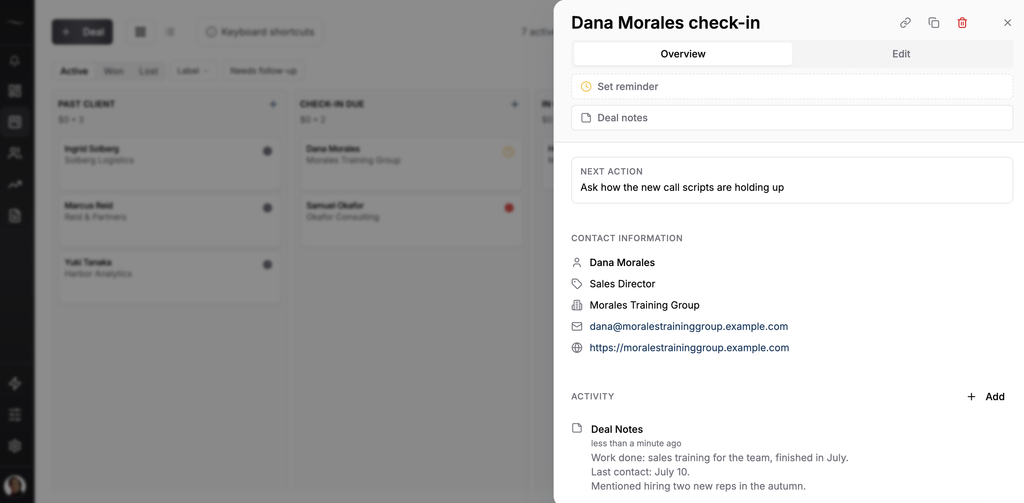
There is one limit to know before you move. A reminder belongs to a card and each card has one reminder at a time, so every client you want to hear about needs a card. Invoices and contracts stay in the tools you already use for them.
When a Client List Is Enough and When to Move It
A client list in Google Sheets or Excel is enough while you are the only person editing it and you open it every week. Stay on it for as long as that is true, because a tool you already use beats a better one you don’t.
It stops being enough when a second person starts editing it, or when a row stays red for weeks because nobody opened the file.
| Client list | Simple pipeline | |
|---|---|---|
| Who is due | You open the file and look for red rows | Today’s reminders arrive in a daily email |
| History | One Notes cell per person | Notes and activity history on each card |
| Two people | Easy to overwrite each other | Both see the same board |
| Cost | Free | Paid per seat |
One verified customer who came from an Excel spreadsheet described the change this way: “I’m not the best organised when it comes to lists but this is doing its job… Beats using an Excel spreadsheet.”
The question of timing has its own post, and Google Sheets vs CRM goes through it in detail. If you are already comparing tools, we ranked the best CRM for solopreneurs by how much upkeep each one needs.
Fluid CRM is a simple solopreneur CRM with one plan at $16/seat/month or $144/seat/year. Build the client list today, and import it on the day it stops being enough.
Start your 7-day free trial here, no credit card required.
Frequently Asked Questions
A client list should include each person’s name, company, email and phone, plus a status, the work you did for them, how they found you, the date of your last contact, the date of your next check-in and a notes column. The last five columns are what make it useful for winning repeat work.
A client list is a table you have to open and read. A CRM holds the same people and adds reminders that reach you on the day, a history for each person and a board that more than one person can use. For one person with a short list, the table is often enough.
Yes. Save the list as a CSV, XLS or XLSX file and upload it. Name, company, email, phone, source, status, next check-in date and notes each have a matching import column, and a file can hold up to 10,000 rows.
A client list has one row per person and covers people you have already worked for. A sales tracker has one row per open deal, with a value and a stage. A one-person business often keeps a client list first and adds a sales tracker when several deals are open at once.