

You can wire Clay, Smartlead and n8n together in an afternoon. Then the leads have to land in a CRM, and that’s where most stacks get slow, because the CRM was picked for its screens and not for its API.
The best CRM for GTM engineers is the one whose API, webhooks and MCP server sit on the plan you’d buy. Fluid CRM fits freelancers, agencies and teams of up to 10 choosing fresh. HubSpot is the pick if the company already runs on it, Attio if you need custom objects and Salesforce at enterprise size.
Here is the pick for each situation, before the detail:
- Freelancer, agency or small team choosing a CRM fresh: Fluid CRM
- The company already runs on it: HubSpot
- You need custom objects and a data model you shape yourself: Attio
- A sales team that lives in activities: Pipedrive
- Reps who call and email from inside the CRM: Close
- Selling through LinkedIn and WhatsApp DMs: Breakcold
- Enterprise, with an admin on staff: Salesforce
What a GTM Engineer Needs From a CRM
A GTM engineer rarely clicks around in the CRM. Your tools push leads into it and pull events out of it, so the part that matters is the part with no screen.
The CRM is one layer of the stack, and it is the layer that keeps the history when the tools around it change.
| Layer | What it does | Typical tools |
|---|---|---|
| System of record | Holds accounts, contacts, deals and what happened to them | The CRM |
| List building and enrichment | Finds, cleans and scores the leads | Clay, Prospeo |
| Sending | Runs the sequences and catches replies | Smartlead, Instantly |
| Sends connection requests and messages | HeyReach | |
| Automation | Moves data between everything else | n8n, Make |
| AI assistant | Does one-off jobs when you ask | Claude, ChatGPT |
I compared the sending layer in my guide to the best cold email software. Swap any of those tools and your pipeline history should stay where it is, which is why the CRM has to accept writes from all of them.
Most GTM engineers inherit the CRM. In the State of GTM Engineering survey of 228 people, 92% used a CRM, about half were on HubSpot and about a third on Salesforce, with Salesforce leading at companies above 500 employees. This post is for the other group, the freelancer, the agency and the first GTM hire who picks the CRM.
I work as a GTM engineer today, and before that I spent almost four years doing outbound. Here are the five things I check before I let a CRM into a stack.
Which plan the API starts on
An API that only exists two tiers up is an API you don’t have. Check the plan you’d pay for, then check whether webhooks and the MCP server sit on that same plan.
Rate limits you can plan around
A limit written as a plain number per minute lets you size a batch job before you run it. A limit written as a token budget, or not written down at all, means you find the ceiling in production.
Bulk create with duplicate matching
Pushing 500 enriched leads one request at a time is slow and it burns your limit. You want a bulk endpoint, and you want it to match existing companies and contacts so a second import doesn’t double your data.
Safe resends
Automations retry. If n8n sends the same lead twice after a timeout, the CRM should update the first record and not create a second deal, and the usual way to get that is an external ID you send with the lead.
Signed webhooks that say what changed
A webhook should carry a signature you can check, so nobody else can post fake events to your endpoint. On a stage change it should also tell you the old stage, or you can’t tell a deal moving forward from one moving back.
One more, and it takes a single line. If you connect an AI assistant through MCP, prefer a server that can create and update but can’t delete. I compared eight on that point in the best MCP CRMs for AI agents.
CRM for GTM Engineers Compared: API, Webhooks and MCP
Every CRM below has a REST API, webhooks and an official MCP server. They differ in where those start, how much you can send and what happens when you send it twice.
| CRM | Plan where the API starts | Rate limit | Bulk create | Safe resends | Webhooks | Can the MCP server delete? |
|---|---|---|---|---|---|---|
| Fluid CRM | The one plan | 300 reads and 60 writes a minute, per key | 50 per call, with duplicate matching | External ID on lead ingestion | 16 events, signed, 3 retries | No |
| HubSpot | Free | 100 per 10 seconds, 250,000 a day | 100 per call | Upsert on a unique property | Signed, up to 10 retries over 24 hours | No |
| Attio | Free, up to 3 seats | 100 reads and 25 writes a second | None in the REST docs | Upsert on a matching attribute | Signed, up to 10 retries over about 3 days | Only tasks and comments |
| Pipedrive | Lite | 30,000 tokens a day per seat on Lite | None for people or deals | None documented | Not signed, basic auth optional, 3 retries | No |
| Close | Solo | No numbers published | None | None documented | Signed, retries for up to 72 hours | Yes, if you grant the destructive scope |
| Breakcold | The one plan | 180 a minute per key, and calls cost tokens | None | Idempotency-Key header | Signed, 3 attempts | Archives records, deletes tasks and custom objects |
| Salesforce | Pro Suite plus a $25 add-on, or Core | 100,000 a day plus 1,000 per licence | 200 per call | Upsert on an External ID field | Outbound Messages over SOAP, not signed, retried for up to 24 hours | Yes on the full server, and a no-delete server exists |
HubSpot and Salesforce have the deepest APIs here, and I’m not ranking against that. The order in this post is for a team of up to 10 choosing fresh, where the question is how little you have to buy and build before leads flow.
A GTM Engineering Workflow: Smartlead Reply to Slack Alert
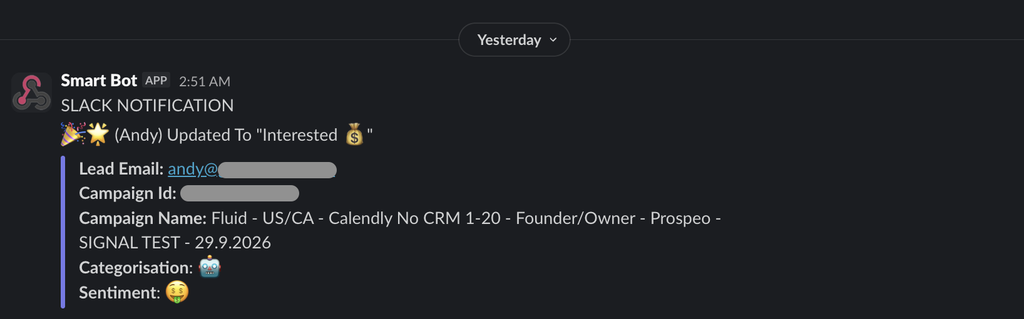
A positive reply is the most expensive record in your stack, and it should reach the CRM without a person copying it. Here is that workflow in Fluid CRM, start to finish. I compare the other ways to do it in my post on connecting Instantly or Smartlead to a CRM.
Between Fenixtal’s clients and my own campaigns I’ve handled more than 5,000 positive replies from cold email, LinkedIn and GTM automations. The copy was rarely where a deal died. It died in the hours between “sounds interesting” and somebody on the team noticing.
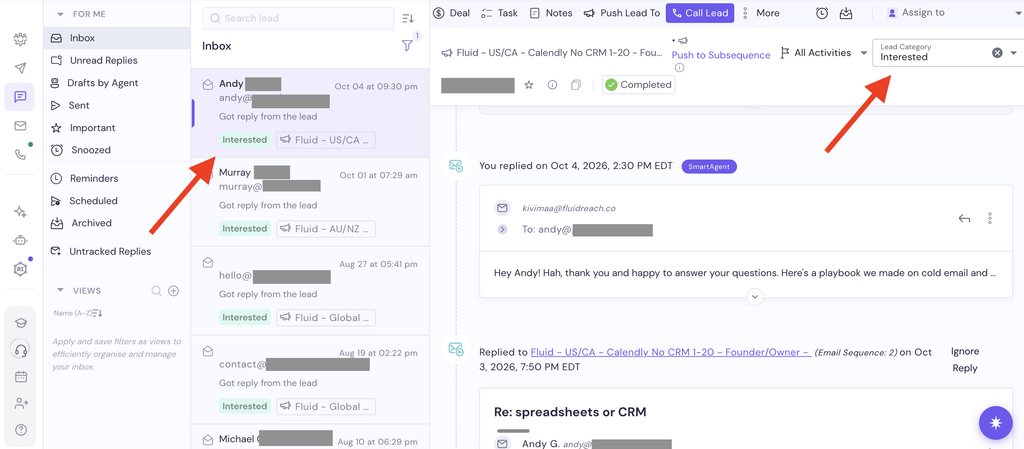
1. Smartlead marks the reply as interested
Smartlead fires a webhook when a lead’s category changes to interested. Point that webhook at an n8n workflow.
2. n8n posts the lead to the ingest endpoint
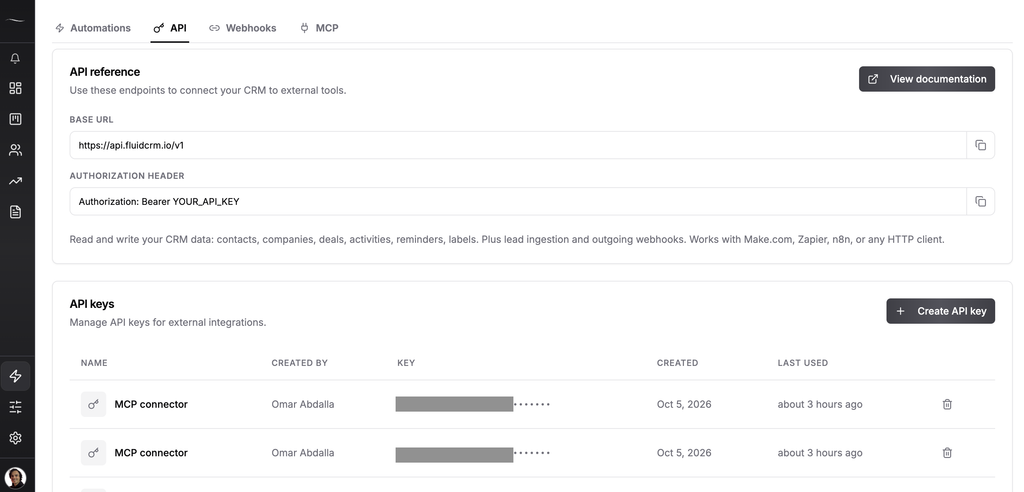
Use an HTTP Request node to send the lead to POST /ingest on the Fluid CRM API. That one call finds the contact by email or creates it, creates the deal in the stage you chose and attaches the two.
Send the Smartlead lead ID as the external ID. If the same reply arrives twice, Fluid CRM updates the deal it already made and doesn’t create another one.
Austin Verner runs a cold email agency and set up this first half. I wrote up what else an agency like his needs in my guide to the best CRM for cold email agencies.
“An easy deal view, reminders, and our interested leads from Smartlead auto-created via API. Our deal organization is 10x better.”
3. A person moves the deal
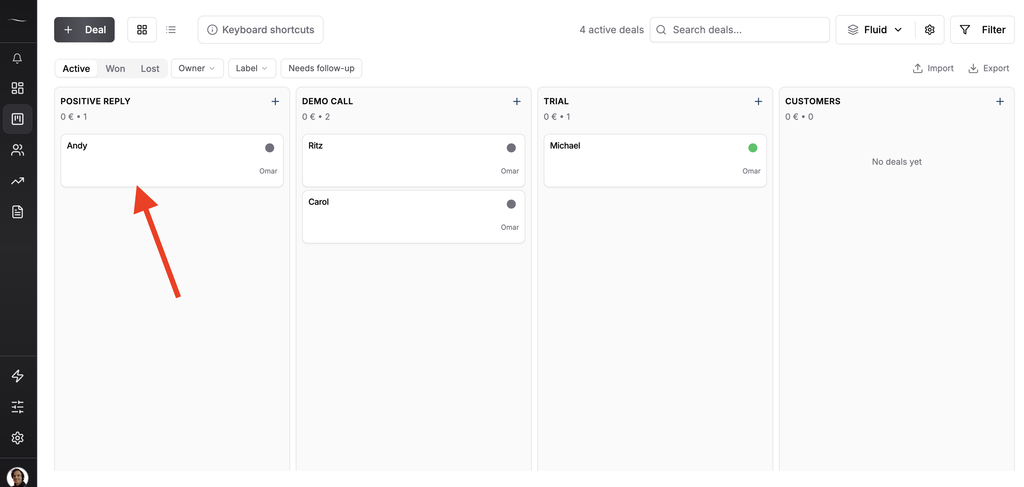
The reply shows up as a card in the pipeline. Whoever owns it reads the thread, answers and drags the card to the next stage.
4. The stage change fires a signed webhook
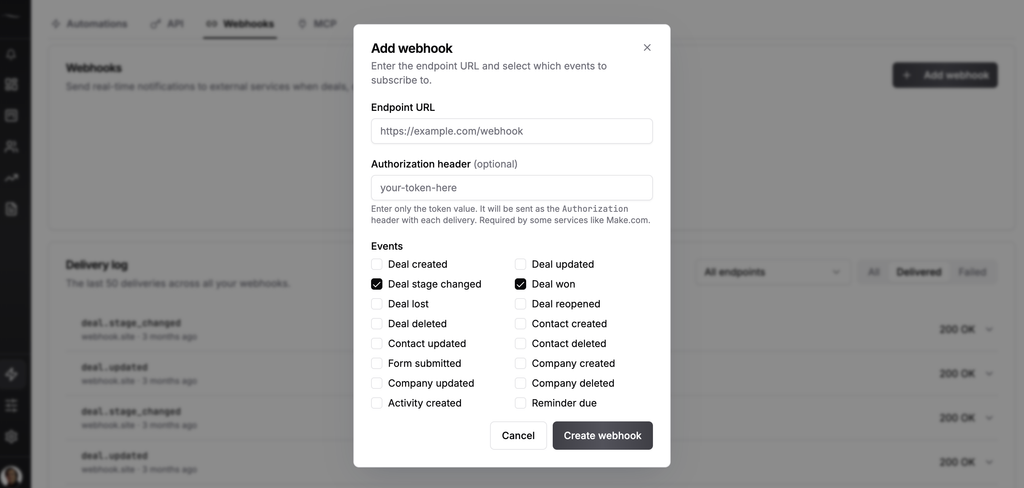
Subscribe to deal.stage_changed under Webhook Management. Fluid CRM posts the full deal to your URL, with the previous stage included and an HMAC signature in the header.
5. n8n posts to Slack
A second n8n workflow catches that webhook, checks the signature and posts to Slack when a deal reaches Call Booked. The same pattern feeds a client report, a commission sheet or a win notification.
There is no native n8n, Make or Zapier app for Fluid CRM yet. Every step above uses a plain HTTP request and a webhook URL, which is why the API docs matter more than an app listing.
How To Set Up a CRM for GTM Engineering
A CRM for GTM engineering has to be quick for the person answering replies, not only for the tools writing to it. In Fluid CRM that comes down to how you lay out pipelines and fields, and it takes about ten minutes.
One pipeline for each client, market or rep
Fluid CRM has no limit on pipelines. An agency can keep one per client, a team selling into three countries can keep one per market and a sales lead can give each rep their own.
Custom fields belong to a pipeline. The pipeline for a SaaS client can carry “Seats” and “Current tool” while the one for a recruiting client carries “Open roles”, and neither board shows the other’s fields.
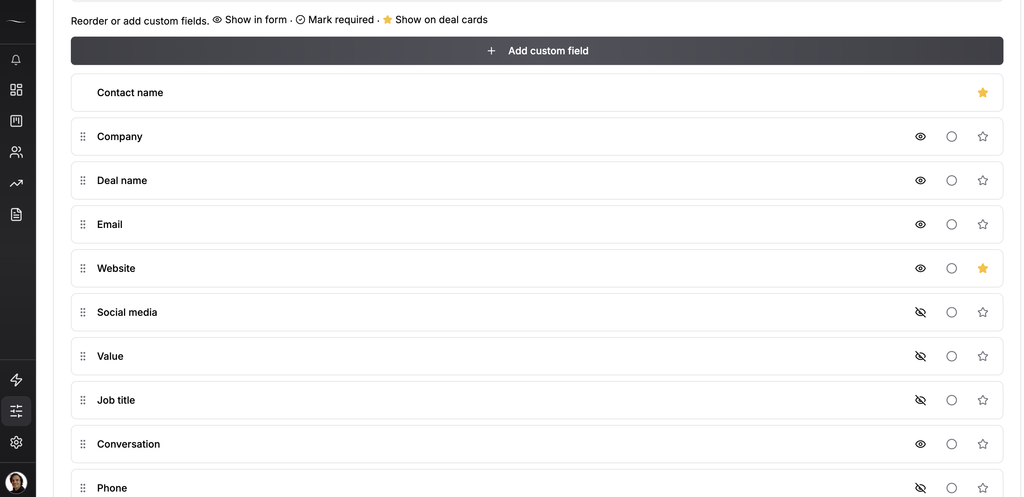
Hide the fields you don’t use
You can hide the fields you don’t need, so a deal card shows the four things you look at and nothing else. A rep working 40 replies shouldn’t scroll past empty boxes to find the one that matters.
Put the unibox link on the deal
Add a URL field and have your automation fill it with the link to that thread in your unibox. Following up becomes one loop of opening the link, replying, logging a note or an activity and moving to the next card.
Let Claude do the typing through MCP
Everything above also works through the MCP server, so you can ask for it in a sentence. With Prospeo connected to the same assistant, a request looks like this:
“Use Prospeo to find 50 ICP leads, add them as deals in the Outbound pipeline in Fluid CRM and assign them to Mia.”
The assistant pulls the leads, imports them 50 at a time with the same duplicate matching as a CSV import and sets Mia as the owner of each deal. It can also log activities, set reminders and move stages, and it can’t delete anything.
What each CRM lets Claude change is compared in the best CRMs for Claude. The other connectors worth adding are in my post on the best Claude connectors for sales teams.
The 7 Best CRMs for GTM Engineers in 2026
Each entry covers what the developer side looks like, who it suits and what it costs to get the API.
1. Fluid CRM (best for agencies and small teams choosing fresh)
Fluid CRM is a calm pipeline board with contacts, deal values and reminders behind every card. We built it with one plan, so the REST API, all 16 webhook events and the MCP server are there from the first day of the trial. What an assistant can do through that server is on our AI CRM page.
The limits are written as plain numbers, 300 reads and 60 writes a minute per key. A verified customer who builds automations said this about it.
“API for automations is well documented.”
Best for: Freelance GTM engineers, outbound agencies and small teams that want leads flowing in a day.
Not for: Anyone who needs custom objects, two-way email sync or a native n8n, Make or Zapier app. Email logging is by BCC, and integrations go through HTTP requests and webhooks.
Real pricing math: $16/seat/month, or $144/seat/year. The full reference is in the Fluid CRM API docs.
2. HubSpot (best when the company already runs on it)
HubSpot is what most GTM engineers at startups work in, and the developer side is a big reason. The API is on the free CRM, batch calls take 100 records and upserts match on any unique property.
Its Claude connector works on every plan, has no delete and caps writes at 10 records at a time. Clay, Zapier and Make all have native apps for it.
Best for: A GTM engineer joining a company that already has its contacts, marketing and reporting in HubSpot. Build on it and don’t migrate.
Not for: A two-person agency that only needs a pipeline. You’d be building around a marketing suite you don’t use.
Real pricing math: The free CRM covers up to 2 users with the API included, at 100 requests per 10 seconds and 250,000 a day.
3. Attio (best for a data model you shape yourself)
Attio is a flexible, database-style CRM with custom objects, and its API is on every plan including the free one. The limits are the most generous on this list at 100 reads and 25 writes a second.
Clay has a native two-way integration with it, so you can pull Attio records into a Clay table, enrich them and write them back. That pairing is the main reason technical startup teams choose it.
I found no batch create endpoint in its REST docs, so a large import outside Clay is one request per record. Webhooks are signed and retried up to 10 times.
Best for: A technical team that wants to model accounts, deals and its own objects exactly, and has time to build that.
Not for: A team that wants a working pipeline in the first ten minutes.
Real pricing math: Free for up to 3 seats. Plus is $44/seat/month or $35 billed annually.
4. Pipedrive (best for teams that sell by logging activities)
Pipedrive has an API on every plan, and its MCP server has no delete tools. The limits work as a daily token budget, 30,000 per seat on Lite and more on higher plans.
Three gaps matter for automation. There is no bulk create for people or deals, no documented way to make a resend safe and webhooks aren’t signed, though you can protect them with basic auth.
Best for: A sales team of 3 to 10 whose day is a list of calls and meetings, where you’re adding automation around an existing habit.
Not for: High-volume lead pushes from Clay or a scraper, where single-record writes and a token budget get in the way.
Real pricing math: The API starts on Lite, at $14/seat/month on annual billing.
5. Close (best for reps who call and email inside the CRM)
Close has calling, email and SMS built in, and the API is on all four plans. Webhooks are signed and retried for up to 72 hours, which ties Attio for the longest window here.
Close doesn’t publish its rate limits as numbers, and there is no bulk create for leads. Its MCP server has three permission levels, and the third one allows deletes.
Best for: An inside sales team doing high-volume calling, where the engineer’s job is to feed a dialer.
Not for: Teams that want to size a batch job from the docs before running it.
Real pricing math: Solo is $19/month or $9 billed annually for one user. A team needs Essentials at $49/seat/month or $35 billed annually.
6. Breakcold (best for selling through social DMs)
Breakcold markets itself to GTM engineers directly, with custom objects, a LinkedIn and WhatsApp inbox and an MCP server with 67 tools in its docs. Webhooks are signed and writes accept an Idempotency-Key header.
API and MCP calls both cost tokens from a monthly allowance, on top of a limit of 180 requests a minute per key. There is no batch create, and the MCP server can archive records and delete tasks and custom objects.
Best for: Teams whose pipeline lives in LinkedIn and WhatsApp conversations.
Not for: Teams that push large lists through the API. Every call costs tokens, so heavy use needs a budget.
Real pricing math: $99/month with one seat included, or $79.20 a month billed annually. Extra seats are $10 each.
7. Salesforce (best at enterprise size)
Salesforce handles almost any integration pattern you can draw. Batch calls take 200 records, upserts match on an External ID field and the hosted MCP server comes in separate read, write and delete versions an admin switches on.
The cost is the entry point. API access isn’t in the two lowest suites, and the hosted MCP server needs Enterprise Edition or above.
Best for: Companies above a few hundred people with a Salesforce admin, where you’re one of several people building on it.
Not for: A freelancer or a five-person agency. You’d spend the first month on setup.
Real pricing math: Pro Suite is $100/seat/month plus $25 for API access, billed annually. Core is $195/seat/month with the API included.
CRM for GTM Engineers: Frequently Asked Questions
A GTM engineer builds the systems a sales team runs on. That means lead lists, enrichment, outbound sequences and the automations that move data between tools like Clay, n8n and the CRM. The role sits between sales operations and software, and most of the work is done with APIs and no-code tools.
Most use HubSpot or Salesforce, because the company chose it before they arrived. In the State of GTM Engineering survey of 228 people, about half used HubSpot and about a third used Salesforce. The rest used smaller CRMs such as Pipedrive, Close and Attio.
Not to run automations, since the API and webhooks do that work. An MCP server helps with the one-off jobs, such as importing a list, cleaning up stages or asking what is overdue. It saves you writing a script for a task you’ll do once.
Yes, through an HTTP request to the Fluid CRM API. There is no native Clay or n8n app, so you call the ingest endpoint or the bulk create endpoint directly. The bulk endpoint takes 50 records per call and matches existing contacts and companies.
An outbound agency needs one pipeline per client, an API that takes positive replies from the sending tool and webhooks for client reporting. Fluid CRM covers all three on one plan at $16/seat/month, and the guide to the best CRM for outbound agencies on this blog compares the options. An agency whose clients are all on HubSpot should work inside their HubSpot.
Which GTM Engineering CRM Should You Pick
If the company already runs on HubSpot or Salesforce, stay there. You’ll get further building on the CRM everyone already opens than moving a team to a new one.
If you get to choose, pick on the plan the API sits on and on whether a rep will open the thing every day. For a freelancer, an agency or a team of up to 10, Fluid CRM is my pick, and a technical startup that wants custom objects and lives in Clay should take Attio. My guides to the best CRM for outbound agencies and the best sales tools for startups cover the rest of the stack.
At Fenixtal I booked 1,250+ sales calls for 50+ clients and built 12M€+ in pipeline. If you have a question about GTM engineering or your own stack, connect with me on LinkedIn and ask.
Start your 7-day free trial here, no credit card required.