

You paid for the list, the inboxes and the copy. Then the reply that says “sure, send me some times” lands in a shared inbox nobody owns, and by Thursday it’s buried.
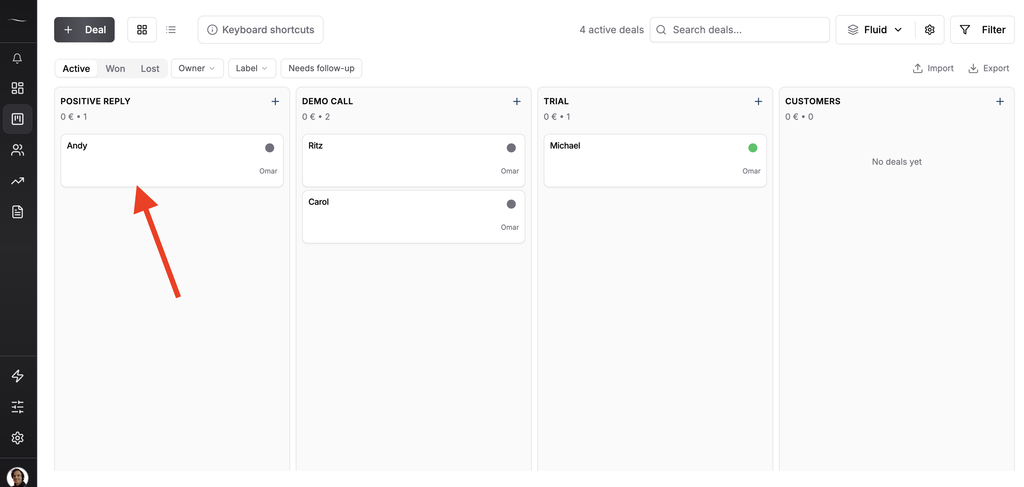
To connect Instantly or Smartlead to a CRM, send only the leads marked as interested, either by hand, through a native integration, with a webhook into the CRM’s API or through an AI assistant connected to both. Each one should become a deal with an owner and a reminder for the same day.
Your sending tool, often called a sequencer, did its job. What happens next is a CRM job, and most cold email setups have nothing built for it.
Why Positive Cold Email Replies Die in the Sequencer Inbox
Positive cold email replies die in the sequencer inbox because in most setups I’ve seen, the reply has no owner and no next step attached to it.
Work out what one reply costs you. Add up a month of your sending tool, inboxes, domains, lead data and your own hours, then divide by the positive replies that month brought in.
With made-up numbers for the example, a month that costs $600 and brings 12 positive replies makes each one $50. Use your own figures. Whatever the result is, that’s what you lose each time a reply gets no answer.
At Fenixtal, my outbound agency, I booked 1,250+ sales calls for 50+ B2B clients. The campaigns were rarely where the money leaked, and the hand-off after the reply often was.
What Should Happen in the First Hour After a Positive Reply
The first hour after a positive reply is the window I hold myself to. Sales teams call this speed to lead, and I aim for minutes with the hour as the outer limit.
A Harvard Business Review audit of inbound web leads found only 37% of companies responded within an hour. I cover it in my sales statistics post. That research was on web leads and not cold email replies, and I hold cold replies to the same clock.
Here is what should be true within that hour.
- A deal exists in your CRM for that lead
- It sits in the right pipeline and stage
- The reply text, or a link to the thread, is on the deal
- One person owns it
- A reminder is set for today
- The lead has stopped receiving the sequence
Check that last one in your sending tool’s settings before you trust it. If the lead goes quiet after your answer, my templates for a follow-up email after no response pick up from there.
Viktor Otterskog had been using Fluid CRM for outreach for a few days when he wrote this. “Reminders for action. Simplistic to ‘play the outbound game’.”
4 Ways to Set Up a Smartlead or Instantly CRM Integration
A Smartlead CRM integration or an Instantly one can be done four ways, and the right one depends on how many positive replies you get in a week.
| Route | Setup effort | How fast the deal appears | What it needs | Best for |
|---|---|---|---|---|
| By hand | None | When you remember | A daily habit | Under five positive replies a week |
| Native integration | Low | Automatic | A CRM on the sending tool’s list | Teams already on one of those CRMs |
| Webhook into the CRM’s API | Medium, once | Seconds | A middle tool and a CRM with an API | Agencies and steady volume |
| An AI assistant connected to both | Low | When you ask | Connectors on both tools | Low volume, or a daily catch-up |
By hand
You copy the lead into the CRM when the reply comes in. It works at very low volume, and it fails on the first busy week because nothing reminds you.
Native integration
Smartlead lists native integrations for HubSpot, Pipedrive, Salesforce, Zoho CRM, Attio and GoHighLevel. Instantly’s own guide points HubSpot and Salesforce users toward a connector tool for syncing activity.
If your CRM is on the list, start there. Fluid CRM isn’t on Smartlead’s list, so it uses the next route.
Webhook into the CRM’s API
A webhook is a message your sending tool fires the moment something happens, such as a lead being marked interested. A middle tool catches it and creates the deal in your CRM. This is the route I’d pick for an agency.
An AI assistant connected to both tools
If both tools have a connector for Claude or ChatGPT, you can ask the assistant to pull the interested replies and create the deals. It’s the quickest to set up.
Its limit is that it only works when someone asks. Used alone it fails the first-hour test, so treat it as a daily catch-up and not as the alarm.
How to Set Up the Webhook Route, Step by Step
The webhook route from Instantly or Smartlead into a CRM takes one sitting to set up and then needs no attention. These steps get you from a reply to a deal.
1. Decide what counts as interested
Only one kind of reply should cross over. Sending tools sort replies into categories, and on every campaign I set, only Interested goes to the CRM. This is done so I can take care of CRM hygiene and focus only on the high-leverage leads.
2. Switch on the webhook in your sending tool
In Smartlead, webhooks are set per campaign. Choose the event for a lead’s category being updated and filter it to Interested, which Smartlead’s webhook reference describes.
In Instantly, go to Settings, then Integrations, then Webhooks. Choose the event for a lead marked as interested, listed in Instantly’s webhook events guide. Instantly says webhooks need its Hyper Growth plan or above.
3. Catch it in a middle tool
Point the webhook at Make, n8n or Zapier. That tool receives the lead’s details and passes them on.
4. Map the fields
Send the email, first name, last name, company and campaign name. Add the reply text if your sending tool includes it, and the tool’s own lead ID, because you’ll need it in the next step.
5. Create the deal
Have the middle tool call your CRM’s API. In Fluid CRM, one call finds the contact by email or creates it, creates the deal in the stage you chose and links the two. The full reference is in the Fluid CRM API docs.
Send the lead ID as the external ID. If the same reply arrives twice, Fluid CRM doesn’t create a second deal.
6. Give it an owner and a reminder
A new deal needs an owner and a reminder for today, or it sits there like the reply did. In Fluid CRM both can be set automatically when the deal is created, so nobody has to remember to do it.
7. Test with one fake lead
Add your own address to a test campaign, reply to yourself and mark it interested. Watch the deal appear, then check every field.
There’s no native Make, n8n or Zapier app for Fluid CRM yet, so step 5 is a plain API call. A verified customer who builds automations noticed the same gap in their first hours of testing. “API for automations is well documented. Native Activepieces and Make integration would be a cherry on top.”
If you want the next half, where a stage change in the CRM alerts your team, it’s in my post on CRMs for GTM engineers.
What to Send to the CRM and What to Leave in the Sequencer
Send the CRM your interested leads and leave everything else in the sequencer. A CRM holding thousands of cold contacts and a few dozen real conversations hides the conversations.
Out-of-office replies, bounces and “not interested” answers are sending data. They help the next campaign and they don’t belong in a pipeline.
The reason to keep the two tools apart at all is deliverability, which I explain in why you should never send cold email from your CRM.
Austin Verner is the founder of Cold Emailers, a cold email agency, and this is his setup. “We’re capturing 100% of our interested leads.”
Here is how he described it. “An easy deal view, reminders and our interested leads from Smartlead auto-created via API.”
Instantly CRM Integration: Frequently Asked Questions
Yes, Instantly has its own built-in CRM. A separate CRM is worth connecting when your deals also come from sources other than cold email.
An Instantly HubSpot integration works through webhooks or a connector tool, which Instantly’s own guide suggests for syncing activity. Check which Instantly plan you’re on first, because webhooks are not on every plan.
Yes. Smartlead lists a native HubSpot integration. It also lists Pipedrive, Salesforce, Zoho CRM, Attio and GoHighLevel, and it has per-campaign webhooks for any CRM that isn’t on the list.
You need a middle tool unless your CRM has a native integration. Zapier, Make and n8n all do the job. The middle tool receives the webhook and makes the API call that creates the deal.
I aim for minutes and treat an hour as the outer limit. Good speed to lead is less about typing fast and more about the reply reaching a person with a reminder attached, on the day it arrives.
Which Smartlead or Instantly CRM Setup to Pick
The right Smartlead or Instantly CRM setup depends on your reply volume and who needs to see the pipeline.
| Your situation | What I’d set up |
|---|---|
| Under five positive replies a week, selling alone | By hand, with a reminder on every deal |
| Your CRM is on your sending tool’s native list | The native integration |
| An agency, or more than a handful of replies a day | The webhook route |
| You already work in Claude or ChatGPT all day | The assistant as a daily catch-up, on top of one of the above |
If you’re still choosing the CRM itself, I compare them in best CRM for cold email agencies.
Fluid CRM is a simple sales pipeline with the API, webhooks and reminders this setup needs. It’s one plan at $16 per seat per month or $144 per seat per year, charged in dollars, euros or pounds depending on where you log in.
Start your 7-day free trial here, no credit card required.
3 thoughts on “Instantly CRM Integration: 4 Ways (Smartlead Too)”
Comments are closed.