

Search for a CRM for a service business and you will see a dispatch app for plumbers next to a sales platform for agencies. Both are right answers, for two different businesses, and picking from the wrong half costs you a wasted trial.
The right CRM for a service business depends on how you sell. A field service business that sends crews to jobs needs scheduling, dispatch and invoicing software such as Jobber. A B2B service business that sells through conversations needs a sales pipeline such as Fluid CRM.
We built Fluid CRM for the second group only. If you are in the first group, the next two sections will send you somewhere better, and I would rather you find that out in two minutes than in a trial.
The Two Kinds of Service Business and the CRM Each One Needs
A CRM for a service business is the system that holds your customers and the next thing you owe each of them. What that next thing is depends on the kind of service you sell.
For a field service business the next thing is a job. Someone calls, you quote, a crew gets booked, the work is done at an address and an invoice goes out, often the same day.
For a B2B service business the next thing is a conversation. A referral comes in, you have a call and send a proposal, then three weeks of follow-up decide whether you win a client worth a year of revenue.
| Field service business | B2B service business | |
|---|---|---|
| Who it is | Plumbers, HVAC, electricians, cleaners, landscapers | Agencies, consultancies, IT services, bookkeeping firms, B2B trainers |
| How work arrives | Calls and booking requests, many per week | Referrals, intros, inbound forms and outbound, a few per month |
| What a sale looks like | A quote accepted in hours or days | Several conversations and a proposal over weeks |
| What the day runs on | The schedule and the map | The list of people you owe a reply |
| Software it needs | Scheduling, dispatch, job tracking, invoicing, payments | Visual pipeline, reminders, notes, contacts and companies |
| Tools built for it | Jobber, Housecall Pro | Fluid CRM, Pipedrive, HubSpot |
Three questions sort most businesses in under a minute.
- Do you send people to a customer’s address to do the work?
- Do you need the invoice and the payment in the same tool as the customer record?
- Does a typical sale close in one or two contacts?
Two or three yes answers put you in field service. Three no answers mean you sell by conversation, and the rest of this post is written for you.
There is a third case. If you are a B2B firm that wants time tracking, project budgets and billing in the same tool as the pipeline, that is a different kind of platform, and I covered it in my guide to choosing a CRM for professional services.
Field Service Businesses Need Scheduling Software, Not a Sales CRM
A field service business should buy field service software, and a sales CRM will let it down on day one. The sales CRM has no calendar of crews, no route for the day, no job sheet and no card payment at the door.
Jobber is built for exactly that work. It handles quotes, scheduling, dispatch, invoices and payments, and its Core plan starts at $29 a month billed annually for one user.
Housecall Pro covers the same ground for home service companies. Its Basic plan starts at $59 a month billed annually for one user, and both tools offer a 14-day free trial with no credit card required.
Fluid CRM does none of that. It has no scheduling, no dispatch and no invoicing, so a plumber who signs up for it will be back on a paper diary within the week.
There is one exception. Some trades win their biggest work by bid, like a commercial cleaning contract or a building project that takes months to land, and that part of the business is a real sales pipeline.
If that is you, I wrote separate guides on a CRM for a cleaning business and a CRM for construction companies. Both keep the job software and the sales pipeline as two tools.
What a CRM for a B2B Service Business Has To Do
B2B service businesses lose deals in the weeks when client work is busiest. The person who sells is usually the person who delivers, so every hour spent on a client is an hour the open proposals sit untouched.
I used to work as a cook, and the closest thing I know is a pot on the back burner during a rush. Nobody decides to burn it, the front of the kitchen just gets loud and you remember when you smell it.
At Fenixtal, my outbound agency, I booked 1,250+ sales calls for 50+ B2B clients, and most of them were service businesses like agencies, consultants and dev firms. I handed them warm leads and then watched a good share of those leads die, because the sheet or the CRM holding them stayed closed during delivery weeks.
None of those owners were lazy. They had a tool that was unpleasant to open, so they opened it on quiet days, and quiet days are the days you least need it.
Nicolas Virtsonis, who has run a specialist B2B marketing agency and a home services business, has been on both sides of the split in this post. “I’ve tried many CRMs over the years, both as a specialist B2B marketing agency and as a home services business… They are all overly complex and simple entries take up your time.”
How many proposals do you have out right now, and when did you last speak to each of those people? If you had to open your inbox to answer, the pipeline lives in your head, and your head is busy with client work.
So a CRM for a B2B service business has a short job list. It has to show every live conversation on one screen, tell you who is waiting on you today and take under a minute to update between client calls.
A board you will still open in a delivery week
The first test is whether you will open it on your busiest day. You should see every open deal, its stage and its value on one calm screen, with no setup banners and no menus to dig through.
Four or five stages are enough for most service firms, something like New, Call Held, Proposal Sent, Verbal Yes and Won.
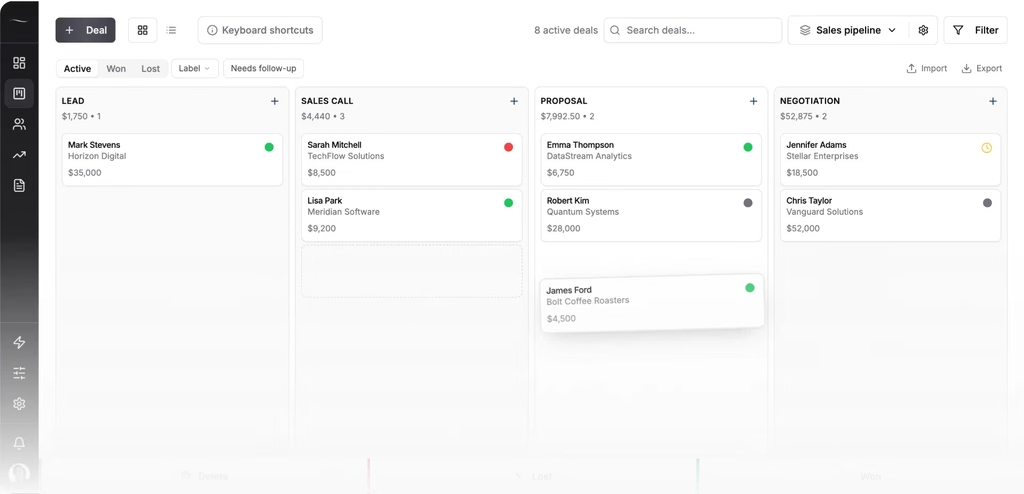
Reminders support that habit. Put a date on every open deal, even if it is three weeks out, and Fluid CRM emails you a daily digest of what is due, which covers the days you do not log in.
A stage or a second pipeline for the clients you already have
In a service business most new revenue comes from people who already paid you once. Renewals, extra projects and referrals need their own board, because their stages have nothing in common with a cold lead.
James, a small business owner who uses Fluid CRM, found the limit here and the way around it. “The tool is designed around deals, rather than contacts, but a work-around is to set up deals for contacts that include an on-going relationship step and you can include comments to that stage of the ‘deal’.”
That is an honest description of how it works. He was a few weeks in when he wrote it, and he added this. “I’ve only had it for a few weeks but it’s already made a significant impact in the way in which I’m interacting with my prospects and clients.”
The other route is a separate board. Tim Chorlton, a one-man band with one external salesperson, uses multiple pipelines. “You can set up multiple pipelines and move a ‘deal’ between them.”
One place instead of four
Service owners rarely have no system, they have four, and the client’s details are in whichever one they did not open.
Doland White is an executive coach and the founder of DWC. “Before Fluid, I was tracking prospects, clients and podcast guests across Google Contacts, LinkedIn, spreadsheets and marketing platforms. Fluid ended the wasted effort.”
Notes that get logged when you have no time to log them
The update after a call is the step that gets skipped in a delivery week. This is where an AI assistant earns its place, as long as it can reach the CRM.
Fluid CRM connects to Claude, ChatGPT and other assistants through MCP, which is a standard way for an assistant to use your tools. You can paste your call notes into the chat and ask it to log them on the deal, move the stage and set a reminder for Thursday.
The assistant can find, create and update records, and it cannot delete anything. Fluid CRM does not send email to your contacts, so if you want the assistant to send the follow-up, that happens through its own Gmail connection and the permission you give it there.
CRMs To Shortlist for a B2B Service Business
Three sales CRMs cover most B2B service businesses under ten people, and they differ in what else they try to be. I have kept this short on purpose, because the longer lists already exist in my guides to the best CRM for consultants and the best CRM for small agencies.
Fluid CRM
Fluid CRM is a visual sales pipeline for B2B teams of one to ten. It has one plan with everything in it, at $16 per seat per month or $144 per seat per year, with a 7-day free trial and no credit card required.
You get unlimited pipelines, follow-up reminders with a daily digest, lead capture forms, email logging by BCC, revenue forecasting, an API with webhooks and the MCP connection. Pick it when your problem is that the pipeline never gets opened.
Pipedrive
Pipedrive is the established choice for a service firm with a dedicated salesperson and a higher volume of deals. Its Lite plan is $14 per seat per month billed annually or $24 billed monthly.
Full two-way email sync sits on the Growth plan and above, at $39 per seat per month billed annually or $49 billed monthly. Choose Pipedrive over Fluid CRM if you need your inbox synced both ways or deeper sales reporting.
HubSpot
HubSpot fits a service business that wins clients through content and email marketing and wants sales and marketing in one system. The free tools cover up to two users, and Sales Hub Starter is $20 per seat per month billed monthly.
Sales Hub Professional is $100 per seat per month billed monthly, plus a one-time $1,500 onboarding fee. Choose HubSpot over Fluid CRM if your marketing email and your sales pipeline have to live in one system, because Fluid CRM has no marketing automation.
Where Fluid CRM stops for a service business
Fluid CRM is a sales tool, and it stops at the point where a deal is won. In a service business that is also the point where most of the relationship starts, so you should know this before you sign up.
A G2 reviewer who works in marketing and advertising put it plainly. “I do wish the app focused on the entire client cycle (post-sales communications), but that is not what it is intended or marketed for.”
Another verified customer, whose work is looking after existing clients, tested it for exactly that. “As it stands, you have to think outside the box to make that work, but you can.”
One way to do it is what James did, an ongoing stage for existing clients. It works for renewals and check-ins, and it is not account management software.
The rest of the list is short. Fluid CRM has no invoicing, no project management, no two-way inbox sync, no dialer and no marketing automation, and it is built for teams of one to ten.
All five tools side by side
| Tool | Built for | What it handles | Starting price | Trial |
|---|---|---|---|---|
| Jobber | Field service | Quotes, scheduling, dispatch, invoices, payments | $29/month billed annually, one user | 14 days |
| Housecall Pro | Home service | Scheduling, dispatch, invoices, payments | $59/month billed annually, one user | 14 days |
| Fluid CRM | B2B service, 1 to 10 people | Pipeline, reminders, forms, AI assistant access | $16/seat/month or $144/seat/year | 7 days, no credit card required |
| Pipedrive | B2B service with a sales hire | Pipeline, email sync on Growth, reporting | $14/seat/month billed annually | 14 days |
| HubSpot | B2B service that sells through marketing | CRM, email marketing, forms | Free tools for two users | Free plan |
You Might Not Need a CRM for Your Service Business Yet
Plenty of service businesses do not need a CRM yet, and buying one early mostly gives you a second place to feel behind. A spreadsheet or a notebook is fine while all of these are true.
- You are the only person who sells
- You have fewer than 20 active deals at a time
- Your leads come from one source, such as referrals
- You open your list at least twice a week without being reminded
The signal that it has tipped is forgetting. If you found a proposal last month that you never followed up on, or two people in the business contacted the same lead, the list has outgrown your memory.
If you are not sure which side you are on, my post on whether you need a CRM goes through it in more detail.
CRM for Service Business: Frequently Asked Questions
A CRM for a service business is the system that holds your customers and the next action you owe each one. For a field service business that means jobs, schedules and invoices. For a B2B service business it means a sales pipeline with deals, stages, notes and reminders.
Jobber includes a customer database, so it does the CRM job for a field service business. Its main work is quoting, scheduling, dispatch and invoicing for crews who go to a customer’s address. It is not built for a long B2B sale with several conversations and a proposal.
A plumber can use one to track larger quotes, such as a commercial contract that takes weeks to win. It will not handle the daily work, because a sales CRM has no crew schedule, no dispatch and no invoicing. For booked jobs, field service software such as Jobber or Housecall Pro is the right tool.
Small agencies, consultancies and IT service firms mostly use a sales CRM with a visual pipeline, such as Fluid CRM, Pipedrive or HubSpot. The choice depends on whether you need inbox sync, marketing features or only a pipeline with reminders. Many start on a spreadsheet and switch when follow-ups begin to get forgotten.
Not always. If you have a handful of referrals a year and you reply to each one the same day, a list is enough. A CRM starts to pay for itself when referrals arrive while you are busy and some of them wait a week for an answer.
Which CRM a Service Business Should Start With
Start with the kind of business you are. If you send crews to jobs, buy field service software such as Jobber or Housecall Pro and do not look at a sales CRM at all.
If you sell a B2B service through conversations and proposals, you need a pipeline you will open in a busy week. Fluid CRM is built for that and nothing else, with a calm board, a reminder on every deal and an AI assistant that can do the typing.
Start your 7-day free trial here, no credit card required.