

You finish a call, open the deal and hit a wall of required boxes before the CRM lets you save. So you tell yourself you’ll do it later, and by Friday the pipeline describes a week that never happened.
CRM data entry is every field, note and stage change someone types to keep a deal current. Cut it in two moves. Delete the fields and stages nobody reads, then let forms, imports, BCC email logging, an API, automations and your own AI assistant do the typing. Fluid CRM supports all six on its one plan.
What CRM Data Entry Is and Why It Piles Up
CRM data entry is the typing that keeps your sales records true. It comes in four kinds, and each one has a different fix. If you want to see what those records are, read our plain guide to the CRM database.
- New leads. A name, a company, an email and where they came from.
- Updates. The stage a deal is in, what was said and what happens next.
- Email. Copying a thread into the deal so the history sits in one place.
- Cleanup. Fixing duplicates, old stages and half-filled records.
Salesforce’s State of Sales report found that reps spend 28% of their time selling. The rest goes to other tasks, and the report names deal management and data entry among them.
The typing piles up for a boring reason. Every field in your CRM was added on a day when it sounded useful, and almost nobody goes back to remove one.
Most advice stops at “be more disciplined”, which puts the blame on the person. I think the tool earns most of it, and I wrote about the wider pattern in why your team won’t use the CRM. This post is about the typing itself.
The 30-Second CRM Deal Update Test
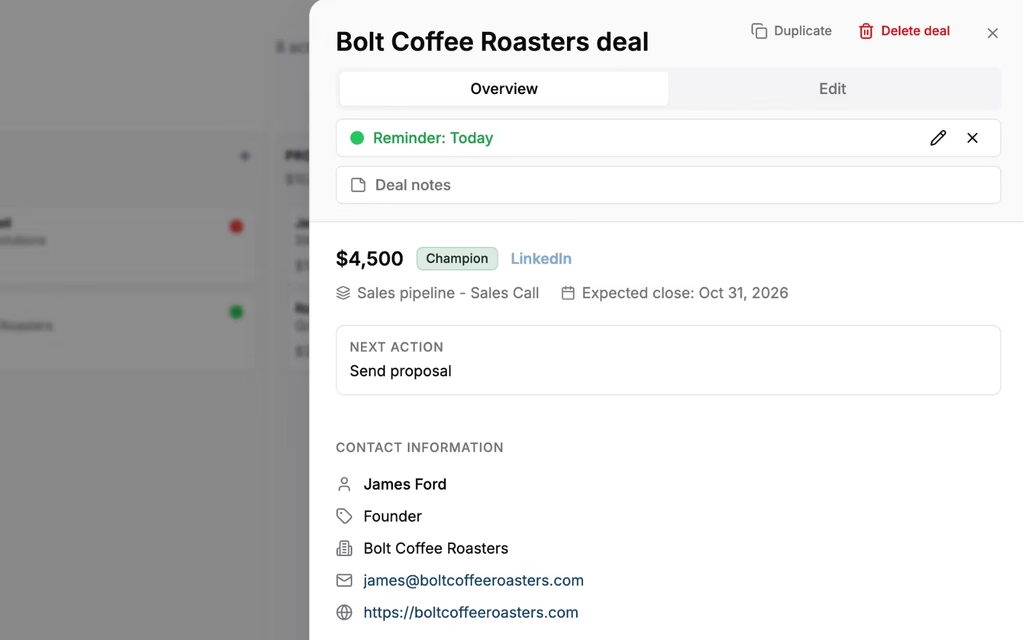
For a small team, a CRM is quick to keep up to date when new leads arrive without anyone typing them and a deal update after a call takes seconds. Automatic email logging is one way to get there, and a short update with few required fields is the other.
Before you change anything, measure it. After your next sales call, start a stopwatch and do the three things every deal update needs.
- Move the deal to its new stage.
- Write one line about what was said.
- Set the reminder for the next step.
Stop the clock when all three are saved. Count the clicks and count the boxes the CRM forced you to fill before it let you leave.
I use 30 seconds as my line. It isn’t a number from a study, it’s what I can stand to do ten times a day without starting to skip it.
Now be honest with yourself. When did you last update a deal the same hour the call ended, and not on a Friday afternoon from memory?
If your update takes two minutes, no amount of discipline will save it. You will do it on the quiet days and skip it on the busy ones, and the busy days are when the pipeline matters.
Delete CRM Fields Before You Automate Data Entry
The cheapest keystroke is the one nobody has to make. So before you connect a single tool, open your CRM settings and start removing things.
Fields nobody has read in 90 days
Go through your deal fields one at a time and ask who last used each one to make a decision. If the answer is nobody in the last 90 days, delete it or hide it. The 90 days is my own rule of thumb, and it’s long enough to cover one full quarter.
“Lead source detail”, “Competitor mentioned” and “Decision style” are the usual suspects. They were added for a report that got looked at once.
Stages that record activity instead of progress
A stage should mean the buyer did something. “Called twice” and “Sent follow-up” are things you did, and they belong in a note. Every extra stage is one more drag on every deal that passes through.
In my experience five to seven stages is plenty for a small team. If you have twelve, half of them are a to-do list dressed up as a pipeline.
Required fields
A required field is a toll on every save. It was meant to protect the data, and what it does in practice is teach people to type “n/a” and “tbd” to get past it.
Keep a field required only when a deal can’t move without it, which for most small teams means the contact and the deal name.
Fenixtal, my outbound agency, booked 1,250+ sales calls for its clients, and I watched what happened to those leads next. Most of those clients either tracked the leads in a messy spreadsheet or paid for a CRM nobody wanted to open, and the leads sat untouched either way.
One small-business reviewer in our study of 1,258 negative CRM reviews said it in one line. “I started the set up it was time intense so only put a small amount of information in and then stopped using it.”
6 Ways to Get CRM Data Entry Off the Keyboard
Once you’ve deleted the fields nobody reads, the CRM data entry that’s left is data you need. The job now is to make something other than your fingers enter it, starting with the fix that takes the least setup.
- Lead capture forms remove the typing of every website lead.
- CSV import removes retyping a list one row at a time.
- BCC logging or inbox sync removes copying emails into deals.
- An API or webhook removes re-entering leads that start in another tool.
- Automations remove the reminders and log entries you repeat on every deal.
- An AI assistant removes the typed update after a call.
Each one is explained below, with how Fluid CRM and other CRMs handle it.
1. Lead capture forms that create the deal
A form on your website already has the lead’s name, email and message. A form that belongs to the CRM turns each submission into a contact and a deal in the right pipeline, with nobody copying it across.
Fluid CRM includes lead capture forms you can embed on any page. One honest limit is that answers to your custom questions are added to the deal’s notes and aren’t stored as separate fields, so you can’t filter on them. HubSpot’s forms tool is free to start and sends each submission into its CRM the same way.
I walk through the build in how to create a lead capture form.
2. Import instead of retyping
If leads reach you as a list, never type them in one by one. A spreadsheet from an event, an export from LinkedIn or a list from a data tool can all go in as one CSV file.
Fluid CRM imports contacts and deals from a CSV and skips duplicate contacts by email. Almost every CRM has an import, so the question to ask is how many tries it takes to get the columns to match.
3. Log email by BCC or sync the inbox
Copying emails into a deal by hand is the most thankless typing there is. There are two ways out, and they are not equal.
The simple way is BCC. You add your CRM’s address in the BCC line and the email files itself against the matching deal. Fluid CRM works this way, and it has no two-way inbox sync, so replies don’t log themselves.
The full way is inbox sync, where the CRM reads your mailbox and logs every thread. Salesflare and Attio include that on every plan, and Pipedrive includes two-way sync from its Growth plan.
4. An API or webhook from where the lead is born
Many leads start life in another tool. A cold email reply in Smartlead or Instantly is the common one for agencies, and a booked call in your calendar tool is another.
Tools like these can send a webhook, a short message fired the moment something happens. A connector such as Make or n8n catches it and calls the CRM’s API, which creates the contact and the deal. Fluid CRM’s API can create up to 50 records in one request and it sends 16 webhook events of its own.
This is the fix with the most setup, and it’s worth it once leads arrive every week. If you’re choosing a tool for this, read the three questions in CRM with API first.
5. Automations for stage changes and reminders
Some typing is the CRM making you do its bookkeeping. Setting a first reminder on every new lead is the best example, because it’s the same action every time.
Fluid CRM has 8 in-app automations. One sets a reminder on every new lead from a form or the API, one writes each stage change into the deal’s activity log and one moves a deal between pipelines with its history attached. Pipedrive’s automations start on its Growth plan.
6. An AI assistant that writes the update for you
This is the newest fix and the one closest to how people talk. You tell an assistant what happened in a sentence, and it writes the update into the CRM for you.
It works through MCP, an open standard that lets an assistant use your other software. Fluid CRM works with Claude and ChatGPT this way. There’s a plain-language explainer in what is an MCP server.
The assistant can create and update records, and it can’t delete anything. It only acts when you ask, so it won’t notice a stalled deal by itself.
The six methods side by side
| Method | What it removes | Setup effort | Fluid CRM | How other CRMs handle it |
|---|---|---|---|---|
| Lead capture forms | Typing in website leads | Low | Included | Free in HubSpot, a paid add-on on Pipedrive’s lower plans |
| Import | Retyping lists | Low | Included | On every Pipedrive plan |
| Email logging | Copying threads | None for BCC | BCC only | Automatic in Salesflare and Attio on every plan, two-way sync from Pipedrive’s Growth plan |
| API and webhooks | Leads from other tools | Highest | Included | Varies by vendor |
| Automations | Repeated reminders and logs | Low | 8 included | From Pipedrive’s Growth plan |
| AI assistant | Typed updates after a call | Low | Claude and ChatGPT | Varies by vendor |
One G2 reviewer in information technology and services described what the result should feel like. “I don’t need to click a hundred times to perform a simple action.” The same review calls the job “registering, tracking and moving deals across stages without having to deal with slow, overloaded interfaces.”
When Manual CRM Data Entry Is Still the Right Call
Some CRM data entry is worth doing by hand, and there are three cases where automating it costs more than it saves.
The one line you write after a call is worth typing. Only you know that the buyer went quiet when price came up, and no form or webhook will ever capture it. Protect that line and remove the typing around it.
Small volume is the second case. My rule of thumb is that under about ten new leads a month, an API setup costs more time than it saves. Type them in, or use the form and stop there.
The third case is a team that lives in its inbox all day. If most of your selling happens in long email threads, a CRM built around inbox capture will fit you better than Fluid CRM. Salesflare is the clearest example, at $29 per user per month billed annually.
Fluid CRM has its own gaps here. There’s no call recording, no contact enrichment and no inbox sync, and a few edits still take more clicks than they should. What it does well is the daily update. Here’s how that works in a CRM for small sales teams.
FAQ
CRM data entry is the work of typing lead details, deal updates, emails and notes into a CRM so the records match what is happening in real life. It covers adding new leads, changing stages, logging conversations and cleaning up old records.
Delete first. Remove the fields nobody reads, the stages that only record activity and the required boxes that aren’t needed. Then move what is left away from the keyboard with lead forms, CSV imports, email logging, an API, automations and an AI assistant.
Most of it can. New leads can arrive through forms, imports and an API, emails can log by BCC or inbox sync, and reminders can be set by automations. The short note about what a buyer said on a call still needs a person, or a person telling an AI assistant.
A CRM is quick to keep up to date when new leads arrive through a form, an import or an API with nobody typing them, and a deal update after a call takes seconds. There is no official number, and I use 30 seconds as my own line for moving the stage, writing one note and setting the next reminder.
No. Fluid CRM logs email by BCC, which means you add an address in the BCC line and the email is filed against the deal. It does not have two-way inbox sync, so replies are not logged by themselves.
What to Delete From Your CRM This Week
Start with the stopwatch. Time one deal update today, then remove every field nobody has read in 90 days and make all but two of the rest optional.
After that, pick the one method from the table that matches where your leads come from and set it up. We built Fluid CRM so that a deal update takes seconds, with every method above on one plan at $16 per seat a month or $144 per seat a year.
Start your 7-day free trial here, no credit card required.