

Your contacts are spread across your phone, your Gmail and a spreadsheet someone made last spring. Finding a phone number is rarely the problem. The expensive part is the person you meant to call back on Thursday and didn’t.
Contact management software keeps the people you work with and their history in one place. Google Contacts is enough if you only need to find people. If you sell to them, pick a tool that puts a next step on each one, like Fluid CRM ($16 per seat a month), Less Annoying CRM ($15) or Bigin ($9).
Contact Manager vs CRM: Which One Do You Need
A contact manager is a shared address book. It stores names, emails, phone numbers, the company each person works at and notes about them, so anyone on the team can find someone in a few seconds.
A CRM stores the same people and adds what you are trying to do with them. It holds the deal, what it is worth, which stage it is in and the date of the next step, and it tells you on that date. Our guide to what a CRM is covers the rest of what one does.
Most small B2B teams that search for contact management software don’t have an address book problem. They have a next step problem. An address book tells you who someone is, and it never tells you who to call today.
Before Fluid CRM I ran Fenixtal, an outbound agency that set up sales calls for B2B companies. The leads that died after those calls weren’t lost because a client misplaced an email address. They died because nobody tracked them, in spreadsheets nobody kept up or in CRMs nobody liked opening.
| What you need to do | Contact manager | CRM |
|---|---|---|
| Find someone’s phone number | Yes | Yes |
| Read the last conversation | Sometimes, as a note | Yes, in date order |
| Know who to contact today | No | Yes |
| See what a deal is worth | No | Yes |
| Hand a client to a teammate | Only the details | The details and the history |
If you have never used either, our guide to the CRM database shows how people, companies and deals link together underneath.
How to Choose Contact Management Software
Answer four questions about the people in your list.
- Do you sell to them? If any of them could pay you this quarter, you need to see the deal next to the person.
- Does more than one person talk to them? If yes, a teammate has to read the history without asking you.
- Does anything have to happen on a date? A callback, a renewal or a proposal follow-up needs a reminder, not a note.
- How many contacts will you have in a year? Some tools cap contacts or records by plan, so a list of 3,000 can push you up a tier.
Three no’s on the first three means a contact manager is enough, and a free one will do. One yes means you want a simple CRM with contacts inside it, which is what most of the tools below are. The fourth answer tells you which plan to price.
The 8 Best Contact Management Software Tools at a Glance
Each price is on monthly billing, on the plan a small team would start on, so the columns compare like with like. Annual prices are in each review below. We built Fluid CRM, and its price in the table is on monthly billing too.
| Tool and plan | Best for | What it limits | 3 seats a month | 5 seats a month |
|---|---|---|---|---|
| Fluid CRM, one plan | A team that sells to its contacts | Nothing by plan | $48 | $80 |
| Less Annoying CRM, one plan | A team that works contact by contact | Nothing by plan | $45 | $75 |
| Bigin, Express | The lowest paid price | Records (50,000) and pipelines (3) | $27 | $45 |
| Capsule, Starter | A team that wants contacts and projects together | Contacts (30,000) | $66 | $110 |
| HubSpot, Sales Hub Starter | A team that will add HubSpot marketing later | Features by plan | $60 | $100 |
| folk, Standard | Relationship work without a pipeline | Features by plan | $90 | $150 |
| Copper, Basic | A team that lives in Google Workspace | Contacts (2,500) | $87 | $145 |
| Google Contacts | Finding people, nothing else | No team features | $0 | $0 |
“What it limits” is the line most lists skip, and it decides which plan you end up on. A cap of 2,500 contacts is plenty for 300 clients, but it is gone the day you import a trade show list.
Bigin counts every row as a record, including contacts, deals, activities and notes, so its 50,000 fills faster than the number suggests.
The 8 Tools, Reviewed for a Team of 3 to 5
1. Fluid CRM (best for a team that sells to its contacts)
Fluid CRM is a sales CRM with one plan at $16 per seat a month or $144 per seat a year, with every feature included. There is a 7-day free trial with no credit card required.
- Best for: a team of 1 to 10 that sells by conversation and wants every contact tied to a deal with a next step.
- Not for: a team that keeps thousands of people it never sells to, like a newsletter list or a member directory.
- Cost for 3 seats: $48 a month, or $432 a year on annual billing.
- Cost for 5 seats: $80 a month, or $720 a year on annual billing.
Contacts are unlimited, and creating a deal creates its contact and company for you, so nobody types a person in twice. Custom fields work on contacts and companies as well as deals, and a CSV import takes up to 10,000 rows per file.
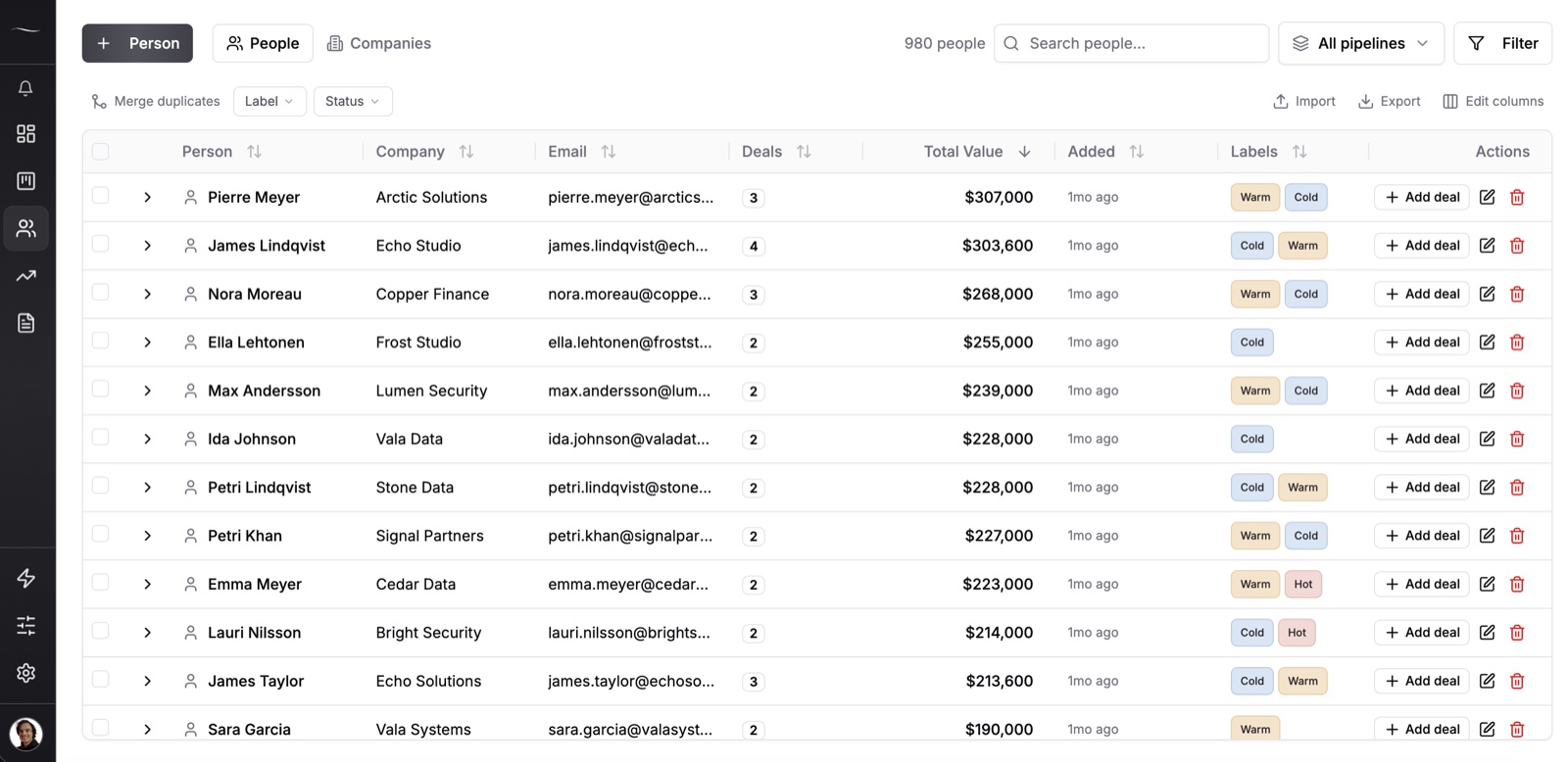
The contacts page shows each person’s company, open deals and total value in one row. Each deal can hold one reminder, and a daily digest email lists what is due that morning.
Two limits matter for this choice. Reminders are on deals, not on contacts, so a person with no deal has no reminder. Each deal also holds one contact, so a buying committee of three goes in the notes.
Tim Chorlton is a one-man band with one outside salesperson, and he had gone back to spreadsheets after trying many CRMs. He keeps the warm leads in Fluid and moves the ones that stall into a separate pipeline, which he exports to his marketing CRM.
He ended his review with a recommendation for people like him.
“So, if you want a CRM that is low touch but highly flexible, I would say give this a try.”
2. Less Annoying CRM (best for a team that works contact by contact)
Less Annoying CRM has one plan at $15 per user a month, with no tiers and nothing held back for a higher plan. The free trial is 30 days with no credit card.
- Best for: a team whose day starts from a list of people and tasks rather than a deal board.
- Not for: a team that wants a discount for paying a year ahead, since there is no annual plan.
- Cost for 3 seats: $45 a month, or $540 over a year.
- Cost for 5 seats: $75 a month, or $900 over a year.
It is the closest thing on this list to a contact manager that grew a pipeline. There is no hard contact cap, and its pricing page suggests staying under 50,000 contacts and companies in total. We compared the two one-plan tools side by side in Fluid CRM vs Less Annoying CRM.
3. Bigin by Zoho (best for the lowest paid price)
Bigin is Zoho’s small-business CRM. Express costs $9 per user a month billed monthly, or $7 on annual billing, and there is a free plan for one user with 500 records.
- Best for: a team that wants the cheapest paid seat and may move to Zoho CRM later.
- Not for: a team that logs a lot of activity, because notes and activities use up records too.
- Cost for 3 seats: $27 a month, or $252 a year on annual billing.
- Cost for 5 seats: $45 a month, or $420 a year on annual billing.
Express allows 3 pipelines and 50,000 records. Premier, at $15 monthly or $12 on annual billing, raises that to 5 pipelines and 100,000 records.
4. Capsule (best for a team that wants contacts and projects together)
Capsule is built around contacts first, with sales and projects attached to them. Starter is $22 per user a month billed monthly, or $18 on annual billing.
- Best for: a team that tracks delivery work for the same people it sells to.
- Not for: a team of three that hopes to stay free, since the free plan stops at 2 users and 250 contacts.
- Cost for 3 seats: $66 a month, or $648 a year on annual billing.
- Cost for 5 seats: $110 a month, or $1,080 a year on annual billing.
Capsule’s plans are defined by contact limits. Starter holds 30,000 contacts, and Growth ($40 monthly, $36 annual) holds 60,000 and adds multiple sales pipelines, workflow automations and email sync.
5. HubSpot (best for a team that will add HubSpot marketing later)
HubSpot has a free CRM for up to 2 users. Sales Hub Starter is $20 per seat a month, and Professional is $100 per seat monthly or $90 on annual billing, with a required one-time onboarding fee of $1,500.
- Best for: a team that already uses HubSpot for email or forms and wants contacts in the same place.
- Not for: a team of five that wants to stay free, since the free plan covers 2 users.
- Cost for 3 seats: $60 a month on Starter.
- Cost for 5 seats: $100 a month on Starter.
The contact records are good and the free plan is real. Moving from Starter to Professional for five people costs $5,400 a year on annual billing, plus the $1,500 fee in year one.
6. folk (best for relationship work without a pipeline)
folk feels like a shared address book with enrichment and email campaigns built in. Standard is $30 per member a month, or $24 on annual billing, and there is no free plan.
- Best for: a team that manages investors, partners or a network more than a sales pipeline.
- Not for: a team that needs deals and an API, which start on Premium ($60 monthly, $48 annual).
- Cost for 3 seats: $90 a month, or $864 a year on annual billing.
- Cost for 5 seats: $150 a month, or $1,440 a year on annual billing.
Standard includes contact enrichment, a LinkedIn extension and email and calendar sync, with monthly limits on enrichments and messages.
7. Copper (best for a team that lives in Google Workspace)
Copper is built to sit inside Gmail and Google Workspace. Basic is $29 per seat a month billed monthly, or $23 on annual billing.
- Best for: a team that answers clients from Gmail all day and wants contacts built from those threads.
- Not for: a team with a big list, since Basic stops at 2,500 contacts.
- Cost for 3 seats: $87 a month, or $828 a year on annual billing.
- Cost for 5 seats: $145 a month, or $1,380 a year on annual billing.
Professional ($69 monthly, $59 annual) raises the cap to 15,000 contacts and adds workflow automation and reporting. A growing list pushes you up a plan here faster than anywhere else on this list.
8. Google Contacts (best for finding people, nothing else)
Google Contacts is free with any Google account, and it is probably where half your contacts already are. It syncs to your phone and fills in addresses when you write an email.
- Best for: one person who only needs to find a phone number or an email address.
- Not for: a team that needs shared history, deal values or a reminder about who to contact next.
- Cost for 3 seats: $0.
- Cost for 5 seats: $0.
It is the honest baseline for this list. If you want a shared list without paying yet, our client list template is the step between Google Contacts and a CRM.
Free vs Paid Contact Management Software for a Team
Free plans on this list are capped by users, so a team of 3 to 5 pays for almost everything here.
| Tool | Free plan limit |
|---|---|
| HubSpot | 2 users |
| Capsule | 2 users and 250 contacts |
| Bigin | 1 user and 500 records |
| Google Contacts | Free, no team features |
| Fluid CRM, Less Annoying CRM, folk, Copper | No free plan, free trial only |
Free is the right choice for one person with a few hundred contacts and nothing that has to happen on a date. Once two people share clients, or a callback date starts to matter, one lead that dies untracked costs more than a year of $16 per seat a month.
If you want the smallest paid tool and no extras, our list of the best lightweight CRMs goes deeper on that one question.
How to Move Your Contacts Into One Tool in an Afternoon
Moving contacts is mostly a cleanup job, and most of it happens before the import. This is the order I would do it in for a team of 3 to 5.
1. Export from every place they live
Export Google Contacts or your phone contacts as a CSV, download the spreadsheet and pull a contact export from your email tool if you use one. Put every file in one folder.
If you would rather stay in a spreadsheet for now, our guide to a Google Sheets CRM shows how to set one up properly.
2. Merge and remove duplicates first
Paste everything into one sheet with the same columns, which are name, email, phone, company and notes. Sort by email and delete the second copy of anyone who appears twice.
This is the step people skip, and it is why a new tool feels messy in week one.
3. Import the clean file
Every tool on this list takes a CSV. In Fluid CRM a single file can hold up to 10,000 rows.
4. Give the 20 people who matter a next step
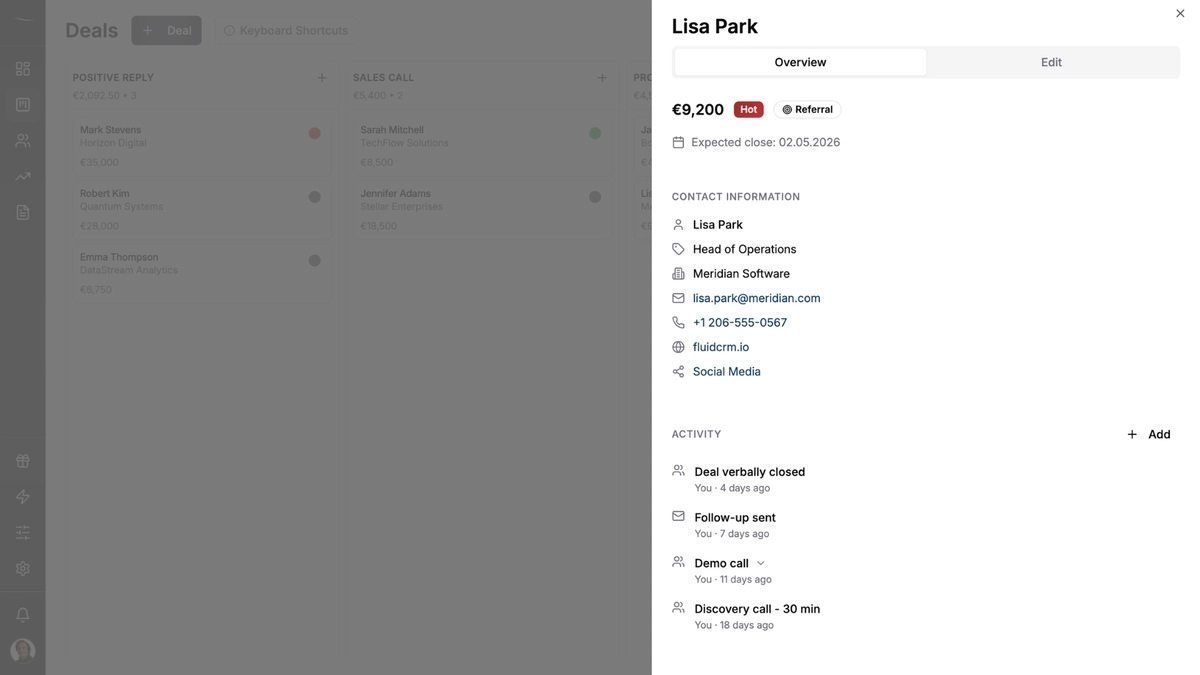
Pick the 20 people you would be upset to lose, such as open proposals, past clients due a check-in and warm referrals. Create a deal for each with a reminder on a real date.
A verified customer put the bar for this step well. Each deal should hold enough to tell you who, what and when, with a note and a reminder in the same place, which is what made the switch from an Excel list work for them.
How many of the people in your phone are waiting on a reply from you right now?
5. Leave everyone else as a contact
The other few hundred people stay as contacts with their details and notes. When one of them gets in touch, you create a deal and the history is already there.
For the clients you have already won, our guide on how to keep in touch with clients gives a simple schedule so past customers don’t drift away.
Contact Management Software FAQ
Contact management software stores the people you work with in one shared place. It keeps each person’s name, email, phone, company and notes, so anyone on the team can find them and see what was said.
A contact manager stores people and notes about them. A CRM stores the same people plus the deals you are working on, what each is worth and the date of the next step. If you sell to your contacts, a CRM is the better fit.
Google Contacts is the best free option for one person who only needs to find people. For a team of two, HubSpot and Capsule both have free plans for 2 users. Bigin’s free plan covers 1 user and 500 records.
For 5 people on monthly billing, the paid tools on this list cost from $45 a month (Bigin Express) to $150 a month (folk Standard). Fluid CRM costs $80 a month for 5 seats, or $720 a year on annual billing.
Not if you work alone and only need phone numbers and emails. You need more once a second person shares your clients or you have follow-ups due on dates, because Google Contacts has no shared history and no reminders.
Which Contact Management Software to Start With
If you only need to find people, use Google Contacts and spend nothing. If you sell to the people in your list, start with Fluid CRM, a simple CRM that puts the next step on every deal and keeps the contact attached to it.
Fluid CRM is one plan at $16 per seat a month or $144 per seat a year, with every feature included. You can import your contacts on day one and judge it on your real list before you pay.
Start your 7-day free trial here, no credit card required.