

A lead is someone who has shown interest but hasn’t been checked, and a prospect is a lead you’ve checked and found to fit. An opportunity is a real sale in progress. Some outbound teams swap lead and prospect, and in Fluid CRM both are a contact with a deal at an early stage.
Your CRM’s import screen asks whether a list is leads or contacts, and your teammate counts 40 leads where you count 12. Both problems come from the same handful of words, so here is a plain meaning for each one.
Lead, Prospect, Opportunity, Contact and Deal in Plain Words
One made-up buyer shows what each sales word means and how the words connect. Maya runs operations at a 30-person freight company, and you sell IT support.
| Word | What it means | Maya’s example |
|---|---|---|
| Lead | Someone who showed interest or was referred to you, not checked yet | Maya fills in the form on your website |
| Prospect | A lead you checked and found to fit what you sell | Her company is the right size and she makes this decision |
| Opportunity | A prospect with a stated need and an agreed next step | She says her contract ends in March and asks for a quote by Thursday |
| Customer | Someone who bought | Maya signs |
| Contact | The record of a person, at any point above | Maya’s name, email and phone |
| Company | The record of the business | The freight company |
| Deal | The record of one possible sale, with a value and a stage | IT support, $18,000 a year |
The first four words say how far along someone is. Contact and company say who they are, and a deal is the sale itself.
Most arguments start when someone compares a word from one group with a word from the other. Maya is a lead and a contact on the same day, and neither word cancels the other. What each record stores, field by field, is covered in our guide to the CRM database.
How a lead turns into a customer
Each move has one trigger, and something has to actually happen for it to count:
- Lead: the form arrives and nobody has looked at it.
- Prospect: you look up the company and it fits.
- Opportunity: on a call, Maya says what she needs and agrees to the next step.
- Customer: she signs.
Your own board may split the middle into more steps, and our post on sales pipeline stages shows how far that is worth taking.
What Is a Lead in Sales?
A lead in sales is a person or company that has shown interest in what you sell, or was referred to you, and that nobody has checked yet. That is close to the plain definition of a lead as someone who showed interest and left their contact details.
On a small B2B team, leads usually arrive in one of five ways:
- A website form or a booking page
- A referral from a client or a friend
- A reply to a cold email
- A message on LinkedIn or Instagram
- Someone at an event who asked you to get in touch
Two things often get counted as leads when they shouldn’t be. A newsletter signup alone is a reader, and HubSpot’s own stages keep it apart from a lead. A name on a bought list is just a name until that person responds.
Once a lead exists, the danger is that it has no date on it. Nobody says no, the person drops off everyone’s list and the money you spent getting them is gone. Leads die on the days the CRM stays closed, which is why lead tracking software matters more than what you call them.
Lead vs Prospect: What Actually Changes
A prospect is a lead you have checked and found to fit: the right kind of company, a likely need and a person who can say yes or bring in whoever can. Between lead and prospect, the buyer may have done nothing at all. What changed is what you know.
| Lead | Prospect | |
|---|---|---|
| What you know | A name and contact details | Company fit, role and likely need |
| Who decides they fit | Nobody yet | Whoever answered the lead |
| How far the talk has gone | One message, often only theirs | Maybe a reply or a short call |
| What you do next | Check them against who buys from you | Book a real conversation |
| Time worth spending | Five minutes | A proper call |
Sales guides often describe this as a handoff, with marketing owning leads and sales owning prospects. On a three-person team, one person does both in five minutes, so don’t build a process around it. If you need to choose who gets called first, that is what lead scoring is for.
If you and your teammate each counted your leads right now, would you get the same number?
Why some teams say prospect first and lead second
Most CRM vendors put lead first, and so does this guide. Glossaries from outbound tools often run the other way, where a prospect is someone you researched and plan to contact and they become a lead once they reply. Crunchbase draws a third line, between one-way contact and a real two-way conversation.
None of these is wrong, and they only hurt when two people on the same team use different ones. If your team sends cold email and already calls everyone on the list a prospect, keep that. Just say so in writing, because the person who joins next month may have learned it the other way.
Lead vs Opportunity: Count Them Separately
An opportunity is a prospect who has said what they need and agreed a next step with you, so there is now a specific sale you could win or lose. Three questions settle it:
- Has this person said out loud what they need?
- Can they talk about buying, or bring in whoever can?
- Is there an agreed next step with a date on it?
Three yeses make an opportunity. Anything less is still a lead or a prospect, however friendly the call felt.
The reason to care is your numbers. Say you have 20 leads and 4 opportunities, and a typical sale is worth $10,000. Count only the opportunities and you have $40,000 in play, but count everyone and you have $240,000.
Base a decision like hiring on the $40,000, not the $240,000.
Opportunity and deal mostly mean the same thing, and which word you see depends on your software.
What Five CRMs Mean by Lead, Contact and Deal
HubSpot, Salesforce, Pipedrive, Zoho CRM and Close each use these words differently. The table gives the default meaning in each, plus Fluid CRM, the simple CRM we built. If you are still working out what a CRM is, start there and come back.
| CRM | Lead | Contact | Opportunity or deal |
|---|---|---|---|
| HubSpot | A lifecycle stage on a contact or company. Sales Hub Professional and Enterprise also offer a separate lead record | The person record | A deal. “Opportunity” is the stage of a contact tied to one |
| Salesforce | Its own record, converted once qualified | Created at conversion, along with an account | An opportunity, optional at conversion |
| Pipedrive | An item in a Leads Inbox, apart from the pipeline | A person, linked to an organization | A deal, after “Convert to deal” |
| Zoho CRM | Its own record, converted once qualified | Created at conversion, along with an account | A deal, optional at conversion |
| Close | The main record, usually a company | People inside that lead | An opportunity, inside that lead |
| Fluid CRM | No lead record. A deal at an early stage | Created with the deal, along with its company | A deal |
The word prospect appears in no row of that table. On a small team it is usually something you say out loud, not a field you fill in.
The table matters most when you import a list or switch tools. A lead in Close is usually a whole company, while a lead in HubSpot’s lifecycle is usually a stage on a person, so a straight field-to-field move can scramble your records.
Salesforce and Zoho also make conversion a one-way step in normal use. That separation keeps a busy inbound queue tidy, but each lead has to be converted, and that normally can’t be undone. Decide what counts before you import, not after.
How Fluid CRM Handles Leads, Prospects and Deals
Fluid CRM has no lead record and no convert button. It has contacts, companies and deals, and creating a deal creates its contact and company. A lead capture form works the same way, putting a new deal on the board with its contact.
A verified customer who looks after existing clients described getting started like this: “I’ve never been able to hit the ground running so quickly and with minimal friction.”
So a lead is a stage. In the demo board below it is the first column, and you can rename any stage or add one called Prospect.
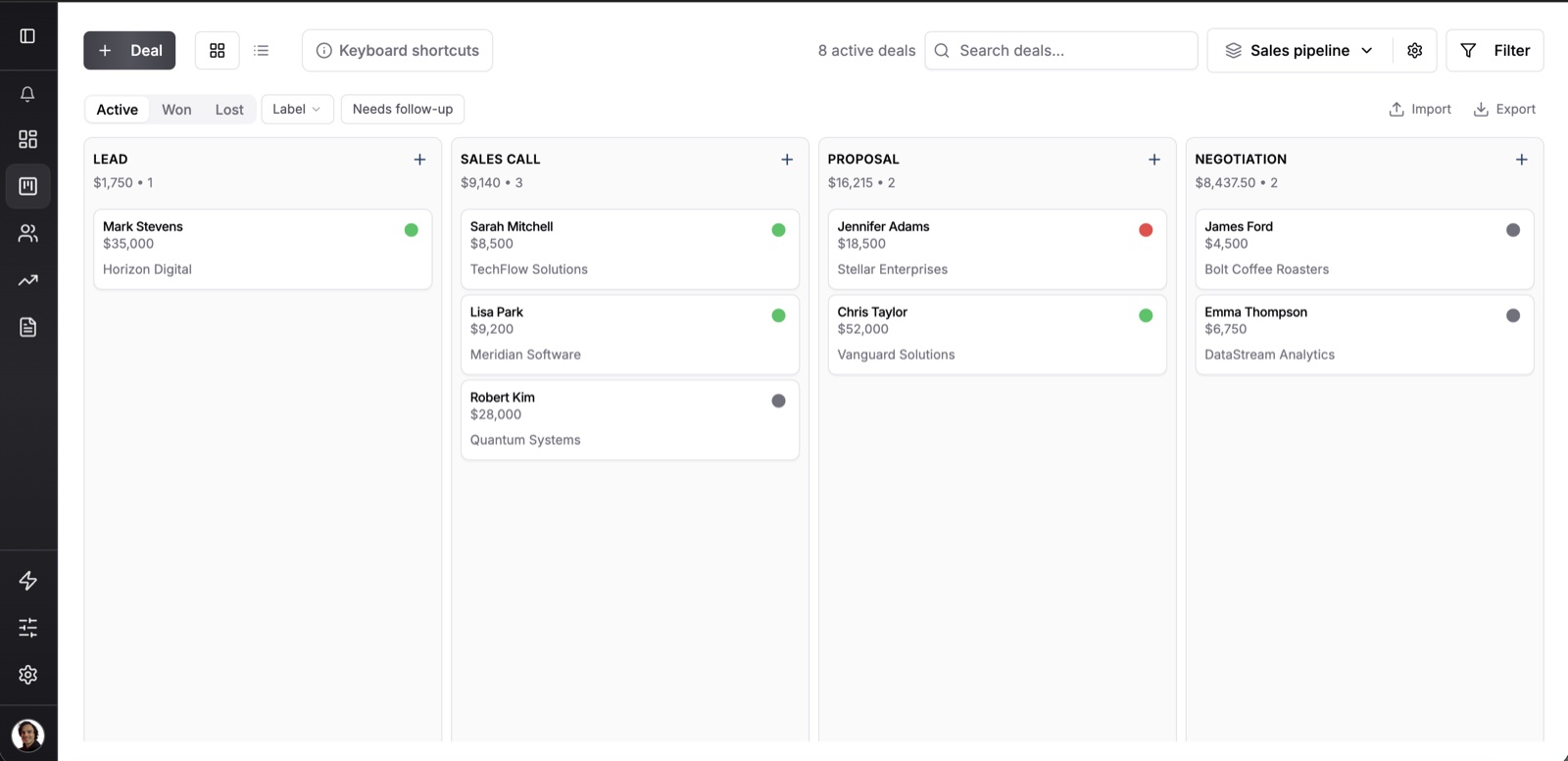
If leads sit on the deal board, don’t they inflate the numbers? Each stage has a win probability, and the column total is weighted by it, so the $35,000 card in Lead above adds $1,750 at 5%.
Each stage also has an optional exit criteria box, which is where your definitions belong. Write “company checked and it fits” under Lead, and the rule is saved on the stage itself.
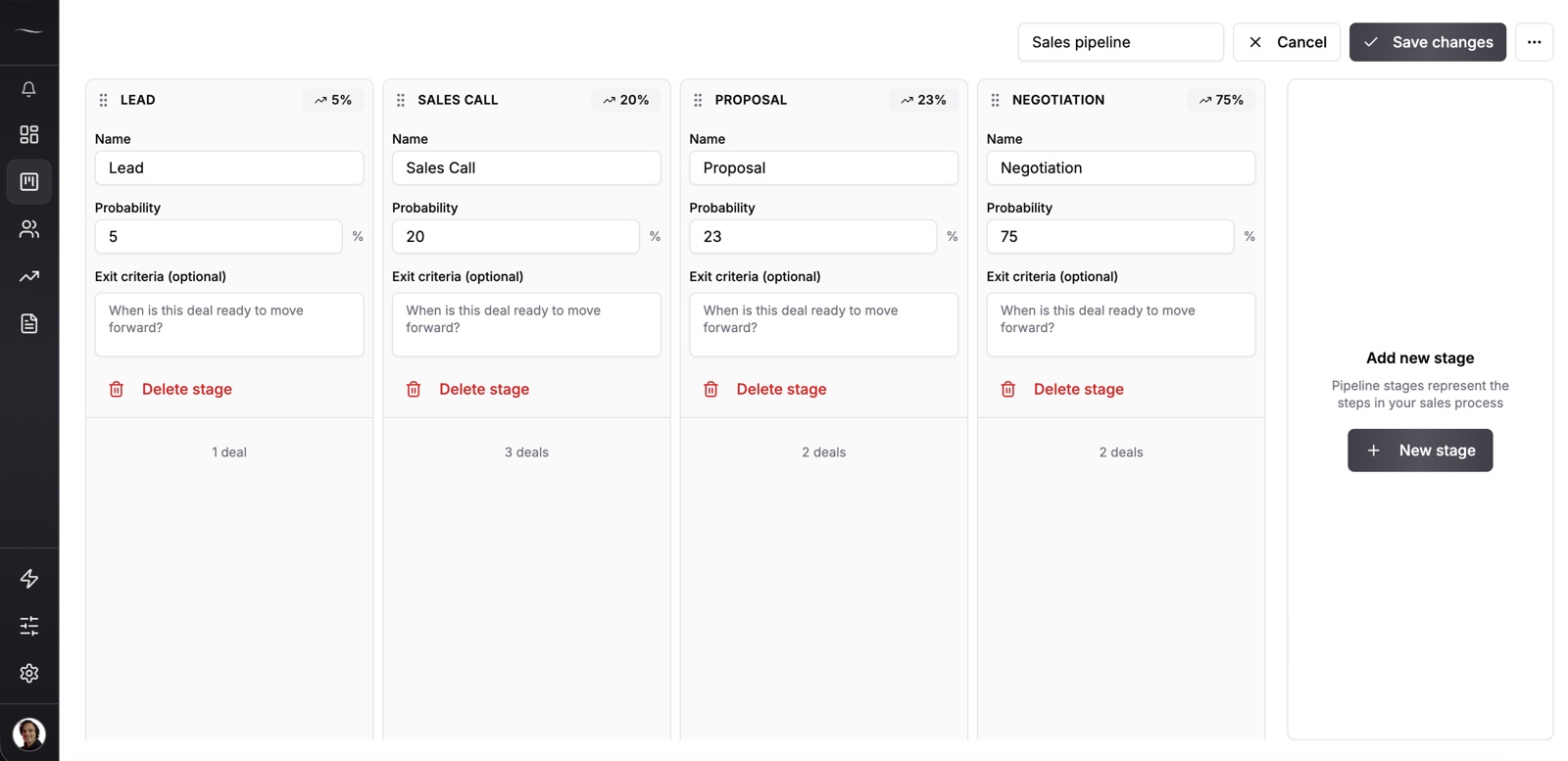
There is no separate inbox for unchecked names, so they share a board with real deals. If that gets crowded, make a second pipeline just for leads, since unlimited pipelines are in the one plan.
Do you need deals if you track people, not sales?
The answer depends on what the list is for. For a plain list, you don’t. A person can be added with no deal at all, with a label, notes and custom fields on their record.
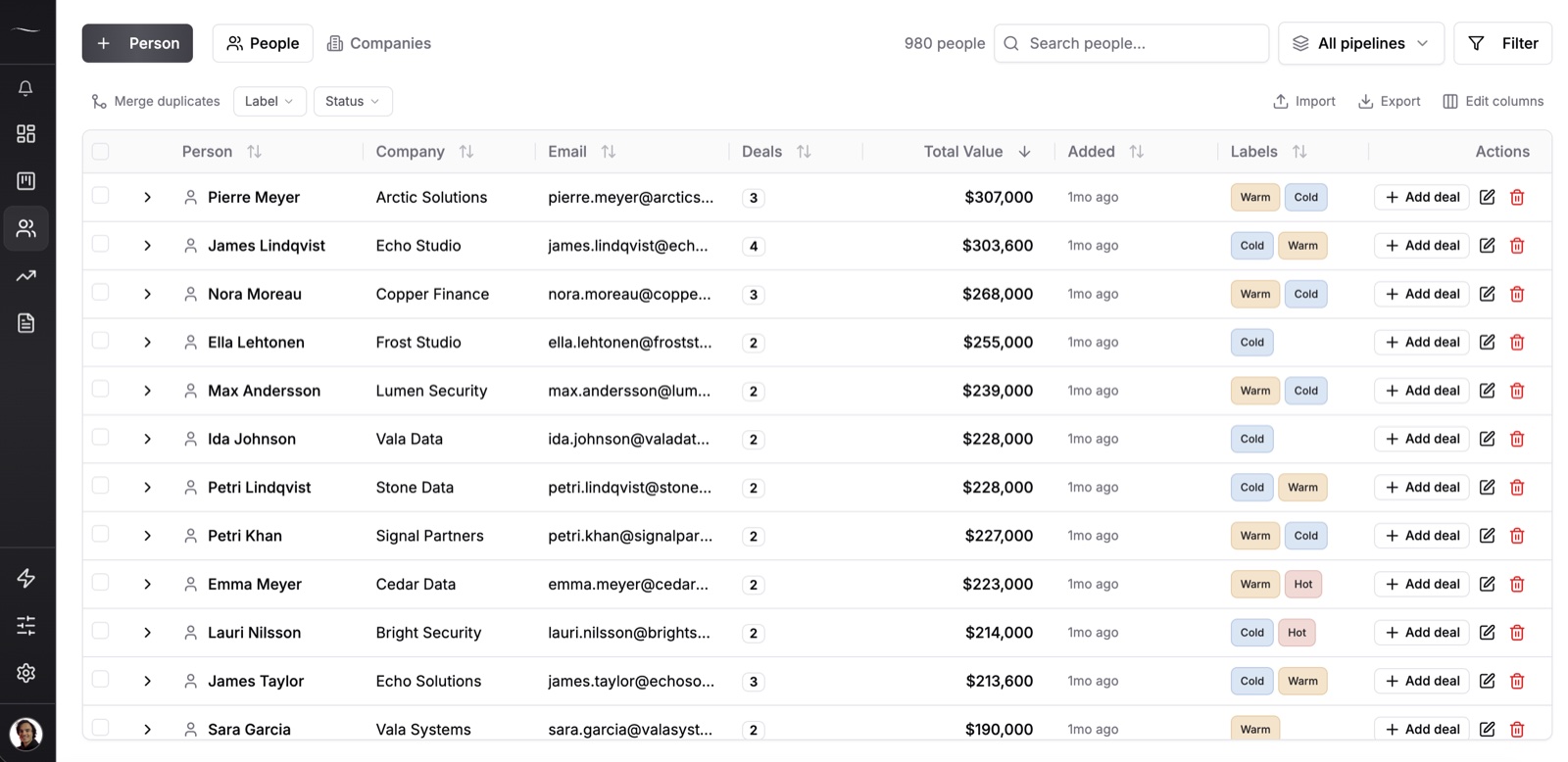
For anyone you need to come back to, you do. Reminders belong to deals in Fluid CRM, not to contacts, so that person needs a card even with no sale behind it.
The usual answer is a separate board, and our guide to how to keep in touch with clients has one to copy. A verified customer who coordinates a coaching network runs seven pipelines this way, all for non-sales work, each with “its own stages, automations and labels, which makes it work beautifully for non-sales use cases.”
Frequently Asked Questions
A prospect is a lead you have checked and found to fit what you sell. They are the right kind of company, they likely have the need and you can reach someone who can decide.
Not quite, although many people use the two words as if they were. A lead hasn’t been checked and a prospect has. On a very small team the gap can be five minutes of looking someone up.
In most CRMs and sales guides the lead comes first. Many outbound teams reverse it and call everyone on their list a prospect until they reply. Either order works if your whole team uses the same one.
Mostly, yes. Salesforce and Close say opportunity, while HubSpot, Pipedrive and Zoho CRM say deal. Both mean one specific sale you could win or lose.
It depends on the software. In Salesforce and Zoho CRM a contact is created when you convert the lead. In tools without a lead record, the person is a contact from the start and the lead part is only a stage or a label.
Write Down What Lead and Prospect Mean for Your Team
Lead and prospect matter less than everyone on your team using them the same way, so settle the definitions in four lines:
- Lead: asked about us or was referred, not checked yet.
- Prospect: we checked, and they match who buys from us.
- Opportunity: they said what they need and agreed a next step.
- Who moves it: the person who owns the deal, on the same day.
Fluid CRM is a simple CRM built for this, with your definitions on the stages and a reminder on every deal.
Start your 7-day free trial here, no credit card required.